Linux进程通信与信号处理
一、命名管道(FIFO)通信
1.1 FIFO通信机制概述
FIFO(命名管道)是一种特殊的文件类型,它允许无亲缘关系的进程间进行通信。FIFO在文件系统中有一个路径名,进程通过打开这个文件来进行读写操作。
1.2 FIFO实现双向聊天程序
🔹 FIFO写端程序(A进程)
/* A进程(写端) */
cpp
#include <errno.h>
#include <fcntl.h>
#include <pthread.h>
#include <stdio.h>
#include <stdlib.h>
#include <string.h>
#include <sys/stat.h>
#include <sys/types.h>
#include <unistd.h>

/* 线程1:向B进程发送消息 */
void* th1(void* arg)
{
    int fd = *(int*)arg;  // 获取FIFO1的写端文件描述符
    while (1)
    {
        char buf[100] = {0};
        printf("to B:");  // 提示输入要发送给B的消息
        fgets(buf, sizeof(buf), stdin);  // 从标准输入读取消息

        /* write参数说明:
         * fd: FIFO文件描述符
         * buf: 要发送的数据缓冲区
         * strlen(buf) + 1: 发送字符串长度+1(包含'\0')
         * 发送'\0'确保对方能正确识别字符串结束
         */
        write(fd, buf, strlen(buf) + 1);

        /* 检查退出条件:
         * strcmp比较输入是否为"#quit\n"
         * 注意:fgets会包含换行符'\n'
         */
        if (0 == strcmp(buf, "#quit\n"))
        {
            exit(0);  // 退出整个进程
        }
    }
    return NULL;
}

/* 线程2:从B进程接收消息 */
void* th2(void* arg)
{
    int fd = *(int*)arg;  // 获取FIFO2的读端文件描述符
    while (1)
    {
        char buf[100] = {0};

        /* read参数说明:
         * fd: FIFO文件描述符
         * buf: 接收数据的缓冲区
         * sizeof(buf): 缓冲区大小
         * 返回值:实际读取的字节数
         */
        read(fd, buf, sizeof(buf));

        /* 检查退出条件:
         * 如果收到"#quit\n"消息,则退出程序
         */
        if (0 == strcmp(buf, "#quit\n"))
        {
            exit(0);
        }
        printf("from B:%s", buf);  // 显示从B接收到的消息
        fflush(stdout);  // 强制刷新输出缓冲区,确保及时显示
    }
    return NULL;
}

/* 主函数 */
int main(int argc, char** argv)
{
    /* 创建两个FIFO文件:
     * myfifo1: A写 -> B读
     * myfifo2: B写 -> A读
     * 权限0666: rw-rw-rw-
     */
    int ret1 = mkfifo("myfifo1", 0666);
    int ret2 = mkfifo("myfifo2", 0666);

    /* 错误处理:
     * EEXIST错误:FIFO已存在,可以继续使用
     * 其他错误:创建失败,退出程序
     */
    if (-1 == ret1 || -1 == ret2)
    {
        if (EEXIST == errno)  // FIFO已存在,可以继续使用
        {
        }
        else  // 其他错误
        {
            perror("mkfifo");
            return 1;
        }
    }

    /* 打开FIFO文件:
     * O_WRONLY: 只写方式打开myfifo1(A写)
     * O_RDONLY: 只读方式打开myfifo2(A读)
     * 注意:open会阻塞,直到另一端也被打开
     */
    int fd_w = open("myfifo1", O_WRONLY);
    if (-1 == fd_w)
    {
        perror("open fd_w");
        return 1;
    }
    int fd_r = open("myfifo2", O_RDONLY);
    if (-1 == fd_r)
    {
        perror("open fd_r");
        return 1;
    }

    /* 创建两个线程:
     * tid1: 负责发送消息(th1)
     * tid2: 负责接收消息(th2)
     * 通过arg参数传递文件描述符
     */
    pthread_t tid1, tid2;
    pthread_create(&tid1, NULL, th1, &fd_w);
    pthread_create(&tid2, NULL, th2, &fd_r);

    /* 等待线程结束:
     * pthread_join会阻塞,直到线程结束
     */
    pthread_join(tid1, NULL);
    pthread_join(tid2, NULL);

    return 0;
}
🔹 FIFO读端程序(B进程)
/*- B进程(读端) */
cpp
#include <errno.h>
#include <fcntl.h>
#include <pthread.h>
#include <stdio.h>
#include <stdlib.h>
#include <string.h>
#include <sys/stat.h>
#include <sys/types.h>
#include <unistd.h>

/* 线程1:向A进程发送消息 */
void* th1(void* arg)
{
    int fd = *(int*)arg;  // 获取FIFO2的写端文件描述符
    while (1)
    {
        char buf[100] = {0};
        printf("to A:");  // 提示输入要发送给A的消息
        fgets(buf, sizeof(buf), stdin);

        write(fd, buf, strlen(buf) + 1);  // 向A发送消息

        if (0 == strcmp(buf, "#quit\n"))
        {
            exit(0);
        }
    }
    return NULL;
}

/* 线程2:从A进程接收消息 */
void* th2(void* arg)
{
    int fd = *(int*)arg;  // 获取FIFO1的读端文件描述符
    while (1)
    {
        char buf[100] = {0};
        read(fd, buf, sizeof(buf));  // 从A接收消息

        if (0 == strcmp(buf, "#quit\n"))
        {
            exit(0);
        }
        printf("from A:%s", buf);  // 显示从A接收到的消息
        fflush(stdout);
    }
    return NULL;
}

/* 主函数 */
int main(int argc, char** argv)
{
    /* 创建FIFO文件:
     * 虽然A进程已经创建,但这里也创建一次确保存在
     * 如果已存在,EEXIST错误被忽略
     */
    int ret1 = mkfifo("myfifo1", 0666);
    int ret2 = mkfifo("myfifo2", 0666);
    if (-1 == ret1 || -1 == ret2)
    {
        if (EEXIST == errno)
        {
        }
        else
        {
            perror("mkfifo");
            return 1;
        }
    }

    /* 打开FIFO文件:
     * O_RDONLY: 只读方式打开myfifo1(B读)
     * O_WRONLY: 只写方式打开myfifo2(B写)
     * 注意:打开顺序与A进程相反
     */
    int fd_r = open("myfifo1", O_RDONLY);
    if (-1 == fd_r)
    {
        perror("open fd_r");
        return 1;
    }
    int fd_w = open("myfifo2", O_WRONLY);
    if (-1 == fd_w)
    {
        perror("open fd_w");
        return 1;
    }

    /* 创建线程 */
    pthread_t tid1, tid2;
    pthread_create(&tid1, NULL, th1, &fd_w);  // th1使用写端
    pthread_create(&tid2, NULL, th2, &fd_r);  // th2使用读端

    /* 等待线程结束 */
    pthread_join(tid1, NULL);
    pthread_join(tid2, NULL);

    return 0;
}
1.3 FIFO通信要点总结
| 项目 | 说明 |
|---|---|
| FIFO创建 | 使用mkfifo("name", mode)创建,在文件系统中可见 |
| 打开方式 | O_RDONLY(只读)、O_WRONLY(只写) |
| 阻塞特性 | open会阻塞直到另一端也被打开 |
| 通信方向 | 单向通信,需要两个FIFO实现双向 |
| 进程关系 | 无亲缘关系的进程也可通信 |
| 退出机制 | 通过"#quit"消息协调退出 |
二、共享内存通信
2.1 共享内存通信机制
共享内存是最快的IPC方式,因为它直接在内存中操作,不需要内核缓冲区的复制。
2.2 共享内存写端程序
/* 共享内存写端 */
cpp
#include <sys/types.h>
#include <sys/ipc.h>
#include <stdio.h>
#include <stdlib.h>
#include <unistd.h>
#include <string.h>
#include <sys/shm.h>

int main(int argc, char *argv[])
{
    /* ftok函数:生成System V IPC键值
     * 参数1:路径名(必须存在且可访问)
     * 参数2:项目ID(低8位有效)
     * 返回值:生成的key_t类型键值
     *
     * 注意:两个进程使用相同的参数才能得到相同的key
     */
    key_t key = ftok("./",'!');
    if(-1 == key)
    {
        perror("ftok");
        return 1;
    }
    printf("0x%x\n",key);  // 打印生成的键值(16进制)

    /* shmget函数:创建/获取共享内存段
     * 参数1:IPC键值
     * 参数2:共享内存大小(字节)
     * 参数3:标志位
     *   IPC_CREAT: 如果不存在则创建
     *   0666: 权限(rw-rw-rw-)
     * 返回值:共享内存标识符
     */
    int shmid = shmget(key,4096,IPC_CREAT|0666);
    if(-1 == shmid)
    {
        perror("shmget");
        return 1;
    }
    printf("shmid is %d\n",shmid);

    /* shmat函数:将共享内存映射到进程地址空间
     * 参数1:共享内存标识符
     * 参数2:指定映射地址(NULL表示系统自动分配)
     * 参数3:标志位
     *   !SHM_RDONLY: 0,表示可读写
     *   SHM_RDONLY: 只读映射
     * 返回值:映射后的内存地址
     */
    void* p = shmat(shmid,NULL,!SHM_RDONLY);
    if((void *) -1 == p)
    {
        perror("shmat");
        return 1;
    }

    /* 向共享内存写入数据 */
    char buf[1024]="hello";

    /* strcpy和memcpy的区别:
     * strcpy: 复制字符串,遇到'\0'停止
     * memcpy: 按字节复制,指定长度
     * 这里使用memcpy确保完全复制
     */
    //strcpy((char*)p,buf);  // 方法1:使用strcpy
    memcpy(p,buf,strlen(buf)+1);  // 方法2:使用memcpy(包含'\0')

    /* shmdt函数:解除共享内存映射
     * 参数:映射地址
     * 注意:只解除映射,不删除共享内存
     */
    shmdt(p);

    return 0;
}
2.3 共享内存读端程序
/*共享内存读端 */
cpp
#include <sys/types.h>
#include <sys/ipc.h>
#include <stdio.h>
#include <stdlib.h>
#include <unistd.h>
#include <string.h>
#include <sys/shm.h>

int main(int argc, char *argv[])
{
    /* 生成与写端相同的键值 */
    key_t key = ftok("./",'!');
    if(-1 == key)
    {
        perror("ftok");
        return 1;
    }
    printf("0x%x\n",key);

    /* 获取已存在的共享内存段
     * 注意:这里不需要IPC_CREAT,因为写端已经创建
     * 但如果写端未创建,会失败
     */
    int shmid = shmget(key,4096,IPC_CREAT|0666);
    if(-1 == shmid)
    {
        perror("shmget");
        return 1;
    }
    printf("shmid is %d\n",shmid);

    /* 映射共享内存(可读写方式) */
    void* p = shmat(shmid,NULL,!SHM_RDONLY);
    if((void *) -1 == p)
    {
        perror("shmat");
        return 1;
    }

    /* 从共享内存读取数据并打印 */
    printf("mem:%s\n",(char*)p);

    /* 解除映射 */
    shmdt(p);

    /* 删除共享内存段(可选)
     * IPC_RMID: 删除共享内存
     * 注意:实际使用时可能需要延迟删除
     */
    // shmctl(shmid,IPC_RMID,NULL);

    return 0;
}#include <sys/types.h>
#include <sys/ipc.h>
#include <stdio.h>
#include <stdlib.h>
#include <unistd.h>
#include <string.h>
#include <sys/shm.h>

int main(int argc, char *argv[])
{
    /* 生成与写端相同的键值 */
    key_t key = ftok("./",'!');
    if(-1 == key)
    {
        perror("ftok");
        return 1;
    }
    printf("0x%x\n",key);

    /* 获取已存在的共享内存段
     * 注意:这里不需要IPC_CREAT,因为写端已经创建
     * 但如果写端未创建,会失败
     */
    int shmid = shmget(key,4096,IPC_CREAT|0666);
    if(-1 == shmid)
    {
        perror("shmget");
        return 1;
    }
    printf("shmid is %d\n",shmid);

    /* 映射共享内存(可读写方式) */
    void* p = shmat(shmid,NULL,!SHM_RDONLY);
    if((void *) -1 == p)
    {
        perror("shmat");
        return 1;
    }

    /* 从共享内存读取数据并打印 */
    printf("mem:%s\n",(char*)p);

    /* 解除映射 */
    shmdt(p);

    /* 删除共享内存段(可选)
     * IPC_RMID: 删除共享内存
     * 注意:实际使用时可能需要延迟删除
     */
    // shmctl(shmid,IPC_RMID,NULL);

    return 0;
}#include <sys/types.h>
#include <sys/ipc.h>
#include <stdio.h>
#include <stdlib.h>
#include <unistd.h>
#include <string.h>
#include <sys/shm.h>

int main(int argc, char *argv[])
{
    /* 生成与写端相同的键值 */
    key_t key = ftok("./",'!');
    if(-1 == key)
    {
        perror("ftok");
        return 1;
    }
    printf("0x%x\n",key);

    /* 获取已存在的共享内存段
     * 注意:这里不需要IPC_CREAT,因为写端已经创建
     * 但如果写端未创建,会失败
     */
    int shmid = shmget(key,4096,IPC_CREAT|0666);
    if(-1 == shmid)
    {
        perror("shmget");
        return 1;
    }
    printf("shmid is %d\n",shmid);

    /* 映射共享内存(可读写方式) */
    void* p = shmat(shmid,NULL,!SHM_RDONLY);
    if((void *) -1 == p)
    {
        perror("shmat");
        return 1;
    }

    /* 从共享内存读取数据并打印 */
    printf("mem:%s\n",(char*)p);

    /* 解除映射 */
    shmdt(p);

    /* 删除共享内存段(可选)
     * IPC_RMID: 删除共享内存
     * 注意:实际使用时可能需要延迟删除
     */
    // shmctl(shmid,IPC_RMID,NULL);

    return 0;
}
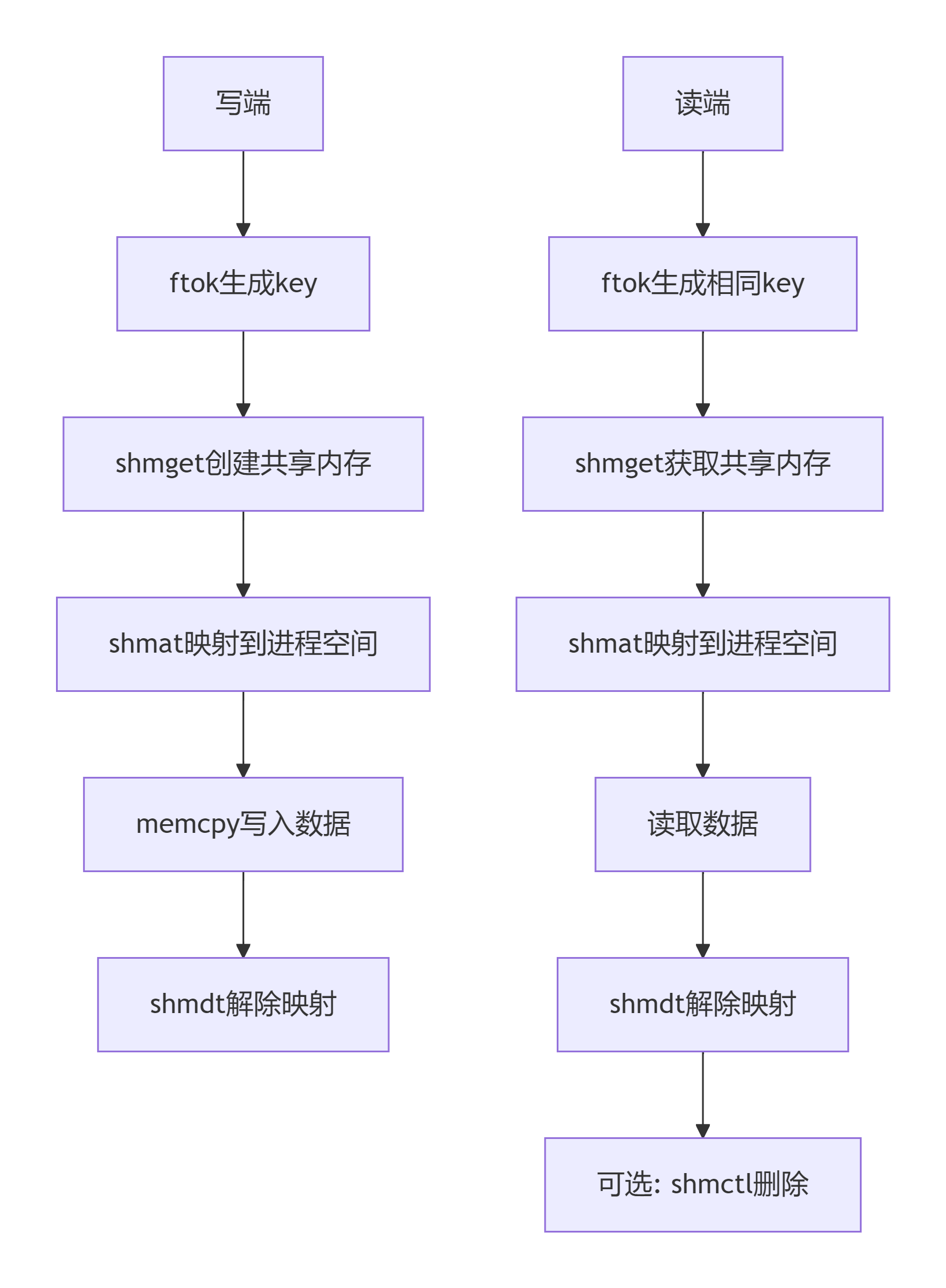
2.4 共享内存操作流程
图表
2.5共享内存函数对比
| 函数 | 功能 | 参数说明 | 返回值 |
|---|---|---|---|
| ftok | 生成IPC键值 | (路径, 项目ID) | key_t类型键值 |
| shmget | 创建/获取共享内存 | (key, 大小, 标志) | 共享内存ID |
| shmat | 映射共享内存 | (shmid, 地址, 标志) | 映射地址 |
| shmdt | 解除映射 | (映射地址) | 成功0/失败-1 |
| shmctl | 控制操作 | (shmid, cmd, buf) | 成功0/失败-1 |
三、管道通信
3.1 父子进程字典查询程序
/* 管道实现字典查询 */
cpp
#include <fcntl.h>
#include <stdio.h>
#include <stdlib.h>
#include <string.h>
#include <unistd.h>
#define MAXLINE 19661  // 字典文件最大行数

int main(int argc, char **argv)
{
    /* 创建管道:
     * fd[0]: 读端
     * fd[1]: 写端
     * 数据从fd[1]写入,从fd[0]读出
     */
    int fd[2] = {0};
    int ret = pipe(fd);
    if (-1 == ret)
    {
        perror("pipe error\n");
        return 1;
    }

    /* 创建子进程 */
    pid_t pid = fork();

    if (pid > 0)  /* 父进程:字典数据提供者 */
    {
        close(fd[0]);  // 父进程关闭读端

        /* 打开字典文件 */
        int fd_dict = open("/home/linux/dict.txt", O_RDONLY);
        if (-1 == fd_dict)
        {
            perror("open dict");
            return 1;
        }

        /* 循环读取字典文件并写入管道 */
        while (1)
        {
            while (1)
            {
                char buf[1024] = {0};
                int rd_ret = read(fd_dict, buf, sizeof(buf));
                if (0 == rd_ret)  // 读到文件末尾
                {
                    break;
                }
                write(fd[1], buf, rd_ret);  // 写入管道
            }
            lseek(fd_dict, 0, SEEK_SET);  // 文件指针回到开头,循环发送
        }

        close(fd_dict);
        close(fd[1]);  // 关闭写端
    }
    else if (0 == pid)  /* 子进程:字典查询客户端 */
    {
        close(fd[1]);  // 子进程关闭写端

        /* 将管道读端转换为FILE*,方便使用标准I/O函数 */
        FILE *fp = fdopen(fd[0], "r");
        if (NULL == fp)
        {
            perror("fdopen");
            return 0;
        }

        /* 查询循环 */
        while (1)
        {
            char want_word[100] = {0};
            printf("input want_word");
            fgets(want_word, sizeof(want_word), stdin);  // 读取用户输入

            /* 去除换行符 */
            want_word[strlen(want_word) - 1] = '\0';

            /* 退出条件检查 */
            if(0 == strcmp(want_word,"#quit"))
            {
                break;
            }

            /* 在字典中查找单词 */
            int num = 0;
            while (1)
            {
                char line_buf[1024] = {0};
                fgets(line_buf, sizeof(line_buf), fp);  // 从管道读取一行

                /* 解析字典行:
                 * 格式:单词 解释\r
                 * strtok分割字符串
                 */
                char *word = strtok(line_buf, " ");    // 获取单词
                char *mean = strtok(NULL, "\r");       // 获取解释

                if (0 == strcmp(word, want_word))      // 找到单词
                {
                    printf("%s %s\n", word, mean);
                    break;
                }

                num++;
                if (num > MAXLINE)  // 超过字典行数,未找到
                {
                    printf("cant find wantword:%s\n", want_word);
                    break;
                }
            }
        }

        close(fd[0]);  // 关闭读端
    }
    else  /* fork失败 */
    {
        perror("fork");
        return 1;
    }

    return 0;
}
3.2 管道通信要点
| 特性 | 描述 |
|---|---|
| 创建方式 | pipe(fd)创建匿名管道 |
| 数据流向 | 单向,fd1写 → fd0读 |
| 进程关系 | 只适用于有亲缘关系的进程 |
| 缓冲区 | 内核维护,通常4KB |
| 读写行为 | 读空阻塞,写满阻塞 |
| 关闭规则 | 进程关闭不需要的端口 |
四、信号处理机制
4.1 信号基础概念
信号是进程间通信的一种异步通知机制,用于通知进程发生了某种事件。
4.2 信号发送程序
/* 信号发送工具 */
cpp
#include <sys/types.h>
#include <signal.h>
#include <stdio.h>
#include <stdlib.h>
#include <unistd.h>

int main(int argc, char *argv[])
{
    /* 参数检查:需要进程ID和信号编号 */
    if(argc<3)
    {
        fprintf(stderr,"usage:./a.out pid sig_num\n");
        return 1;
    }

    // 用法:./a.out 1234 9
    // argv[1]: 目标进程ID
    // argv[2]: 信号编号

    pid_t pid = atoi(argv[1]);  // 目标进程ID
    int num = atoi(argv[2]);     // 信号编号

    /* kill函数:向指定进程发送信号
     * 参数1:目标进程ID
     *     >0: 发送给特定进程
     *     =0: 发送给同进程组的所有进程
     *     -1: 发送给所有有权限的进程
     *     <-1: 发送给进程组ID为|pid|的所有进程
     * 参数2:信号编号
     *     0: 检查进程是否存在
     */
    int ret = kill(pid,num);
    if(-1 == ret)
    {
        perror("kill");
        return 1;
    }

    return 0;
}
4.3 信号测试程序
/* 信号接收测试程序 */
cpp
#include <stdio.h>
#include <stdlib.h>
#include <unistd.h>

int main(int argc, char *argv[])
{
    /* 无限循环,用于接收信号测试
     * 可以使用kill命令或12kill.c发送信号
     * 例如:kill -9 <pid> 或 kill -SIGUSR1 <pid>
     */
    while(1)
    {
        printf("pid :%d\n",getpid());  // 打印进程ID,方便测试
        sleep(1);
    }
    return 0;
}
4.4 自定义信号处理程序
/* 自定义用户信号处理 */
cpp
#include <stdio.h>
#include <unistd.h>
#include <stdlib.h>
#include <string.h>
#include <signal.h>

/* SIGUSR1信号处理函数
 * 特性:被调用3次后忽略该信号
 */
void myhandle1(int num)
{
    static int a = 0;  // 静态变量,记录调用次数
    printf("老爸叫你,去帮忙...\n");
    a++;
    if(3 == a)
    {
        /* 信号处理方式设置:
         * SIG_IGN: 忽略信号
         * SIG_DFL: 恢复默认处理
         * 函数指针: 自定义处理函数
         */
        signal(SIGUSR1,SIG_IGN);  // 第3次后忽略SIGUSR1
    }
    return ;
}

/* SIGUSR2信号处理函数
 * 特性:被调用4次后恢复默认处理
 */
void myhandle2(int num)
{
    static int a = 0;
    printf("老妈叫你,去帮忙...\n");
    a++;
    if(4 == a)
    {
        signal(SIGUSR2,SIG_DFL);  // 第4次后恢复默认
    }
    return ;
}

int main(int argc, char *argv[])
{
    /* 注册信号处理函数
     * signal函数:设置信号处理方式
     * 参数1:信号编号
     * 参数2:处理函数或宏
     */
    signal(SIGUSR1,myhandle1);  // SIGUSR1: 用户自定义信号1
    signal(SIGUSR2,myhandle2);  // SIGUSR2: 用户自定义信号2

    /* 主循环:模拟进程正常工作 */
    while(1)
    {
        printf("i'm playing... pid:%d\n",getpid());
        sleep(1);
    }
    return 0;
}
4.5 统一信号处理函数版本
/* 统一处理多个信号 */
cpp
#include <stdio.h>
#include <unistd.h>
#include <stdlib.h>
#include <string.h>
#include <signal.h>

/* 统一的信号处理函数
 * 通过num参数区分不同信号
 */
void myhandle1(int num)
{
    if(SIGUSR1 == num)  // 处理SIGUSR1
    {
        static int a = 0;
        printf("老爸叫你,去帮忙...\n");
        a++;
        if(3 == a)
        {
            signal(SIGUSR1,SIG_IGN);
        }
    }
    if (SIGUSR2 == num)  // 处理SIGUSR2
    {
        static int a = 0;
        printf("老妈叫你,去帮忙...\n");
        a++;
        if(4 == a)
        {
            signal(SIGUSR2,SIG_DFL);
        }
    }
    return ;
}

int main(int argc, char *argv[])
{
    /* 两个信号都使用同一个处理函数 */
    signal(SIGUSR1,myhandle1);
    signal(SIGUSR2,myhandle1);

    while(1)
    {
        printf("i'm playing... pid:%d\n",getpid());
        sleep(1);
    }
    return 0;
}
4.6 定时器与信号
/* 简单定时器示例 */
cpp
#include <stdio.h>
#include <unistd.h>
#include <stdlib.h>

int main(int argc, char *argv[])
{
    /* alarm函数:设置定时器
     * 参数:秒数
     * 功能:n秒后向进程发送SIGALRM信号
     * 默认处理:终止进程
     * 返回值:上次定时器的剩余时间
     */
    alarm(5);  // 5秒后发送SIGALRM

    /* 主循环:5秒后被SIGALRM终止 */
    while(1)
    {
        printf("i'm processing...\n");
        sleep(1);
    }

    return 0;
}/* 自定义alarm信号处理 */
cpp
#include <stdio.h>
#include <unistd.h>
#include <stdlib.h>
#include <signal.h>

int flag = 0 ;  // 全局标志,用于任务切换

/* SIGALRM信号处理函数 */
void myhandle(int num)
{
    flag = 1;  // 收到信号后改变标志
}

int main(int argc, char *argv[])
{
    // 修改SIGALRM信号处理函数
    signal(SIGALRM,myhandle);

    // 设置5秒定时器
    alarm(5);

    /* 通过flag实现状态切换:
     * 前5秒:flag=0,处理任务
     * 5秒后:flag=1,切换状态
     */
    while(1)
    {
        if(0 == flag)
        {
            printf("i'm processing...\n");  // 正常工作
        }
        else
        {
            printf("i'm off duty....\n");   // 休息状态
        }
        sleep(1);
    }

    return 0;
}
4.7 进程挂起与恢复
/* 进程挂起示例 */
cpp
#include <stdio.h>
#include <unistd.h>

int main(int argc, char *argv[])
{
    int i = 0;
    while(1)
    {
        printf("i'm listen music...\n");
        sleep(1);
        i++;

        /* 运行3秒后挂起进程
         * pause():挂起进程,直到收到信号
         * 收到信号后,信号处理函数执行完毕,pause返回
         */
        if(3 == i)
        {
            pause();  // 挂起进程,等待信号
        }
    }
    return 0;
}/* SIGCONT信号处理 */
cpp
#include <stdio.h>
#include <unistd.h>
#include <signal.h>

/* SIGCONT信号处理函数(空函数) */
void myhandle(int num)
{
    // 空处理函数,只用于唤醒pause
}

int main(int argc, char *argv[])
{
    int i = 0;

    /* 注册SIGCONT信号处理
     * SIGCONT:继续执行信号(默认忽略)
     * 当进程被暂停(Ctrl+Z)后,SIGCONT可恢复执行
     */
    signal(SIGCONT,myhandle);

    while(1)
    {
        printf("i'm listen music...,pid:%d\n",getpid());
        sleep(1);
        i++;

        /* 运行3秒后挂起,等待SIGCONT信号 */
        if(3 == i)
        {
            pause();  // 挂起,可被SIGCONT唤醒
        }
    }
    return 0;
}
4.8 子进程回收信号
/* 子进程回收信号处理 */
cpp
#include <stdio.h>
#include <stdlib.h>
#include <string.h>
#include <unistd.h>
#include <signal.h>
#include <sys/wait.h>

/* SIGCHLD信号处理函数
 * SIGCHLD:子进程状态改变时发送给父进程
 * 可用于异步回收子进程
 */
void myhandle(int num)
{
    /* wait函数:
     * 参数:状态信息(NULL表示不关心)
     * 返回值:结束的子进程ID
     * 功能:回收一个子进程
     */
    pid_t recycle = wait(NULL);
    printf("pid:%d recycle pid:%d\n",getpid(),recycle);
}

int main(int argc, char *argv[])
{
    /* 注册SIGCHLD信号处理
     * 避免使用wait阻塞父进程
     */
    signal(SIGCHLD,myhandle);

    /* 创建子进程 */
    pid_t pid = fork();

    if(pid>0)  /* 父进程 */
    {
        int i =10;
        while(i--)
        {
            printf("father ,i'm processing... pid:%d\n",getpid());
            sleep(1);
        }
    }
    else if(0 == pid)  /* 子进程 */
    {
        int i =3;
        while(i--)
        {
            printf("child ,i'm processsing... pid:%d\n",getpid());
            sleep(1);
        }
        exit(0);  // 子进程退出,发送SIGCHLD
    }
    else  /* fork失败 */
    {
        perror("fork");
        return 1;
    }
    return 0;
}
4.9 常用信号列表
| 信号编号 | 信号名 | 默认动作 | 说明 |
|---|---|---|---|
| 1 | SIGHUP | 终止 | 终端挂起或控制进程终止 |
| 2 | SIGINT | 终止 | 中断信号(Ctrl+C) |
| 3 | SIGQUIT | 终止+core | 退出信号(Ctrl+\) |
| 9 | SIGKILL | 终止 | 强制终止(不可捕获) |
| 10 | SIGUSR1 | 终止 | 用户自定义信号1 |
| 12 | SIGUSR2 | 终止 | 用户自定义信号2 |
| 14 | SIGALRM | 终止 | 定时器信号 |
| 17 | SIGCHLD | 忽略 | 子进程状态改变 |
| 18 | SIGCONT | 继续 | 继续执行(如果停止) |
| 19 | SIGSTOP | 停止 | 停止进程(不可捕获) |
五、 总结要点
进程通信方式对比
| 方式 | 适用关系 | 通信方向 | 特点 |
|---|---|---|---|
| FIFO | 任意进程 | 单向 | 文件系统可见,需要两个FIFO双向 |
| 共享内存 | 任意进程 | 双向 | 最快,需要同步机制 |
| 管道 | 父子进程 | 单向 | 简单,内核缓冲区 |
| 信号 | 任意进程 | 单向 | 异步通知,功能有限 |
信号处理重要函数
-
signal - 注册信号处理函数
-
kill - 发送信号给进程
-
alarm - 设置定时器
-
pause - 挂起进程等待信号
-
sigaction - 更强大的信号处理(推荐)
编程建议
-
信号处理函数要简短,避免复杂操作
-
使用volatile防止编译器优化标志变量
-
注意信号可能丢失,不应用于精确计数
-
SIGKILL和SIGSTOP不可捕获
-
多线程中信号处理要特别小心