gitee代码仓地址:DataWareHouse: UserBehaviorAttributionAnalysis
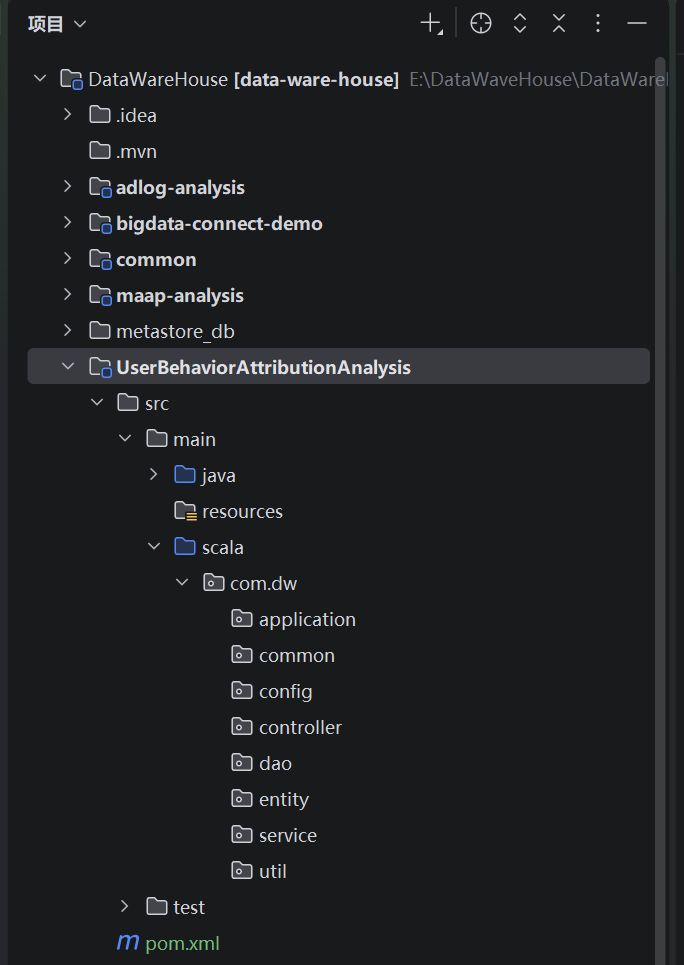
一、整体目录结构
1、本地项目构建模式
单项目多模块
2、本次新增模块
UserBehaviorAttributionAnalysis
3、调整pom文件
父项目:增加模块配置UserBehaviorAttributionAnalysis
XML
<!-- 声明子模块 -->
<modules>
    <module>common</module>
    <module>maap-analysis</module>
    <module>bigdata-connect-demo</module>
    <module>adlog-analysis</module>
    <module>UserBehaviorAttributionAnalysis</module>
</modules>
子项目pom文件
XML
<?xml version="1.0" encoding="UTF-8"?>
<project xmlns="http://maven.apache.org/POM/4.0.0"
         xmlns:xsi="http://www.w3.org/2001/XMLSchema-instance"
         xsi:schemaLocation="http://maven.apache.org/POM/4.0.0 http://maven.apache.org/xsd/maven-4.0.0.xsd">
    <!-- 继承父项目配置 -->
    <parent>
        <groupId>com.dw</groupId>
        <artifactId>data-ware-house</artifactId>
        <version>1.0.0</version>
        <!-- 父POM相对路径(默认向上找,无需手动指定,若父POM在上级则写../pom.xml) -->
        <relativePath>../pom.xml</relativePath>
    </parent>


    <!-- 新模块核心配置 -->
    <modelVersion>4.0.0</modelVersion>
    <artifactId>UserBehaviorAttributionAnalysis</artifactId>
    <name>UserBehaviorAttributionAnalysis</name>
    <description>用户行为归因分析模块(渠道/触点/留存归因)</description>

    <!-- 依赖配置(复用父项目版本管理,仅声明依赖组件) -->
    <dependencies>
        <!-- 依赖公共模块(Spark环境、工具类等) -->
        <dependency>
            <groupId>com.dw</groupId>
            <artifactId>common</artifactId>
            <version>1.0.0</version>
        </dependency>

        <!-- Spark核心依赖(父项目已统一管理版本) -->
        <dependency>
            <groupId>org.apache.spark</groupId>
            <artifactId>spark-core_2.12</artifactId>
        </dependency>
        <dependency>
            <groupId>org.apache.spark</groupId>
            <artifactId>spark-sql_2.12</artifactId>
        </dependency>

        <!-- 可选:若需操作Hive/Mysql,添加对应依赖 -->
        <dependency>
            <groupId>org.apache.spark</groupId>
            <artifactId>spark-hive_2.12</artifactId>
        </dependency>
        <dependency>
            <groupId>mysql</groupId>
            <artifactId>mysql-connector-java</artifactId>
            <scope>runtime</scope>
        </dependency>
        <!-- 引入Hive JDBC驱动 -->
        <dependency>
            <groupId>org.apache.hive</groupId>
            <artifactId>hive-jdbc</artifactId>
            <version>3.1.2</version>
            <exclusions>
                <exclusion>
                    <groupId>org.eclipse.jetty</groupId>
                    <artifactId>*</artifactId>
                </exclusion>
            </exclusions>
        </dependency>

        <!-- 可选:单元测试依赖 -->
        <dependency>
            <groupId>org.scalatest</groupId>
            <artifactId>scalatest_2.12</artifactId>
            <scope>test</scope>
        </dependency>
    </dependencies>

    <!-- 可选:编译插件(复用父项目配置,若需自定义可添加) -->
    <build>
        <plugins>
            <plugin>
                <groupId>net.alchim31.maven</groupId>
                <artifactId>scala-maven-plugin</artifactId>
            </plugin>
            <plugin>
                <groupId>org.apache.maven.plugins</groupId>
                <artifactId>maven-compiler-plugin</artifactId>
            </plugin>
        </plugins>
    </build>
</project>
二、样例类
结合数据流图,我们需要准备以下样例类(代码见顶部代码仓地址)
1、ods层三个
(scala模拟生成数据也用这个)
InstallOds
ActivateOds
UninstallOds
2、dwd层三个
InstallDwd
ActivateDwd
UninstallDwd
3、dws层一个
AttributionDws
4、dim层两个
AppInfoDim
DeviceInfoDim
三、共用工具类(父项目)
父项目工具类:通用工具类(后续会持续补充,因为在开发项目的过程中会发现很多功能需要放在通用工具类)
1、HiveJdbcUtil
hive相关的工具类,查询sql、插入数据等功能
Scala
package com.dw.common.utils

import com.zaxxer.hikari.{HikariConfig, HikariDataSource}
import org.slf4j.LoggerFactory

import java.sql.{Connection, PreparedStatement, ResultSet, SQLException}
import scala.collection.mutable.ListBuffer


object HiveJdbcUtil {
  //  // 加载Hive JDBC驱动
  //  Class.forName(hiveConfig.getString("hive_driver_class"))
  //  // HiveServer2连接信息
  //  private val url = hiveConfig.getString("hiveServer2_Url") // 替换为虚拟机IP
  //  private val user = hiveConfig.getString("hive_user") // 虚拟机用户名
  //  private val password = hiveConfig.getString("hive_password") // Hive默认无密码
  // 建立连接
  //  private val conn: Connection = DriverManager.getConnection(url, user, password)
  //  private val stmt: Statement = conn.createStatement()


  private val logger = LoggerFactory.getLogger(this.getClass)
  // 读取公共配置(来自common模块)
  private val hiveConfig = ConfigUtil.getHiveCommonConfig
  // 初始化 Hikari 连接池(线程安全,懒加载)
  private lazy val dataSource: HikariDataSource = {
    val hikariConf = new HikariConfig()

    Class.forName("org.apache.hive.jdbc.HiveDriver")

    hikariConf.setJdbcUrl(hiveConfig.getString("hiveServer2_Url"))
    hikariConf.setUsername(hiveConfig.getString("hive_user"))
    hikariConf.setPassword(hiveConfig.getString("hive_password"))
    hikariConf.setDriverClassName(hiveConfig.getString("hive_driver_class"))

    // 连接池参数
    //    hikariConf.setMaximumPoolSize(hiveConfig.getInt("pool.maximum-pool-size"))
    //    hikariConf.setMinimumIdle(hiveConfig.getInt("pool.minimum-idle"))
    //    hikariConf.setConnectionTimeout(hiveConfig.getLong("pool.connection-timeout"))
    new HikariDataSource(hikariConf)
  }


  /**
   * 获取 Hive 连接(从连接池获取)
   */
  private def getConnection: Connection = {
    try {
      val conn = dataSource.getConnection
      logger.info("Hive 连接获取成功")
      conn
    } catch {
      case e: SQLException =>
        logger.error("Hive 连接获取失败", e)
        throw new RuntimeException("Hive 连接异常", e)
    }
  }

  /**
   * 关闭资源(连接、Statement、ResultSet)
   */
  private def close(conn: Connection, stmt: PreparedStatement, rs: ResultSet): Unit = {
    if (rs != null) try rs.close() catch {
      case e: SQLException => logger.warn("关闭 ResultSet 失败", e)
    }
    if (stmt != null) try stmt.close() catch {
      case e: SQLException => logger.warn("关闭 Statement 失败", e)
    }
    if (conn != null) try conn.close() catch {
      case e: SQLException => logger.warn("关闭 Connection 失败", e)
    }
  }

  /**
   * 执行增删改(如创建表、插入数据)
   */
  def executeUpdate(sql: String): Int = {
    var conn: Connection = null
    var stmt: PreparedStatement = null
    try {
      conn = getConnection
      stmt = conn.prepareStatement(sql)
      val affectedRows = stmt.executeUpdate()
      logger.info(s"执行 SQL 成功:$sql,影响行数:$affectedRows")
      affectedRows
    } catch {
      case e: SQLException =>
        logger.error(s"执行 SQL 失败:$sql", e)
        throw new RuntimeException("Hive SQL 执行异常", e)
    } finally {
      close(conn, stmt, null)
    }
  }

  /**
   * 基础版 executeSelect:执行查询,返回每行数据的列名-值映射(通用型)
   *
   * @param sql    Hive查询SQL(支持带参数占位符 ?,需传入params)
   * @param params SQL参数(适配PreparedStatement,防止注入)
   * @return List[Map[String, String]] 结果集(NULL值转为空字符串)
   */
  def executeSelect(sql: String, params: Seq[Any] = Nil): List[Map[String, String]] = {
    var conn: Connection = null
    var stmt: PreparedStatement = null
    var rs: ResultSet = null
    val resultBuffer = new ListBuffer[Map[String, String]]()

    try {
      // 1. 获取连接 & 预编译SQL
      conn = getConnection
      stmt = conn.prepareStatement(sql)
      // 2. 设置SQL参数(适配?占位符)
      params.zipWithIndex.foreach { case (param, idx) =>
        stmt.setObject(idx + 1, param) // JDBC参数索引从1开始
      }
      // 3. 执行查询
      logger.info(s"执行Hive查询:$sql,参数:${params.mkString(",")}")
      rs = stmt.executeQuery()

      // 4. 解析结果集元数据(列名)
      val metaData = rs.getMetaData
      val columnCount = metaData.getColumnCount
      val columnNames = (1 to columnCount).map(metaData.getColumnName).toList

      // 5. 遍历结果集,封装为Map
      while (rs.next()) {
        val rowMap = columnNames.map { colName =>
          // 处理NULL值,避免NPE
          val colValue = Option(rs.getString(colName)).getOrElse("")
          (colName, colValue)
        }.toMap
        resultBuffer += rowMap
      }
      logger.info(s"Hive查询完成,返回${resultBuffer.size}行数据")
    } catch {
      case e: SQLException =>
        logger.error(s"Hive查询失败:$sql,参数:${params.mkString(",")}", e)
        throw new RuntimeException("Hive查询异常", e)
    } finally {
      close(conn, stmt, rs)
    }

    resultBuffer.toList
  }


  /** *********************************************************************** */
  /**
   * 泛型版 executeSelect:将结果映射为指定样例类(类型安全,适配数仓样例类)
   *
   * @param sql    查询SQL
   * @param params SQL参数
   * @param mapper 行映射函数(Map[String, String] → T)
   * @tparam T 目标样例类(如InstallDwd/ActivateDwd)
   * @return List[T] 类型安全的结果列表
   */
  //  def executeSelect[T](sql: String, params: Seq[Any] = Nil)(mapper: Map[String, String] => T): List[T] = {
  //    // 复用基础版查询,再映射为目标类型
  //    executeSelect(sql, params).map(mapper)
  //  }

  /**
   * 批量版 executeSelect:分批处理大结果集(避免内存溢出,适配百万级数据)
   *
   * @param sql           查询SQL
   * @param params        SQL参数
   * @param batchSize     每批处理行数
   * @param batchCallback 批处理回调(返回true继续,false终止)
   */
  def executeSelectBatch(
                          sql: String,
                          params: Seq[Any] = Nil,
                          batchSize: Int = 1000
                        )
                        (batchCallback: List[Map[String, String]] => Boolean): Unit = {
    var conn: Connection = null
    var stmt: PreparedStatement = null
    var rs: ResultSet = null
    val batchBuffer = new ListBuffer[Map[String, String]]()

    try {
      conn = getConnection
      stmt = conn.prepareStatement(sql)
      params.zipWithIndex.foreach { case (param, idx) =>
        stmt.setObject(idx + 1, param)
      }
      logger.info(s"执行Hive批量查询:$sql,批次大小:$batchSize")
      rs = stmt.executeQuery()

      val metaData = rs.getMetaData
      val columnCount = metaData.getColumnCount
      val columnNames = (1 to columnCount).map(metaData.getColumnName).toList

      // 分批读取&处理
      var continue = true
      while (rs.next() && continue) {
        val rowMap = columnNames.map { colName =>
          (colName, Option(rs.getString(colName)).getOrElse(""))
        }.toMap
        batchBuffer += rowMap

        // 达到批次大小,执行回调
        if (batchBuffer.size >= batchSize) {
          continue = batchCallback(batchBuffer.toList)
          batchBuffer.clear() // 清空缓冲区
        }
      }

      // 处理最后一批剩余数据
      if (batchBuffer.nonEmpty && continue) {
        batchCallback(batchBuffer.toList)
      }
      logger.info("Hive批量查询处理完成")
    } catch {
      case e: SQLException =>
        logger.error(s"Hive批量查询失败:$sql", e)
        throw new RuntimeException("Hive批量查询异常", e)
    } finally {
      close(conn, stmt, rs)
    }
  }


}
2、SparkEnv
构建spark环境,获取spark连接
Scala
//spark环境准备工具类,用来获取SparkContext和SparkSession
package com.dw.common.utils

import org.apache.spark.sql.SparkSession
import org.apache.spark.{SparkConf, SparkContext}

trait SparkEnv {

  def getSparkContext(appName: String = "AppName", master: String = "local[*]"): SparkContext = {
    val conf: SparkConf = new SparkConf().setMaster(master).setAppName(appName)
    new SparkContext(conf)
  }

  def getSparkSession(appName: String = "AppName", master: String = "local[*]"): SparkSession = {
    SparkSession.builder().master(master).appName(appName).getOrCreate()
  }
}
3、SparkEnvUtil
局部线程封装spark连接
Scala
package com.dw.common.utils

import org.apache.spark.SparkContext
import org.apache.spark.sql.SparkSession

object SparkEnvUtil {
  private val scLocal = new ThreadLocal[SparkContext]
  private val sparkLocal = new ThreadLocal[SparkSession]

  def getSc: SparkContext = {
    scLocal.get()
  }

  def setSc(sc: SparkContext): Unit = {
    scLocal.set(sc)
  }

  def clearSc(): Unit = {
    scLocal.remove()
  }

  def clearSession(): Unit = {
    sparkLocal.remove()
  }

  def getSession: SparkSession = {
    sparkLocal.get()
  }

  def setSession(sc: SparkSession): Unit = {
    sparkLocal.set(sc)
  }
}
4、ConfigUtil 配置工具类
ConfigFactory 是 Lightbend Config (也常称 HOCON 配置库)的核心工具类
大数据集群的应用开发中(如 Spark 作业、Flink 任务、Hive UDF 封装等), ConfigFactory 主要解决:
- 统一加载多来源配置(配置文件、系统环境变量、命令行参数、集群配置);
- 支持配置的分层、继承和覆盖(如开发 / 测试 / 生产环境配置隔离);
- 类型安全的配置读取(避免硬编码,简化配置修改)
核心方法(最常用)
|----------------------------|------------------------------------------------------------------------------------|
| 方法 | 作用 |
| load() | 加载默认配置(优先级:系统属性 > application.conf > application.json > application.properties) |
| load(String resource) | 加载指定配置文件(如 load("dev.conf") ) |
| parseFile(File file) | 解析本地配置文件 |
| parseString(String config) | 解析字符串格式的配置(如命令行传入的配置) |
| resolve() | 解析配置中的变量引用(如 ${hdfs.path} ) |
配置文件
application.conf
Scala
# 全局hive连接参数配置(所有模块复用)
hive {
  common {
      hive_driver_class="org.apache.hive.jdbc.HiveDriver"
      hiveServer2_Url="jdbc:hive2://master:10000/default"
      hive_user="hadoop"
      hive_password="123456"
  }
  # 连接池参数
    pool {
      maximum-pool-size = 10
      minimum-idle = 2
      connection-timeout = 30000
    }
}
hdfs {
    user_info{
        hdfs_uri = "hdfs://master:8020" // 替换为虚拟机IP
        user_name = "hadoop"
    }
}
ConfigUtil类
Scala
package com.dw.common.utils

import com.typesafe.config.{Config, ConfigFactory}

object ConfigUtil {
  private val rootConfig: Config = ConfigFactory.load()
  def getHiveCommonConfig: Config = rootConfig.getConfig("hive.common")
  def getHiveTableName:Config=rootConfig.getConfig("hive_table")
  def getMysqlTableName:Config=rootConfig.getConfig("mysql_table")
  def getHdfsFilePath:Config=rootConfig.getConfig("hdfs_path")
  def getHdfsCommonConfig:Config=rootConfig.getConfig("hdfs")

}
四、子模块工具类
UserBehaviorAttributionAnalysis项目的子模块工具类
1、DateUtils 日期工具类
目前只有一个方法:getSpecifiedDayInLastYear(近N天前的随机某一天的时间)
Scala
package com.dw.util

import java.time.format.DateTimeFormatter
import java.time.{LocalDate, LocalDateTime, LocalTime, ZoneId}
import scala.util.Random

class DateUtils {
  // 数仓标准时间格式(yyyy-MM-dd HH:mm:ss)
  private val DEFAULT_FORMATTER: DateTimeFormatter = DateTimeFormatter.ofPattern("yyyy-MM-dd HH:mm:ss")
  // 中国时区(避免服务器时区偏差)
  private val DEFAULT_ZONE: ZoneId = ZoneId.of("Asia/Shanghai")
  private val random = new Random()

  def getSpecifiedDayInLastYear(days:Int=1): String = {
    // 1. 参数校验:天数需≥1,避免非法输入
    require(days >= 1, s"天数必须≥1,当前输入:$days")

    val today = LocalDate.now(DEFAULT_ZONE)
    val startDate = today.minusDays(days)

    // 3. 生成随机日期(在startDate ~ today之间)
    val randomDayOffset = random.nextInt(days)
    val randomDate = startDate.plusDays(randomDayOffset) //plusDays是 Scala 中用于日期时间计算的核心方法,主要用于在指定日期基础上增加指定天数,返回新的日期对象

    // 4. 生成随机时分秒(00:00:00 ~ 23:59:59)
    val randomHour = random.nextInt(24)    // 0-23小时
    val randomMinute = random.nextInt(60)  // 0-59分钟
    val randomSecond = random.nextInt(60)  // 0-59秒
    val randomTime = LocalTime.of(randomHour, randomMinute, randomSecond)

    // 5. 拼接日期+时间 → 格式化输出
    LocalDateTime.of(randomDate, randomTime).format(DEFAULT_FORMATTER)
  }
}
2、RadomUtils 随机数工具类
RadomDeviceId 获取随机的设备ID
Scala
package com.dw.util

import scala.util.Random

class RadomUtils {
  private val chars = "ABCDEFGHIJKLMNOPQRSTUVWXYZabcdefghijklmnopqrstuvwxyz01234567890123456789012345678901234567890123456789012345678901234567890123456789"

  def RadomDeviceId(length: Int): String = {
    (1 to length).map(_ => chars(Random.nextInt(chars.length))).mkString
  }
}
五、Dao层
1、HdfsFileWriter 文件写入hdfs
主要是获取到hadoop配置之后操作hdfs的目录
Scala
package com.dw.dao

import com.dw.common.utils.ConfigUtil
import org.apache.hadoop.conf.Configuration
import org.apache.hadoop.fs.{FileSystem, Path}

import java.io.{File, FileWriter, IOException, PrintWriter}
import java.net.URI

class HdfsFileWriter {
  // 初始化Hadoop配置(自动加载resources下的core-site.xml/hdfs-site.xml)
  private val conf = new Configuration()

  private val hdfsUri = ConfigUtil.getHdfsCommonConfig.getConfig("user_info").getString("hdfs_uri")
  private val hdfsUser = ConfigUtil.getHdfsCommonConfig.getConfig("user_info").getString("user_name")

  /**
   * 写入CSV文件(指定文件名)
   *
   * @param csvData   二维列表,每行是一个List[String](第一行建议是表头)
   * @param fileName  目标CSV文件名(如 "sales_data.csv")
   * @param delimiter 列分隔符(默认逗号)
   */
  def writeToCsvFile(
                      csvData: List[List[String]],
                      fileName: String,
                      delimiter: String = ","
                    ): Unit = {
    var writer: PrintWriter = null

    try {
      writer = new PrintWriter(new FileWriter("UserBehaviorAttributionAnalysis/src/dataTest/" + fileName))
      // 遍历每行,用分隔符拼接列
      csvData.foreach { row =>

        writer.println(escapedRow.mkString(delimiter))
      }
      println(s"CSV数据已写入:$fileName")
    } catch {
      case e: Exception => println(s"CSV写入失败:${e.getMessage}")
    } finally {
      if (writer != null) writer.close()
    }
  }

  /**
   * 检查HDFS目录是否存在
   *
   * @param hdfsDirPath HDFS目录路径
   * @return 是否存在
   */
  def existsHdfsDir(hdfsDirPath: String): Boolean = {
    var fs: FileSystem = null
    try {
      fs = FileSystem.get(new URI(hdfsUri), conf, hdfsUser)

      if (fs.exists(new Path(hdfsDirPath))) {
        true
      } else {
        println(s"目录$hdfsDirPath 不存在")
        false
      }
    } catch {
      case e: IOException =>
        println(s"检查HDFS目录时发生异常:${e.getMessage}")
        false
    } finally {
      if (fs != null) fs.close()
    }
  }


  /**
   * 创建HDFS目录(支持递归创建多级目录)
   *
   * @param hdfsDirPath HDFS目录路径(如:hdfs://localhost:9000/user/uninstall/20251230/)
   * @param permission  目录权限(默认755,格式:"755")
   * @return 是否创建成功
   */
  def createHdfsDir(hdfsDirPath: String, permission: String = "755"): Boolean = {
    var fs: FileSystem = null
    try {
      fs = FileSystem.get(new URI(hdfsUri), conf, hdfsUser)
      val dirPath = new Path(hdfsDirPath)

      // 1. 检查目录是否已存在
      if (fs.exists(dirPath)) {
        println(s"HDFS目录已存在:$hdfsDirPath")
        return true
      }

      // 2. 递归创建多级目录(mkdirs支持创建父目录,mkdir仅创建单级)
      val isCreated = fs.mkdirs(dirPath)

      // 3. 设置目录权限(可选)
      if (isCreated) {
        val fsPermission = new org.apache.hadoop.fs.permission.FsPermission(permission)
        fs.setPermission(dirPath, fsPermission)
        println(s"HDFS目录创建成功:$hdfsDirPath,权限:$permission")
      } else {
        println(s"HDFS目录创建失败:$hdfsDirPath")
      }
      isCreated
    } catch {
      case e: IOException =>
        println(s"创建HDFS目录异常:${e.getMessage}")
        false
    } finally {
      if (fs != null) fs.close() // 关闭文件系统连接
    }
  }

  /**
   * 上传单个本地文件到HDFS
   *
   * @param localFilePath 本地文件路径(如:/tmp/local_file.csv)
   * @param hdfsDirPath   HDFS目标目录(如:hdfs://master:8020/user/uninstall/)
   * @param overwrite     是否覆盖HDFS已存在的同名文件(默认true)
   * @param deleteSource  是否删除本地源文件(默认false)
   * @return 是否上传成功
   */
  def putSingleFile(
                     localFilePath: String,
                     hdfsDirPath: String,
                     overwrite: Boolean = true,
                     deleteSource: Boolean = false
                   ): Boolean = {
    var fs: FileSystem = null
    try {
      // 1. 校验本地文件是否存在
      val localFile = new File(localFilePath)
      if (!localFile.exists() || localFile.isDirectory) {
        println(s"本地文件不存在或为目录:$localFilePath")
        return false
      }

      // 2. 获取HDFS文件系统实例
      fs = FileSystem.get(new URI(hdfsUri), conf, hdfsUser)
      val hdfsDir = new Path(hdfsDirPath)

      // 3. 确保HDFS目标目录存在(不存在则创建)
      if (!fs.exists(hdfsDir)) {
        fs.mkdirs(hdfsDir)
        println(s"HDFS目标目录不存在,已自动创建:$hdfsDirPath")
      }

      // 4. 拼接HDFS目标文件路径(保留本地文件名)
      val hdfsFilePath = new Path(hdfsDir, localFile.getName)

      // 5. 执行上传(copyFromLocalFile:deleteSource, overwrite, 本地路径, HDFS路径)
      fs.copyFromLocalFile(deleteSource, overwrite, new Path(localFilePath), hdfsFilePath)

      println(s"文件上传成功:")
      println(s"  本地文件:$localFilePath")
      println(s"  HDFS文件:${hdfsFilePath.toString}")
      true
    } catch {
      case e: IOException =>
        println(s"上传单个文件失败:${e.getMessage}")
        false
    } finally {
      if (fs != null) fs.close()
    }
  }

  /**
   * 批量上传本地文件到HDFS(支持通配符/目录)
   *
   * @param localDirPath 本地目录(如:/tmp/local_dir/)
   * @param hdfsDirPath  HDFS目标目录
   * @param fileSuffix   仅上传指定后缀的文件(如:.csv,默认上传所有文件)
   * @param overwrite    是否覆盖
   * @return 成功上传的文件数
   */
  def putBatchFiles(
                     datePrefix: String,
                     hdfsDirPath: String,
                     localDirPath: String = "UserBehaviorAttributionAnalysis/src/dataTest",

                     overwrite: Boolean = true
                   ): Int = {
    var fs: FileSystem = null
    var successCount = 0
    try {
      val localDir = new File(localDirPath)
      if (!localDir.exists() || !localDir.isDirectory) {
        println(s"本地目录不存在:$localDirPath")
        return 0
      }

      fs = FileSystem.get(new URI(hdfsUri), conf, hdfsUser)
      val hdfsDir = new Path(hdfsDirPath)
      if (!fs.exists(hdfsDir)) fs.mkdirs(hdfsDir)

      // 遍历本地目录下的文件
      val localFiles = localDir.listFiles()
        .filter(f => f.isFile &&  f.getName.startsWith(datePrefix))

      localFiles.foreach { localFile =>
        val hdfsFilePath: Path = new Path(hdfsDir, localFile.getName)
        fs.copyFromLocalFile(false, overwrite, new Path(localFile.getAbsolutePath), hdfsFilePath)
        if (fs.exists(hdfsFilePath)) {
          successCount += 1
          println(s"批量上传成功:${localFile.getName}")

        } else {
          println(s"批量上传失败:${localFile.getName}")
        }
      }
      println(s"批量上传完成:共${localFiles.length}个文件,成功${successCount}个")
      successCount
    } catch {
      case e: IOException =>
        println(s"批量上传失败:${e.getMessage}")
        successCount
    } finally {
      if (fs != null) fs.close()
    }
  }
}
这两行代码就是父项目的ConfigUtil工具类的应用,主要用来加载application.conf配置文件,获取hadoop配置信息
Scala
private val hdfsUri = ConfigUtil.getHdfsCommonConfig.getConfig("user_info").getString("hdfs_uri")
private val hdfsUser = ConfigUtil.getHdfsCommonConfig.getConfig("user_info").getString("user_name")
2、HiveSqlExecute
主要用来实现本项目的hivesql操作
使用用父项目的公共工具类HiveJdbcUtil来实现hive的连接查询
Scala
package com.dw.dao

import com.dw.common.utils.HiveJdbcUtil
import com.dw.entity.{DimAppInfo, DimDeviceInfo}

import scala.math.BigDecimal.RoundingMode

class HiveSqlExecute {
  //insertOverwrite 语句
  def batchInsertOverWrite(TABLE_NAME: String, ValueSql: String): Int = {
    val sql =
      s"""
         |INSERT overwrite TABLE $TABLE_NAME
         |VALUES $ValueSql
         |""".stripMargin
    if (sql.isEmpty) return 0
    HiveJdbcUtil.executeUpdate(sql)
  }

  //insert 语句
  def batchInsert(TABLE_NAME: String, ValueSql: String): Int = {
    val sql =
      s"""
         |INSERT into TABLE $TABLE_NAME
         |VALUES $ValueSql
         |""".stripMargin
    if (sql.isEmpty) return 0
    HiveJdbcUtil.executeUpdate(sql)
  }

  //查询sql返回字符串
  def selectOpt(selectSql: String): Seq[Map[String, String]] = {
    val result: Seq[Map[String, String]] = HiveJdbcUtil.executeSelect(selectSql)
    result
  }

  //查询sql返回DimAppInfo样例类
  def selectDimAppInfoDm(selectSql: String): Seq[DimAppInfo] = {
    selectOpt(selectSql).map(
      row => DimAppInfo(
        app_id = row("app_id"),
        app_name = row("app_name"),
        app_category = row("app_category"),
        update_time = row("update_time")
      )
    )
  }

  //查询sql返回DimDeviceInfo样例类
  def selectDimDeviceInfoDm(selectSql: String): Seq[DimDeviceInfo] = {
    selectOpt(selectSql).map(
      row => DimDeviceInfo(
        device_id = row("device_id"),
        device_model = row("device_model"),
        device_brand = row("device_brand"),
        device_price = BigDecimal(row("device_price")).setScale(2, RoundingMode.HALF_UP).toDouble,
        update_time = row("update_time")
      )
    )
  }
}
公共的一些功能开发就到此结束,后续开发中可能会填充Dao和父项目的工具类以及子模块的工具类