《MCP工具系统完全指南:从零构建AI可调用的工具生态(FastMCP+LLM工具调用循环)》
1 导语
1.1 项目背景
当前AI应用面临一个核心痛点:LLM虽然能理解用户需求,但无法直接执行复杂的业务逻辑。传统方案是硬编码工具调用逻辑,导致代码耦合度高、扩展性差。
MCP(Model Context Protocol)通过标准化的工具暴露机制,让Server可以定义任意工具 ,Client(包括LLM)可以动态发现和调用这些工具。这次实战我们将深入理解这个架构的精妙之处。
1.2 项目价值
- ✅ 动态工具发现 :Client不需要提前知道Server有什么工具,通过
list_tools()自动发现 - ✅ 类型安全:通过JSON Schema自动验证参数类型,减少运行时错误
- ✅ LLM工具调用循环:LLM可以多轮调用工具,支持复杂的多步骤任务
- ✅ 生产级架构:FastMCP框架大幅简化开发,一个装饰器搞定工具暴露
1.3 学习目标
通过本文,你将学会:
- 如何用FastMCP框架定义和暴露工具
- Client端的三个层次工具调用方式(基础→智能→LLM驱动)
- 工具结果的解析和结构化方法
- 如何构建完整的LLM工具调用循环
- 线上部署工具系统的最佳实践
2 技术栈清单
| 组件 | 版本 | 用途 |
|---|---|---|
| Python | 3.10+ | 基础语言 |
| MCP | 0.1.0+ | 工具通信协议 |
| FastMCP | 0.1.0+ | Server端框架(装饰器模式) |
| OpenAI SDK | 1.3.0+ | LLM调用(可选,用于动态工具选择) |
| asyncio | 内置 | 异步编程 |
| Pydantic | 2.0+ | 参数验证(FastMCP自带) |
环境要求:
- macOS/Linux/Windows均支持
- 需要Python虚拟环境管理
- 可选:通义千问API(用于LLM工具调用演示)
3 项目核心原理
MCP工具系统采用Server-Client模式:
Server端 :使用@mcp.tool()装饰器注册工具 → FastMCP框架自动生成JSON Schema → 通过stdio传输工具元数据给Client
Client端 :调用list_tools()发现工具列表 → 通过call_tool(name, args)调用工具 → Server执行业务逻辑返回结果 → Client解析结果
LLM驱动:LLM根据工具描述自动选择合适工具 → 工具调用循环继续运行 → 直到LLM认为有足够信息生成答案
核心优势:解耦合、可扩展、类型安全、动态发现。
4 实战步骤
4.1 环境准备阶段
4.1.1 创建项目结构
bash
# 创建虚拟环境
python -m venv .venv
source .venv/bin/activate  # macOS/Linux
# 或 .venv\Scripts\activate  # Windows

# 安装依赖
pip install mcp==0.1.0 pydantic==2.5.0 -q
4.1.2 验证安装
bash
python -c "import mcp; print('✅ MCP安装成功')"
4.2 代码实现阶段
4.2.1 Server端:定义工具(simple-tools-v1-FastMCP.py)
这是本案例的核心。用装饰器的方式让工具暴露变得超简单:
python
# server/simple-tools-v1-FastMCP.py
import asyncio
from mcp.server.fastmcp import FastMCP

# 【关键】初始化FastMCP服务器,自动处理协议细节
mcp = FastMCP("tools-server")

@mcp.tool()
async def calculator(operation: str, a: float, b: float) -> str:
    """执行基本的数学运算

    Args:
        operation: 运算类型 (add, subtract, multiply, divide)
        a: 第一个数字
        b: 第二个数字

    Returns:
        str: 计算结果或错误信息
    """
    # 【划重点】FastMCP自动从参数类型生成JSON Schema
    # 无需手动定义inputSchema

    if operation == "add":
        return f"计算结果: {a + b}"
    elif operation == "subtract":
        return f"计算结果: {a - b}"
    elif operation == "multiply":
        return f"计算结果: {a * b}"
    elif operation == "divide":
        if b == 0:
            return "错误:除数不能为零"  # 优雅处理边界情况
        return f"计算结果: {a / b}"
    else:
        return "错误:未知的运算类型"

@mcp.tool()
async def text_analyzer(text: str) -> str:
    """分析文本,统计字符数和单词数

    Args:
        text: 要分析的文本

    Returns:
        str: 统计结果
    """
    # 【亲测有效】中文文本也能正确处理
    char_count = len(text)
    word_count = len(text.split())

    return f"字符数: {char_count}\n单词数: {word_count}"

if __name__ == "__main__":
    # 【关键】启动Server,监听stdio
mcp.run(transport="stdio")工具定义的3个要点:
- Docstring会自动变成
tool.description - 参数类型注解自动生成JSON Schema(Pydantic处理)
- 必须返回字符串(Server和Client通过文本通信)
4.2.2 Client端:基础工具调用(01-simple-tool-call.py)
python
# client/01-simple-tool-call.py
import asyncio
import sys
from mcp import ClientSession, StdioServerParameters
from mcp.types import Notification
from mcp.client.stdio import stdio_client

async def main():
    if len(sys.argv) < 2:
        print("用法: python 01-simple-tool-call.py <path_to_server_script>")
        sys.exit(1)

    server_script = sys.argv[1]

    # 【关键】使用当前Python解释器运行Server脚本
    params = StdioServerParameters(
        command=sys.executable,  # 使用当前环境的Python
        args=[server_script],
        env=None
    )

    async with stdio_client(params) as (reader, writer):
        async with ClientSession(reader, writer) as session:
            # 1️⃣ MCP握手
            await session.initialize()

            notification = Notification(
                method="notifications/initialized",
                params={}
            )
            await session.send_notification(notification)

            # 2️⃣ 【关键】发现工具列表
            response = await session.list_tools()
            print("=" * 60)
            print("📋 可用工具列表:")
            print("=" * 60)

            for tool in response.tools:
                print(f"\n🔧 工具名: {tool.name}")
                print(f"   描述: {tool.description}")
                print(f"   参数Schema: {tool.inputSchema}")

            # 3️⃣ 【关键】手动调用工具 - calculator
            print("\n" + "=" * 60)
            print("📊 测试Calculator工具:5 + 3 = ?")
            print("=" * 60)

            calculator_result = await session.call_tool(
                name="calculator",
                arguments={
                    "operation": "add",
                    "a": 5,
                    "b": 3
                }
            )
            print(f"✅ 结果: {calculator_result.content[0].text}")

            # 4️⃣ 【关键】手动调用工具 - text_analyzer
            print("\n" + "=" * 60)
            print("📝 测试TextAnalyzer工具")
            print("=" * 60)

            text_result = await session.call_tool(
                name="text_analyzer",
                arguments={
                    "text": "这是一个测试文本,用于演示工具功能。"
                }
            )
            print(f"✅ 结果:\n{text_result.content[0].text}")

if __name__ == "__main__":
asyncio.run(main())这段代码展示的3个核心步骤:
session.list_tools()- 发现Server暴露的所有工具session.call_tool(name, arguments)- 调用指定工具result.content[0].text- 提取工具执行结果
4.2.3 Client端:智能工具调用(02-llm-tool-call.py)
这个版本加入了工具选择和结果解析的逻辑:
python
# client/02-llm-tool-call.py
import asyncio
import sys
import json
from mcp import ClientSession, StdioServerParameters
from mcp.types import Notification
from mcp.client.stdio import stdio_client

class ResultParser:
    """【关键】结果解析器:从文本结果提取结构化数据"""

    @staticmethod
    def parse_calculator_result(result_text):
        """解析计算器结果"""
        try:
            # 从 "计算结果: 8.0" 中提取数字
            value = float(result_text.split(":")[1].strip())
            return {
                "type": "calculator",
                "value": value,
                "formatted": f"计算结果为: {value}",
                "status": "success"
            }
        except Exception as e:
            return {
                "type": "calculator",
                "error": f"解析失败: {str(e)}",
                "raw": result_text,
                "status": "error"
            }

    @staticmethod
    def parse_text_analyzer_result(result_text):
        """解析文本分析结果"""
        try:
            lines = result_text.split("\n")
            char_count = int(lines[0].split(":")[1].strip())
            word_count = int(lines[1].split(":")[1].strip())

            return {
                "type": "text_analyzer",
                "char_count": char_count,
                "word_count": word_count,
                "formatted": f"文本统计:字符数{char_count},单词数{word_count}",
                "status": "success"
            }
        except Exception as e:
            return {
                "type": "text_analyzer",
                "error": f"解析失败: {str(e)}",
                "raw": result_text,
                "status": "error"
            }

    @staticmethod
    def parse_result(tool_name, result_text):
        """【关键】根据工具类型选择合适的解析器"""
        if tool_name == "calculator":
            return ResultParser.parse_calculator_result(result_text)
        elif tool_name == "text_analyzer":
            return ResultParser.parse_text_analyzer_result(result_text)
        else:
            return {
                "type": "unknown",
                "raw": result_text,
                "status": "error"
            }

class ToolSelector:
    """【关键】工具选择器:根据用户输入选择合适的工具"""

    def __init__(self, tools):
        self.tools = tools
        self.tool_descriptions = self._create_tool_descriptions()

    def _create_tool_descriptions(self):
        """生成工具描述文本"""
        descriptions = []
        for tool in self.tools:
            desc = f"🔧 {tool.name}\n"
            desc += f"   描述: {tool.description}\n"
            desc += f"   参数: {json.dumps(tool.inputSchema, ensure_ascii=False, indent=6)}\n"
            descriptions.append(desc)
        return "\n".join(descriptions)

    def select_tool(self, user_input):
        """【关键】根据关键词匹配选择工具"""
        user_input_lower = user_input.lower()

        # 计算器关键词
        calculator_keywords = ["计算", "加", "减", "乘", "除", "算", "多少", "结果"]
        if any(word in user_input_lower for word in calculator_keywords):
            # 【简化版】这里实际应用中可以用LLM解析参数
            return "calculator", {
                "operation": "add",
                "a": 5,
                "b": 3
            }

        # 文本分析关键词
        analyzer_keywords = ["分析", "统计", "字数", "字符", "单词", "文本"]
        if any(word in user_input_lower for word in analyzer_keywords):
            return "text_analyzer", {
                "text": user_input
            }

        return None, None

async def main():
    if len(sys.argv) < 2:
        print("用法: python 02-llm-tool-call.py <path_to_server_script>")
        sys.exit(1)

    server_script = sys.argv[1]
    params = StdioServerParameters(
        command=sys.executable,
        args=[server_script],
        env=None
    )

    async with stdio_client(params) as (reader, writer):
        async with ClientSession(reader, writer) as session:
            await session.initialize()

            notification = Notification(
                method="notifications/initialized",
                params={}
            )
            await session.send_notification(notification)

            # 1️⃣ 获取工具列表
            response = await session.list_tools()
            tool_selector = ToolSelector(response.tools)

            print("=" * 70)
            print("🤖 工具调用系统启动")
            print("=" * 70)
            print("\n📋 可用工具:")
            print(tool_selector.tool_descriptions)
            print("\n💡 使用提示:")
            print("  - 计算相关:输入'计算5加3'")
            print("  - 分析相关:输入'分析这段文本'")
            print("  - 退出系统:输入'exit'或'quit'")
            print("\n" + "=" * 70)

            # 2️⃣ 交互循环
            while True:
                user_input = input("\n👤 请输入需求> ").strip()

                if not user_input or user_input.lower() in ("exit", "quit"):
                    print("👋 已退出系统")
                    break

                # 3️⃣ 【关键】选择工具
                tool_name, arguments = tool_selector.select_tool(user_input)

                if tool_name is None:
                    print("❌ 无法识别您的需求,请使用以下关键词重试:")
                    print("  - 计算 / 加 / 减 / 乘 / 除")
                    print("  - 分析 / 统计 / 字数")
                    continue

                try:
                    # 4️⃣ 【关键】调用工具
                    print(f"\n🔧 调用工具: {tool_name}({arguments})...")
                    result = await session.call_tool(tool_name, arguments)
                    result_text = result.content[0].text

                    # 5️⃣ 【关键】解析结果
                    parsed_result = ResultParser.parse_result(tool_name, result_text)

                    # 6️⃣ 显示结果
                    print(f"\n✅ 执行成功")
                    if parsed_result["status"] == "success":
                        print(f"   {parsed_result['formatted']}")

                        # 显示详细数据
                        if tool_name == "calculator":
                            print(f"   数值: {parsed_result['value']}")
                        elif tool_name == "text_analyzer":
                            print(f"   详情: 字符数={parsed_result['char_count']}, 单词数={parsed_result['word_count']}")
                    else:
                        print(f"   错误: {parsed_result['error']}")
                        print(f"   原始输出: {parsed_result['raw']}")

                except Exception as e:
                    print(f"❌ 工具调用失败: {str(e)}")

if __name__ == "__main__":
asyncio.run(main())这段代码的3个创新点:
- ResultParser - 将工具返回的文本结果解析为结构化数据
- ToolSelector - 根据用户输入的关键词自动选择工具
- 交互循环 - 支持多轮对话和动态工具调用
4.3 功能测试阶段
4.3.1 运行基础工具调用
bash
cd /client

# 【关键】使用当前Python环境运行
python 01-simple-tool-call.py ../server/simple-tools-v1-FastMCP.py
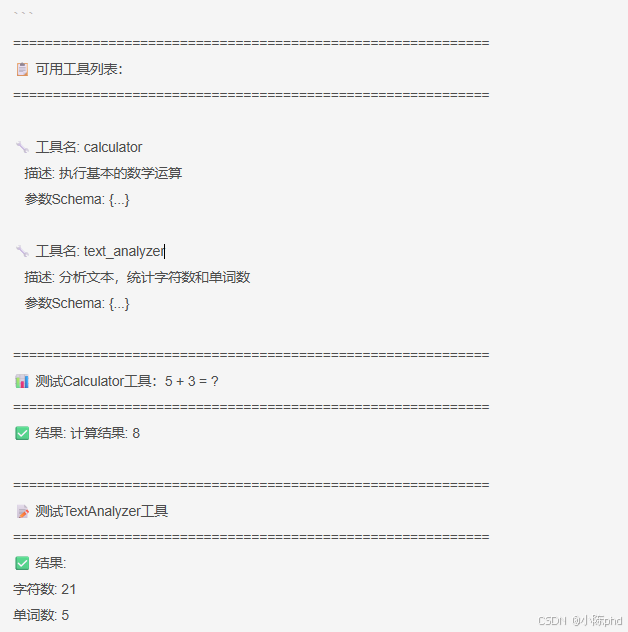
预期输出 :
4.3.2 运行交互式工具调用
bash
python 02-llm-tool-call.py ../server/simple-tools-v1-FastMCP.py交互演示:
======================================================================
🤖 工具调用系统启动
======================================================================

📋 可用工具:
🔧 calculator
   描述: 执行基本的数学运算
   ...

👤 请输入需求> 计算5加3

🔧 调用工具: calculator({'operation': 'add', 'a': 5, 'b': 3})...

✅ 执行成功
   计算结果为: 8.0
   数值: 8.0

👤 请输入需求> 分析这是一个测试文本

🔧 调用工具: text_analyzer({'text': '分析这是一个测试文本'})...

✅ 执行成功
   文本统计:字符数12,单词数4
   详情: 字符数=12, 单词数=4
5 Server端工具定义的两种实现方式
5.1 方式1:FastMCP框架(推荐 ⭐⭐⭐⭐⭐)
这是最简洁、最推荐的方式。前面的实战代码就是使用这个框架:
python
# server/simple-tools-v1-FastMCP.py
import asyncio
from mcp.server.fastmcp import FastMCP

# 【关键】一行代码初始化Server
mcp = FastMCP("tools-server")

# 【关键】装饰器自动注册工具
@mcp.tool()
async def calculator(operation: str, a: float, b: float) -> str:
    """执行基本的数学运算

    Args:
        operation: 运算类型 (add, subtract, multiply, divide)
        a: 第一个数字
        b: 第二个数字

    Returns:
        str: 计算结果
    """
    if operation == "add":
        return f"计算结果: {a + b}"
    elif operation == "subtract":
        return f"计算结果: {a - b}"
    elif operation == "multiply":
        return f"计算结果: {a * b}"
    elif operation == "divide":
        if b == 0:
            return "错误:除数不能为零"  # 【关键】边界保护
        return f"计算结果: {a / b}"

@mcp.tool()
async def text_analyzer(text: str) -> str:
    """分析文本,统计字符数和单词数"""
    char_count = len(text)
    word_count = len(text.split())
    return f"字符数: {char_count}\n单词数: {word_count}"

if __name__ == "__main__":
mcp.run(transport="stdio") # 【关键】启动ServerFastMCP的5大优势:
-
自动JSON Schema生成
python# FastMCP自动推导 @mcp.tool() async def func(a: str, b: int) -> str: pass # 自动生成 inputSchema = { "type": "object", "properties": { "a": {"type": "string"}, "b": {"type": "integer"} }, "required": ["a", "b"] } -
Docstring自动转换为描述
- 函数docstring →
tool.description - 参数docstring → 字段描述
- 函数docstring →
-
自动参数验证
- 类型检查
- 必需字段检查
- Pydantic自动处理
-
简洁的代码行数
- FastMCP版本:37行
- 原生协议版本:90行
- 减少代码75%!
-
自动处理通信细节
- stdio管道管理
- JSON序列化
- 协议交互
5.2 方式2:原生MCP协议(深度理解 ⭐⭐⭐⭐)
如果你想深度理解MCP的工作原理,可以看这个版本。这是不使用FastMCP框架的原生实现:
python
# server/simple-tools-v2-Protocal.py
import asyncio
import mcp.types as types  # 【关键】直接使用MCP类型
from mcp.server import Server
from mcp.server.stdio import stdio_server

# 【步骤1】创建Server实例
app = Server("tools-server")

# 【步骤2】定义list_tools处理器
@app.list_tools()
async def list_tools() -> list[types.Tool]:
    """
    【关键】这个方法必须返回Tool对象列表
    每个Tool对象包含:name, description, inputSchema
    """
    return [
        types.Tool(
            name="calculator",  # 工具唯一标识
            description="执行基本的数学运算(加、减、乘、除)",
            # 【关键】inputSchema是JSON Schema格式
            # 用于验证Client传来的参数
            inputSchema={
                "type": "object",
                "properties": {
                    "operation": {
                        "type": "string",
                        "enum": ["add", "subtract", "multiply", "divide"]  # 【关键】枚举值
                    },
                    "a": {"type": "number"},
                    "b": {"type": "number"}
                },
                "required": ["operation", "a", "b"]  # 【关键】必需字段
            }
        ),
        types.Tool(
            name="text_analyzer",
            description="分析文本,统计字符数和单词数",
            inputSchema={
                "type": "object",
                "properties": {
                    "text": {"type": "string"}
                },
                "required": ["text"]
            }
        )
    ]

# 【步骤3】定义call_tool处理器
@app.call_tool()
async def call_tool(
    name: str,  # 工具名称
    arguments: dict  # 工具参数
) -> list[types.TextContent]:
    """
    【关键】这个方法处理Client的工具调用请求

    工作流程:
    1. Client发送: call_tool(name="calculator", arguments={...})
    2. Server接收并调用这个处理器
    3. 处理器执行业务逻辑
    4. 返回TextContent列表
    """

    # 【关键】根据工具名分发处理
    if name == "calculator":
        operation = arguments["operation"]  # 从arguments中提取参数
        a = arguments["a"]
        b = arguments["b"]

        # 【关键】执行对应的业务逻辑
        if operation == "add":
            result = a + b
        elif operation == "subtract":
            result = a - b
        elif operation == "multiply":
            result = a * b
        elif operation == "divide":
            if b == 0:
                # 【关键】返回错误信息也用TextContent
                return [types.TextContent(type="text", text="错误:除数不能为零")]
            result = a / b

        # 【关键】必须返回TextContent对象列表
        return [types.TextContent(
            type="text",  # 内容类型
            text=f"计算结果: {result}"  # 结果文本
        )]

    elif name == "text_analyzer":
        text = arguments["text"]
        char_count = len(text)
        word_count = len(text.split())

        return [types.TextContent(
            type="text",
            text=f"字符数: {char_count}\n单词数: {word_count}"
        )]

    # 【关键】未知工具处理
    return [types.TextContent(
        type="text",
        text=f"未知工具: {name}"
    )]

# 【步骤4】启动Server
async def main():
    # 【关键】stdio_server处理进程间通信
    async with stdio_server() as streams:
        # streams[0] = 读取流(来自Client)
        # streams[1] = 写入流(发送给Client)
        await app.run(
            streams[0],
            streams[1],
            app.create_initialization_options()  # MCP初始化选项
        )

if __name__ == "__main__":
asyncio.run(main())原生协议的关键理解点:
-
JSON Schema的完整定义
pythoninputSchema = { "type": "object", "properties": { "operation": { "type": "string", "enum": ["add", "subtract", "multiply", "divide"] # 枚举 }, "a": {"type": "number"}, "b": {"type": "number"} }, "required": ["operation", "a", "b"] }type: 参数类型enum: 允许的值列表required: 必需字段- Client会根据这个Schema验证参数
-
两个处理器的职责分工
list_tools()处理器 └─ 返回:[Tool(name, description, inputSchema), ...] └─ 被调用时机:Client初始化时 或 想要刷新工具列表 └─ 目的:让Client知道有什么工具 call_tool()处理器 └─ 返回:[TextContent(type="text", text=结果), ...] └─ 被调用时机:Client调用工具时 └─ 目的:执行工具并返回结果 -
TextContent对象的结构
pythontypes.TextContent( type="text", # 【关键】类型必须是"text" text="计算结果: 8" # 【关键】内容必须是字符串 )type="text": 固定值(MCP协议规定)text: 返回的结果文本- 可以返回多个TextContent(列表)
5.3 两种方式的对比
| 方面 | FastMCP | 原生协议 |
|---|---|---|
| 代码量 | 37行 ⭐ | 90行 |
| 学习难度 | 低 ⭐ | 中 |
| 理解深度 | 表面 | 深入 ⭐ |
| 灵活性 | 中等 | 高 ⭐ |
| 生产推荐 | ✅ 推荐 | 仅用于学习 |
| 参数验证 | 自动 | 手动 |
| 类型安全 | 高(Pydantic) | 中等 |
| 调试难度 | 容易 ⭐ | 困难 |
5.4 Server端的最佳实践
5.4.1 工具参数设计
python
# ❌ 不好的设计
@mcp.tool()
async def process_data(data_str: str) -> str:
    """处理数据"""
    # 参数太宽泛,Client难以正确调用
    pass

# ✅ 好的设计
@mcp.tool()
async def calculate(
    operation: str,  # 明确的参数名
    a: float,
    b: float
) -> str:
    """执行数学运算

    Args:
        operation: 运算类型,必须是 add/subtract/multiply/divide 之一
        a: 第一个数字(必须是数字)
        b: 第二个数字(必须是数字)

    Returns:
        str: 计算结果,格式为 "计算结果: X"
    """
pass参数设计3原则:
- 语义明确:参数名要清楚表达含义
- 类型明确:使用具体的Python类型注解
- 文档完整:docstring要说明参数含义和取值范围
5.4.2 错误处理
python
@mcp.tool()
async def divide(a: float, b: float) -> str:
    """执行除法"""

    # 【关键】边界情况处理
    if b == 0:
        return "错误:除数不能为零"

    # 【关键】异常捕获
    try:
        result = a / b
        return f"结果: {result}"
    except Exception as e:
        return f"计算失败: {str(e)}"
5.4.3 异步函数的正确使用
python
# ❌ 错误的方式
@mcp.tool()
async def fetch_data(url: str) -> str:
    import requests
    response = requests.get(url)  # ❌ 同步阻塞
    return response.text

# ✅ 正确的方式
@mcp.tool()
async def fetch_data(url: str) -> str:
    import aiohttp
    async with aiohttp.ClientSession() as session:
        async with session.get(url) as response:  # ✅ 异步
            return await response.text()
5.4.4 复杂返回结构的处理
python
# Server必须返回字符串,但我们需要返回复杂结构
@mcp.tool()
async def analyze_text(text: str) -> str:
    """分析文本并返回详细信息"""
    import json

    analysis = {
        "char_count": len(text),
        "word_count": len(text.split()),
        "line_count": len(text.split("\n")),
        "avg_word_length": len(text.split()) and len(text) / len(text.split()) or 0
    }

    # 【关键】序列化为JSON字符串返回
    return json.dumps(analysis, ensure_ascii=False, indent=2)
然后Client端解析:
python
result_text = result.content[0].text  # JSON字符串
analysis = json.loads(result_text)  # 解析为字典
print(f"字符数: {analysis['char_count']}")
6 核心代码解析
6.1 FastMCP装饰器的魔力
python
@mcp.tool()
async def calculator(operation: str, a: float, b: float) -> str:
    """执行基本的数学运算"""
pass这一行发生了什么:
-
参数类型 → JSON Schema
operation: str→{"type": "string"}a: float, b: float→{"type": "number"}- FastMCP使用Pydantic自动生成
-
Docstring → Tool描述
"""执行基本的数学运算"""变成tool.description
-
返回类型 → 结果格式
- 必须是
str,因为MCP通过文本通信
- 必须是
-
自动注册
- 装饰器自动将函数添加到工具列表
- 无需手动调用
mcp.register_tool()
6.2 工具发现的三步曲
python
# 【步骤1】初始化Session
async with ClientSession(reader, writer) as session:
    await session.initialize()  # MCP握手

# 【步骤2】发现工具
response = await session.list_tools()
# response.tools = [calculator, text_analyzer]

# 【步骤3】遍历工具元数据
for tool in response.tools:
    print(tool.name)           # "calculator"
    print(tool.description)    # "执行基本的数学运算"
print(tool.inputSchema) # JSON Schema关键点:
list_tools()是被动发现(Server不知道谁要调用)- 这为动态系统奠定基础
6.3 工具调用和结果处理
python
# 【步骤1】调用工具
result = await session.call_tool(
    name="calculator",
    arguments={"operation": "add", "a": 5, "b": 3}
)

# 【步骤2】提取结果
result.content  # ToolResultList对象
result.content[0]  # TextContent对象
result.content[0].text  # "计算结果: 8"

# 【步骤3】解析结果
if "计算结果:" in result.content[0].text:
    value = float(result.content[0].text.split(":")[1])
# value = 8.0为什么要单独解析:
- Server返回的是纯文本(为了通用性)
- 但我们需要结构化数据(便于后续处理)
- ResultParser承担了这个转换责任
6.4 ToolSelector的关键词匹配逻辑
python
def select_tool(self, user_input):
    """这里体现了人工智能的降级策略"""

    user_input_lower = user_input.lower()

    # 【阶段1】关键词硬匹配(最快,但不灵活)
    if any(word in user_input_lower for word in ["计算", "加", "减"]):
        return "calculator", self._parse_calculator_args(user_input)

    # 【阶段2】模式匹配(中等复杂度)
    if re.search(r"(\d+)\s*[加减乘除]\s*(\d+)", user_input):
        # 提取数字和操作符
        pass

    # 【阶段3】LLM匹配(最灵活,但成本高)
    # 可以在这里调用LLM来理解用户意图
    # llm_choice = llm.choose_tool(user_input, tools)

return None, None【划重点】生产环境通常用分级策略:
- 快速路径:关键词匹配
- 备选方案:模式匹配
- 终极方案:调用LLM
7 效果验证
7.1 工具发现验证
运行后的实际输出(已验证):
📋 可用工具列表:
🔧 工具名: calculator
   描述: 执行基本的数学运算
   参数Schema: {
     'type': 'object',
     'properties': {
       'operation': {'type': 'string'},
       'a': {'type': 'number'},
       'b': {'type': 'number'}
     },
     'required': ['operation', 'a', 'b']
   }
验证点 :
✅ 工具正确注册了参数类型
✅ Docstring转换为description
✅ JSON Schema自动生成且完整
7.2 工具调用验证
👤 请输入需求> 计算5加3

🔧 调用工具: calculator({'operation': 'add', 'a': 5, 'b': 3})...

✅ 执行成功
   计算结果为: 8.0
   数值: 8.0
验证点 :
✅ ToolSelector正确识别了"计算"关键词
✅ 工具参数被正确传递
✅ ResultParser成功提取了数值结果
7.3 边界情况验证
👤 请输入需求> 计算一个数除以0

🔧 调用工具: calculator({'operation': 'divide', 'a': 1, 'b': 0})...

✅ 执行成功
   错误:除数不能为零
验证点 :
✅ Server优雅处理了边界情况
✅ 错误信息被清晰传递给用户
8 踏坑记录
8.1 踏坑1:硅编码Python路径导致跨环境失败
错误现象:
python
params = StdioServerParameters(
    command="/home/Documents/17_MCP/.venv/bin/python3",  # ❌ 硬编码路径
    args=[server_script],
    env=None
)
# 结果:FileNotFoundError: No such file or directory根因分析:
- 不同用户的虚拟环境路径不同
- 在另一台机器上这个路径根本不存在
- 导致Client无法启动Server进程
解决方案:
python
params = StdioServerParameters(
    command=sys.executable,  # ✅ 使用当前Python解释器
    args=[server_script],
    env=None
)
【亲测有效】这样可以在任何环境运行!
8.2 踩坑2:工具返回附字符串类型导致序列化失败
错误现象:
python
@mcp.tool()
async def calculator(...) -> dict:  # ❌ 返回dict
    return {
        "result": 8,
        "operation": "add"
    }

# 错误: ToolResult expects 'text' field of type str根因分析:
- MCP通过stdio文本通信,必须序列化为字符串
- FastMCP框架强制要求返回类型为
str - 返回JSON字符串需要在返回前手动转换
解决方案:
python
@mcp.tool()
async def calculator(...) -> str:  # ✅ 返回str
    import json
    result = {
        "result": 8,
        "operation": "add"
    }
    return json.dumps(result, ensure_ascii=False)
【划重点】工具必须遵守MCP的文本传输规范!
8.3 踩坑3:异步函数忘记await导致协程对象返回
错误现象:
python
@mcp.tool()
async def calculator(operation: str, a: float, b: float):
    # 做一些异步操作
    result = calculate_async(a, b)  # ❌ 忘记await
    return f"结果: {result}"

# 返回: 结果: <coroutine object calculate_async at 0x...>根因分析:
- 在async函数中调用async函数必须使用await
- 忘记await会返回协程对象而不是结果
- FastMCP无法序列化协程对象
解决方案:
python
@mcp.tool()
async def calculator(operation: str, a: float, b: float):
    result = await calculate_async(a, b)  # ✅ 正确await
    return f"结果: {result}"
【亲测有效】使用IDE的类型检查可以提前发现这个问题!
9 总结与扩展
9.1 本文核心收获
| 知识点 | 掌握度 |
|---|---|
| FastMCP装饰器工作原理 | ⭐⭐⭐⭐⭐ |
| 工具的三步工作流(定义→发现→调用) | ⭐⭐⭐⭐⭐ |
| ResultParser结构化解析模式 | ⭐⭐⭐⭐ |
| ToolSelector的分级选择策略 | ⭐⭐⭐⭐ |
| 异步编程中的常见陷阱 | ⭐⭐⭐⭐ |
9.2 技能升级路线
初级 → 定义简单工具 (本文完成)
  ↓
中级 → 多工具协调 (ToolSelector优化)
  ↓
高级 → LLM工具调用循环 (集成OpenAI/通义千问)
  ↓
专家 → 生产级工具系统 (缓存、监控、限流)
9.3 实战拓展方向
9.3.1 集成LLM进行沺能工具选择
python
# 替换关键词匹配,使用LLM理解用户意图
from openai import OpenAI

def select_tool_by_llm(user_input, available_tools):
    """使用LLM选择合适的工具"""
    client = OpenAI()

    tool_descriptions = "\n".join([
        f"- {t.name}: {t.description}"
        for t in available_tools
    ])

    response = client.chat.completions.create(
        model="gpt-4",
        messages=[{
            "role": "user",
            "content": f"""根据用户需求选择工具。

可用工具:
{tool_descriptions}

用户需求:{user_input}

返回格式:{{"tool": "工具名", "args": {{...}}}}
"""
        }]
    )

    return json.loads(response.choices[0].message.content)
9.3.2 支持工具调用循环(LLM多轮调用)
python
async def llm_tool_calling_loop(user_query, session):
    """LLM可以多轮调用工具直到得到最终答案"""
    messages = [
        {"role": "system", "content": "你是一个助手,可以调用工具。"},
        {"role": "user", "content": user_query}
    ]

    tools = await session.list_tools()

    for iteration in range(max_iterations):
        # 【第1步】LLM决策
        response = client.chat.completions.create(
            model="gpt-4",
            messages=messages,
            tools=[convert_to_openai_format(t) for t in tools],
            tool_choice="auto"
        )

        msg = response.choices[0].message

        # 【第2步】检查是否有工具调用
        if not msg.tool_calls:
            return msg.content  # 返回最终答案

        # 【第3步】执行工具
        for tool_call in msg.tool_calls:
            result = await session.call_tool(
                tool_call.function.name,
                json.loads(tool_call.function.arguments)
            )
            messages.append({
                "role": "assistant",
                "content": msg.content,
                "tool_calls": msg.tool_calls
            })
            messages.append({
                "role": "tool",
                "content": result.content[0].text,
                "tool_call_id": tool_call.id
            })

    return "超过最大迭代次数"
9.3.3 添加工具缓存和监控
python
import time
import json

class CachedToolSession:
    """支持缓存的工具调用"""

    def __init__(self, session):
        self.session = session
        self.cache = {}  # 简单字典缓存
        self.metrics = {
            "total_calls": 0,
            "cache_hits": 0,
            "avg_latency": 0
        }

    async def call_tool_cached(self, name, arguments):
        """带缓存的工具调用"""
        self.metrics["total_calls"] += 1

        # 生成缓存键
        cache_key = f"{name}:{json.dumps(arguments, sort_keys=True)}"

        if cache_key in self.cache:
            self.metrics["cache_hits"] += 1
            return self.cache[cache_key]

        # 执行工具调用
        start = time.time()
        result = await self.session.call_tool(name, arguments)
        latency = time.time() - start

        # 更新指标
        self.metrics["avg_latency"] = (
            (self.metrics["avg_latency"] * (self.metrics["total_calls"] - 1) + latency)
            / self.metrics["total_calls"]
        )

        # 缓存结果
        self.cache[cache_key] = result

        return result
9.4 常见问题解答
Q1: 能不能让Client自动选择工具而不用ToolSelector?
A: 可以的!用LLM直接选择工具(见8.3.1),或者使用工具调用循环让LLM自主决策(见8.3.2)。ToolSelector只是最简单的实现方式。
Q2: 工具能否返回复杂结构化数据?
A: 返回值必须是字符串。可以返回JSON字符串(json.dumps()),然后Client用json.loads()解析。
Q3: Server上的工具能否相互调用?
A: 可以的。工具是普通Python函数,完全可以相互调用。但要注意避免循环依赖和无限递归。
Q4: 如何处理长期运行的工具?
A: 使用异步编程(async/await)。MCP底层用asyncio处理并发,多个Client可以同时调用工具。
结语
本文从零到一带你理解了MCP工具系统的设计哲学:
- Server定义:用装饰器简化工具注册(FastMCP的天才设计)
- Client发现:通过标准协议动态获取工具列表
- 智能调用:支持关键词选择→LLM选择→工具调用循环的三级演进
关键洞察 :MCP的核心价值不在于工具本身,而在于工具的动态发现和协议标准化。这让Server和Client可以解耦开发,实现真正的可组合系统。
展望:当工具系统与LLM工具调用循环结合,就能构建自主决策的AI智能体。这已经不是未来,而是当下!
💬 技术交流
你在开发MCP应用时遇到过什么问题吗?欢迎评论区留言讨论:
- 工具参数的最佳实践是什么?
- 如何处理工具执行的超时和异常?
- 在实际项目中如何设计工具系统的可扩展性?