
从网页和文档中提取可用文本比看起来更具挑战性。HTML 页面将有意义的内容与布局元素、脚本、广告和样式规则混合在一起,而 PDF 文件则围绕打印逻辑进行结构化,而非自然的文本流。如果没有可靠的方法来解析这些格式,即使是简单的提取也可能变得不一致且难以自动化。
Reader 通过像浏览器一样精确渲染源内容,然后从完全解析后的文档中提取文本来解决这个问题。这种方法避免了猜测,并能在各种真实世界的网站和文件中生成稳定的输出。
Jina Reader 服务提供两个 endpoints,分别提供不同的服务:
-
r.jina.ai :通过 https://r.jina.ai/ 将任何 URL 转换为 LLM-ready text,为你的 agents 和 RAG 系统生成更干净、更可靠的输入。
-
s.jina.ai :通过 https://s.jina.ai/your+query 对任意查询执行实时 web search,使你的 LLMs 能够从整个 web 获取最新信息。
这两个 endpoints 结合在一起,为开发者提供了一种简单、可靠的方式,只需一次请求,就能将复杂的 HTML 或 PDF 源转换为干净的 Markdown 或结构良好的 JSON,使 Reader 成为任何数据摄取或处理 pipeline 的实用基础。
快速开始
为了快速了解 Reader,你可以直接使用任何 internet browser,而无需编写任何代码或配置 API key。
HTML → Markdown
打开 https://www.elastic.co/elasticsearch 。你应该会看到 Elasticsearch 产品页面(截图截至 2025 年 11 月 17 日)。
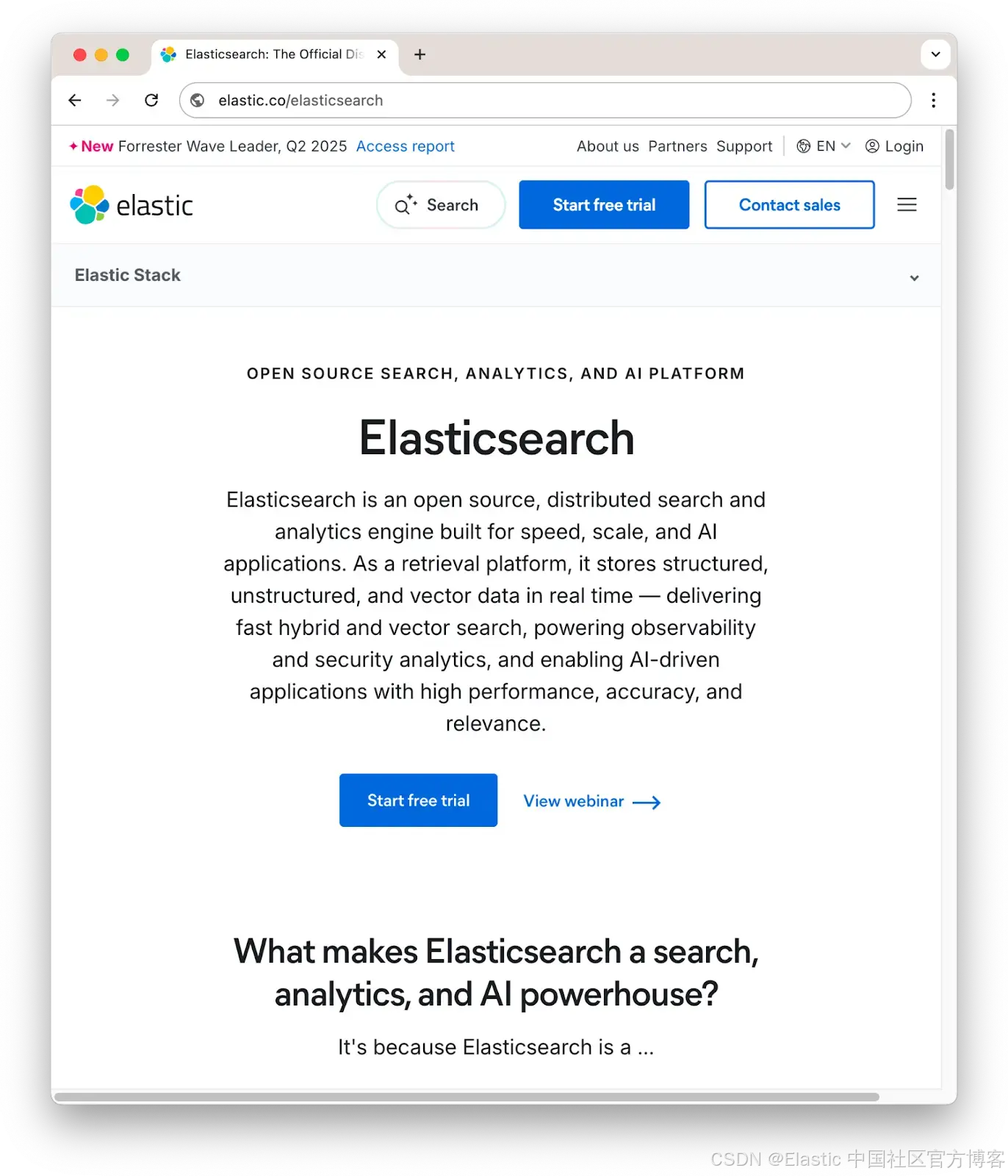
现在通过 Reader 打开同一个页面,只需在 URL 前加上 r.jina.ai:
https://r.jina.ai/https://www.elastic.co/elasticsearch
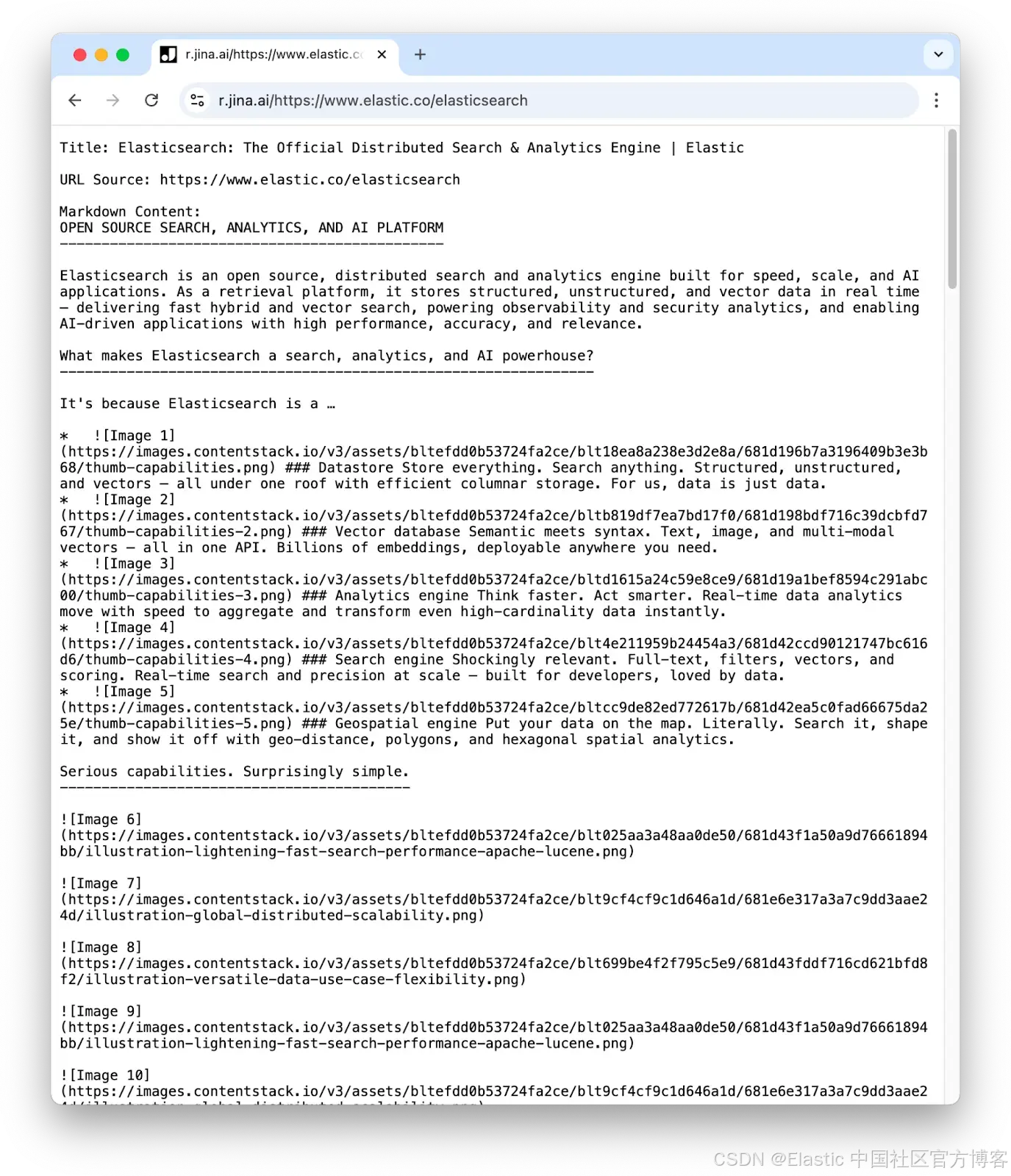
Reader 会返回一个以 Markdown 格式表示页面内容的纯文本响应。
通过 r.jina.ai 在浏览器中直接访问 Reader 是一种方便的实验方式。免费、未认证的使用是有速率限制的,并且对某些 URL 可能会受到限制。对于生产环境或更高优先级的工作流,你应该使用带 API key 的认证 API。你可以在 Jina Reader API 网站获取一个 API key,并在下一节所示的请求头中插入它。
使用 Reader
将页面转换为 Markdown
使用 Reader 的最简单方式是将一个 URL 传给 https://r.jina.ai/ 并使用任何可访问互联网的工具保存输出。
使用 curl:
curl "https://r.jina.ai/https://www.elastic.co/elasticsearch" \
   -o elasticsearch.md
这里,标志和参数 -o elasticsearch.md 会把结果写入一个名为 elasticsearch.md 的本地文件。
使用 wget:
wget \
  --header="X-Return-Format: markdown" \
  -O elasticsearch.md \
  "https://r.jina.ai/https://www.elastic.co/elasticsearch"
参数 -O elasticsearch.md 会把结果写入指定的文件。
使用 Python:
import requests

headers = {
    "X-Return-Format": "markdown",
}

response = requests.get(
    "https://r.jina.ai/https://www.elastic.co/elasticsearch",
    headers=headers,
)
print(response.text)
这段代码会把结果打印到屏幕上。
我们还提供一个交互式界面,让你可以尝试不同的参数设置,并自动生成其他编程语言的示例代码。
认证使用和输出模式
如果你需要更高优先级的访问和更少的限制,请在 Authorization header 中包含你的 Jina API key(将下面示例中的 YOUR_API_KEY 替换为你的 key),并且可以通过 X-Return-Format 可选地指定明确的输出模式。
使用 curl:
curl "https://r.jina.ai/https://www.elastic.co/elasticsearch" \
  -H "Authorization: Bearer YOUR_API_KEY" \
  -H "X-Return-Format: markdown" \
  -o elasticsearch.md
使用 wget:
wget \
  --header="Authorization: Bearer YOUR_API_KEY" \
  --header="X-Return-Format: markdown" \
  -O elasticsearch.md \
  "https://r.jina.ai/https://www.elastic.co/elasticsearch"
使用 Python:
import requests

headers = {
    "Authorization": "Bearer YOUR_API_KEY",
    "X-Return-Format": "markdown",
}

response = requests.get(
    "https://r.jina.ai/https://www.elastic.co/elasticsearch",
    headers=headers,
)
print(response.text)
JSON 模式
在生产环境中,你可能更希望将 Reader 的输出包装成一个 JSON 对象,这样更容易解析。要在 r.jina.ai 上启用 JSON 模式,请添加请求头 Accept: application/json。例如,在 Python 中:
headers = {
    "Authorization": "Bearer <YOUR_API_KEY>",
    "X-Return-Format": "markdown",
    "Accept": "application/json",
}
对于 curl,使用标志 -H "Authorization: Bearer <YOUR_API_KEY>";对于 wget,使用 --header="Authorization: Bearer <YOUR_API_KEY>",如上例所示,将 header 添加到请求中。生成的 JSON 输出核心部分如下所示:
{
  "code": 200,
  "status": 20000,
  "data": {
    "title": "...",
    "description": "...",
    "url": "https://www.elastic.co/elasticsearch",
    "content": "..."
  }
}
有关通过 r.jina.ai 提供的服务的更多信息,请访问 Reader API 文档页面。
使用 s.jina.ai 搜索
Reader ------ 通过 https://s.jina.ai API ------ 执行 web search:你提供一个 query,它会处理来自搜索引擎的结果。它提供的服务是标准化 SERPs(Search Engine Results Page):即你在 Google 或其他搜索引擎搜索时得到的结果页面。SERP 通常包含一组带有 snippets、预览文本和小型 metadata 字段的链接,但直接提取很困难,因为页面通常还包含广告以及可选服务或其他产品的链接。
使用方法很简单,只需检索以下 URL,并替换为你自己的查询词:
https://s.jina.ai/<your search query>将查询词之间的空格替换为 "+",如下面的示例所示:
https://s.jina.ai/Elastic+Jina+AIReader API 会在 Google 上执行你的搜索,并将结果处理成结构化的 Markdown 页面,其中包含前 10 个匹配项的页面标题、URL,以及底层搜索引擎提供的描述/摘要。默认情况下,它还会尝试抓取网页并将其转换为 Markdown,使用与上述 HTML/PDF 转 Markdown 转换器相同的模型,但请求可能因超时或其他原因失败,因此页面可能不存在。
与所有 Reader API 服务一样,如果你使用 Jina API key,你将获得更高优先级,因此可以更快地获得结果,无流量限制,也不会因流量过大而被拒绝请求。
一个具体示例:
curl "https://s.jina.ai/Elastic+Jina" -H "Authorization: Bearer <YOUR_API_KEY>"这会返回 Markdown 格式的文本,看起来如下:
[1] Title: Elastic and Jina AI join forces to advance open source retrieval for AI ...
[1] URL Source: https://www.elastic.co/blog/elastic-jina-ai
[1] Description: We are thrilled to announce that Elastic has joined forces with Jina AI, a pioneer in open source multimodal and multilingual embeddings, ...
[1] Date: Oct 9, 2025


[2] Title: Elastic Completes Acquisition of Jina AI, a Leader in Frontier Models for Multimodal and Multilingual Search
[2] URL Source: https://ir.elastic.co/news/news-details/2025/Elastic-Completes-Acquisition-of-Jina-AI-a-Leader-in-Frontier-Models-for-Multimodal-and-Multilingual-Search/default.aspx
[2] Description: Acquisition advances Elastic's leadership in retrieval, embeddings, and context engineering to power agentic AI Elastic (NYSE: ESTC), the Search AI Company, has completed the acquisition of Jina AI , a pioneer in open source multimodal and multilingual embeddings, reranker, and small language models. The acquisition deepens Elastic's capabilities in vector search, retrieval-augmented generation (RAG), and context engineering, further strengthening the company's position as the leading Search AI Platform for developers and enterprises. Elastic's addition of Jina AI demonstrates its continued commitment to delivering open, accessible, and production-ready Search AI at scale. "Search is the foundation of generative AI," said Ash Kulkarni, CEO, Elastic . "Jina AI's team and technology bring cutting-edge models into the Elastic ecosystem, making our platform even more powerful for context engineering. Together, we are expanding what developers and enterprises can achieve with
[2] Date: Oct 9, 2025


### Elastic Completes Acquisition of Jina AI, a Leader in Frontier Models for Multimodal and Multilingual Search


_Acquisition advances Elastic's leadership in retrieval, embeddings, and context engineering to power agentic AI_你可以仅执行搜索 ,而不尝试获取底层页面,只需添加请求头 X-Respond-With: no-content。例如:
curl "https://s.jina.ai/Elastic+Jina" \
  -H "Authorization: Bearer <YOUR_API_KEY>" \
  -H "X-Respond-With: no-content"
这会返回以 Markdown 格式表示的文本,开头如下:
[1] Title: Elastic and Jina AI join forces to advance open source retrieval for AI ...
[1] URL Source: https://www.elastic.co/blog/elastic-jina-ai
[1] Description: We are thrilled to announce that Elastic has joined forces with Jina AI, a pioneer in open source multimodal and multilingual embeddings, ...
[1] Date: Oct 9, 2025


[2] Title: Elastic Completes Acquisition of Jina AI, a Leader in Frontier Models ...
[2] URL Source: https://ir.elastic.co/news/news-details/2025/Elastic-Completes-Acquisition-of-Jina-AI-a-Leader-in-Frontier-Models-for-Multimodal-and-Multilingual-Search/default.aspx
[2] Description: The acquisition of Jina AI broadens Elastic's leadership in relevance for unstructured data by adding dense vector, multilingual and multimodal ...
[2] Date: Oct 9, 2025


[3] Title: Jina AI - Elasticsearch Labs
[3] URL Source: https://www.elastic.co/search-labs/integrations/jina
[3] Description: Jina AI is now part of Elastic, bringing its high-performance multilingual and multimodal search AI to Elasticsearch's powerful data storage, retrieval, and ...


[4] Title: Elastic Completes Acquisition of Jina AI, a Leader in Frontier Models ...
[4] URL Source: https://finance.yahoo.com/news/elastic-completes-acquisition-jina-ai-130200685.html
[4] Description: Elastic's addition of Jina AI demonstrates its continued commitment to delivering open, accessible, and production-ready Search AI at scale.
[4] Date: Oct 9, 2025
Reader 还提供结构化提取模式,如果你添加请求头 Accept: application/json,它会返回 JSON 结构化数据。例如,要执行与上面相同的搜索:
 curl "https://s.jina.ai/Elastic+Jina" \
  -H "Authorization: Bearer <YOUR_API_KEY>" \
  -H "Accept: application/json"
这会以 JSON 格式返回相同的信息,方便其他应用程序访问,同时还包括一些页面 metadata 和 token 使用摘要。下面的示例输出为了可读性和节省空间,很多内容已被省略(用 <...> 代替):
"data": [
 {
   "title": "Elastic Completes Acquisition of Jina AI, a Leader in Frontier Models for Multimodal and Multilingual Search",
   "url": "https://ir.elastic.co/news/news-details/2025/Elastic-Completes-Acquisition-of-Jina-AI-a-Leader-in-Frontier-Models-for-Multimodal-and-Multilingual-Search/default.aspx",
   "description": "Acquisition advances Elastic's leadership <...>",
   "date": "Oct 9, 2025",
   "content": "### Elastic Completes Acquisition of Jina AI<...>",
   "metadata": {
     "lang": "en-US",
     <...>
   },
   "usage": {
     "tokens": 1447
   }
 },
 {
   "title": "Elastic Completes Acquisition of Jina AI, a Leader in Frontier Models for Multimodal and Multilingual Search",
   "url": "https://finance.yahoo.com/news/elastic-completes-acquisition-jina-ai-130200685.html",
 <...>
这个 API 还有更多选项。欲了解完整信息,包括可选参数及其对应的 headers,请访问 Reader API 页面。
Reader 与 Elasticsearch
Reader API 是一个方便的工具,用于执行表面看似简单但实际上并不简单的任务。网络环境足够复杂,你确实需要 AI 才能充分利用它。从网页和 PDF 中提取数据对程序员来说是一项杂乱的工作,但非常适合 AI 语言模型。
Reader 选择以 JSON 和 Markdown 作为标准格式,这反映了支持最有用、广泛支持、同时又简单且人类可访问的数据格式的策略。
你可以将 Markdown 直接放入 Elasticsearch 文档存储,并使用 Elastic Document API 提供的任意方法进行索引。最佳策略通常是先使用 Reader 获取文档,然后批量处理,或者在资源受限时使用尽可能大的批次。你可以将 Reader 输出与任何文本存储或索引策略结合使用。
Elasticsearch 在存储、索引和检索中对 JSON 提供直接支持。JSON 格式可供人工检查,可作为纯文本传输,并在所有主流编程语言和框架中有可靠支持,同时在浏览器中也内置支持。
Reader 通过将 AI 引入现实世界生成的杂乱数据,使你的 Elastic 安装更有用。
原文:https://www.elastic.co/search-labs/tutorials/jina-tutorial/jina-reader