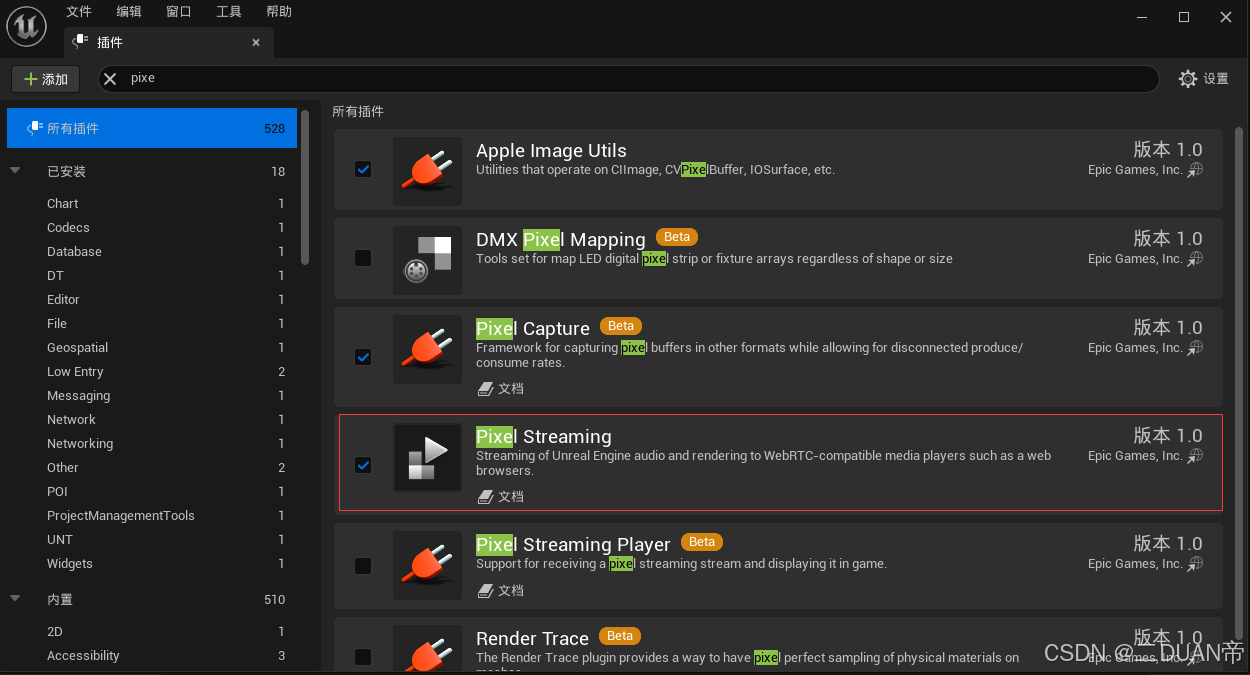
1.给UE配置像素流插件
2.Web如何给UE发送数据/接收UE数据
peerStream.js
javascript
"5.1.3";

// Must be kept in sync with JavaScriptKeyCodeToFKey C++ array.
// special keycodes different from KeyboardEvent.keyCode
const SpecialKeyCodes = {
	Backspace: 8,
	ShiftLeft: 16,
	ControlLeft: 17,
	AltLeft: 18,
	ShiftRight: 253,
	ControlRight: 254,
	AltRight: 255,
};

// https://developer.mozilla.org/en-US/docs/Web/API/MouseEvent/button
const MouseButton = {
	MainButton: 0, // Left button.
	AuxiliaryButton: 1, // Wheel button.
	SecondaryButton: 2, // Right button.
	FourthButton: 3, // Browser Back button.
	FifthButton: 4, // Browser Forward button.
};

// https://developer.mozilla.org/en-US/docs/Web/API/MouseEvent/buttons#value
const MouseButtonsMask = {
	1: 0,
	2: 2,
	4: 1,
	8: 3,
	16: 4
}

// Must be kept in sync with PixelStreamingProtocol::EToClientMsg C++ enum.
const RECEIVE = {
	QualityControlOwnership: 0,
	Response: 1,
	Command: 2,
	FreezeFrame: 3,
	UnfreezeFrame: 4,
	VideoEncoderAvgQP: 5,
	LatencyTest: 6,
	InitialSettings: 7,
	FileExtension: 8,
	FileMimeType: 9,
	FileContents: 10,
	InputControlOwnership: 12,
	CompositionStart: 64,
	Protocol: 255
};

// Must be kept in sync with PixelStreamingProtocol::EToUE4Msg C++ enum.
const SEND = {
	/*
	 * Control Messages. Range = 0..49.
	 */
	IFrameRequest: 0,
	RequestQualityControl: 1,
	FpsRequest: 2,
	AverageBitrateRequest: 3,
	StartStreaming: 4,
	StopStreaming: 5,
	LatencyTest: 6,
	RequestInitialSettings: 7,
	/*
	 * Input Messages. Range = 50..89.
	 */

	// Generic Input Messages. Range = 50..59.
	UIInteraction: 50,
	Command: 51,

	// Keyboard Input Message. Range = 60..69.
	KeyDown: 60,
	KeyUp: 61,
	KeyPress: 62,
	FindFocus: 63,
	CompositionEnd: 64,

	// Mouse Input Messages. Range = 70..79.
	MouseEnter: 70,
	MouseLeave: 71,
	MouseDown: 72,
	MouseUp: 73,
	MouseMove: 74,
	MouseWheel: 75,

	// Touch Input Messages. Range = 80..89.
	TouchStart: 80,
	TouchEnd: 81,
	TouchMove: 82,

	// Gamepad Input Messages. Range = 90..99
	GamepadButtonPressed: 90,
	GamepadButtonReleased: 91,
	GamepadAnalog: 92,
};

let iceServers = undefined;

class PeerStream extends HTMLVideoElement {
	constructor() {
		super();

		window.ps = this;

		this.ws = { send() { }, close() { } }; // WebSocket
		this.pc = { close() { } }; // RTCPeerConnection

		this.setupVideo();
		this.registerKeyboardEvents();
		this.registerMouseHoverEvents();
		this.registerFakeMouseEvents();

		document.addEventListener(
			"pointerlockchange",
			() => {
				if (document.pointerLockElement === this) {
					this.registerPointerLockEvents();
				} else {
					this.registerMouseHoverEvents();
				}
			},
			false
		);

		this.addEventListener("loadeddata", (e) => {
			this.style["aspect-ratio"] = this.videoWidth / this.videoHeight;
		});

		// this.setupPeerConnection();
	}
	checkWebRTCSupport() {
		// Step 2: Check for RTCPeerConnection
		const RTCPeerConnection = window.RTCPeerConnection || window.webkitRTCPeerConnection || window.mozRTCPeerConnection;
		if (!RTCPeerConnection) {
			console.warn('checkWebRTCSupport RTCPeerConnection not supported');
			return false
		}
		// Step 3: Check for DataChannel
		let dataChannelSupported = false;
		let pc = null;
		if (RTCPeerConnection) {
			try {
				pc = new RTCPeerConnection();
				const dc = pc.createDataChannel('test');
				dataChannelSupported = !!dc;
				dc.close(); // Close the DataChannel when done
				pc.close()
			} catch (e) {
				console.error(e)
				console.warn('checkWebRTCSupport dataChannelSupported not supported');
				return false
			}
			if (!dataChannelSupported) {
				console.warn('checkWebRTCSupport DataChannel not supported');
				return false
			}
		}
		return true

	}

	// setupWebsocket
	async connectedCallback() {
		if (false == this.checkWebRTCSupport()) {
			const overlayDiv = document.createElement('div');
			overlayDiv.innerHTML = '你的浏览器版本过低!<br>推荐使用谷歌100以上版本浏览器!!';
			overlayDiv.style.position = 'absolute';
			overlayDiv.style.top = '50%';
			overlayDiv.style.left = '50%';
			overlayDiv.style.transform = 'translate(-50%, -50%)';
			overlayDiv.style.background = 'rgba(255, 255, 255, 0.8)';
			overlayDiv.style.padding = '10px';
			overlayDiv.style.borderRadius = '5px';
			overlayDiv.style.display = 'block'; // Initially hidden
			this.parentNode.appendChild(overlayDiv)
		}

		// This will happen each time the node is moved, and may happen before the element"s contents have been fully parsed. may be called once your element is no longer connected
		if (!this.isConnected) return;
		if (this.pc.connectionState === "connected" && this.dc.readyState === "open" && this.ws.readyState === 1) {
			// this.pc.restartIce();
			this.play();
			return;
		}
		// await new Promise((res) => setTimeout(res, 1000));
		this.ws.onclose = null
		this.ws.close(1000);
		this.ws = new WebSocket(this.id || location.href.replace(/^http/, "ws"), 'peer-stream');

		this.ws.onerror

		this.ws.onopen = () => {
			console.info("✅", this.ws);
		};

		this.ws.onmessage = (e) => {
			this.onWebSocketMessage(e.data);
		};

		this.ws.onclose = (e) => {
			console.warn(e);
			this.dispatchEvent(new CustomEvent("playerdisconnected", {}));
			clearTimeout(this.reconnect);
			this.reconnect = setTimeout(() => this.connectedCallback(), 3000);
		};
	}

	disconnectedCallback() {
		// lifecycle binding
		setTimeout(() => {
			if (this.isConnected) return
			this.ws.close(1000);
			this.pc.close();
			console.log("❌ peer connection closing");
			// this.dc.close();
		}, 5 * 1000);
	}

	adoptedCallback() { }

	attributeChangedCallback(name, oldValue, newValue) {
		if (!this.isConnected) return;
		// fired before connectedCallback when startup
		this.ws.close(1000);
	}

	async onWebSocketMessage(msg) {
		try {
			msg = JSON.parse(msg);
		} catch {
			console.debug("↓↓", msg);
			return;
		}
		if (msg.type === "offer") {
			this.setupPeerConnection();

			const offer = new RTCSessionDescription(msg);
			console.log("↓↓ offer", offer);

			await this.pc.setRemoteDescription(offer);

			// Setup a transceiver for getting UE video
			this.pc.addTransceiver("video", { direction: "recvonly" });

			const answer = await this.pc.createAnswer();
			await this.pc.setLocalDescription(answer);

			console.log("↑↑ answer", answer);
			this.ws.send(JSON.stringify(answer));

			for (let receiver of this.pc.getReceivers()) {
				receiver.playoutDelayHint = 0;
			}
		} else if (msg.type === "iceCandidate") {
			const candidate = new RTCIceCandidate(msg.candidate);
			console.log("↓↓ candidate:", candidate);
			await this.pc.addIceCandidate(candidate);
		} else if (msg.type === "answer") {
			const answer = new RTCSessionDescription(msg)
			await this.pc.setRemoteDescription(answer)
			console.log('↓↓ answer:', answer)
			for (const receiver of this.pc.getReceivers()) {
				receiver.playoutDelayHint = 0
			}
		} else if (msg.type === "playerqueue") {
			this.dispatchEvent(new CustomEvent("playerqueue", { detail: msg }));
			console.log("↓↓ playerqueue:", msg);
		} else if (msg.type === "seticeServers") {
			iceServers = msg.iceServers
			console.log("↓↓ seticeServers:", msg);
		} else if (msg.type === 'playerConnected') {
			console.log('↓↓ playerConnected:', msg)
			this.setupPeerConnection_ue4()
			this.setupDataChannel_ue4()
		} else if (msg.type === "ping") {
			console.log("↓↓ ping:", msg);
			msg.type = "pong"
			this.ws.send(JSON.stringify(msg));

			if (this.mouseReleaseTime) {
				let now = new Date()
				if ((now - this.lastmouseTime) > this.mouseReleaseTime * 1000) {
					msg.type = "mouseRelease"
					this.ws.send(JSON.stringify(msg));
				}
			}
		}
		else if (msg.type === "ueDisConnected") {
			this.dispatchEvent(new CustomEvent("ueDisConnected", { detail: msg }));
			console.log("↓↓ ueDisConnected:", msg);
		}
		else if (msg.type === "setmouseReleaseTime") {
			this.mouseReleaseTime = msg.mouseReleaseTime
			this.lastmouseTime = new Date()
			console.log("↓↓ setmouseReleaseTime:", msg);
		}
		else if (msg.type === "getStatus") {
			console.log("↓↓ getStatus:", msg);
			this.handleGetStatus(msg)
		}
		else {
			console.warn("↓↓", msg);
		}
	}
	handleGetStatus(msg) {
		if (false == (this.pc instanceof RTCPeerConnection)) {
			msg.videoencoderqp = null
			msg.netrate = null
			this.ws.send(JSON.stringify(msg));
			console.log("↑↑ handleGetStatus:", msg);
			return
		}
		let initialBytesReceived = 0;
		// 获取初始统计信息
		this.pc.getStats(null).then(stats => {
			stats.forEach(report => {
				if (report.type === "transport") {
					initialBytesReceived = report.bytesReceived;
				}
			});
		});
		// 等待指定的时间间隔后再次获取统计信息
		let durationInSeconds = 0.2
		setTimeout(() => {
			this.pc.getStats(null).then(stats => {
				stats.forEach(report => {
					if (report.type === "transport") {
						const finalBytesReceived = report.bytesReceived;
						const bytesReceived = finalBytesReceived - initialBytesReceived;

						// 计算平均带宽(单位:字节/秒)
						const averageReceiveBandwidth = (bytesReceived / durationInSeconds)*8/1000/1000;
						msg.videoencoderqp = this.VideoEncoderQP
						msg.netrate = averageReceiveBandwidth.toFixed(2)
						this.ws.send(JSON.stringify(msg));
						console.log("↑↑ handleGetStatus:", msg);
					}
				});
			});
		}, durationInSeconds * 1000);
	}

	onDataChannelMessage(data) {
		data = new Uint8Array(data);
		const utf16 = new TextDecoder("utf-16");
		switch (data[0]) {
			case RECEIVE.VideoEncoderAvgQP: {
				this.VideoEncoderQP = +utf16.decode(data.slice(1));
				// console.debug("↓↓ QP:", this.VideoEncoderQP);
				break;
			}
			case RECEIVE.Response: {
				// user custom message
				const detail = utf16.decode(data.slice(1));
				this.dispatchEvent(new CustomEvent("message", { detail }));
				console.info(detail);
				break;
			}
			case RECEIVE.Command: {
				const command = JSON.parse(utf16.decode(data.slice(1)));
				console.info("↓↓ command:", command);
				if (command.command === "onScreenKeyboard") {
					console.info("You should setup a on-screen keyboard");
					if (command.showOnScreenKeyboard) {
						if (this.enableChinese) {
							let input = document.createElement('input');
							input.style.position = 'fixed';
							input.style.zIndex = -1;
							input.autofocus = true;
							document.body.append(input);
							input.focus();
							input.addEventListener('compositionend', e => {
								console.log(e.data)
								this.emitMessage(e.data, SEND.CompositionEnd)
							})
							input.addEventListener('blue', e => {
								input.remove()
							})
							input.addEventListener('keydown', e => {
								this.onkeydown(e)
							})
							input.addEventListener('keyup', e => {
								this.onkeyup(e)
							})
							input.addEventListener('keypress', e => {
								this.onkeypress(e)
							})
						}
					}
				}
				break;
			}
			case RECEIVE.FreezeFrame: {
				const size = new DataView(data.slice(1, 5).buffer).getInt32(0, true);
				const jpeg = data.slice(1 + 4);
				console.info("↓↓ freezed frame:", jpeg);
				break;
			}
			case RECEIVE.UnfreezeFrame: {
				console.info("↓↓ 【unfreeze frame】");
				break;
			}
			case RECEIVE.LatencyTest: {
				const latencyTimings = JSON.parse(utf16.decode(data.slice(1)));
				console.info("↓↓ latency timings:", latencyTimings);
				break;
			}
			case RECEIVE.QualityControlOwnership: {
				this.QualityControlOwnership = data[1] !== 0;
				console.info("↓↓ Quality Control Ownership:", this.QualityControlOwnership);
				break;
			}
			case RECEIVE.InitialSettings: {
				this.InitialSettings = JSON.parse(utf16.decode(data.slice(1)));
				console.log("↓↓ initial setting:", this.InitialSettings);
				break;
			}
			case RECEIVE.InputControlOwnership: {
				this.InputControlOwnership = data[1] !== 0;
				console.log("↓↓ input control ownership:", this.InputControlOwnership);
				break;
			}
			case RECEIVE.Protocol: {
				let protocol = JSON.parse(utf16.decode(data.slice(1)));
				console.log(protocol)
				if (protocol.Direction === 0) {
					for (let key in protocol) {
						SEND[key] = protocol[key].id
					}
				} else if (protocol.Direction === 1) {
					for (let key in protocol) {
						RECEIVE[key] = protocol[key].id
					}
				}

				this.dc.send(new Uint8Array([SEND.RequestInitialSettings]));
				this.dc.send(new Uint8Array([SEND.RequestQualityControl]));

				break
			}
			default: {
				console.error("↓↓ invalid data:", data);
			}
		}
	}

	setupVideo() {
		this.tabIndex = 0; // easy to focus..
		// this.autofocus = true;
		this.playsInline = true;
		this.disablepictureinpicture = true;

		// Recently many browsers can only autoplay the videos with sound off
		this.muted = true;
		this.autoplay = true;

		// this.onsuspend
		// this.onresize
		// this.requestPointerLock();

		this.style["pointer-events"] = "none";
		this.style["object-fit"] = "fill";
	}

	setupDataChannel(e) {
		// See https://www.w3.org/TR/webrtc/#dom-rtcdatachannelinit for values (this is needed for Firefox to be consistent with Chrome.)
		// this.dc = this.pc.createDataChannel(label, { ordered: true });

		this.dc = e.channel;

		// Inform browser we would like binary data as an ArrayBuffer (FF chooses Blob by default!)
		this.dc.binaryType = "arraybuffer";

		this.dc.onopen = (e) => {
			console.log("✅", this.dc);
			this.style.pointerEvents = "auto";

			// setTimeout(() => {
			// 	this.dc.send(new Uint8Array([SEND.RequestInitialSettings]));
			// 	this.dc.send(new Uint8Array([SEND.RequestQualityControl]));
			// }, 500);
		};


		this.dc.onclose = (e) => {
			console.info("❌ data channel closed");
			this.style.pointerEvents = "none";
			this.blur();
		};

		this.dc.onerror;

		this.dc.onmessage = (e) => {
			this.onDataChannelMessage(e.data);
		};
	}

	setupDataChannel_ue4(label = 'hello') {
		// See https://www.w3.org/TR/webrtc/#dom-rtcdatachannelinit for values (this is needed for Firefox to be consistent with Chrome.)
		this.dc = this.pc.createDataChannel(label, { ordered: true })
		// Inform browser we would like binary data as an ArrayBuffer (FF chooses Blob by default!)
		this.dc.binaryType = 'arraybuffer'

		this.dc.onopen = (e) => {
			console.log('✅ data channel connected:', label)
			this.style.pointerEvents = 'auto'
			this.dc.send(new Uint8Array([SEND.RequestInitialSettings]))
			this.dc.send(new Uint8Array([SEND.RequestQualityControl]))
		}

		this.dc.onclose = (e) => {
			console.info('❌ data channel closed:', label)
			this.style.pointerEvents = 'none'
		}

		this.dc.onmessage = (e) => {
			this.onDataChannelMessage(e.data)
		}
	}

	setupPeerConnection() {
		this.pc.close();
		this.pc = new RTCPeerConnection({
			sdpSemantics: "unified-plan",
			bundlePolicy: "balanced",
			iceServers: iceServers
		});

		this.pc.ontrack = (e) => {
			console.log(`↓↓ ${e.track.kind} track:`, e);
			if (e.track.kind === "video") {
				this.srcObject = e.streams[0];
			} else if (e.track.kind === "audio") {
				this.audio = document.createElement("audio");
				this.audio.autoplay = true;
				this.audio.srcObject = e.streams[0];
			}
		};
		this.pc.onicecandidate = (e) => {
			// firefox
			if (e.candidate?.candidate) {
				console.log("↑↑ candidate:", e.candidate);
				this.ws.send(JSON.stringify({ type: "iceCandidate", candidate: e.candidate }));
			} else {
				// Notice that the end of negotiation is detected here when the event"s candidate property is null.
			}
		};

		this.pc.ondatachannel = (e) => {
			this.setupDataChannel(e);
		};
	}

	setupPeerConnection_ue4() {
		this.pc.close()
		this.pc = new RTCPeerConnection({
			sdpSemantics: 'unified-plan',
			bundlePolicy: 'balanced',
			iceServers: iceServers
		})

		this.pc.ontrack = (e) => {
			console.log(`↓↓ ${e.track.kind} track:`, e)
			if (e.track.kind === 'video') {
				this.srcObject = e.streams[0]
			} else if (e.track.kind === 'audio') {
				this.audio = document.createElement('audio')
				this.audio.autoplay = true
				this.audio.srcObject = e.streams[0]
			}
		}
		this.pc.onicecandidate = (e) => {
			// firefox
			if (e.candidate?.candidate) {
				console.log('↑↑ candidate:', e.candidate)
				this.ws.send(
					JSON.stringify({ type: 'iceCandidate', candidate: e.candidate })
				)
			} else {
				// Notice that the end of negotiation is detected here when the event"s candidate property is null.
			}
		}
		this.pc.onnegotiationneeded = (e) => {
			this.setupOffer()
		}
	}

	async setupOffer() {
		// this.pc.addTransceiver("video", { direction: "recvonly" });

		const offer = await this.pc.createOffer({
			offerToReceiveAudio: +this.hasAttribute('audio'),
			offerToReceiveVideo: 1,
			voiceActivityDetection: false,
		})

		// this indicate we support stereo (Chrome needs this)
		offer.sdp = offer.sdp.replace(
			'useinbandfec=1',
			'useinbandfec=1;stereo=1;sprop-maxcapturerate=48000'
		)

		this.pc.setLocalDescription(offer)

		this.ws.send(JSON.stringify(offer))
		console.log('↓↓ sending offer:', offer)
	}

	keysDown = new Set()

	registerKeyboardEvents() {
		this.onkeydown = (e) => {
			const keyCode = SpecialKeyCodes[e.code] || e.keyCode
			this.dc.send(new Uint8Array([SEND.KeyDown, keyCode, e.repeat]));
			this.keysDown.add(keyCode)

			// Backspace is not considered a keypress in JavaScript but we need it
			// to be so characters may be deleted in a UE text entry field.
			if (e.keyCode === SpecialKeyCodes.Backspace) {
				this.onkeypress({
					keyCode: SpecialKeyCodes.Backspace
				});
			}
			// whether to prevent browser"s default behavior when keyboard/mouse have inputs, like F1~F12 and Tab
			// e.preventDefault();
		};

		this.onkeyup = (e) => {
			const keyCode = SpecialKeyCodes[e.code] || e.keyCode
			this.dc.send(new Uint8Array([SEND.KeyUp, keyCode]));
			this.keysDown.delete(keyCode)
		};

		this.onkeypress = (e) => {
			const data = new DataView(new ArrayBuffer(3));
			data.setUint8(0, SEND.KeyPress);
			data.setUint16(1, SpecialKeyCodes[e.code] || e.keyCode, true);
			this.dc.send(data);
		};

		this.onblur = e => {
			this.keysDown.forEach(keyCode => {
				this.dc.send(new Uint8Array([SEND.KeyUp, keyCode]));
			})
			this.keysDown.clear()
		}
	}

	registerTouchEvents() {
		// We need to assign a unique identifier to each finger.
		// We do this by mapping each Touch object to the identifier.
		const fingers = [9, 8, 7, 6, 5, 4, 3, 2, 1, 0];
		const fingerIds = {};

		this.ontouchstart = (e) => {
			// Assign a unique identifier to each touch.
			for (const touch of e.changedTouches) {
				// remember touch
				const finger = fingers.pop();
				if (finger === undefined) {
					console.info("exhausted touch indentifiers");
				}
				fingerIds[touch.identifier] = finger;
			}
			this.emitTouchData(SEND.TouchStart, e.changedTouches, fingerIds);
			e.preventDefault();
		};

		this.ontouchend = (e) => {
			this.emitTouchData(SEND.TouchEnd, e.changedTouches, fingerIds);
			// Re-cycle unique identifiers previously assigned to each touch.
			for (const touch of e.changedTouches) {
				// forget touch
				fingers.push(fingerIds[touch.identifier]);
				delete fingerIds[touch.identifier];
			}
			e.preventDefault();
		};

		this.ontouchmove = (e) => {
			this.emitTouchData(SEND.TouchMove, e.touches, fingerIds);
			e.preventDefault();
		};
	}

	// touch as mouse
	registerFakeMouseEvents() {
		let finger = undefined;

		const { left, top } = this.getBoundingClientRect();

		this.ontouchstart = (e) => {
			if (finger === undefined) {
				const firstTouch = e.changedTouches[0];
				finger = {
					id: firstTouch.identifier,
					x: firstTouch.clientX - left,
					y: firstTouch.clientY - top,
				};
				// Hack: Mouse events require an enter and leave so we just enter and leave manually with each touch as this event is not fired with a touch device.
				this.onmouseenter(e);
				this.emitMouseDown(MouseButton.MainButton, finger.x, finger.y);
			}
			e.preventDefault();
		};

		this.ontouchend = (e) => {
			// filtering multi finger touch events temporarily
			if (finger) {
				for (const touch of e.changedTouches) {
					if (touch.identifier === finger.id) {
						const x = touch.clientX - left;
						const y = touch.clientY - top;
						this.emitMouseUp(MouseButton.MainButton, x, y);
						// Hack: Manual mouse leave event.
						this.onmouseleave(e);
						finger = undefined;
						break;
					}
				}
			}
			e.preventDefault();
		};

		this.ontouchmove = (e) => {
			// filtering multi finger touch events temporarily
			if (finger) {
				for (const touch of e.touches) {
					if (touch.identifier === finger.id) {
						const x = touch.clientX - left;
						const y = touch.clientY - top;
						this.emitMouseMove(x, y, x - finger.x, y - finger.y);
						finger.x = x;
						finger.y = y;
						break;
					}
				}
			}
			e.preventDefault();
		};
	}

	registerMouseHoverEvents() {
		this.registerMouseEnterAndLeaveEvents();

		this.onmousemove = (e) => {
			this.emitMouseMove(e.offsetX, e.offsetY, e.movementX, e.movementY);
			e.preventDefault();
		};

		this.onmousedown = (e) => {
			this.emitMouseDown(e.button, e.offsetX, e.offsetY);
			// e.preventDefault();
		};

		this.onmouseup = (e) => {
			this.emitMouseUp(e.button, e.offsetX, e.offsetY);
			// e.preventDefault();
		};

		// When the context menu is shown then it is safest to release the button which was pressed when the event happened. This will guarantee we will get at least one mouse up corresponding to a mouse down event. Otherwise the mouse can get stuck.
		// https://github.com/facebook/react/issues/5531
		this.oncontextmenu = (e) => {
			this.emitMouseUp(e.button, e.offsetX, e.offsetY);
			e.preventDefault();
		};

		this.onwheel = (e) => {
			this.emitMouseWheel(e.wheelDelta, e.offsetX, e.offsetY);
			e.preventDefault();
		};
	}

	registerPointerLockEvents() {
		this.registerMouseEnterAndLeaveEvents();

		console.info("mouse locked in, ESC to exit");

		const { clientWidth, clientHeight } = this;
		let x = clientWidth / 2;
		let y = clientHeight / 2;

		this.onmousemove = (e) => {
			x += e.movementX;
			y += e.movementY;
			x = (x + clientWidth) % clientWidth;
			y = (y + clientHeight) % clientHeight;

			this.emitMouseMove(x, y, e.movementX, e.movementY);
		};

		this.onmousedown = (e) => {
			this.emitMouseDown(e.button, x, y);
		};

		this.onmouseup = (e) => {
			this.emitMouseUp(e.button, x, y);
		};

		this.onwheel = (e) => {
			this.emitMouseWheel(e.wheelDelta, x, y);
		};
	}

	registerMouseEnterAndLeaveEvents() {
		this.onmouseenter = (e) => {
			this.dc.send(new Uint8Array([SEND.MouseEnter]));
		};

		this.onmouseleave = (e) => {
			if (this.dc.readyState === "open") this.dc.send(new Uint8Array([SEND.MouseLeave]));
			// 释放掉
			for (let i = 1; i <= 16; i *= 2) {
				if (e.buttons & i) {
					this.emitMouseUp(MouseButtonsMask[i], 0, 0)
				}
			}
		};
	}

	emitMouseMove(x, y, deltaX, deltaY) {
		const coord = this.normalize(x, y);
		deltaX = (deltaX * 65536) / this.clientWidth;
		deltaY = (deltaY * 65536) / this.clientHeight;
		const data = new DataView(new ArrayBuffer(9));
		data.setUint8(0, SEND.MouseMove);
		data.setUint16(1, coord.x, true);
		data.setUint16(3, coord.y, true);
		data.setInt16(5, deltaX, true);
		data.setInt16(7, deltaY, true);
		this.dc.send(data);
		this.lastmouseTime = new Date()
	}

	emitMouseDown(button, x, y) {
		const coord = this.normalize(x, y);
		const data = new DataView(new ArrayBuffer(6));
		data.setUint8(0, SEND.MouseDown);
		data.setUint8(1, button);
		data.setUint16(2, coord.x, true);
		data.setUint16(4, coord.y, true);
		this.dc.send(data);
		if (this.enableChinese) {
			this.dc.send(new Uint8Array([SEND.FindFocus]))
		}
	}

	emitMouseUp(button, x, y) {
		const coord = this.normalize(x, y);
		const data = new DataView(new ArrayBuffer(6));
		data.setUint8(0, SEND.MouseUp);
		data.setUint8(1, button);
		data.setUint16(2, coord.x, true);
		data.setUint16(4, coord.y, true);
		this.dc.send(data);
	}

	emitMouseWheel(delta, x, y) {
		const coord = this.normalize(x, y);
		const data = new DataView(new ArrayBuffer(7));
		data.setUint8(0, SEND.MouseWheel);
		data.setInt16(1, delta, true);
		data.setUint16(3, coord.x, true);
		data.setUint16(5, coord.y, true);
		this.dc.send(data);
	}

	emitTouchData(type, touches, fingerIds) {
		const data = new DataView(new ArrayBuffer(2 + 6 * touches.length));
		data.setUint8(0, type);
		data.setUint8(1, touches.length);
		let byte = 2;
		for (const touch of touches) {
			const x = touch.clientX - this.offsetLeft;
			const y = touch.clientY - this.offsetTop;

			const coord = this.normalize(x, y);
			data.setUint16(byte, coord.x, true);
			byte += 2;
			data.setUint16(byte, coord.y, true);
			byte += 2;
			data.setUint8(byte, fingerIds[touch.identifier], true);
			byte += 1;
			data.setUint8(byte, 255 * touch.force, true); // force is between 0.0 and 1.0 so quantize into byte.
			byte += 1;
		}
		this.dc.send(data);
	}

	// emit string
	emitMessage(msg, messageType = SEND.UIInteraction) {
		if (typeof msg !== "string") msg = JSON.stringify(msg);

		// Add the UTF-16 JSON string to the array byte buffer, going two bytes at a time.
		const data = new DataView(new ArrayBuffer(1 + 2 + 2 * msg.length));
		let byteIdx = 0;
		data.setUint8(byteIdx, messageType);
		byteIdx++;
		data.setUint16(byteIdx, msg.length, true);
		byteIdx += 2;
		for (let i = 0; i < msg.length; i++) {
			// charCodeAt() is UTF-16, codePointAt() is Unicode.
			data.setUint16(byteIdx, msg.charCodeAt(i), true);
			byteIdx += 2;
		}
		this.dc.send(data);

		return new Promise(resolve => this.addEventListener(
			'message',
			e => resolve(e.detail),
			{ once: true }
		));
	}

	normalize(x, y) {
		const normalizedX = x / this.clientWidth;
		const normalizedY = y / this.clientHeight;
		if (normalizedX < 0.0 || normalizedX > 1.0 || normalizedY < 0.0 || normalizedY > 1.0) {
			return {
				inRange: false,
				x: 65535,
				y: 65535,
			};
		} else {
			return {
				inRange: true,
				x: normalizedX * 65536,
				y: normalizedY * 65536,
			};
		}
	}


}

customElements.define("peer-stream", PeerStream, { extends: "video" });
test.html
html
<!DOCTYPE html>
<html>
<head>
	<meta charset="utf-8" />
	<style>
		body {
			background-color: black;
			font-weight: bold;
			font-size: large;
		}
		video {
			position: absolute;
		}
		#btn {
			top:8px;
			height: 30px;
			position: absolute;
			z-index: 1;
			left: 870px;
			cursor: pointer;
		}
		#input {
			width: 800px;
			height: 330px;
			position: absolute;
			z-index: 1;
			left: 50px;
		}
		p {
			top:-5px;
			width: 180px;
			height: 30px;
			position: absolute;
			z-index: 1;
			left: 500px;
			color: #fff;
		}
		#response {
			width: 500px;
			height: 50px;
			position: absolute;
			z-index: 1;
			left: 970px;
		}
	</style>
</head>

<body>
	<script>
		let oldListener = null;
		// 插件会把 PeerStream 挂载到 window.ps 上
		// 监听UE发送的消息
		Object.defineProperty(window, 'ps', {
			set(value) {
				console.log('window.ps 被赋值为:', value);

				if (oldListener && window._ps) {
					window._ps.removeEventListener('message', oldListener);
				}

				oldListener = function (event) {
					try {
						const info = JSON.parse(event.detail);
						if (Object.keys(info).length === 0) return;
						console.log('接收UE发送的消息', info);
						const responseValue = document.getElementById("response");
						responseValue.value = event.detail
					} catch (err) {
						console.error('消息处理出错', err);
					}
				};

				if (value && typeof value.addEventListener === 'function') {
					value.addEventListener('message', oldListener);
				}

				window._ps = value;
			},
			get() {
				return window._ps;
			},
			configurable: true,
		});

		//点击按钮 给UE发送消息
		function btnAction() {
			const inputValue = document.getElementById("input");
			window.ps.emitMessage(inputValue.value)
		};

	</script>
	<script src="./peerStream.js"></script>
	<textarea id="input" placeholder="给UE发送的消息" rows="10" cols="100" style="resize: none; font-size: 16px;"></textarea>

	<button id="btn" onclick="btnAction()">发送</button>
	<p>接收UE发送的消息:</p>
	<input type="text" id="response" placeholder="接收UE发送的消息" readonly />
	<!-- 一定要使用 is="peer-stream" -->
	<video is="peer-stream" id="ws://10.13.191.58:11188" autoplay muted></video>
</body>
</html>
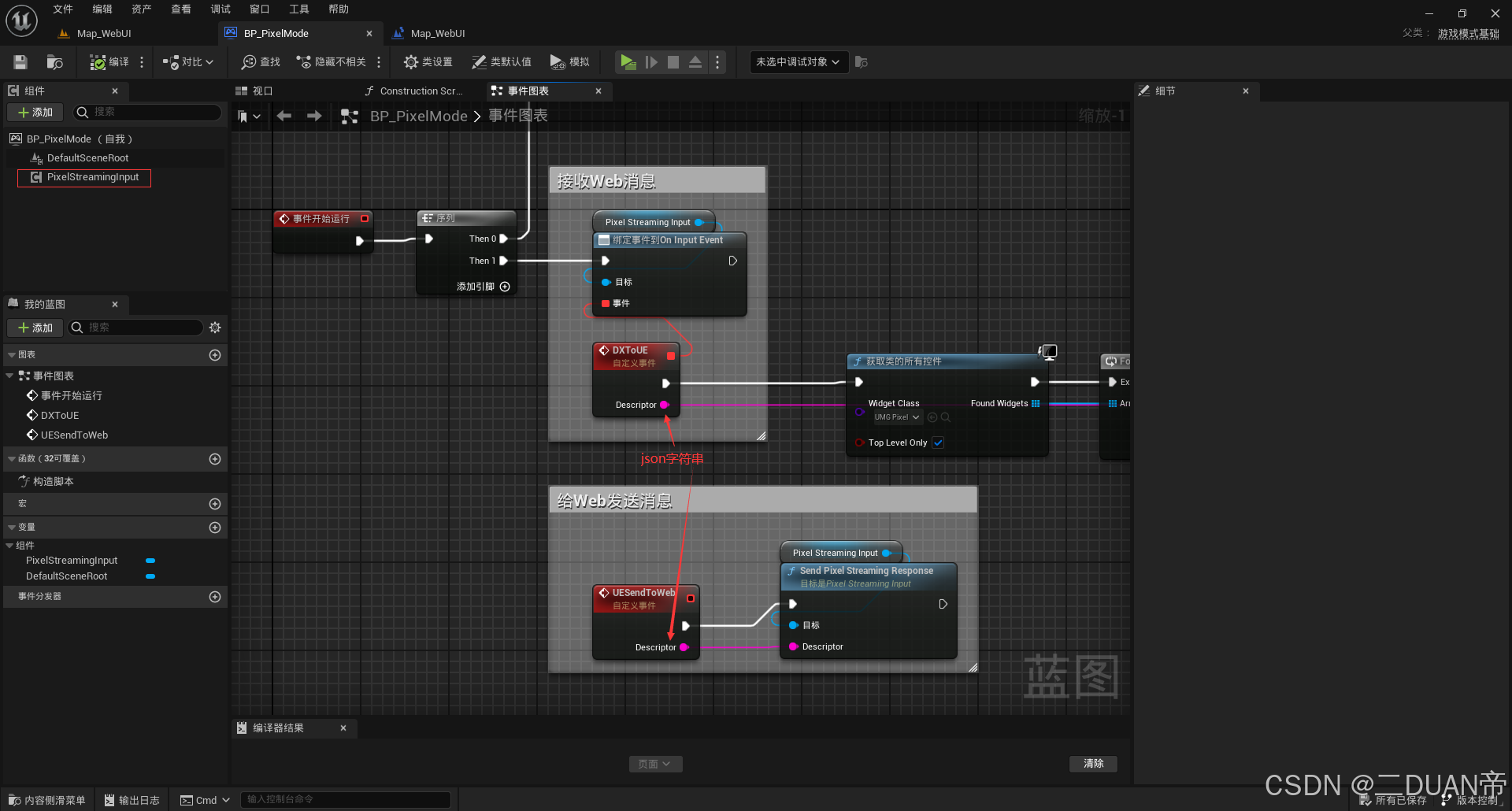
3.UE如何给Web发送数据/接收Web数据
4.UE打包出来、像素流发布、嵌入到前端页面中
像素流部署可以参考:UE像素流部署