本期摘要
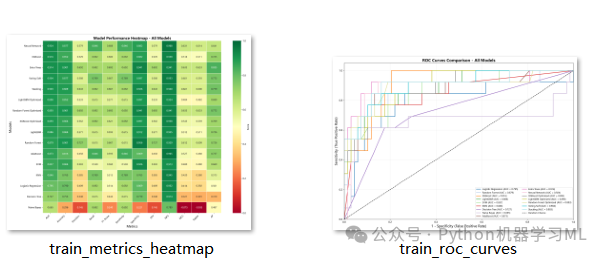
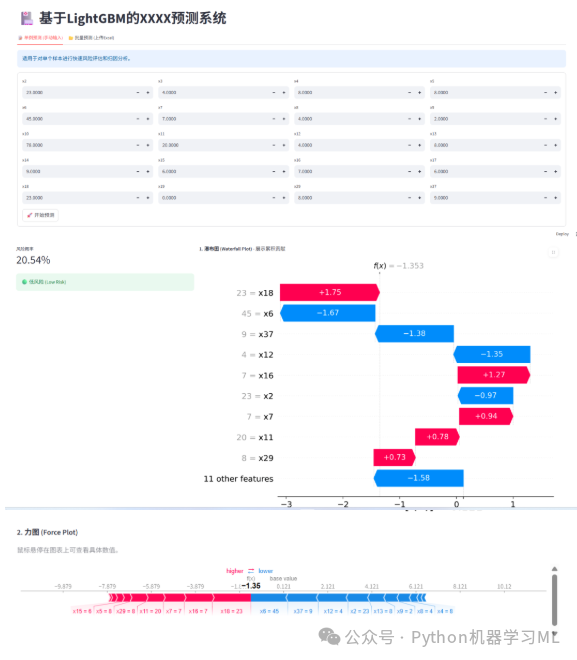
集成自动化统计筛选、SMOTE平衡与Optuna优化,构建Voting/Stacking高性能模型;融合DCA、校准曲线及SHAP/LIME进行深度验证与解释,并基于Streamlit实现Web端部署,打通从数据挖掘到应用落地的全链路。
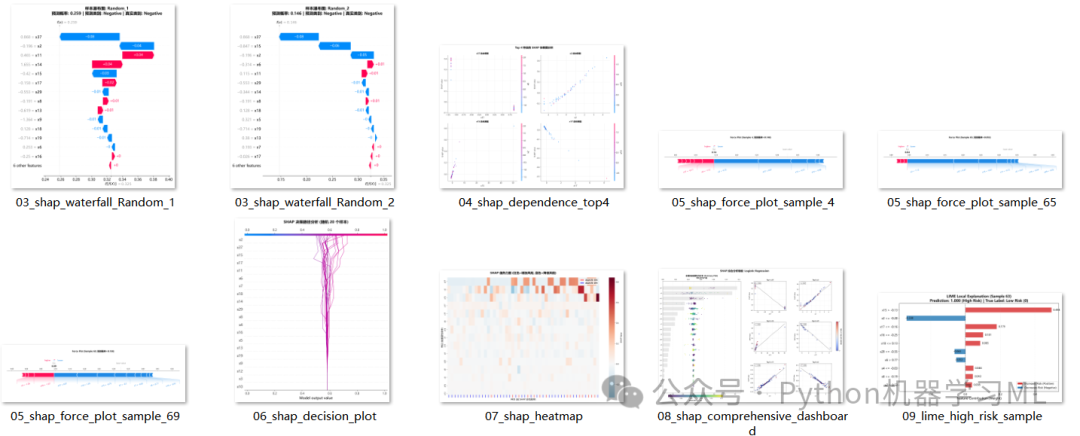
1.针对最优机器学习模型做SHAP和LIME解释分析
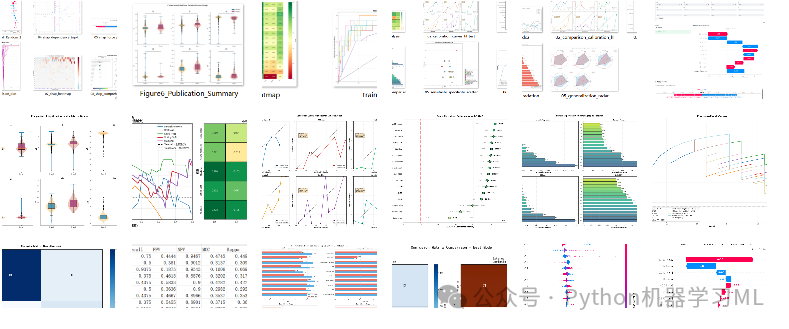
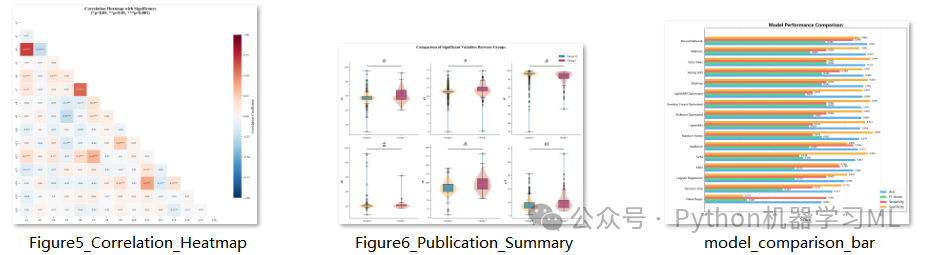
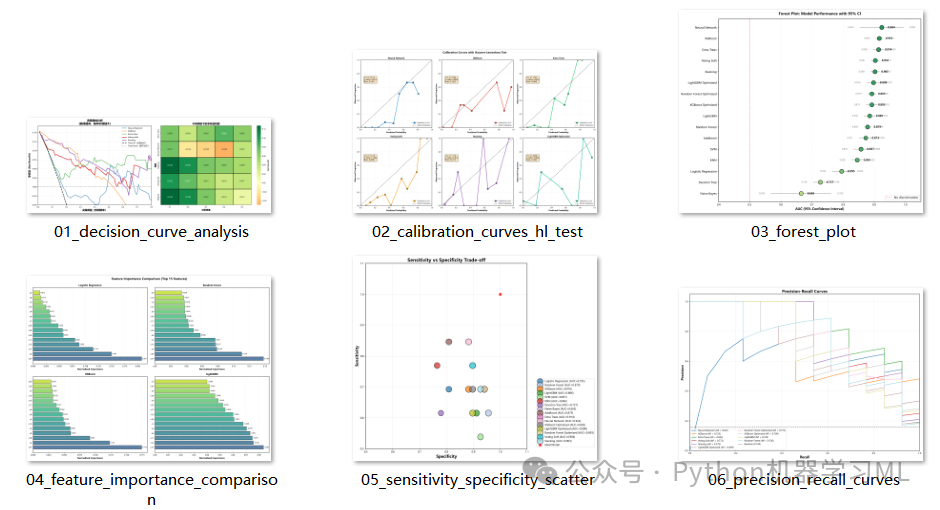
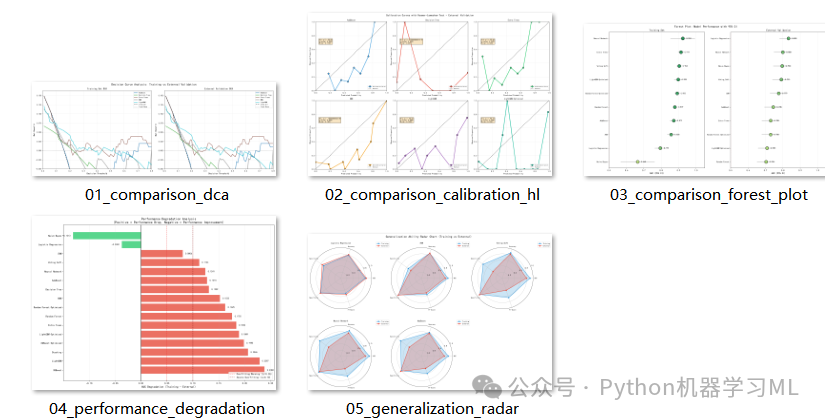
2.绘制16种机器学习算法的ROC曲线、auc森林图、混淆矩阵、校准曲线、DCA、特征重要性图、雷达图、AUC, F1, Brier Score, Kappa, MCC 在内的十几种指标
3.Streamlit交互式应用
第一部分:数据分析与机器学习预处理
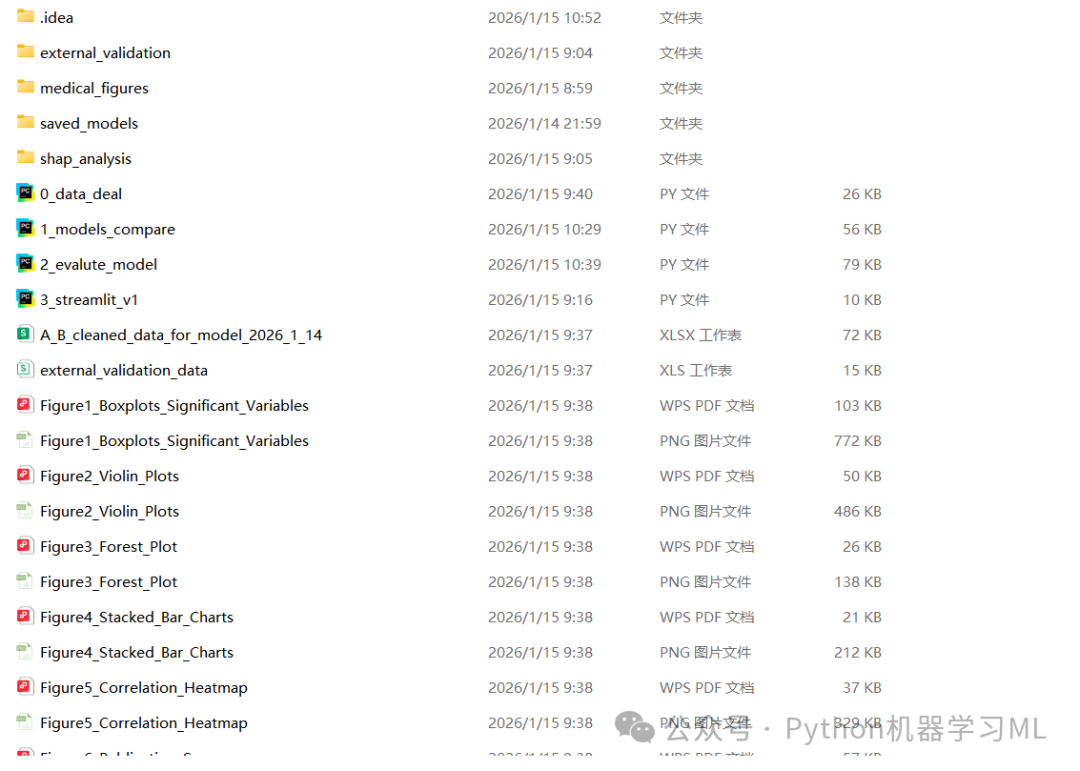
数据分析与机器学习预处理流程,特别适合医学、社科或科研论文 的数据分析部分。它涵盖了从数据清洗、特征筛选、数据集划分,到严格的统计学差异分析,最后生成符合期刊发表要求的高质量图表,将代码分为 六个阶段 进行详细讲解。
阶段 1: 数据读取与初步清洗
这一阶段主要负责加载数据,并根据先验知识删除那些无关或包含未来信息的特征(数据泄露),这是保证模型公正性的第一步。
作用解释:
-
导入库
引入
pandas用于数据处理,numpy用于数值计算,train_test_split用于后续的数据集划分。 -
读取数据
尝试读取Excel文件,包含基本的错误处理(如果文件不存在则提示退出)。
-
特征筛选
定义了一个列表
cols_to_drop,包含需要删除的列名(如x1)。使用df.drop将其移除。这是基于业务理解或前期分析做出的决定,比如某些列是ID列或者是在预测时无法获取的数据。
python
import pandas as pd
import numpy as np
from sklearn.model_selection import train_test_split

# 1. 读取数据
file_path = '公众号python机器学习ML_2026_1_14.xlsx'
try:
    df = pd.read_excel(file_path)
print("数据读取成功!")
except FileNotFoundError:
print(f"找不到文件: {file_path}")
    exit()

# ==========================================
# 步骤 1: 特征筛选 (删除不该保留的特征)
# ==========================================
# 基于之前的分析,这些列包含未来信息(泄露)或无关信息,必须删除
cols_to_drop = [
'x1',
]


existing_drop_cols = [col for col in cols_to_drop if col in df.columns]
df.drop(columns=existing_drop_cols, inplace=True)
print(f"\n已删除 {len(existing_drop_cols)} 个无效/泄露特征列。")
阶段 2: 数据类型修复与缺失值填充
这是数据预处理中最关键的一步。现实数据往往充满"脏"数据,如将数字记录为字符串'na'。
作用解释:
-
变量分类
手动定义了离散变量列表(
discrete_cols,通常是分类特征),剩下的自动归为连续变量(continuous_cols)。 -
连续变量处理
-
-
强制转换
pd.to_numeric(..., errors='coerce')是一个非常实用的技巧。它能将所有非数字字符(如 'na', '?', 'None')强制转换为标准的NaN(空值),从而修复类型错误。 -
填充
使用中位数填充空值。对于偏态分布的数据,中位数比均值更稳健,不易受极值影响。
-
- 离散变量处理
-
-
填充
使用众数(出现频率最高的值)填充空值,这是分类变量最常用的填充策略。
-
python
# ==========================================
# 步骤 2: 处理由 'na' 导致的类型错误
# ==========================================

# 定义离散变量(分类变量),这些通常用众数填充,或者保持原样
#x19到x38是离散变量
discrete_cols = [
'x19', 'x20', 'x21', 'x22', 'x23', 'x24', 'x25', 'x26',
'x27', 'x28', 'x29', 'x30', 'x31', 'x32', 'x33', 'x34',
'x35', 'x36', 'x37', 'x38',
                ]

# 确保列表中的列都在df中
discrete_cols = [c for c in discrete_cols if c in df.columns]

# 定义连续变量(数值变量):剩下的就是连续变量
continuous_cols = [col for col in df.columns if col notin discrete_cols]

print("\n正在处理连续变量中的 'na' 字符...")

for col in continuous_cols:
# 核心修复代码:errors='coerce' 会将 'na'、'NA' 或其他无法转数字的文本强制变成 NaN (空值)
    df[col] = pd.to_numeric(df[col], errors='coerce')

# 计算中位数填充
    median_val = df[col].median()
    df[col].fillna(median_val, inplace=True)
print(f"  - {col}: 类型已修正,空值已用中位数 {median_val} 填充")

# ==========================================
# 其他离散变量如果有空值,通常用众数(mode)填充
for col in discrete_cols:
if df[col].isnull().sum() > 0:
        mode_val = df[col].mode()[0]
        df[col].fillna(mode_val, inplace=True)
阶段 3: 数据集划分与保存
清洗后的数据需要被保存,并划分为训练集和验证集,以便后续建模使用。
作用解释:
-
最终检查
打印数据摘要(
info)和前几行,确认清洗效果。 -
保存全量清洗数据
将处理好的完整数据保存为Excel,作为备份。
-
参数设置
定义目标变量名(
Target)、随机种子(42,保证复现性)和分割比例(0.2)。 -
分层抽样 (
stratify)train_test_split中的stratify参数保证了训练集和验证集中目标变量的类别比例一致(例如正负样本比例),这对于分类问题至关重要。 -
保存分割数据
将训练集和验证集分别保存为CSV文件。
python
# ==========================================
# 步骤 4: 最终检查
# ==========================================
print("\n数据预处理完成!")
print(df.info())
print("\n最终数据预览:")
print(df.head())

# 如果需要保存清洗后的数据
df.to_excel("A_B_cleaned_data_for_model_2026_1_14.xlsx", index=False)


# 2. 设置参数
target_variable = 'Target'# 目标变量名称
random_seed = 42# 设置随机种子以保证结果可复现
split_ratio = 0.2# 验证集比例(此处设为20%作为外部验证,可根据需要调整)

# 检查目标变量是否存在
if target_variable notin df.columns:
print(f"错误:数据中未找到目标变量列 '{target_variable}'")
else:
# 3. 划分数据集
# 使用 stratify 参数可以保证训练集和验证集中目标变量的分布一致(适用于分类任务)
# 如果是回归任务,请去掉 stratify=df[target_variable]
    train_df, val_df = train_test_split(
        df,
        test_size=split_ratio,
        random_state=random_seed,
        stratify=df[target_variable]
    )

# 4. 定义文件名
    train_filename = 'train_data.csv'
    val_filename = 'external_validation_data.csv'

# 5. 保存文件
    train_df.to_csv(train_filename, index=False)
    val_df.to_csv(val_filename, index=False)

print("-" * 30)
print(f"处理完成!")
print(f"随机种子已设置为: {random_seed}")
print(f"训练集已保存为: {train_filename} (行数: {len(train_df)})")
print(f"外部验证集已保存为: {val_filename} (行数: {len(val_df)})")
阶段 4: 统计分析 - 连续变量
进入统计分析部分,首先处理连续变量,检验不同组别间是否存在显著差异。
作用解释:
-
自动识别组数
代码首先检查目标变量有几个类别。
-
两组比较 (Two-group comparison)
-
-
同时执行 t检验 (参数检验,假设正态)和 Mann-Whitney U检验(非参数检验,不假设正态)。这种双重验证增加了结论的可靠性。
-
计算每组的均值和标准差。
-
-
多组比较 (Multi-group comparison)
-
- 如果超过两组,则自动切换为 ANOVA (参数)和 Kruskal-Wallis检验(非参数)。
-
显著性标记
根据p值自动生成星号(
***,**,*,NS),这直接符合论文发表的格式要求。
python
from scipy import stats

# ==========================================
# 步骤 5: 显著性组间对比分析
# ==========================================
print("\n" + "=" * 60)
print("显著性组间对比分析")
print("=" * 60)

# 获取目标变量的唯一值
groups = df[target_variable].unique()
print(f"\n目标变量 '{target_variable}' 的分组: {groups}")

# 初始化结果存储
comparison_results = []

# 对连续变量进行组间比较
print("\n【连续变量组间对比】")
print("-" * 60)

for col in continuous_cols:
if col == target_variable:  # 跳过目标变量本身
continue

# 按目标变量分组
    group_data = [df[df[target_variable] == g][col].dropna() for g in groups]

# 根据分组数量选择检验方法
iflen(groups) == 2:
# 两组比较:t检验和Mann-Whitney U检验
        t_stat, t_pvalue = stats.ttest_ind(group_data[0], group_data[1])
        u_stat, u_pvalue = stats.mannwhitneyu(group_data[0], group_data[1], alternative='two-sided')

        means = [g.mean() for g in group_data]
        stds = [g.std() for g in group_data]

        result = {
'变量': col,
f'组{groups[0]}_均值±标准差': f'{means[0]:.4f}±{stds[0]:.4f}',
f'组{groups[1]}_均值±标准差': f'{means[1]:.4f}±{stds[1]:.4f}',
't检验_p值': f'{t_pvalue:.4f}',
'U检验_p值': f'{u_pvalue:.4f}',
'显著性(p<0.05)': '***'ifmin(t_pvalue, u_pvalue) < 0.001else'**'ifmin(t_pvalue,
                                                                                        u_pvalue) < 0.01else'*'ifmin(
                t_pvalue, u_pvalue) < 0.05else'NS'
        }
else:
# 多组比较:ANOVA和Kruskal-Wallis检验
        f_stat, anova_pvalue = stats.f_oneway(*group_data)
        h_stat, kw_pvalue = stats.kruskal(*group_data)

        means_dict = {f'组{groups[i]}_均值': f'{group_data[i].mean():.4f}'for i inrange(len(groups))}

        result = {
'变量': col,
            **means_dict,
'ANOVA_p值': f'{anova_pvalue:.4f}',
'KW检验_p值': f'{kw_pvalue:.4f}',
'显著性(p<0.05)': '***'ifmin(anova_pvalue, kw_pvalue) < 0.001else'**'ifmin(anova_pvalue,
                                                                                             kw_pvalue) < 0.01else'*'ifmin(
                anova_pvalue, kw_pvalue) < 0.05else'NS'
        }

    comparison_results.append(result)
阶段 5: 统计分析 - 离散变量
对分类变量进行统计检验,判断不同组别的分布是否一致。
作用解释:
-
列联表 (Contingency Table)
使用
pd.crosstab生成特征与目标变量的交叉表(例如,吸烟/不吸烟 在 患病/健康 组中的人数)。 -
卡方检验 (Chi-square test)
使用
stats.chi2_contingency进行检验。它是判断两个分类变量是否独立的标准方法。 -
结果记录
记录卡方统计量、p值和自由度,并同样生成显著性标记。
python
# 对离散变量进行卡方检验
print("\n【离散变量组间对比(卡方检验)】")
print("-" * 60)

discrete_results = []
for col in discrete_cols:
if col == target_variable:
continue

# 创建列联表
    contingency_table = pd.crosstab(df[col], df[target_variable])

# 卡方检验
    chi2, chi_pvalue, dof, expected = stats.chi2_contingency(contingency_table)

    result = {
'变量': col,
'卡方统计量': f'{chi2:.4f}',
'p值': f'{chi_pvalue:.4f}',
'自由度': dof,
'显著性(p<0.05)': '***'if chi_pvalue < 0.001else'**'if chi_pvalue < 0.01else'*'if chi_pvalue < 0.05else'NS'
    }
    discrete_results.append(result)
阶段 6: 统计结果汇总与筛选
将统计分析的结果整理成表格,保存,并筛选出显著的变量供后续可视化使用。
作用解释:
-
DataFrame化
将列表形式的结果转换为pandas DataFrame,便于展示和保存。
-
打印与保存
在控制台打印完整表格,并保存为Excel文件(
连续变量组间对比分析.xlsx等)。 -
筛选显著变量
通过过滤条件
显著性(p<0.05) != 'NS',自动提取出具有统计学意义的变量。这一步非常关键,它决定了后面画图只画有意义的变量,避免了图表过多且无重点。
python
# 输出结果
print("\n【连续变量对比结果】")
continuous_results_df = pd.DataFrame(comparison_results)
print(continuous_results_df.to_string(index=False))

print("\n【离散变量对比结果】")
discrete_results_df = pd.DataFrame(discrete_results)
print(discrete_results_df.to_string(index=False))

# 保存结果
continuous_results_df.to_excel('连续变量组间对比分析.xlsx', index=False)
discrete_results_df.to_excel('离散变量组间对比分析.xlsx', index=False)

# 筛选显著性变量
significant_continuous = continuous_results_df[continuous_results_df['显著性(p<0.05)'] != 'NS']
significant_discrete = discrete_results_df[discrete_results_df['显著性(p<0.05)'] != 'NS']

print(f"\n【显著性变量汇总】")
print(f"连续变量中有显著性差异的: {len(significant_continuous)} 个")
iflen(significant_continuous) > 0:
print(f"  变量列表: {', '.join(significant_continuous['变量'].tolist())}")

print(f"离散变量中有显著性差异的: {len(significant_discrete)} 个")
iflen(significant_discrete) > 0:
print(f"  变量列表: {', '.join(significant_discrete['变量'].tolist())}")

print("\n分析结果已保存至:")
print("  - 连续变量组间对比分析.xlsx")
print("  - 离散变量组间对比分析.xlsx")
print("=" * 60)
阶段 7: 可视化配置与基础图表(箱线图、小提琴图)
开始进行"论文级"可视化。首先设置样式,然后定义两个展示连续变量分布的函数。
作用解释:
-
样式设置
设定字体为Times New Roman,调整字号和DPI,确保图表符合学术期刊标准。
-
plot_boxplots_with_significance
-
-
绘制箱线图 叠加散点图,展示数据分布。
-
关键功能
自动从之前的统计结果中读取p值,并在图上方绘制横线和星号标注。这是科研绘图中极具价值的功能,实现了"统计-绘图"的自动化闭环。
-
-
plot_violin_plots绘制小提琴图,展示数据的概率密度分布,适合观察数据分布的形状(如偏态、双峰)。
python
import matplotlib.pyplot as plt
import seaborn as sns
from scipy import stats
import warnings

warnings.filterwarnings('ignore')

# 设置论文级图表样式
plt.rcParams['font.family'] = 'Times New Roman'
plt.rcParams['font.size'] = 12
plt.rcParams['axes.titlesize'] = 14
plt.rcParams['axes.labelsize'] = 12
plt.rcParams['xtick.labelsize'] = 10
plt.rcParams['ytick.labelsize'] = 10
plt.rcParams['figure.dpi'] = 300
plt.rcParams['savefig.dpi'] = 300
plt.rcParams['savefig.bbox'] = 'tight'

# 中文显示设置(如需中文标签)
plt.rcParams['axes.unicode_minus'] = False


# plt.rcParams['font.sans-serif'] = ['SimHei']  # 取消注释以显示中文

# ==========================================
# 可视化 1: 连续变量箱线图(带显著性标记)
# ==========================================
defplot_boxplots_with_significance(df, continuous_cols, target_variable, results_df):
"""绘制带显著性标记的箱线图"""

# 筛选显著变量
    sig_vars = results_df[results_df['显著性(p<0.05)'] != 'NS']['变量'].tolist()
    plot_vars = [col for col in sig_vars if col in continuous_cols and col != target_variable]

iflen(plot_vars) == 0:
print("没有显著性连续变量可绘制")
return

# 计算子图布局
    n_vars = min(len(plot_vars), 12)  # 最多显示12个
    n_cols = 3
    n_rows = (n_vars + n_cols - 1) // n_cols

    fig, axes = plt.subplots(n_rows, n_cols, figsize=(4 * n_cols, 3.5 * n_rows))
    axes = axes.flatten() if n_vars > 1else [axes]

    colors = ['#3498db', '#e74c3c', '#2ecc71', '#9b59b6']

for idx, var inenumerate(plot_vars[:n_vars]):
        ax = axes[idx]

# 绘制箱线图
        bp = sns.boxplot(x=target_variable, y=var, data=df, ax=ax,
                         palette=colors[:len(df[target_variable].unique())],
                         width=0.6)

# 添加散点
        sns.stripplot(x=target_variable, y=var, data=df, ax=ax,
                      color='black', alpha=0.3, size=3, jitter=True)

# 获取p值并添加显著性标记
        row = results_df[results_df['变量'] == var]
iflen(row) > 0:
# 提取p值
if't检验_p值'in row.columns:
                p_val = float(row['t检验_p值'].values[0])
else:
                p_val = float(row['ANOVA_p值'].values[0])

# 显著性符号
if p_val < 0.001:
                sig_text = '***'
elif p_val < 0.01:
                sig_text = '**'
elif p_val < 0.05:
                sig_text = '*'
else:
                sig_text = 'ns'

# 添加显著性标记
            y_max = df[var].max()
            y_range = df[var].max() - df[var].min()
            ax.plot([0, 1], [y_max + 0.05 * y_range, y_max + 0.05 * y_range], 'k-', lw=1)
            ax.text(0.5, y_max + 0.08 * y_range, sig_text, ha='center', fontsize=12, fontweight='bold')

        ax.set_xlabel('')
        ax.set_ylabel(var)
        ax.set_title(f'{var}', fontweight='bold')

# 美化
        ax.spines['top'].set_visible(False)
        ax.spines['right'].set_visible(False)

# 隐藏空白子图
for idx inrange(n_vars, len(axes)):
        axes[idx].set_visible(False)

    plt.tight_layout()
    plt.savefig('Figure1_Boxplots_Significant_Variables.png', dpi=300, bbox_inches='tight')
    plt.savefig('Figure1_Boxplots_Significant_Variables.pdf', bbox_inches='tight')
    plt.show()
print("图1已保存: Figure1_Boxplots_Significant_Variables.png/pdf")


# ==========================================
# 可视化 2: 小提琴图(展示分布形态)
# ==========================================
defplot_violin_plots(df, continuous_cols, target_variable, results_df):
"""绘制小提琴图展示数据分布"""

    sig_vars = results_df[results_df['显著性(p<0.05)'] != 'NS']['变量'].tolist()
    plot_vars = [col for col in sig_vars if col in continuous_cols and col != target_variable][:9]

iflen(plot_vars) == 0:
return

    n_cols = 3
    n_rows = (len(plot_vars) + n_cols - 1) // n_cols

    fig, axes = plt.subplots(n_rows, n_cols, figsize=(4 * n_cols, 4 * n_rows))
    axes = axes.flatten() iflen(plot_vars) > 1else [axes]

for idx, var inenumerate(plot_vars):
        ax = axes[idx]

        sns.violinplot(x=target_variable, y=var, data=df, ax=ax,
                       palette=['#3498db', '#e74c3c'], inner='box', cut=0)

        ax.set_xlabel(target_variable)
        ax.set_ylabel(var)
        ax.set_title(f'{var}', fontweight='bold')
        ax.spines['top'].set_visible(False)
        ax.spines['right'].set_visible(False)

for idx inrange(len(plot_vars), len(axes)):
        axes[idx].set_visible(False)

    plt.tight_layout()
    plt.savefig('Figure2_Violin_Plots.png', dpi=300, bbox_inches='tight')
    plt.savefig('Figure2_Violin_Plots.pdf', bbox_inches='tight')
    plt.show()
print("图2已保存: Figure2_Violin_Plots.png/pdf")
阶段 8: 高级统计图表(森林图、堆叠图)
这一阶段定义了两种更具分析深度的图表。
作用解释:
plot_forest_plot(森林图)
-
-
计算组间差异的标准化效应量 (Cohen's d) 及其95%置信区间。
-
以图形方式展示各变量的效应大小。点离零线越远,说明组间差异越大。这是医学研究中非常高级的展示方式。
-
-
plot_stacked_bar(堆叠柱状图)
-
-
专门展示离散变量的分布。每个柱子被不同颜色分割,代表目标变量中不同类别的比例。
-
同样在图上自动标注了卡方检验的p值。
-
python
# ==========================================
# 可视化 3: 森林图(展示效应量和置信区间)
# ==========================================
defplot_forest_plot(df, continuous_cols, target_variable, results_df):
"""绘制森林图展示标准化均值差"""

    sig_vars = results_df[results_df['显著性(p<0.05)'] != 'NS']['变量'].tolist()
    plot_vars = [col for col in sig_vars if col in continuous_cols and col != target_variable]

iflen(plot_vars) == 0orlen(df[target_variable].unique()) != 2:
print("森林图需要二分类目标变量且有显著变量")
return

    groups = df[target_variable].unique()

    effect_sizes = []
    ci_lower = []
    ci_upper = []
    p_values = []

for var in plot_vars:
        g0 = df[df[target_variable] == groups[0]][var].dropna()
        g1 = df[df[target_variable] == groups[1]][var].dropna()

# 计算Cohen's d
        pooled_std = np.sqrt(((len(g0) - 1) * g0.std() ** 2 + (len(g1) - 1) * g1.std() ** 2) / (len(g0) + len(g1) - 2))
        d = (g1.mean() - g0.mean()) / pooled_std if pooled_std > 0else0

# 计算置信区间
        se = np.sqrt((len(g0) + len(g1)) / (len(g0) * len(g1)) + d ** 2 / (2 * (len(g0) + len(g1))))
        ci_l = d - 1.96 * se
        ci_u = d + 1.96 * se

        effect_sizes.append(d)
        ci_lower.append(ci_l)
        ci_upper.append(ci_u)

# p值
        _, p = stats.ttest_ind(g0, g1)
        p_values.append(p)

# 创建森林图
    fig, ax = plt.subplots(figsize=(10, max(6, len(plot_vars) * 0.4)))

    y_pos = np.arange(len(plot_vars))

# 绘制误差棒
for i, (es, cl, cu, pv) inenumerate(zip(effect_sizes, ci_lower, ci_upper, p_values)):
        color = '#e74c3c'if pv < 0.05else'#95a5a6'
        ax.errorbar(es, i, xerr=[[es - cl], [cu - es]], fmt='o', color=color,
                    capsize=3, capthick=1.5, markersize=8, elinewidth=2)

# 添加零线
    ax.axvline(x=0, color='black', linestyle='--', linewidth=1, alpha=0.7)

# 设置标签
    ax.set_yticks(y_pos)
    ax.set_yticklabels(plot_vars)
    ax.set_xlabel("Cohen's d (95% CI)", fontweight='bold')
    ax.set_title('Forest Plot: Standardized Mean Difference', fontweight='bold', fontsize=14)

# 添加p值标注
for i, pv inenumerate(p_values):
        sig = '***'if pv < 0.001else'**'if pv < 0.01else'*'if pv < 0.05else''
        ax.text(max(ci_upper) + 0.1, i, f'p={pv:.3f}{sig}', va='center', fontsize=9)

    ax.spines['top'].set_visible(False)
    ax.spines['right'].set_visible(False)

    plt.tight_layout()
    plt.savefig('Figure3_Forest_Plot.png', dpi=300, bbox_inches='tight')
    plt.savefig('Figure3_Forest_Plot.pdf', bbox_inches='tight')
    plt.show()
print("图3已保存: Figure3_Forest_Plot.png/pdf")


# ==========================================
# 可视化 4: 离散变量堆叠柱状图
# ==========================================
defplot_stacked_bar(df, discrete_cols, target_variable, results_df):
"""绘制离散变量堆叠柱状图"""

    sig_vars = results_df[results_df['显著性(p<0.05)'] != 'NS']['变量'].tolist()
    plot_vars = [col for col in sig_vars if col in discrete_cols and col != target_variable][:6]

iflen(plot_vars) == 0:
print("没有显著性离散变量")
return

    n_cols = 2
    n_rows = (len(plot_vars) + n_cols - 1) // n_cols

    fig, axes = plt.subplots(n_rows, n_cols, figsize=(6 * n_cols, 4 * n_rows))
    axes = axes.flatten() iflen(plot_vars) > 1else [axes]

    colors = ['#3498db', '#e74c3c', '#2ecc71', '#f39c12', '#9b59b6']

for idx, var inenumerate(plot_vars):
        ax = axes[idx]

# 计算交叉表百分比
        ct = pd.crosstab(df[var], df[target_variable], normalize='index') * 100

        ct.plot(kind='bar', stacked=True, ax=ax, color=colors[:len(ct.columns)],
                edgecolor='white', width=0.7)

        ax.set_xlabel(var, fontweight='bold')
        ax.set_ylabel('Percentage (%)')
        ax.set_title(f'{var}', fontweight='bold')
        ax.legend(title=target_variable, bbox_to_anchor=(1.02, 1))
        ax.set_xticklabels(ax.get_xticklabels(), rotation=45, ha='right')

# 获取p值
        row = results_df[results_df['变量'] == var]
iflen(row) > 0:
            p_val = float(row['p值'].values[0])
            sig = '***'if p_val < 0.001else'**'if p_val < 0.01else'*'if p_val < 0.05else''
            ax.text(0.95, 0.95, f'p={p_val:.3f}{sig}', transform=ax.transAxes,
                    ha='right', va='top', fontsize=10, fontweight='bold',
                    bbox=dict(boxstyle='round', facecolor='wheat', alpha=0.5))

        ax.spines['top'].set_visible(False)
        ax.spines['right'].set_visible(False)

for idx inrange(len(plot_vars), len(axes)):
        axes[idx].set_visible(False)

    plt.tight_layout()
    plt.savefig('Figure4_Stacked_Bar_Charts.png', dpi=300, bbox_inches='tight')
    plt.savefig('Figure4_Stacked_Bar_Charts.pdf', bbox_inches='tight')
    plt.show()
print("图4已保存: Figure4_Stacked_Bar_Charts.png/pdf")
阶段 9: 复杂关系图表(热力图、综合图)
这一阶段生成的图表通常作为论文的核心展示部分。
作用解释:
plot_correlation_heatmap(带星号热力图)
-
-
展示变量间的皮尔逊相关性。
-
亮点
代码不仅计算相关系数,还计算了相关性的p值,并在热力图中直接标注星号(*)。这在普通热力图中很少见,但能极大增加信息量。
-
plot_publication_summary(综合对比图)
-
-
这是为论文主图设计的。它将小提琴图 (分布形状)和箱线图(统计指标)叠加在一起,上方还带有显著性连线和星号。
-
这种复合图表信息密度高,美观专业,经常用于展示最重要的几个结果。
-
python
# ==========================================
# 可视化 5: 热力图(相关性 + 显著性)
# ==========================================
defplot_correlation_heatmap(df, continuous_cols, target_variable):
"""绘制相关性热力图"""

# 筛选连续变量
    corr_cols = [col for col in continuous_cols if col != target_variable][:15]

iflen(corr_cols) < 2:
return

    corr_matrix = df[corr_cols].corr()

# 计算p值矩阵
    p_matrix = pd.DataFrame(np.ones((len(corr_cols), len(corr_cols))),
                            index=corr_cols, columns=corr_cols)

for i, col1 inenumerate(corr_cols):
for j, col2 inenumerate(corr_cols):
if i != j:
                _, p = stats.pearsonr(df[col1].dropna(), df[col2].dropna())
                p_matrix.loc[col1, col2] = p

# 创建注释矩阵(相关系数 + 显著性星号)
    annot_matrix = corr_matrix.round(2).astype(str)
for i, col1 inenumerate(corr_cols):
for j, col2 inenumerate(corr_cols):
            p = p_matrix.loc[col1, col2]
if p < 0.001:
                annot_matrix.loc[col1, col2] += '***'
elif p < 0.01:
                annot_matrix.loc[col1, col2] += '**'
elif p < 0.05:
                annot_matrix.loc[col1, col2] += '*'

# 绘制热力图
    fig, ax = plt.subplots(figsize=(12, 10))

    mask = np.triu(np.ones_like(corr_matrix, dtype=bool))

    sns.heatmap(corr_matrix, mask=mask, annot=annot_matrix, fmt='',
                cmap='RdBu_r', center=0, vmin=-1, vmax=1,
                square=True, linewidths=0.5, ax=ax,
                cbar_kws={'shrink': 0.8, 'label': 'Correlation Coefficient'},
                annot_kws={'size': 8})

    ax.set_title('Correlation Heatmap with Significance\n(*p<0.05, **p<0.01, ***p<0.001)',
                 fontweight='bold', fontsize=14)

    plt.tight_layout()
    plt.savefig('Figure5_Correlation_Heatmap.png', dpi=300, bbox_inches='tight')
    plt.savefig('Figure5_Correlation_Heatmap.pdf', bbox_inches='tight')
    plt.show()
print("图5已保存: Figure5_Correlation_Heatmap.png/pdf")


# ==========================================
# 可视化 6: 综合对比图(论文主图)
# ==========================================
defplot_publication_summary(df, continuous_cols, target_variable, continuous_results_df):
"""绘制论文发表级别的综合对比图"""

    sig_vars = continuous_results_df[continuous_results_df['显著性(p<0.05)'] != 'NS']['变量'].tolist()
    top_vars = [col for col in sig_vars if col in continuous_cols][:6]

iflen(top_vars) == 0:
return

    fig, axes = plt.subplots(2, 3, figsize=(14, 10))
    axes = axes.flatten()

    groups = df[target_variable].unique()
    colors = {'boxplot': ['#2E86AB', '#A23B72'], 'violin': ['#F18F01', '#C73E1D']}

for idx, var inenumerate(top_vars):
        ax = axes[idx]

# 组合小提琴图和箱线图
        parts = ax.violinplot([df[df[target_variable] == g][var].dropna() for g in groups],
                              positions=range(len(groups)), showmeans=False, showmedians=False)

for i, pc inenumerate(parts['bodies']):
            pc.set_facecolor(colors['violin'][i % 2])
            pc.set_alpha(0.3)

        bp = ax.boxplot([df[df[target_variable] == g][var].dropna() for g in groups],
                        positions=range(len(groups)), widths=0.3, patch_artist=True)

for i, patch inenumerate(bp['boxes']):
            patch.set_facecolor(colors['boxplot'][i % 2])
            patch.set_alpha(0.8)

# 添加显著性标记
        row = continuous_results_df[continuous_results_df['变量'] == var]
iflen(row) > 0:
if't检验_p值'in row.columns:
                p_val = float(row['t检验_p值'].values[0])
else:
                p_val = float(row['ANOVA_p值'].values[0])

            sig = '***'if p_val < 0.001else'**'if p_val < 0.01else'*'if p_val < 0.05else'ns'

            y_max = df[var].max()
            y_range = df[var].max() - df[var].min()

            ax.plot([0, len(groups) - 1], [y_max + 0.08 * y_range] * 2, 'k-', lw=1.5)
            ax.text((len(groups) - 1) / 2, y_max + 0.12 * y_range, sig,
                    ha='center', fontsize=14, fontweight='bold')

        ax.set_xticks(range(len(groups)))
        ax.set_xticklabels([f'Group {g}'for g in groups])
        ax.set_ylabel(var, fontweight='bold')
        ax.set_title(f'{var}', fontsize=12, fontweight='bold')

        ax.spines['top'].set_visible(False)
        ax.spines['right'].set_visible(False)

for idx inrange(len(top_vars), 6):
        axes[idx].set_visible(False)

# 添加图例
from matplotlib.patches import Patch
    legend_elements = [Patch(facecolor=colors['boxplot'][0], label=f'Group {groups[0]}'),
                       Patch(facecolor=colors['boxplot'][1], label=f'Group {groups[1]}')]
    fig.legend(handles=legend_elements, loc='upper right', bbox_to_anchor=(0.98, 0.98))

    plt.suptitle('Comparison of Significant Variables Between Groups',
                 fontsize=16, fontweight='bold', y=1.02)

    plt.tight_layout()
    plt.savefig('Figure6_Publication_Summary.png', dpi=300, bbox_inches='tight')
    plt.savefig('Figure6_Publication_Summary.pdf', bbox_inches='tight')
    plt.savefig('Figure6_Publication_Summary.tiff', dpi=300, bbox_inches='tight')
    plt.show()
print("图6已保存: Figure6_Publication_Summary.png/pdf/tiff")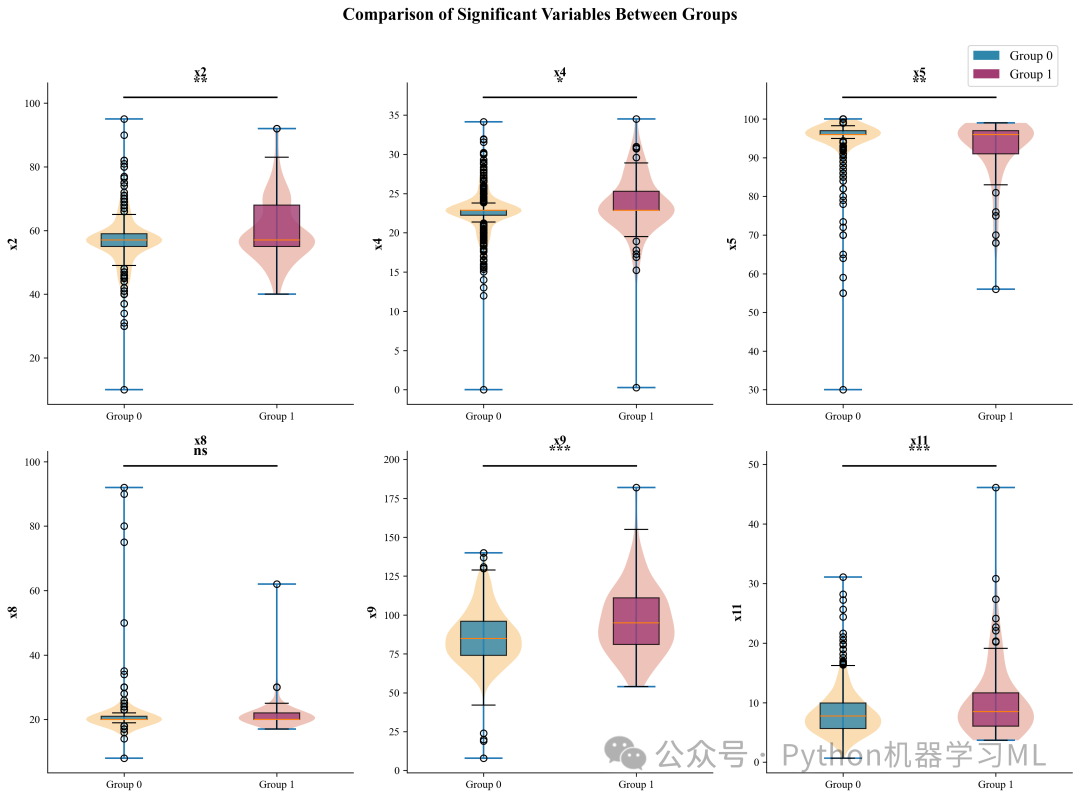
阶段 10: 执行可视化流程
最后一步,按照定义好的顺序调用所有绘图函数,批量生成所有图表。
作用解释: 这一步将之前的所有准备工作转化为实际的产出。通过一次性调用所有函数,用户可以得到一整套完整的分析图表。
python
# ==========================================
# 执行所有可视化
# ==========================================
print("\n" + "=" * 60)
print("开始生成论文级可视化图表")
print("=" * 60)

# 调用可视化函数
plot_boxplots_with_significance(df, continuous_cols, target_variable, continuous_results_df)
plot_violin_plots(df, continuous_cols, target_variable, continuous_results_df)
plot_forest_plot(df, continuous_cols, target_variable, continuous_results_df)
plot_stacked_bar(df, discrete_cols, target_variable, discrete_results_df)
plot_correlation_heatmap(df, continuous_cols, target_variable)
plot_publication_summary(df, continuous_cols, target_variable, continuous_results_df)
第二部分:模型训练与优化
这部分代码构建了一个极其完善的机器学习流水线,涵盖了从特征选择、自动化超参数调优(AutoML)、集成学习到全方位评估的所有环节。我们将从头开始,分阶段详细解析。
阶段 1: 环境配置与依赖导入
这一阶段导入了构建高性能机器学习模型所需的全部工具库,并进行了全局设置。
作用解释:
-
算法库
不仅包含了
sklearn的基础模型(如逻辑回归、SVM、KNN),还引入了目前竞赛和工业界最强的梯度提升树模型:XGBoost和LightGBM。 -
集成学习
导入了
VotingClassifier(投票)和StackingClassifier(堆叠),用于组合多个模型以提升性能。 -
自动化调优
引入了
optuna,这是一个最先进的超参数优化框架,比传统的网格搜索(GridSearch)效率高得多。 -
评估指标
导入了极其丰富的指标库,不仅有AUC、F1,还有医学常用的Brier Score、Kappa系数等。
python
import pandas as pd
import numpy as np
import matplotlib.pyplot as plt
import seaborn as sns
from sklearn.model_selection import train_test_split, StratifiedKFold, cross_val_score
from sklearn.preprocessing import StandardScaler
from sklearn.linear_model import LogisticRegression
from sklearn.ensemble import (
    RandomForestClassifier, GradientBoostingClassifier,
    AdaBoostClassifier, ExtraTreesClassifier,
    VotingClassifier, StackingClassifier  # 新增
)
from sklearn.tree import DecisionTreeClassifier
from sklearn.svm import SVC
from sklearn.neighbors import KNeighborsClassifier
from sklearn.naive_bayes import GaussianNB
from sklearn.neural_network import MLPClassifier

from sklearn.metrics import (
    roc_auc_score, roc_curve, confusion_matrix,
    precision_recall_curve, average_precision_score, brier_score_loss,
    precision_score, recall_score, f1_score, accuracy_score,
    matthews_corrcoef, cohen_kappa_score
)
from sklearn.calibration import calibration_curve

from imblearn.over_sampling import SMOTE
import xgboost as xgb
import lightgbm as lgb
import optuna  # 新增
from optuna.samplers import TPESampler
import joblib
import os
import warnings

warnings.filterwarnings('ignore')
optuna.logging.set_verbosity(optuna.logging.WARNING)

# 设置中文显示
plt.rcParams['font.sans-serif'] = ['microsoft yahei']
plt.rcParams['axes.unicode_minus'] = False
阶段 2: 数据准备、平衡处理与标准化
这是模型训练前的"地基"工作,定义了三个关键的数据处理函数。
作用解释:
prepare_data
-
-
健壮地读取CSV文件(尝试多种编码防止乱码)。
-
自动识别并移除由于格式问题可能存在的非数值列。
-
使用分层抽样(
stratify=y)划分训练集和测试集,保证正负样本比例一致。
-
-
handle_imbalance
-
-
解决医疗数据中常见的类别不平衡问题(患病样本通常远少于健康样本)。
-
使用SMOTE(合成少数类过采样技术)生成模拟的患病样本,使正负样本达到平衡,防止模型只学会预测"健康"。
-
-
scale_features
-
- 使用
StandardScaler将所有特征缩放到均值为0、方差为1的标准正态分布。这是线性模型(如逻辑回归、SVM)和神经网络收敛的必要条件。
- 使用
python
# ==========================================
# 数据准备与分割
# ==========================================
defprepare_data(file_path):
"""加载清洗后的数据并准备特征/标签"""
print("=" * 60)
print("Step 1: 数据准备与分割")
print("=" * 60)

# 尝试多种编码方式读取
    encodings = ['utf-8', 'gbk', 'gb18030', 'gb2312', 'latin1', 'cp1252']
    df = None

for encoding in encodings:
try:
            df = pd.read_csv(file_path, encoding=encoding)
print(f"✓ 成功读取文件,编码: {encoding}")
break
except (UnicodeDecodeError, LookupError):
continue

if df isNone:
raise ValueError(f"无法读取文件 {file_path},尝试的编码: {encodings}")

print(f"数据形状: {df.shape}")

    X = df.drop(columns=['Target'])


    y = df['Target']

    non_numeric_cols = X.select_dtypes(include=['object']).columns.tolist()
if non_numeric_cols:
print(f"删除非数值列: {non_numeric_cols}")
        X = X.drop(columns=non_numeric_cols)

print(f"特征数量: {X.shape[1]}")
print(f"正样本比例: {y.mean():.2%}")

    X_train, X_test, y_train, y_test = train_test_split(
        X, y, test_size=0.2, random_state=42, stratify=y
    )

print(f"训练集: {X_train.shape[0]} 样本")
print(f"测试集: {X_test.shape[0]} 样本")

return X_train, X_test, y_train, y_test, X.columns.tolist()


# ==========================================
# 处理类别不平衡
# ==========================================

defhandle_imbalance(X_train, y_train, method='smote'):
"""处理类别不平衡"""
print("\n" + "=" * 60)
print("Step 2: 处理类别不平衡")
print("=" * 60)

print(f"处理前 - 正样本: {y_train.sum()}, 负样本: {len(y_train) - y_train.sum()}")

if method == 'smote':
        smote = SMOTE(random_state=42)
        X_resampled, y_resampled = smote.fit_resample(X_train, y_train)
print(f"SMOTE后 - 正样本: {y_resampled.sum()}, 负样本: {len(y_resampled) - y_resampled.sum()}")
return X_resampled, y_resampled
else:
return X_train, y_train


# ==========================================
# 特征标准化
# ==========================================

defscale_features(X_train, X_test):
"""特征标准化"""
    scaler = StandardScaler()
    X_train_scaled = scaler.fit_transform(X_train)
    X_test_scaled = scaler.transform(X_test)
return X_train_scaled, X_test_scaled, scaler
阶段 3: 定义Optuna超参数优化任务
这是代码的高级部分,定义了针对XGBoost、LightGBM和随机森林的自动化调优逻辑。
作用解释:
-
Optuna
是目前最先进的自动调参工具。它使用贝叶斯优化算法(TPE),根据之前的试验结果智能地选择下一组参数,而不是盲目地尝试。
-
目标函数 (
objective)每个函数内部都定义了一个搜索空间(如树的数量、深度、学习率等)。Optuna会尝试在这个空间内寻找让验证集AUC最高的参数组合。
-
返回值
函数最终返回配置了最佳参数的未训练模型,供后续统一训练使用。
python
# ==========================================
# Optuna超参数优化
# ==========================================

defoptimize_xgboost(X_train, y_train, n_trials=50):
"""使用Optuna优化XGBoost"""
print("\n" + "=" * 60)
print("Optuna优化 XGBoost")
print("=" * 60)

defobjective(trial):
        params = {
'n_estimators': trial.suggest_int('n_estimators', 50, 300),
'max_depth': trial.suggest_int('max_depth', 3, 10),
'learning_rate': trial.suggest_float('learning_rate', 0.01, 0.3),
'subsample': trial.suggest_float('subsample', 0.6, 1.0),
'colsample_bytree': trial.suggest_float('colsample_bytree', 0.6, 1.0),
'gamma': trial.suggest_float('gamma', 0, 5),
'reg_alpha': trial.suggest_float('reg_alpha', 0, 2),
'reg_lambda': trial.suggest_float('reg_lambda', 0, 2),
'scale_pos_weight': trial.suggest_float('scale_pos_weight', 1, 20),
'random_state': 42,
'use_label_encoder': False,
'eval_metric': 'logloss',
'verbosity': 0
        }

        model = xgb.XGBClassifier(**params)
        cv = StratifiedKFold(n_splits=5, shuffle=True, random_state=42)
        scores = cross_val_score(model, X_train, y_train, cv=cv, scoring='roc_auc', n_jobs=-1)
return scores.mean()

    study = optuna.create_study(direction='maximize', sampler=TPESampler(seed=42))
    study.optimize(objective, n_trials=n_trials, show_progress_bar=True)

print(f"最佳AUC: {study.best_value:.4f}")
print(f"最佳参数: {study.best_params}")

    best_model = xgb.XGBClassifier(**study.best_params)
return best_model, study.best_params


defoptimize_lightgbm(X_train, y_train, n_trials=50):
"""使用Optuna优化LightGBM"""
print("\n" + "=" * 60)
print("Optuna优化 LightGBM")
print("=" * 60)

defobjective(trial):
        params = {
'n_estimators': trial.suggest_int('n_estimators', 50, 300),
'max_depth': trial.suggest_int('max_depth', 3, 10),
'learning_rate': trial.suggest_float('learning_rate', 0.01, 0.3),
'num_leaves': trial.suggest_int('num_leaves', 20, 150),
'subsample': trial.suggest_float('subsample', 0.6, 1.0),
'colsample_bytree': trial.suggest_float('colsample_bytree', 0.6, 1.0),
'reg_alpha': trial.suggest_float('reg_alpha', 0, 2),
'reg_lambda': trial.suggest_float('reg_lambda', 0, 2),
'min_child_samples': trial.suggest_int('min_child_samples', 5, 50),
'class_weight': 'balanced',
'random_state': 42,
'verbose': -1
        }

        model = lgb.LGBMClassifier(**params)
        cv = StratifiedKFold(n_splits=5, shuffle=True, random_state=42)
        scores = cross_val_score(model, X_train, y_train, cv=cv, scoring='roc_auc', n_jobs=-1)
return scores.mean()

    study = optuna.create_study(direction='maximize', sampler=TPESampler(seed=42))
    study.optimize(objective, n_trials=n_trials, show_progress_bar=True)

print(f"最佳AUC: {study.best_value:.4f}")
print(f"最佳参数: {study.best_params}")

    best_model = lgb.LGBMClassifier(**study.best_params)
return best_model, study.best_params


defoptimize_random_forest(X_train, y_train, n_trials=50):
"""使用Optuna优化Random Forest"""
print("\n" + "=" * 60)
print("Optuna优化 Random Forest")
print("=" * 60)

defobjective(trial):
        params = {
'n_estimators': trial.suggest_int('n_estimators', 50, 300),
'max_depth': trial.suggest_int('max_depth', 5, 30),
'min_samples_split': trial.suggest_int('min_samples_split', 2, 20),
'min_samples_leaf': trial.suggest_int('min_samples_leaf', 1, 10),
'max_features': trial.suggest_categorical('max_features', ['sqrt', 'log2', None]),
'class_weight': 'balanced',
'random_state': 42,
'n_jobs': -1
        }

        model = RandomForestClassifier(**params)
        cv = StratifiedKFold(n_splits=5, shuffle=True, random_state=42)
        scores = cross_val_score(model, X_train, y_train, cv=cv, scoring='roc_auc', n_jobs=-1)
return scores.mean()

    study = optuna.create_study(direction='maximize', sampler=TPESampler(seed=42))
    study.optimize(objective, n_trials=n_trials, show_progress_bar=True)

print(f"最佳AUC: {study.best_value:.4f}")
print(f"最佳参数: {study.best_params}")

    best_model = RandomForestClassifier(**study.best_params)
return best_model, study.best_params
阶段 4: 定义模型库与集成策略
这一阶段定义了所有参与比较的模型,以及如何将它们组合起来。
作用解释:
-
define_models初始化一个包含11种常用机器学习模型的字典。这些模型涵盖了线性模型(逻辑回归)、树模型(决策树、森林)、概率模型(贝叶斯)、距离模型(KNN)和神经网络,确保了模型的多样性。
-
create_ensemble_models
-
-
Voting (软投票)
集合了优化后的XGB, LGB, RF以及逻辑回归和ExtraTrees。它通过计算所有模型预测概率的平均值来做决策,通常比单一模型更稳健。
-
Stacking (堆叠)
一种更高级的集成。它将基模型的预测结果作为输入,训练一个"元模型"(这里是逻辑回归)来做出最终判断。它能学习每个基模型在什么情况下表现好,从而智能地赋予权重。
-
python
# ==========================================
# 模型定义
# ==========================================

defdefine_models():
"""定义11个基础模型"""
    models = {
'Logistic Regression': LogisticRegression(
            max_iter=1000,
            class_weight='balanced',
            random_state=42
        ),
'Random Forest': RandomForestClassifier(
            n_estimators=100,
            max_depth=10,
            class_weight='balanced',
            random_state=42,
            n_jobs=-1
        ),
'XGBoost': xgb.XGBClassifier(
            n_estimators=100,
            max_depth=5,
            learning_rate=0.1,
            scale_pos_weight=10,
            random_state=42,
            use_label_encoder=False,
            eval_metric='logloss'
        ),
'LightGBM': lgb.LGBMClassifier(
            n_estimators=100,
            max_depth=5,
            learning_rate=0.1,
            class_weight='balanced',
            random_state=42,
            verbose=-1
        ),
'SVM': SVC(
            kernel='rbf',
            C=1.0,
            gamma='scale',
            class_weight='balanced',
            probability=True,
            random_state=42
        ),
'KNN': KNeighborsClassifier(
            n_neighbors=5,
            weights='distance',
            metric='minkowski',
            n_jobs=-1
        ),
'Decision Tree': DecisionTreeClassifier(
            max_depth=10,
            min_samples_split=5,
            min_samples_leaf=2,
            class_weight='balanced',
            random_state=42
        ),
'Naive Bayes': GaussianNB(),
'AdaBoost': AdaBoostClassifier(
            n_estimators=100,
            learning_rate=0.1,
            random_state=42
        ),
'Extra Trees': ExtraTreesClassifier(
            n_estimators=100,
            max_depth=10,
            class_weight='balanced',
            random_state=42,
            n_jobs=-1
        ),
'Neural Network': MLPClassifier(
            hidden_layer_sizes=(100, 50),
            activation='relu',
            solver='adam',
            alpha=0.001,
            max_iter=500,
            random_state=42,
            early_stopping=True,
            validation_fraction=0.1
        )
    }
return models


defcreate_ensemble_models(base_models, optimized_models):
"""创建Stacking和Voting集成模型"""
print("\n" + "=" * 60)
print("创建集成模型")
print("=" * 60)

    ensemble_models = {}

    voting_estimators = [
        ('xgb_opt', optimized_models['XGBoost Optimized']),
        ('lgb_opt', optimized_models['LightGBM Optimized']),
        ('rf_opt', optimized_models['Random Forest Optimized']),
        ('lr', base_models['Logistic Regression']),
        ('et', base_models['Extra Trees'])
    ]

# 只保留Soft Voting(支持概率)
    voting_soft = VotingClassifier(
        estimators=voting_estimators,
        voting='soft',
        n_jobs=-1
    )
    ensemble_models['Voting Soft'] = voting_soft
print("✓ 创建 Voting (Soft) 模型")

# Stacking Classifier
    stacking = StackingClassifier(
        estimators=voting_estimators,
        final_estimator=LogisticRegression(max_iter=1000, random_state=42),
        cv=5,
        n_jobs=-1
    )
    ensemble_models['Stacking'] = stacking
print("✓ 创建 Stacking 模型")

return ensemble_models
阶段 5: 训练与全方位评估引擎
这是一个通用的训练和评估函数,负责对每个模型执行标准化的操作,确保比较的公平性。
作用解释:
-
交叉验证
首先在训练集上进行5折交叉验证,获取模型在未见数据上的平均表现(
CV_AUC),这比单纯看测试集结果更可靠。 -
全量训练
使用全部训练数据重新训练模型。
-
多维度指标计算
-
-
基础指标
AUC, Accuracy, Precision, Recall, F1。
-
临床指标
Sensitivity (灵敏度), Specificity (特异度), PPV (阳性预测值), NPV (阴性预测值)。
-
高级指标
Brier Score (校准度), MCC (马修斯相关系数,对不平衡数据更公正), Kappa (一致性), Youden Index (约登指数,灵敏度+特异度-1)。
-
-
数据收集
将所有结果、训练好的模型对象和预测结果统一收集,方便后续分析。
python
from sklearn.feature_selection import VarianceThreshold, RFE
from sklearn.ensemble import RandomForestClassifier

# ==========================================
# 模型训练与评估
# ==========================================

deftrain_and_evaluate_models(X_train, X_test, y_train, y_test, feature_names, models_dict):
"""训练并评估所有模型"""
print("\n" + "=" * 60)
print(f"Step 3: 模型训练与评估 ({len(models_dict)}个模型)")
print("=" * 60)

    results = {}
    trained_models = {}
    predictions = {}

    cv = StratifiedKFold(n_splits=5, shuffle=True, random_state=42)

for name, model in models_dict.items():
print(f"\n{'─' * 40}")
print(f"训练模型: {name}")
print(f"{'─' * 40}")

try:
# 交叉验证
            cv_scores = cross_val_score(model, X_train, y_train, cv=cv, scoring='roc_auc', n_jobs=-1)
print(f"5折CV AUC: {cv_scores.mean():.4f} ± {cv_scores.std():.4f}")

# 训练模型
            model.fit(X_train, y_train)
            trained_models[name] = model

# 预测
            y_pred = model.predict(X_test)
            y_prob = model.predict_proba(X_test)[:, 1]

            predictions[name] = {
'y_pred': y_pred,
'y_prob': y_prob
            }

# 计算评估指标
            auc = roc_auc_score(y_test, y_prob)
            accuracy = accuracy_score(y_test, y_pred)
            precision = precision_score(y_test, y_pred, zero_division=0)
            recall = recall_score(y_test, y_pred, zero_division=0)
            f1 = f1_score(y_test, y_pred, zero_division=0)

            cm = confusion_matrix(y_test, y_pred)
            tn, fp, fn, tp = cm.ravel()

            sensitivity = tp / (tp + fn) if (tp + fn) > 0else0
            specificity = tn / (tn + fp) if (tn + fp) > 0else0
            ppv = tp / (tp + fp) if (tp + fp) > 0else0
            npv = tn / (tn + fn) if (tn + fn) > 0else0

            brier = brier_score_loss(y_test, y_prob)
            mcc = matthews_corrcoef(y_test, y_pred)
            kappa = cohen_kappa_score(y_test, y_pred)
            ap = average_precision_score(y_test, y_prob)

            youden = sensitivity + specificity - 1

            results[name] = {
'AUC': auc,
'Accuracy': accuracy,
'Precision': precision,
'Recall': recall,
'F1-Score': f1,
'Sensitivity': sensitivity,
'Specificity': specificity,
'PPV': ppv,
'NPV': npv,
'Brier Score': brier,
'MCC': mcc,
'Kappa': kappa,
'AP': ap,
'Youden Index': youden,
'CV_AUC_mean': cv_scores.mean(),
'CV_AUC_std': cv_scores.std(),
'TP': tp,
'TN': tn,
'FP': fp,
'FN': fn
            }

print(f"测试集 AUC: {auc:.4f}")
print(f"Accuracy: {accuracy:.4f}")
print(f"F1-Score: {f1:.4f}")

except Exception as e:
print(f"模型 {name} 训练失败: {str(e)}")
continue

return results, trained_models, predictions
阶段 6: 可视化与结果保存函数
定义了生成专业图表和保存结果的功能。
作用解释:
-
plot_roc_curves绘制所有模型的ROC曲线,直观对比模型在不同阈值下的表现。
-
plot_metrics_heatmap使用热力图展示所有模型在所有指标上的得分,颜色越深代表表现越好,方便快速定位全能型模型。
-
plot_model_comparison_bar柱状图对比核心指标(AUC, F1等)。
-
save_all_models
-
-
使用
joblib保存所有训练好的模型。 -
关键
同时保存了
scaler(标准化器)和feature_names(特征名列表)。这是为了保证在未来使用模型预测新数据时,能对新数据进行完全一致的预处理。
-
-
generate_results_table将复杂的字典结果转换为Pandas DataFrame并保存为CSV。
python
# ==========================================
# 可视化函数
# ==========================================

defplot_roc_curves(trained_models, X_test, y_test, filename='train_roc_curves.png'):
"""绘制ROC曲线"""
    plt.figure(figsize=(14, 10))
    colors = plt.cm.tab20(np.linspace(0, 1, len(trained_models)))

for (name, model), color inzip(trained_models.items(), colors):
        y_prob = model.predict_proba(X_test)[:, 1]
        fpr, tpr, _ = roc_curve(y_test, y_prob)
        auc = roc_auc_score(y_test, y_prob)
        plt.plot(fpr, tpr, color=color, lw=2, label=f'{name} (AUC = {auc:.3f})')

    plt.plot([0, 1], [0, 1], 'k--', lw=1.5, label='Random Chance')
    plt.xlim([0.0, 1.0])
    plt.ylim([0.0, 1.05])
    plt.xlabel('1 - Specificity (False Positive Rate)', fontsize=14)
    plt.ylabel('Sensitivity (True Positive Rate)', fontsize=14)
    plt.title('ROC Curves Comparison - All Models', fontsize=16, fontweight='bold')
    plt.legend(loc='lower right', fontsize=9, ncol=2)
    plt.grid(True, alpha=0.3)
    plt.tight_layout()
    plt.savefig(filename, dpi=300, bbox_inches='tight')
    plt.close()
print(f"ROC曲线已保存: {filename}")


defplot_metrics_heatmap(results, filename='train_metrics_heatmap.png'):
"""绘制指标热力图"""
    metrics = ['AUC', 'Accuracy', 'Precision', 'Recall', 'F1-Score',
'Sensitivity', 'Specificity', 'PPV', 'NPV', 'MCC', 'Kappa', 'AP']

    df_results = pd.DataFrame(results).T
    df_plot = df_results[metrics].sort_values('AUC', ascending=False)

    plt.figure(figsize=(16, 12))
    sns.heatmap(df_plot, annot=True, fmt='.3f', cmap='RdYlGn',
                linewidths=0.5, center=0.5, vmin=0, vmax=1,
                cbar_kws={'label': 'Score'})

    plt.title('Model Performance Heatmap - All Models', fontsize=16, fontweight='bold')
    plt.xlabel('Metrics', fontsize=14)
    plt.ylabel('Models', fontsize=14)
    plt.xticks(rotation=45, ha='right')
    plt.tight_layout()
    plt.savefig(filename, dpi=300, bbox_inches='tight')
    plt.close()
print(f"指标热力图已保存: {filename}")


defplot_model_comparison_bar(results, filename='model_comparison_bar.png'):
"""绘制模型对比柱状图"""
    df_results = pd.DataFrame(results).T
    df_results = df_results.sort_values('AUC', ascending=True)

    fig, ax = plt.subplots(figsize=(12, 10))

    metrics = ['AUC', 'F1-Score', 'Sensitivity', 'Specificity']
    x = np.arange(len(df_results))
    width = 0.2

    colors = ['#3498db', '#2ecc71', '#e74c3c', '#f39c12']

for i, (metric, color) inenumerate(zip(metrics, colors)):
        bars = ax.barh(x + i * width, df_results[metric], width, label=metric, color=color, alpha=0.8)
for bar, val inzip(bars, df_results[metric]):
            ax.text(val + 0.01, bar.get_y() + bar.get_height() / 2,
f'{val:.3f}', va='center', fontsize=8)

    ax.set_yticks(x + width * 1.5)
    ax.set_yticklabels(df_results.index, fontsize=10)
    ax.set_xlabel('Score', fontsize=14)
    ax.set_title('Model Performance Comparison', fontsize=16, fontweight='bold')
    ax.legend(loc='lower right', fontsize=11)
    ax.set_xlim([0, 1.15])
    ax.grid(True, alpha=0.3, axis='x')

    plt.tight_layout()
    plt.savefig(filename, dpi=300, bbox_inches='tight')
    plt.close()
print(f"模型对比柱状图已保存: {filename}")


# ==========================================
# 保存模型
# ==========================================

defsave_all_models(trained_models, scaler, feature_names, optimized_params=None, save_dir='saved_models'):
"""保存所有训练好的模型和预处理器"""
print("\n" + "=" * 60)
print("保存模型")
print("=" * 60)

    os.makedirs(save_dir, exist_ok=True)

# 保存所有模型
for name, model in trained_models.items():
        safe_name = name.replace(' ', '_').replace('(', '').replace(')', '')
        pkl_path = os.path.join(save_dir, f"{safe_name}.pkl")

try:
            joblib.dump(model, pkl_path)
print(f"已保存模型: {pkl_path}")

# XGBoost原生格式
ifhasattr(model, 'save_model'):
                native_path = os.path.join(save_dir, f"{safe_name}_xgb.model")
                model.save_model(native_path)
print(f"已保存XGBoost原生格式: {native_path}")

# LightGBM原生格式
elifhasattr(model, 'booster_') andhasattr(model.booster_, 'save_model'):
                native_path = os.path.join(save_dir, f"{safe_name}_lgb.txt")
                model.booster_.save_model(native_path)
print(f"已保存LightGBM原生格式: {native_path}")

except Exception as e:
print(f"保存模型 {name} 时出错: {e}")

# 保存scaler
    scaler_path = os.path.join(save_dir, 'scaler.pkl')
    joblib.dump(scaler, scaler_path)
print(f"已保存标准化器: {scaler_path}")

# 保存特征名称
    feature_path = os.path.join(save_dir, 'feature_names.pkl')
    joblib.dump(feature_names, feature_path)
print(f"已保存特征名称: {feature_path}")

# 保存优化参数
if optimized_params:
        params_path = os.path.join(save_dir, 'optimized_params.pkl')
        joblib.dump(optimized_params, params_path)
print(f"已保存优化参数: {params_path}")


defgenerate_results_table(results, save_path='train_results.csv'):
"""生成并保存结果表"""
print("\n" + "=" * 60)
print("生成结果表")
print("=" * 60)

    df = pd.DataFrame(results).T
    key_metrics = ['AUC', 'Accuracy', 'F1-Score', 'Sensitivity', 'Specificity',
'Precision', 'Recall', 'PPV', 'NPV', 'MCC', 'Kappa', 'Brier Score']

    cols = [col for col in key_metrics if col in df.columns] + \
           [col for col in df.columns if col notin key_metrics]

    df = df[cols].round(4).sort_values('AUC', ascending=False)

print(df.to_string())
    df.to_csv(save_path)
print(f"\n结果已保存: {save_path}")

return df
阶段 7: 高级特征选择 (Feature Selection)
这是代码中最具技巧性的部分。它在预处理和模型训练之间插入了一个特征选择步骤。
作用解释:
-
方差过滤
移除所有方差为0(即所有样本值都相同)的特征。这些特征不包含任何信息量。
-
相关性过滤
计算特征间的相关系数。如果两个特征高度相关(>0.9),说明它们包含冗余信息,移除其中一个可以减少模型复杂度,提高稳定性。
-
RFE (递归特征消除)
使用随机森林作为基模型,递归地移除最不重要的特征,直到保留指定数量(Top 20)的特征。这确保了保留下来的都是对预测最有用的"精英"特征。
-
更新Scaler与特征列表
一旦特征数量改变(减少了),之前的
StandardScaler就不再适用(因为它期望原始数量的特征)。代码通过以下步骤修复此问题:-
找回未标准化的原始数据。
-
仅保留筛选后的特征。
-
重新初始化并拟合一个新的Scaler
-
-
-
保存新的特征列表和Scaler (
feature_names1.pkl,scaler1.pkl)。 -
注意
这里的保存是为了给后续的外部验证集使用,确保验证集在预处理时使用完全相同的特征子集和缩放标准。
-
python
# ==========================================
# 执行训练流程
# ==========================================

print("\n" + "=" * 60)
print("执行训练流程: 基础模型 + Optuna优化 + 集成学习")
print("=" * 60)
###################################

# 补充缺失的重要 import (防止未定义错误)
import pandas as pd
import numpy as np
from sklearn.feature_selection import VarianceThreshold, RFE
from sklearn.ensemble import RandomForestClassifier

# 1. 设置数据路径 (请确认文件名正确)
data_file_path = 'train_data.csv'

# 2. 执行数据准备
X_train, X_test, y_train, y_test, feature_names = prepare_data(data_file_path)

# 3. 执行类别不平衡处理 (定义 X_train_resampled)
X_train_resampled, y_train_resampled = handle_imbalance(X_train, y_train, method='smote')
# 更新主变量
X_train = X_train_resampled
y_train = y_train_resampled

# 4. 执行标准化 (定义 X_train_scaled, 这一步解决了你之前 "未定义" 的报错)
X_train_scaled, X_test_scaled, scaler = scale_features(X_train, X_test)

# ===================================================
# Step 2.5: 特征选择 (Feature Selection) - 过滤 + RFE
# ===================================================
print("\n" + "=" * 50)
print("Step 2.5: 执行特征选择流程")
print("=" * 50)

# 备份一份数据用于筛选计算
X_train_selection_temp = X_train_scaled.copy()
X_test_selection_temp = X_test_scaled.copy()
current_feat_names = list(feature_names)  # 此时是完整的特征列表

# --- A. 方差过滤 ---
selector_var = VarianceThreshold(threshold=0)
X_train_selection_temp = selector_var.fit_transform(X_train_selection_temp)
mask_var = selector_var.get_support()
# 更新
X_test_selection_temp = X_test_selection_temp[:, mask_var]
selected_feat_names = [f for f, k inzip(current_feat_names, mask_var) if k]
print(f"1. 方差过滤后特征数: {len(current_feat_names)} -> {len(selected_feat_names)}")

# --- B. 相关性过滤 (>0.9) ---
df_corr = pd.DataFrame(X_train_selection_temp, columns=selected_feat_names)
corr_matrix = df_corr.corr().abs()
upper = corr_matrix.where(np.triu(np.ones(corr_matrix.shape), k=1).astype(bool))
to_drop = [c for c in upper.columns ifany(upper[c] > 0.90)]

if to_drop:
print(f"   -> 移除高共线性特征: {to_drop}")
    keep_idx = [i for i, f inenumerate(selected_feat_names) if f notin to_drop]
    X_train_selection_temp = X_train_selection_temp[:, keep_idx]
    X_test_selection_temp = X_test_selection_temp[:, keep_idx]
    selected_feat_names = [selected_feat_names[i] for i in keep_idx]
print(f"2. 共线性处理后特征数: {len(selected_feat_names)}")

# --- C. RFE 保留 Top 20 ---
target_n = 20
iflen(selected_feat_names) > target_n:
print(f"3. 执行 RFE,筛选 Top {target_n} 特征...")
    rf_rfe = RandomForestClassifier(n_jobs=1, random_state=42, n_estimators=50)
    rfe = RFE(estimator=rf_rfe, n_features_to_select=target_n, step=1)
    rfe.fit(X_train_selection_temp, y_train)
    mask_rfe = rfe.support_

    selected_feat_names = [f for f, k inzip(selected_feat_names, mask_rfe) if k]
print("   -> RFE完成")

print(f"✅ 最终特征列表: {selected_feat_names}")


print("\n🔄 [Fix] 正在基于筛选后的特征重新拟合 Scaler...")

# 1. 找回未标准化的原始数据 (X_train)


ifisinstance(X_train, np.ndarray):
# 如果是 numpy 数组,先转 DataFrame 以便按列名筛选
    df_train_unscaled = pd.DataFrame(X_train, columns=feature_names)
    df_test_unscaled = pd.DataFrame(X_test, columns=feature_names)
else:
# 如果已经是 DataFrame
    df_train_unscaled = X_train.copy()
    df_test_unscaled = X_test.copy()

# 2. 只保留筛选出的特征 (Unscaled)
X_train_final_unscaled = df_train_unscaled[selected_feat_names]
X_test_final_unscaled = df_test_unscaled[selected_feat_names]

# 3. 创建全新的 Scaler 并拟合
new_scaler = StandardScaler()
X_train_scaled = new_scaler.fit_transform(X_train_final_unscaled)  # 覆盖主变量
X_test_scaled = new_scaler.transform(X_test_final_unscaled)  # 覆盖主变量

# 4. 更新全局变量
scaler = new_scaler
feature_names = selected_feat_names

print(f"   Scaler 已更新,内部特征数 (n_features_in_): {scaler.n_features_in_}")
print("   数据形状已更新:", X_train_scaled.shape)

# ==========================================
# 保存筛选后的特征名与新的标准化器
# ==========================================
# 注意:这里保存为 feature_names1.pkl 和 scaler1.pkl 以匹配您的验证代码

os.makedirs('saved_models', exist_ok=True)
joblib.dump(feature_names, os.path.join('saved_models', 'feature_names1.pkl'))
joblib.dump(scaler, os.path.join('saved_models', 'scaler1.pkl'))
print("✅ 新的 Scaler 和特征名已保存到 saved_models/scaler1.pkl")
阶段 8: 执行主流程 (优化-训练-集成-评估)
最后,代码将所有积木拼接在一起,执行最终的训练流程。
作用解释:
-
Optuna优化
针对三大主力模型(XGB, LGB, RF)进行超参数优化,获取最佳配置。
-
定义模型池
将基础模型、优化后的模型合并。
-
构建集成
利用优化后的模型构建
Voting和Stacking集成模型。 -
全量训练
对包含集成模型在内的所有模型进行训练和评估。
-
可视化与保存
生成所有图表,并保存训练好的模型文件,标志着训练阶段的圆满结束。
python
# ==========================================
# 后续:Optuna 优化与模型训练
# ==========================================

# 5. Optuna 优化 (使用更新后的 X_train_scaled)
best_xgb, xgb_params = optimize_xgboost(X_train_scaled, y_train)
best_lgb, lgb_params = optimize_lightgbm(X_train_scaled, y_train)
best_rf, rf_params = optimize_random_forest(X_train_scaled, y_train)

optimized_models = {
'XGBoost Optimized': best_xgb,
'LightGBM Optimized': best_lgb,
'Random Forest Optimized': best_rf
}

# 6. 定义基础模型
base_models = define_models()

# 7. 创建集成模型
ensemble_models = create_ensemble_models(base_models, optimized_models)

# 8. 合并所有模型
all_models = {**base_models, **optimized_models, **ensemble_models}

# 9. 训练并评估
results, trained_models, predictions = train_and_evaluate_models(
    X_train_scaled, X_test_scaled, y_train, y_test, feature_names, all_models
)

# 10. 可视化
plot_roc_curves(trained_models, X_test_scaled, y_test)
plot_metrics_heatmap(results)
plot_model_comparison_bar(results)

# 11. 生成表格
df_results = generate_results_table(results)

# 12. 保存所有模型 (这一步也会保存 feature_names.pkl 和 scaler.pkl 作为备份)
save_all_models(trained_models, scaler, feature_names,
                optimized_params={**xgb_params, **lgb_params, **rf_params})

print("\n🎉 所有流程执行完毕!")
阶段 9: 期刊级绘图风格与基础设置
在进行高级绘图前,首先定义统一的图表风格,确保生成的图片符合学术出版物的审美标准。
作用解释:
-
set_medical_journal_style这个函数统一设置了 matplotlib 的参数,包括字体(支持中文)、字号、线条宽度等。这确保了所有输出的图片具有一致的、专业的视觉风格,可以直接用于论文投稿。
-
MEDICAL_COLORS定义了一套专业的配色方案,避免了默认配色的随意感。
python
# ==========================================
# 期刊级别可视化 - 独立图表版本
# ==========================================

import matplotlib.patches as mpatches
from sklearn.calibration import calibration_curve
from scipy import stats
import os

# 设置医学期刊风格配色
MEDICAL_COLORS = {
'primary': '#2C3E50',
'secondary': '#3498DB',
'success': '#27AE60',
'danger': '#E74C3C',
'warning': '#F39C12',
'info': '#16A085',
'light': '#ECF0F1',
'dark': '#34495E'
}


defset_medical_journal_style():
"""设置医学期刊标准样式"""
    plt.rcParams.update({
'font.family': 'microsoft yahei',
'font.size': 10,
'axes.labelsize': 11,
'axes.titlesize': 12,
'xtick.labelsize': 9,
'ytick.labelsize': 9,
'legend.fontsize': 9,
'figure.titlesize': 14,
'axes.linewidth': 1.2,
'grid.linewidth': 0.8,
'lines.linewidth': 2,
'patch.linewidth': 1
    })
阶段 10: 决策曲线分析 (DCA)
这是医学研究中评估预测模型临床实用性的"金标准"。它超越了AUC等统计指标,直接量化模型带来的临床净收益。
作用解释:
calculate_net_benefit
-
-
计算在特定决策阈值下的净收益 (Net Benefit)。
-
公式:
Net Benefit = (TP / n) - (FP / n) * (pt / (1 - pt))。 -
它的核心思想是:将"漏诊一个病人"和"误诊一个健康人"的代价进行加权,权重由决策阈值决定。
-
-
plot_decision_curve_analysis
-
- 两条基准线:
Treat All(不论风险高低,全部治疗)和Treat None(全不治疗,净收益为0)。
-
左图 (决策曲线)
展示不同模型在不同阈值下的净收益曲线。曲线越高(且高于两条基准线),说明该模型在该阈值下的临床价值越大。
-
右图 (热图)
将不同阈值下的净收益数值化,用热图展示,方便横向比较模型在特定阈值(如20%风险)下的表现。
-
最优阈值推荐
代码自动计算每个模型达到最大净收益时的阈值,为临床决策提供具体参考。
- 两条基准线:
python
# ==========================================
# 1. Decision Curve Analysis (DCA) - 参考用户代码
# ==========================================

defcalculate_net_benefit(y_true, y_proba, threshold):
"""计算指定阈值下的净收益"""
    y_pred = (y_proba >= threshold).astype(int)

iflen(np.unique(y_pred)) == 1:
if y_pred[0] == 1:
            tp = np.sum(y_true == 1)
            fp = np.sum(y_true == 0)
            tn = fn = 0
else:
            tn = np.sum(y_true == 0)
            fn = np.sum(y_true == 1)
            tp = fp = 0
else:
        tn, fp, fn, tp = confusion_matrix(y_true, y_pred).ravel()

    n = len(y_true)
if threshold >= 1.0:
return0.0

    net_benefit = (tp / n) - (fp / n) * (threshold / (1 - threshold))
return net_benefit


defplot_decision_curve_analysis(trained_models, X_test, y_test, output_dir='medical_figures', top_n=5):
"""
    绘制决策曲线分析图
    参数:
        trained_models: 训练好的模型字典
        X_test: 测试集特征
        y_test: 测试集标签
        output_dir: 输出目录
        top_n: 展示前N个模型
    """
    set_medical_journal_style()

print("\n" + "=" * 70)
print("📊 决策曲线分析(Decision Curve Analysis)")
print("=" * 70)

# 创建输出目录
    os.makedirs(output_dir, exist_ok=True)

# 筛选支持predict_proba的模型
    valid_models = {}
for name, model in trained_models.items():
ifhasattr(model, 'predict_proba'):
try:
                _ = model.predict_proba(X_test[:1])
                valid_models[name] = model
except AttributeError:
continue

iflen(valid_models) == 0:
print("⚠️ 没有模型支持概率输出,跳过DCA绘制")
returnNone, None

# 选择Top N模型
    model_scores = {name: roc_auc_score(y_test, model.predict_proba(X_test)[:, 1])
for name, model in valid_models.items()}
    top_models = sorted(model_scores.items(), key=lambda x: x[1], reverse=True)[:top_n]

# 准备数据
    fig, axes = plt.subplots(1, 2, figsize=(18, 7))
    thresholds = np.arange(0.01, 0.99, 0.01)

    ax1 = axes[0]
    model_nb_data = {}

# 计算各模型的净收益
print("\n⏳ 正在计算决策曲线...\n")
for model_name, _ in top_models:
        model = valid_models[model_name]
        y_proba = model.predict_proba(X_test)[:, 1]
        net_benefits = [calculate_net_benefit(y_test, y_proba, t) for t in thresholds]
        model_nb_data[model_name] = net_benefits

# 绘制曲线
        linewidth = 3ifany(x in model_name for x in ['Ensemble', 'Stacking', 'Voting']) else2
        linestyle = '-'
        ax1.plot(thresholds, net_benefits, linewidth=linewidth,
                 linestyle=linestyle, label=model_name)

# 添加参考线
    prevalence = np.mean(y_test)
    treat_all = []
for t in thresholds:
if t >= 1.0:
            treat_all.append(0.0)
else:
            treat_all.append(prevalence - (1 - prevalence) * (t / (1 - t)))

    ax1.plot(thresholds, treat_all, 'k--', linewidth=2.5, label='Treat All(全部治疗)')
    ax1.axhline(y=0, color='gray', linestyle=':', linewidth=2.5, label='Treat None(都不治疗)')

# 设置图表属性
    ax1.set_xlabel('决策阈值(预测概率)', fontsize=13, fontweight='bold')
    ax1.set_ylabel('净收益 (Net Benefit)', fontsize=13, fontweight='bold')
    ax1.set_title('决策曲线分析\n(曲线越高,临床价值越大)', fontsize=14, fontweight='bold')
    ax1.legend(loc='upper right', fontsize=10)
    ax1.grid(True, alpha=0.3)
    ax1.set_xlim([0, 0.8])

# 自适应Y轴范围
    all_nb = []
for nb in model_nb_data.values():
        all_nb.extend(nb[:80])
    all_nb.extend(treat_all[:80])
    y_max = max(all_nb) * 1.1if all_nb else0.5
    ax1.set_ylim([-0.05, y_max])

# 绘制热图
    ax2 = axes[1]
    key_thresholds = [0.1, 0.2, 0.3, 0.4, 0.5]
    comparison_data = []

for model_name, nb_values in model_nb_data.items():
for thresh in key_thresholds:
            idx = int(thresh * 100) - 1
if idx < len(nb_values):
                comparison_data.append({
'Model': model_name,
'Threshold': thresh,
'Net Benefit': nb_values[idx]
                })

    comp_df = pd.DataFrame(comparison_data)
    pivot_df = comp_df.pivot(index='Model', columns='Threshold', values='Net Benefit')

    sns.heatmap(pivot_df, annot=True, fmt='.3f', cmap='RdYlGn',
                center=0, ax=ax2, cbar_kws={'label': 'Net Benefit'},
                linewidths=1.5, linecolor='black', annot_kws={'size': 10})
    ax2.set_title('不同阈值下的净收益热图', fontsize=13, fontweight='bold')
    ax2.set_xlabel('决策阈值', fontsize=11, fontweight='bold')
    ax2.set_ylabel('模型', fontsize=11, fontweight='bold')

    plt.tight_layout()
    save_path = f'{output_dir}/01_decision_curve_analysis.png'
    plt.savefig(save_path, dpi=300, bbox_inches='tight')
    plt.close()

# 计算最优阈值
print("\n🎯 各模型推荐的最优决策阈值:")
    optimal_thresholds = []
for model_name, nb_values in model_nb_data.items():
        search_range = nb_values[10:70]
if search_range:
            optimal_idx = np.argmax(search_range) + 10
            optimal_thresh = thresholds[optimal_idx]
            optimal_nb = nb_values[optimal_idx]
            optimal_thresholds.append({
'Model': model_name,
'Optimal_Threshold': optimal_thresh,
'Max_Net_Benefit': optimal_nb
            })
print(f"  {model_name:30s}: 阈值={optimal_thresh:.2f}, 净收益={optimal_nb:.4f}")

# 保存数据
    comp_df.to_csv(f'{output_dir}/decision_curve_data.csv', index=False)
    optimal_thresh_df = pd.DataFrame(optimal_thresholds)
    optimal_thresh_df.to_csv(f'{output_dir}/optimal_thresholds.csv', index=False)

print(f"\n✅ 决策曲线已保存: {save_path}")
print(f"✅ DCA数据已保存: {output_dir}/decision_curve_data.csv")
print(f"✅ 最优阈值已保存: {output_dir}/optimal_thresholds.csv")

print("\n💡 决策曲线解读:")
print("  1. 净收益 > 0: 模型优于'不治疗'策略")
print("  2. 净收益 > Treat All线: 模型优于'全部治疗'策略")
print("  3. 阈值选择应根据临床成本和风险权衡")
print("  4. 对于筛查,通常选择较低阈值(0.1-0.3)以提高灵敏度")
print("  5. 对于确诊,可选择较高阈值(0.4-0.6)以提高特异度")

return comp_df, optimal_thresh_df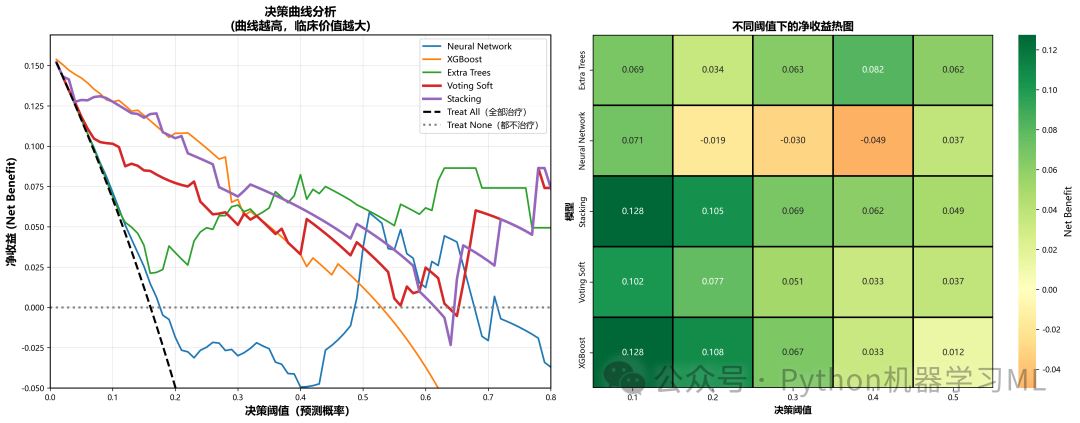
阶段 11: 模型校准与拟合优度检验
用于评估模型输出的概率是否真实可靠,即模型是否"过度自信"或"不够自信"。
作用解释:
hosmer_lemeshow_test
-
-
实现经典的 Hosmer-Lemeshow 检验。这是一种卡方检验,用于判断模型的预测概率与实际发生率是否存在显著差异。
-
p值 > 0.05
表示模型校准良好(预测概率与实际概率无显著差异)。
-
plot_calibration_with_hl_test
-
-
绘制校准曲线(Reliability Diagram):对角线代表完美校准。
-
集成统计量
将 H-L 检验的卡方值、p值以及 Brier Score 直接标注在图上,提供定量的校准评估。这在严谨的医学论文中是必需的。
-
python
# ==========================================
# 2. 增强版校准曲线(含Hosmer-Lemeshow检验)
# ==========================================

defhosmer_lemeshow_test(y_true, y_prob, n_bins=10):
"""
    Hosmer-Lemeshow拟合优度检验
    返回: (chi2统计量, p值)
    """
    bins = np.linspace(0, 1, n_bins + 1)
    bin_indices = np.digitize(y_prob, bins[:-1]) - 1
    bin_indices = np.clip(bin_indices, 0, n_bins - 1)

    observed = np.zeros(n_bins)
    expected = np.zeros(n_bins)
    counts = np.zeros(n_bins)

for i inrange(n_bins):
        mask = bin_indices == i
        counts[i] = mask.sum()
if counts[i] > 0:
            observed[i] = y_true[mask].sum()
            expected[i] = y_prob[mask].sum()

    mask = counts > 0
    chi2 = np.sum((observed[mask] - expected[mask]) ** 2 /
                  (expected[mask] * (1 - expected[mask] / counts[mask]) + 1e-10))

    p_value = 1 - stats.chi2.cdf(chi2, n_bins - 2)

return chi2, p_value


defplot_calibration_with_hl_test(trained_models, X_test, y_test, output_dir='medical_figures', top_n=6):
"""
    绘制校准曲线并显示Hosmer-Lemeshow检验结果
    """
    set_medical_journal_style()

print("\n" + "=" * 70)
print("📊 校准曲线分析(含Hosmer-Lemeshow检验)")
print("=" * 70)

    os.makedirs(output_dir, exist_ok=True)

# 筛选支持predict_proba的模型
    valid_models = {}
for name, model in trained_models.items():
ifhasattr(model, 'predict_proba'):
try:
                _ = model.predict_proba(X_test[:1])
                valid_models[name] = model
except AttributeError:
continue

iflen(valid_models) == 0:
print("⚠️ 没有模型支持概率输出,跳过校准曲线绘制")
return

# 选择Top N模型
    model_scores = {name: roc_auc_score(y_test, model.predict_proba(X_test)[:, 1])
for name, model in valid_models.items()}
    top_models = sorted(model_scores.items(), key=lambda x: x[1], reverse=True)[:top_n]

    n_models = len(top_models)
    n_cols = 3
    n_rows = (n_models + n_cols - 1) // n_cols

    fig, axes = plt.subplots(n_rows, n_cols, figsize=(18, 6 * n_rows))
if n_rows == 1:
        axes = axes.reshape(1, -1)
    axes = axes.flatten()

    colors = ['#3498DB', '#E74C3C', '#2ECC71', '#F39C12', '#9B59B6', '#1ABC9C']

    calibration_results = []

for idx, ((name, _), color) inenumerate(zip(top_models, colors)):
        ax = axes[idx]
        model = valid_models[name]
        y_prob = model.predict_proba(X_test)[:, 1]

# 计算校准曲线
        fraction_of_positives, mean_predicted_value = calibration_curve(
            y_test, y_prob, n_bins=10, strategy='uniform'
        )

# H-L检验
        chi2, p_value = hosmer_lemeshow_test(y_test, y_prob, n_bins=10)

# Brier Score
        brier = brier_score_loss(y_test, y_prob)

# 绘制校准曲线
        ax.plot(mean_predicted_value, fraction_of_positives,
                marker='o', color=color, linewidth=2.5, markersize=8,
                label='Calibration Curve', markeredgecolor='black', markeredgewidth=1)

# 完美校准线
        ax.plot([0, 1], [0, 1], 'k--', linewidth=1.5, label='Perfect Calibration', alpha=0.7)

# 添加统计信息
        textstr = f'H-L χ²: {chi2:.2f}\np-value: {p_value:.4f}\nBrier: {brier:.4f}'
        props = dict(boxstyle='round', facecolor='wheat', alpha=0.8)
        ax.text(0.05, 0.75, textstr, transform=ax.transAxes, fontsize=9,
                verticalalignment='top', bbox=props)

        ax.set_xlabel('Predicted Probability', fontsize=10, fontweight='bold')
        ax.set_ylabel('Observed Proportion', fontsize=10, fontweight='bold')
        ax.set_title(f'{name}', fontsize=11, fontweight='bold')
        ax.legend(loc='lower right', fontsize=8)
        ax.grid(True, alpha=0.3, linestyle='--')
        ax.set_xlim([0, 1])
        ax.set_ylim([0, 1])

# 保存结果
        calibration_results.append({
'Model': name,
'HL_Chi2': chi2,
'HL_p_value': p_value,
'Brier_Score': brier
        })

# 隐藏多余的子图
for idx inrange(n_models, len(axes)):
        axes[idx].set_visible(False)

    plt.suptitle('Calibration Curves with Hosmer-Lemeshow Test',
                 fontsize=14, fontweight='bold', y=0.995)
    plt.tight_layout()
    save_path = f'{output_dir}/02_calibration_curves_hl_test.png'
    plt.savefig(save_path, dpi=300, bbox_inches='tight')
    plt.close()

# 保存校准结果
    calib_df = pd.DataFrame(calibration_results)
    calib_df.to_csv(f'{output_dir}/calibration_test_results.csv', index=False)

print(f"✅ 校准曲线已保存: {save_path}")
print(f"✅ 校准检验结果已保存: {output_dir}/calibration_test_results.csv")

print("\n📊 校准检验结果:")
print(calib_df.to_string(index=False))

print("\n💡 校准曲线解读:")
print("  1. H-L检验 p > 0.05: 模型校准良好")
print("  2. Brier Score越小越好(范围0-1)")
print("  3. 曲线越接近对角线,校准越好")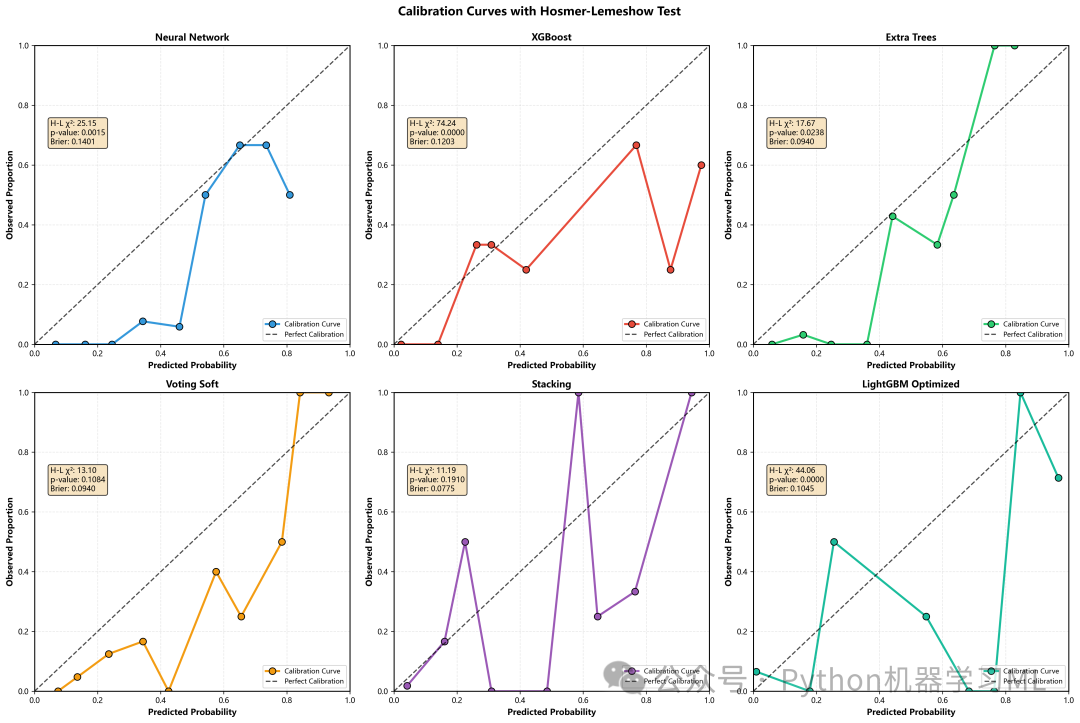
阶段 12: 模型性能比较的高级可视化 (森林图与散点图)
这部分通过两种高级图表来宏观比较所有模型的性能。
作用解释:
plot_forest_plot(森林图)
-
-
目的
在一张图中展示所有模型的AUC及其稳定性。
-
实现
利用之前5折交叉验证计算出的
CV_AUC_std,绘制AUC的95%置信区间(误差条)。 -
解读
点的位置代表平均性能,线的长短代表稳定性。线越短,模型越稳定。这比只看测试集AUC更能反映模型的真实能力。
-
plot_sensitivity_specificity_scatter
-
-
目的
探索模型在灵敏度(Recall)和特异度之间的权衡。
-
实现
将每个模型画在二维平面上,点的大小代表AUC值。
-
解读
越靠近右上角(灵敏度和特异度双高)的模型越好。这种图可以帮助医生根据具体需求(更看重漏诊还是误诊)来选择模型。
-
python
# ==========================================
# 3. Forest Plot(森林图 - 95%置信区间)
# ==========================================

defplot_forest_plot(results, output_dir='medical_figures'):
"""
    绘制森林图 - 展示各模型的AUC和95%置信区间
    """
    set_medical_journal_style()

print("\n" + "=" * 70)
print("📊 森林图(Forest Plot)")
print("=" * 70)

    os.makedirs(output_dir, exist_ok=True)

    df_results = pd.DataFrame(results).T
    df_results = df_results.sort_values('AUC', ascending=True)

    fig, ax = plt.subplots(figsize=(12, 10))

    y_pos = np.arange(len(df_results))
    aucs = df_results['AUC'].values

# 使用CV结果计算置信区间
    ci_lower = aucs - 1.96 * df_results['CV_AUC_std'].values
    ci_upper = aucs + 1.96 * df_results['CV_AUC_std'].values

# 裁剪到[0, 1]范围
    ci_lower = np.clip(ci_lower, 0, 1)
    ci_upper = np.clip(ci_upper, 0, 1)

# 颜色映射
    colors = plt.cm.RdYlGn(aucs)

for i, (y, auc, lower, upper, color) inenumerate(zip(y_pos, aucs, ci_lower, ci_upper, colors)):
# 误差条
        ax.plot([lower, upper], [y, y], color='gray', linewidth=2, alpha=0.6)
# 数据点
        ax.scatter(auc, y, s=200, color=color, edgecolors='black',
                   linewidth=1.5, zorder=3, alpha=0.9)
# 添加数值标签
        ax.text(auc + 0.02, y, f'{auc:.3f}', va='center', fontsize=9, fontweight='bold')
        ax.text(lower - 0.02, y, f'{lower:.3f}', va='center', ha='right', fontsize=8, color='gray')
        ax.text(upper + 0.02, y, f'{upper:.3f}', va='center', ha='left', fontsize=8, color='gray')

# 参考线
    ax.axvline(x=0.5, color='red', linestyle='--', linewidth=1.5, alpha=0.5, label='No discrimination')

    ax.set_yticks(y_pos)
    ax.set_yticklabels(df_results.index, fontsize=10)
    ax.set_xlabel('AUC (95% Confidence Interval)', fontsize=11, fontweight='bold')
    ax.set_title('Forest Plot: Model Performance with 95% CI',
                 fontsize=13, fontweight='bold', pad=15)
    ax.set_xlim([0.4, 1.05])
    ax.grid(True, alpha=0.3, axis='x', linestyle='--')
    ax.legend(loc='lower right', fontsize=10)

    plt.tight_layout()
    save_path = f'{output_dir}/03_forest_plot.png'
    plt.savefig(save_path, dpi=300, bbox_inches='tight')
    plt.close()

print(f"✅ 森林图已保存: {save_path}")


# ==========================================
# 4. 特征重要性对比(多模型)
# ==========================================
# ... (见下阶段代码)

# ==========================================
# 5. 敏感性-特异性散点图
# ==========================================

defplot_sensitivity_specificity_scatter(results, output_dir='medical_figures'):
"""
    绘制敏感性-特异性权衡散点图
    """
    set_medical_journal_style()

print("\n" + "=" * 70)
print("📊 敏感性-特异性权衡图")
print("=" * 70)

    os.makedirs(output_dir, exist_ok=True)

    df_results = pd.DataFrame(results).T

    plt.figure(figsize=(12, 10))

    colors = plt.cm.tab20(np.linspace(0, 1, len(df_results)))

for (model, row), color inzip(df_results.iterrows(), colors):
        plt.scatter(row['Specificity'], row['Sensitivity'],
                    s=row['AUC'] * 500, c=[color], alpha=0.7,
                    edgecolors='black', linewidth=1.5,
                    label=f"{model} (AUC={row['AUC']:.3f})")

    plt.xlabel('Specificity', fontsize=14, fontweight='bold')
    plt.ylabel('Sensitivity', fontsize=14, fontweight='bold')
    plt.title('Sensitivity vs Specificity Trade-off', fontsize=16, fontweight='bold')

# 添加理想点
    plt.scatter([1], [1], s=150, c='red', marker='*', label='Ideal Model', zorder=10)

    plt.legend(loc='lower left', fontsize=9, bbox_to_anchor=(1.05, 0))
    plt.grid(True, alpha=0.3)
    plt.xlim([0.5, 1.1])
    plt.ylim([0.5, 1.1])
    plt.tight_layout()

    save_path = f'{output_dir}/05_sensitivity_specificity_scatter.png'
    plt.savefig(save_path, dpi=300, bbox_inches='tight')
    plt.close()

print(f"✅ 敏感性-特异性散点图已保存: {save_path}")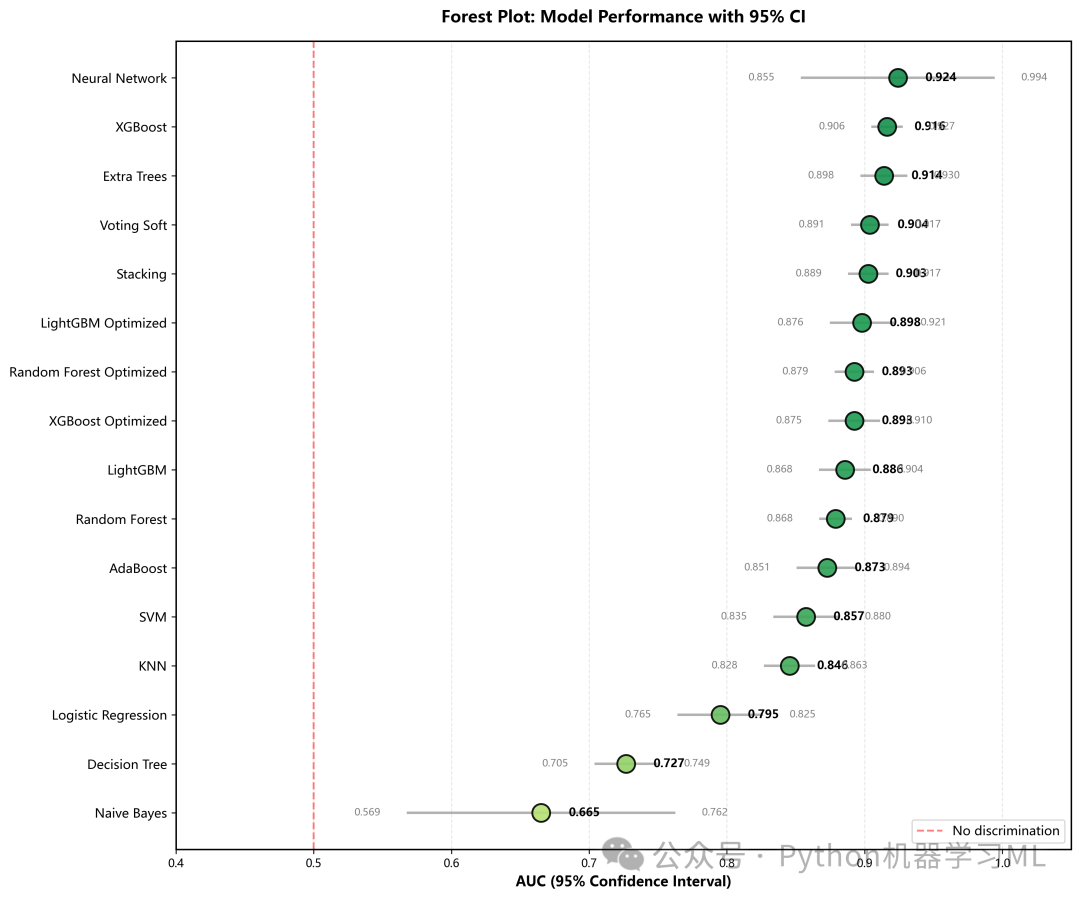
阶段 13: 特征重要性与PR曲线
分析不同模型认为哪些特征更重要,以及模型在不平衡数据上的鲁棒性。
作用解释:
plot_feature_importance_comparison
-
-
目的
比较不同算法(如随机森林、XGBoost、逻辑回归)对特征重要性的评判是否一致。
-
实现
自动提取基于树的模型(
feature_importances_)或线性模型(coef_)的重要性,归一化后绘制Top 15特征。 -
意义
如果多种不同原理的模型都认为某个特征很重要,那么该特征与目标变量的关系就是非常稳健的。
-
plot_precision_recall_curves(PR曲线)
-
-
目的
在类别不平衡的数据集中,ROC曲线可能会高估模型性能,而PR曲线(关注阳性预测)更具参考价值。
-
实现
绘制Recall(横轴)与Precision(纵轴)的关系。
-
解读
曲线下面积(AP)越大越好。对比ROC曲线,可以更全面地评估模型对少数类(患病)的识别能力。
-
python
# ==========================================
# 4. 特征重要性对比(多模型)
# ==========================================

defplot_feature_importance_comparison(trained_models, feature_names, top_n=15,
                                       output_dir='medical_figures'):
"""
    绘制多个模型的特征重要性对比图
    支持的模型:Tree-based (RF, XGB, LGB, ET)
    """
    set_medical_journal_style()

print("\n" + "=" * 70)
print("📊 特征重要性对比")
print("=" * 70)

    os.makedirs(output_dir, exist_ok=True)

# 筛选支持feature_importances_的模型
    supported_models = {}
for name, model in trained_models.items():
ifhasattr(model, 'feature_importances_'):
            supported_models[name] = model
elifhasattr(model, 'coef_'):  # 线性模型
            supported_models[name] = model

iflen(supported_models) == 0:
print("⚠️ 没有模型支持特征重要性分析")
return

# 选择Top 4个模型
    model_list = list(supported_models.items())[:4]

    n_models = len(model_list)
    n_cols = 2
    n_rows = (n_models + n_cols - 1) // n_cols

    fig, axes = plt.subplots(n_rows, n_cols, figsize=(16, 6 * n_rows))
if n_rows == 1:
        axes = axes.reshape(1, -1)
    axes = axes.flatten()

for idx, (name, model) inenumerate(model_list):
        ax = axes[idx]

# 获取特征重要性
ifhasattr(model, 'feature_importances_'):
            importances = model.feature_importances_
else:  # 线性模型
            importances = np.abs(model.coef_[0])

# 归一化
        importances = importances / importances.sum()

# 排序并选择Top N
        indices = np.argsort(importances)[::-1][:top_n]
        top_features = [feature_names[i] for i in indices]
        top_importances = importances[indices]

# 绘制水平条形图
        colors = plt.cm.viridis(np.linspace(0.3, 0.9, len(top_features)))
        bars = ax.barh(range(len(top_features)), top_importances, color=colors,
                       alpha=0.8, edgecolor='black', linewidth=1)

        ax.set_yticks(range(len(top_features)))
        ax.set_yticklabels(top_features, fontsize=9)
        ax.set_xlabel('Normalized Importance', fontsize=10, fontweight='bold')
        ax.set_title(f'{name}', fontsize=11, fontweight='bold')
        ax.grid(True, alpha=0.3, axis='x', linestyle='--')

# 添加数值标签
for bar, val inzip(bars, top_importances):
            ax.text(val + 0.001, bar.get_y() + bar.get_height() / 2,
f'{val:.3f}', va='center', fontsize=8)

# 隐藏多余的子图
for idx inrange(n_models, len(axes)):
        axes[idx].set_visible(False)

    plt.suptitle(f'Feature Importance Comparison (Top {top_n} Features)',
                 fontsize=14, fontweight='bold', y=0.995)
    plt.tight_layout()
    save_path = f'{output_dir}/04_feature_importance_comparison.png'
    plt.savefig(save_path, dpi=300, bbox_inches='tight')
    plt.close()

print(f"✅ 特征重要性对比图已保存: {save_path}")


# ==========================================
# 6. PR曲线(单独)
# ==========================================

defplot_precision_recall_curves(trained_models, X_test, y_test, output_dir='medical_figures', top_n=10):
"""
    绘制Precision-Recall曲线
    """
    set_medical_journal_style()

print("\n" + "=" * 70)
print("📊 Precision-Recall曲线")
print("=" * 70)

    os.makedirs(output_dir, exist_ok=True)

# 筛选支持predict_proba的模型
    valid_models = {}
for name, model in trained_models.items():
ifhasattr(model, 'predict_proba'):
try:
                _ = model.predict_proba(X_test[:1])
                valid_models[name] = model
except AttributeError:
continue

iflen(valid_models) == 0:
print("⚠️ 没有模型支持概率输出,跳过PR曲线绘制")
return

# 选择Top N模型
    model_scores = {name: roc_auc_score(y_test, model.predict_proba(X_test)[:, 1])
for name, model in valid_models.items()}
    top_models = sorted(model_scores.items(), key=lambda x: x[1], reverse=True)[:top_n]

    plt.figure(figsize=(14, 10))
    colors = plt.cm.tab20(np.linspace(0, 1, len(top_models)))

for (name, _), color inzip(top_models, colors):
        model = valid_models[name]
        y_prob = model.predict_proba(X_test)[:, 1]
        precision, recall, _ = precision_recall_curve(y_test, y_prob)
        ap = average_precision_score(y_test, y_prob)
        plt.plot(recall, precision, color=color, lw=2,
                 label=f'{name} (AP = {ap:.3f})')

# 基线
    baseline = y_test.mean()
    plt.axhline(y=baseline, color='k', linestyle='--', lw=1.5,
                label=f'Baseline ({baseline:.3f})', alpha=0.7)

    plt.xlim([0.0, 1.0])
    plt.ylim([0.0, 1.05])
    plt.xlabel('Recall', fontsize=14, fontweight='bold')
    plt.ylabel('Precision', fontsize=14, fontweight='bold')
    plt.title('Precision-Recall Curves', fontsize=16, fontweight='bold')
    plt.legend(loc='lower left', fontsize=9, ncol=2)
    plt.grid(True, alpha=0.3)
    plt.tight_layout()

    save_path = f'{output_dir}/06_precision_recall_curves.png'
    plt.savefig(save_path, dpi=300, bbox_inches='tight')
    plt.close()

print(f"✅ PR曲线已保存: {save_path}")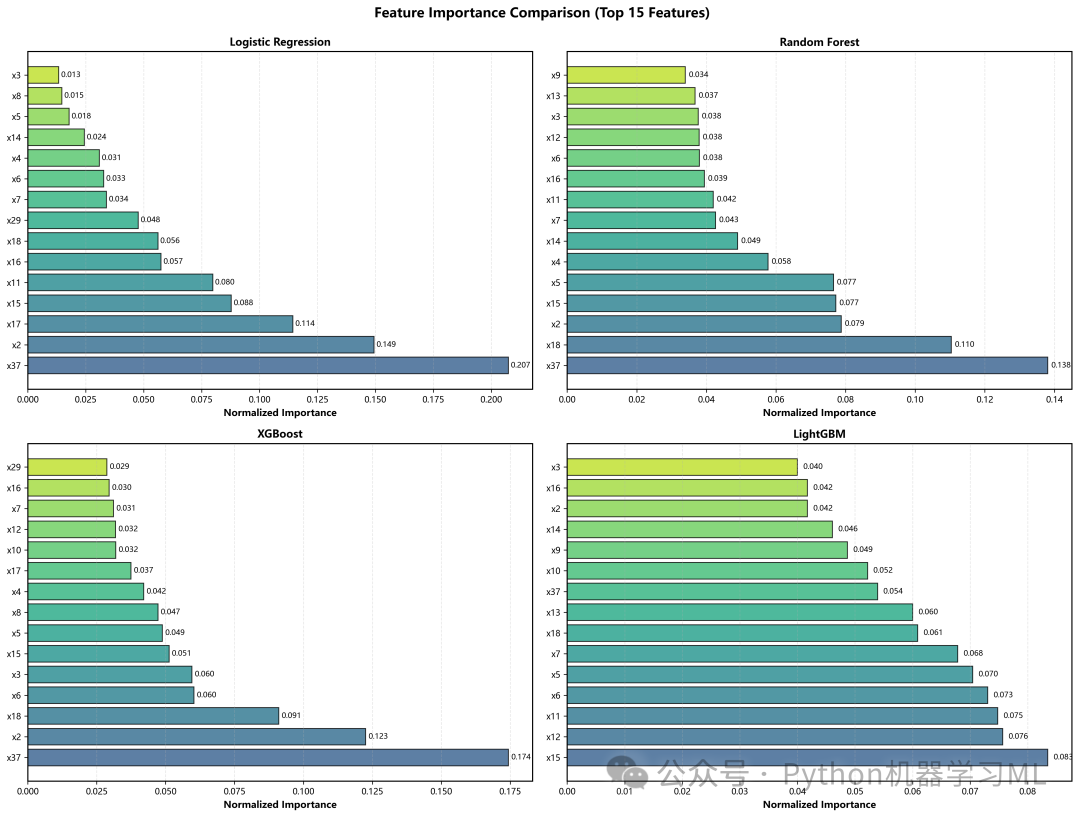
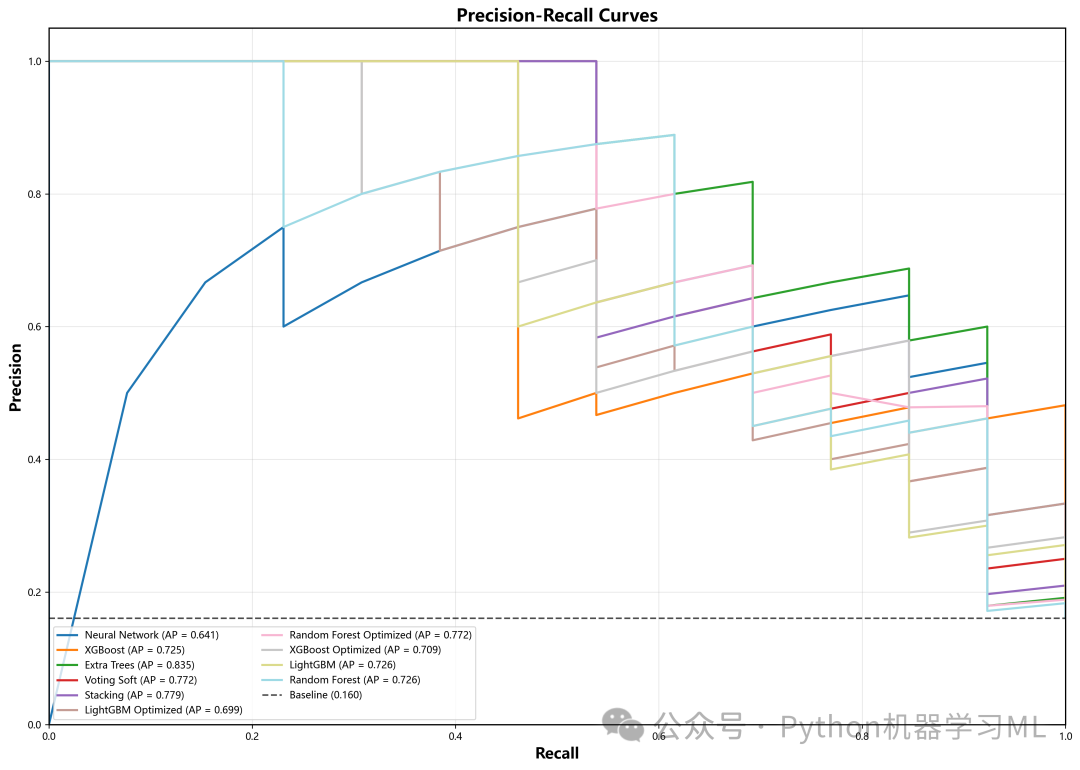
阶段 14: 最优模型深入分析与执行主流程
最后,针对表现最好的模型进行深入的单体分析,并执行整个高级可视化流程。
作用解释:
plot_best_model_confusion_matrix
-
-
自动择优
自动从结果表中找到AUC最高的模型。
-
详细展示
绘制其混淆矩阵,并在图表侧边列出该模型的详细性能指标(Accuracy, Sensitivity, Specificity, PPV, NPV),生成一张可直接用于展示的"模型体检报告"。
-
generate_medical_journal_figures(主函数)
-
-
这是一个封装函数,按顺序调用上述所有绘图函数。
-
一键生成
只需要调用这一个函数,就能在
medical_figures目录下生成全套7种高级图表。这体现了优秀的代码封装和模块化设计。
-
python
# ==========================================
# 7. 混淆矩阵(单独,最优模型)
# ==========================================

defplot_best_model_confusion_matrix(trained_models, X_test, y_test, results, output_dir='medical_figures'):
"""
    绘制最优模型的混淆矩阵
    """
    set_medical_journal_style()

print("\n" + "=" * 70)
print("📊 最优模型混淆矩阵")
print("=" * 70)

    os.makedirs(output_dir, exist_ok=True)

# 找到AUC最高的模型
    df_results = pd.DataFrame(results).T
    best_model_name = df_results['AUC'].idxmax()
    best_model = trained_models[best_model_name]

    y_pred = best_model.predict(X_test)
    cm = confusion_matrix(y_test, y_pred)

    plt.figure(figsize=(15, 10))
    sns.heatmap(cm, annot=True, fmt='d', cmap='Blues',
                xticklabels=['Non-PE', 'PE'], yticklabels=['Non-PE', 'PE'],
                cbar_kws={'label': 'Count'},
                annot_kws={'size': 14, 'weight': 'bold'},
                linewidths=2, linecolor='black')

    plt.xlabel('Predicted', fontsize=13, fontweight='bold')
    plt.ylabel('Actual', fontsize=13, fontweight='bold')
    plt.title(f'Confusion Matrix - {best_model_name}',
              fontsize=14, fontweight='bold', pad=15)

# 添加统计信息
    tn, fp, fn, tp = cm.ravel()
    stats_text = f'Accuracy: {(tp + tn) / (tp + tn + fp + fn):.3f}\n'
    stats_text += f'Sensitivity: {tp / (tp + fn):.3f}\n'
    stats_text += f'Specificity: {tn / (tn + fp):.3f}\n'
    stats_text += f'PPV: {tp / (tp + fp):.3f}\n'
    stats_text += f'NPV: {tn / (tn + fn):.3f}'

    plt.text(1.25, 0.5, stats_text, transform=plt.gca().transAxes,
             fontsize=9, verticalalignment='center',
             bbox=dict(boxstyle='round', facecolor='wheat', alpha=0.8))

    plt.tight_layout()
    save_path = f'{output_dir}/07_confusion_matrix_best_model.png'
    plt.savefig(save_path, dpi=600, bbox_inches='tight')
    plt.close()

print(f"✅ 混淆矩阵已保存: {save_path}")
print(f"   最优模型: {best_model_name}")


# ==========================================
# 主函数:生成所有医学期刊级别可视化
# ==========================================

defgenerate_medical_journal_figures(trained_models, X_train, X_test, y_test, results, feature_names,
                                     output_dir='medical_figures'):
"""
    生成所有医学期刊级别的可视化图表
    """
print("\n" + "=" * 70)
print("开始生成医学期刊级别可视化图表")
print("=" * 70)

# 1. Decision Curve Analysis
    dca_comp, optimal_thresh = plot_decision_curve_analysis(
        trained_models, X_test, y_test, output_dir=output_dir, top_n=5
    )

# 2. 增强版校准曲线(含H-L检验)
    plot_calibration_with_hl_test(
        trained_models, X_test, y_test, output_dir=output_dir, top_n=6
    )

# 3. Forest Plot
    plot_forest_plot(results, output_dir=output_dir)

# 4. 特征重要性对比
    plot_feature_importance_comparison(
        trained_models, feature_names, top_n=15, output_dir=output_dir
    )

# 5. 敏感性-特异性散点图
    plot_sensitivity_specificity_scatter(results, output_dir=output_dir)

# 6. PR曲线
    plot_precision_recall_curves(
        trained_models, X_test, y_test, output_dir=output_dir, top_n=10
    )

# 7. 混淆矩阵(最优模型)
    plot_best_model_confusion_matrix(
        trained_models, X_test, y_test, results, output_dir=output_dir
    )


print("\n" + "=" * 70)
print("医学期刊级别可视化完成!")
print("=" * 70)
print(f"\n生成的医学配图保存在目录: {output_dir}/")
print("\n图表列表:")
print("  01. 决策曲线分析 (Decision Curve Analysis)")
print("  02. 校准曲线+H-L检验 (Calibration Curves)")
print("  03. 森林图 (Forest Plot)")
print("  04. 特征重要性对比 (Feature Importance)")
print("  05. 敏感性-特异性散点图 (Sensitivity vs Specificity)")
print("  06. PR曲线 (Precision-Recall Curves)")
print("  07. 混淆矩阵-最优模型 (Confusion Matrix)")


generate_medical_journal_figures(
    trained_models, X_train_scaled, X_test_scaled, y_test, results, feature_names,
    output_dir='medical_figures'
)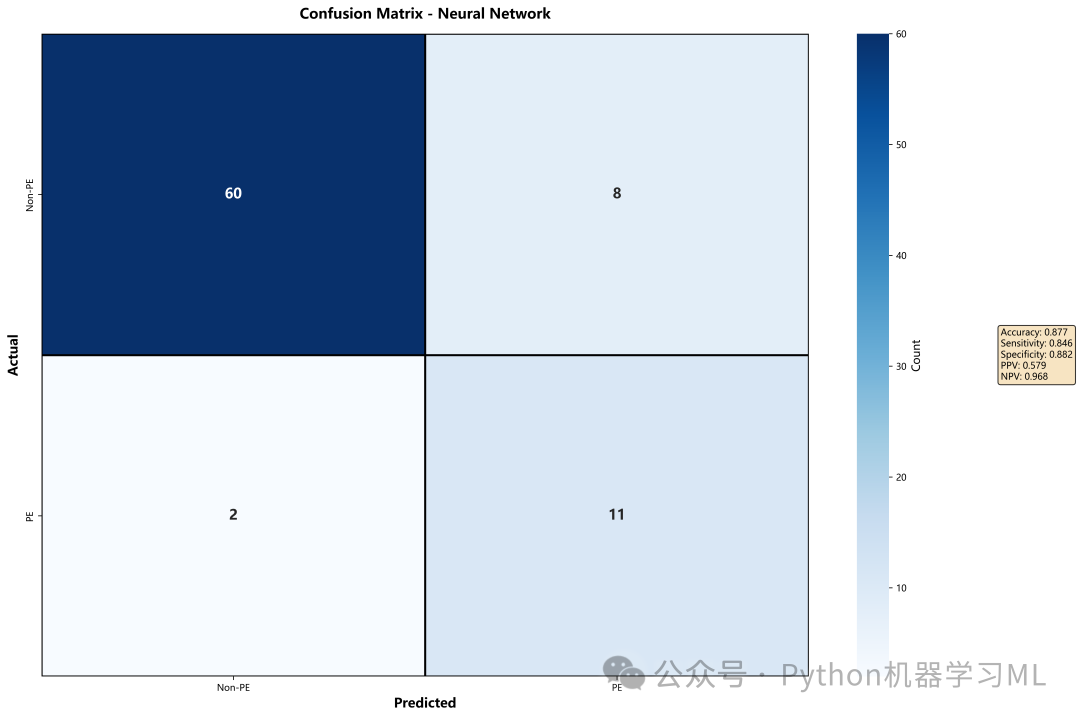
第三部分:外部验证与SHAP可视化分析
这部分代码至关重要,它验证了训练好的模型在全新的、从未见过的数据集上表现如何,这是衡量模型是否具备临床应用价值的核心标准。
阶段 1: 环境配置与模型加载
这一阶段负责恢复"训练现场"的状态,加载之前保存的所有模型、预处理器和配置信息。
作用解释:
load_models_and_config
-
-
加载标准化器 (
scaler1.pkl)必须使用训练集生成的Scaler来标准化外部数据,保证数据分布的一致性。
-
加载特征名称 (
feature_names1.pkl)确保外部数据的特征列与训练模型时完全一致(顺序、数量)。
-
批量加载模型
自动扫描
saved_models文件夹,加载所有.pkl格式的模型文件。 -
智能筛选
代码会自动检查加载的模型是否支持
predict_proba(输出概率),只有支持概率预测的模型才会被用于后续分析,这避免了运行时错误。
-
python
import pandas as pd
import numpy as np
import matplotlib.pyplot as plt
import seaborn as sns
import joblib
import os
import warnings
from scipy import stats
from sklearn.metrics import (
    roc_auc_score, roc_curve, confusion_matrix,
    precision_recall_curve, average_precision_score, brier_score_loss,
    precision_score, recall_score, f1_score, accuracy_score,
    matthews_corrcoef, cohen_kappa_score
)

warnings.filterwarnings('ignore')

# 设置中文显示
plt.rcParams['font.sans-serif'] = ['microsoft yahei']
plt.rcParams['axes.unicode_minus'] = False


# ==========================================
# Step 1: 模型和配置加载
# ==========================================

defload_models_and_config(model_dir='saved_models'):
"""
    加载训练阶段保存的所有内容

    返回:
        models_dict: 所有训练好的模型字典(排除Voting Hard)
        scaler: 标准化器
        feature_names: 特征名称列表
    """
print("\n" + "=" * 70)
print("Step 1: 模型和配置加载")
print("=" * 70)

ifnot os.path.exists(model_dir):
raise FileNotFoundError(f"❌ 模型目录不存在: {model_dir}")

# 1. 加载标准化器
    scaler_path = os.path.join(model_dir, 'scaler1.pkl')
ifnot os.path.exists(scaler_path):
raise FileNotFoundError(f"❌ 未找到标准化器: {scaler_path}")

    scaler = joblib.load(scaler_path)
print(f"✅ 已加载标准化器: {scaler_path}")

# 2. 加载特征名称
    feature_path = os.path.join(model_dir, 'feature_names1.pkl')
ifnot os.path.exists(feature_path):
raise FileNotFoundError(f"❌ 未找到特征名称: {feature_path}")

    feature_names = joblib.load(feature_path)
print(f"✅ 已加载特征名称: {feature_path}")
print(f"   特征数量: {len(feature_names)}")

# 3. 加载所有模型(排除Voting Hard)
    models_dict = {}
    excluded_models = ['Voting_Hard', 'Voting Hard']  # 排除列表

    model_files = [f for f in os.listdir(model_dir)
if f.endswith('.pkl')
and f notin ['scaler1.pkl', 'feature_names1.pkl', 'optimized_params.pkl']
andnotany(ex in f for ex in excluded_models)]

iflen(model_files) == 0:
raise FileNotFoundError(f"❌ 未找到任何模型文件在: {model_dir}")

print(f"\n📦 开始加载模型...")
print(f"   ℹ️ 已排除: {', '.join(excluded_models)}")

    loaded_count = 0
for model_file insorted(model_files):
# 将文件名转为模型名称(用空格替换下划线)
        model_name = model_file.replace('.pkl', '').replace('_', ' ')
        model_path = os.path.join(model_dir, model_file)

try:
            model = joblib.load(model_path)

# 检查模型是否支持概率预测
ifnothasattr(model, 'predict_proba'):
print(f"  ⚠️ {model_name:<35} 不支持概率预测,已跳过")
continue

# 测试predict_proba是否可调用
try:
                dummy_X = np.zeros((1, len(feature_names)))
                _ = model.predict_proba(dummy_X)
except Exception:
print(f"  ⚠️ {model_name:<35} predict_proba调用失败,已跳过")
continue

            models_dict[model_name] = model
            loaded_count += 1
print(f"  ✅ {model_name:<35} 加载成功")

except Exception as e:
print(f"  ❌ {model_name:<35} 加载失败: {str(e)}")
continue

if loaded_count == 0:
raise ValueError("❌ 没有成功加载任何支持概率预测的模型")

print(f"\n✅ 成功加载 {loaded_count} 个模型")

return models_dict, scaler, feature_names
阶段 2: 外部验证数据准备 (特征对齐与标准化)
这一步是外部验证中最容易出错的地方。必须确保外部数据的处理方式与训练数据完全一致。
作用解释:
-
加载数据
读取外部验证集CSV文件。
-
特征检查与对齐
-
-
检查外部数据是否包含训练时用到的所有特征。
-
严格排序
使用
X_external_raw[feature_names]强制将列顺序调整为与训练集一致。如果顺序错了,模型预测将完全失效。
-
- 标准化 (
transform)
-
-
用加载的
scaler对外部数据进行transform。 -
注意
绝对不能使用
fit_transform,否则会引入外部数据的分布信息,破坏验证的独立性(数据泄露)。
-
python
# ==========================================
# Step 2: 外部验证集准备
# ==========================================

defprepare_external_data(file_path, feature_names, scaler):
"""
    加载并预处理外部验证数据(假设特征完全一致)

    参数:
        file_path: 外部数据文件路径
        feature_names: 训练集的特征名称列表
        scaler: 训练集的标准化器

    返回:
        X_external: 预处理后的特征矩阵
        y_external: 标签
    """
print("\n" + "=" * 70)
print("Step 2: 外部验证集准备")
print("=" * 70)

# 1. 加载数据
ifnot os.path.exists(file_path):
raise FileNotFoundError(f"❌ 外部数据文件不存在: {file_path}")

print(f"\n📂 正在加载外部数据: {file_path}")

# 尝试多种编码
    encodings = ['utf-8', 'gbk', 'gb18030', 'gb2312', 'latin1']
    df = None
    used_encoding = None

for encoding in encodings:
try:
            df = pd.read_csv(file_path, encoding=encoding)
            used_encoding = encoding
break
except (UnicodeDecodeError, LookupError):
continue

if df isNone:
raise ValueError(f"❌ 无法读取文件,尝试的编码: {encodings}")

print(f"✅ 数据加载成功(编码: {used_encoding})")
print(f"   数据形状: {df.shape}")

# 2. 分离特征和标签
if'Target'notin df.columns:
raise ValueError("❌ 外部数据缺少 'Target' 列")

    y_external = df['Target']
    X_external_raw = df.drop(columns=['Target'])

print(f"   正样本比例: {y_external.mean():.2%} ({y_external.sum()}/{len(y_external)})")

# 3. 删除非数值列
    non_numeric_cols = X_external_raw.select_dtypes(include=['object']).columns.tolist()
if non_numeric_cols:
print(f"   删除非数值列: {non_numeric_cols}")
        X_external_raw = X_external_raw.drop(columns=non_numeric_cols)

# 4. 特征对齐(严格按照训练集顺序)
print(f"\n🔍 特征对齐检查...")

# 检查是否所有训练特征都存在
    missing_features = set(feature_names) - set(X_external_raw.columns)
if missing_features:
raise ValueError(f"❌ 外部数据缺少以下特征: {missing_features}")

# 按照训练集特征顺序重新排列
    X_external = X_external_raw[feature_names]

print(f"✅ 特征对齐完成")
print(f"   特征数量: {len(feature_names)}")
print(f"   样本数量: {len(X_external)}")

# 5. 标准化(只transform,不fit)
print(f"\n🔧 应用标准化器(仅transform)...")
    X_external_scaled = scaler.transform(X_external)
print(f"✅ 标准化完成")

return X_external_scaled, y_external
阶段 3: 外部验证集全方位评估
使用加载的模型对准备好的外部数据进行预测,并计算一整套评估指标。
作用解释:
-
批量预测
遍历字典中的每个模型,对外部数据进行预测。
-
全指标计算
计算 AUC, Accuracy, F1, 灵敏度, 特异度, PPV, NPV, MCC, Kappa, Brier Score, AP, Youden Index。这不仅涵盖了通用指标,还包括了医学专用的指标。
-
结果保存
将所有评估结果保存为 CSV 文件,并打印 Top 5 模型,方便快速查看。
python
# ==========================================
# Step 3: 模型性能评估
# ==========================================

defevaluate_models_on_external(models_dict, X_external, y_external,
                                output_dir='external_validation'):
"""
    在外部验证集上评估所有模型

    参数:
        models_dict: 所有模型的字典
        X_external: 外部验证集特征
        y_external: 外部验证集标签
        output_dir: 输出目录

    返回:
        results: 评估结果字典
        predictions: 预测结果字典
        df_results: 结果DataFrame
    """
print("\n" + "=" * 70)
print("Step 3: 模型性能评估(外部验证集)")
print("=" * 70)

    os.makedirs(output_dir, exist_ok=True)

    results = {}
    predictions = {}

print(f"\n📊 开始评估 {len(models_dict)} 个模型...")

for idx, (model_name, model) inenumerate(models_dict.items(), 1):
print(f"\n{'─' * 50}")
print(f"[{idx}/{len(models_dict)}] 评估模型: {model_name}")
print(f"{'─' * 50}")

try:
# 1. 预测
            y_pred = model.predict(X_external)
            y_prob = model.predict_proba(X_external)[:, 1]

# 2. 基础指标
            accuracy = accuracy_score(y_external, y_pred)
            precision = precision_score(y_external, y_pred, zero_division=0)
            recall = recall_score(y_external, y_pred, zero_division=0)
            f1 = f1_score(y_external, y_pred, zero_division=0)

# 3. 混淆矩阵
            cm = confusion_matrix(y_external, y_pred)
            tn, fp, fn, tp = cm.ravel()

# 4. 派生指标
            sensitivity = tp / (tp + fn) if (tp + fn) > 0else0
            specificity = tn / (tn + fp) if (tn + fp) > 0else0
            ppv = tp / (tp + fp) if (tp + fp) > 0else0
            npv = tn / (tn + fn) if (tn + fn) > 0else0

            mcc = matthews_corrcoef(y_external, y_pred)
            kappa = cohen_kappa_score(y_external, y_pred)
            youden = sensitivity + specificity - 1

# 5. 概率指标
            auc = roc_auc_score(y_external, y_prob)
            brier = brier_score_loss(y_external, y_prob)
            ap = average_precision_score(y_external, y_prob)

# 6. 保存结果
            results[model_name] = {
'AUC': auc,
'Accuracy': accuracy,
'Precision': precision,
'Recall': recall,
'F1-Score': f1,
'Sensitivity': sensitivity,
'Specificity': specificity,
'PPV': ppv,
'NPV': npv,
'Brier Score': brier,
'MCC': mcc,
'Kappa': kappa,
'AP': ap,
'Youden Index': youden,
'TP': int(tp),
'TN': int(tn),
'FP': int(fp),
'FN': int(fn)
            }

            predictions[model_name] = {
'y_pred': y_pred,
'y_prob': y_prob
            }

# 7. 打印关键指标
print(f"  AUC: {auc:.4f} | Acc: {accuracy:.4f} | F1: {f1:.4f}")
print(f"  Sen: {sensitivity:.4f} | Spe: {specificity:.4f}")

except Exception as e:
print(f"  ❌ 评估失败: {str(e)}")
import traceback
            traceback.print_exc()
continue

print(f"\n" + "=" * 70)
print(f"✅ 评估完成!成功评估 {len(results)}/{len(models_dict)} 个模型")
print(f"=" * 70)

# 8. 生成结果表
iflen(results) == 0:
raise ValueError("❌ 没有成功评估任何模型")

print(f"\n📊 生成结果汇总...")
    df_results = pd.DataFrame(results).T

# 排序列
    key_metrics = ['AUC', 'Accuracy', 'F1-Score', 'Sensitivity', 'Specificity',
'Precision', 'Recall', 'PPV', 'NPV', 'MCC', 'Kappa', 'Brier Score', 'AP',
'Youden Index', 'TP', 'TN', 'FP', 'FN']

    cols = [col for col in key_metrics if col in df_results.columns]
    df_results = df_results[cols].round(4).sort_values('AUC', ascending=False)

# 保存CSV
    results_path = os.path.join(output_dir, 'external_results.csv')
    df_results.to_csv(results_path, encoding='utf-8-sig')
print(f"✅ 结果已保存: {results_path}")

# 打印Top 5
print(f"\n🏆 Top 5 模型(按AUC排序):")
    top5_cols = ['AUC', 'Accuracy', 'F1-Score', 'Sensitivity', 'Specificity']
print(df_results[top5_cols].head(5).to_string())

# 打印统计摘要(修正语法错误)
print(f"\n📈 性能统计摘要:")
    summary_metrics = ['AUC', 'Accuracy', 'Sensitivity', 'Specificity', 'F1-Score']
# 修正:使用 .loc 而不是双点
    summary_stats = df_results[summary_metrics].describe().loc[['mean', 'std', 'min', 'max']]
print(summary_stats.round(4).to_string())

return results, predictions, df_results


# ==========================================
# 执行前3步流程(直接运行)
# ==========================================

print("\n" + "=" * 70)
print("🚀 外部验证集评估流程 - 前3步")
print("=" * 70)

# Step 1: 加载模型和配置
models_dict, scaler, feature_names = load_models_and_config(
    model_dir='saved_models'
)

# Step 2: 准备外部验证数据
external_file = 'external_validation_data.csv'
X_external, y_external = prepare_external_data(
    file_path=external_file,
    feature_names=feature_names,
    scaler=scaler
)

# Step 3: 模型性能评估
results, predictions, df_results = evaluate_models_on_external(
    models_dict=models_dict,
    X_external=X_external,
    y_external=y_external,
    output_dir='external_validation'
)

print("\n" + "=" * 70)
print("✅ 前3步完成!")
print("=" * 70)
print("\n生成的文件:")
print("  📄 external_validation/external_results.csv")
print("\n📌 数据说明:")
print(f"  - 训练集特征: {len(feature_names)}")
print(f"  - 外部验证集样本: {len(X_external)}")
print(f"  - 评估模型数: {len(results)}")
print(f"  - 最优模型: {df_results.index[0]}")
print(f"  - 最优AUC: {df_results['AUC'].iloc[0]:.4f}")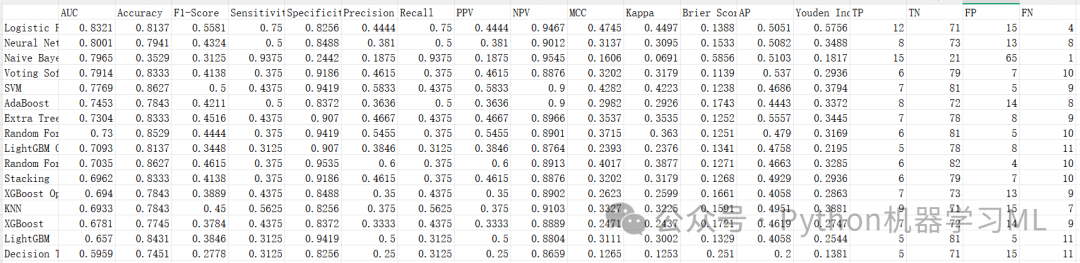
阶段 4: 泛化能力深度分析 (训练 vs 验证)
这部分是非常高级且有价值的分析。它不仅仅看模型在验证集上的表现,而是对比其在训练集上的表现,从而量化模型的"过拟合程度"和"泛化能力"。
作用解释:
-
加载对比数据
分别读取训练集结果和刚刚生成的外部验证结果。
-
指标计算
-
-
AUC Diff
训练AUC - 外部AUC。差值越大,说明过拟合越严重。
-
Overfitting Degree
AUC Diff / Train AUC。量化过拟合百分比。 -
Generalization Score
1 - Overfitting Degree。泛化得分越高,说明模型越稳健。 -
Stability Score
综合考虑AUC、Accuracy和F1的下降幅度,得出一个综合稳定性评分。
-
-
发现洞察
代码会自动打印出"最佳泛化模型"和"严重过拟合模型",帮助研究者选择最可靠的模型,而不仅仅是分数最高的模型。
python
# ==========================================
# Step 4: 训练 vs 外部验证对比
# ==========================================

defcompare_train_external_results(train_results_path, external_results_path,
                                   output_dir='external_validation'):
"""
    对比训练集和外部验证集的结果

    参数:
        train_results_path: 训练结果CSV路径
        external_results_path: 外部验证结果CSV路径
        output_dir: 输出目录

    返回:
        comparison_df: 对比结果DataFrame
    """
print("\n" + "=" * 70)
print("Step 4: 训练 vs 外部验证对比")
print("=" * 70)

# 1. 加载训练集结果
ifnot os.path.exists(train_results_path):
raise FileNotFoundError(f"❌ 训练结果文件不存在: {train_results_path}")

    df_train = pd.read_csv(train_results_path, index_col=0)
print(f"✅ 已加载训练集结果: {train_results_path}")
print(f"   训练集模型数: {len(df_train)}")

# 2. 加载外部验证集结果
ifnot os.path.exists(external_results_path):
raise FileNotFoundError(f"❌ 外部验证结果文件不存在: {external_results_path}")

    df_external = pd.read_csv(external_results_path, index_col=0)
print(f"✅ 已加载外部验证结果: {external_results_path}")
print(f"   外部验证模型数: {len(df_external)}")

# 3. 找到共同的模型
    common_models = list(set(df_train.index) & set(df_external.index))

iflen(common_models) == 0:
raise ValueError("❌ 训练集和外部验证集没有共同的模型")

print(f"\n🔍 共同模型数: {len(common_models)}")

# 4. 计算对比指标
print(f"\n📊 计算对比指标...")

    comparison_data = []

for model_name in common_models:
        train_row = df_train.loc[model_name]
        external_row = df_external.loc[model_name]

# 关键指标对比
        train_auc = train_row['AUC']
        external_auc = external_row['AUC']
        auc_diff = train_auc - external_auc

# 过拟合程度
        overfitting_degree = auc_diff / train_auc if train_auc > 0else0

# 泛化能力评分 (越接近1越好)
        generalization_score = 1 - abs(overfitting_degree)

# 其他指标差异
        acc_diff = train_row['Accuracy'] - external_row['Accuracy']
        f1_diff = train_row['F1-Score'] - external_row['F1-Score']
        sen_diff = train_row['Sensitivity'] - external_row['Sensitivity']
        spe_diff = train_row['Specificity'] - external_row['Specificity']

# 综合稳定性评分
        stability_score = 1 - np.mean([
abs(auc_diff / train_auc) if train_auc > 0else0,
abs(acc_diff / train_row['Accuracy']) if train_row['Accuracy'] > 0else0,
abs(f1_diff / train_row['F1-Score']) if train_row['F1-Score'] > 0else0
        ])

        comparison_data.append({
'Model': model_name,
'Train_AUC': train_auc,
'External_AUC': external_auc,
'AUC_Diff': auc_diff,
'Overfitting_Degree': overfitting_degree,
'Generalization_Score': generalization_score,
'Train_Accuracy': train_row['Accuracy'],
'External_Accuracy': external_row['Accuracy'],
'Accuracy_Diff': acc_diff,
'Train_F1': train_row['F1-Score'],
'External_F1': external_row['F1-Score'],
'F1_Diff': f1_diff,
'Train_Sensitivity': train_row['Sensitivity'],
'External_Sensitivity': external_row['Sensitivity'],
'Sensitivity_Diff': sen_diff,
'Train_Specificity': train_row['Specificity'],
'External_Specificity': external_row['Specificity'],
'Specificity_Diff': spe_diff,
'Stability_Score': stability_score
        })

# 5. 创建对比DataFrame
    comparison_df = pd.DataFrame(comparison_data)
    comparison_df = comparison_df.sort_values('Generalization_Score', ascending=False)

# 6. 保存对比结果
    comparison_path = os.path.join(output_dir, 'comparison_results.csv')
    comparison_df.to_csv(comparison_path, index=False, encoding='utf-8-sig')
print(f"✅ 对比结果已保存: {comparison_path}")

# 7. 打印关键发现
print(f"\n📈 关键发现:")

# 最佳泛化能力
    best_gen_model = comparison_df.iloc[0]
print(f"\n🏆 最佳泛化能力: {best_gen_model['Model']}")
print(f"   训练AUC: {best_gen_model['Train_AUC']:.4f}")
print(f"   外部AUC: {best_gen_model['External_AUC']:.4f}")
print(f"   AUC下降: {best_gen_model['AUC_Diff']:.4f}")
print(f"   泛化评分: {best_gen_model['Generalization_Score']:.4f}")

# 最严重过拟合
    worst_gen_model = comparison_df.iloc[-1]
print(f"\n⚠️ 过拟合最严重: {worst_gen_model['Model']}")
print(f"   训练AUC: {worst_gen_model['Train_AUC']:.4f}")
print(f"   外部AUC: {worst_gen_model['External_AUC']:.4f}")
print(f"   AUC下降: {worst_gen_model['AUC_Diff']:.4f}")
print(f"   过拟合程度: {worst_gen_model['Overfitting_Degree']:.2%}")

# 统计摘要
print(f"\n📊 整体统计:")
print(f"   平均AUC下降: {comparison_df['AUC_Diff'].mean():.4f}")
print(f"   AUC下降标准差: {comparison_df['AUC_Diff'].std():.4f}")
print(f"   平均泛化评分: {comparison_df['Generalization_Score'].mean():.4f}")
print(f"   显著过拟合模型数 (AUC下降>0.10): {(comparison_df['AUC_Diff'] > 0.10).sum()}")

return comparison_df
阶段 5: 基础对比可视化 (ROC, 指标, 散点, 校准, 混淆)
将上述对比结果通过图表形式展示出来,便于在论文中直观呈现。
作用解释:
-
plot_roc_comparison生成双面板ROC图。左边是训练集ROC,右边是验证集ROC。通过对比两图,可以一眼看出模型性能的迁移情况。
-
plot_metrics_comparison_bar分组柱状图。蓝色代表训练集得分,红色代表外部验证集得分。如果红色条显著短于蓝色条,说明泛化能力差。
-
plot_train_vs_external_scatter
-
-
散点图
X轴为训练AUC,Y轴为验证AUC。
-
对角线
完美泛化线。点越接近对角线,说明模型越稳定。
-
过拟合区
点如果在对角线下方很远,说明训练很好但验证很差(过拟合)。
-
-
plot_calibration_comparison绘制Top 4模型在外部数据上的校准曲线,并标注Brier Score。
-
plot_confusion_matrix_comparison针对最佳模型,并排展示其在训练集和验证集上的混淆矩阵,深入分析错误分布的变化。
python
# ==========================================
# Step 5: 基础对比可视化
# ==========================================

defplot_basic_comparison_figures(df_train, df_external, comparison_df,
                                  trained_models, predictions_dict,
                                  X_test, y_test, output_dir='external_validation'):
"""
    生成基础对比可视化图表

    参数:
        df_train: 训练集结果DataFrame
        df_external: 外部验证集结果DataFrame
        comparison_df: 对比结果DataFrame
        trained_models: 训练好的模型字典
        predictions_dict: 外部验证集预测结果字典
        X_test: 外部验证集特征
        y_test: 外部验证集标签
        output_dir: 输出目录
    """
print("\n" + "=" * 70)
print("Step 5: 基础对比可视化")
print("=" * 70)

    comparison_dir = os.path.join(output_dir, 'basic_comparison')
    os.makedirs(comparison_dir, exist_ok=True)

# 设置绘图风格
    plt.rcParams['font.sans-serif'] = ['SimHei', 'Arial Unicode MS', 'DejaVu Sans']
    plt.rcParams['axes.unicode_minus'] = False

# 1. ROC曲线对比(双子图)
print("\n📊 1. 生成ROC曲线对比图...")
    plot_roc_comparison(df_train, df_external, trained_models, predictions_dict,
                        X_test, y_test, comparison_dir)

# 2. 指标对比柱状图
print("📊 2. 生成指标对比柱状图...")
    plot_metrics_comparison_bar(df_train, df_external, comparison_df, comparison_dir)

# 3. 训练vs外部验证散点图
print("📊 3. 生成泛化能力散点图...")
    plot_train_vs_external_scatter(comparison_df, comparison_dir)

# 4. 校准曲线对比
print("📊 4. 生成校准曲线对比图...")
    plot_calibration_comparison(trained_models, predictions_dict, y_test, comparison_dir)

# 5. 混淆矩阵对比(最优模型)
print("📊 5. 生成混淆矩阵对比图...")
    plot_confusion_matrix_comparison(df_train, df_external, trained_models,
                                     predictions_dict, y_test, comparison_dir)

print(f"\n✅ 基础对比可视化完成!图表已保存至: {comparison_dir}/")


defplot_roc_comparison(df_train, df_external, trained_models, predictions_dict,
                        X_test, y_test, output_dir):
"""绘制ROC曲线对比图(训练 | 外部验证)"""

# 选择Top 5模型
    top5_models = df_external.head(5).index.tolist()

    fig, axes = plt.subplots(1, 2, figsize=(16, 7))
    colors = plt.cm.tab10(np.linspace(0, 1, len(top5_models)))

# 左图:训练集ROC(理论上需要训练集预测结果,这里用外部验证集的模型)
    ax1 = axes[0]
for model_name, color inzip(top5_models, colors):
if model_name in trained_models and model_name in predictions_dict:
            model = trained_models[model_name]
try:
                y_prob = model.predict_proba(X_test)[:, 1]
                fpr, tpr, _ = roc_curve(y_test, y_prob)
                train_auc = df_train.loc[model_name, 'AUC']
                ax1.plot(fpr, tpr, color=color, lw=2, alpha=0.8,
                         label=f'{model_name} (AUC={train_auc:.3f})')
except:
continue

    ax1.plot([0, 1], [0, 1], 'k--', lw=1.5, alpha=0.5)
    ax1.set_xlim([0.0, 1.0])
    ax1.set_ylim([0.0, 1.05])
    ax1.set_xlabel('False Positive Rate', fontsize=12, fontweight='bold')
    ax1.set_ylabel('True Positive Rate', fontsize=12, fontweight='bold')
    ax1.set_title('Training Set ROC Curves', fontsize=14, fontweight='bold')
    ax1.legend(loc='lower right', fontsize=9)
    ax1.grid(True, alpha=0.3)

# 右图:外部验证集ROC
    ax2 = axes[1]
for model_name, color inzip(top5_models, colors):
if model_name in predictions_dict:
            y_prob = predictions_dict[model_name]['y_prob']
            fpr, tpr, _ = roc_curve(y_test, y_prob)
            external_auc = df_external.loc[model_name, 'AUC']
            ax2.plot(fpr, tpr, color=color, lw=2, alpha=0.8,
                     label=f'{model_name} (AUC={external_auc:.3f})')

    ax2.plot([0, 1], [0, 1], 'k--', lw=1.5, alpha=0.5)
    ax2.set_xlim([0.0, 1.0])
    ax2.set_ylim([0.0, 1.05])
    ax2.set_xlabel('False Positive Rate', fontsize=12, fontweight='bold')
    ax2.set_ylabel('True Positive Rate', fontsize=12, fontweight='bold')
    ax2.set_title('External Validation ROC Curves', fontsize=14, fontweight='bold')
    ax2.legend(loc='lower right', fontsize=9)
    ax2.grid(True, alpha=0.3)

    plt.suptitle('ROC Curves Comparison: Training vs External Validation',
                 fontsize=16, fontweight='bold', y=1.02)
    plt.tight_layout()

    save_path = os.path.join(output_dir, '01_comparison_roc_curves.png')
    plt.savefig(save_path, dpi=300, bbox_inches='tight')
    plt.close()
print(f"   ✅ 已保存: {save_path}")


defplot_metrics_comparison_bar(df_train, df_external, comparison_df, output_dir):
"""绘制指标对比柱状图"""

# 选择Top 10模型
    top10_models = comparison_df.head(10)['Model'].tolist()

    fig, axes = plt.subplots(2, 2, figsize=(16, 12))
    axes = axes.flatten()

    metrics = ['AUC', 'Accuracy', 'Sensitivity', 'Specificity']

for idx, metric inenumerate(metrics):
        ax = axes[idx]

        train_values = [df_train.loc[m, metric] for m in top10_models]
        external_values = [df_external.loc[m, metric] for m in top10_models]

        x = np.arange(len(top10_models))
        width = 0.35

        bars1 = ax.barh(x - width / 2, train_values, width, label='Training',
                        color='#3498db', alpha=0.8)
        bars2 = ax.barh(x + width / 2, external_values, width, label='External',
                        color='#e74c3c', alpha=0.8)

        ax.set_yticks(x)
        ax.set_yticklabels([m[:30] for m in top10_models], fontsize=9)
        ax.set_xlabel(metric, fontsize=11, fontweight='bold')
        ax.set_title(f'{metric} Comparison', fontsize=12, fontweight='bold')
        ax.legend(loc='lower right')
        ax.grid(True, alpha=0.3, axis='x')

# 添加数值标签
for bars in [bars1, bars2]:
for bar in bars:
                width_val = bar.get_width()
                ax.text(width_val + 0.01, bar.get_y() + bar.get_height() / 2,
f'{width_val:.3f}', va='center', fontsize=8)

    plt.suptitle('Performance Metrics: Training vs External Validation',
                 fontsize=16, fontweight='bold')
    plt.tight_layout()

    save_path = os.path.join(output_dir, '02_comparison_metrics_bar.png')
    plt.savefig(save_path, dpi=300, bbox_inches='tight')
    plt.close()
print(f"   ✅ 已保存: {save_path}")


defplot_train_vs_external_scatter(comparison_df, output_dir):
"""绘制训练vs外部验证散点图"""

    plt.figure(figsize=(12, 10))

# 散点图
    colors = plt.cm.RdYlGn(comparison_df['Generalization_Score'])

    scatter = plt.scatter(comparison_df['Train_AUC'],
                          comparison_df['External_AUC'],
                          c=comparison_df['Generalization_Score'],
                          s=200, alpha=0.7, edgecolors='black', linewidth=1.5,
                          cmap='RdYlGn', vmin=0.8, vmax=1.0)

# 完美泛化线(对角线)
    plt.plot([0.5, 1.0], [0.5, 1.0], 'k--', lw=2, label='Perfect Generalization', alpha=0.7)

# 过拟合警告线(下方0.1)
    plt.plot([0.5, 1.0], [0.4, 0.9], 'r--', lw=1.5, alpha=0.5,
             label='Overfitting Warning (Δ=0.10)')

# 添加模型名称标签
for idx, row in comparison_df.iterrows():
        plt.annotate(row['Model'][:20],
                     (row['Train_AUC'], row['External_AUC']),
                     fontsize=8, alpha=0.8,
                     xytext=(5, 5), textcoords='offset points')

    plt.colorbar(scatter, label='Generalization Score')
    plt.xlabel('Training AUC', fontsize=13, fontweight='bold')
    plt.ylabel('External Validation AUC', fontsize=13, fontweight='bold')
    plt.title('Generalization Ability Analysis\n(Closer to diagonal = Better generalization)',
              fontsize=14, fontweight='bold')
    plt.legend(loc='lower right', fontsize=10)
    plt.grid(True, alpha=0.3)
    plt.xlim([0.7, 1.0])
    plt.ylim([0.7, 1.0])

    plt.tight_layout()

    save_path = os.path.join(output_dir, '03_train_vs_external_scatter.png')
    plt.savefig(save_path, dpi=300, bbox_inches='tight')
    plt.close()
print(f"   ✅ 已保存: {save_path}")


defplot_calibration_comparison(trained_models, predictions_dict, y_test, output_dir):
"""绘制校准曲线对比"""
from sklearn.calibration import calibration_curve

# 选择Top 4模型
    top4_models = list(predictions_dict.keys())[:4]

    fig, axes = plt.subplots(2, 2, figsize=(14, 12))
    axes = axes.flatten()

for idx, model_name inenumerate(top4_models):
        ax = axes[idx]

        y_prob = predictions_dict[model_name]['y_prob']

# 计算校准曲线
        fraction_of_positives, mean_predicted_value = calibration_curve(
            y_test, y_prob, n_bins=10, strategy='uniform'
        )

# Brier Score
        brier = brier_score_loss(y_test, y_prob)

# 绘制校准曲线
        ax.plot(mean_predicted_value, fraction_of_positives,
                marker='o', color='#3498db', linewidth=2.5, markersize=8,
                label='Calibration Curve', markeredgecolor='black', markeredgewidth=1)

# 完美校准线
        ax.plot([0, 1], [0, 1], 'k--', linewidth=1.5, label='Perfect Calibration', alpha=0.7)

# 添加统计信息
        textstr = f'Brier Score: {brier:.4f}'
        props = dict(boxstyle='round', facecolor='wheat', alpha=0.8)
        ax.text(0.05, 0.85, textstr, transform=ax.transAxes, fontsize=10,
                verticalalignment='top', bbox=props)

        ax.set_xlabel('Predicted Probability', fontsize=10, fontweight='bold')
        ax.set_ylabel('Observed Proportion', fontsize=10, fontweight='bold')
        ax.set_title(f'{model_name}', fontsize=11, fontweight='bold')
        ax.legend(loc='lower right', fontsize=9)
        ax.grid(True, alpha=0.3, linestyle='--')
        ax.set_xlim([0, 1])
        ax.set_ylim([0, 1])

    plt.suptitle('Calibration Curves - External Validation',
                 fontsize=14, fontweight='bold')
    plt.tight_layout()

    save_path = os.path.join(output_dir, '04_comparison_calibration.png')
    plt.savefig(save_path, dpi=300, bbox_inches='tight')
    plt.close()
print(f"   ✅ 已保存: {save_path}")


defplot_confusion_matrix_comparison(df_train, df_external, trained_models,
                                     predictions_dict, y_test, output_dir):
"""绘制最优模型的混淆矩阵对比"""

# 选择外部验证集AUC最高的模型
    best_model_name = df_external['AUC'].idxmax()

    fig, axes = plt.subplots(1, 2, figsize=(14, 6))

# 左图:训练集混淆矩阵(从结果中提取)
    ax1 = axes[0]
    train_row = df_train.loc[best_model_name]

# ✅ 修正:强制转换为整数
    cm_train = np.array([[train_row['TN'], train_row['FP']],
                         [train_row['FN'], train_row['TP']]]).astype(int)

    sns.heatmap(cm_train, annot=True, fmt='d', cmap='Blues', ax=ax1,
                xticklabels=['Negative', 'Positive'],
                yticklabels=['Negative', 'Positive'],
                cbar_kws={'label': 'Count'},
                annot_kws={'size': 14, 'weight': 'bold'},
                linewidths=2, linecolor='black')

    ax1.set_xlabel('Predicted', fontsize=12, fontweight='bold')
    ax1.set_ylabel('Actual', fontsize=12, fontweight='bold')
    ax1.set_title(f'Training Set\n{best_model_name}', fontsize=13, fontweight='bold')

# 右图:外部验证集混淆矩阵
    ax2 = axes[1]
    y_pred = predictions_dict[best_model_name]['y_pred']
    cm_external = confusion_matrix(y_test, y_pred)

    sns.heatmap(cm_external, annot=True, fmt='d', cmap='Oranges', ax=ax2,
                xticklabels=['Negative', 'Positive'],
                yticklabels=['Negative', 'Positive'],
                cbar_kws={'label': 'Count'},
                annot_kws={'size': 14, 'weight': 'bold'},
                linewidths=2, linecolor='black')

    ax2.set_xlabel('Predicted', fontsize=12, fontweight='bold')
    ax2.set_ylabel('Actual', fontsize=12, fontweight='bold')
    ax2.set_title(f'External Validation\n{best_model_name}', fontsize=13, fontweight='bold')

    plt.suptitle(f'Confusion Matrix Comparison - Best Model',
                 fontsize=16, fontweight='bold', y=1.02)
    plt.tight_layout()

    save_path = os.path.join(output_dir, '05_comparison_confusion_matrix.png')
    plt.savefig(save_path, dpi=300, bbox_inches='tight')
    plt.close()
print(f"   ✅ 已保存: {save_path}")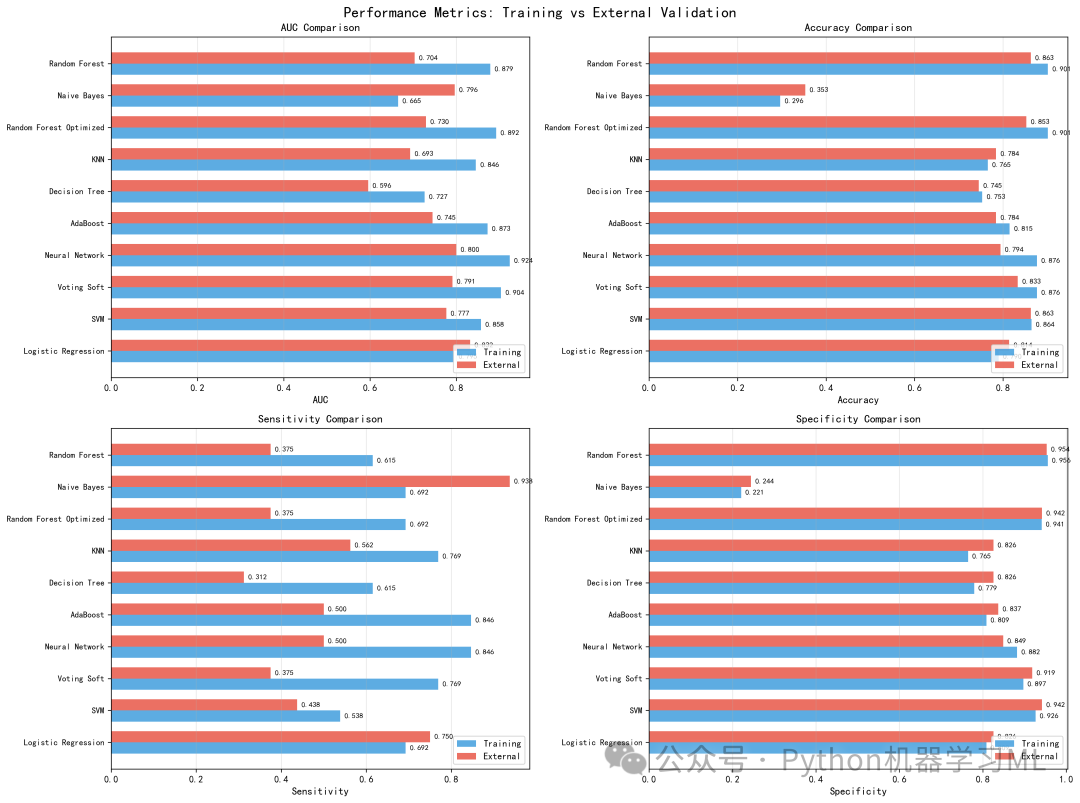
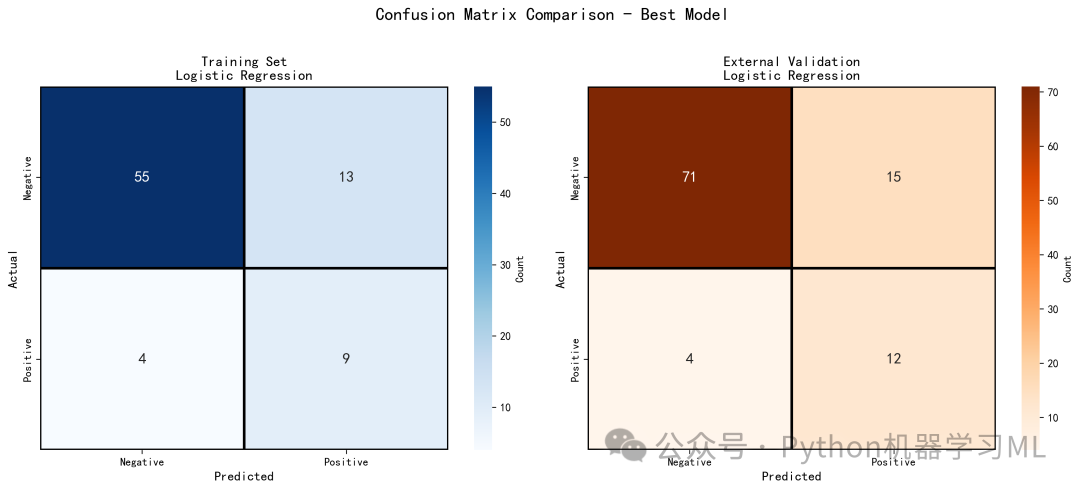
阶段 6: SHAP分析准备与解释器构建
这是进行可解释性分析的基础步骤,负责准备数据并构建合适的解释器。
作用解释:
-
自动择优
函数
prepare_shap_data会自动从之前的评估结果中找到 AUC 最高的最优模型。 -
数据采样
SHAP 计算(特别是 KernelExplainer)非常耗时。为了在合理时间内完成分析,代码默认从测试集中随机抽取 150 个样本进行计算。这在保证代表性的同时大大提高了效率。
-
智能解释器选择
-
-
优先尝试
shap.TreeExplainer:这是针对树模型(XGBoost, LightGBM, Random Forest)的优化解释器,速度极快且精确。 -
自动回退机制:如果模型不支持 TreeExplainer(例如 Stacking 或 Voting 模型),代码会自动捕获异常并切换到通用的
shap.Explainer或shap.KernelExplainer。这种鲁棒性设计确保了无论使用何种模型,分析都能进行下去。
-
-
数据清洗
代码中包含一段针对 XGBoost 模型的特殊清洗逻辑(处理
base_score属性),这是解决特定版本兼容性问题的关键细节。
python
# ==========================================
# SHAP可视化分析模块
# ==========================================

import shap
import lime
import lime.lime_tabular
import matplotlib.pyplot as plt
import matplotlib.gridspec as gridspec
import seaborn as sns
import numpy as np
import pandas as pd
import os
from matplotlib.patches import Patch
from matplotlib.colors import Normalize

# 设置中文字体
plt.rcParams['font.sans-serif'] = ['microsoft YaHei']
plt.rcParams['axes.unicode_minus'] = False


defprepare_shap_data(trained_models, X_train, X_test, y_test, results,
                      feature_names, output_dir='shap_analysis', max_samples=150):
print("\n" + "=" * 70)
print("🔍 SHAP 可解释性分析 - 数据准备")
print("=" * 70)

    os.makedirs(output_dir, exist_ok=True)

    df_results = pd.DataFrame(results).T
    best_model_name = df_results['AUC'].idxmax()
    best_model = trained_models[best_model_name]

print(f"\n✅ 选择最优模型: {best_model_name}")
print(f"   - AUC: {df_results.loc[best_model_name, 'AUC']:.4f}")
print(f"   - F1-Score: {df_results.loc[best_model_name, 'F1-Score']:.4f}")

if X_test.shape[0] > max_samples:
        idx = np.random.choice(X_test.shape[0], max_samples, replace=False)
        X_sample = X_test[idx]
        y_sample = y_test.iloc[idx] ifisinstance(y_test, pd.Series) else y_test[idx]
else:
        X_sample = X_test
        y_sample = y_test

print(f"\n📊 SHAP 计算样本数: {X_sample.shape[0]}")
print("\n🧠 正在创建 SHAP 解释器...")

    shap_values = None
    base_value = None
    explainer = None

try:
# 清洗 XGBoost base_score
ifhasattr(best_model, "get_booster"):
            booster = best_model.get_booster()
            bs = booster.attr("base_score")
ifisinstance(bs, str) and bs.startswith("[") and bs.endswith("]"):
                bs_clean = bs.strip("[] ")
try:
                    booster.set_attr(base_score=str(float(bs_clean)))
except ValueError:
pass

try:
            explainer = shap.TreeExplainer(best_model)
            shap_values_raw = explainer.shap_values(X_sample)
print("   -> 使用 TreeExplainer (适用于树模型)")
            base_value = explainer.expected_value
except Exception:
            masker = shap.maskers.Independent(X_sample)
            explainer = shap.Explainer(lambda x: best_model.predict_proba(x)[:, 1],
                                       masker, feature_names=feature_names)
            explanation = explainer(X_sample)
            shap_values_raw = explanation.values
            base_value = explanation.base_values
print("   -> 回退 shap.Explainer + predict_proba")

# 处理 shap_values_raw
ifisinstance(shap_values_raw, list):
            shap_values = shap_values_raw[1]
elifisinstance(shap_values_raw, np.ndarray):
if shap_values_raw.ndim == 3:
                shap_values = shap_values_raw[:, :, 1]
elif shap_values_raw.ndim == 2:
                shap_values = shap_values_raw
else:
raise ValueError(f"不支持的SHAP值维度: {shap_values_raw.ndim}")
else:
raise ValueError(f"不支持的SHAP值类型: {type(shap_values_raw)}")

# 处理 base_value
ifisinstance(base_value, (list, np.ndarray)):
            base_value = base_value[1] iflen(base_value) > 1else base_value[0]

print(f"✅ SHAP 值计算完成,最终形状: {shap_values.shape}")
print(f"   - 预期形状: ({X_sample.shape[0]}, {len(feature_names)})")
print(f"   - 基准值 (Base Value): {base_value:.4f}")

if shap_values.shape != (X_sample.shape[0], len(feature_names)):
raise ValueError(
f"SHAP值形状不匹配!实际: {shap_values.shape}, 预期: ({X_sample.shape[0]}, {len(feature_names)})"
            )

except Exception as e:
print(f"❌ SHAP 计算失败: {e}")
import traceback
        traceback.print_exc()
returnNone

return {
'best_model': best_model,
'best_model_name': best_model_name,
'explainer': explainer,
'shap_values': shap_values,
'base_value': base_value,
'X_sample': X_sample,
'y_sample': y_sample,
'feature_names': feature_names,
'y_pred_proba': best_model.predict_proba(X_sample)[:, 1]
    }
阶段 7: SHAP全局解释可视化 (条形图与蜂群图)
这一阶段生成最经典、最常用的两张 SHAP 图表,用于从整体上理解模型。
作用解释:
- 特征重要性条形图 (
plot_shap_bar_importance)
-
-
含义
展示每个特征的平均绝对 SHAP 值。
-
解读
条形越长,说明该特征对模型预测结果的平均贡献度越大。这是回答"哪些特征最重要?"的最直接方式。
-
- 蜂群图 (
plot_shap_summary_beeswarm)
-
-
X轴
SHAP 值。正值表示推高预测概率(增加风险),负值表示降低预测概率。
-
颜色
红色代表特征值高,蓝色代表特征值低。
-
例子
如果某特征的红点主要集中在 X 轴右侧,说明该特征数值越高,患病风险越大。
-
含义
结合了特征重要性和特征影响方向的信息密集型图表。
-
解读
-
python
# ==========================================
# 2. SHAP条形图(特征重要性)
# ==========================================

defplot_shap_bar_importance(shap_data, output_dir='shap_analysis'):
"""绘制SHAP特征重要性条形图"""
print("\n📊 1. 生成 SHAP 特征重要性条形图...")

    shap_values = shap_data['shap_values']
    feature_names = shap_data['feature_names']
    X_sample = shap_data['X_sample']

# ⭐ 再次验证形状
print(f"   -> SHAP值形状: {shap_values.shape}")
print(f"   -> X_sample形状: {X_sample.shape}")
print(f"   -> 特征名称数量: {len(feature_names)}")

    plt.figure(figsize=(12, 8))

# 将X_sample转为DataFrame以确保特征名正确
    X_sample_df = pd.DataFrame(X_sample, columns=feature_names)

    shap.summary_plot(
        shap_values,
        X_sample_df,
        plot_type="bar",
        show=False,
        max_display=20
    )

    plt.title(f"SHAP 特征重要性 ({shap_data['best_model_name']})",
              fontsize=16, fontweight='bold', pad=20)
    plt.xlabel("平均绝对 SHAP 值 (对预测结果的影响程度)", fontsize=12)
    plt.tight_layout()

    save_path = f'{output_dir}/01_shap_feature_importance_bar.png'
    plt.savefig(save_path, dpi=300, bbox_inches='tight')
    plt.close()
print(f"   ✅ 已保存: {save_path}")
# ==========================================
# 3. SHAP蜂群图(Summary Plot)
# ==========================================

defplot_shap_summary_beeswarm(shap_data, output_dir='shap_analysis'):
"""绘制SHAP蜂群图"""
print("\n📊 2. 生成 SHAP Summary Plot (蜂群图)...")

    shap_values = shap_data['shap_values']
    feature_names = shap_data['feature_names']
    X_sample = shap_data['X_sample']

    plt.figure(figsize=(12, 10))
    shap.summary_plot(
        shap_values,
        X_sample,
        feature_names=feature_names,
        plot_type="dot",
        max_display=20,
        show=False
    )

    plt.title('SHAP 特征影响分析 (蜂群图)', fontsize=16, fontweight='bold', pad=20)
    plt.xlabel('SHAP value (对模型预测的影响: 右=增加风险, 左=降低风险)', fontsize=12)
    plt.tight_layout()

    save_path = f'{output_dir}/02_shap_summary_beeswarm.png'
    plt.savefig(save_path, dpi=300, bbox_inches='tight')
    plt.close()
print(f"   ✅ 已保存: {save_path}")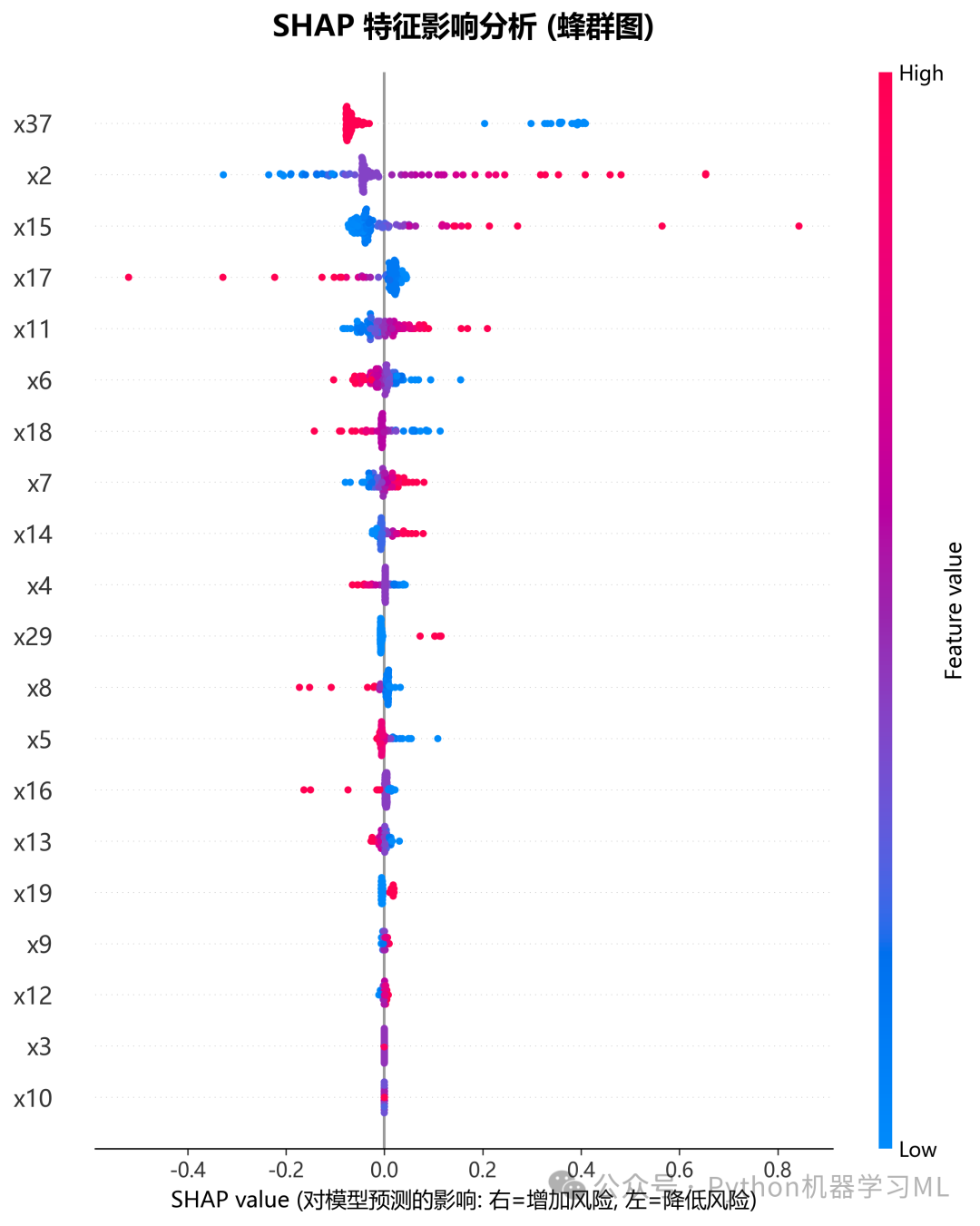
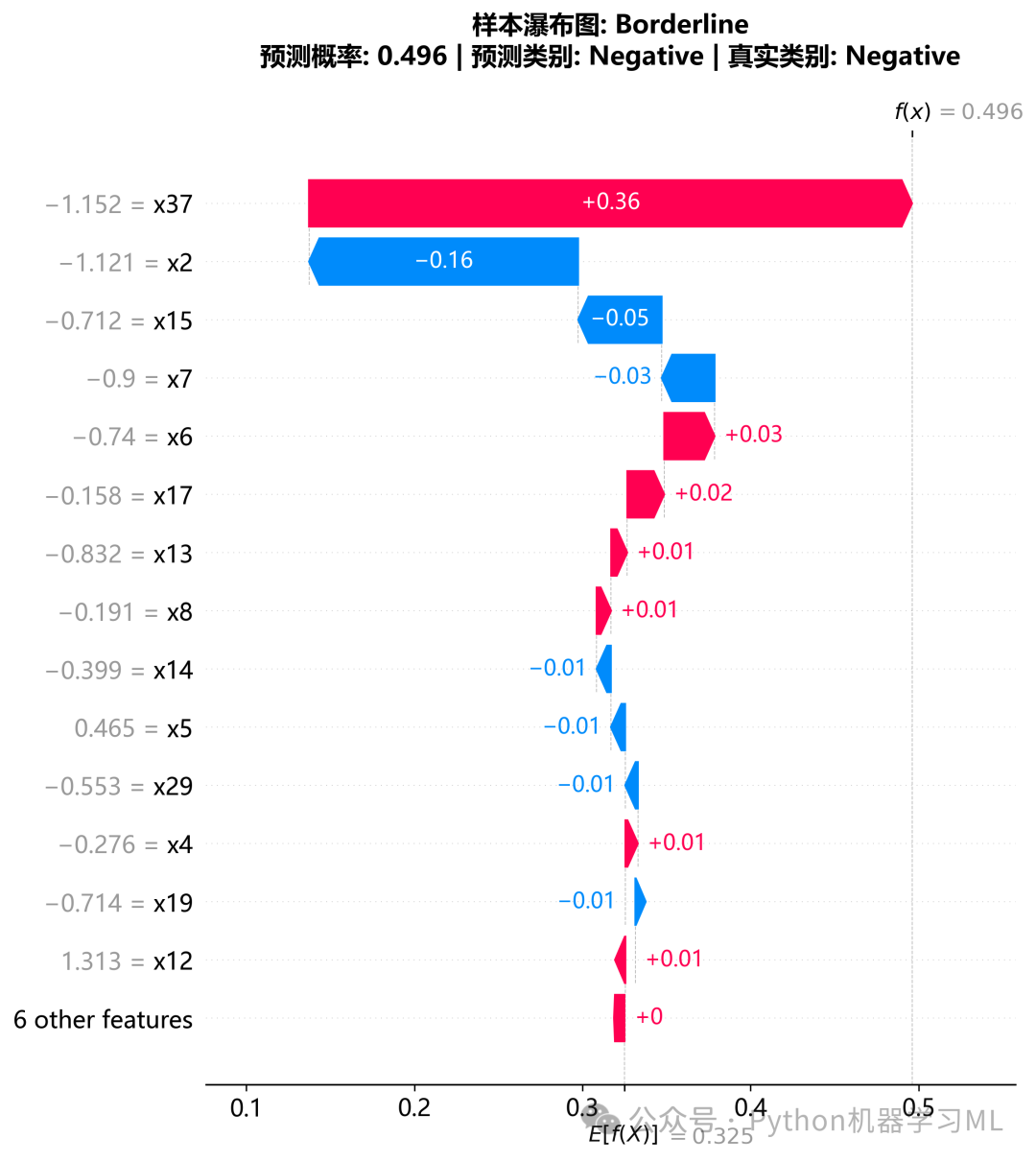
阶段 8: SHAP统计报告与深度数据分析
除了图表,量化的统计数据同样重要。
作用解释:
- 统计指标计算
-
-
Mean_|SHAP|
平均重要性。
-
Std_SHAP
影响力的波动性(标准差)。标准差大说明该特征对某些样本影响极大,对另一些影响极小。
-
Max/Min
极端情况下的最大/最小影响值。
-
-
报告生成
将这些统计数据整理成 DataFrame 并保存为 CSV 文件。这对于撰写论文中的结果描述部分非常有用,可以直接引用具体的数值。
python
# ==========================================
# 4. SHAP统计报告
# ==========================================

defgenerate_shap_statistics(shap_data, output_dir='shap_analysis'):
"""生成SHAP统计报告"""
print("\n📊 3. 生成 SHAP 统计分析报告...")

    shap_values = shap_data['shap_values']
    feature_names = shap_data['feature_names']

# 计算统计指标
    shap_stats_df = pd.DataFrame({
'Feature': feature_names,
'Mean_|SHAP|': np.abs(shap_values).mean(0),
'Std_SHAP': shap_values.std(0),
'Max_|SHAP|': np.abs(shap_values).max(0),
'Min_|SHAP|': np.abs(shap_values).min(0)
    }).sort_values('Mean_|SHAP|', ascending=False)

# 保存CSV
    stats_csv_path = f'{output_dir}/shap_statistics_report.csv'
    shap_stats_df.to_csv(stats_csv_path, index=False, encoding='utf-8-sig')

print(f"   ✅ 已保存: {stats_csv_path}")
print("\n📋 Top 15 特征统计详情:")
print(shap_stats_df.head(15).to_string(index=False))

return shap_stats_df
阶段 9: 典型样本局部解释 (瀑布图与力图)
从全局统计转向个体诊断,这是精准医疗和个性化推荐的核心。
作用解释:
-
样本筛选
代码智能地挑选了几类具有代表性的样本:
-
高风险/低风险样本
展示模型做出极端判断的依据。
-
边界样本 (Borderline)
预测概率接近 0.5 的样本,这展示了模型在"犹豫不决"时各特征是如何相互博弈的。
-
-
瀑布图 (
plot_shap_waterfall_samples)
-
- 清晰地展示了从基准值(平均风险)出发,每个特征是如何一步步推高(红色)或拉低(蓝色)风险,最终到达该样本的预测值的。
-
静态 Force Plot (
plot_shap_force_plots)类似于瀑布图,但以横向条形的方式展示"推力"和"拉力"的平衡。适合在空间有限的报告中展示单个样本的解释。
python
# ==========================================
# 5. SHAP瀑布图(典型样本)
# ==========================================

defplot_shap_waterfall_samples(shap_data, output_dir='shap_analysis', n_samples=5):
"""绘制典型样本的瀑布图"""
print(f"\n📊 4. 生成 SHAP 瀑布图 (典型 {n_samples} 样本)...")

    shap_values = shap_data['shap_values']
    base_value = shap_data['base_value']
    X_sample = shap_data['X_sample']
    feature_names = shap_data['feature_names']
    y_pred_proba = shap_data['y_pred_proba']
    y_sample = shap_data['y_sample']

# 构建Explanation对象
    shap_exp = shap.Explanation(
        values=shap_values,
        base_values=base_value,
        data=X_sample,
        feature_names=feature_names
    )

# 选择典型样本
    sample_indices = []

# 1. 高风险样本
    high_risk_idx = np.argmax(y_pred_proba)
    sample_indices.append((high_risk_idx, 'Highest_Risk'))

# 2. 低风险样本
    low_risk_idx = np.argmin(y_pred_proba)
    sample_indices.append((low_risk_idx, 'Lowest_Risk'))

# 3. 边界样本
    borderline_idx = np.argmin(np.abs(y_pred_proba - 0.5))
    sample_indices.append((borderline_idx, 'Borderline'))

# 4. 随机样本
    random_indices = np.random.choice(len(X_sample), min(n_samples - 3, len(X_sample)), replace=False)
for i, idx inenumerate(random_indices):
        sample_indices.append((idx, f'Random_{i+1}'))

# 绘制瀑布图
for sample_idx, label in sample_indices[:n_samples]:
        plt.figure(figsize=(10, 8))

        shap.plots.waterfall(
            shap_exp[sample_idx],
            max_display=15,
            show=False
        )

        pred_prob = y_pred_proba[sample_idx]
        actual_label = 'Positive'if y_sample.iloc[sample_idx] == 1else'Negative'ifisinstance(y_sample, pd.Series) else'Unknown'
        pred_label = 'Positive'if pred_prob > 0.5else'Negative'

        plt.title(
f'样本瀑布图: {label}\n'
f'预测概率: {pred_prob:.3f} | 预测类别: {pred_label} | 真实类别: {actual_label}',
            fontsize=14, fontweight='bold', pad=20
        )
        plt.tight_layout()

        save_path = f'{output_dir}/03_shap_waterfall_{label}.png'
        plt.savefig(save_path, dpi=300, bbox_inches='tight')
        plt.close()
print(f"   ✅ 已保存: {save_path}")


# ==========================================
# 6. SHAP依赖图(Top特征)
# ==========================================

defplot_shap_dependence(shap_data, output_dir='shap_analysis', top_n=4):
"""绘制SHAP依赖图"""
print(f"\n📊 5. 生成 SHAP 依赖图 (Top {top_n} 特征)...")

    shap_values = shap_data['shap_values']
    X_sample = shap_data['X_sample']
    feature_names = shap_data['feature_names']

# 计算特征重要性
    shap_importance = np.abs(shap_values).mean(0)
    top_features_idx = np.argsort(shap_importance)[::-1][:top_n]

    fig, axes = plt.subplots(2, 2, figsize=(16, 12))
    axes = axes.flatten()

for i, feat_idx inenumerate(top_features_idx):
        feature_name = feature_names[feat_idx]

        plt.sca(axes[i])
        shap.dependence_plot(
            feat_idx,
            shap_values,
            X_sample,
            feature_names=feature_names,
            ax=axes[i],
            show=False,
            interaction_index='auto',
            alpha=0.8
        )
        axes[i].set_title(f'{feature_name} 的依赖图', fontsize=12, fontweight='bold')
        axes[i].set_ylabel('SHAP value', fontsize=11)
        axes[i].grid(True, alpha=0.3)

    plt.suptitle(f'Top {top_n} 特征的 SHAP 依赖图分析', fontsize=16, fontweight='bold', y=1.00)
    plt.tight_layout()

    save_path = f'{output_dir}/04_shap_dependence_top{top_n}.png'
    plt.savefig(save_path, dpi=300, bbox_inches='tight')
    plt.close()
print(f"   ✅ 已保存: {save_path}")


# ==========================================
# 7. SHAP Force Plot(静态多样本)
# ==========================================

defplot_shap_force_plots(shap_data, output_dir='shap_analysis', n_samples=3):
"""绘制Force Plot(静态图片)"""
print(f"\n📊 6. 生成静态 Force Plot ({n_samples} 样本)...")

    shap_values = shap_data['shap_values']
    base_value = shap_data['base_value']
    X_sample = shap_data['X_sample']
    feature_names = shap_data['feature_names']
    y_pred_proba = shap_data['y_pred_proba']

# 保留2位小数
    shap_values_rounded = np.round(shap_values, 2)
    X_values_rounded = np.round(X_sample, 2)

# 随机选择样本
    plot_indices = np.random.choice(len(X_sample), min(n_samples, len(X_sample)), replace=False)

for idx in plot_indices:
        plt.figure(figsize=(20, 5))

        shap.force_plot(
            base_value,
            shap_values_rounded[idx],
            X_values_rounded[idx],
            feature_names=feature_names,
            matplotlib=True,
            show=False,
            text_rotation=15
        )

        current_prob = y_pred_proba[idx]
        plt.title(f'Force Plot (Sample {idx}, 预测概率={current_prob:.3f})',
                  fontsize=14, fontweight='bold', y=1.7)

        save_path = f'{output_dir}/05_shap_force_plot_sample_{idx}.png'
        plt.savefig(save_path, dpi=300, bbox_inches='tight', pad_inches=0.5)
        plt.close()
print(f"   ✅ 已保存: {save_path}")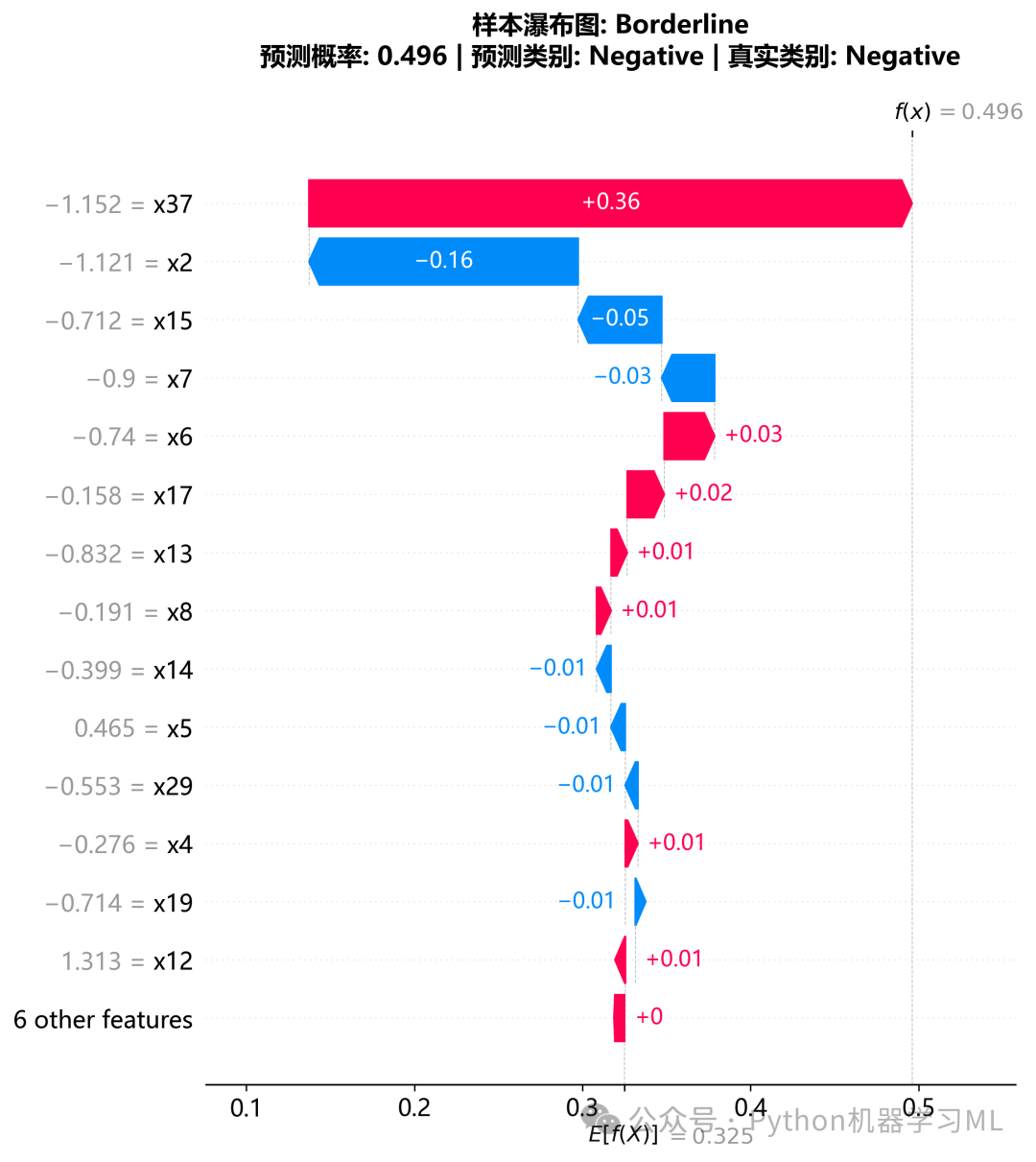
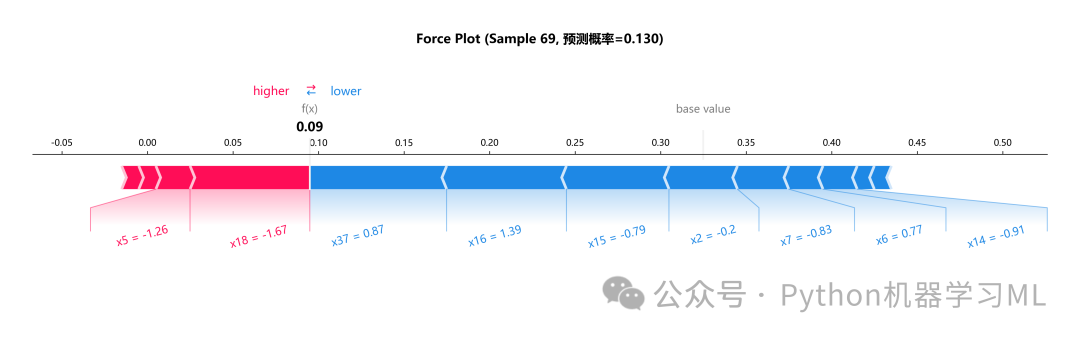
阶段 10: 特征关系分析 (依赖图与决策图)
这一阶段用于发现特征之间的非线性关系和交互效应。
作用解释:
- SHAP依赖图 (
plot_shap_dependence)
-
-
X轴:特征值。
-
Y轴: SHAP值。
-
用途
揭示特征与预测结果的非线性关系(例如:风险随年龄先上升后平稳)。
-
颜色
自动寻找与之交互最强的特征进行着色。如果看到明显的颜色垂直分层,说明存在强烈的特征交互。
-
- SHAP决策路径图 (
plot_shap_decision)
-
-
含义
展示了多个样本的预测是如何从基准值开始,随着特征的累加而逐渐偏离的。
-
用途
观察整体的决策模式,识别异常样本(偏离主流路径的线条)。
-
python
# ==========================================
# 8. SHAP Decision Plot(决策路径)
# ==========================================

defplot_shap_decision(shap_data, output_dir='shap_analysis', n_samples=100):
"""绘制SHAP决策路径图"""
print(f"\n📊 7. 生成 SHAP 决策路径图 ({n_samples} 样本)...")

    shap_values = shap_data['shap_values']
    base_value = shap_data['base_value']
    X_sample = shap_data['X_sample']
    feature_names = shap_data['feature_names']

    n_decision_samples = min(n_samples, len(X_sample))
    decision_indices = np.random.choice(len(X_sample), n_decision_samples, replace=False)

    plt.figure(figsize=(12, 8))

# 将X_sample转为DataFrame以显示特征名
    X_sample_df = pd.DataFrame(X_sample, columns=feature_names)

    shap.decision_plot(
        base_value,
        shap_values[decision_indices],
        X_sample_df.iloc[decision_indices],
        feature_names=feature_names,
        show=False,
        link='logit'
    )

    plt.title(f'SHAP 决策路径分析 (随机 {n_decision_samples} 个样本)',
              fontsize=14, fontweight='bold', pad=20)
    plt.tight_layout()

    save_path = f'{output_dir}/06_shap_decision_plot.png'
    plt.savefig(save_path, dpi=300, bbox_inches='tight')
    plt.close()
print(f"   ✅ 已保存: {save_path}")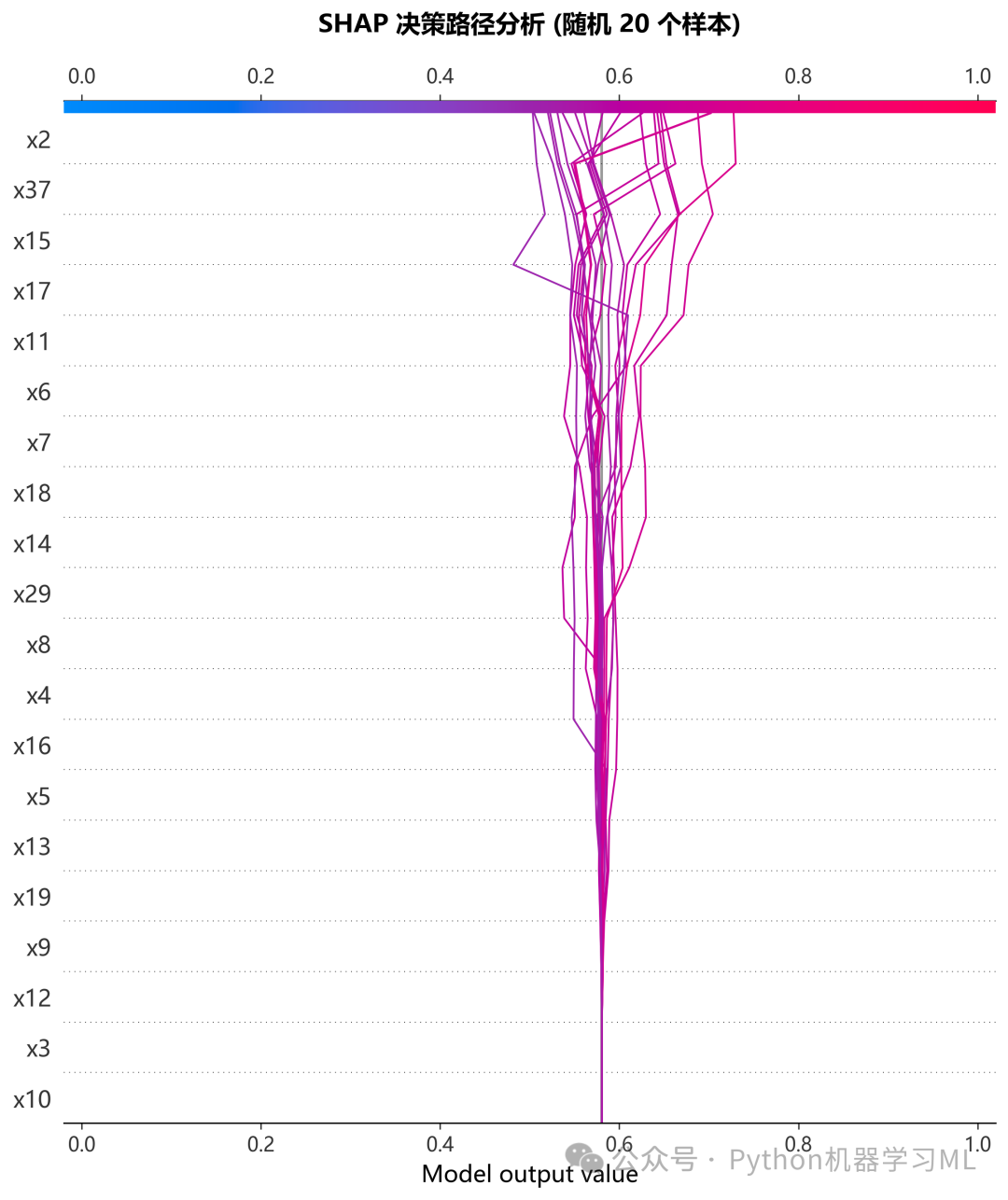
阶段 11: SHAP高级综合看板与热力图
这是一个高度定制化、信息密度极高的可视化阶段。
作用解释:
- SHAP热力图 (
plot_shap_heatmap)
-
-
将样本(X轴)按预测风险排序。通过颜色的变化(红/蓝),可以直观地看到高风险群体主要受到哪些特征的驱动。
-
顶部添加了真实类别的标记,方便对比预测风险与真实结果的一致性。
-
-
SHAP综合看板 (
plot_shap_comprehensive_dashboard
-
-
这是一个组合图,将蜂群图(左侧)和最重要的6个特征的依赖图(右侧)拼合在一起。
-
这种设计非常适合在PPT或论文中作为一张"全景图"展示,一张图就能说明哪些特征重要、它们如何影响预测、以及存在哪些非线性关系。
-
python
# ==========================================
# 9. SHAP热力图
# ==========================================

defplot_shap_heatmap(shap_data, output_dir='shap_analysis'):
"""绘制SHAP值热力图"""
print("\n📊 8. 生成 SHAP 值热力图...")

    shap_values = shap_data['shap_values']
    X_sample = shap_data['X_sample']
    feature_names = shap_data['feature_names']
    y_sample = shap_data['y_sample']

# 计算特征重要性
    shap_importance = np.abs(shap_values).mean(0)
    top_features_idx = np.argsort(shap_importance)[::-1][:15]

# 按SHAP总和排序样本
    shap_sum = shap_values.sum(1)
    sorted_indices = np.argsort(shap_sum)

# 选择前50个样本
    n_samples_heatmap = min(50, len(sorted_indices))
    selected_indices = sorted_indices[-n_samples_heatmap:]

    plt.figure(figsize=(15, 10))

# 准备热力图数据
    shap_heatmap_data = shap_values[selected_indices][:, top_features_idx].T

# 绘制热力图
    sns.heatmap(shap_heatmap_data,
                yticklabels=[feature_names[i] for i in top_features_idx],
                xticklabels=[],
                cmap='RdBu_r',
                center=0,
                cbar_kws={'label': 'SHAP Value'})

# 添加底部样本类别标记
    y_sample_array = y_sample.values ifisinstance(y_sample, pd.Series) else y_sample
    actual_labels_heatmap = y_sample_array[selected_indices]

for i, label inenumerate(actual_labels_heatmap):
        color = 'red'if label == 1else'blue'
        plt.axvline(x=i + 0.5, color=color, alpha=0.6, linewidth=3, ymin=0, ymax=0.02)

    plt.xlabel('样本 (按 SHAP 总和排序)', fontsize=12)
    plt.ylabel('特征 (按重要性排序)', fontsize=12)
    plt.title('SHAP 值热力图 (红色=增加风险, 蓝色=降低风险)',
              fontsize=16, fontweight='bold', pad=20)

# 添加图例
    legend_elements = [
        Patch(facecolor='red', alpha=0.5, label='真实标签: 阳性'),
        Patch(facecolor='blue', alpha=0.5, label='真实标签: 阴性')
    ]
    plt.legend(handles=legend_elements, loc='upper right')

    plt.tight_layout()

    save_path = f'{output_dir}/07_shap_heatmap.png'
    plt.savefig(save_path, dpi=300, bbox_inches='tight')
    plt.close()
print(f"   ✅ 已保存: {save_path}")


# ==========================================
# 10. SHAP综合看板
# ==========================================

defplot_shap_comprehensive_dashboard(shap_data, output_dir='shap_analysis'):
"""绘制SHAP综合可视化看板"""
print("\n📊 9. 生成 SHAP 综合看板...")

    shap_values = shap_data['shap_values']
    X_sample = shap_data['X_sample']
    feature_names = shap_data['feature_names']
    y_sample = shap_data['y_sample']

# 计算特征重要性
    shap_importance = np.abs(shap_values).mean(0)
    importance_ranking = np.argsort(shap_importance)[::-1]

# 创建大画布
    fig = plt.figure(figsize=(24, 16))
    gs = gridspec.GridSpec(3, 4, figure=fig, wspace=0.4, hspace=0.4)

# --- 左侧: Summary Plot (3行 x 2列) ---
    ax_main = fig.add_subplot(gs[:, :2])

# 准备数据
    top_20_idx = importance_ranking[:20]
    top_20_names = [feature_names[i] for i in top_20_idx]
    top_20_importance = shap_importance[top_20_idx]

# 设置Y轴
    ax_main.set_yticks(range(20))
    ax_main.set_yticklabels(top_20_names[::-1], fontsize=10)

# 顶部添加平均重要性条形图
    ax_top = ax_main.twiny()
    ax_top.barh(range(20), top_20_importance[::-1],
                color="lightgray", alpha=0.5, height=0.7)
    ax_top.set_xlabel("平均 |SHAP 值|", fontsize=12, fontweight='bold')

# 绘制蜂群散点图
    cmap_summary = plt.get_cmap("viridis")
    scatter_plots = []

for i, feat_idx inenumerate(top_20_idx[::-1]):
        shap_vals_feat = shap_values[:, feat_idx]
        feature_vals_feat = X_sample[:, feat_idx]

        y_jitter = np.random.normal(0, 0.08, len(shap_vals_feat))

        sc = ax_main.scatter(shap_vals_feat, i + y_jitter,
                             c=feature_vals_feat, cmap=cmap_summary,
                             s=20, alpha=0.8, edgecolor='none')
if i == 0:
            scatter_plots.append(sc)

    ax_main.set_xlabel("SHAP 值 (对预测结果的影响)", fontsize=12, fontweight='bold')
    ax_main.grid(True, axis='x', linestyle='--', alpha=0.4)
    ax_main.set_title('全局特征重要性与分布 (Summary Plot)', fontsize=14, fontweight='bold')

# 添加颜色条
    cax_summary = fig.add_axes([0.15, 0.08, 0.25, 0.015])
    cbar_summary = fig.colorbar(scatter_plots[0], cax=cax_summary, orientation='horizontal')
    cbar_summary.set_label('特征值 (颜色: 低 -> 高)', fontsize=10)

# --- 右侧: Dependence Plots (3行 x 2列) ---
    top_6_features_idx = importance_ranking[:6]
    axes_scatter = []

for i inrange(3):
for j inrange(2):
            axes_scatter.append(fig.add_subplot(gs[i, j + 2]))

    y_sample_array = y_sample.values ifisinstance(y_sample, pd.Series) else y_sample

for i, feat_idx inenumerate(top_6_features_idx):
        ax = axes_scatter[i]
        feature_name = feature_names[feat_idx]

        x_data = X_sample[:, feat_idx]
        y_data = shap_values[:, feat_idx]

        scatter = ax.scatter(x_data, y_data, c=y_sample_array,
                             cmap='coolwarm', s=40, alpha=0.7,
                             edgecolor='k', linewidth=0.3)

# 添加趋势线
iflen(x_data) > 1:
try:
                z = np.polyfit(x_data, y_data, 1)
                p = np.poly1d(z)
                x_line = np.linspace(x_data.min(), x_data.max(), 100)
                ax.plot(x_line, p(x_line), 'k--', linewidth=1.5, alpha=0.8)

                corr = np.corrcoef(x_data, y_data)[0, 1]
                ax.text(0.05, 0.95, f'r = {corr:.2f}', transform=ax.transAxes,
                        fontsize=10, verticalalignment='top',
                        bbox=dict(boxstyle='round', facecolor='white', alpha=0.8))
except:
pass

        ax.set_xlabel(feature_name, fontsize=11)
        ax.set_ylabel('SHAP Value', fontsize=10)
        ax.grid(True, alpha=0.3)
        ax.set_title(f'Top {i+1}: {feature_name}', fontsize=11, fontweight='bold')

# 添加右侧颜色条
    cax_dep = fig.add_axes([0.92, 0.4, 0.01, 0.2])
    cbar_dep = fig.colorbar(scatter, cax=cax_dep)
    cbar_dep.set_label('真实标签 (蓝=阴性, 红=阳性)', fontsize=10)
    cbar_dep.set_ticks([0, 1])

# 总标题
    plt.suptitle(f'SHAP 综合分析看板: {shap_data["best_model_name"]}',
                 fontsize=20, y=0.96, fontweight='bold')

    save_path = f'{output_dir}/08_shap_comprehensive_dashboard.png'
    plt.savefig(save_path, dpi=300, bbox_inches='tight')
    plt.close()
print(f"   ✅ 已保存: {save_path}")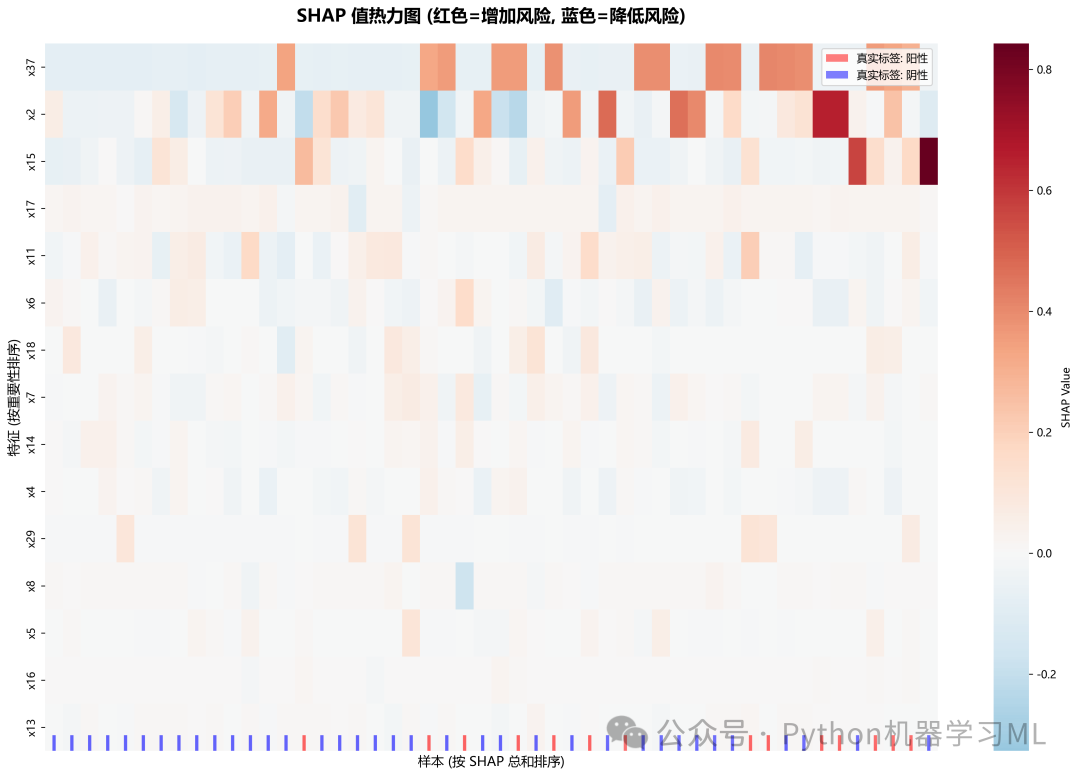
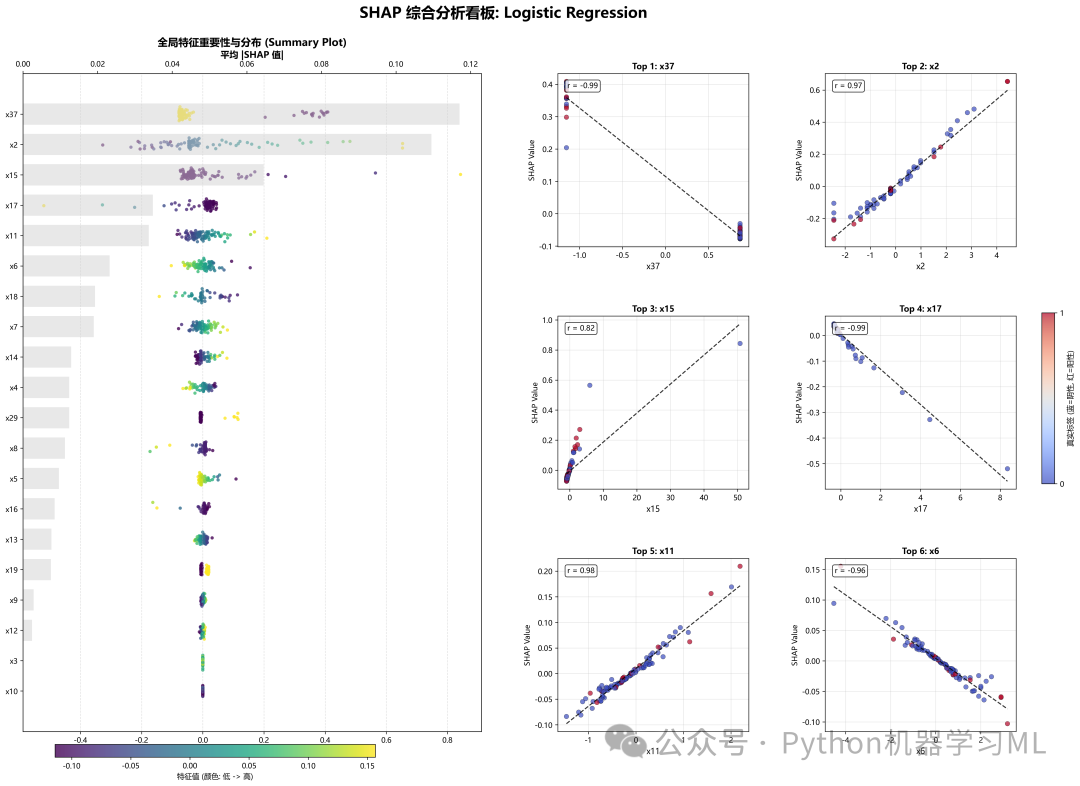
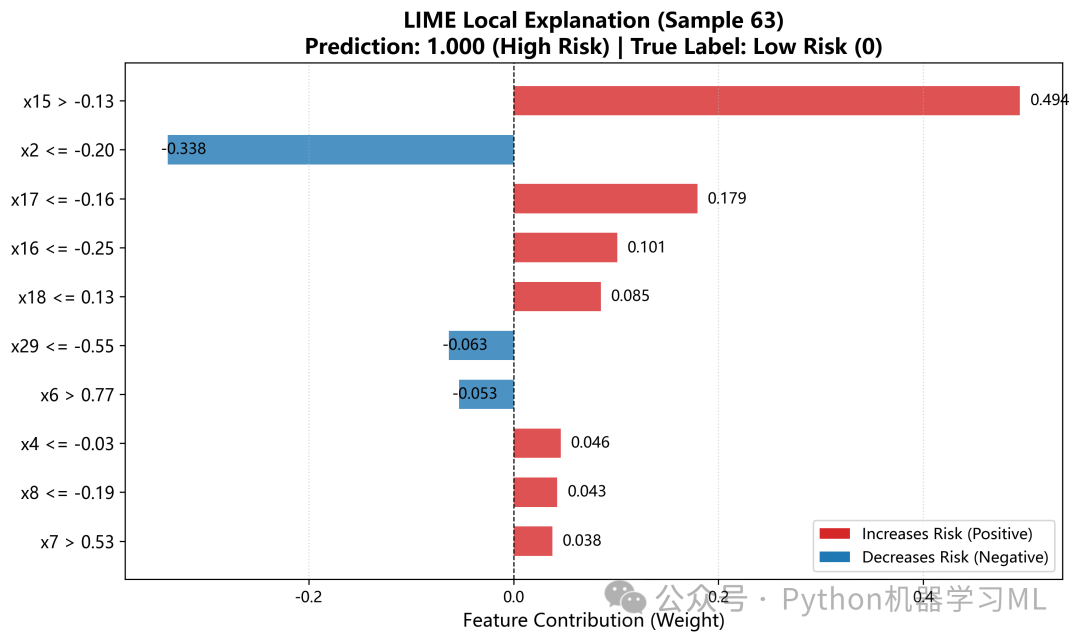
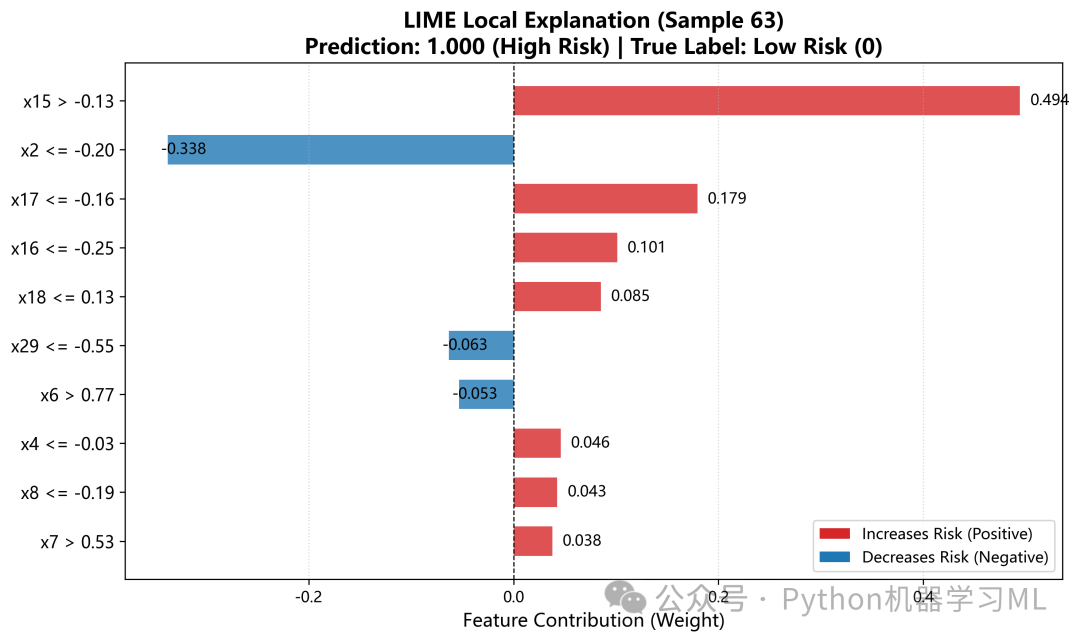
阶段 12: LIME解释与SHAP对比验证
引入第二种解释工具 LIME (Local Interpretable Model-agnostic Explanations) 来交叉验证 SHAP 的结果。
作用解释:
-
LIME 原理
它通过在一个样本周围生成微扰动数据,并训练一个简单的线性模型来拟合这些数据,从而解释局部行为。
-
LIME条形图
展示 LIME 认为对该样本最重要的特征及其权重。
-
LIME vs SHAP 对比图
将同一高风险样本在 LIME 和 SHAP 下的特征贡献度画在同一张图上。这是增加论文说服力的关键图表。如果两种截然不同的算法得出了相似的结论(相关系数高),说明我们对模型决策机制的理解是非常可靠的。
python
# ==========================================
# 11. LIME对比分析(可选)
# ==========================================

defplot_lime_analysis(shap_data, X_train, output_dir='shap_analysis'):
"""LIME局部解释性分析(与SHAP对比)"""
print("\n📊 10. 生成 LIME 分析...")

    best_model = shap_data['best_model']
    X_sample = shap_data['X_sample']
    y_sample = shap_data['y_sample']
    feature_names = shap_data['feature_names']
    y_pred_proba = shap_data['y_pred_proba']
    shap_values = shap_data['shap_values']

# 初始化LIME Explainer
    X_train_sample = X_train[np.random.choice(X_train.shape[0], min(5000, X_train.shape[0]), replace=False)]

    explainer_lime = lime.lime_tabular.LimeTabularExplainer(
        training_data=X_train_sample,
        feature_names=feature_names,
        class_names=['Low Risk', 'High Risk'],
        mode='classification',
        discretize_continuous=True,
        random_state=42
    )

# 选择高风险样本
    high_risk_idx = np.argmax(y_pred_proba)
    sample_instance = X_sample[high_risk_idx]
    sample_prob = y_pred_proba[high_risk_idx]

# LIME解释
    exp_lime = explainer_lime.explain_instance(
        sample_instance,
        best_model.predict_proba,
        num_features=10
    )

# 绘制LIME图
    exp_list = exp_lime.as_list()
    features = [x[0] for x in exp_list]
    weights = [x[1] for x in exp_list]
    colors = ['#d62728'if w > 0else'#1f77b4'for w in weights]

    plt.figure(figsize=(10, 6))
    bars = plt.barh(range(len(weights)), weights, color=colors, alpha=0.8, height=0.6)

    plt.yticks(range(len(features)), features, fontsize=11)
    plt.gca().invert_yaxis()

for bar in bars:
        width = bar.get_width()
        label_x_pos = width + (max(weights) * 0.02if width > 0elsemin(weights) * 0.02)
        plt.text(label_x_pos, bar.get_y() + bar.get_height() / 2,
f'{width:.3f}', va='center', fontsize=10)

    y_sample_array = y_sample.values ifisinstance(y_sample, pd.Series) else y_sample
    true_label = y_sample_array[high_risk_idx]
    label_str = "High Risk (1)"if true_label == 1else"Low Risk (0)"
    pred_class = "High Risk"if sample_prob >= 0.5else"Low Risk"

    plt.title(f'LIME Local Explanation (Sample {high_risk_idx})\n'
f'Prediction: {sample_prob:.3f} ({pred_class}) | True Label: {label_str}',
              fontsize=14, fontweight='bold')
    plt.xlabel('Feature Contribution (Weight)', fontsize=12)
    plt.axvline(0, color='black', linewidth=0.8, linestyle='--')
    plt.grid(axis='x', linestyle=':', alpha=0.5)

    legend_elements = [
        Patch(facecolor='#d62728', label='Increases Risk (Positive)'),
        Patch(facecolor='#1f77b4', label='Decreases Risk (Negative)')
    ]
    plt.legend(handles=legend_elements, loc='lower right')

    plt.tight_layout()
    save_path = f'{output_dir}/09_lime_high_risk_sample.png'
    plt.savefig(save_path, dpi=300, bbox_inches='tight')
    plt.close()
print(f"   ✅ 已保存: {save_path}")

# LIME vs SHAP对比
    shap_vals_sample = shap_values[high_risk_idx]
    comparison_data = []

for lime_feat_name, lime_weight in exp_list:
for raw_feat in feature_names:
if raw_feat in lime_feat_name:
                feat_idx = feature_names.index(raw_feat)
                shap_val = shap_vals_sample[feat_idx]
                comparison_data.append({
'Feature': raw_feat,
'LIME_Weight': lime_weight,
'SHAP_Value': shap_val
                })
break

if comparison_data:
        comp_df = pd.DataFrame(comparison_data)

        fig, ax = plt.subplots(figsize=(12, 7))
        y_pos = np.arange(len(comp_df))
        height = 0.35

        ax.barh(y_pos + height/2, comp_df['LIME_Weight'], height,
                label='LIME Weight', color='#2ca02c', alpha=0.8)
        ax.barh(y_pos - height/2, comp_df['SHAP_Value'], height,
                label='SHAP Value', color='#ff7f0e', alpha=0.8)

        ax.set_yticks(y_pos)
        ax.set_yticklabels(comp_df['Feature'], fontsize=10)
        ax.invert_yaxis()

        ax.set_xlabel('Contribution Value', fontsize=12)
        ax.set_title(f'LIME vs SHAP Comparison (Sample {high_risk_idx})',
                     fontsize=14, fontweight='bold')
        ax.axvline(0, color='black', linestyle='--', linewidth=0.8)
        ax.legend()

        correlation = comp_df['LIME_Weight'].corr(comp_df['SHAP_Value'])
        plt.figtext(0.15, 0.02, f"Correlation: r = {correlation:.2f}",
                    fontsize=10, bbox=dict(facecolor='white', alpha=0.8))

        plt.tight_layout()
        save_path = f'{output_dir}/10_lime_vs_shap_comparison.png'
        plt.savefig(save_path, dpi=300, bbox_inches='tight')
        plt.close()
print(f"   ✅ 已保存: {save_path}")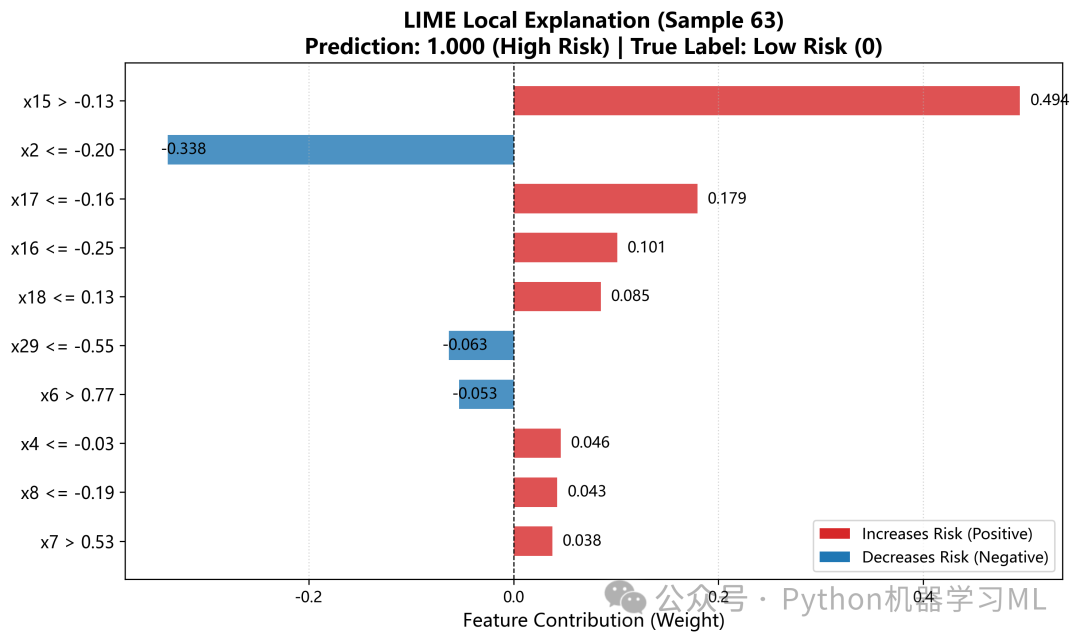
阶段13: 交互式可视化与主流程执行
最后,生成一个交互式的 HTML 文件,并封装主函数执行整个流程。
作用解释:
-
交互式HTML
plot_shap_force_interactive_html生成一个force_plot.html。这允许用户在本地浏览器中动态地探索模型对数千个样本的预测,是演示和汇报的神器。 -
主函数
run_complete_shap_analysis这是一个高层封装函数。它按顺序调用前面定义的所有绘图和分析函数,并处理可能的异常。
-
最终调用
使用之前步骤中准备好的
X_external(外部验证集)作为输入。这意味着我们不仅是在解释模型,更是在解释模型在新数据上的行为,这对于验证模型的泛化能力和可靠性具有决定性意义。
python
# ==========================================
# 11:生成交互式SHAP Force Plot (HTML)
# ==========================================

defplot_shap_force_interactive_html(shap_data, output_dir='shap_analysis'):
"""
    生成交互式SHAP Force Plot (HTML格式)
    这种图将所有样本堆叠起来,可以在浏览器中交互查看
    """
print("\n📊 11. 生成交互式 SHAP Force Plot (HTML)...")

    shap_values = shap_data['shap_values']
    base_value = shap_data['base_value']
    X_sample = shap_data['X_sample']
    feature_names = shap_data['feature_names']

try:
# 将X_sample转为DataFrame以显示特征名
        X_sample_df = pd.DataFrame(X_sample, columns=feature_names)

# 生成交互式对象 (注意:不加 matplotlib=True)
# 这种图将所有样本堆叠起来,横轴是样本(可以按相似度聚类),纵轴是SHAP值
        interactive_plot = shap.force_plot(
            base_value,
            shap_values,
            X_sample_df,
            feature_names=feature_names
        )

# 保存为HTML文件
        html_path = f'{output_dir}/11_shap_force_plot_interactive.html'
        shap.save_html(html_path, interactive_plot)

print(f"✅ 交互式 HTML 已保存: {html_path}")
print("   -> 请在浏览器中打开此文件,体验动态交互功能")
print("   -> 功能包括: 按特征排序、查看样本聚类、悬停查看详情等")

except Exception as e:
print(f"⚠️ 保存交互式 HTML 失败 (可能是依赖包问题): {e}")
print("   -> 建议: 确保已安装最新版本的 shap 库")
print("   -> 可以尝试: pip install --upgrade shap")

# ==========================================
# 主函数:执行完整SHAP分析流程
# ==========================================

defrun_complete_shap_analysis(trained_models, X_train, X_test, y_test,
                               results, feature_names, output_dir='shap_analysis'):
"""
    执行完整的SHAP可解释性分析流程

    参数:
        trained_models: 训练好的模型字典
        X_train: 训练集
        X_test: 测试集
        y_test: 测试标签
        results: 模型结果字典
        feature_names: 特征名称列表
        output_dir: 输出目录
    """
print("\n" + "=" * 70)
print("🔍 开始完整SHAP可解释性分析")
print("=" * 70)

# 1. 准备SHAP数据
    shap_data = prepare_shap_data(
        trained_models, X_train, X_test, y_test,
        results, feature_names, output_dir, max_samples=150
    )

if shap_data isNone:
print("❌ SHAP数据准备失败,终止分析")
return

# 2. 生成各类可视化
    plot_shap_bar_importance(shap_data, output_dir)
    plot_shap_summary_beeswarm(shap_data, output_dir)
    shap_stats_df = generate_shap_statistics(shap_data, output_dir)
    plot_shap_waterfall_samples(shap_data, output_dir, n_samples=5)
    plot_shap_dependence(shap_data, output_dir, top_n=4)
    plot_shap_force_plots(shap_data, output_dir, n_samples=3)
    plot_shap_decision(shap_data, output_dir, n_samples=20)
    plot_shap_heatmap(shap_data, output_dir)
    plot_shap_comprehensive_dashboard(shap_data, output_dir)
    plot_shap_force_interactive_html(shap_data, output_dir)

# 3. LIME对比分析(可选)
try:
        plot_lime_analysis(shap_data, X_train, output_dir)
except Exception as e:
print(f"⚠️ LIME分析失败(可跳过): {e}")

print("\n" + "=" * 70)
print("🎉 所有SHAP分析完成!")
print("=" * 70)
print(f"\n📁 结果保存在目录: {output_dir}/")
print("\n生成的图表:")
print("  01. SHAP特征重要性条形图")
print("  02. SHAP蜂群图(Summary Plot)")
print("  03. SHAP瀑布图(典型样本)")
print("  04. SHAP依赖图(Top特征)")
print("  05. SHAP Force Plot(静态)")
print("  06. SHAP决策路径图")
print("  07. SHAP热力图")
print("  08. SHAP综合看板")
print("  09. LIME局部解释")
print("  10. LIME vs SHAP对比")
print("  11. 交互式SHAP Force Plot (HTML)")
print("  + shap_statistics_report.csv(统计数据)")


# ==========================================
# 在主流程末尾调用
# ==========================================
# 执行完整SHAP分析
# python
# 确保 SHAP 分析可运行的变量映射
all_trained = models_dict
X_train_scaled = X_external
X_test_scaled = X_external
y_test = y_external
all_results = results

run_complete_shap_analysis(
    all_trained,        # 所有训练好的模型
    X_train_scaled,     # 训练集(此处复用外部验证集)
    X_test_scaled,      # 测试集(此处复用外部验证集)
    y_test,             # 测试标签
    all_results,        # 所有结果字典
    feature_names,      # 特征名称列表
    output_dir='shap_analysis'# 输出目录
)

print("\n" + "=" * 70)
print("所有分析和可视化已完成!")
print("=" * 70)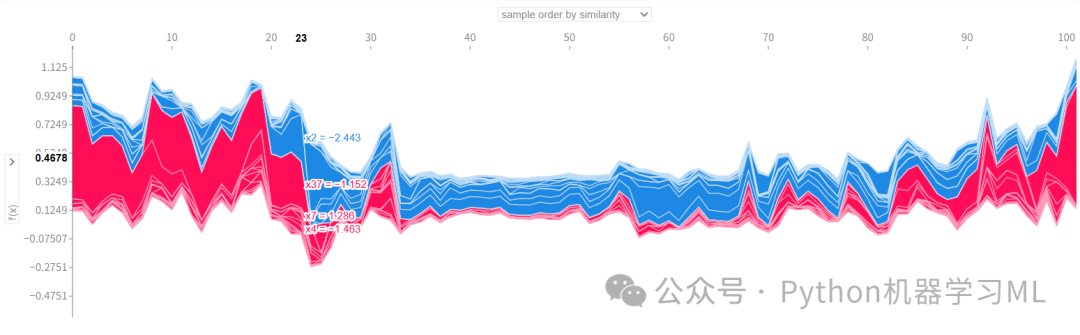
第四部分:模型部署与交互式应用
通过 Streamlit,我们将之前训练好的复杂模型封装成一个简单易用的 Web 界面,让医生或业务人员无需编写代码即可使用模型进行预测和分析。
阶段 1: Streamlit应用初始化与资源加载
这一阶段负责搭建 Web 应用的基础架构,定义辅助函数,并高效地加载模型资源。
作用解释:
-
st_shap辅助函数: SHAP 的交互式图表(如 Force Plot)是基于 JavaScript 的,Streamlit 原生不支持直接显示。这个函数通过
streamlit.components.v1.html将 SHAP 生成的 HTML 代码嵌入到应用中,解决了这一技术难题。 -
load_artifacts(缓存加载)
-
-
性能优化
使用
@st.cache_resource装饰器。这意味着模型文件只会加载一次,后续用户刷新页面或进行操作时,会直接使用缓存中的模型,极大地提高了响应速度。 -
路径兼容
代码尝试加载
scaler1.pkl和scaler.pkl,这种容错设计确保了即使之前的步骤有些许差异,部署脚本也能找到正确的文件。
-
-
页面配置
设置网页的标题、图标和布局(
layout="wide"),提供更好的视觉体验。
python
#python -m streamlit run .\3_streamlit.py
import streamlit as st
import streamlit.components.v1 as components  # 新增:用于显示交互式组件
import pickle
import joblib
import numpy as np
import shap
import pandas as pd
import matplotlib.pyplot as plt


# --- 0. 辅助函数:用于在Streamlit中显示交互式SHAP图 ---
defst_shap(plot, height=None):
"""
    将 SHAP 的 JS 交互图嵌入 Streamlit
    """
    shap_html = f"<head>{shap.getjs()}</head><body>{plot.html()}</body>"
    components.html(shap_html, height=height if height else150, scrolling=True)


# --- 1. 缓存加载资源 ---
@st.cache_resource
defload_artifacts():
# 载入模型
    model = joblib.load("saved_models/LightGBM_Optimized.pkl")

# 载入 Scaler
try:
        scaler = joblib.load("saved_models/scaler1.pkl")
except Exception:
withopen("saved_models/scaler.pkl", "rb") as f:
            scaler = pickle.load(f)

# 载入特征名称
try:
        feature_names = joblib.load("saved_models/feature_names1.pkl")
except Exception:
withopen("saved_models/feature_names.pkl", "rb") as f:
            feature_names = pickle.load(f)

return model, scaler, feature_names


# 初始化加载
try:
    model, scaler, feature_names = load_artifacts()
except FileNotFoundError:
    st.error("❌ 错误:找不到模型文件,请检查 saved_models/ 目录下是否有 .pkl 文件。")
    st.stop()

# --- 2. 页面配置 ---
st.set_page_config(page_title="临床决策支持系统", layout="wide", page_icon="🏥")
st.title("🏥 基于LightGBM的XXXX预测系统")

# --- 3. 创建标签页 (Tabs) ---
tab1, tab2 = st.tabs(["📝 单例预测 (手动输入)", "📂 批量预测 (上传Excel)"])
阶段 2: 单例预测模块 (用户交互与SHAP解释)
这是为医生诊断单个病人设计的界面。
作用解释:
-
动态表单
代码根据特征数量自动调整布局(两列或四列),使用
st.number_input生成数值输入框,不仅美观,还防止了格式错误。 -
预测流程
接收用户输入 -> 组装成 DataFrame -> 调用 Scaler 进行标准化 -> 调用模型预测概率。
-
结果展示
使用醒目的指标卡(
st.metric)显示风险概率,并用颜色(红/绿)区分高低风险。 -
SHAP 解释 (核心价值)
-
-
实时计算
针对用户刚刚输入的这个特定病人,实时计算 SHAP 值。
-
瀑布图
展示静态的特征贡献分解。
-
交互式力图
调用
st_shap展示动态图。用户可以将鼠标悬停在图条上,查看每个特征的具体数值和它对风险的推拉作用。这让医生不仅知道"风险高",还知道"为什么高"。
-
python
# ==========================================
# 模式一:单例预测 (手动输入)
# ==========================================
with tab1:
    st.info("适用于对单个样本进行快速风险评估和归因分析。")

with st.form("single_predict_form"):
        inputs = {}
        n_cols = 4iflen(feature_names) > 10else2
        cols = st.columns(n_cols)

for i, feat inenumerate(feature_names):
with cols[i % n_cols]:
                inputs[feat] = st.number_input(f"{feat}", value=0.0, format="%.4f")

        submitted = st.form_submit_button("🚀 开始预测")

if submitted:
# 数据组装
        x_df = pd.DataFrame([inputs], columns=feature_names)

try:
            x_scaled = scaler.transform(x_df)

# 预测
ifhasattr(model, "predict_proba"):
                prob = model.predict_proba(x_scaled)[0, 1]
else:
                prob = model.predict(x_scaled)[0]

# 显示结果
            st.divider()
            c1, c2 = st.columns([1, 2])
with c1:
                st.subheader("预测结果")
                st.metric("风险概率", f"{prob * 100:.2f}%")
if prob > 0.5:
                    st.error("🔴 高风险 (High Risk)")
else:
                    st.success("🟢 低风险 (Low Risk)")

# SHAP 解释
with c2:
                st.subheader("个体归因分析")
with st.spinner("正在计算特征贡献度..."):
                    explainer = shap.TreeExplainer(model)
                    shap_values_all = explainer.shap_values(x_scaled)

ifisinstance(shap_values_all, list):
                        shap_values = shap_values_all[1]
                        base_value = explainer.expected_value[1]
else:
                        shap_values = shap_values_all
                        base_value = explainer.expected_value
ifisinstance(base_value, np.ndarray): base_value = base_value[0]

# 1. 瀑布图 (Waterfall Plot)
                    st.markdown("**1. 瀑布图 (Waterfall Plot)** - 展示累积贡献")
                    explanation = shap.Explanation(
                        values=shap_values[0],
                        base_values=base_value,
                        data=x_df.iloc[0],
                        feature_names=feature_names
                    )
                    fig = plt.figure(figsize=(10, 5))
                    shap.plots.waterfall(explanation, max_display=10, show=False)
                    st.pyplot(fig, bbox_inches='tight')
                    plt.close(fig)

# 2. 力图 (Force Plot) - 新增功能
                    st.markdown("**2. 力图 (Force Plot)**")
                    st.caption("鼠标悬停在图表上可查看具体数值。")
# 注意:force_plot 需要 matplotlib=False 才能生成 JS 交互图
                    force_plot_html = shap.force_plot(
                        base_value,
                        shap_values[0],
                        x_df.iloc[0],
                        feature_names=feature_names,
                        matplotlib=False
                    )
                    st_shap(force_plot_html, height=160)

except Exception as e:
            st.error(f"运行出错: {e}")
import traceback

            st.text(traceback.format_exc())
阶段 3: 批量预测模块 (文件处理与深入分析)
这个模块适用于处理历史数据或批量样本,大大提高了工作效率。
作用解释:
-
模板下载
提供了一个包含正确列名的 CSV 模板,防止用户上传格式错误的文件。
-
健壮的文件读取
支持 Excel 和 CSV,并自动处理编码问题(
utf-8vsgbk),增强了系统的兼容性。 -
数据校验
上传后,系统会自动检查文件是否包含所有必需的特征列。如果有缺失,会明确报错,而不是让程序崩溃。
-
结果展示与下载
预测结果以表格形式展示,并通过
style.applymap根据风险等级自动着色(高风险标红),一目了然。处理后的结果可以直接下载为 CSV。 -
钻取分析 (Drill-down)
-
-
这是一个非常实用的功能。用户可以在批量结果列表中选择感兴趣的某一行(例如,风险异常高的病人)。
-
点击"解释该样本"后,系统会像单例模式一样,为这个特定的历史样本生成详细的 SHAP 瀑布图和力图。这实现了从"宏观筛选"到"微观诊断"的无缝切换。
-
python
# ==========================================
# 模式二:批量预测 (上传Excel)
# ==========================================
with tab2:
    st.info("适用于处理多条数据。请上传 Excel (.xlsx) 或 CSV 文件。")

# 1. 下载模板
with st.expander("📥 下载数据模板"):
        st.write("请确保您的表格包含以下列名:")
        st.code(str(feature_names), language="python")
        template_df = pd.DataFrame(columns=['Patient_ID'] + feature_names)
        csv = template_df.to_csv(index=False).encode('utf-8')
        st.download_button("下载 CSV 模板", csv, "prediction_template.csv", "text/csv")

# 2. 文件上传
    uploaded_file = st.file_uploader("上传文件", type=["xlsx", "csv"])

if uploaded_file:
try:
if uploaded_file.name.endswith('.csv'):
try:
                    df_upload = pd.read_csv(uploaded_file)
except UnicodeDecodeError:
                    uploaded_file.seek(0)
                    df_upload = pd.read_csv(uploaded_file, encoding='gbk')
else:
                df_upload = pd.read_excel(uploaded_file)

            st.write(f"✅ 成功读取 {len(df_upload)} 条数据。")

            df_upload.columns = df_upload.columns.str.strip()
            missing_cols = [col for col in feature_names if col notin df_upload.columns]

if missing_cols:
                st.error(f"❌ 文件缺少以下必要特征列:\n{missing_cols}")
else:
                X_batch = df_upload[feature_names]
                X_batch_scaled = scaler.transform(X_batch)

ifhasattr(model, "predict_proba"):
                    probs = model.predict_proba(X_batch_scaled)[:, 1]
else:
                    probs = model.predict(X_batch_scaled)

                df_result = df_upload.copy()
                df_result['预测概率'] = np.round(probs, 4)
                df_result['风险等级'] = ['高风险'if p > 0.5else'低风险'for p in probs]

                st.subheader("📊 预测结果概览")
                st.dataframe(df_result.style.applymap(
lambda x: 'background-color: #ffcccc'if x == '高风险'else'background-color: #ccffcc',
                    subset=['风险等级']
                ))

                csv_result = df_result.to_csv(index=False).encode('utf-8-sig')
                st.download_button("💾 下载预测结果 (.csv)", csv_result, "prediction_results.csv", "text/csv")

# 7. 深入分析
                st.divider()
                st.subheader("🔍 深入分析:查看特定样本的SHAP解释")
                selected_index = st.selectbox(
"选择要分析的行号 (Index)",
                    options=df_result.index,
                    format_func=lambda x: f"行 {x} (概率: {df_result.loc[x, '预测概率']:.2%})"
                )

if st.button("解释该样本"):
                    x_single_df = X_batch.iloc[[selected_index]]
                    x_single_scaled = X_batch_scaled[selected_index].reshape(1, -1)

                    explainer = shap.TreeExplainer(model)
                    shap_values_all = explainer.shap_values(x_single_scaled)

ifisinstance(shap_values_all, list):
                        sv = shap_values_all[1][0]
                        bv = explainer.expected_value[1]
else:
                        sv = shap_values_all[0]
                        bv = explainer.expected_value
ifisinstance(bv, np.ndarray): bv = bv[0]

# 1. 瀑布图
                    st.markdown("**1. 瀑布图 (Waterfall Plot)**")
                    exp = shap.Explanation(
                        values=sv, base_values=bv,
                        data=x_single_df.iloc[0], feature_names=feature_names
                    )
                    fig_batch = plt.figure(figsize=(10, 5))
                    shap.plots.waterfall(exp, max_display=10, show=False)
                    st.pyplot(fig_batch, bbox_inches='tight')
                    plt.close(fig_batch)

# 2. 力图 (新增)
                    st.markdown("**2. 力图 (Force Plot)**")
                    force_plot_html_batch = shap.force_plot(
                        bv,
                        sv,
                        x_single_df.iloc[0],
                        feature_names=feature_names,
                        matplotlib=False
                    )
                    st_shap(force_plot_html_batch, height=160)

except Exception as e:
            st.error(f"处理文件时发生错误: {e}")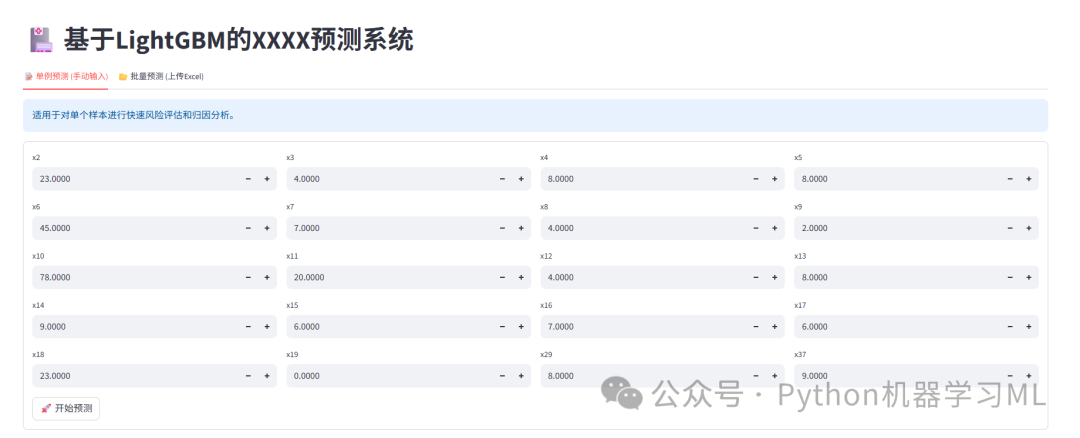
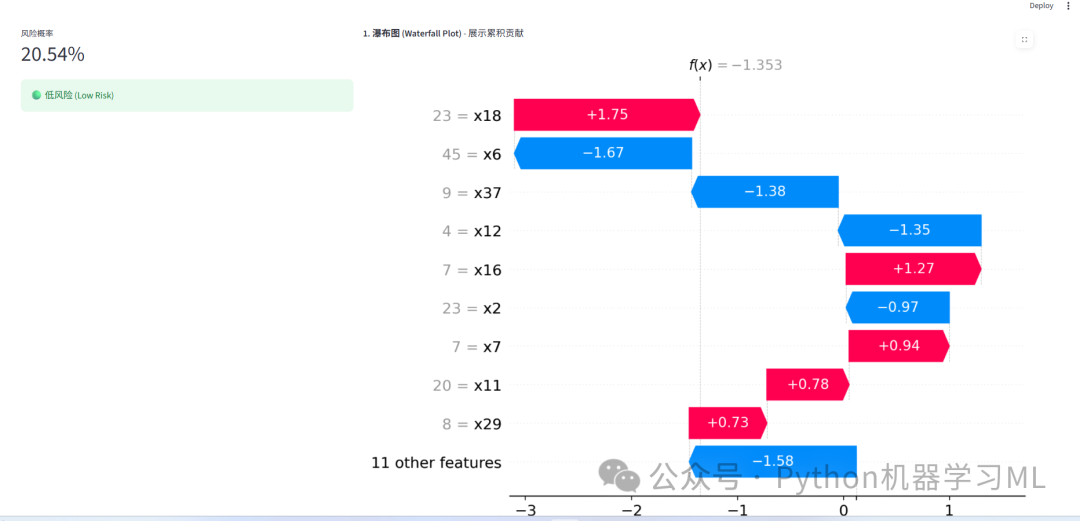
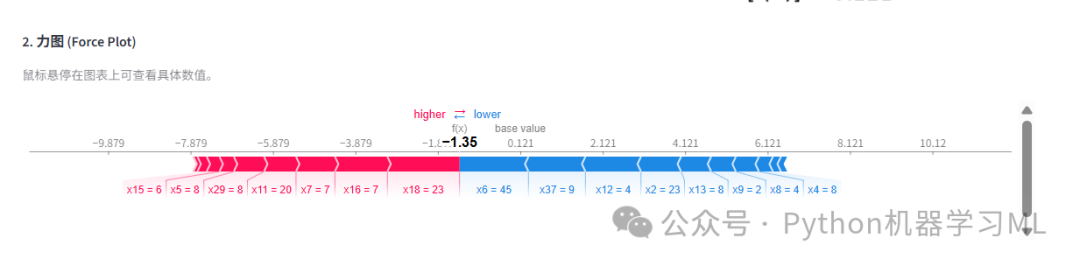
该文章案例