关于页面是展示应用信息的重要页面。这篇文章我们来实现一个完整的关于页面,包括应用信息、数据来源、开源协议、以及隐私政策。通过这个功能,我们能展示如何构建一个信息展示页面 。
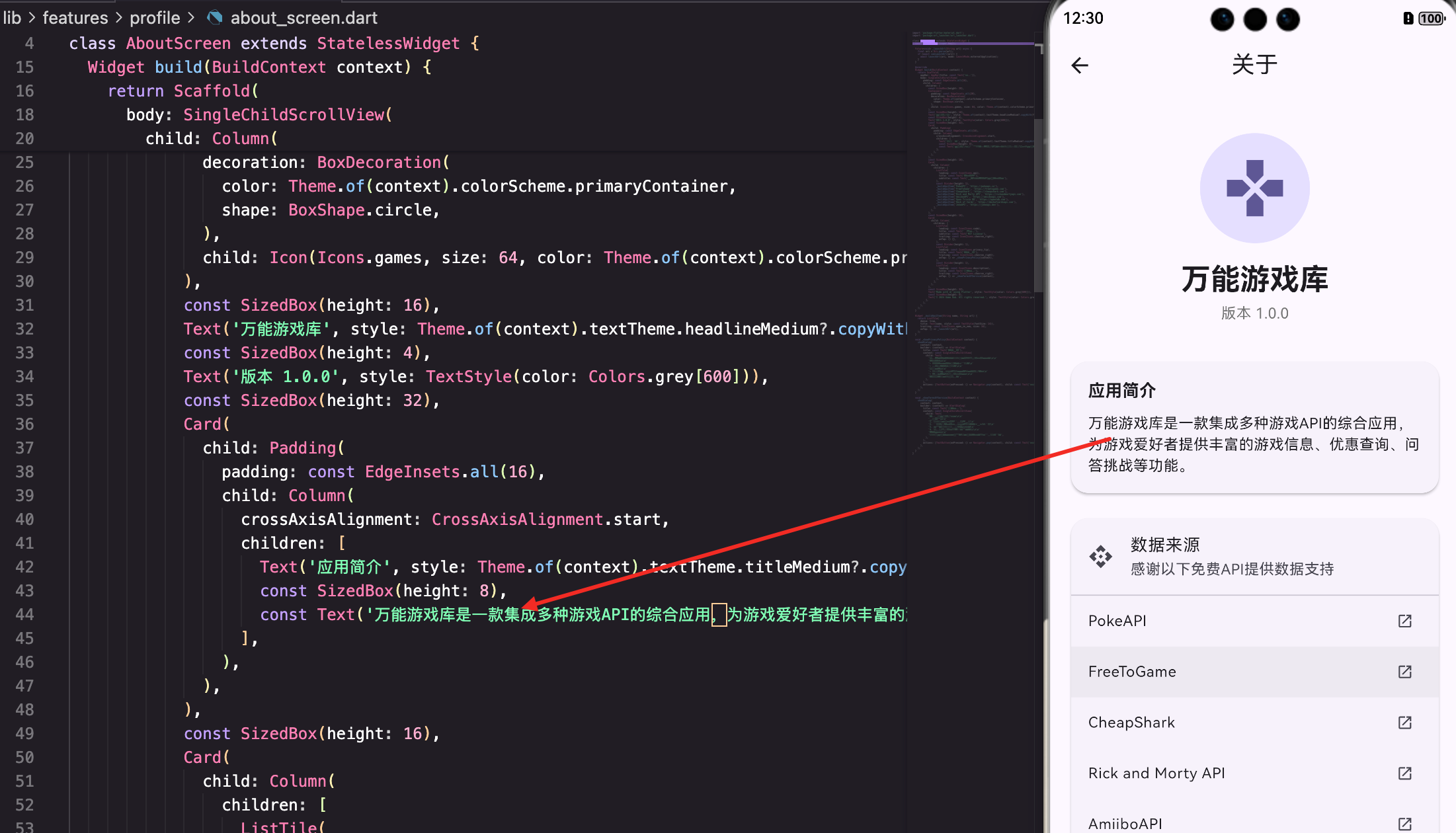
页面的基本结构
AboutScreen是关于页面的主页面:
dart
class AboutScreen extends StatelessWidget {
  const AboutScreen({super.key});

  Future<void> _launchUrl(String url) async {
    final uri = Uri.parse(url);
    if (await canLaunchUrl(uri)) {
      await launchUrl(uri, mode: LaunchMode.externalApplication);
    }
  }

  @override
  Widget build(BuildContext context) {
    return Scaffold(
      appBar: AppBar(title: const Text('关于')),
      body: SingleChildScrollView(
        padding: const EdgeInsets.all(16),
        child: Column(
          children: [
            // 应用信息
            // 数据来源
            // 开源协议
          ],
        ),
      ),
    );
  }
}
页面用SingleChildScrollView包装,支持滚动。
应用信息
应用信息用Card展示:
dart
            const SizedBox(height: 20),
            Container(
              padding: const EdgeInsets.all(20),
              decoration: BoxDecoration(
                color: Theme.of(context).colorScheme.primaryContainer,
                shape: BoxShape.circle,
              ),
              child: Icon(Icons.games, size: 64, color: Theme.of(context).colorScheme.primary),
            ),
            const SizedBox(height: 16),
            Text('万能游戏库', style: Theme.of(context).textTheme.headlineMedium?.copyWith(fontWeight: FontWeight.bold)),
            const SizedBox(height: 4),
            Text('版本 1.0.0', style: TextStyle(color: Colors.grey[600])),
            const SizedBox(height: 32),
            Card(
              child: Padding(
                padding: const EdgeInsets.all(16),
                child: Column(
                  crossAxisAlignment: CrossAxisAlignment.start,
                  children: [
                    Text('应用简介', style: Theme.of(context).textTheme.titleMedium?.copyWith(fontWeight: FontWeight.bold)),
                    const SizedBox(height: 8),
                    const Text('万能游戏库是一款集成多种游戏API的综合应用,为游戏爱好者提供丰富的游戏信息、优惠查询、问答挑战等功能。'),
                  ],
                ),
              ),
            ),
显示应用图标、名称、版本和简介。
数据来源
数据来源用Card和ListTile展示:
dart
            const SizedBox(height: 16),
            Card(
              child: Column(
                children: [
                  ListTile(
                    leading: const Icon(Icons.api),
                    title: const Text('数据来源'),
                    subtitle: const Text('感谢以下免费API提供数据支持'),
                  ),
                  const Divider(height: 1),
                  _buildApiItem('PokeAPI', 'https://pokeapi.co'),
                  _buildApiItem('FreeToGame', 'https://freetogame.com'),
                  _buildApiItem('CheapShark', 'https://cheapshark.com'),
                  _buildApiItem('Rick and Morty API', 'https://rickandmortyapi.com'),
                  _buildApiItem('AmiiboAPI', 'https://amiiboapi.com'),
                  _buildApiItem('Open Trivia DB', 'https://opentdb.com'),
                  _buildApiItem('Deck of Cards', 'https://deckofcardsapi.com'),
                  _buildApiItem('JokeAPI', 'https://jokeapi.dev'),
                ],
              ),
            ),
列出所有使用的API和数据来源。
_buildApiItem方法创建API项:
dart
  Widget _buildApiItem(String name, String url) {
    return ListTile(
      title: Text(name),
      trailing: const Icon(Icons.open_in_new, size: 18),
      onTap: () => _launchUrl(url),
    );
  }
点击可以打开API的官方网站。
开源协议和政策
开源协议和政策用Card和ListTile展示:
dart
            const SizedBox(height: 16),
            Card(
              child: Column(
                children: [
                  ListTile(
                    leading: const Icon(Icons.code),
                    title: const Text('开源协议'),
                    subtitle: const Text('MIT License'),
                    trailing: const Icon(Icons.chevron_right),
                    onTap: () {},
                  ),
                  const Divider(height: 1),
                  ListTile(
                    leading: const Icon(Icons.privacy_tip),
                    title: const Text('隐私政策'),
                    trailing: const Icon(Icons.chevron_right),
                    onTap: () => _showPrivacyPolicy(context),
                  ),
                  const Divider(height: 1),
                  ListTile(
                    leading: const Icon(Icons.description),
                    title: const Text('用户协议'),
                    trailing: const Icon(Icons.chevron_right),
                    onTap: () => _showTermsOfService(context),
                  ),
                ],
              ),
            ),
显示开源协议、隐私政策和用户协议。
总结
这篇文章我们实现了一个关于页面。涉及到的知识点包括:
- 信息展示 - 清晰地展示应用信息
- 链接打开 - 使用url_launcher打开外部链接
- 列表展示 - 使用ListTile展示多个项目
- 对话框 - 显示隐私政策和用户协议
- UI设计 - 使用Card和Divider创建清晰的布局
- 感谢致辞 - 感谢所有API提供者
关于页面展示了如何构建一个信息展示页面 。通过清晰的信息组织和完善的链接,我们能为用户提供一个完整的应用信息中心。
欢迎加入开源鸿蒙跨平台社区:https://openharmonycrossplatform.csdn.net