目录
[emplace() 成员函数插入](#emplace() 成员函数插入)
[lower_bound ()/upper_bound ()/equal_range ()成员函数查找](#lower_bound ()/upper_bound ()/equal_range ()成员函数查找)
[迭代器有效性(删除 / 插入后)](#迭代器有效性(删除 / 插入后))
在c++11及以上的版本,借助erase的返回值来更新迭代器
map
map的介绍
cplusplus中关于map的文档:map - C++ Reference
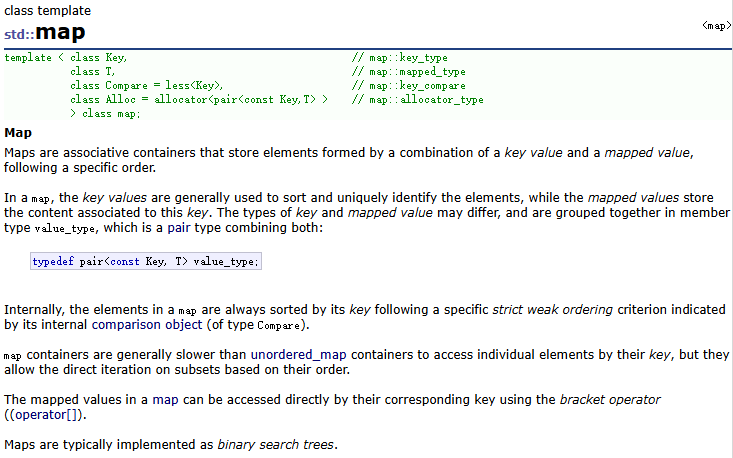
翻译过来就是:
- map是关联式容器,它按照特定的次序(按照key来比较)存储键值key和值value组成的元素,使用map的迭代器遍历map中的元素,可以得到有序序列。
- 在map中,键值key通常用于排序和唯一地标识元素,而值value中存储与此键值key关联的内容。键值key和值value的类型可能不同,并且在map的内部,key与value通过成员类型value_type绑定在一起,并取别名为pair。
- map容器中元素的键值key不能被修改,但是元素的值value可以被修改,因为map底层的二叉搜索树是根据每个元素的键值key进行构建的,而不是值value。
- 在内部,map中的元素总是按照键值key进行比较排序的。当不传入内部比较对象时,map中元素的键值key默认按照小于来比较。
- map容器通过键值key访问单个元素的速度通常比unordered_map容器慢,但map容器允许根据顺序对元素进行直接迭代。
- map容器支持下标访问符,即在\[\]中放入key,就可以找到与key对应的value。
- map在底层是用平衡搜索树(红黑树)实现的,所以在map当中查找某个元素的时间复杂度为O( log₂N)
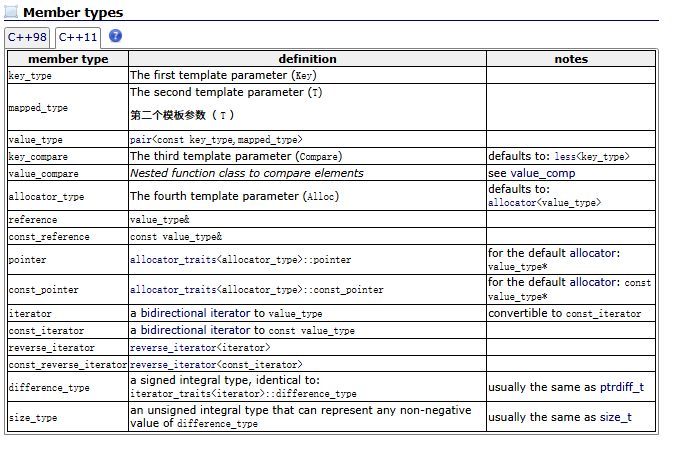
member_types
map的使用
头文件:<map>
模板参数说明
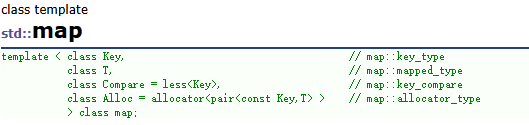
- key: 键值对中key的类型
- T: 键值对中value的类型
- Compare: 比较器的类型,map中的元素是按照key来比较的,缺省情况下按照小于来比
- 较,一般情况下(内置类型元素)该参数不需要传递,如果无法比较时(自定义类型),需要用户自己显式传递比较规则(一般情况下按照函数指针或者仿函数来传递)
- Alloc:通过空间配置器来申请底层空间,不需要用户传递,除非用户不想使用标准库提供的空间配置器
构造函数
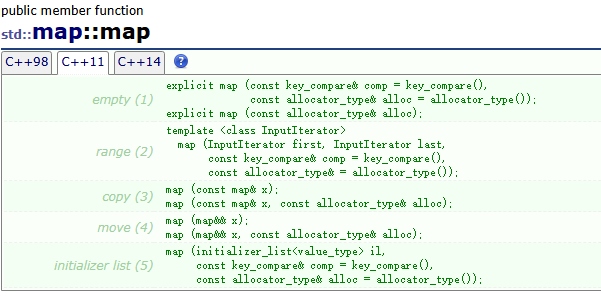
以下是常用构造函数类型及示例
cpp
#include <iostream>
#include <map>
#include <vector>
using namespace std;

int main() {
    // 构造函数1:默认构造(空map)
    map<int, string> map1;  // 空的map,键为int,值为string

    // 构造函数2:初始化列表构造(C++11及以上)
    map<int, string> map2 = {
        {1, "apple"},
        {2, "banana"},
        {3, "orange"}
    };

    // 构造函数3:拷贝构造(从已有map复制)
    map<int, string> map3(map2);  // map3 是 map2 的副本

    // 构造函数4:范围构造(从其他容器/迭代器范围初始化)
    vector<pair<int, string>> vec = {{4, "pear"}, {5, "grape"}};
    map<int, string> map4(vec.begin(), vec.end());  // 从vector的迭代器范围构造

    // 构造函数5:自定义比较规则的构造(默认是less<T>,即升序)
    // 示例:按键降序排列
    map<int, string, greater<int>> map5 = {{1, "a"}, {2, "b"}};

    // 验证输出
    cout << "map2: ";
    for (auto& p : map2) {
        cout << "{" << p.first << ":" << p.second << "} ";
    }
    cout << endl;

    cout << "map5(降序): ";
    for (auto& p : map5) {
        cout << "{" << p.first << ":" << p.second << "} ";
    }
    cout << endl;

    return 0;
}
map的插入
insert()成员函数插入
insert的返回值是pair<iterator, bool>,通过bool可以判断是否插入成功
- 若待插入元素的键值key在map当中不存在,则insert函数插入成功,并返回插入后元素的迭代器和true。
- 若待插入元素的键值key在map当中已经存在,则insert函数插入失败,并返回map当中键值为key的元素的迭代器和false。
代码示例:
cpp
#include <iostream>
#include <map>
#include <string>
using namespace std;

int main() {
    map<int, string> myMap;

    // 写法1:显式构造 pair 对象(C++98 风格)
    // 缺点:类型名重复书写,冗长
    myMap.insert(pair<int, string>(1, "Apple"));

    // 写法2:使用 make_pair 模板函数(C++98 推荐)
    // 优点:自动推导类型,代码简洁
    myMap.insert(make_pair(2, "Banana"));

    // 写法3:使用 C++11 初始化列表(现代 C++ 推荐)
    // 优点:最简洁,无需记忆函数名
    myMap.insert({3, "Orange"});

    // 判断插入结果
    // insert 返回值是一个 pair<iterator, bool>
    auto ret = myMap.insert({1, "Green Apple"});
    if (!ret.second) {
        cout << "插入失败,键 1 已存在,原值为:" << ret.first->second << endl;
    }

    return 0;
}
\[\]运算符插入
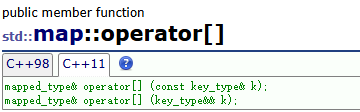
c++ stl map通过operator\[\]运算符重载,支持直接对象名key = value的方式直接插入或修改key对应的value
cpp
#include <iostream>
#include <map>
using namespace std;

int main() {
    map<int, string> myMap;

    // 1. 插入新元素
    myMap[1] = "Apple";
    // 2. 覆盖已有元素
    myMap[1] = "Red Apple";

    // 读取不存在的键
    // cout << myMap[2];
    // 后果:map 会自动插入一个 {2, ""} 的空值元素,导致 map 意外扩容。

    return 0;
}
emplace() 成员函数插入
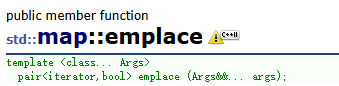
emplace()成员函数插入的方式仅支持c++11及以上版本,"就地构造",适用于追求极致性能,或者插入自定义类对象的场景
cpp
#include <iostream>
#include <map>
using namespace std;

int main() {
    map<int, string> myMap;

    // 直接传入构造 pair 所需的参数,而不是构造好的 pair 对象
    // map 内部会直接在内存中构造这个对象,避免了临时对象的拷贝开销
    myMap.emplace(4, "Pear");

    // 返回值用法与 insert 完全一致
    auto ret = myMap.emplace(4, "Yellow Pear");
    if (!ret.second) {
        cout << "emplace 失败,键已存在" << endl;
    }

    return 0;
}
insert_or_assign()成员函数插入
c++官方网站对该特性的介绍:std::map<Key,T,Compare,Allocator>::insert_or_assign - cppreference.cn - C++参考手册
(ps:cplusplus不是c++官方运营的,但是在视觉布局上比官方网站好)
insert_or_assign成员函数插入的方式仅支持c++17及以上版本,支持覆盖与插入二合一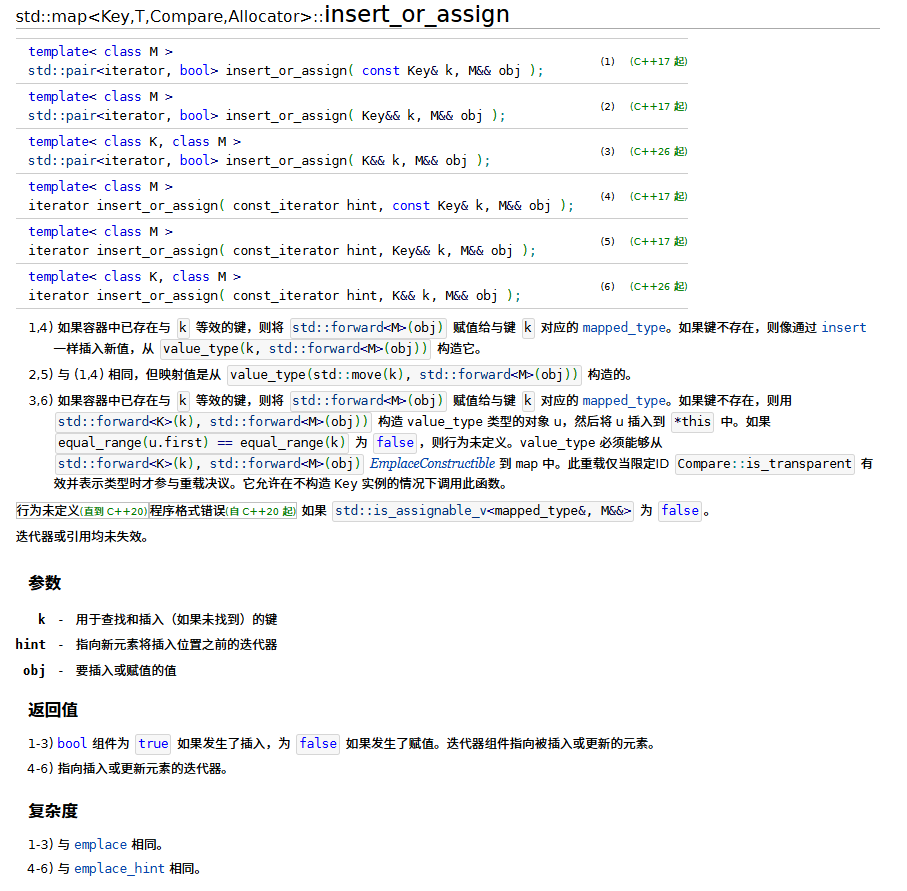
cpp
#include <iostream>
#include <map>
using namespace std;

int main() {
    map<int, string> myMap;
    myMap[1] = "Apple";

    // 键存在则覆盖
    myMap.insert_or_assign(1, "Green Apple");
    // 键不存在则插入
    myMap.insert_or_assign(5, "Grape");

    return 0;
}
map的查找
find()成员函数查找
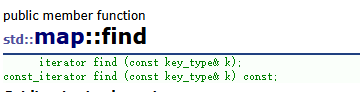
c++ stl map的find查找函数是根据所给key值在map当中进行查找,若找到了,则返回对应元素的迭代器,若未找到,则返回容器中最后一个元素下一个位置的正向迭代器。
cpp
#include <iostream>
#include <map>
#include <string>
using namespace std;

int main() {
    map<int, string> fruitMap = {
        {1, "apple"},
        {2, "banana"},
        {3, "orange"}
    };

    // 1. 基础用法:查找指定键
    int targetKey = 2;
    auto it = fruitMap.find(targetKey);

    // 2. 判断是否找到
    if (it != fruitMap.end()) {
        cout << "找到键 " << targetKey << ",对应值:" << it->second << endl;
    } else {
        cout << "未找到键 " << targetKey << endl;
    }

    // 3. 查找不存在的键
    it = fruitMap.find(4);
    if (it == fruitMap.end()) {
        cout << "键 4 不存在" << endl;
    }

    return 0;
}
\[\]运算符查找
c++ stl map 对[] 运算符进行了重载,既可用于插入 / 赋值,也可用于查找,但存在严重的 "隐式插入" 问题,仅适合确定键存在的场景
cpp
#include <iostream>
#include <map>
#include <string>
using namespace std;

int main() {
    map<int, string> fruitMap = {{1, "apple"}, {2, "banana"}};

    // 1. 键存在:正常获取值
    cout << "键 1 的值:" << fruitMap[1] << endl;

    // 2. 键不存在:隐式插入空值元素)
    cout << "键 3 的值:" << fruitMap[3] << endl; // 输出空字符串
    // 此时 fruitMap 已新增 {3, ""},map 大小从 2 变为 3
    cout << "map 大小:" << fruitMap.size() << endl; // 输出 3

    return 0;
}
count()成员函数查找
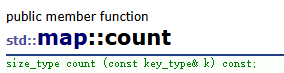
c++ stl map的成员函数count() 用于判断指定键是否存在,返回值为 size_type(通常是 size_t),由于 map 键唯一,返回值只能是 0(不存在)或 1(存在)。
cpp
#include <iostream>
#include <map>
#include <string>
using namespace std;

int main() {
    map<int, string> fruitMap = {{1, "apple"}, {2, "banana"}};

    // 1. 判断键是否存在
    int key1 = 2;
    if (fruitMap.count(key1)) {
        cout << "键 " << key1 << " 存在" << endl;
    } else {
        cout << "键 " << key1 << " 不存在" << endl;
    }

    // 2. 查找不存在的键
    int key2 = 4;
    if (fruitMap.count(key2) == 0) {
        cout << "键 " << key2 << " 不存在" << endl;
    }

    return 0;
}
lower_bound ()/upper_bound ()/equal_range ()成员函数查找
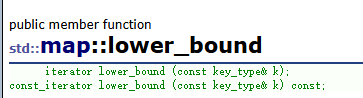

- lower_bound(key) :返回指向第一个大于等于 key 的元素的迭代器;
- upper_bound(key) :返回指向第一个大于 key 的元素的迭代器;
- equal_range(key):返回一个 pair,包含 lower_bound 和 upper_bound 的结果,等价于 "键等于 key 的元素范围"(map 中最多一个);
这三个方法适用于有序遍历或范围查找场景,返回键的边界迭代器
cpp
#include <iostream>
#include <map>
#include <string>
using namespace std;

int main() {
    map<int, string> fruitMap = {{1, "apple"}, {2, "banana"}, {3, "orange"}, {5, "pear"}};

    // 1. lower_bound(key):返回 >= key 的第一个元素的迭代器
    auto itLower = fruitMap.lower_bound(3);
    cout << "lower_bound(3):键=" << itLower->first << ",值=" << itLower->second << endl; // 3, orange

    // 2. upper_bound(key):返回 > key 的第一个元素的迭代器
    auto itUpper = fruitMap.upper_bound(3);
    cout << "upper_bound(3):键=" << itUpper->first << ",值=" << itUpper->second << endl; // 5, pear

    // 3. equal_range(key):返回 pair<lower_bound, upper_bound>
    auto range = fruitMap.equal_range(3);
    cout << "equal_range(3) 左边界:" << range.first->first << endl;  // 3
    cout << "equal_range(3) 右边界:" << range.second->first << endl; // 5

    // 4. 查找不存在的键(返回插入位置)
    itLower = fruitMap.lower_bound(4);
    cout << "lower_bound(4):键=" << itLower->first << endl; // 5(4 应插入在 3 和 5 之间)

    return 0;
}
map的删除
erase()成员函数
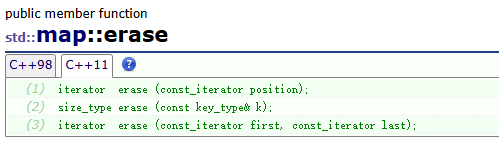
通过迭代器指向待删除元素,直接移除该元素
cpp
#include <iostream>
#include <map>
#include <string>
using namespace std;

int main() {
    map<int, string> fruitMap = {
        {1, "apple"}, {2, "banana"}, {3, "orange"}, {4, "pear"}
    };

    // 步骤1:先查找迭代器(避免删除不存在的元素)
    auto it = fruitMap.find(2);
    if (it != fruitMap.end()) {
        // 步骤2:通过迭代器删除
        fruitMap.erase(it);
        cout << "删除键 2 成功" << endl;
    } else {
        cout << "键 2 不存在,删除失败" << endl;
    }

    // 遍历验证结果
    cout << "\n删除后的 map:" << endl;
    for (const auto& p : fruitMap) {
        cout << p.first << ":" << p.second << endl;
    }

    return 0;
}
通过指定待删除元素key删除元素
cpp
#include <iostream>
#include <map>
#include <string>
using namespace std;

int main() {
    map<int, string> fruitMap = {{1, "apple"}, {2, "banana"}, {3, "orange"}};

    // 方式1:直接删除键
    size_t deletedCount = fruitMap.erase(3); // 返回删除的元素个数(map 中只能是 0 或 1)
    if (deletedCount > 0) {
        cout << "删除键 3 成功" << endl;
    } else {
        cout << "键 3 不存在" << endl;
    }

    // 方式2:删除不存在的键(返回 0)
    deletedCount = fruitMap.erase(4);
    cout << "删除键 4 的返回值:" << deletedCount << endl;

    return 0;
}
通过指定待删除元素迭代器范围删除元素
cpp
#include <iostream>
#include <map>
#include <string>
using namespace std;

int main() {
    map<int, string> fruitMap = {
        {1, "apple"}, {2, "banana"}, {3, "orange"}, {4, "pear"}, {5, "grape"}
    };

    // 步骤1:确定删除范围(删除键 2 ~ 4 的元素,左闭右开)
    auto itStart = fruitMap.find(2);
    auto itEnd = fruitMap.find(5); // 不包含 5

    // 步骤2:批量删除
    if (itStart != fruitMap.end() && itEnd != fruitMap.end()) {
        fruitMap.erase(itStart, itEnd);
        cout << "批量删除 2~4 的元素成功" << endl;
    }

    // 遍历验证
    cout << "\n批量删除后的 map:" << endl;
    for (const auto& p : fruitMap) {
        cout << p.first << ":" << p.second << endl;
    }

    return 0;
}
需要注意的是:
erase(iterator)和erase(key)的返回值,在c++11之前为void,在c++11及以上版本为iterator,指向被删除元素下一个元素的迭代器,可用于遍历中删除。
erase(key)的返回值,在c++11之前为void,在c++11及以上版本为size_t,返回删除元素的个数,在map仅为0/1,在multimap中可能大于1
clear成员函数
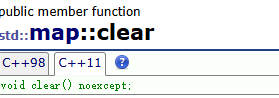
通过成员函数clear清空map中所有元素,使容器变为空,但不会释放map本身占用的内存,如果需要释放map本身占用的内存,可通过shrink_to_fit()释放
cpp
#include <iostream>
#include <map>
#include <string>
using namespace std;

int main() {
    map<int, string> fruitMap = {{1, "apple"}, {2, "banana"}, {3, "orange"}};

    cout << "清空前 map 大小:" << fruitMap.size() << endl; // 3

    // 清空所有元素
    fruitMap.clear();

    cout << "清空后 map 大小:" << fruitMap.size() << endl; // 0
    cout << "map 是否为空:" << boolalpha << fruitMap.empty() << endl; // true

    // 可选:释放多余内存(C++11+)
    fruitMap.shrink_to_fit();

    return 0;
}
map的迭代器
结构及其类型
map 的迭代器本质是指向红黑树节点的指针封装 ,每个迭代器指向的是 std::pair<const Key, T> 类型的键值对
- 键(
first)是const类型:不允许通过迭代器修改键(保证 map 有序性); - 值(
second)是普通类型:可通过迭代器修改值。
map 提供 4 种迭代器类型,适配不同读写场景:
| 迭代器类型 | 关键字 | 读写权限 | 适用场景 |
|---|---|---|---|
| 普通迭代器 | iterator |
可读可写 | 修改值、遍历中删除元素 |
| 常量迭代器 | const_iterator |
只读 | 只读遍历(如 const map) |
| 反向迭代器 | reverse_iterator |
反向读写 | 从后往前遍历 |
| 常量反向迭代器 | const_reverse_iterator |
反向只读 | const map 反向遍历 |
特性
- 双向遍历,不支持随机访问,仅支持
++it/it++向后移动,--it/it--向前移动 - ❌ 不支持
it + n/it - n(随机访问)、it[]等操作(区别于 vector 迭代器)
迭代器有效性(删除 / 插入后)
- 插入元素 :除
end()外,所有原有迭代器仍有效; - 删除元素:仅被删除元素的迭代器失效,其余迭代器仍有效;
- 清空 / 批量删除:被删除范围内的迭代器失效,其余仍有效。
需要注意的是:
end() 是尾后迭代器,不指向任何元素,解引用 end() 会触发未定义行为
cpp
// ❌ 错误
auto it = fruitMap.end();
cout << it->first << endl; // 崩溃

// ✅ 正确:先判断
if (it != fruitMap.end()) {
    cout << it->first << endl;
}
遍历map代码示例:
cpp
#include <iostream>
#include <map>
#include <string>
using namespace std;

int main() {
    map<int, string> fruitMap = {{1, "apple"}, {2, "banana"}, {3, "orange"}};

    //正向遍历

    // 方式1:普通 for 循环(新手友好)
    cout << "正向遍历(普通迭代器):" << endl;
    for (map<int, string>::iterator it = fruitMap.begin(); it != fruitMap.end(); ++it) {
        cout << "键:" << it->first << ",值:" << it->second << endl;
    }

    // 方式2:C++11 范围 for 循环(推荐,自动用 iterator)
    cout << "\n范围 for 遍历:" << endl;
    for (auto& pair : fruitMap) { // 用 & 避免拷贝,可修改值
        pair.second += "_new"; // 修改值
        cout << "键:" << pair.first << ",值:" << pair.second << endl;
    }
/////////////////////////////////////////////////////////

    // 反向遍历
    cout << "\n反向遍历:" << endl;
    for (map<int, string>::reverse_iterator rit = fruitMap.rbegin(); rit != fruitMap.rend(); ++rit) {
        // 注意:反向迭代器的 ++ 等价于普通迭代器的 --
        cout << "键:" << rit->first << ",值:" << rit->second << endl;
    }
    return 0;
}


正向遍历(普通迭代器):
键:1,值:apple
键:2,值:banana
键:3,值:orange

范围 for 遍历:
键:1,值:apple_new
键:2,值:banana_new
键:3,值:orange_new

反向遍历:
键:3,值:orange_new
键:2,值:banana_new
键:1,值:apple_new
迭代器遍历过程中删除元素的坑
遍历中删除元素是迭代器最易出错的场景,需遵循 "先获取下一个迭代器,再删除" 的原则:
在c++11及以上的版本,借助erase的返回值来更新迭代器
cpp
#include <iostream>
#include <map>
#include <string>
using namespace std;

int main() {
    map<int, string> fruitMap = {{1, "apple"}, {2, "banana"}, {3, "orange"}, {4, "pear"}};

    // 遍历删除键为偶数的元素
    for (auto it = fruitMap.begin(); it != fruitMap.end();) { // 注意:无 ++it
        if (it->first % 2 == 0) {
            // erase 返回下一个有效迭代器,直接赋值
            it = fruitMap.erase(it);
        } else {
            ++it;
        }
    }

    // 验证结果
    cout << "删除偶数键后的 map:" << endl;
    for (auto& pair : fruitMap) {
        cout << pair.first << ":" << pair.second << endl;
    }

    return 0;
}
在c++11以前的版本,需要提前保存好下一个迭代器
cpp
// 遍历删除逻辑替换为:
for (auto it = fruitMap.begin(); it != fruitMap.end();) {
    if (it->first % 2 == 0) {
        auto nextIt = ++it; // 先记录下一个迭代器
        fruitMap.erase(--it); // 删除当前迭代器
        it = nextIt; // 更新迭代器
    } else {
        ++it;
    }
}
map的容量函数
empty():返回一个布尔值,表示 std::map 是否为空。如果为空,则返回 true;否则,返回 false。
cpp
std::map<Key, Value> myMap;
if (myMap.empty()) {
    // map为空
}size():返回 std::map 容器中键值对的数量。
cpp
std::map<Key, Value> myMap;
std::size_t count = myMap.size();
multimap
multimap的介绍
cplusplus中关于multimap的介绍:multimap - C++ Reference
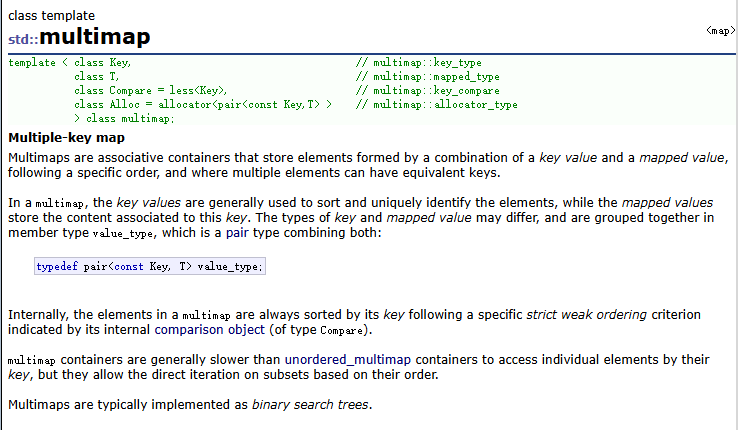
- Multimaps是关联式容器,它按照特定的顺序,存储由key和value映射成的键值对<key, value>,其中多个键值对之间的key是可以重复的。
- 在multimap中,通常按照key排序和惟一地标识元素,而映射的value存储与key关联的内 容。key和value的类型可能不同,通过multimap内部的成员类型value_type组合在一起, value_type是组合key和value的键值对: typedef pair<const Key, T> value_type;
- 在内部,multimap中的元素总是通过其内部比较对象,按照指定的特定严格弱排序标准对 key进行排序的。
- multimap通过key访问单个元素的速度通常比unordered_multimap容器慢,但是使用迭代 器直接遍历multimap中的元素可以得到关于key有序的序列。
- multimap在底层用二叉搜索树(红黑树)来实现。
注意: multimap 和 map 的唯一不同就是: map 中的 key 是唯一的,而 multimap 中 key 是可以
重复的 。
multimap的使用
multimap 中的接口可以参考 map ,功能都是类似的。
注意:
- multimap中的key是可以重复的。
- multimap中的元素默认将key按照小于来比较
- multimap中没有重载operator\[\]操作。
- 使用时与map包含的头文件相同
为什么muiltimap没有重载operator\[\]?
multimap 的核心特性是键可以重复 ,这就导致了 operator[] 的语义完全无法适配:
- 当键存在时,可能有多个值与之关联,
multimap[key]无法确定要返回哪一个值的引用。 - 当键不存在时,
operator[]隐式插入的行为也违背了multimap作为 "多值映射" 的设计初衷(用户可能只是想查询,而非插入)。
std::map与std::multimap的比较
相同点:
- 存储键值对:std::map 和 std::multimap 都用于存储键值对,并提供了对键值对的有序存储和访问能力。
- 基于红黑树:std::map 和 std::multimap 在内部实现上都使用了红黑树(Red-Black Tree),以保持元素的有序性。
- 迭代器支持:它们都提供了迭代器的支持,可以使用迭代器进行遍历、访问和修改容器中的元素。
不同点:
- 唯一性:最主要的区别在于键的唯一性。std::map 中的键是唯一的,每个键只能对应一个值,如果插入具有相同键的元素,则会替换原有键对应的值。而 std::multimap 允许多个元素具有相同的键,因此可以在 std::multimap 中存储重复的键值对。
- 插入和查找:由于 std::map 中的键是唯一的,插入新元素时要进行键的比较和查找,以保持键的唯一性。这会导致插入和查找的时间复杂度是对数级别的。而 std::multimap 允许重复的键,因此插入新元素时只需按照键的顺序插入即可,插入的时间复杂度为常数级别。
- 迭代器范围:对于 std::map,每个键只有一个对应的值,因此迭代器范围是唯一的。而对于 std::multimap,由于允许重复的键,因此迭代器范围可以包含多个具有相同键的元素。