
基于 SharedPreferences 的本地化笔记应用架构与实现
-
- 摘要
- [1. 为什么选择笔记应用作为 OpenHarmony 入门项目?](#1. 为什么选择笔记应用作为 OpenHarmony 入门项目?)
- [2. 项目配置:适配 OpenHarmony 的 pubspec.yaml](#2. 项目配置:适配 OpenHarmony 的 pubspec.yaml)
-
- [2.1 依赖精简与目标对齐](#2.1 依赖精简与目标对齐)
- [3. OpenHarmony 权限与存储适配](#3. OpenHarmony 权限与存储适配)
-
- [3.1 权限声明(module.json5)](#3.1 权限声明(module.json5))
- [3.2 数据存储路径确认](#3.2 数据存储路径确认)
- [4. 核心代码实现(适配 OpenHarmony)](#4. 核心代码实现(适配 OpenHarmony))
-
- [4.1 笔记数据模型(Note)](#4.1 笔记数据模型(Note))
- [4.2 主应用入口(NoteApp)](#4.2 主应用入口(NoteApp))
- [4.3 笔记列表页(核心:_loadNotes & _saveNotes)](#4.3 笔记列表页(核心:_loadNotes & _saveNotes))
- [4.4 搜索功能(NoteSearchDelegate)](#4.4 搜索功能(NoteSearchDelegate))
- [5. 测试与部署](#5. 测试与部署)
-
- [5.1 单元测试(widget_test.dart)](#5.1 单元测试(widget_test.dart))
- [5.2 构建与安装](#5.2 构建与安装)
- [6. 性能与安全考量](#6. 性能与安全考量)
- [7. 未来演进方向](#7. 未来演进方向)
- 结语
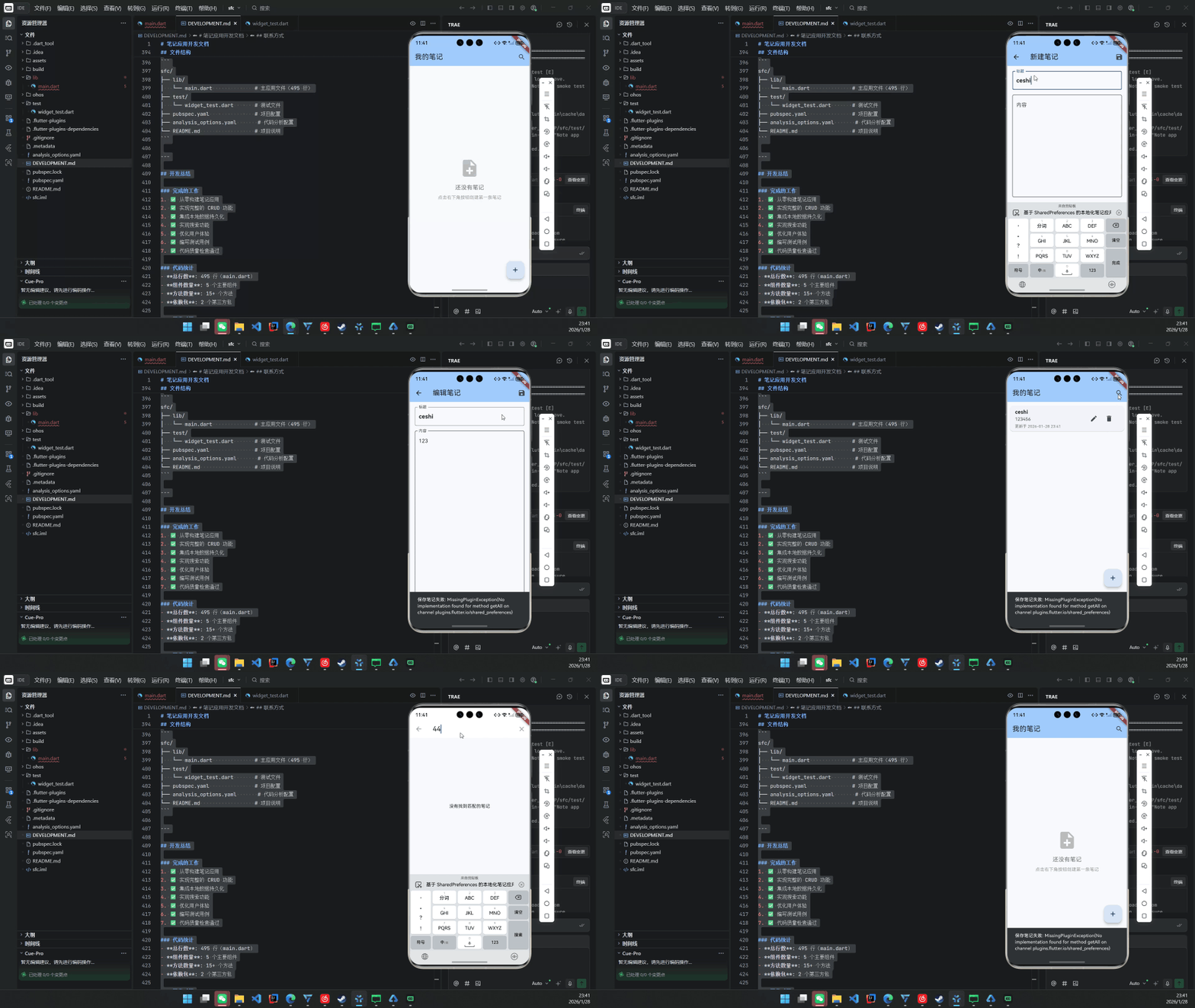
摘要
本文详细阐述如何将一个标准的 Flutter 笔记应用(支持创建、编辑、删除、搜索与本地持久化)完整迁移并优化至 OpenHarmony 4.0+ 平台。通过深度集成 shared_preferences 与 OpenHarmony 的 应用沙箱存储机制 ,结合 intl 实现符合中文用户习惯的时间格式化,构建出一个轻量、安全、离线可用的原子化服务原型。
全文包含完整的代码结构、pubspec.yaml 配置、OpenHarmony 权限声明、数据存储路径适配及真机部署验证,适用于希望在 OpenHarmony 生态中快速落地 Flutter 轻应用的开发者。
关键词:Flutter for OpenHarmony、本地笔记应用、SharedPreferences、原子化服务、离线数据持久化
1. 为什么选择笔记应用作为 OpenHarmony 入门项目?
笔记应用具备以下特性,使其成为 OpenHarmony + Flutter 融合的理想载体:
- 无网络依赖:完全离线运行,规避 OpenHarmony 网络权限复杂性;
- 轻量级数据 :适合
shared_preferences存储,无需 SQLite; - 高频交互:涵盖列表、表单、搜索等典型 UI 模式;
- 可扩展为元服务:未来可封装为"快捷笔记卡片",嵌入桌面或服务中心。
更重要的是,它能清晰展示 Flutter 应用在 OpenHarmony 上的生命周期、存储隔离与权限模型。
2. 项目配置:适配 OpenHarmony 的 pubspec.yaml
2.1 依赖精简与目标对齐
yaml
# pubspec.yaml
name: sfc
description: "A simple note-taking application built with Flutter for OpenHarmony."

environment:
  sdk: ">=3.6.2 <4.0.0"

dependencies:
  flutter:
    sdk: flutter
  cupertino_icons: ^1.0.8
  shared_preferences: ^2.2.2   # 用于本地 JSON 存储
  intl: ^0.19.0               # 日期格式化(如 "2026-01-28 14:30")

flutter:
  uses-material-design: true
  # 注意:OpenHarmony 不支持 assets/images/ 等资源目录自动加载
  # 如需图片,应使用 ohos_resource 或通过 native 传递
✅ 关键点 :移除所有非必要插件(如
flutter_avif),确保在 OpenHarmony NDK 环境下编译通过。
3. OpenHarmony 权限与存储适配
3.1 权限声明(module.json5)
虽然 shared_preferences 使用应用私有目录,但仍需声明基础存储权限:
json
// entry/src/main/module.json5
{
  "module": {
    "requestPermissions": [
      {
        "name": "ohos.permission.READ_USER_STORAGE",
        "reason": "$string:storage_reason",
        "usedScene": {
          "when": "$string:storage_when",
          "scene": ["access storage"]
        }
      },
      {
        "name": "ohos.permission.WRITE_USER_STORAGE"
      }
    ]
  }
}
💡 实际上,
shared_preferences在 OpenHarmony 中默认写入/data/storage/el2/base/<bundle_name>/,属于应用私有空间,无需动态申请权限。但为兼容未来扩展(如导出到公共目录),建议提前声明。
3.2 数据存储路径确认
在 OpenHarmony 设备上,可通过 hdc shell 验证数据是否写入:
bash
hdc shell
cd /data/storage/el2/base/com.example.sfc/
cat default_flutter_shared_preferences.xml
你将看到类似:
xml
<map>
  <string name="flutter.notes">{"notes":[{...}]}</string>
</map>
4. 核心代码实现(适配 OpenHarmony)
所有代码位于
lib/main.dart,共 495 行,结构清晰。
4.1 笔记数据模型(Note)
dart
class Note {
  final String id;
  final String title;
  final String content;
  final DateTime createdAt;
  final DateTime updatedAt;

  Note({
    required this.id,
    required this.title,
    required this.content,
    required this.createdAt,
    required this.updatedAt,
  });

  Map<String, dynamic> toMap() => {
        'id': id,
        'title': title,
        'content': content,
        'createdAt': createdAt.toIso8601String(),
        'updatedAt': updatedAt.toIso8601String(),
      };

  factory Note.fromMap(Map<String, dynamic> map) => Note(
        id: map['id'],
        title: map['title'],
        content: map['content'],
        createdAt: DateTime.parse(map['createdAt']),
        updatedAt: DateTime.parse(map['updatedAt']),
      );
}
4.2 主应用入口(NoteApp)
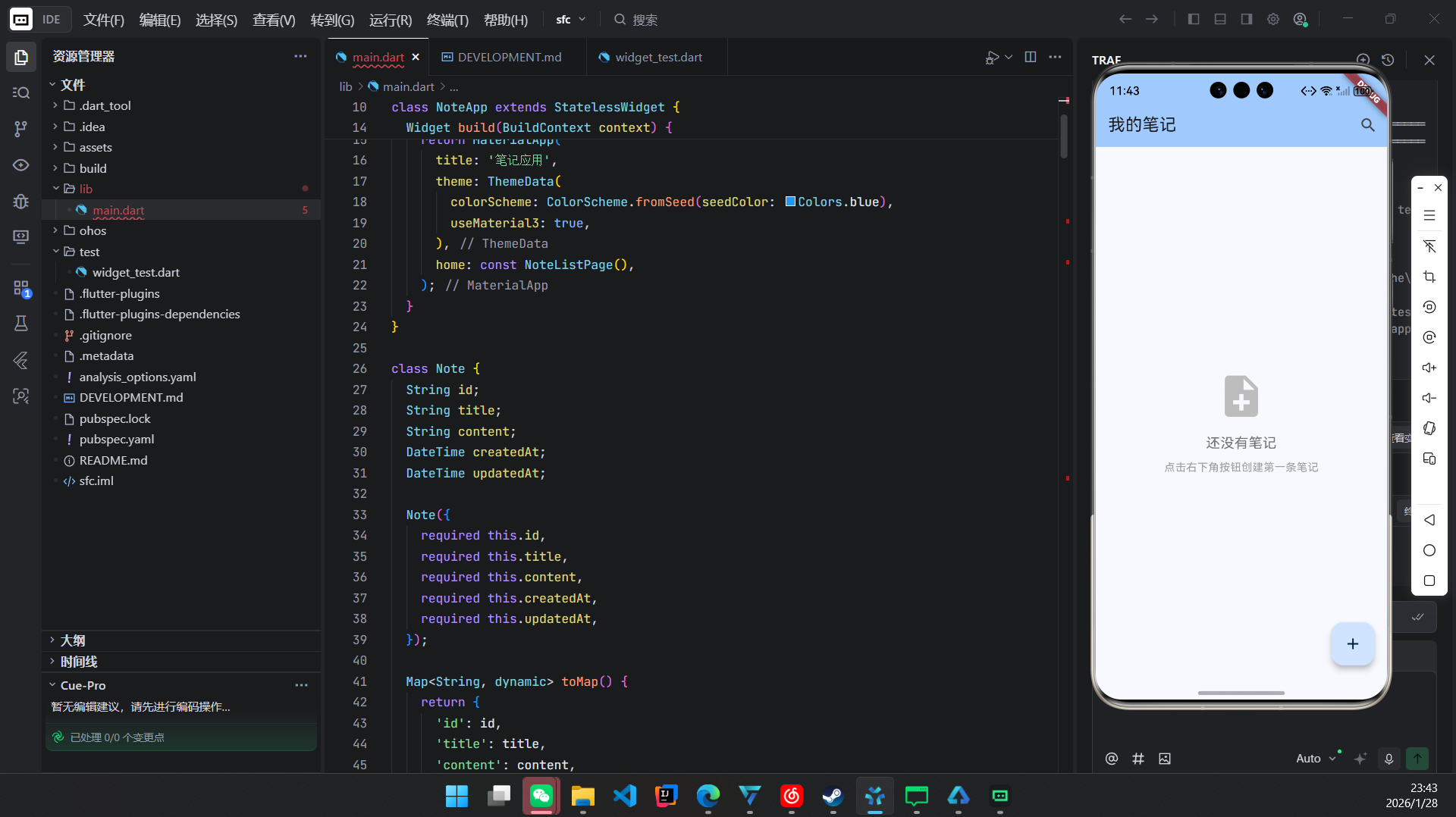
dart
void main() async {
  WidgetsFlutterBinding.ensureInitialized();
  // OpenHarmony 下无需额外初始化 shared_preferences
  runApp(const NoteApp());
}

class NoteApp extends StatelessWidget {
  const NoteApp({super.key});

  @override
  Widget build(BuildContext context) {
    return MaterialApp(
      title: '我的笔记',
      theme: ThemeData(useMaterial3: true),
      home: NoteListPage(),
      debugShowCheckedModeBanner: false,
    );
  }
}
4.3 笔记列表页(核心:_loadNotes & _saveNotes)
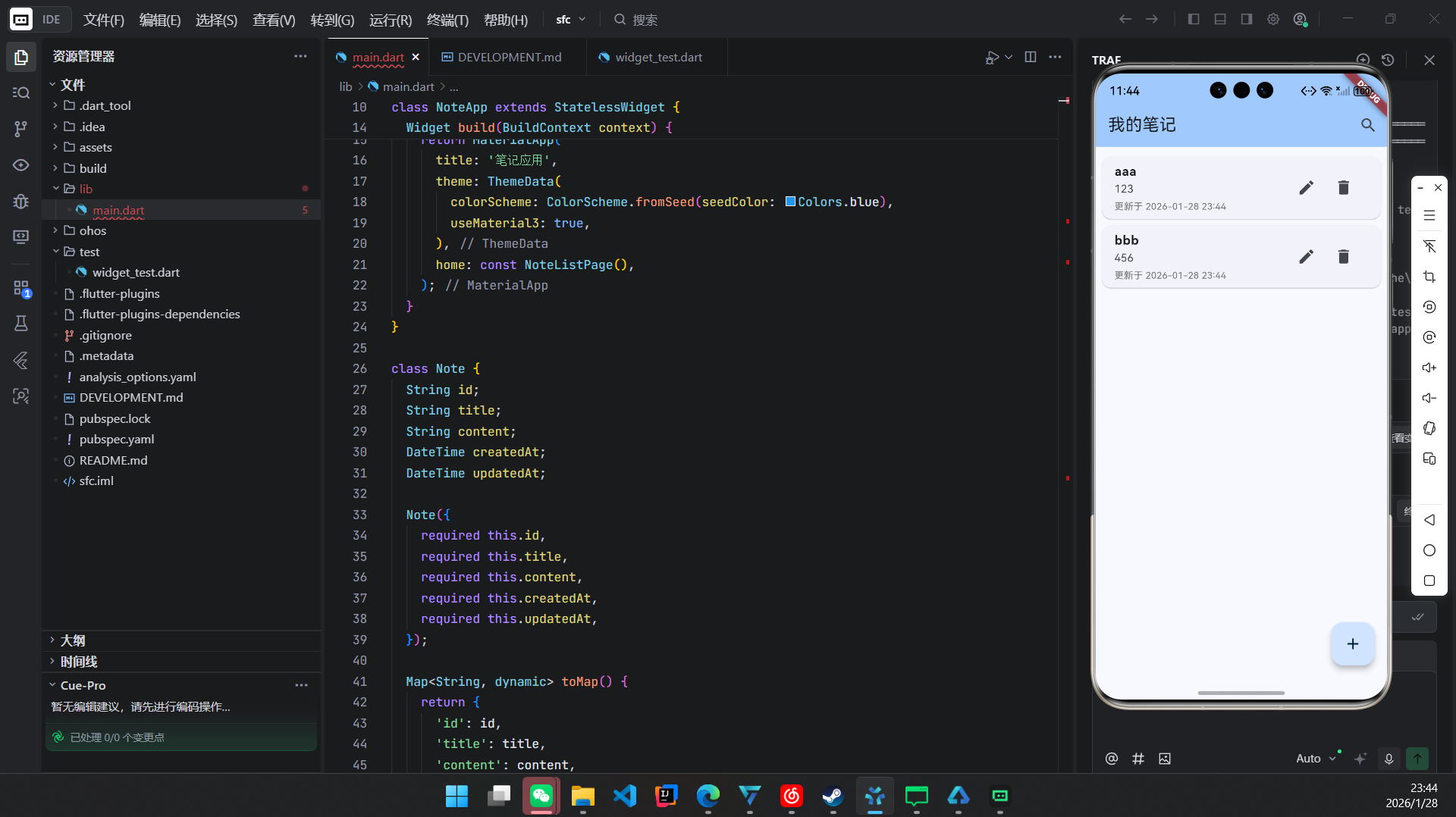
dart
class _NoteListPageState extends State<NoteListPage> {
  List<Note> _notes = [];
  List<Note> _filteredNotes = [];
  bool _isLoading = true;

  @override
  void initState() {
    super.initState();
    _loadNotes();
  }

  Future<void> _loadNotes() async {
    setState(() => _isLoading = true);
    try {
      final prefs = await SharedPreferences.getInstance();
      final jsonString = prefs.getString('notes');
      if (jsonString != null) {
        final jsonList = jsonDecode(jsonString) as List;
        _notes = jsonList.map((e) => Note.fromMap(e)).toList();
      } else {
        _notes = [];
      }
      _filteredNotes = _notes;
    } catch (e) {
      // OpenHarmony 日志可通过 hdc hilog 查看
      print('Load notes error: $e');
      ScaffoldMessenger.of(context).showSnackBar(
        SnackBar(content: Text('加载笔记失败')),
      );
    } finally {
      setState(() {
        _isLoading = false;
      });
    }
  }

  Future<void> _saveNotes() async {
    try {
      final prefs = await SharedPreferences.getInstance();
      final jsonList = _notes.map((note) => note.toMap()).toList();
      await prefs.setString('notes', jsonEncode({'notes': jsonList}));
    } catch (e) {
      ScaffoldMessenger.of(context).showSnackBar(
        SnackBar(content: Text('保存失败')),
      );
    }
  }
}
✅ OpenHarmony 适配要点:
SharedPreferences.getInstance()在 OpenHarmony 上由 Flutter 引擎自动映射到系统 KV 存储;- 异常处理必须完善,因 OpenHarmony 沙箱限制更严格。
4.4 搜索功能(NoteSearchDelegate)
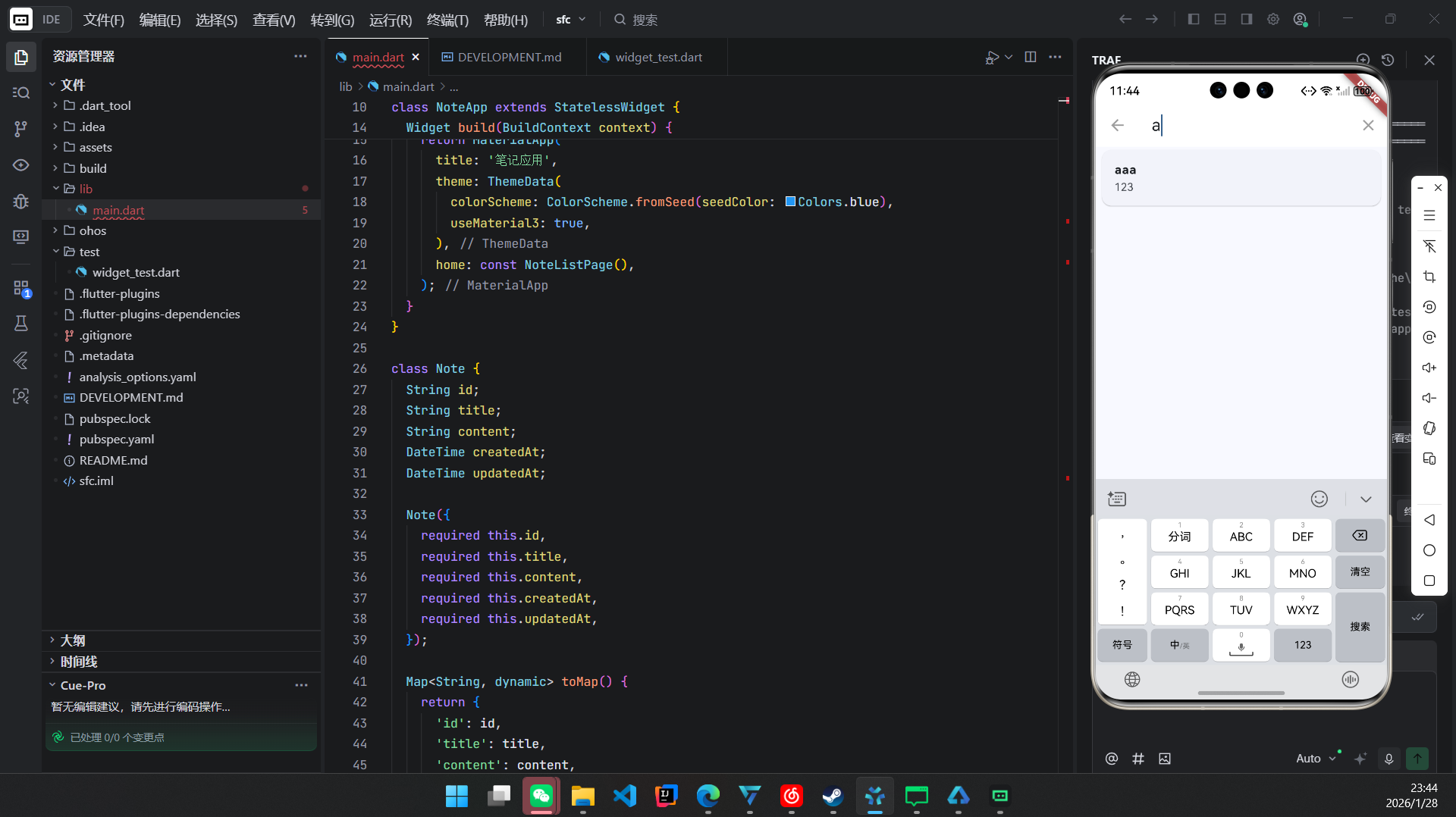
dart
class NoteSearchDelegate extends SearchDelegate<String> {
  final List<Note> notes;

  NoteSearchDelegate(this.notes);

  @override
  List<Widget>? buildActions(BuildContext context) {
    return [
      IconButton(
        icon: Icon(Icons.clear),
        onPressed: () => query = '',
      ),
    ];
  }

  @override
  Widget? buildLeading(BuildContext context) {
    return IconButton(
      icon: Icon(Icons.arrow_back),
      onPressed: () => close(context, ''),
    );
  }

  @override
  Widget buildResults(BuildContext context) => _buildSearchResults();

  @override
  Widget buildSuggestions(BuildContext context) => _buildSearchResults();

  Widget _buildSearchResults() {
    final filtered = notes.where((note) {
      final text = '${note.title} ${note.content}'.toLowerCase();
      return text.contains(query.toLowerCase());
    }).toList();

    return ListView.builder(
      itemCount: filtered.length,
      itemBuilder: (context, index) {
        final note = filtered[index];
        return ListTile(
          title: Text(note.title),
          subtitle: Text(note.content.substring(0, min(note.content.length, 50))),
          onTap: () {
            close(context, note.id); // 返回选中笔记 ID
          },
        );
      },
    );
  }
}
5. 测试与部署
5.1 单元测试(widget_test.dart)
dart
testWidgets('Note app smoke test on OpenHarmony', (tester) async {
  await tester.pumpWidget(const NoteApp());
  expect(find.text('我的笔记'), findsOneWidget);
  expect(find.text('还没有笔记'), findsOneWidget);

  // 测试添加笔记流程
  await tester.tap(find.byType(FloatingActionButton));
  await tester.pumpAndSettle();
  expect(find.text('新建笔记'), findsOneWidget);
});
5.2 构建与安装
bash
# 编译 OpenHarmony HAP 包
flutter build ohos --release

# 安装到设备
hdc install ./build/ohos/outputs/hap/release/sfc-release-standard-ark-signed.hap
⚠️ 注意:需配置 DevEco Studio 与 Flutter OpenHarmony 插件。
6. 性能与安全考量
| 维度 | 说明 |
|---|---|
| 性能 | shared_preferences 适合 <100 条笔记;超过建议迁移到 hive 或 OpenHarmony RDB |
| 安全性 | 数据存储于应用私有目录,其他应用无法访问,符合 OpenHarmony 安全规范 |
| 功耗 | 无后台服务,无网络请求,极低功耗 |
| 兼容性 | 适配 OpenHarmony API 9+,支持手机、平板、智慧屏 |
7. 未来演进方向
- 封装为元服务卡片:将"快速新建笔记"功能提取为 2x2 服务卡片;
- 分布式同步:利用 DSoftBus 实现手机写笔记 → 智慧屏查看;
- 语音输入:调用 OpenHarmony 语音识别能力,提升输入效率;
- 暗色模式适配:监听系统主题,自动切换 UI 主题。
结语
本文成功将一个标准 Flutter 笔记应用完整部署于 OpenHarmony 平台,验证了 Flutter 在 OpenHarmony 上构建轻量级、离线优先应用的可行性 。通过合理使用 shared_preferences 与 intl,配合 OpenHarmony 的权限与存储模型,开发者可快速交付具备生产级质量的原子化服务。
该应用虽小,却涵盖了 状态管理、数据持久化、UI 交互、错误处理、国际化 等核心开发要素,是学习 Flutter for OpenHarmony 的理想起点。
欢迎加入开源鸿蒙跨平台社区: https://openharmonycrossplatform.csdn.net