一.基本概念
1.1初识
进程 = 内核数据结构(task_struct)(PCB) + ⾃⼰的程序代码和数据
我们上篇文章提到过,OS进行管理时,都是先描述再组织,进程一样
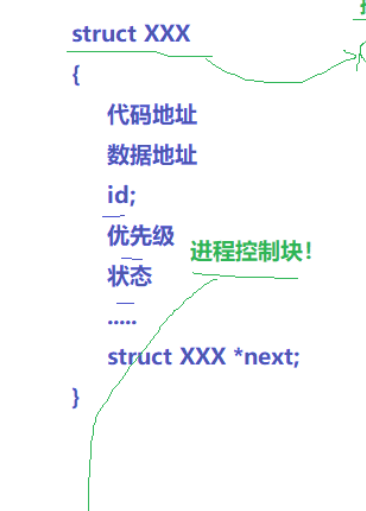
进程所以属性,都可以通过该struct找到
其中在内存内部,分为进程和进程列表,进程列表存放指针,指针之间一一相连就形成了列表,每个列表都有自己对应的程序代码和数据
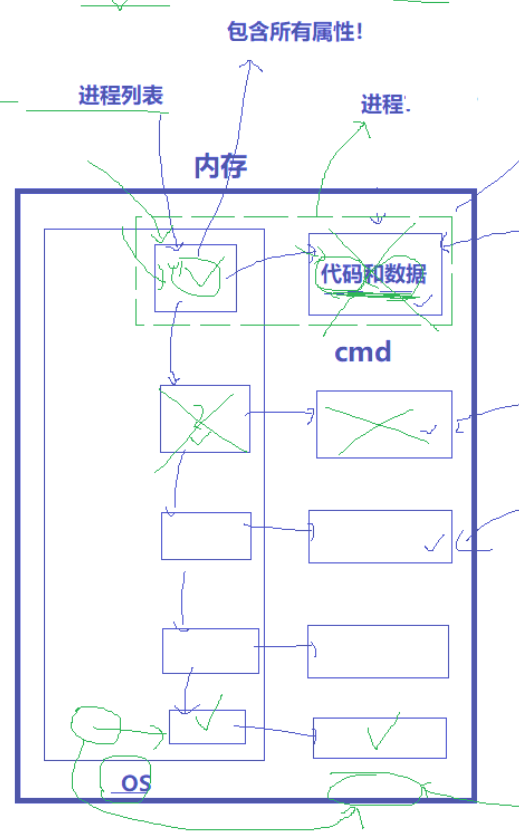
因此,对进程的管理,就这样变成了对链表的增删查改
1.2.task_struct
标⽰符: 描述本进程的唯⼀标⽰符,⽤来区别其他进程。
状态: 任务状态,退出代码,退出信号等。
优先级: 相对于其他进程的优先级。
程序计数器: 程序中即将被执⾏的下⼀条指令的地址。
内存指针: 包括程序代码和进程相关数据的指针,还有和其他进程共享的内存块的指针
上下⽂数据: 进程执⾏时处理器的寄存器中的数据休学例⼦,要加图CPU,寄存器。
I∕O状态信息: 包括显⽰的I/O请求,分配给进程的I∕O设备和被进程使⽤的⽂件列表。
记账信息: 可能包括处理器时间总和,使⽤的时钟数总和,时间限制,记账号等。
其他信息
1.3 查看进程
- 进程的信息可以通过 /proc 系统⽂件夹查看
如:要获取PID为1的进程信息,你需要查看 /proc/1 这个⽂件夹。
bash/proc: total 0 0 1 0 12 0 15538 0 18 0 22134 0 24 0 25 0 261 0 271 0 288 0 39 0 51 0 602 0 987 0 devices 0 iomem 0 kpageflags 0 net 0 stat 0 version 0 10 0 1278 0 16 0 18947 0 22136 0 240 0 2510 0 262 0 273 0 29 0 397 0 511 0 629 0 acpi 0 diskstats 0 ioports 0 loadavg 0 pagetypeinfo 0 swaps 0 vmallocinfo 0 1004 0 13 0 161 0 19 0 22155 0 24011 0 2517 0 263 0 274 0 30747 0 4 0 513 0 65 0 buddyinfo 0 dma 0 irq 0 locks 0 partitions 0 sys 0 vmstat 0 1086 0 13520 0 16170 0 2 0 22156 0 24018 0 252 0 265 0 275 0 30765 0 421 0 515 0 679 0 bus 0 driver 0 kallsyms 0 mdstat 0 sched_debug 0 sysrq-trigger 0 zoneinfo 0 1094 0 13704 0 16177 0 20 0 22451 0 241 0 2528 0 266 0 277 0 31 0 47 0 517 0 7 0 cgroups 0 execdomains 0 kcore 0 meminfo 0 schedstat 0 sysvipc 0 1095 0 14 0 16187 0 21 0 23 0 243 0 255 0 268 0 278 0 36 0 49 0 52 0 704 0 cmdline 0 fb 0 keys 0 misc 0 scsi 0 timer_list 0 11 0 15073 0 17465 0 21489 0 234 0 244 0 256 0 269 0 28 0 37 0 50 0 520 0 8 0 consoles 0 filesystems 0 key-users 0 modules 0 self 0 timer_stats 0 1101 0 15083 0 17473 0 22 0 238 0 24812 0 26 0 27 0 281 0 373 0 507 0 596 0 860 0 cpuinfo 0 fs 0 kmsg 0 mounts 0 slabinfo 0 tty 0 1102 0 15519 0 17484 0 22133 0 239 0 24819 0 260 0 270 0 287 0 38 0 509 0 6 0 9 0 crypto 0 interrupts 0 kpagecount 0 mtrr 0 softirqs 0 uptime
- ⼤多数进程信息同样可以使⽤top和ps这些⽤⼾级⼯具来获取
bash[lcb@hcss-ecs-1cde test]$ ps aut | grep root root 1101 0.0 0.0 110208 856 tty1 Ss+ Dec12 0:00 /sbin/agetty --noclear tty1 linux root 1102 0.0 0.0 110208 864 ttyS0 Ss+ Dec12 0:00 /sbin/agetty --keep-baud 115200,38400,9600 ttyS0 vt220 root 22136 0.0 0.1 115548 1988 pts/0 Ss 19:55 0:00 -bash root 22155 0.0 0.1 189820 2344 pts/0 S 19:55 0:00 su lcb lcb 22455 0.0 0.0 112816 976 pts/0 S+ 20:45 0:00 grep --color=auto root
1.4 系统调用来获取进程标识符
• 进程id(PID)
• ⽗进程id(PPID)
查看使用
bashID(1) User Commands ID(1) NAME id - print real and effective user and group IDs SYNOPSIS id [OPTION]... [USER] DESCRIPTION Print user and group information for the specified USER, or (when USER omitted) for the current user. -a ignore, for compatibility with other versions -Z, --context print only the security context of the current user -g, --group print only the effective group ID -G, --groups print all group IDs -n, --name print a name instead of a number, for -ugG -r, --real print the real ID instead of the effective ID, with -ugG -u, --user print only the effective user ID -z, --zero delimit entries with NUL characters, not whitespace; not permitted in default format --help display this help and exit --version output version information and exit Without any OPTION, print some useful set of identified information. GNU coreutils online help: <http://www.gnu.org/software/coreutils/> Report id translation bugs to <http://translationproject.org/team/> AUTHOR Written by Arnold Robbins and David MacKenzie. COPYRIGHT Copyright © 2013 Free Software Foundation, Inc. License GPLv3+: GNU GPL version 3 or later <http://gnu.org/licenses/gpl.html>. This is free software: you are free to change and redistribute it. There is NO WARRANTY, to the extent permitted by law. SEE ALSO The full documentation for id is maintained as a Texinfo manual. If the info and id programs are properly installed at your site, the command info coreutils 'id invocation' should give you access to the complete manual. GNU coreutils 8.22 November 2020 ID(1) Manual page id(1) line 1 (press h for help or q to quit)
实践使用
test1.c
bash
1: test1.c ⮀ ⮂⮂ buffers
1 #include<stdio.h>
2 #include<unistd.h>
3 #include<sys/types.h>
4 int main()
5 {
W> 6 printf("id:%d\n",getpid);
7
W> 8 printf("id:%d\n",getppid);
9 }
10
11 结果
bash
[lcb@hcss-ecs-1cde test]$ make
gcc -o test1 test1.c
[lcb@hcss-ecs-1cde test]$ ./test1
id:4195472
id:4195536
1.5 通过系统调用创建进程 -fork初识
test1.c
bash
 1 #include<stdio.h>
    2 #include<unistd.h>
    3 #include<sys/types.h>
    4 int main()
    5 {
    6   pid_t ret =fork();
    7   if(ret < 0)
    8   {
    9     perror("fork");
   10     return 1;
   11   }
   12   else if(ret == 0)
   13   {
W> 14      printf("这是一个子进程id:%d\n",getpid);
W> 15      printf("它的父进程id:%d\n",getppid);
   16   }
   17   else{
W> 18     printf("这是一个父进程id:%d\n",getpid);
W> 19     printf("它的父进程id:%d\n",getppid);
   20   }
   21 }
   22
结果出人意料,else if与if竟然都可以执行
bash
[lcb@hcss-ecs-1cde test]$ make
gcc -o test1 test1.c
[lcb@hcss-ecs-1cde test]$ ./test1
这是一个父进程id:4195584
它的父进程id:4195664
这是一个子进程id:4195584
它的父进程id:4195664
原因就在于fork于父子进程
先看fork
当fork被调用时,操作系统创建一个新的进程控制块(PCB)和地址空间,复制父进程的代码、数据和堆栈。子进程获得父进程资源的副本,包括打开的文件描述符、信号处理程序和环境变量。
调用fork的进程称为父进程,新创建的进程称为子进程
再看父子进程,我们知道父:子的个数比==1:n,
一个父可以有多个子,但子只能有一个父,所以子的父亲是确定一个的,那么父进程需要拿到子进程的PID来进行确认子进程
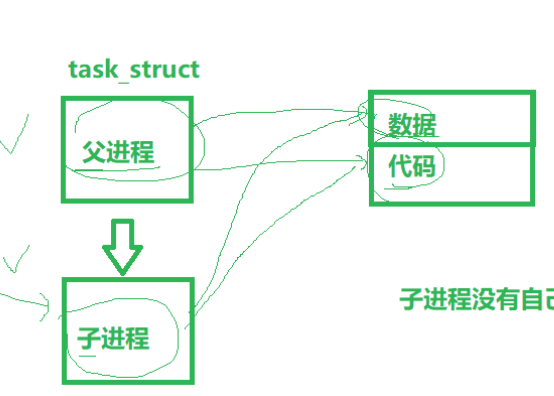
所以fork返回值有三种情况
- 返回大于0的值:在父进程中,返回子进程的PID
- 返回0:在子进程中
- 返回-1:表示fork失败,通常由于系统资源不足
那么上面代码无论是父进程先进入fork还是子进程先进入,两个进程进入后,返回值一定不一样,ret就发送变化,当任一进程尝试修改页面时,操作系统就会复制该页面,让OS在底层拷贝一份,让目标进程修改这份拷贝(写实拷贝)
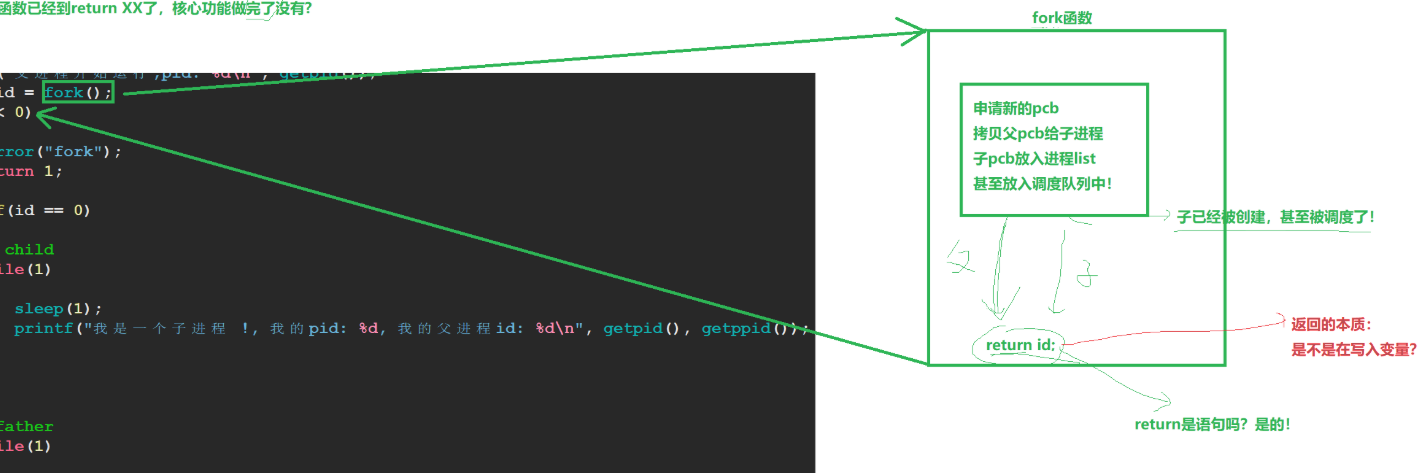
得出结论:进程具有独立性
二.进程状态
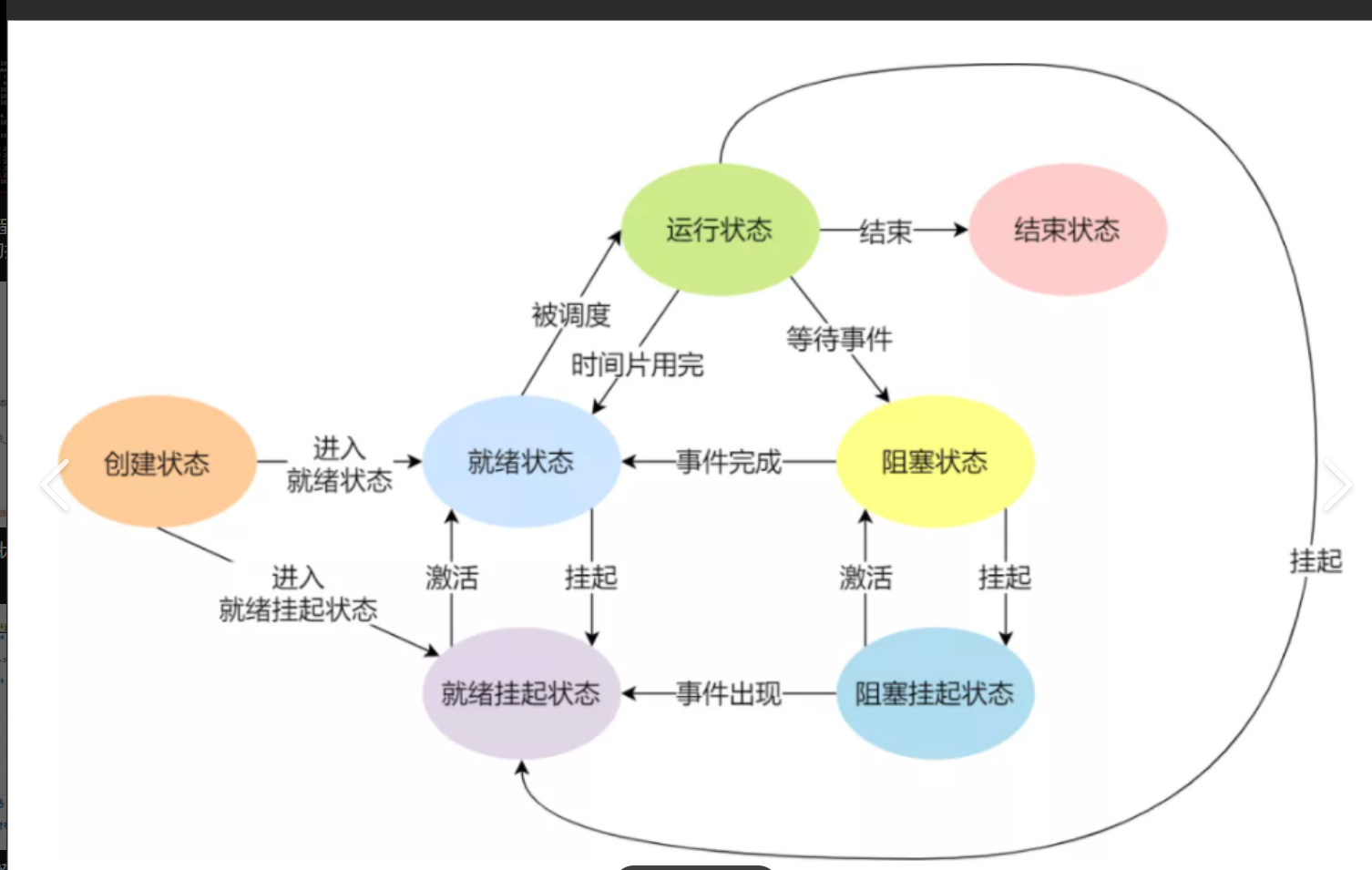
2.1 Linux内核源代码
bash
下⾯的状态在kernel源代码⾥定义:
/*
*The task state array is a strange "bitmap" of
*reasons to sleep. Thus "running" is zero, and
*you can test for combinations of others with
*simple bit tests.
*/
static const char *const task_state_array[] = {
"R (running)", /*0 */
"S (sleeping)", /*1 */
"D (disk sleep)", /*2 */
"T (stopped)", /*4 */

"t (tracing stop)", /*8 */
"X (dead)", /*16 */
"Z (zombie)", /*32 */
};
R运⾏状态(running): 并不意味着进程⼀定在运⾏中,它表明进程要么是在运⾏中要么在运⾏
队列⾥。
S睡眠状态(sleeping): 意味着进程在等待事件完成(这⾥的睡眠有时候也叫做可中断睡眠
(interruptible sleep))。
D磁盘休眠状态(Disk sleep)有时候也叫不可中断睡眠状态(uninterruptible sleep),在这个
状态的进程通常会等待IO的结束。
T停⽌状态(stopped): 可以通过发送 SIGSTOP 信号给进程来停⽌(T)进程。这个被暂停的
进程可以通过发送 SIGCONT 信号让进程继续运⾏。
X死亡状态(dead):这个状态只是⼀个返回状态,你不会在任务列表⾥看到这个状态
后面会进行讲解
2.2 运行&&阻塞&&挂起
2.2.1 运行状态
R运⾏状态(running): 并不意味着进程⼀定在运⾏中,它表明进程要么是在运⾏中要么在运⾏队列⾥。
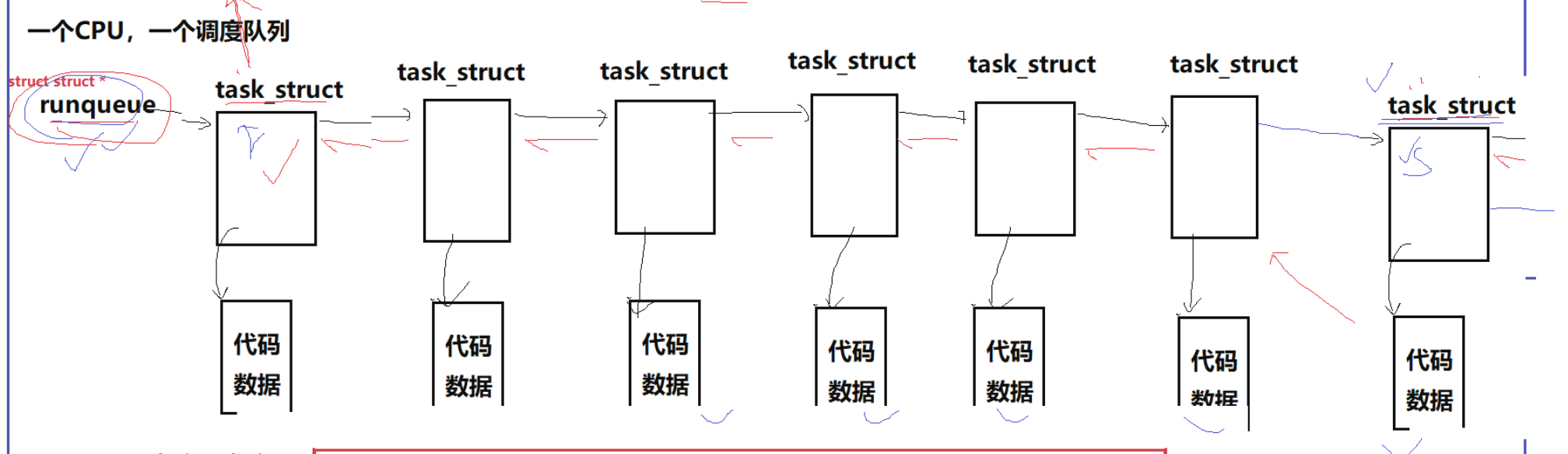
我们要先知道task_struct可以在多个不同的数据结构(eg:调度队列,进程列表),原因就在于Linux下使用该结构与我们平常使用不一样
以 struct list_head为例
平常的结构体为
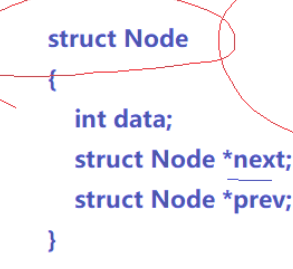
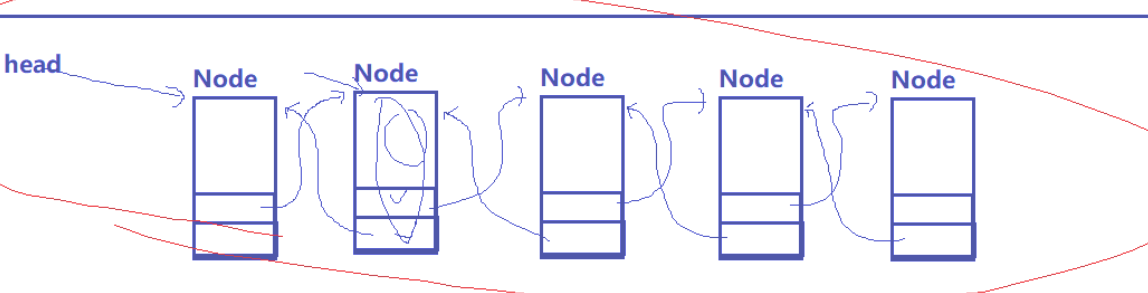
平常的next prev指针,指向的是下一个节点的开始地址,那么每种数据类型都需单独实现,对Linux内核不友好Linux
但struct list_head(侵入式列表)内部内
bash
struct list_head{
    struct list_head *next,*prev;
}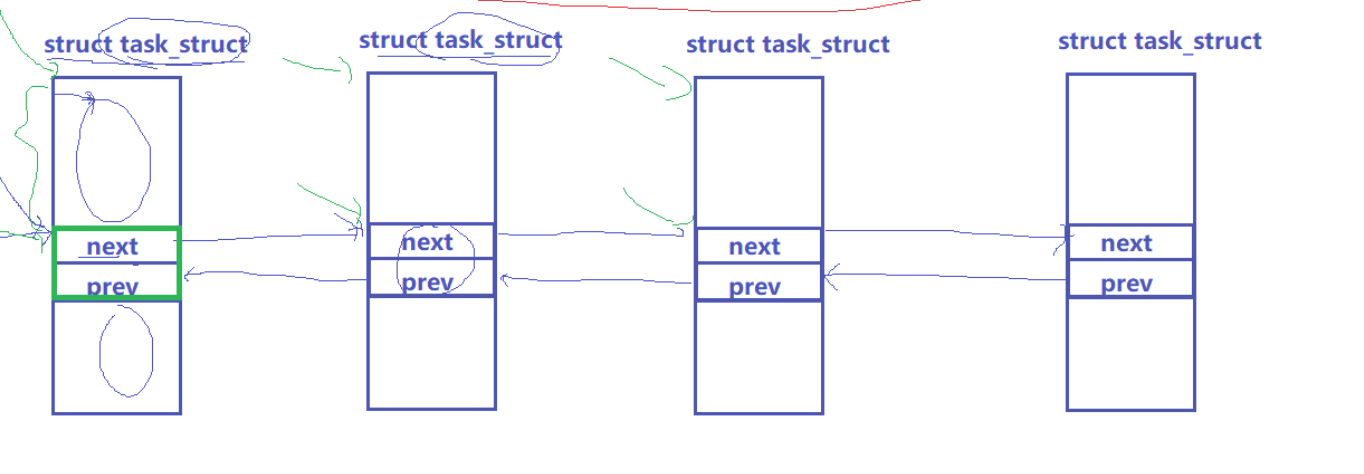
next prev是直接指向下个节点中的next prev,那么一个struct task_struct可以存在多种不同数据类型的侵入式列表
完全通用:同一套链表操作(list_add/list_del等)可管理任意业务结构体,无需重复实现
如何获得其他数据
通过内存偏移,c语言知识,不细讲
或者调用offset

2.2.2 阻塞状态
我们现在阶段写代码遇到的阻塞状态,就是cin scanf
当代码执行到该位置时,OS就是等待我们输入,进行了阻塞状态

2.2.3 挂起状态
计算机的运行内存是有限的,当快达到上限时,就会优先把阻塞状态的进程变成挂起状态(调用硬盘进行存储),更极端情况,将优先级低的运行状态的进程变成挂起状态,在运行内存充足后,再进行释放
更有甚者,直接将进程结束
2.3 僵尸状态
我们创建子进程的目的就是为了完成某件事,所以子进程要能够被获取某些信息
进程的退出状态必须被维持下去,因为他要告诉关⼼它的进程(⽗进程),你交给我的任务,我 办的怎么样了。可⽗进程如果⼀直不读取,那⼦进程就⼀直处于Z状态?是的!
维护退出状态本⾝就是要⽤数据维护,也属于进程基本信息,所以保存在task_struct(PCB)中, 换句话说,Z状态⼀直不退出,PCB⼀直都要维护?是的!
那么我们可以说,僵尸状态有泄漏内存的风险(不通过malloc new)
加强理解:
某天你在路上看到一个死人,打电话进行了报警,警方来的第一件事不是通知家属收拾尸体,而是封锁现场,通知法医,法医对死者获取其生前状态,死者家属要领回尸体,只能等法医采集信息完成才可
法医获取信息就是PCB一直被维护
2.4 孤儿状态
⽗进程先退出,⼦进程就称之为"孤⼉进程"
孤⼉进程被1号init/systemd进程领养,当然要有init/systemd进程回收喽。
bash
#include <stdio.h>
#include <unistd.h>
#include <stdlib.h>
int main()
{
pid_t id = fork();
if(id < 0){
perror("fork");
return 1;
}
else if(id == 0){//child
printf("I am child, pid : %d\n", getpid());
sleep(10);
}else{//parent
printf("I am parent, pid: %d\n", getpid());
sleep(3);
exit(0);
}
return 0;
}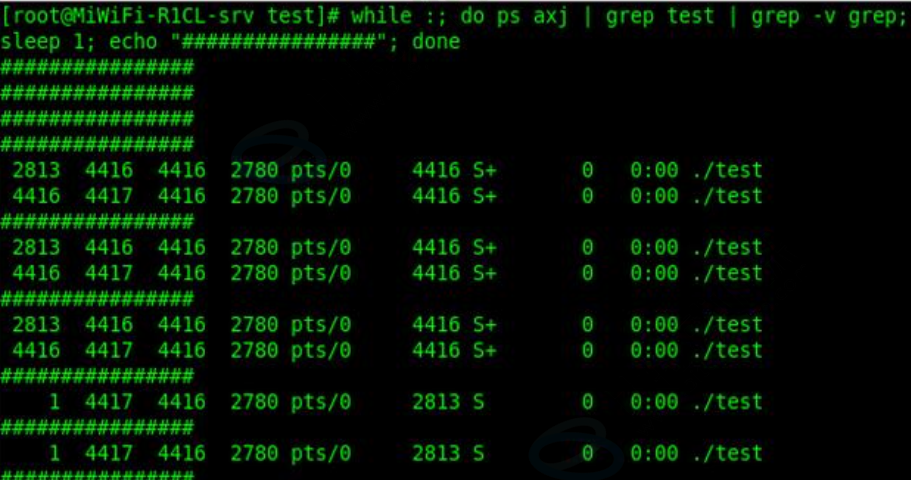
如果不对子进程进行领养,那就会出现数据丢失的问题了,如果在涉及公司或者国家,那就是极其严重的问题
总结
明白task_struct的组成及各种进程状态,为后面的学习打好基础