目录
[1. 概览](#1. 概览)
[2. 代码实现与详细注释](#2. 代码实现与详细注释)
[第一步:定义 Attribute](#第一步:定义 Attribute)
[第二步:实现 PropertyDrawer](#第二步:实现 PropertyDrawer)
[3. 常见问题解析](#3. 常见问题解析)
[4. 实际效果](#4. 实际效果)
在 Unity 开发中,为了保证代码规范,变量名通常使用英文**(如 playerHealth、isGameStarted)** 。但在 Inspector 面板中配置数值时,策划或美术人员可能更希望看到直观的中文标签**(如"玩家血量"、"游戏是否开始")。**
本文将介绍如何使用 Unity 的 PropertyAttribute 和 PropertyDrawer 功能,实现一个 **CustomLabel**特性,让我们既能保留规范的代码命名,又能拥有清晰的中文 Inspector 面板。
1. 概览
我们需要创建三个部分:
-
Attribute(特性类): 用于在变量上打标签,存储我们需要显示的中文名称。
-
Drawer(绘制类): 核心逻辑,告诉 Unity 编辑器当遇到这个标签时,该如何绘制界面。
-
Usage(测试用例): 实际挂载使用的脚本。
2. 代码实现与详细注释
第一步:定义 Attribute
这个脚本定义了 CustomLabel 属性本身。它只负责存储数据(标签名称)。
文件名:CustomLabelAttribute.cs 存放位置:任意 Scripts 文件夹(不需要放在 Editor 文件夹)
可以参考我的目录
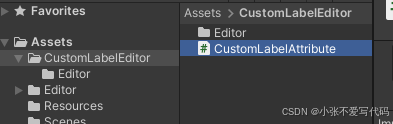
CustomLabelAttribute.cs 代码内容如下
cs
using UnityEngine;

public class CustomLabelAttribute : PropertyAttribute
{
    public string label;

    public CustomLabelAttribute(string label)
    {
        this.label = label;
    }
}
第二步:实现 PropertyDrawer
这个脚本负责具体的绘制逻辑。通过反射机制,它能在 Inspector 渲染该属性时,截获并修改显示的 Label。
文件名:CustomLabelDrawer.cs 存放位置:必须放在 Editor 文件夹内
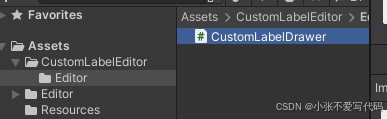
CustomLabelDrawer .cs 代码内容如下
cs
using UnityEditor;
using UnityEngine;

[CustomPropertyDrawer(typeof(CustomLabelAttribute))]
public class CustomLabelDrawer : PropertyDrawer
{
    public override void OnGUI(Rect position, SerializedProperty property, GUIContent label)
    {
        CustomLabelAttribute customLabel = (CustomLabelAttribute)attribute;

        // --- 关键逻辑解析 ---
        // 检查当前属性的路径是否以 "]" 结尾。
        // 在 Unity 中,数组或 List 的元素路径通常是 "variableName.Array.data[0]" 这种格式。
        // 如果我们不加这个判断,当此 Attribute 应用于数组字段本身时,
        // Unity 可能会尝试将数组内部的 "Element 0", "Element 1" 也重命名为我们的 Label,
        // 导致所有元素都叫同一个名字,没法区分。
        // 加上这个判断,确保我们只修改字段本身的名称,而保留数组元素的索引名称。
        if (!property.propertyPath.EndsWith("]"))
        {
            label.text = customLabel.label;
        }

        // 标记属性绘制开始
        EditorGUI.BeginProperty(position, label, property);

        // 绘制属性字段
        // includeChildren: true 表示如果是结构体或类,会自动绘制其子字段
        EditorGUI.PropertyField(position, property, label, true);

        // 标记属性绘制结束
        EditorGUI.EndProperty();
    }

    // 重新计算属性高度
    // 这一步很重要,否则对于自定义类或数组,Inspector 可能会因为高度计算错误导致重叠
    public override float GetPropertyHeight(SerializedProperty property, GUIContent label)
    {
        return EditorGUI.GetPropertyHeight(property, label, true);
    }
}
第三步:实际应用测试 (Test.cs)
这里展示了在普通字段、自定义类内部字段、结构体、以及数组上的表现。
cs
using UnityEngine;
using System.Collections.Generic;
using System;

[Serializable]
public class PlayerInfo
{
    [CustomLabel("血量")]
    public int health = 100;
    public int mana = 50;
    public string playerName = "Hero";
    public float speed = 5.0f;
}

public class Test : MonoBehaviour
{
    [CustomLabel("玩家信息")]
    public PlayerInfo player;

    public List<PlayerInfo> enemies;

    public PlayerInfo[] playerinfos;

    [CustomLabel("分数")]
    public int score;

    [CustomLabel("结构体")]
    public MyStruct myStruct;
}

[Serializable]
public struct MyStruct
{
    [CustomLabel("年龄")]
    public int age;
    [CustomLabel("性别")]
    public int sex;
    [CustomLabel("名字")]
    public string name;
    public string occupation;
}
3. 常见问题解析
为什么要判断 !property.propertyPath.EndsWith("]")?
在 Unity 的序列化系统中:
1.普通变量路径:score
2.数组/列表变量本身路径:enemies、playerinfos
3.数组/列表内的元素路径:enemies.Array.data0、playerinfos.Array.data0
当你写下 **CustomLabel("我的列表") public int\[\] myList;**时:
1.Unity 绘制列表头,路径是 myList 。判断通过,名字变成**"我的列表"**。
2.如果不加那个判断,有些复杂的绘制情况下,Unity 可能会把 Attribute 的作用域延续到子元素上,导致你看到的列表变成了:
我的列表
我的列表 (本该是 Element 0)
我的列表 (本该是 Element 1)
3.加上 **EndsWith("]")**的判断,就显式地过滤掉了所有数组元素,保证了索引显示的正确性。
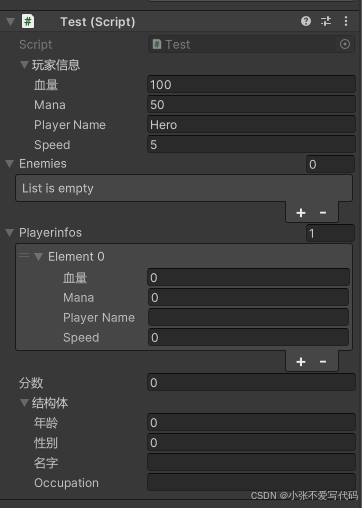
4. 实际效果