十、day10
1、订单状态定时处理
1.1、Spring Task
Spring Task 是 Spring 框架提供的任务调度和异步执行功能,它提供了一种简单的方式来配置和执行定时任务以及异步方法。
简单来说就是一个定时任务框架
①、主要功能
- 定时任务(Scheduled Tasks)
- 基于注解的定时任务配置
- 支持固定速率、固定延迟和cron表达式
- 轻量级的任务调度解决方案
- 异步执行(Async Tasks)
- 方法异步执行能力
- 简化多线程编程
- 与Spring其他组件无缝集成
②、核心注解
Ⅰ、定时任务相关
- @Scheduled: 标记方法为定时任务
fixedRate: 固定速率执行fixedDelay: 固定延迟执行cron: 使用cron表达式
Ⅱ、异步任务相关
@Async: 标记方法为异步执行@EnableAsync: 启用异步支持
③、Cron 表达式详解
Cron 表达式是一种用于配置定时任务执行时间的字符串格式,由6或7个字段组成(Spring Task通常使用6字段格式)。它被广泛用于各种调度系统中,包括Spring Task、Quartz、Linux Cron等。
标准的Cron表达式由6个字段组成,格式如下:
秒 分 时 日 月 周每个字段的含义和取值范围如下:
| 字段 | 允许值 | 允许的特殊字符 |
|---|---|---|
| 秒 | 0-59 | , - * / |
| 分 | 0-59 | , - * / |
| 时 | 0-23 | , - * / |
| 日 | 1-31 | , - * ? / L W C |
| 月 | 1-12或JAN-DEC | , - * / |
| 周 | 0-6或SUN-SAT | , - * ? / L C # |
注意:在Spring中,周日=0或7
可使用在线的 cron生成器进行辅助生成
④、使用
Ⅰ、导入依赖坐标
该依赖存在于 spring-boot-starter中,我们不需要额外导入
Ⅱ、开启任务调度
在启动类中添加注解 @EnableScheduling 开启任务调度
Ⅲ、自定义定时任务
创建定时任务类(要创建实例交给 Spring 管理,多用@Component),之后在该定时任务类中自定义定时任务即可
1.2、订单状态定时处理
主要是通过 Spring Task 对下单但未支付的订单以及派送中(送达/未送达)的订单状态进行处理
①、超时订单
②、派送中订单
二者可通过同一个定时任务类完成
Ⅰ、开启任务调度
java
@SpringBootApplication
@EnableTransactionManagement //开启注解方式的事务管理
@Slf4j
@MapperScan("com.sky.mapper") //扫描mapper接口
@EnableCaching  // 开启缓存功能
@EnableScheduling  // 开启定时任务功能(开启任务调度)
public class SkyApplication {
    public static void main(String[] args) {
        SpringApplication.run(SkyApplication.class, args);
        log.info("server started");
    }
}
Ⅱ、定时任务类
java
// 定时任务类
@Component
@Slf4j
public class OrderTask {
    @Autowired
    private OrderMapper orderMapper;

    // 处理超时订单(每分钟检查一次)
    @Scheduled(cron = "0 * * * * ?") // 每分钟执行一次
    public void handleTimeoutOrders() {
        log.info("处理超时订单(每分钟检查一次)");
        // 通过订单状态和下单时间查询超时订单
        // 订单状态为待付款(1),且当前时间-下单时间 > 15分钟
        List<Orders> timeoutOrder = orderMapper.getByStatusAndOrderTime(Orders.PENDING_PAYMENT, LocalDateTime.now().minusMinutes(15));
        if (timeoutOrder != null && !timeoutOrder.isEmpty()) {
            // 遍历超时订单,更新状态为已取消
            for (Orders order : timeoutOrder) {
                order.setStatus(Orders.CANCELLED);
                order.setCancelReason(MessageConstant.ORDER_TIMEOUT);
                order.setCancelTime(LocalDateTime.now());
                orderMapper.update(order);
            }
        }
    }

    // 处理派送中订单(每天检查一次)
    @Scheduled(cron = "0 0 1 * * ?") // 每天凌晨 1 点执行一次
//    @Scheduled(cron = "0/2 * * * * * ")  // 2s一周期
    public void handleDeliveringOrders() {
        log.info("处理派送中订单(每天检查一次)");
        // 通过订单状态和预计送达时间查询一直派送中的订单
        // 订单状态为派送中(2),且当前时间-预计送达时间 > 1小时
        List<Orders> timeoutOrder = orderMapper.getByStatusAndEstimatedDeliveryTime(Orders.DELIVERY_IN_PROGRESS, LocalDateTime.now().minusHours(1));
        if (timeoutOrder != null && !timeoutOrder.isEmpty()) {
            // 遍历派送中订单,更新状态为已完成
            for (Orders order : timeoutOrder) {
                order.setStatus(Orders.COMPLETED);
                orderMapper.update(order);
            }
        }
    }
}
Ⅲ、测试
临时设置为2s一个周期进行日志打印进行测试
2、Web Socket
WebSocket 是一种在单个TCP连接上进行全双工通信的协议,它使得客户端和服务器之间的数据交换变得更加简单,允许服务端主动向客户端推送数据。
2.1、与传统HTTP的区别
- 持久连接:WebSocket建立后保持连接,不像HTTP需要反复建立/断开
- 双向通信:服务器可以主动推送消息到客户端
- 低延迟:避免了HTTP的头部开销和连接建立时间
- 更少的数据传输:相比HTTP轮询更高效
传统 HTTP 协议是短链接、单向通信,WebSocket是长连接、双向通信,二者底层都是基于 TCP协议
2.2、协议特点
- 基于TCP
- 全双工通信
- 默认端口80(ws)或443(wss)
- 轻量级,适合实时应用
2.3、应用场景
- 弹幕
- 实时聊天应用
- 在线协作工具
- 实时数据监控
- 多人在线游戏
- 股票行情推送
- 实时通知系统
2.4、使用
①、导入依赖坐标
yml
<dependency>
    <groupId>org.springframework.boot</groupId>
    <artifactId>spring-boot-starter-websocket</artifactId>
    <version>3.5.7</version>
</dependency>
②、导入服务端配置
多是固定配置(注意 javax 已被 jakarta取代)
java
/**
 * WebSocket服务
 */
@Component
@ServerEndpoint("/ws/{sid}")
public class WebSocketServer {

    //存放会话对象
    private static Map<String, Session> sessionMap = new HashMap();

    /**
     * 连接建立成功调用的方法
     */
    @OnOpen
    public void onOpen(Session session, @PathParam("sid") String sid) {
        System.out.println("客户端:" + sid + "建立连接");
        sessionMap.put(sid, session);
    }

    /**
     * 收到客户端消息后调用的方法
     *
     * @param message 客户端发送过来的消息
     */
    @OnMessage
    public void onMessage(String message, @PathParam("sid") String sid) {
        System.out.println("收到来自客户端:" + sid + "的信息:" + message);
    }

    /**
     * 连接关闭调用的方法
     *
     * @param sid
     */
    @OnClose
    public void onClose(@PathParam("sid") String sid) {
        System.out.println("连接断开:" + sid);
        sessionMap.remove(sid);
    }

    /**
     * 群发
     *
     * @param message
     */
    public void sendToAllClient(String message) {
        Collection<Session> sessions = sessionMap.values();
        for (Session session : sessions) {
            try {
                //服务器向客户端发送消息
                session.getBasicRemote().sendText(message);
            } catch (Exception e) {
                e.printStackTrace();
            }
        }
    }

}
③、js配置客户端
前端自行书写回调函数等
3、来单提醒
通过 WebSocket建立商家管理端页面和服务端之间的长连接,每当客户支付九通过 WebSocket 的Api 向商家管理端页面进行推送消息(数据格式为 json,内容包括:type【1为来单提醒,2为客户催单】、orderid【订单id】、content【推送内容】)
原项目已导入了依赖,同时前端js也配置好了客户端代码,服务端使用固定配置即可,我们只需封装 json 信息通过 WebSocket 的 API 发送给商家管理端即可
java
//  支付成功,修改订单状态
public void paySuccess(String outTradeNo) {
    // 根据订单号查询订单
    Orders ordersDB = orderMapper.getByNumber(outTradeNo);

    // 根据订单id更新订单的状态、支付方式、支付状态、结账时间
    Orders orders = Orders.builder()
            .id(ordersDB.getId())
            .status(Orders.TO_BE_CONFIRMED)
            .payStatus(Orders.PAID)
            .checkoutTime(LocalDateTime.now())
            .build();

    // 向 WebSocket 服务端发送消息
    // 封装 json 字符串
    Map map = new HashMap();
    map.put("type", 1); // 1 为订单提醒 2 为用户催单
    map.put("orderId", ordersDB.getId());
    map.put("content", "订单号:" + outTradeNo);
    String message = JSONObject.toJSONString(map);
    webSocketServer.sendToAllClient(message);

    orderMapper.update(orders);
}
该功能是在用户支付成功后进行商家提醒的,即要先配置好微信支付功能(配置文件√、公网IP√)
4、客户催单
①、controller层
java
@RestController("userOrderController")
@RequestMapping("/user/order")
@Slf4j
public class OrderController {

    @Autowired
    private OrderService orderService;

    // 用户下单
    @PostMapping("/submit")
    public Result<OrderSubmitVO> submit(@RequestBody OrdersSubmitDTO ordersSubmitDTO) {
        return Result.success(orderService.submitOrder(ordersSubmitDTO));
    }

    // 微信订单支付
    @PutMapping("/payment")
    public Result<OrderPaymentVO> payment(@RequestBody OrdersPaymentDTO ordersPaymentDTO) throws Exception {
        log.info("订单支付:{}", ordersPaymentDTO);
        OrderPaymentVO orderPaymentVO = orderService.payment(ordersPaymentDTO);
        log.info("生成预支付交易单:{}", orderPaymentVO);
        return Result.success(orderPaymentVO);
    }

    // 用户催单
    @GetMapping("/reminder/{id}")
    public Result reminder(@PathVariable("id") Integer id) {
        orderService.reminder(id);
        return Result.success();
    }
}
②、service层
java
public interface OrderService {
    // 用户下单
    OrderSubmitVO submitOrder(OrdersSubmitDTO ordersSubmitDTO);

    // 微信订单支付
    OrderPaymentVO payment(OrdersPaymentDTO ordersPaymentDTO) throws Exception;

    // 支付成功,修改订单状态
    void paySuccess(String outTradeNo);

    // 用户催单
    void reminder(Integer id);
}
java
@Service
public class OrderServiceImpl implements OrderService {
    @Autowired
    private OrderMapper orderMapper;
    @Autowired
    private OrderDetailMapper orderDetailMapper;
    @Autowired
    private AddressBookMapper addressBookMapper;
    @Autowired
    private ShoppingCartMapper shoppingCartMapper;
    @Autowired
    private WeChatPayUtil weChatPayUtil;
    @Autowired
    private UserMapper userMapper;
    @Autowired
    private WebSocketServer webSocketServer;

    // 用户催单
    public void reminder(Integer id) {
        // 根据订单id查询订单
        Orders ordersDB = orderMapper.getById(id);
        if (ordersDB == null) {
            throw new OrderBusinessException(MessageConstant.ORDER_NOT_FOUND);
        }
        // 向 WebSocket 服务端发送消息
        // 封装 json 字符串
        Map map = new HashMap();
        map.put("type", 2); // 1 为订单提醒 2 为用户催单
        map.put("orderId", id);
        map.put("content", "用户催单,订单号:" + ordersDB.getNumber());
        String message = JSONObject.toJSONString(map);
        webSocketServer.sendToAllClient(message);
    }
}
③、mapper层
java
@Mapper
public interface OrderMapper {
        // 插入订单数据
        void insert(Orders order);

        // 根据订单号查询订单
        @Select("select * from orders where number = #{orderNumber}")
        Orders getByNumber(String orderNumber);

        // 根据订单id查询订单
        @Select("select * from orders where id = #{id}")
        Orders getById(Integer id);

        // 修改订单信息
        void update(Orders orders);

        // 通过订单状态为待付款(1)和下单时间(当前时间-下单时间 > 15分钟)查询超时订单
        @Select("select * from orders where status = #{status} and order_time < #{orderTime}")
        List<Orders> getByStatusAndOrderTime(Integer status, LocalDateTime orderTime);

        // 通过订单状态为派送中(2),且当前时间-预计送达时间 > 1小时查询超时订单
        @Select("select * from orders where status = #{status} and estimated_delivery_time < #{estimatedDeliveryTime}")
        List<Orders> getByStatusAndEstimatedDeliveryTime(Integer status, LocalDateTime estimatedDeliveryTime);
}
可见该接口也是通过调用 WebSocket 的第三方 API进行订单提醒的
十一、day11
1、Apache ECharts
Apache ECharts 是一个强大的基于 JavaScript 的开源可视化图表库,广泛应用于数据可视化领域。
在官方网站上下载 dist/echarts.js 文件保存到本地后创建 html 文件,在其中引用 js 文件创建图表即可,详见官方文档:https://echarts.apache.org/handbook/zh/get-started/
html
<!DOCTYPE html>
<html>
  <head>
    <meta charset="utf-8" />
    <title>ECharts</title>
    <!-- 引入刚刚下载的 ECharts 文件 -->
    <script src="echarts.js"></script>
  </head>
  <body>
    <!-- 为 ECharts 准备一个定义了宽高的 DOM -->
    <div id="main" style="width: 600px;height:400px;"></div>
    <script type="text/javascript">
      // 基于准备好的dom,初始化echarts实例
      var myChart = echarts.init(document.getElementById('main'));

      // 指定图表的配置项和数据
      var option = {
        title: {
          text: 'ECharts 入门示例'
        },
        tooltip: {},
        legend: {
          data: ['销量']
        },
        xAxis: {
          data: ['衬衫', '羊毛衫', '雪纺衫', '裤子', '高跟鞋', '袜子']
        },
        yAxis: {},
        series: [
          {
            name: '销量',
            type: 'bar',
            data: [5, 20, 36, 10, 10, 20]
          }
        ]
      };

      // 使用刚指定的配置项和数据显示图表。
      myChart.setOption(option);
    </script>
  </body>
</html>
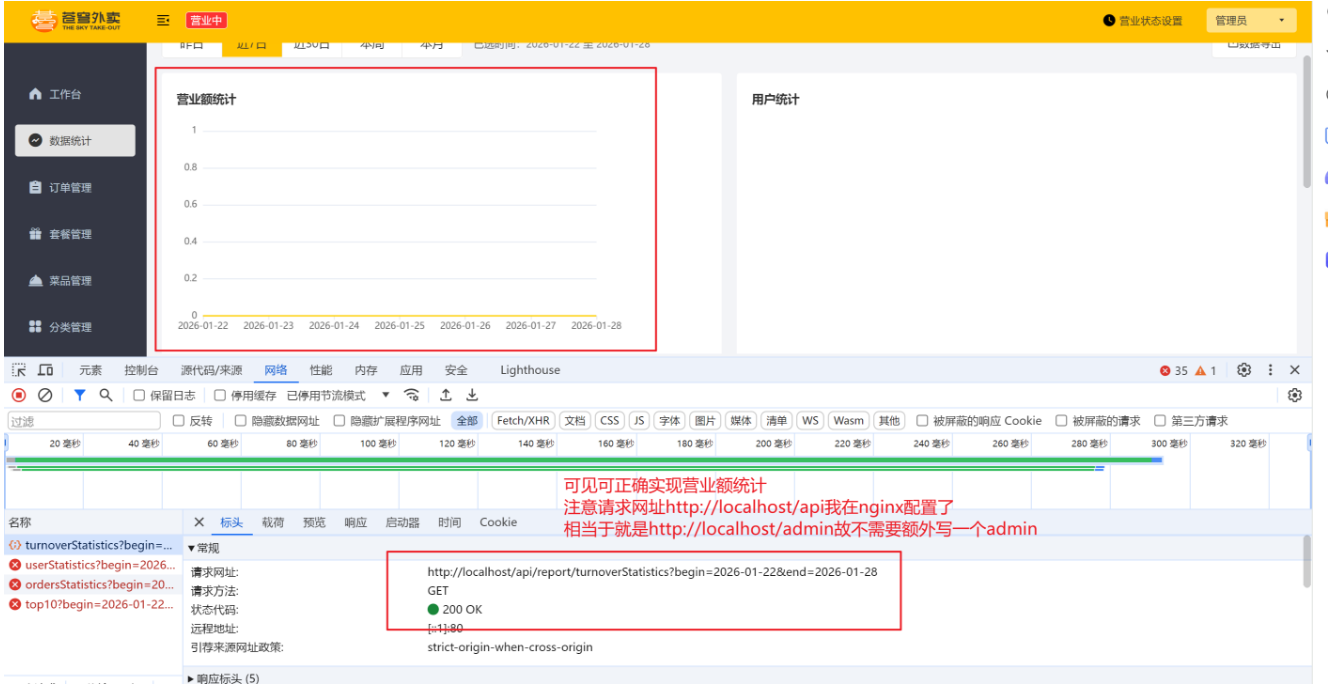
2、营业额统计
①、controller层
java
@RestController
// 注意请求网址 http://localhost/api我在nginx配置了,相当于就是 http://localhost/admin,故不需要额外写一个admin
@RequestMapping("/report")
public class ReportController {

    @Autowired
    private ReportService reportService;

    // 营业额统计
    @GetMapping("/turnoverStatistics")
    // 参数中通过注解指定日期格式,使用 LocalDate 类型(年月日),而不使用 LocalDateTime 类型(年月日时分秒)
    public Result<TurnoverReportVO> turnover(
            @DateTimeFormat(pattern = "yyyy-MM-dd") LocalDate begin,
            @DateTimeFormat(pattern = "yyyy-MM-dd") LocalDate end) {
        return Result.success(reportService.getTurnoverStatistics(begin, end));
    }
}
②、service层
java
public interface ReportService {
    // 营业额统计
    TurnoverReportVO getTurnoverStatistics(LocalDate begin, LocalDate end);
}
java
@Service
public class ReportServiceImpl implements ReportService {

    @Autowired
    private OrderMapper orderMapper;
    @Autowired
    private UserMapper userMapper;

    public TurnoverReportVO getTurnoverStatistics(LocalDate begin, LocalDate end) {
        // 1、计算从 begin 到 end 的所有日期,包括 begin 和 end 本身
        List<LocalDate> dateList = new ArrayList<>();
        dateList.add(begin);
        while (!begin.isEqual(end)) {
            begin = begin.plusDays(1);
            dateList.add(begin);
        }
        // 使用 StringUtils 中的 join 方法,将日期列表转换为逗号分隔的字符串
        String dateListStr = StringUtils.join(dateList, ",");

        // 2、遍历日期集合,通过日期查询当天的订单状态为 "已完成" 的订单总金额
        List<Double> turnoverList = new ArrayList<>();
        for(LocalDate date : dateList) {
            // 通过当天时间 0 点 0 分作为开始,23 点 59 分(无限接近第二天 0 点 0 分)作为结束时间
            // LocalDate 转换为 LocalDateTime
            LocalDateTime beginTime = LocalDateTime.of(date, LocalTime.MIN);
            LocalDateTime endTime = LocalDateTime.of(date, LocalTime.MAX);
            Map map = new HashMap();
            map.put("status", 5); // 5 为已完成
            map.put("begin", beginTime);
            map.put("end", endTime);
            // Select("select sum(amount) from orders where status = #{status} and order_time < #{end} and order_time >= #{begin}")
            Double turnover = orderMapper.sumByMap(map);
            turnoverList.add(turnover == null ? 0.0 : turnover);
        }
        // 使用 StringUtils 中的 join 方法,将营业额列表转换为逗号分隔的字符串
        String turnoverListStr = StringUtils.join(turnoverList, ",");

        TurnoverReportVO turnoverReportVO = TurnoverReportVO.builder()
                .dateList(dateListStr)
                .turnoverList(turnoverListStr)
                .build();
        return turnoverReportVO;
    }
}
③、mapper层
java
@Mapper
public interface OrderMapper {
        // 插入订单数据
        void insert(Orders order);

        // 根据订单号查询订单
        @Select("select * from orders where number = #{orderNumber}")
        Orders getByNumber(String orderNumber);

        // 根据订单id查询订单
        @Select("select * from orders where id = #{id}")
        Orders getById(Integer id);

        // 修改订单信息
        void update(Orders orders);

        // 通过订单状态为待付款(1)和下单时间(当前时间-下单时间 > 15分钟)查询超时订单
        @Select("select * from orders where status = #{status} and order_time < #{orderTime}")
        List<Orders> getByStatusAndOrderTime(Integer status, LocalDateTime orderTime);

        // 通过订单状态为派送中(2),且当前时间-预计送达时间 > 1小时查询超时订单
        @Select("select * from orders where status = #{status} and estimated_delivery_time < #{estimatedDeliveryTime}")
        List<Orders> getByStatusAndEstimatedDeliveryTime(Integer status, LocalDateTime estimatedDeliveryTime);

        // 通过日期查询当天的订单状态为 "已完成" 的订单总金额
        Double sumByMap(Map map);

}
xml
<?xml version="1.0" encoding="UTF-8" ?>
<!DOCTYPE mapper PUBLIC "-//mybatis.org//DTD Mapper 3.0//EN"
"http://mybatis.org/dtd/mybatis-3-mapper.dtd" >
<mapper namespace="com.sky.mapper.OrderMapper">
<!--通过日期查询当天的订单状态为 "已完成" 的订单总金额 -->
<!-- 大于号可使用 > 代替,小于号可使用 < 代替 -->
<select id="sumByMap" resultType="java.lang.Double">
select sum(amount) from orders
<where>
<if test="status != null"> and status = #{status} </if>
<if test="begin != null"> and order_time >= #{begin} </if>
<if test="end != null"> and order_time < #{end} </if>
</where>
</select>
</mapper>④、测试
3、用户统计
①、controller层
java
@RestController
// 注意请求网址 http://localhost/api我在nginx配置了,相当于就是 http://localhost/admin,故不需要额外写一个admin
@RequestMapping("/report")
public class ReportController {

    @Autowired
    private ReportService reportService;

    // 营业额统计
    @GetMapping("/turnoverStatistics")
    // 参数中通过注解指定日期格式,使用 LocalDate 类型(年月日),而不使用 LocalDateTime 类型(年月日时分秒)
    public Result<TurnoverReportVO> turnover(
            @DateTimeFormat(pattern = "yyyy-MM-dd") LocalDate begin,
            @DateTimeFormat(pattern = "yyyy-MM-dd") LocalDate end) {
        return Result.success(reportService.getTurnoverStatistics(begin, end));
    }

    // 用户统计
    @GetMapping("/userStatistics")
    public Result<UserReportVO> userStatistics(
            @DateTimeFormat(pattern = "yyyy-MM-dd") LocalDate begin,
            @DateTimeFormat(pattern = "yyyy-MM-dd") LocalDate end) {
        return Result.success(reportService.getUserStatistics(begin, end));
    }
}
②、service层
java
public interface ReportService {
    // 营业额统计
    TurnoverReportVO getTurnoverStatistics(LocalDate begin, LocalDate end);

    // 用户统计
    UserReportVO getUserStatistics(LocalDate begin, LocalDate end);
}
java
@Service
public class ReportServiceImpl implements ReportService {

    @Autowired
    private OrderMapper orderMapper;
    @Autowired
    private UserMapper userMapper;

    // 营业额统计
    public TurnoverReportVO getTurnoverStatistics(LocalDate begin, LocalDate end) {
        // 1、计算从 begin 到 end 的所有日期,包括 begin 和 end 本身
        List<LocalDate> dateList = new ArrayList<>();
        dateList.add(begin);
        while (!begin.isEqual(end)) {
            begin = begin.plusDays(1);
            dateList.add(begin);
        }
        // 使用 StringUtils 中的 join 方法,将日期列表转换为逗号分隔的字符串
        String dateListStr = StringUtils.join(dateList, ",");

        // 2、遍历日期集合,通过日期查询当天的订单状态为 "已完成" 的订单总金额
        List<Double> turnoverList = new ArrayList<>();
        for(LocalDate date : dateList) {
            // 通过当天时间 0 点 0 分作为开始,23 点 59 分(无限接近第二天 0 点 0 分)作为结束时间
            // LocalDate 转换为 LocalDateTime
            LocalDateTime beginTime = LocalDateTime.of(date, LocalTime.MIN);
            LocalDateTime endTime = LocalDateTime.of(date, LocalTime.MAX);
            Map map = new HashMap();
            map.put("status", 5); // 5 为已完成
            map.put("begin", beginTime);
            map.put("end", endTime);
            // Select("select sum(amount) from orders where status = #{status} and order_time < #{end} and order_time >= #{begin}")
            Double turnover = orderMapper.sumByMap(map);
            turnoverList.add(turnover == null ? 0.0 : turnover);
        }
        // 使用 StringUtils 中的 join 方法,将营业额列表转换为逗号分隔的字符串
        String turnoverListStr = StringUtils.join(turnoverList, ",");

        TurnoverReportVO turnoverReportVO = TurnoverReportVO.builder()
                .dateList(dateListStr)
                .turnoverList(turnoverListStr)
                .build();
        return turnoverReportVO;
    }

    // 用户统计
    public UserReportVO getUserStatistics(LocalDate begin, LocalDate end) {
        // 1、计算从 begin 到 end 的所有日期,包括 begin 和 end 本身
        List<LocalDate> dateList = new ArrayList<>();
        dateList.add(begin);
        // 对于日期时间比较,优先使用 isEqual;对于其他对象比较,使用 equals
        while (!begin.isEqual(end)) {
            begin = begin.plusDays(1);
            dateList.add(begin);
        }
        // 使用 StringUtils 中的 join 方法,将日期列表转换为逗号分隔的字符串
        String dateListStr = StringUtils.join(dateList, ",");

        // 2、遍历日期集合,通过日期和注册时间对比查询当天的用户注册数和下单用户数
        List<Integer> newUserList = new ArrayList<>();
        List<Integer> totalUserList = new ArrayList<>();
        for (LocalDate date : dateList) {
            // 通过当天时间 0 点 0 分作为开始,23 点 59 分(无限接近第二天 0 点 0 分)作为结束时间
            // LocalDate 转换为 LocalDateTime
            LocalDateTime beginTime = LocalDateTime.of(date, LocalTime.MIN);
            LocalDateTime endTime = LocalDateTime.of(date, LocalTime.MAX);
            // 2.1、查询注册的总用户数
            Map map = new HashMap();
            map.put("end", endTime);
            // Select("select count(id) from user where create_time < #{end}")
            // 注册时间小于当前时间
            Integer totalUser = userMapper.countByMap(map);
            totalUserList.add(totalUser == null ? 0 : totalUser);
            // 2.2、查询当天注册的新用户数
            map.put("begin", beginTime);
            // Select("select count(id) from user where create_time < #{end} and create_time > #{begin}")
            // 注册时间小于当前时间且大于昨天
            Integer newUser = userMapper.countByMap(map);
            newUserList.add(newUser == null ? 0 : newUser);
        }
        // 使用 StringUtils 中的 join 方法,将用户列表转换为逗号分隔的字符串
        String totalUserListStr = StringUtils.join(totalUserList, ",");
        String newUserListStr = StringUtils.join(newUserList, ",");
        UserReportVO userReportVO = UserReportVO.builder()
                .dateList(dateListStr)
                .newUserList(newUserListStr)
                .totalUserList(totalUserListStr)
                .build();
        return userReportVO;
    }
}
③、mapper层
java
@Mapper
public interface UserMapper {
    // 根据 openid 查询用户
    @Select("select * from user where openid = #{openid}")
    User getByOpenid(String openid);

    // 新增用户
    // 由于并不符合我们自定义的自动填充策略(不含 createUser 和 updateUser 字段),所以这里不使用 @AutoFill 注解
    void insert(User user);

    // 根据用户id查询用户
    @Select("select * from user where id = #{id}")
    User getById(Long id);

    // 根据时间范围查询注册的用户数
    Integer countByMap(Map map);
}
xml
<?xml version="1.0" encoding="UTF-8" ?>
<!DOCTYPE mapper PUBLIC "-//mybatis.org//DTD Mapper 3.0//EN"
"http://mybatis.org/dtd/mybatis-3-mapper.dtd" >
<mapper namespace="com.sky.mapper.UserMapper">
<!-- 新增用户 -->
<!-- useGeneratedKeys="true"代表开启主键自增,keyProperty="id"代表将自增的主键值赋值给实体类的id属性 -->
<insert id="insert" parameterType="com.sky.entity.User" useGeneratedKeys="true" keyProperty="id">
insert into user (openid, name, phone, sex, id_number, avatar)
values (#{openid}, #{name}, #{phone}, #{sex}, #{idNumber}, #{avatar})
</insert>
<!-- 根据时间范围查询注册的用户数-->
<!-- 大于号可使用 > 代替,小于号可使用 < 代替 -->
<select id="countByMap" resultType="java.lang.Integer">
select count(id) from user
<where>
<if test="begin != null"> and create_time > #{begin} </if>
<if test="end != null"> and create_time < #{end} </if>
</where>
</select>
</mapper>④、测试
在进行测试之前先为数据库插入几条测试数据
sql
-- 1. 插入第一条用户数据
INSERT INTO user (openid, name, phone, sex, id_number, create_time)
VALUES ('oP3x9Zabc123456', '张三', '13800138001', '1', '110101199001011234','2022-05-10 10:00:00');

-- 2. 插入第二条用户数据
INSERT INTO user (openid, name, phone, sex, id_number, create_time)
VALUES ('oP3x9Zdef789012', '李四', '13800138002', '0', '110101199102022345','2023-05-11 11:30:00');

-- 3. 插入第三条用户数据
INSERT INTO user (openid, name, phone, sex, id_number, create_time)
VALUES ('oP3x9Zghi345678', '王五', '13800138003', '1', '110101199203033456', '2024-05-12 09:15:00');

-- 4. 插入第四条用户数据
INSERT INTO user (openid, name, phone, sex, id_number, create_time)
VALUES ('oP3x9Zjkl901234', '赵六', '13800138004', '0', '110101199304044567', '2025-05-13 14:20:00');

-- 5. 插入第五条用户数据
INSERT INTO user (openid, name, phone, sex, id_number, create_time)
VALUES ('oP3x9Zmno567890', '钱七', '13800138005', '1', '110101199405055678', '2026-01-22 16:10:00');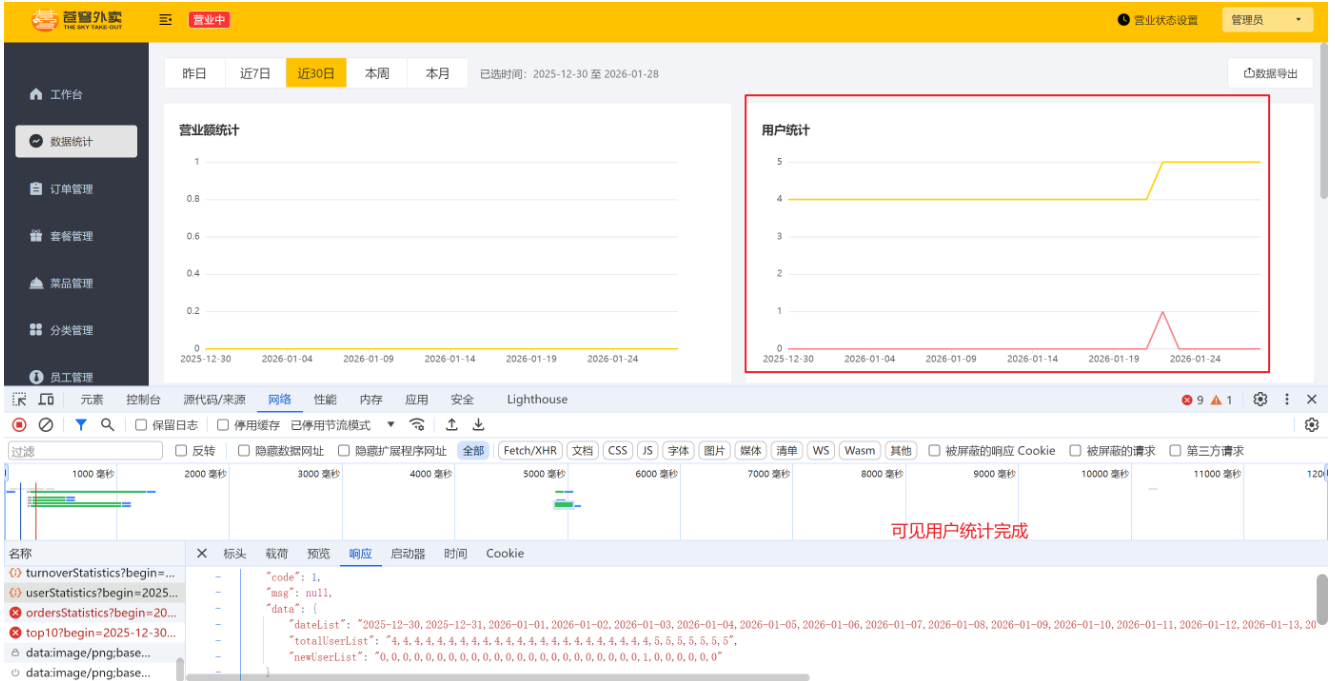
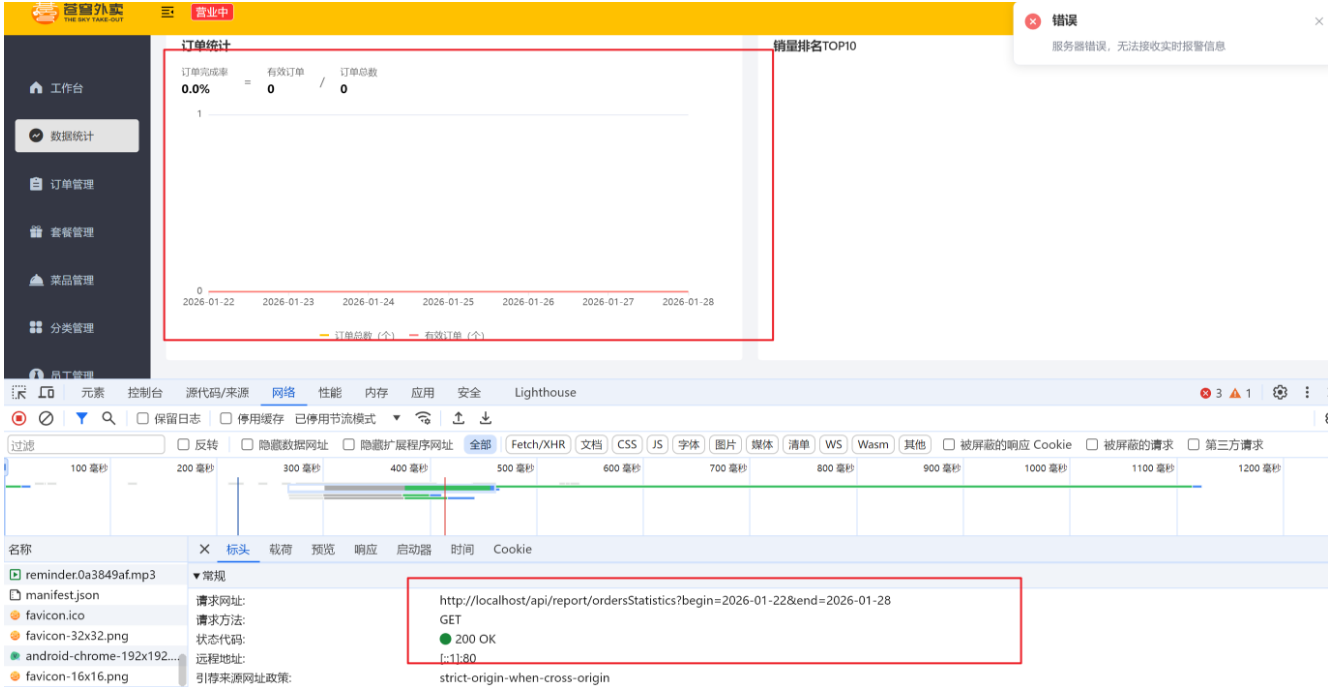
4、订单统计
①、controller层
java
@RestController
// 注意请求网址 http://localhost/api我在nginx配置了,相当于就是 http://localhost/admin,故不需要额外写一个admin
@RequestMapping("/report")
public class ReportController {

    @Autowired
    private ReportService reportService;

    // 营业额统计
    @GetMapping("/turnoverStatistics")
    // 参数中通过注解指定日期格式,使用 LocalDate 类型(年月日),而不使用 LocalDateTime 类型(年月日时分秒)
    public Result<TurnoverReportVO> turnover(
            @DateTimeFormat(pattern = "yyyy-MM-dd") LocalDate begin,
            @DateTimeFormat(pattern = "yyyy-MM-dd") LocalDate end) {
        return Result.success(reportService.getTurnoverStatistics(begin, end));
    }

    // 用户统计
    @GetMapping("/userStatistics")
    public Result<UserReportVO> userStatistics(
            @DateTimeFormat(pattern = "yyyy-MM-dd") LocalDate begin,
            @DateTimeFormat(pattern = "yyyy-MM-dd") LocalDate end) {
        return Result.success(reportService.getUserStatistics(begin, end));
    }

    // 订单统计
    @GetMapping("/ordersStatistics")
    public Result<OrderReportVO> orderStatistics(
            @DateTimeFormat(pattern = "yyyy-MM-dd") LocalDate begin,
            @DateTimeFormat(pattern = "yyyy-MM-dd") LocalDate end) {
        return Result.success(reportService.getOrderStatistics(begin, end));
    }
}
②、service层
java
public interface ReportService {
    // 营业额统计
    TurnoverReportVO getTurnoverStatistics(LocalDate begin, LocalDate end);

    // 用户统计
    UserReportVO getUserStatistics(LocalDate begin, LocalDate end);

    // 订单统计
    OrderReportVO getOrderStatistics(LocalDate begin, LocalDate end);
}
java
@Service
public class ReportServiceImpl implements ReportService {

    @Autowired
    private OrderMapper orderMapper;
    @Autowired
    private UserMapper userMapper;

    // 订单统计
    public OrderReportVO getOrderStatistics(LocalDate begin, LocalDate end) {
        // 1、计算从 begin 到 end 的所有日期,包括 begin 和 end 本身
        List<LocalDate> dateList = new ArrayList<>();
        dateList.add(begin);
        // 对于日期时间比较,优先使用 isEqual;对于其他对象比较,使用 equals
        while (!begin.isEqual(end)) {
            begin = begin.plusDays(1);
            dateList.add(begin);
        }
        // 使用 StringUtils 中的 join 方法,将日期列表转换为逗号分隔的字符串
        String dateListStr = StringUtils.join(dateList, ",");

        // 2、获取订单总数、每日订单数、有效订单数、订单完成率、每日有效订单数
        Integer totalOrderCount = 0;
        Integer totalValidOrderCount = 0;
        List<Integer> orderCountList = new ArrayList<>();
        List<Integer> validOrderCountList = new ArrayList<>();
        for (LocalDate date : dateList) {
            // 通过当天时间 0 点 0 分作为开始,23 点 59 分(无限接近第二天 0 点 0 分)作为结束时间
            // LocalDate 转换为 LocalDateTime
            LocalDateTime beginTime = LocalDateTime.of(date, LocalTime.MIN);
            LocalDateTime endTime = LocalDateTime.of(date, LocalTime.MAX);
            // 2.1、查询总订单数
            // Select("select count(id) from orders where order_time < #{end}")
            Map map = new HashMap();
            map.put("end", endTime);
//            也可使用 stream 流操作
//            totalOrderCount += orderMapper.countByMap(map);
            // 2.2、查询总有效订单数
            // Select("select count(id) from orders where status = #{status} and order_time < #{end}")
//            也可使用 stream 流操作
//            map.put("status", Orders.PAID);
//            totalValidOrderCount += orderMapper.countByMap(map);
//            map.remove("status");
            // 2.3、查询当天的订单数
            // Select("select count(id) from orders where order_time < #{end} and order_time >= #{begin}")
            map.put("begin", beginTime);
            Integer orderCount = orderMapper.countByMap(map);
            orderCountList.add(orderCount == null ? 0 : orderCount);
            // 2.4、查询当天的有效订单数
            // Select("select count(id) from orders where status = #{status} and order_time < #{end} and order_time >= #{begin}")
            map.put("status", Orders.PAID);
            Integer validOrderCount = orderMapper.countByMap(map);
            validOrderCountList.add(validOrderCount == null ? 0 : validOrderCount);
        }
        // 使用 StringUtils 中的 join 方法转换为逗号分隔的字符串
        String orderCountListStr = StringUtils.join(orderCountList, ",");
        String validOrderCountListStr = StringUtils.join(validOrderCountList, ",");
        // 若不直接去数据库查询,而是通过 stream 流操作,可直接计算出订单总数和有效订单数
        totalOrderCount = orderCountList.stream().mapToInt(Integer::intValue).sum();
        totalValidOrderCount = validOrderCountList.stream().mapToInt(Integer::intValue).sum();

        OrderReportVO orderReportVO = OrderReportVO.builder()
                .dateList(dateListStr)
                .orderCountList(orderCountListStr)
                .validOrderCountList(validOrderCountListStr)
                .totalOrderCount(totalOrderCount)
                .validOrderCount(totalValidOrderCount)
                .orderCompletionRate(totalOrderCount == 0 ? 0.0 : (double) totalValidOrderCount / totalOrderCount)
                .build();
        return orderReportVO;
    }
}
③、mapper层
java
@Mapper
public interface OrderMapper {
        // 通过日期查询当天的订单数
        Integer countByMap(Map map);

}
xml
<?xml version="1.0" encoding="UTF-8" ?>
<!DOCTYPE mapper PUBLIC "-//mybatis.org//DTD Mapper 3.0//EN"
"http://mybatis.org/dtd/mybatis-3-mapper.dtd" >
<mapper namespace="com.sky.mapper.UserMapper">
<!-- 根据时间范围查询当天的订单数 -->
<!-- 大于号可使用 > 代替,小于号可使用 < 代替 -->
<select id="countByMap" resultType="java.lang.Integer">
select count(id) from orders
<where>
<if test="status != null"> and status = #{status} </if>
<if test="begin != null"> and order_time >= #{begin} </if>
<if test="end != null"> and order_time < #{end} </if>
</where>
</select>
</mapper>④、测试
5、销量排名统计
①、controller层
java
@RestController
// 注意请求网址 http://localhost/api我在nginx配置了,相当于就是 http://localhost/admin,故不需要额外写一个admin
@RequestMapping("/report")
public class ReportController {

    @Autowired
    private ReportService reportService;

    // 营业额统计
    @GetMapping("/turnoverStatistics")
    // 参数中通过注解指定日期格式,使用 LocalDate 类型(年月日),而不使用 LocalDateTime 类型(年月日时分秒)
    public Result<TurnoverReportVO> turnover(
            @DateTimeFormat(pattern = "yyyy-MM-dd") LocalDate begin,
            @DateTimeFormat(pattern = "yyyy-MM-dd") LocalDate end) {
        return Result.success(reportService.getTurnoverStatistics(begin, end));
    }

    // 用户统计
    @GetMapping("/userStatistics")
    public Result<UserReportVO> userStatistics(
            @DateTimeFormat(pattern = "yyyy-MM-dd") LocalDate begin,
            @DateTimeFormat(pattern = "yyyy-MM-dd") LocalDate end) {
        return Result.success(reportService.getUserStatistics(begin, end));
    }

    // 订单统计
    @GetMapping("/ordersStatistics")
    public Result<OrderReportVO> orderStatistics(
            @DateTimeFormat(pattern = "yyyy-MM-dd") LocalDate begin,
            @DateTimeFormat(pattern = "yyyy-MM-dd") LocalDate end) {
        return Result.success(reportService.getOrderStatistics(begin, end));
    }

    // 销量排名top10
    @GetMapping("/top10")
    public Result<SalesTop10ReportVO> salesTop10(
            @DateTimeFormat(pattern = "yyyy-MM-dd") LocalDate begin,
            @DateTimeFormat(pattern = "yyyy-MM-dd") LocalDate end) {
        return Result.success(reportService.getSalesTop10(begin, end));
    }
}
②、service层
java
public interface ReportService {
    // 营业额统计
    TurnoverReportVO getTurnoverStatistics(LocalDate begin, LocalDate end);

    // 用户统计
    UserReportVO getUserStatistics(LocalDate begin, LocalDate end);

    // 订单统计
    OrderReportVO getOrderStatistics(LocalDate begin, LocalDate end);

    // 销量排名top10
    SalesTop10ReportVO getSalesTop10(LocalDate begin, LocalDate end);
}
java
@Service
public class ReportServiceImpl implements ReportService {

    @Autowired
    private OrderMapper orderMapper;
    @Autowired
    private UserMapper userMapper;

    // 销量排名top10,核心是 SQL 语句(查询日期内订单表和订单详情表,根据商品名称分组,按售出量倒序排序取前 10)
    // select od.name, sum(od.number) as number from orders o,order_detail od
    // where o.order_time < #{end} and o.order_time >= #{begin} and o.status = 5
    // group by od.name order by number desc limit 10
    public SalesTop10ReportVO getSalesTop10(LocalDate begin, LocalDate end) {
        LocalDateTime beginTime = LocalDateTime.of(begin, LocalTime.MIN);
        LocalDateTime endTime = LocalDateTime.of(end, LocalTime.MAX);
        List<GoodsSalesDTO> list = orderMapper.getSalesTop10(beginTime, endTime);
        List<String> nameList = new ArrayList<>();
        List<Integer> numberList = new ArrayList<>();
        for(GoodsSalesDTO goodsSalesDTO : list) {
            nameList.add(goodsSalesDTO.getName());
            numberList.add(goodsSalesDTO.getNumber());
        }
        // 使用 StringUtils 中的 join 方法转换为逗号分隔的字符串
        SalesTop10ReportVO salesTop10ReportVO = SalesTop10ReportVO.builder()
                .nameList(StringUtils.join(nameList, ","))
                .numberList(StringUtils.join(numberList, ","))
                .build();
        return salesTop10ReportVO;
    }
}
③、mapper层
java
@Mapper
public interface OrderMapper {
        // 查询销量排名top10
        List<GoodsSalesDTO> getSalesTop10(LocalDateTime begin, LocalDateTime end);
}
xml
<?xml version="1.0" encoding="UTF-8" ?>
<!DOCTYPE mapper PUBLIC "-//mybatis.org//DTD Mapper 3.0//EN"
"http://mybatis.org/dtd/mybatis-3-mapper.dtd" >
<mapper namespace="com.sky.mapper.UserMapper">
<!-- 查询销量排名top10 -->
<select id="getSalesTop10" resultType="com.sky.dto.GoodsSalesDTO">
select od.name, sum(od.number) as number
from order_detail od left join orders o on od.order_id = o.id
<where>
status = 5
<if test="begin != null"> and order_time > #{begin} </if>
<if test="end != null"> and order_time < #{end} </if>
</where>
group by od.name
order by number desc
limit 10
</select>
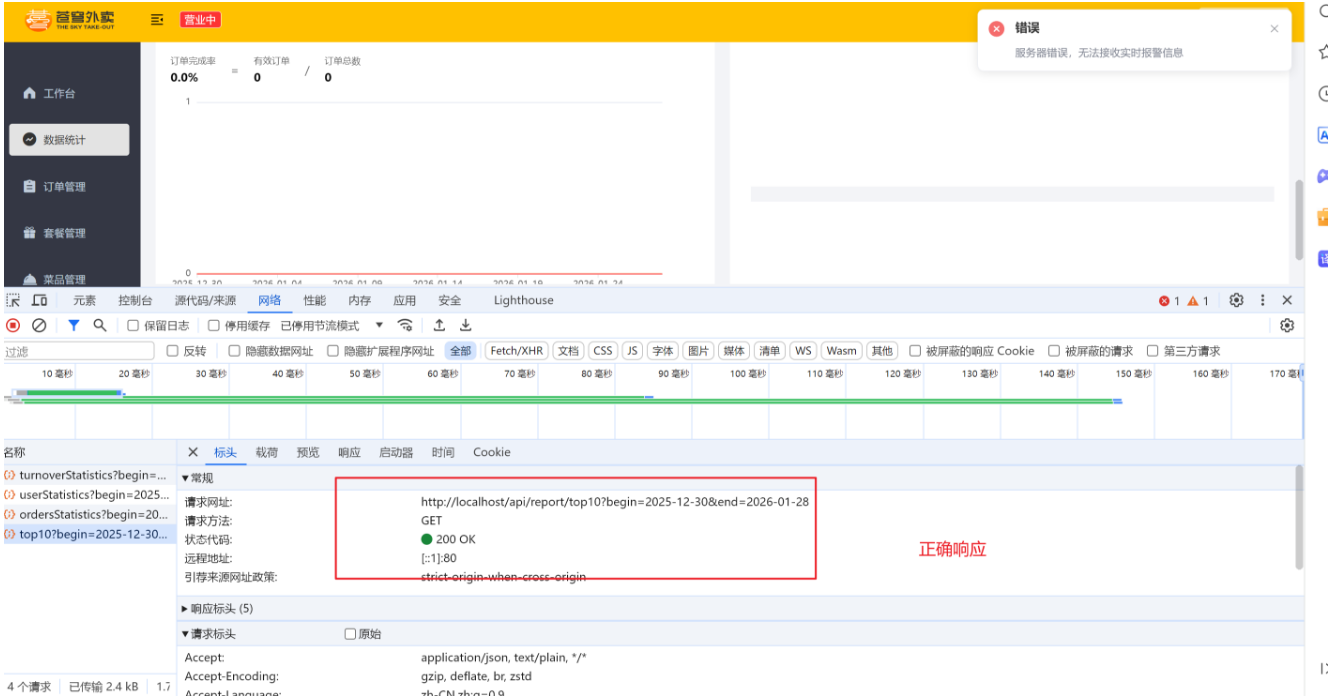
</mapper>④、测试
十二、day12
1、工作台
①、controller层
java
@RestController
@RequestMapping("/workspace")
public class WorkSpaceController {
    @Autowired
    private WorkSpaceService workSpaceService;

    // 查询今日运营数据
    @GetMapping("/businessData")
    public Result<BusinessDataVO> workSpace() {
        //获得当天的开始时间
        LocalDateTime begin = LocalDateTime.now().with(LocalTime.MIN);
        //获得当天的结束时间
        LocalDateTime end = LocalDateTime.now().with(LocalTime.MAX);
        return Result.success(workSpaceService.getBusinessData(begin, end));
    }

    // 查询套餐总览
    @GetMapping("/overviewSetmeals")
    public Result<SetmealOverViewVO> setmealOverView(){
        return Result.success(workSpaceService.getSetmealOverView());
    }

    // 查询菜品总览
    @GetMapping("/overviewDishes")
    public Result<DishOverViewVO> dishOverView(){
        return Result.success(workSpaceService.getDishOverView());
    }

    // 查询订单管理数据
    @GetMapping("/overviewOrders")
    public Result<OrderOverViewVO> orderOverView(){
        return Result.success(workSpaceService.getOrderOverView());
    }
}
②、service层
java
public interface WorkSpaceService {
    // 查询今日运营数据
    BusinessDataVO getBusinessData(LocalDateTime begin, LocalDateTime end);

    // 查询菜品总览
    DishOverViewVO getDishOverView();

    // 查询套餐总览
    SetmealOverViewVO getSetmealOverView();

    // 查询订单管理数据
    OrderOverViewVO getOrderOverView();
}
java
@Service
public class WorkSpaceServiceImpl implements WorkSpaceService {
    @Autowired
    private OrderMapper orderMapper;
    @Autowired
    private UserMapper userMapper;
    @Autowired
    private DishMapper dishMapper;
    @Autowired
    private SetmealMapper setmealMapper;

    // 查询今日运营数据
    public BusinessDataVO getBusinessData(LocalDateTime begin, LocalDateTime end){
        Map map = new HashMap();
        map.put("begin",begin);
        map.put("end",end);
        // 1、查询新增用户数
        Integer newUsers = userMapper.countByMap(map);

        // 2、查询总订单数
        Integer totalOrderCount = orderMapper.countByMap(map);
        map.put("status", Orders.COMPLETED);

        // 3、当天营业额
        Double turnover = orderMapper.sumByMap(map);
        turnover = turnover == null? 0.0 : turnover;

        // 4、查询当天有效订单数
        Integer validOrderCount = orderMapper.countByMap(map);
        Double unitPrice = 0.0;
        Double orderCompletionRate = 0.0;
        if(totalOrderCount != 0 && validOrderCount != 0){
            //订单完成率
            orderCompletionRate = validOrderCount.doubleValue() / totalOrderCount;
            //平均客单价
            unitPrice = turnover / validOrderCount;
        }

        return BusinessDataVO.builder()
                .turnover(turnover)
                .validOrderCount(validOrderCount)
                .orderCompletionRate(orderCompletionRate)
                .unitPrice(unitPrice)
                .newUsers(newUsers)
                .build();
    }

    // 查询套餐总览
    public SetmealOverViewVO getSetmealOverView(){
        // 1、查询已启售套餐数
        Integer soldSetmeals = setmealMapper.countByStatus(StatusConstant.ENABLE);

        // 2、查询已停售套餐数
        Integer discontinuedSetmeals = setmealMapper.countByStatus(StatusConstant.DISABLE);

        return SetmealOverViewVO.builder()
                .sold(soldSetmeals)
                .discontinued(discontinuedSetmeals)
                .build();
    }

    // 查询菜品总览
    public DishOverViewVO getDishOverView(){
        // 1、查询已启售菜品数
        Integer soldDishes = dishMapper.countByStatus(StatusConstant.ENABLE);

        // 2、查询已停售菜品数
        Integer discontinuedDishes = dishMapper.countByStatus(StatusConstant.DISABLE);

        return DishOverViewVO.builder()
                .sold(soldDishes)
                .discontinued(discontinuedDishes)
                .build();
    }

    // 查询订单管理数据
    public OrderOverViewVO getOrderOverView(){
        //待接单
        Integer waitingOrders = orderMapper.countByStatus(Orders.TO_BE_CONFIRMED);

        //待派送
        Integer deliveredOrders = orderMapper.countByStatus(Orders.CONFIRMED);

        //已完成
        Integer completedOrders = orderMapper.countByStatus(Orders.COMPLETED);

        //已取消
        Integer cancelledOrders = orderMapper.countByStatus(Orders.CANCELLED);

        //全部订单
        Integer allOrders = orderMapper.countByStatus(null);

        return OrderOverViewVO.builder()
                .waitingOrders(waitingOrders)
                .deliveredOrders(deliveredOrders)
                .completedOrders(completedOrders)
                .cancelledOrders(cancelledOrders)
                .allOrders(allOrders)
                .build();
    }
}
mapper层自行书写即可
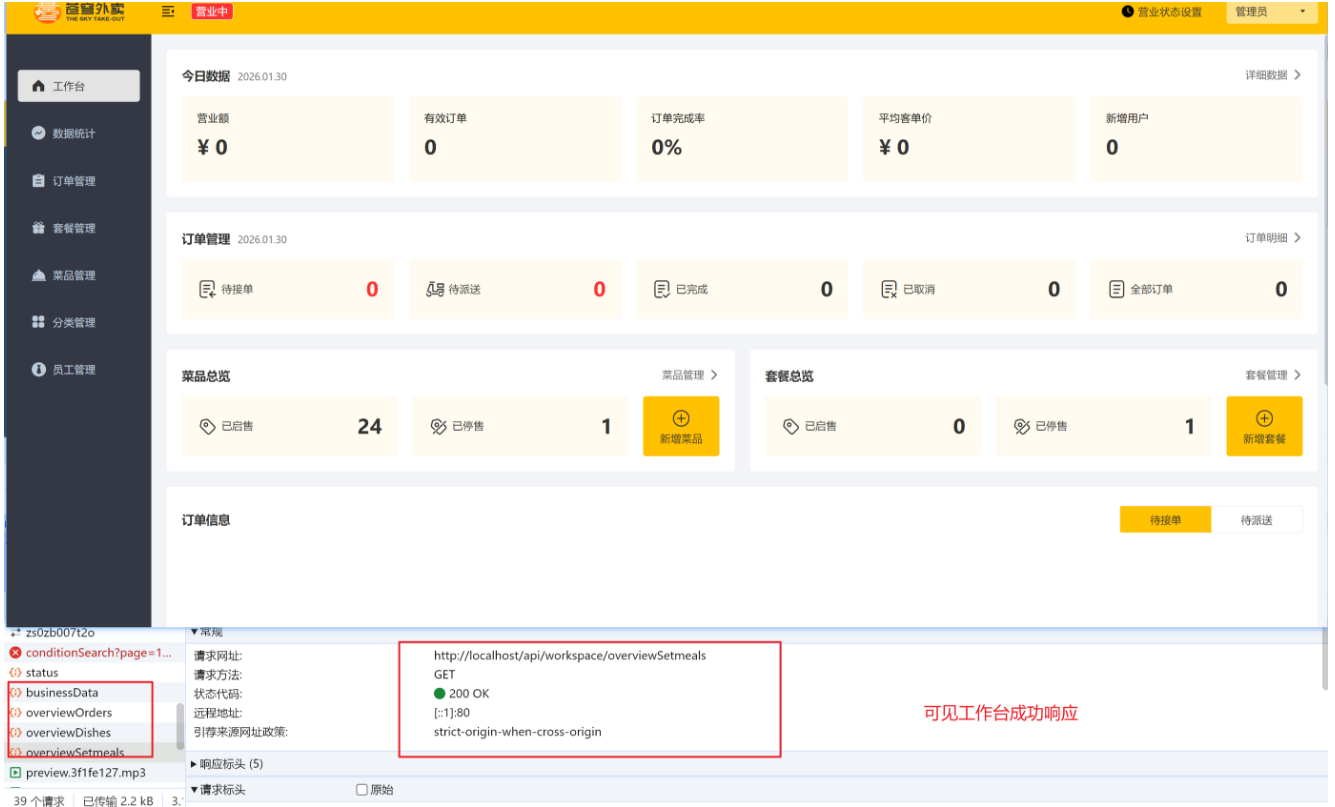
③、测试
2、Apache POI
Apache POI 是 Apache 软件基金会的开源项目,提供 Java 操作 Microsoft Office 格式文件的功能,包括 Excel、Word、PowerPoint 等多种文档格式
Apache POI 包含多个组件,分别处理不同类型的 Office 文件:
- Excel 处理组件
- HSSF:处理 Excel 97-2003 格式(.xls)
- XSSF:处理 Excel 2007+ 的 OOXML 格式(.xlsx)
- SXSSF:处理大型 Excel 文件
- Word 处理组件
- HWPF:处理 Word 97-2003 格式(.doc)
- XWPF:处理 Word 2007+ 的 OOXML 格式(.docx)
- PowerPoint 处理组件
- HSLF:处理 PowerPoint 97-2003 格式(.ppt)
- XSLF:处理 PowerPoint 2007+ 的 OOXML 格式(.pptx)
- 其他组件
- HDGF/XDGF:处理 Visio 文件
- HPBF:处理 Publisher 文件
- HSMF:处理 Outlook 文件
- HMEF:处理 Outlook 附件(TNEF/winmail.dat)
简单来说就是操作 office 文件的工具
如:Excel 文件创建
java
// 创建XLSX工作簿
Workbook workbook = new XSSFWorkbook();
Sheet sheet = workbook.createSheet("Sheet1");

// 创建行和单元格
Row row = sheet.createRow(0);
Cell cell = row.createCell(0);
cell.setCellValue("Hello POI");

// 写入文件
try (FileOutputStream fos = new FileOutputStream("example.xlsx")) {
    workbook.write(fos);
} catch (IOException e) {
    e.printStackTrace();
}finally {
		// 关闭资源
  	fos.close;
  	workbook.close;
}
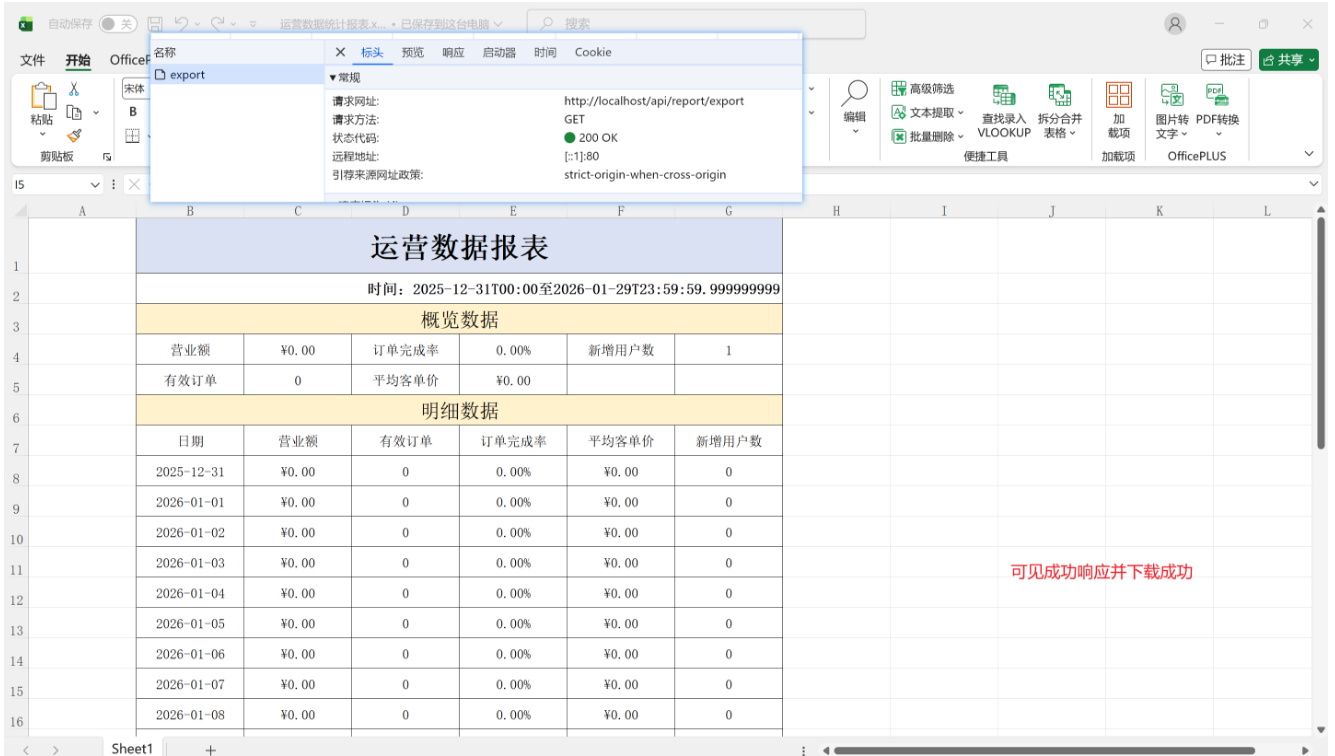
3、导出Excel报表
3.1、设计报表样式模板
3.2、实现接口
①、controller层
java
@RestController
// 注意请求网址 http://localhost/api我在nginx配置了,相当于就是 http://localhost/admin,故不需要额外写一个admin
@RequestMapping("/report")
public class ReportController {

    @Autowired
    private ReportService reportService;

    // 营业额统计
    @GetMapping("/turnoverStatistics")
    // 参数中通过注解指定日期格式,使用 LocalDate 类型(年月日),而不使用 LocalDateTime 类型(年月日时分秒)
    public Result<TurnoverReportVO> turnover(
            @DateTimeFormat(pattern = "yyyy-MM-dd") LocalDate begin,
            @DateTimeFormat(pattern = "yyyy-MM-dd") LocalDate end) {
        return Result.success(reportService.getTurnoverStatistics(begin, end));
    }

    // 用户统计
    @GetMapping("/userStatistics")
    public Result<UserReportVO> userStatistics(
            @DateTimeFormat(pattern = "yyyy-MM-dd") LocalDate begin,
            @DateTimeFormat(pattern = "yyyy-MM-dd") LocalDate end) {
        return Result.success(reportService.getUserStatistics(begin, end));
    }

    // 订单统计
    @GetMapping("/ordersStatistics")
    public Result<OrderReportVO> orderStatistics(
            @DateTimeFormat(pattern = "yyyy-MM-dd") LocalDate begin,
            @DateTimeFormat(pattern = "yyyy-MM-dd") LocalDate end) {
        return Result.success(reportService.getOrderStatistics(begin, end));
    }

    // 销量排名top10
    @GetMapping("/top10")
    public Result<SalesTop10ReportVO> salesTop10(
            @DateTimeFormat(pattern = "yyyy-MM-dd") LocalDate begin,
            @DateTimeFormat(pattern = "yyyy-MM-dd") LocalDate end) {
        return Result.success(reportService.getSalesTop10(begin, end));
    }

    // 导出Excel报表
    @GetMapping("/export")
    public Result exportExcel(HttpServletResponse response) {
        reportService.exportBusinessData(response);
        return Result.success();
    }
}
②、service层
java
public interface ReportService {
    // 营业额统计
    TurnoverReportVO getTurnoverStatistics(LocalDate begin, LocalDate end);

    // 用户统计
    UserReportVO getUserStatistics(LocalDate begin, LocalDate end);

    // 订单统计
    OrderReportVO getOrderStatistics(LocalDate begin, LocalDate end);

    // 销量排名top10
    SalesTop10ReportVO getSalesTop10(LocalDate begin, LocalDate end);

    // 导出Excel报表
    void exportBusinessData(HttpServletResponse response);
}
java
@Service
public class ReportServiceImpl implements ReportService {

    @Autowired
    private OrderMapper orderMapper;
    @Autowired
    private UserMapper userMapper;
    @Autowired
    private WorkSpaceService workSpaceService;
    // 导出Excel报表
    public void exportBusinessData(HttpServletResponse response) {
        // 1、查询过去 30 天内的业务数据
        LocalDateTime beginTime = LocalDateTime.of(LocalDate.now().minusDays(30), LocalTime.MIN);
        LocalDateTime endTime = LocalDateTime.of(LocalDate.now().minusDays(1), LocalTime.MAX);
        BusinessDataVO businessDataVO = workSpaceService.getBusinessData(beginTime, endTime);

        // 2、通过 Apache POI 将业务数据写入 Excel 文件
        // 2.1、获取模板文件的输入流
        InputStream inputStream = this.getClass().getClassLoader().getResourceAsStream("template/运营数据报表模板.xlsx");
        try {
            // 2.2、基于输入流模板创建工作簿
            Workbook excel = new XSSFWorkbook(inputStream);
            //获取表格文件的Sheet页
            Sheet sheet = excel.getSheet("Sheet1");

            //填充数据--时间
            sheet.getRow(1).getCell(1).setCellValue("时间:" + beginTime + "至" + endTime);

            //获得第4行
            Row row = sheet.getRow(3);
            row.getCell(2).setCellValue(businessDataVO.getTurnover());
            row.getCell(4).setCellValue(businessDataVO.getOrderCompletionRate());
            row.getCell(6).setCellValue(businessDataVO.getNewUsers());

            //获得第5行
            row = sheet.getRow(4);
            row.getCell(2).setCellValue(businessDataVO.getValidOrderCount());
            row.getCell(4).setCellValue(businessDataVO.getUnitPrice());

            //填充明细数据
            for (int i = 0; i < 30; i++) {
                LocalDate date = beginTime.toLocalDate().plusDays(i);
                //查询某一天的营业数据
                BusinessDataVO businessData = workSpaceService.getBusinessData(LocalDateTime.of(date, LocalTime.MIN), LocalDateTime.of(date, LocalTime.MAX));

                //获得某一行
                row = sheet.getRow(7 + i);
                row.getCell(1).setCellValue(date.toString());
                row.getCell(2).setCellValue(businessData.getTurnover());
                row.getCell(3).setCellValue(businessData.getValidOrderCount());
                row.getCell(4).setCellValue(businessData.getOrderCompletionRate());
                row.getCell(5).setCellValue(businessData.getUnitPrice());
                row.getCell(6).setCellValue(businessData.getNewUsers());
            }

            //3. 通过输出流将Excel文件下载到客户端浏览器
            ServletOutputStream out = response.getOutputStream();
            excel.write(out);

            //关闭资源
            out.close();
            excel.close();
        } catch (IOException e) {
            throw new RuntimeException(e);
        }
    }
}
③、测试