报错信息如下
java
Caused by: dev.langchain4j.exception.HttpException: {"error":{"message":"1 validation error:\n  {'type': 'missing', 'loc': ('body',), 'msg': 'Field required', 'input': None}\n\n  File \"/Users/wangzhe112/workspace/workspace_my_python/ai-test/.venv/lib/python3.13/site-packages/vllm/entrypoints/utils.py\", line 478, in create_chat_completion\n    POST /v1/chat/completions [{'type': 'missing', 'loc': ('body',), 'msg': 'Field required', 'input': None}]","type":"Bad Request","param":null,"code":400}}
	at dev.langchain4j.http.client.jdk.JdkHttpClient.execute(JdkHttpClient.java:53)
	at dev.langchain4j.model.openai.internal.SyncRequestExecutor.execute(SyncRequestExecutor.java:20)
	at dev.langchain4j.model.openai.internal.RequestExecutor.executeRaw(RequestExecutor.java:44)
	at dev.langchain4j.model.openai.OpenAiChatModel.lambda$doChat$0(OpenAiChatModel.java:150)
	at dev.langchain4j.internal.ExceptionMapper.withExceptionMapper(ExceptionMapper.java:29)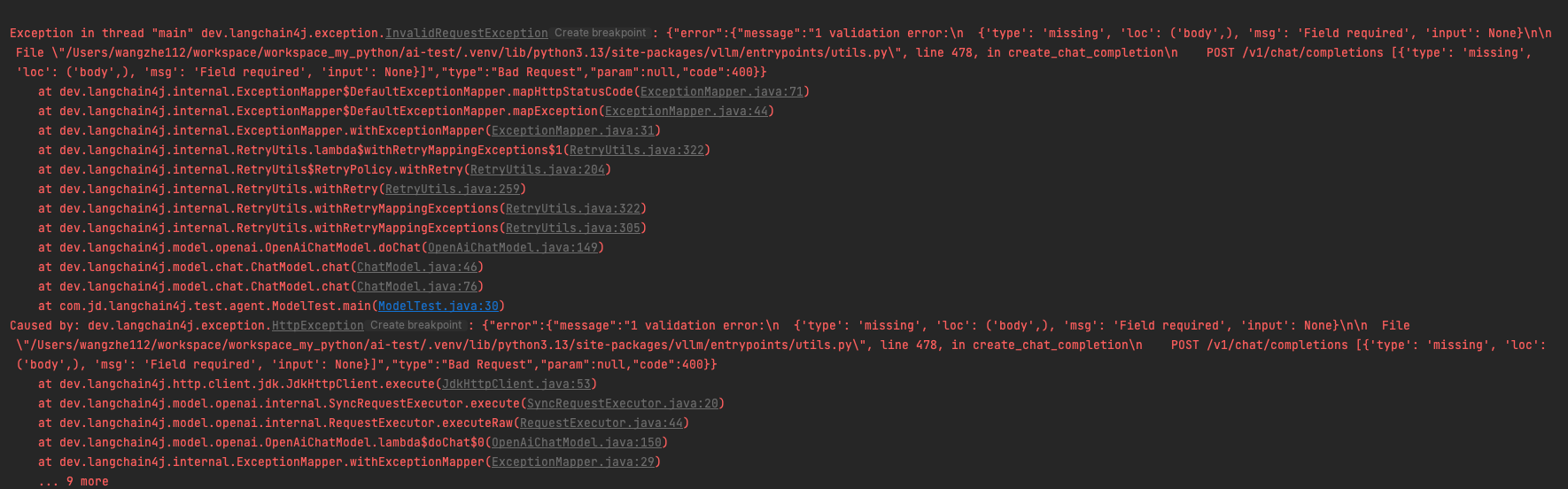
版本
java=jdk17
langchain4j=1.8.0
python=3.13.0
vLLM=0.14.1
大模型=Qwen/Qwen3-4B
maven依赖
xml
	<dependencyManagement>
		<dependencies>
			<!-- LangChain4j BOM (Bill of Materials) -->
			<!-- BOM只负责版本管理,不会实际引入依赖 -->
			<!-- 子模块需要显式声明所需的依赖,但可以省略版本号 -->
			<dependency>
				<groupId>dev.langchain4j</groupId>
				<artifactId>langchain4j-bom</artifactId>
				<version>1.8.0</version>
				<type>pom</type>
				<scope>import</scope>
			</dependency>
		</dependencies>
	</dependencyManagement>

	<dependencies>
		<!-- LangChain4j 核心库 -->
		<!-- 官方 langchain4j(包含 AiServices 等服务类) -->
		<dependency>
			<groupId>dev.langchain4j</groupId>
			<artifactId>langchain4j</artifactId>
		</dependency>
		<dependency>
			<groupId>dev.langchain4j</groupId>
			<artifactId>langchain4j-core</artifactId>
		</dependency>
		<!-- 通义千问模型支持 - 在langchain4j 1.x版本中使用 -->
		<dependency>
			<groupId>dev.langchain4j</groupId>
			<artifactId>langchain4j-open-ai</artifactId>
		</dependency>
		<dependency>
			<groupId>dev.langchain4j</groupId>
			<artifactId>langchain4j-community-dashscope</artifactId>
			<version>1.9.0-beta16</version>
		</dependency>
	</dependencies>
导致错误(未找到原因)
本地vLLM启动的qwen3-4B的大模型,使用python的langchain可以成功调用,但是用java的langchain4j的OpenAiChatModel就调用报错,同时使用postman调用也成功,经过多次尝试,发现请求体为空对象时,postman也会报同样的错误,那么问题就出在请求上。
经过多方搜索,奈何始终找不到对应的解答,AI也回答的不对,都是langchain4j 0.x版本的,1.x版本几乎没有,苦苦寻求无果。
解题思路
变换思路,langchain4j调用vLLM的openAI接口,使用的是langchain4j-http-client-jdk包中的类,其发送请求使用的是java原生的net包下的HttpClient,由于知识浅薄,很可能是兼容性问题吧,此包就3个类,那么我们自己替换这3个类,不用原生的了,换成apache的httpcomponents,OpenAiChatModel也开放了httpclient的替换,开干
代码奉上
仿照langchain4j-http-client-jdk,我手撸了HttpClient和HttpClientBuilder类,同时在调用时显示执行了httpclient类,请求就成功了,可喜可贺,虽然原因没找到,但问题解决了,有大神知道是啥原因不?希望大神指点迷津
代码如下,实验性的代码,如用在生产还需完善,见谅
java
import dev.langchain4j.exception.HttpException;
import dev.langchain4j.exception.TimeoutException;
import dev.langchain4j.http.client.HttpClient;
import dev.langchain4j.http.client.HttpRequest;
import dev.langchain4j.http.client.SuccessfulHttpResponse;
import dev.langchain4j.http.client.sse.ServerSentEventListener;
import org.apache.http.client.config.RequestConfig;
import org.apache.http.client.methods.CloseableHttpResponse;
import org.apache.http.client.methods.HttpGet;
import org.apache.http.client.methods.HttpPost;
import org.apache.http.client.methods.HttpUriRequest;
import org.apache.http.entity.StringEntity;
import org.apache.http.impl.client.CloseableHttpClient;
import org.apache.http.impl.client.HttpClients;
import org.apache.http.util.EntityUtils;
import org.springframework.util.ObjectUtils;
import org.springframework.util.StringUtils;

import java.io.IOException;
import java.net.http.HttpTimeoutException;
import java.nio.charset.Charset;
import java.time.temporal.ChronoUnit;
import java.util.List;
import java.util.Map;

public class ComponentsHttpClient implements HttpClient {
    private final CloseableHttpClient delegate;
    private final Integer readTimeout;

    public ComponentsHttpClient(ComponentsHttpClientBuilder builder) {
        this.readTimeout = (int) builder.readTimeout().get(ChronoUnit.MILLIS);
        this.delegate = HttpClients.custom().build();
    }

    public static ComponentsHttpClientBuilder builder() {
        return new ComponentsHttpClientBuilder();
    }

    public SuccessfulHttpResponse execute(HttpRequest request) throws HttpException {
        try {
            HttpUriRequest httpUriRequest = this.toRequest(request);
            CloseableHttpResponse response = this.delegate.execute(httpUriRequest);
            // 判断返回状态是否为200
            int statusCode = response.getStatusLine().getStatusCode();
            String body = EntityUtils.toString(response.getEntity(), "UTF-8");
            if (!isSuccessful(response)) {
                throw new HttpException(statusCode, body);
            } else {
                return fromResponse(statusCode, body);
            }
        } catch (HttpTimeoutException var4) {
            throw new TimeoutException(var4);
        } catch (IOException var5) {
            throw new RuntimeException(var5);
        }
    }

    public void execute(HttpRequest request, dev.langchain4j.http.client.sse.ServerSentEventParser parser, ServerSentEventListener listener) {
        // 此方法为异步调用模型,由于我使用的是HttpComponents 4.x版本,本身不具备异步调用的能力,需要额外实现,故此处省略
        // 有此需求的则自行实现该方法
    }

    private HttpUriRequest toRequest(HttpRequest request) {
        Map<String, List<String>> headers = request.headers();
        if ("POST".equals(request.method().name())) {
            HttpPost httpPost = new HttpPost(request.url());
            if (!ObjectUtils.isEmpty(headers)) {
                for (String headerName : headers.keySet()) {
                    httpPost.setHeader(headerName, String.join(";",headers.get(headerName)));
                }
            }
            if (StringUtils.hasLength(request.body())){
                StringEntity entity = new StringEntity(request.body(), Charset.forName("UTF-8"));
                entity.setContentType("application/json");
                httpPost.setEntity(entity);
            }
            RequestConfig requestConfig =  RequestConfig.custom().setSocketTimeout(readTimeout).setConnectTimeout(readTimeout).build();
            httpPost.setConfig(requestConfig);
            return httpPost;
        }
        HttpGet httpGet = new HttpGet(request.url());
        if (!ObjectUtils.isEmpty(headers)) {
            for (String headerName : headers.keySet()) {
                httpGet.setHeader(headerName, String.join(";",headers.get(headerName)));
            }
        }
        RequestConfig requestConfig =  RequestConfig.custom().setSocketTimeout(readTimeout).setConnectTimeout(readTimeout).build();
        httpGet.setConfig(requestConfig);
        return httpGet;
    }

    private static SuccessfulHttpResponse fromResponse(Integer statusCode, String body) {
        return SuccessfulHttpResponse.builder().statusCode(statusCode).body(body).build();
    }

    private static boolean isSuccessful(CloseableHttpResponse response) {
        int statusCode = response.getStatusLine().getStatusCode();
        return statusCode >= 200 && statusCode < 300;
    }

}
java
import dev.langchain4j.http.client.HttpClientBuilder;

import java.net.http.HttpClient;
import java.time.Duration;

public class ComponentsHttpClientBuilder implements HttpClientBuilder {
    private HttpClient.Builder httpClientBuilder;
    private Duration connectTimeout;
    private Duration readTimeout;

    public ComponentsHttpClientBuilder() {
    }

    public HttpClient.Builder httpClientBuilder() {
        return this.httpClientBuilder;
    }

    public ComponentsHttpClientBuilder httpClientBuilder(HttpClient.Builder httpClientBuilder) {
        this.httpClientBuilder = httpClientBuilder;
        return this;
    }

    public Duration connectTimeout() {
        return this.connectTimeout;
    }

    public ComponentsHttpClientBuilder connectTimeout(Duration connectTimeout) {
        this.connectTimeout = connectTimeout;
        return this;
    }

    public Duration readTimeout() {
        return this.readTimeout;
    }

    public ComponentsHttpClientBuilder readTimeout(Duration readTimeout) {
        this.readTimeout = readTimeout;
        return this;
    }

    public ComponentsHttpClient build() {
        return new ComponentsHttpClient(this);
    }
}