一:集群角色
1:Flink Client
客户端:代码由客户端获取并做转换,之后提交给JobManager
2:JobManager
JobManagcr就是Flink集群里的"管事人",对作业进行**中央调度管理。**而它获取到要执行的作业后,会进一步处理转换,然后分发任务给众多的TaskManager。
3:TaskManager
TaskManager,就是真正"干活的人",数据的处理操作都是它们来做的。
注意:Flink是一个非常灵活的处理框架,它支持多种不同的部署场景,还可以和不同的资源管理平台方便地集成,避让说yarn比方说DolphinScheduler。所以接下来我们会先做一个简单的介绍,让大家有一个初步的认识,之后再展开讲述不同情形下的Flink部署。
二:集群启动
1:集群规划
|----------------|------------------------|
| 192.168.67.137 | TaskManager/JobManager |
| 192.168.67.138 | TaskManager |
| 192.168.67.139 | TaskManager |
2:下载和解压包
[root@localhost src]# ll
total 614020
drwxr-xr-x. 10 root root       156 Mar 17  2023 flink-1.17.0
-rw-r--r--.  1 root root 469363537 Feb 11 15:31 flink-1.17.0-bin-scala_2.12.tgz
drwxr-xr-x.  9 root root       129 Feb  6 16:09 kafka_2.12-3.7.0
-rw-r--r--.  1 root root 119203328 Feb  6 15:40 kafka_2.12-3.7.0.tgz
drwxrwxr-x.  7 root root      4096 Jan 19 23:46 redis-6.2.14
-rw-r--r--.  1 root root   2496149 Nov  5 23:46 redis-6.2.14.tar.gz
drwxr-xr-x. 16 2002 2002      4096 Feb  5 13:13 zookeeper-3.4.14
-rw-r--r--.  1 root root  37676320 Feb  5 13:10 zookeeper-3.4.14.tar.gz
[root@localhost src]# cd flink-1.17.0/
[root@localhost flink-1.17.0]# ll
total 176
drwxr-xr-x.  2 root root   4096 Mar 17  2023 bin
drwxr-xr-x.  2 root root    263 Mar 17  2023 conf
drwxr-xr-x.  6 root root     63 Mar 17  2023 examples
drwxr-xr-x.  2 root root   4096 Mar 17  2023 lib
-rw-r--r--.  1 root root  11357 Mar 17  2023 LICENSE
drwxr-xr-x.  2 root root   4096 Mar 17  2023 licenses
drwxr-xr-x.  2 root root      6 Mar 17  2023 log
-rw-r--r--.  1 root root 145757 Mar 17  2023 NOTICE
drwxr-xr-x.  3 root root   4096 Mar 17  2023 opt
drwxr-xr-x. 10 root root    210 Mar 17  2023 plugins
-rw-r--r--.  1 root root   1309 Mar 17  2023 README.txt
[root@localhost flink-1.17.0]#
3:修改集群配置
1:修改配置
# 配置 Flink JobManager 的 RPC 通信地址
# 作用:指定 TaskManager、客户端等组件与 JobManager 进行 RPC 通信的地址
# 配置值:192.168.67.137 是你的集群中 JobManager 所在的机器名/IP
jobmanager.rpc.address: 192.168.67.137

# 配置 Flink JobManager 的绑定主机
# 作用:指定 JobManager 绑定的网络接口,0.0.0.0 表示监听所有可用的网络接口
# 注意:该配置仅控制绑定的接口,不影响外部访问的地址(外部访问用 jobmanager.rpc.address)
jobmanager.bind-host: 0.0.0.0

# 配置 Flink REST API 的对外访问地址
# 作用:指定 Flink WebUI、REST 接口对外暴露的地址(如浏览器访问 WebUI 用这个地址)
# 配置值:192.168.67.137 是 REST 服务对外提供访问的机器名/IP
rest.address: 192.168.67.137

# 配置 Flink REST API 的绑定主机
# 作用:指定 REST 服务绑定的网络接口,0.0.0.0 表示监听所有可用的网络接口
# 注意:确保该端口能被外部访问(如防火墙开放对应端口,默认 8081)
rest.bind-address: 0.0.0.0

# TaskManager 节点地址.需要配置为当前机器名
# 配置 Flink TaskManager 的绑定主机
# 作用:指定 TaskManager 绑定的网络接口,0.0.0.0 表示监听所有可用的网络接口
# 说明:无论 TaskManager 部署在哪个节点,该配置都建议设为 0.0.0.0,保证网络可达
taskmanager.bind-host: 0.0.0.0

# 配置 Flink TaskManager 的对外标识地址
# 作用:指定 TaskManager 向 JobManager 注册时使用的主机名/IP
# 注意:如果是集群部署,每个 TaskManager 节点需要配置为自身的机器名(如 hadoop103/hadoop104)
taskmanager.host: 192.168.67.137
4:修改workers配置
[root@localhost conf]# vi workers
[root@localhost conf]# cat workers
192.168.67.137
192.168.67.138
192.168.67.139
[root@localhost conf]#
5:修改Master配置
[root@localhost conf]# vi masters
[root@localhost conf]# ^C
[root@localhost conf]# cat masters
192.168.67.137:8081
[root@localhost conf]#
6:将配置拷贝到其他服务
[root@localhost src]# scp -r root@192.168.67.138:/usr/local/src/flink-1.17.0 /usr/local/src
The authenticity of host '192.168.67.138 (192.168.67.138)' can't be established.
ECDSA key fingerprint is SHA256:u6dTsyxm+k1MR2tSeqVFuabueDqRP9Xf4pYESxFGftc.
ECDSA key fingerprint is MD5:34:a1:1b:c2:5a:92:c0:01:ef:0c:6f:8c:af:4b:70:99.
Are you sure you want to continue connecting (yes/no)? yes
Warning: Permanently added '192.168.67.138' (ECDSA) to the list of known hosts.
root@192.168.67.138's password:
[root@localhost src]# scp -r root@192.168.67.137:/usr/local/src/flink-1.17.0 /usr/local/src
root@192.168.67.137's password:
NOTICE 100% 142KB 34.9MB/s 00:00
README.txt 100% 1309 900.2KB/s 00:00
flink-table-planner-loader-1.17.0.jar 100% 36MB 107.1MB/s 00:00
log4j-core-2.17.1.jar 100% 1748KB 66.0MB/s 00:00
flink-table-runtime-1.17.0.jar 100% 3072KB 98.0MB/s 00:00
flink-json-1.17.0.jar 100% 176KB 37.4MB/s 00:00
flink-connector-files-1.17.0.jar 100% 530KB 90.9MB/s 00:00
flink-cep-1.17.0.jar 100% 192KB 26.1MB/s 00:00
log4j-slf4j-impl-2.17.1.jar 100% 24KB 3.6MB/s 00:00
log4j-api-2.17.1.jar 100% 295KB 55.1MB/s 00:00
flink-dist-1.17.0.jar 100% 130MB 115.7MB/s 00:01
flink-scala_2.12-1.17.0.jar 100% 20MB 114.8MB/s 00:00
log4j-1.2-api-2.17.1.jar 100% 203KB 38.9MB/s 00:00
flink-csv-1.17.0.jar 100% 100KB 54.9MB/s 00:00
flink-table-api-java-uber-1.17.0.jar 100% 15MB 116.4MB/s 00:00
LICENSE 100% 11KB 3.3MB/s 00:00
LICENSE.slf4j-api 100% 1149 337.6KB/s 00:00
LICENSE.automaton 100% 1398 596.2KB/s 00:00
LICENSE.threetenbp 100% 1520 1.9MB/s 00:00
LICENSE.minlog 100% 1487 1.9MB/s 00:00
LICENSE.pyrolite 100% 1068 1.4MB/s 00:00
LICENSE.jline 100% 1236 2.8MB/s 00:00
LICENSE.influx 100% 1084 1.2MB/s 00:00
LICENSE-aopalliance 100% 63 51.4KB/s 00:00
LICENSE.jdom 100% 2556 3.4MB/s 00:00
LICENSE.antlr-runtime 100% 1491 2.2MB/s 00:00
LICENSE.protobuf-java-util 100% 1732 2.2MB/s 00:00
LICENSE.api-common 100% 1471 1.7MB/s 00:00
LICENSE.icu4j 100% 21KB 9.8MB/s 00:00
LICENSE.asm 100% 1575 1.9MB/s 00:00
LICENSE.protobuf 100% 1732 1.8MB/s 00:00
LICENSE.jaxb 100% 17KB 10.8MB/s 00:00
LICENSE.protobuf-java 100% 1732 1.1MB/s 00:00
LICENSE-re2j 100% 1617 1.3MB/s 00:00
LICENSE.google-auth-library-oauth2-http 100% 1473 1.3MB/s 00:00
LICENSE.gax-httpjson 100% 1475 1.7MB/s 00:00
LICENSE.scala 100% 1493 1.1MB/s 00:00
LICENSE.javax.activation 100% 17KB 14.5MB/s 00:00
LICENSE.grizzled-slf4j 100% 1480 2.2MB/s 00:00
LICENSE.gax 100% 1475 1.9MB/s 00:00
LICENSE.google-auth-library-credentials 100% 1473 1.6MB/s 00:00
LICENSE.protobuf.txt 100% 1731 1.2MB/s 00:00
LICENSE.janino 100% 1602 1.5MB/s 00:00
LICENSE.base64 100% 1592 934.1KB/s 00:00
LICENSE.antlr-java-grammar-files 100% 1485 1.7MB/s 00:00
LICENSE.jsr166y 100% 1592 1.8MB/s 00:00
LICENSE.py4j 100% 1481 1.4MB/s 00:00
LICENSE-hdrhistogram 100% 7217 5.1MB/s 00:00
LICENSE.jzlib 100% 1465 1.3MB/s 00:00
LICENSE.kryo 100% 1487 1.4MB/s 00:00
LICENSE.webbit 100% 1598 929.6KB/s 00:00
LICENSE-stax2api 100% 1288 1.7MB/s 00:00
flink-metrics-datadog-1.17.0.jar 100% 538KB 67.2MB/s 00:00
README.txt 100% 654 611.3KB/s 00:00
gpu-discovery-common.sh 100% 3189 3.5MB/s 00:00
flink-external-resource-gpu-1.17.0.jar 100% 15KB 9.9MB/s 00:00
nvidia-gpu-discovery.sh 100% 1794 1.8MB/s 00:00
flink-metrics-graphite-1.17.0.jar 100% 172KB 55.5MB/s 00:00
flink-metrics-influxdb-1.17.0.jar 100% 961KB 101.2MB/s 00:00
flink-metrics-slf4j-1.17.0.jar 100% 10KB 2.6MB/s 00:00
flink-metrics-prometheus-1.17.0.jar 100% 99KB 37.9MB/s 00:00
flink-metrics-statsd-1.17.0.jar 100% 11KB 15.3MB/s 00:00
flink-metrics-jmx-1.17.0.jar 100% 18KB 12.4MB/s 00:00
flink-s3-fs-presto-1.17.0.jar 100% 92MB 112.9MB/s 00:00
flink-s3-fs-hadoop-1.17.0.jar 100% 30MB 119.0MB/s 00:00
flink-oss-fs-hadoop-1.17.0.jar 100% 25MB 109.2MB/s 00:00
flink-shaded-netty-tcnative-dynamic-2.0.54.Final-16.1.jar 100% 228KB 66.0MB/s 00:00
flink-sql-gateway-1.17.0.jar 100% 205KB 38.9MB/s 00:00
flink-table-planner_2.12-1.17.0.jar 100% 20MB 118.1MB/s 00:00
flink-sql-client-1.17.0.jar 100% 930KB 84.4MB/s 00:00
flink-python-1.17.0.jar 100% 31MB 120.3MB/s 00:00
flink-queryable-state-runtime-1.17.0.jar 100% 20KB 12.9MB/s 00:00
cloudpickle-2.2.0-src.zip 100% 21KB 11.1MB/s 00:00
pyflink.zip 100% 740KB 78.6MB/s 00:00
py4j-0.10.9.7-src.zip 100% 84KB 36.8MB/s 00:00
flink-gs-fs-hadoop-1.17.0.jar 100% 45MB 120.7MB/s 00:00
flink-azure-fs-hadoop-1.17.0.jar 100% 27MB 123.4MB/s 00:00
flink-cep-scala_2.12-1.17.0.jar 100% 47KB 21.5MB/s 00:00
flink-state-processor-api-1.17.0.jar 100% 187KB 57.0MB/s 00:00
logback-console.xml 100% 2711 1.8MB/s 00:00
flink-conf.yaml 100% 1580 1.5MB/s 00:00
logback.xml 100% 2302 2.8MB/s 00:00
log4j.properties 100% 2694 1.4MB/s 00:00
log4j-console.properties 100% 3041 4.0MB/s 00:00
log4j-session.properties 100% 2041 2.4MB/s 00:00
logback-session.xml 100% 1550 2.5MB/s 00:00
zoo.cfg 100% 1434 1.3MB/s 00:00
log4j-cli.properties 100% 2917 4.1MB/s 00:00
workers 100% 45 74.3KB/s 00:00
masters 100% 20 14.8KB/s 00:00
config.sh 100% 22KB 10.7MB/s 00:00
kubernetes-jobmanager.sh 100% 1650 1.8MB/s 00:00
stop-cluster.sh 100% 1617 2.4MB/s 00:00
yarn-session.sh 100% 1725 2.9MB/s 00:00
pyflink-shell.sh 100% 2994 5.5MB/s 00:00
sql-client.sh 100% 4051 8.0MB/s 00:00
start-zookeeper-quorum.sh 100% 1854 3.0MB/s 00:00
stop-zookeeper-quorum.sh 100% 1845 1.4MB/s 00:00
taskmanager.sh 100% 2960 1.9MB/s 00:00
bash-java-utils.jar 100% 2237KB 99.1MB/s 00:00
kubernetes-taskmanager.sh 100% 1770 516.3KB/s 00:00
zookeeper.sh 100% 2405 784.9KB/s 00:00
sql-gateway.sh 100% 3299 1.4MB/s 00:00
flink-daemon.sh 100% 6783 1.9MB/s 00:00
flink-console.sh 100% 4446 1.1MB/s 00:00
find-flink-home.sh 100% 1318 387.2KB/s 00:00
kubernetes-session.sh 100% 1717 532.0KB/s 00:00
start-cluster.sh 100% 1837 466.8KB/s 00:00
jobmanager.sh 100% 2498 2.5MB/s 00:00
flink 100% 2381 2.6MB/s 00:00
standalone-job.sh 100% 2006 1.1MB/s 00:00
historyserver.sh 100% 1564 2.0MB/s 00:00
pulsar.py 100% 3270 3.4MB/s 00:00
elasticsearch.py 100% 5186 4.8MB/s 00:00
kafka_csv_format.py 100% 2970 1.7MB/s 00:00
kafka_json_format.py 100% 2971 3.3MB/s 00:00
kafka_avro_format.py 100% 3437 3.7MB/s 00:00
tumbling_count_window.py 100% 3052 1.9MB/s 00:00
session_with_dynamic_gap_window.py 100% 3942 5.4MB/s 00:00
tumbling_time_window.py 100% 3753 3.9MB/s 00:00
session_with_gap_window.py 100% 3927 4.7MB/s 00:00
sliding_time_window.py 100% 3773 6.0MB/s 00:00
basic_operations.py 100% 3014 3.7MB/s 00:00
state_access.py 100% 2819 1.8MB/s 00:00
word_count.py 100% 5963 3.4MB/s 00:00
event_time_timer.py 100% 3576 4.3MB/s 00:00
process_json_data.py 100% 2227 3.6MB/s 00:00
conversion_from_dataframe.py 100% 1735 1.3MB/s 00:00
pandas_udaf.py 100% 3888 3.5MB/s 00:00
over_window.py 100% 3663 4.2MB/s 00:00
tumble_window.py 100% 3748 6.0MB/s 00:00
session_window.py 100% 3642 6.4MB/s 00:00
sliding_window.py 100% 3770 6.5MB/s 00:00
basic_operations.py 100% 34KB 27.5MB/s 00:00
word_count.py 100% 6791 5.0MB/s 00:00
mixing_use_of_datastream_and_table.py 100% 3315 3.0MB/s 00:00
process_json_data.py 100% 2685 2.7MB/s 00:00
multi_sink.py 100% 2684 2.1MB/s 00:00
process_json_data_with_udf.py 100% 2910 1.3MB/s 00:00
WordCount.jar 100% 10KB 12.5MB/s 00:00
ConnectedComponents.jar 100% 14KB 15.4MB/s 00:00
KMeans.jar 100% 19KB 9.6MB/s 00:00
TransitiveClosure.jar 100% 12KB 8.6MB/s 00:00
DistCp.jar 100% 15KB 7.1MB/s 00:00
WebLogAnalysis.jar 100% 26KB 18.3MB/s 00:00
EnumTriangles.jar 100% 17KB 19.9MB/s 00:00
PageRank.jar 100% 16KB 22.2MB/s 00:00
SessionWindowing.jar 100% 9908 8.4MB/s 00:00
StateMachineExample.jar 100% 5306KB 87.6MB/s 00:00
WordCount.jar 100% 14KB 5.1MB/s 00:00
Iteration.jar 100% 14KB 4.9MB/s 00:00
TopSpeedWindowing.jar 100% 16KB 3.0MB/s 00:00
WindowJoin.jar 100% 16KB 3.2MB/s 00:00
SocketWindowWordCount.jar 100% 9394 6.5MB/s 00:00
ChangelogSocketExample.jar 100% 19KB 14.2MB/s 00:00
StreamSQLExample.jar 100% 7935 11.7MB/s 00:00
StreamWindowSQLExample.jar 100% 7167 7.6MB/s 00:00
GettingStartedExample.jar 100% 10KB 10.9MB/s 00:00
UpdatingTopCityExample.jar 100% 9440 6.9MB/s 00:00
WordCountSQLExample.jar 100% 6562 5.6MB/s 00:00
AdvancedFunctionsExample.jar 100% 14KB 13.8MB/s 00:007:修改配置
jobmanager.rpc.address: 192.168.67.137
jobmanager.rpc.port: 6123
jobmanager.bind-host: 0.0.0.0
rest.address: 192.168.67.137
rest.bind-address: 0.0.0.0
taskmanager.bind-host: 0.0.0.0
taskmanager.host: 192.168.67.138
taskmanager.memory.process.size: 1728m
taskmanager.numberOfTaskSlots: 1
parallelism.default: 1
jobmanager.execution.failover-strategy: region
rest.address: localhost
8:启动
[root@localhost bin]# ./start-cluster.sh
Starting cluster.
Starting standalonesession daemon on host localhost.localdomain.
The authenticity of host '192.168.67.137 (192.168.67.137)' can't be established.
ECDSA key fingerprint is SHA256:u6dTsyxm+k1MR2tSeqVFuabueDqRP9Xf4pYESxFGftc.
ECDSA key fingerprint is MD5:34:a1:1b:c2:5a:92:c0:01:ef:0c:6f:8c:af:4b:70:99.
Are you sure you want to continue connecting (yes/no)? ^C
[root@localhost bin]# ./start-cluster.sh
Starting cluster.
[INFO] 1 instance(s) of standalonesession are already running on localhost.localdomain.
Starting standalonesession daemon on host localhost.localdomain.
The authenticity of host '192.168.67.137 (192.168.67.137)' can't be established.
ECDSA key fingerprint is SHA256:u6dTsyxm+k1MR2tSeqVFuabueDqRP9Xf4pYESxFGftc.
ECDSA key fingerprint is MD5:34:a1:1b:c2:5a:92:c0:01:ef:0c:6f:8c:af:4b:70:99.
Are you sure you want to continue connecting (yes/no)? yes
Warning: Permanently added '192.168.67.137' (ECDSA) to the list of known hosts.
root@192.168.67.137's password:
Starting taskexecutor daemon on host localhost.localdomain.
root@192.168.67.138's password:
Starting taskexecutor daemon on host localhost.localdomain.
The authenticity of host '192.168.67.139 (192.168.67.139)' can't be established.
ECDSA key fingerprint is SHA256:u6dTsyxm+k1MR2tSeqVFuabueDqRP9Xf4pYESxFGftc.
ECDSA key fingerprint is MD5:34:a1:1b:c2:5a:92:c0:01:ef:0c:6f:8c:af:4b:70:99.
Are you sure you want to continue connecting (yes/no)? yes
Warning: Permanently added '192.168.67.139' (ECDSA) to the list of known hosts.
root@192.168.67.139's password:
Starting taskexecutor daemon on host localhost.localdomain.
[root@localhost bin]# jps
8512 StandaloneSessionClusterEntrypoint
2613 QuorumPeerMain
9351 TaskManagerRunner
9433 Jps
3306 Kafka
[root@localhost bin]#
9:检查
[root@localhost bin]# jps
8512 StandaloneSessionClusterEntrypoint
2613 QuorumPeerMain
9351 TaskManagerRunner
9433 Jps
3306 Kafka

[root@localhost conf]# jps
8529 Jps
2596 QuorumPeerMain
8404 TaskManagerRunner
3222 Kafka

[root@localhost conf]# jps
3186 Kafka
8228 Jps
8105 TaskManagerRunner
2602 QuorumPeerMain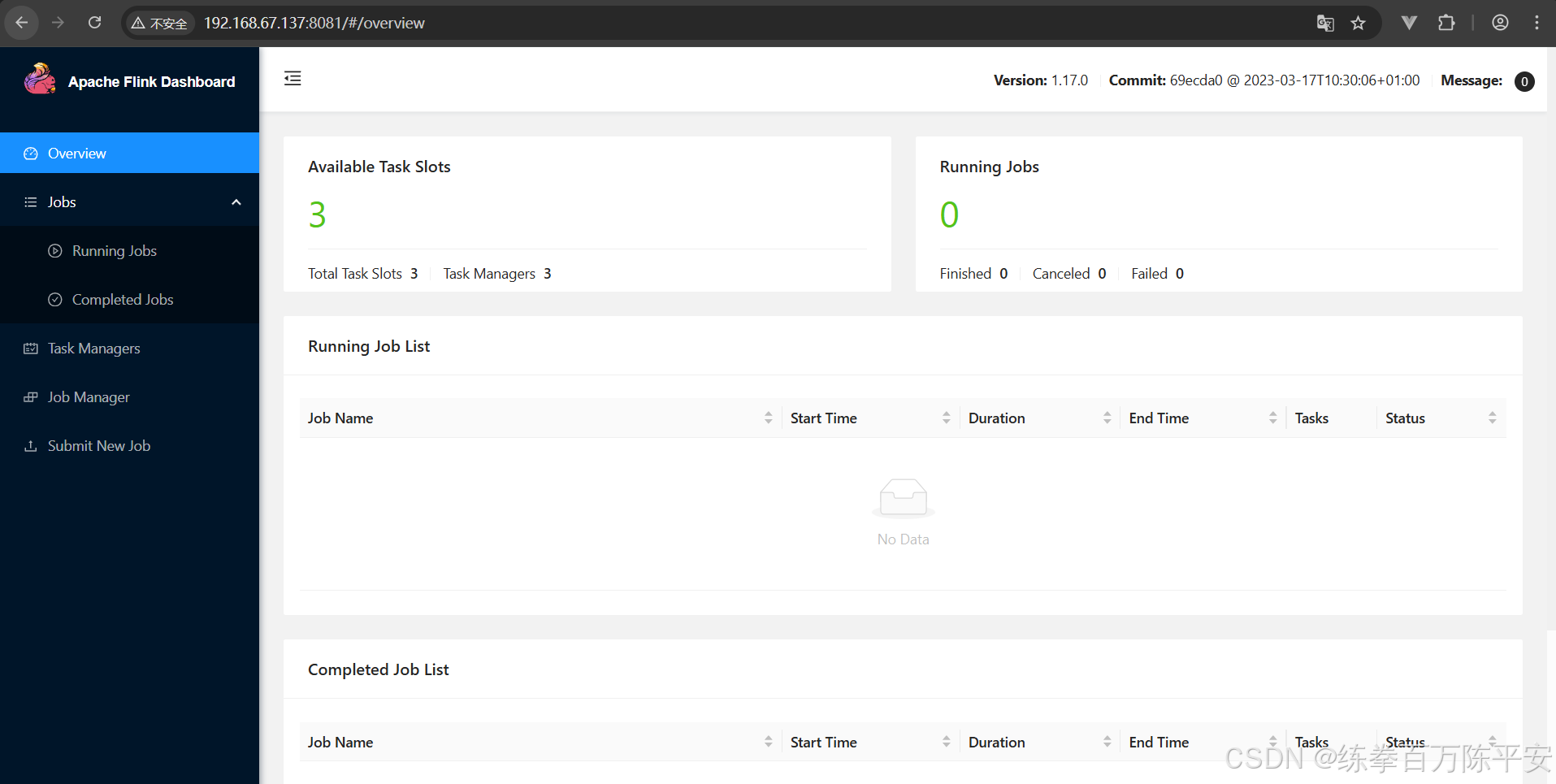
三:Web UI提交作业
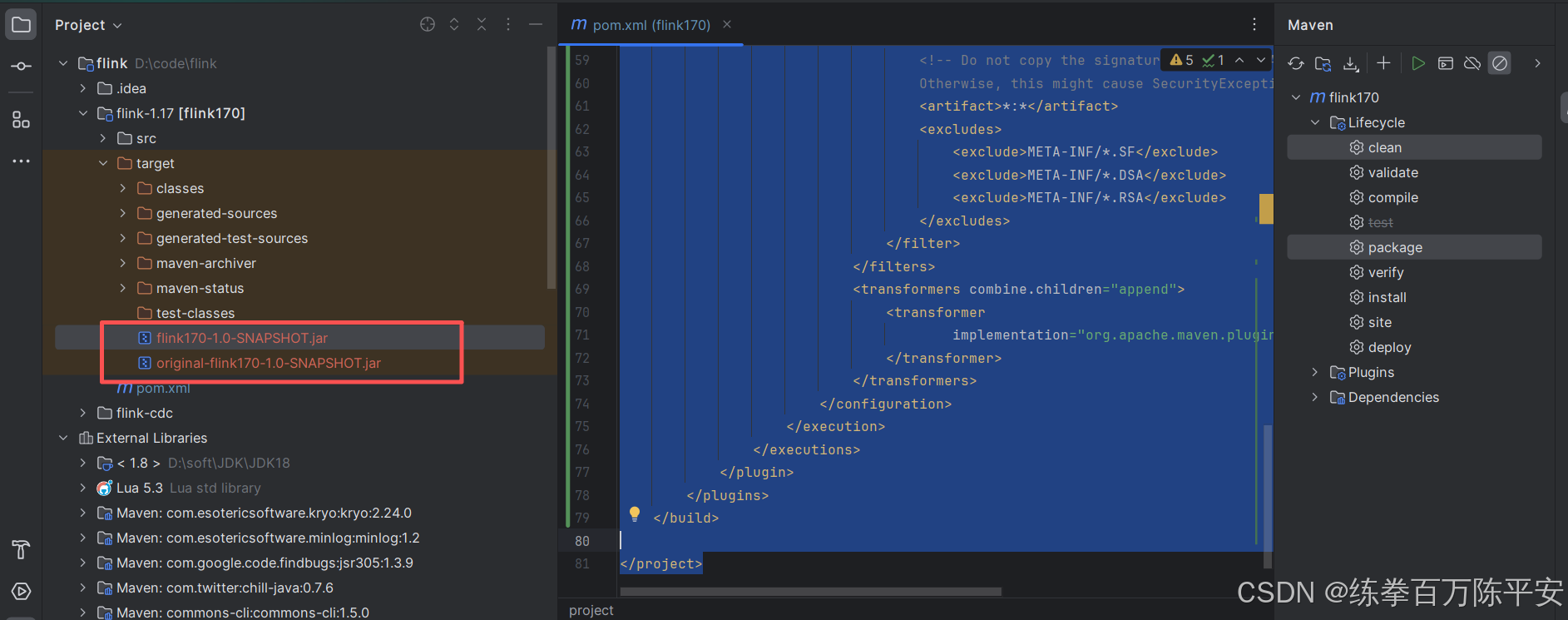
1:添加打包插件
依赖设置为provided。这样就不会把依赖打入包中。
<?xml version="1.0" encoding="UTF-8"?>
<project xmlns="http://maven.apache.org/POM/4.0.0"
         xmlns:xsi="http://www.w3.org/2001/XMLSchema-instance"
         xsi:schemaLocation="http://maven.apache.org/POM/4.0.0 http://maven.apache.org/xsd/maven-4.0.0.xsd">
    <modelVersion>4.0.0</modelVersion>

    <groupId>com.dashu</groupId>
    <artifactId>flink170</artifactId>
    <version>1.0-SNAPSHOT</version>

    <properties>
        <maven.compiler.source>8</maven.compiler.source>
        <maven.compiler.target>8</maven.compiler.target>
        <project.build.sourceEncoding>UTF-8</project.build.sourceEncoding>
        <flink.version>1.17.1</flink.version>
    </properties>


    <dependencies>
        <!--基本核心依赖-->
        <dependency>
            <groupId>org.apache.flink</groupId>
            <artifactId>flink-streaming-java</artifactId>
            <version>${flink.version}</version>
            <scope>provided</scope>
        </dependency>
        <!--客户端依赖,有了这个才可以在跑-->
        <dependency>
            <groupId>org.apache.flink</groupId>
            <artifactId>flink-clients</artifactId>
            <version>${flink.version}</version>
            <scope>provided</scope>
        </dependency>
    </dependencies>

    <!--这里添加打包插件,这样的话,assebly这个功能一样,但是可能会有bug,就不用这个了。-->
    <build>
        <plugins>
            <plugin>
                <groupId>org.apache.maven.plugins</groupId>
                <artifactId>maven-shade-plugin</artifactId>
                <version>3.2.4</version>
                <executions>
                    <execution>
                        <phase>package</phase>
                        <goals>
                            <goal>shade</goal>
                        </goals>
                        <configuration>
                            <artifactSet>
                                <excludes>
                                    <exclude>com.google.code.findbugs:jsr305</exclude>
                                    <exclude>org.slf4j:*</exclude>
                                    <exclude>log4j:*</exclude>
                                </excludes>
                            </artifactSet>
                            <filters>
                                <filter>
                                    <!-- Do not copy the signatures in the META-INF folder.
                                    Otherwise, this might cause SecurityExceptions when using the JAR. -->
                                    <artifact>*:*</artifact>
                                    <excludes>
                                        <exclude>META-INF/*.SF</exclude>
                                        <exclude>META-INF/*.DSA</exclude>
                                        <exclude>META-INF/*.RSA</exclude>
                                    </excludes>
                                </filter>
                            </filters>
                            <transformers combine.children="append">
                                <transformer
                                        implementation="org.apache.maven.plugins.shade.resource.ServicesResourceTransformer">
                                </transformer>
                            </transformers>
                        </configuration>
                    </execution>
                </executions>
            </plugin>
        </plugins>
    </build>

</project>
2:打出来jar包
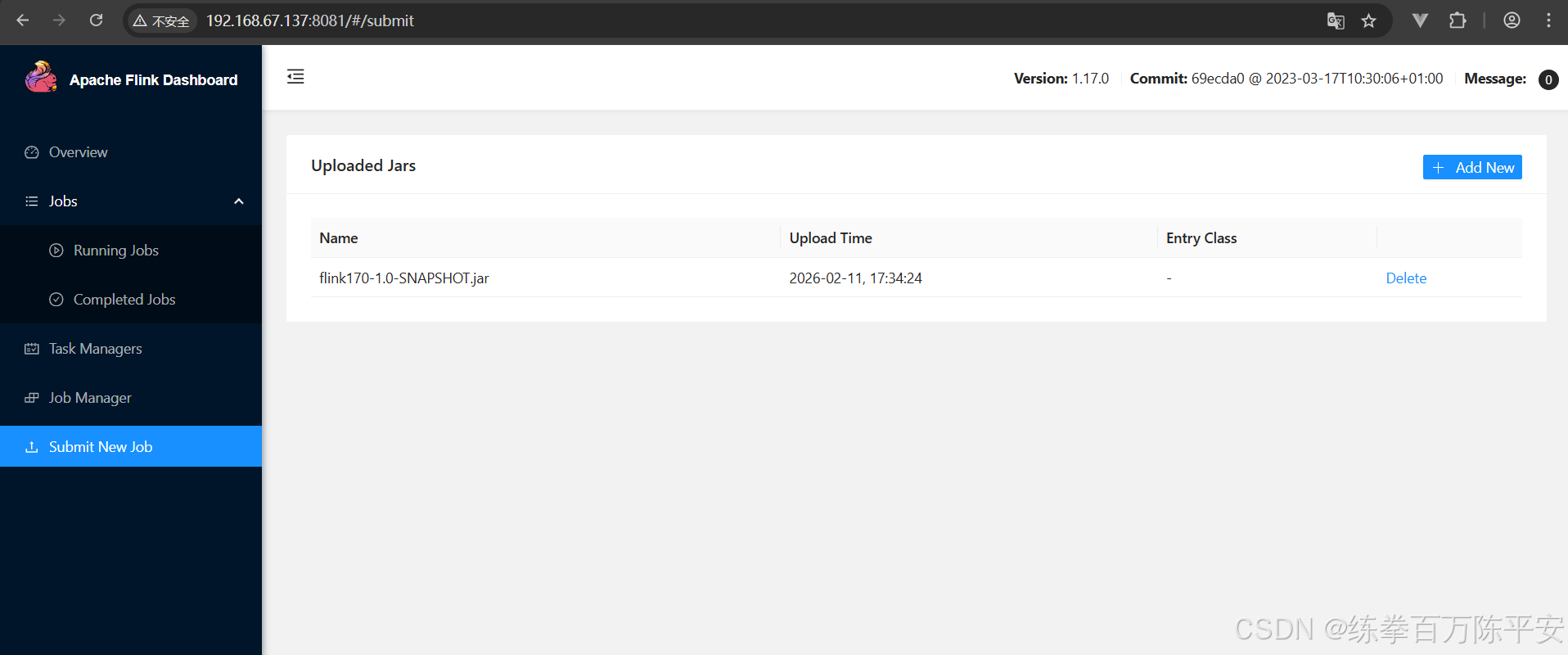
3:上传
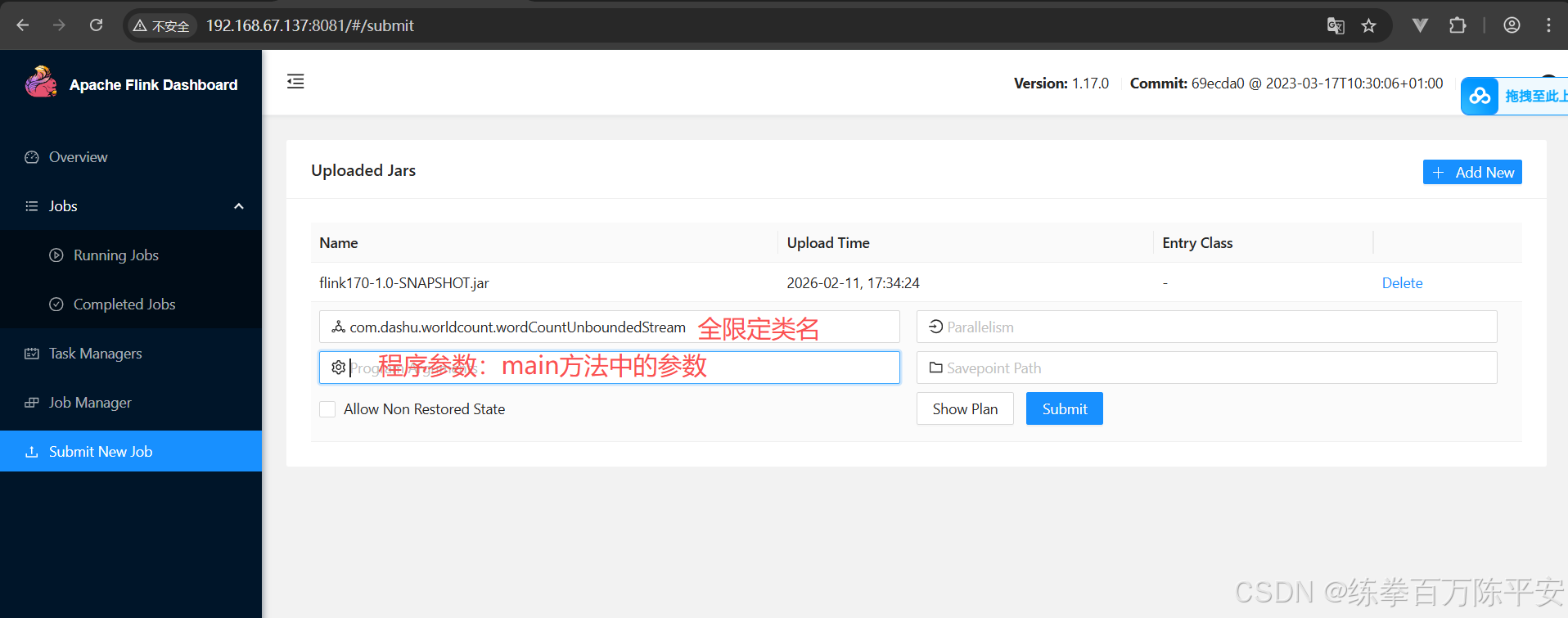
4:配置启动
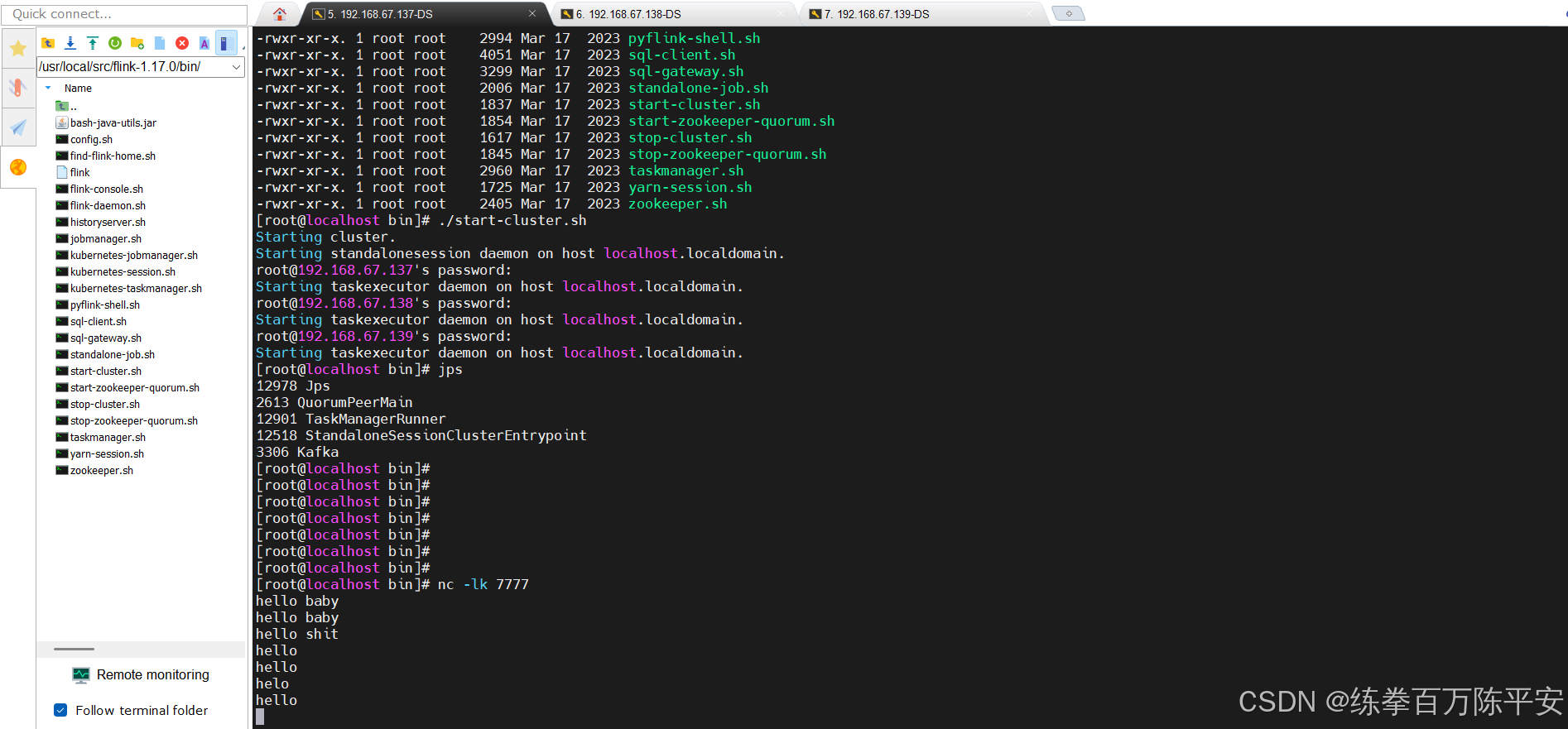
5:启动netcat
启动netcat模拟无界流。
6:查看flink作业情况
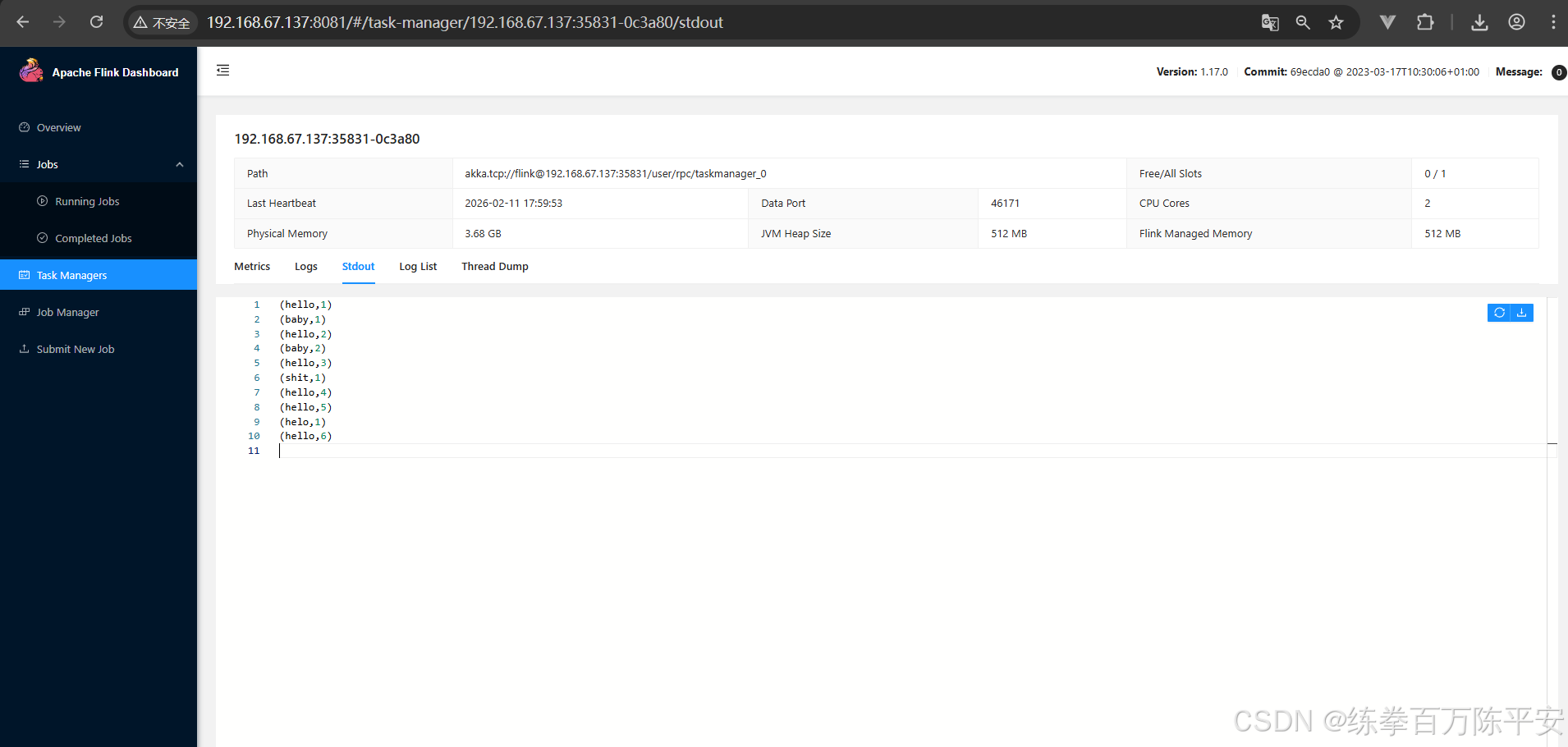
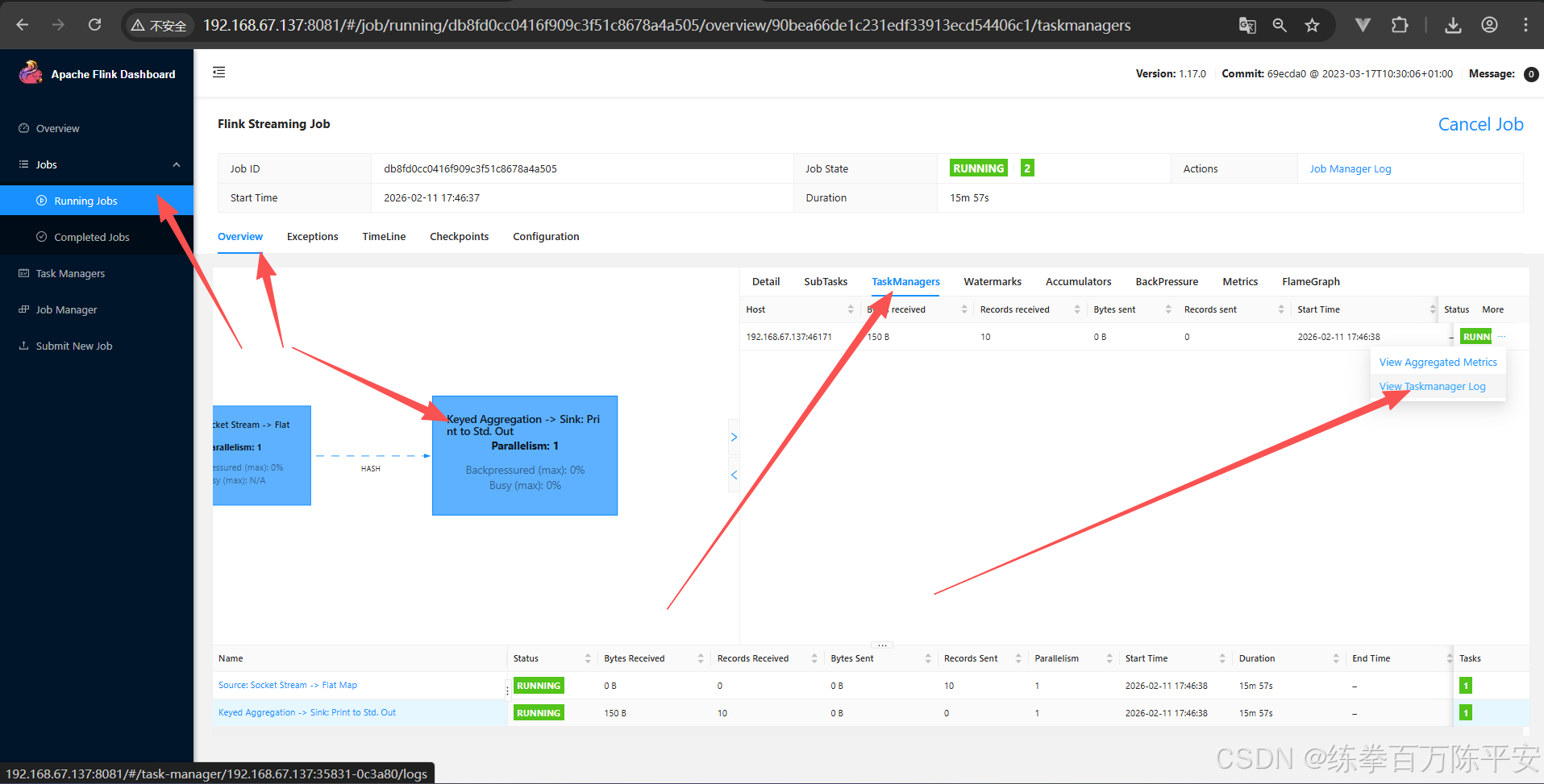
如何快速查看taskManager作业日志,print会进行标准输出到sout当中
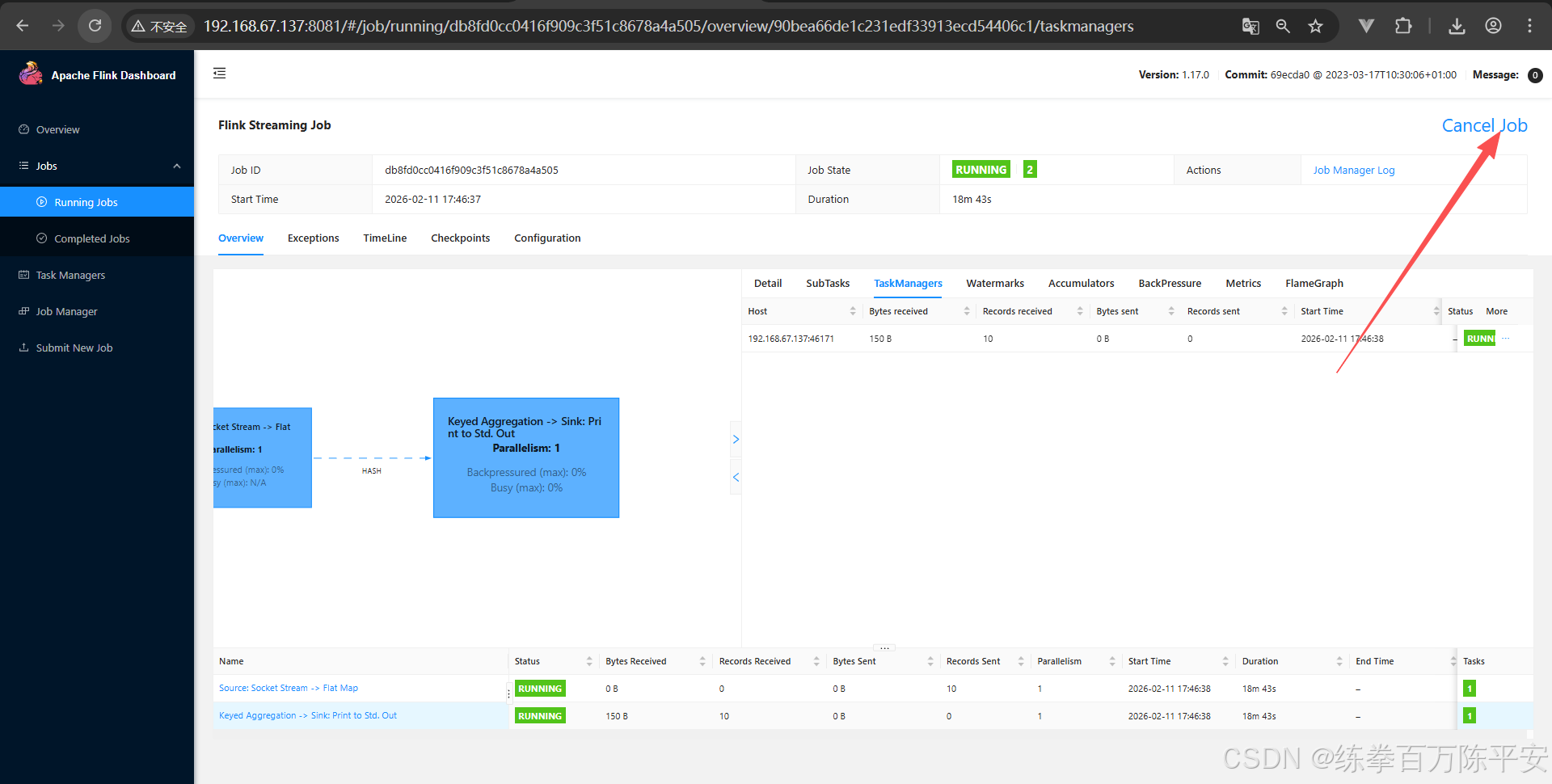
7:停止任务
四:命令行提交作业
1:上传jar包到服务器
这个无所谓,上传到哪里都行。
2:命令行启动
flink run -m 192.168.67.137:8081 -c com.dashu.worldcount.wordCountUnboundedStream
./flink170-1.0-SNAPSHOT.jar
通过命令行的方式才是用的比较多的。