文章目录
- 一、效果
- 二、简介
- 三、环境
- 四、知识点
-
- 4.1、模型格式选择
- 4.2、不同格式的加载方式
-
- 4.2.1、最简单:glb/gltf(一行核心代码)
- [4.2.2、PLY 格式加载(需额外解析)](#4.2.2、PLY 格式加载(需额外解析))
- 4.2.3、模型加载的旋转、缩放、上色
- 4.2.4、模型加载的元素选择
- 五、核心源码
一、效果
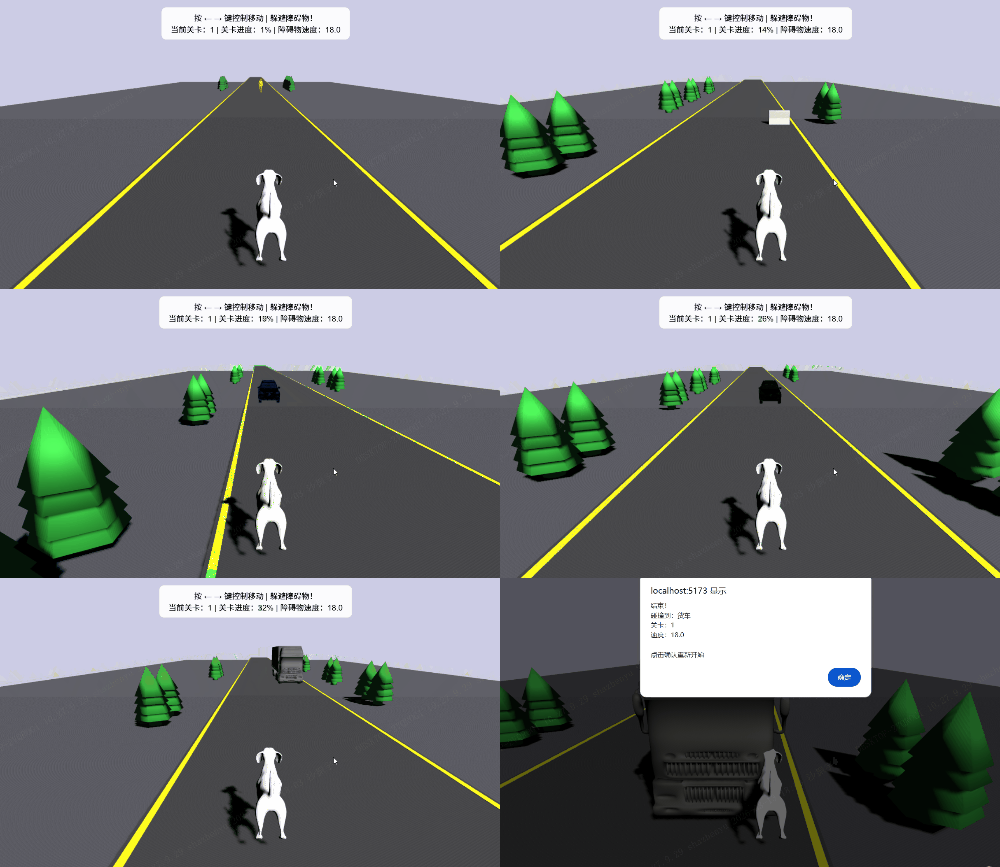
二、简介
在上一篇《【Web】使用Vue3+PlayCanvas开发3D游戏(三)3D障碍物躲避游戏》中,我们实现了基础的 3D 游戏框架与交互逻辑,但核心的「模型加载」环节仅停留在基础几何形状层面。本文将聚焦 PlayCanvas 模型加载的核心实战:从免费 3D 模型资源选型(GLB/GLTF/PLY 等格式适配)、本地模型加载踩坑修复(如 Asset API 误用、实体方法调用异常),到模型材质自定义(彩色化、PBR 质感优化),全程基于真实项目场景拆解 ------ 解决圣诞树模型黑白显示、缩放异常、加载失败等高频问题,最终实现「自定义 3D 模型」无缝融入障碍物躲避游戏,让 3D 游戏从 "几何方块" 升级为 "写实化场景"!
三、环境
- OS:Windows11
- Browser:Google
- Node:v24.14.0
- NPM:11.9.0
- Vue:3.5.25
- Vite:7.3.1
四、知识点
4.1、模型格式选择
4.1.1、主要支持的格式
PlayCanvas 作为专业的 WebGL 3D 引擎,支持的模型格式非常丰富,不同格式适配不同的使用场景(比如轻量展示、高精度建模、游戏开发等)。我整理了完整的支持列表 + 格式特点 + 使用建议,记笔记~
| 序号 | 优先级 | 格式 | 支持方式 | 核心特点 | 适用场景 |
|---|---|---|---|---|---|
| 1 | 核心 | glb/gltf | GL Transmission Format | 单文件(glb)/ 文本 + 资源(gltf),体积小、加载快、支持 PBR 材质、Web 端最优 | 网页 3D 展示、游戏、交互可视化 |
| 2 | 核心 | FBX | FilmBox | 工业标准格式,支持动画 / 骨骼,需编辑器转换为 PlayCanvas 资产 | 带动画的模型、高精度建模 |
| 3 | 次要 | PLY | 原生支持(需解析) | 点云 / 网格格式,文本 / 二进制两种编码,精度高但体积大 | 3D 扫描、点云数据展示 |
| 4 | 次要 | OBJ | 原生支持 | 简单文本格式,易编辑但不含材质 / 动画,需单独导入纹理 | 静态低模、学习 / 测试 |
| 5 | 次要 | 3DS | 编辑器导入后转换 | 老式格式,面数少,兼容性一般 | 复古游戏资源、旧模型迁移 |
| 6 | 次要 | Collada (DAE) | 编辑器导入后转换 | 开源格式,支持复杂场景,但解析慢、体积大 | 从 Blender/Maya 导出的复杂模型 |
4.1.2、不推荐与避坑
不推荐 / 需转换的格式
- STL:仅支持静态网格,无材质,需通过 Blender 转换为 glb 后再导入;
- OBJ + MTL:需手动关联纹理,不如 glb 一站式方便;
- MAX/MAYA 源文件:无法直接加载,必须导出为 glb/FBX。
避坑建议
- 优先选 glb:哪怕你只有 PLY/OBJ 模型,也建议用 Blender(免费)转换为 glb,加载速度提升 50%+,还能自动带上材质;
- 体积优化:网页端模型面数控制在 1 万以内(低模树 < 5000 面),避免卡顿;
- 格式转换工具:
- 在线转换:https://convertio.co/zh/obj-glb/(OBJ/PLY 转 glb)
- 本地工具:Blender(导出时选 glb,勾选 "嵌入纹理")。
4.1.3、模型下载与转换
很多免费的网站,例如:
- 国际
- 国内
下载下来为blend格式,blend 是 Blender 源文件,PlayCanvas 不能直接加载,必须导出成 glb。
- 网页在线转换1:https://convert3d.org/blend-to-glb/app(推荐)
- 网页在线转换2:https://www.dorchester3d.com/convert/blend-to-glb(推荐)
- 其他在线工具:https://3dconvert.nsdt.cloud/conv/to/glb
- 用免费软件 Blender 导出:下载地址
- 转好后怎么在 PlayCanvas 用?
- 把 XXX.glb 拖进编辑器 Assets
- 直接拖到场景里,就能显示
- 支持材质、光照、缩放,完美运行
4.2、不同格式的加载方式
4.2.1、最简单:glb/gltf(一行核心代码)
PlayCanvas 对 glb/gltf 有专属加载器,无需额外配置,加载最快:
js
// 初始化加载器
const gltfLoader = new pc.GltfLoader(app.assets);

// 加载glb模型(替换为你的模型路径)
gltfLoader.load("assets/your-tree-model.glb", (result) => {
    // 将模型添加到场景
    const entity = result.scene.root.clone();
    app.root.addChild(entity);
    // 调整位置/缩放
    entity.setPosition(0, 0, 0);
    entity.setScale(1, 1, 1);
}, {
    // 加载进度回调(可选)
    progress: (progress) => {
        console.log(`加载进度:${(progress * 100).toFixed(1)}%`);
    }
});
4.2.2、PLY 格式加载(需额外解析)
目前用XXX三维扫描工具扫出来即为ply格式,也尝试了下ply格式。PLY 加载稍复杂,需要先解析二进制 / 文本数据:
js
// 加载PLY文件
app.assets.loadFromUrl("assets/your-tree.ply", "binary", (err, asset) => {
    if (err) {
        console.error("加载失败:", err);
        return;
    }
    // 解析PLY数据
    const plyParser = new pc.PlyParser();
    const meshData = plyParser.parse(asset.resource);
    // 创建网格和实体
    const mesh = new pc.Mesh(app.graphicsDevice);
    mesh.setPositions(meshData.positions);
    mesh.setNormals(meshData.normals);
    mesh.setIndices(meshData.indices);

    const entity = new pc.Entity();
    entity.addComponent("render", { mesh: mesh });
    app.root.addChild(entity);
});
4.2.3、模型加载的旋转、缩放、上色
以树为例子
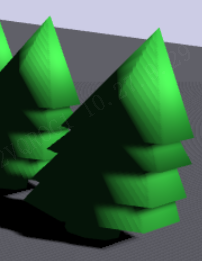
不同模型加载完,坐标系和你用的坐标系可能不一样,记得做方向旋转和缩放。
让圣诞树模型,显示绿色树枝 + 棕色树干的彩色效果,需要更改模型材质的纹理和颜色渲染问题:
js
// 加载圣诞树GLB模型
const loadTreeModel = async () => {
  return new Promise((resolve, reject) => {
    const asset = new pc.Asset(
      'christmastree',
      'model',
      { url: '/download/tree/christmastree.glb' },
      { preload: true }
    );

    app.assets.add(asset);

    asset.on('load', () => {
      const treeEntity = new pc.Entity('tree-template');
      treeEntity.addComponent('model', {
        type: 'asset',
        asset: asset,
        castShadows: true,
        receiveShadows: true
      });

      // 调整模型旋转
      treeEntity.setLocalEulerAngles(-90, 0, 0);
      treeEntity.setLocalScale(0.8, 0.8, 0.8);

      // ========== 手动设置材质颜色 ==========
      setTimeout(() => {
        if (treeEntity.model && treeEntity.model.meshInstances) {
          treeEntity.model.meshInstances.forEach((mi, index) => {
            if (mi.material) {
              // 强制启用材质渲染
              mi.material.useLighting = true;
              mi.material.diffuseMap = mi.material.diffuseMap || null;
              mi.material.specular = new pc.Color(0.1, 0.1, 0.1);
              mi.material.roughness = 0.4;
              mi.material.metalness = 0.0;

              // 区分树干和树枝,设置不同颜色
              // 方案1:按索引区分(第0个mesh是树干,其余是树枝)
              if (index === 0) {
                // 树干:棕色系
                mi.material.diffuse = new pc.Color(0.4, 0.25, 0.1); // 深棕色
                mi.material.emissive = new pc.Color(0.05, 0.03, 0.01); // 轻微发光增强质感
              } else {
                // 树枝:绿色系
                mi.material.diffuse = new pc.Color(0.15, 0.6, 0.2); // 鲜绿色
                mi.material.emissive = new pc.Color(0.02, 0.08, 0.03); // 轻微发光
              }

              // 强制更新材质
              mi.material.update();
            }
          });
        }

        // 递归处理子节点的材质(GLB模型可能嵌套)
        const updateChildMaterials = (entity) => {
          if (entity.children.length === 0) return;
          entity.children.forEach(child => {
            if (child.model && child.model.meshInstances) {
              child.model.meshInstances.forEach((mi, index) => {
                if (mi.material) {
                  mi.material.useLighting = true;
                  if (index === 0) {
                    // 树干颜色
                    mi.material.diffuse = new pc.Color(0.4, 0.25, 0.1);
                    mi.material.emissive = new pc.Color(0.05, 0.03, 0.01);
                  } else {
                    // 树枝颜色
                    mi.material.diffuse = new pc.Color(0.15, 0.6, 0.2);
                    mi.material.emissive = new pc.Color(0.02, 0.08, 0.03);
                  }
                  mi.material.roughness = 0.4;
                  mi.material.metalness = 0.0;
                  mi.material.update();
                }
              });
            }
            updateChildMaterials(child);
          });
        };

        updateChildMaterials(treeEntity);
      }, 200);

      treeTemplate = treeEntity;
      resolve();
    });

    asset.on('error', (err) => {
      console.error('加载圣诞树模型失败:', err);
      alert('树木模型加载失败,请检查文件路径和格式!');
      reject(err);
    });

    app.assets.load(asset);
  });
};

// 树木创建方法
const makeTree = (parent) => {
  if (!treeTemplate) return;

  const treeEntity = treeTemplate.clone();
  treeEntity.setPosition(0, 0, 0);

  parent.addComponent('collision', {
    type: 'box',
    halfExtents: new pc.Vec3(1.2, 3.5, 1.2)
  });

  parent.addChild(treeEntity);

  // 二次强制更新材质,确保克隆后的模型颜色生效
  setTimeout(() => {
    const updateMaterials = (entity) => {
      if (entity.model && entity.model.meshInstances) {
        entity.model.meshInstances.forEach((mi, index) => {
          if (mi.material) {
            // 重新应用颜色,防止克隆后材质丢失
            if (index === 0) {
              mi.material.diffuse = new pc.Color(0.4, 0.25, 0.1); // 树干
            } else {
              mi.material.diffuse = new pc.Color(0.15, 0.6, 0.2); // 树枝
            }
            mi.material.update();
          }
        });
      }
      entity.children.forEach(child => updateMaterials(child));
    };

    updateMaterials(treeEntity);
  }, 300);
};
4.2.4、模型加载的元素选择
例如有多个子元素的 GLB 模型,想要只显示指定元素(如Mercedes)并隐藏其他元素(如Cylinder、Cylinder001),核心思路是遍历模型的子实体树,根据名称筛选并控制可见性。以下是具体实现方案:
js
// 加载GLB模型并只显示指定子元素
const loadGLBWithFilter = async (app, glbUrl, targetChildName) => {
  return new Promise((resolve, reject) => {
    // 1. 创建模型资源
    const modelAsset = new pc.Asset(
      'car-model',
      'model',
      { url: glbUrl },
      { preload: true }
    );

    app.assets.add(modelAsset);

    // 2. 加载资源
    modelAsset.on('load', () => {
      // 3. 创建根实体承载模型
      const rootEntity = new pc.Entity('car-root');
      rootEntity.addComponent('model', {
        type: 'asset',
        asset: modelAsset,
        castShadows: true
      });

      // 4. 等待模型加载完成后遍历子节点(关键步骤)
      setTimeout(() => {
        // 递归遍历所有子实体
        const traverseChildren = (entity) => {
          // 跳过根节点
          if (entity.name === 'car-root') {
            entity.children.forEach(child => traverseChildren(child));
            return;
          }

          // 匹配目标子元素:只显示targetChildName,隐藏其他
          if (entity.name === targetChildName) {
            entity.enabled = true; // 显示目标元素
            entity.visible = true;
            console.log(`显示元素: ${targetChildName}`);
          } else {
            entity.enabled = false; // 隐藏非目标元素
            entity.visible = false;
            // 如果需要彻底移除而非隐藏,可使用:
            // entity.parent.removeChild(entity);
            // entity.destroy();
            console.log(`隐藏元素: ${entity.name}`);
          }

          // 递归处理子节点的子节点(多层嵌套场景)
          if (entity.children.length > 0) {
            entity.children.forEach(child => traverseChildren(child));
          }
        };

        // 执行遍历筛选
        traverseChildren(rootEntity);

        resolve(rootEntity);
      }, 500); // 延迟确保模型子节点完全加载(GLB解析可能有延迟)
    });

    modelAsset.on('error', (err) => {
      console.error('GLB模型加载失败:', err);
      reject(err);
    });

    app.assets.load(modelAsset);
  });
};

// ========== 调用示例(替换到你的代码中) ==========
// 在initApp中替换原有的障碍物生成逻辑,以加载car.glb为例
const initApp = async () => {
  await nextTick();
  if (!canvasContainer.value) return;

  // ... 省略原有引擎初始化代码 ...

  // 加载car.glb并只显示Mercedes
  const carEntity = await loadGLBWithFilter(
    app,
    '/download/car/car.glb', // 你的GLB文件路径
    'Mercedes' // 要显示的子元素名称
  );

  // 将筛选后的汽车模型添加到场景
  carEntity.setPosition(0, 0, -20); // 设置位置
  app.root.addChild(carEntity);

  // ... 省略其他原有逻辑(相机、灯光、玩家等) ...
};
或者直接改三维模型里面的结构,通过以下网址:
https://bj.glbxz.com/
五、核心源码
html
<template>
<div class="game-container">
<canvas id="app-container" ref="canvasContainer"></canvas>
<!-- 游戏信息面板 -->
<div class="game-info">
按 ← → 键控制移动 | 躲避障碍物!<br>
当前关卡:{{ currentLevel }} | 关卡进度:{{ levelProgress }}% | 障碍物速度:{{ obstacleSpeed.toFixed(1) }}
</div>
<!-- 关卡提示弹窗 -->
<div class="level-up-modal" v-if="showLevelUpModal">
<div class="modal-content">
<h2>恭喜!</h2>
<p>已通过第 {{ currentLevel - 1 }} 关</p>
<p>障碍物速度提升至 {{ obstacleSpeed.value.toFixed(1) }}</p>
<button @click="closeLevelUpModal">继续游戏</button>
</div>
</div>
</div>
</template>
<script setup>
import { ref, onMounted, onUnmounted, nextTick } from 'vue';
import * as pc from 'playcanvas';
// 容器
const canvasContainer = ref(null);
// 引擎实例
let app = null;
let camera = null;
let player = null;
let roadEntities = []; // 改为数组存储双段道路
let roadLineEntities = []; // 双段道路标线
let obstaclePool = []; // 普通障碍物池
let treePool = []; // 两侧动态树木池
let treeTemplate = null; // 圣诞树实体模板
// 车辆/人物/狗模型模板
let carTemplateBlue = null; // 蓝色轿车模板
let carTemplateBlack = null; // 黑色轿车模板
let truckTemplate = null; // 灰色货车模板
let personTemplate = null; // 黄色人物模板
let dogTemplate = null; // 狗模型模板
let barrierTemplate = null; // 路障模型模板
// ====================== 游戏数值 ======================
const currentLevel = ref(1);
const levelProgress = ref(0);
const showLevelUpModal = ref(false);
let startTime = 0;
let baseSpeed = 18; // 初始速度
const obstacleSpeed = ref(baseSpeed);
const speedIncreaseRate = 1.2; // 每关提升幅度
const secondsPerLevel = 60;
// 数量限制配置
const MAX_OBSTACLES = 6; // 普通障碍物最大数量
const MAX_TREES = 12; // 两侧树木最大数量
const TREE_SPACING = 20; // 树木间隔距离
const TREE_OFFSET_X = 12; // 树木离道路中心线的距离
const ROAD_SEGMENT_LENGTH = 200; // 单段道路长度
// ==============================================================
// 初始化
const initApp = async () => {
await nextTick();
if (!canvasContainer.value) return;
app = new pc.Application(canvasContainer.value, {
elementInput: new pc.ElementInput(canvasContainer.value),
mouse: new pc.Mouse(canvasContainer.value),
keyboard: new pc.Keyboard(window),
touch: new pc.TouchDevice(canvasContainer.value),
graphicsDeviceOptions: { webgl2: true, antialias: true, powerPreference: 'high-performance' },
createCanvas: false
});
app.setCanvasFillMode(pc.FILLMODE_FILL_WINDOW);
app.setCanvasResolution(pc.RESOLUTION_AUTO);
app.start();
app.scene.background = new pc.Color(0.8, 0.8, 0.9);
startTime = Date.now();
// 加载所有模型
await Promise.all([
loadTreeModel(),
loadCarModels(),
loadTruckModel(),
loadPersonModel(),
loadDogModel(), // 新增加载狗模型
loadBarrierModel() // 新增加载路障模型
]);
createCamera();
createLight();
createGroundAndRoad(); // 创建无限滚动的道路
createPlayer(); // 创建玩家(现在使用狗模型)
startSpawnObstacles();
startSpawnTrees(); // 启动动态树木生成
listenKeyboard();
app.on('update', update);
window.addEventListener('resize', () => {
app?.resizeCanvas(window.innerWidth, window.innerHeight);
});
};
// 加载狗GLB模型
const loadDogModel = async () => {
return new Promise((resolve, reject) => {
const asset = new pc.Asset(
'dog',
'model',
{ url: '/download/dog/dog.glb' },
{ preload: true }
);
app.assets.add(asset);
asset.on('load', () => {
const dogEntity = new pc.Entity('dog-template');
dogEntity.addComponent('model', {
type: 'asset',
asset: asset,
castShadows: true,
receiveShadows: true
});
// 调整模型大小和旋转(根据实际模型调整)
dogEntity.setLocalScale(0.08, 0.08, 0.08); // 可根据实际模型大小调整缩放
dogEntity.setLocalEulerAngles(-90, -180, 0); // 调整朝向,确保面向前方
// 延迟设置材质确保生效
setTimeout(() => {
if (dogEntity.model && dogEntity.model.meshInstances) {
dogEntity.model.meshInstances.forEach((mi) => {
if (mi.material) {
// 启用光照并优化材质属性
mi.material.useLighting = true;
mi.material.roughness = 0.5;
mi.material.metalness = 0.1;
mi.material.update();
}
});
}
// 递归处理子节点材质
const updateChildMaterials = (entity) => {
if (entity.children.length === 0) return;
entity.children.forEach(child => {
if (child.model && child.model.meshInstances) {
child.model.meshInstances.forEach((mi) => {
if (mi.material) {
mi.material.useLighting = true;
mi.material.roughness = 0.5;
mi.material.metalness = 0.1;
mi.material.update();
}
});
}
updateChildMaterials(child);
});
};
updateChildMaterials(dogEntity);
}, 200);
dogTemplate = dogEntity;
resolve();
});
asset.on('error', (err) => {
console.error('加载狗模型失败:', err);
alert('狗模型加载失败,请检查文件路径和格式!');
reject(err);
});
app.assets.load(asset);
});
};
// 加载路障GLB模型
const loadBarrierModel = async () => {
return new Promise((resolve, reject) => {
const asset = new pc.Asset(
'barrier',
'model',
{ url: './download/barrier/barrier.glb' },
{ preload: true }
);
app.assets.add(asset);
asset.on('load', () => {
const barrierEntity = new pc.Entity('barrier-template');
barrierEntity.addComponent('model', {
type: 'asset',
asset: asset,
castShadows: true,
receiveShadows: true
});
// 调整路障模型大小和旋转(根据实际模型调整)
barrierEntity.setLocalScale(0.5, 0.5, 0.3); // 可根据实际模型调整
barrierEntity.setLocalEulerAngles(0, 90, 0); // 调整朝向,确保正确显示
// 延迟设置材质确保生效
setTimeout(() => {
if (barrierEntity.model && barrierEntity.model.meshInstances) {
barrierEntity.model.meshInstances.forEach((mi) => {
if (mi.material) {
// 启用光照并优化材质属性
mi.material.useLighting = true;
mi.material.roughness = 0.5;
mi.material.metalness = 0.1;
mi.material.specular = new pc.Color(0.1, 0.1, 0.1);
mi.material.update();
}
});
}
// 递归处理子节点材质
const updateChildMaterials = (entity) => {
if (entity.children.length === 0) return;
entity.children.forEach(child => {
if (child.model && child.model.meshInstances) {
child.model.meshInstances.forEach((mi) => {
if (mi.material) {
mi.material.useLighting = true;
mi.material.roughness = 0.5;
mi.material.metalness = 0.1;
mi.material.specular = new pc.Color(0.1, 0.1, 0.1);
mi.material.update();
}
});
}
updateChildMaterials(child);
});
};
updateChildMaterials(barrierEntity);
}, 200);
barrierTemplate = barrierEntity;
resolve();
});
asset.on('error', (err) => {
console.error('加载路障模型失败:', err);
alert('路障模型加载失败,请检查文件路径和格式!');
reject(err);
});
app.assets.load(asset);
});
};
// 加载圣诞树GLB模型
const loadTreeModel = async () => {
return new Promise((resolve, reject) => {
const asset = new pc.Asset(
'christmastree',
'model',
{ url: '/download/tree/christmastree.glb' },
{ preload: true }
);
app.assets.add(asset);
asset.on('load', () => {
const treeEntity = new pc.Entity('tree-template');
treeEntity.addComponent('model', {
type: 'asset',
asset: asset,
castShadows: true,
receiveShadows: true
});
// 调整模型旋转
treeEntity.setLocalEulerAngles(-90, 0, 0);
treeEntity.setLocalScale(1.6, 1.6, 1.6);
// 手动设置材质颜色
setTimeout(() => {
if (treeEntity.model && treeEntity.model.meshInstances) {
treeEntity.model.meshInstances.forEach((mi, index) => {
if (mi.material) {
// 强制启用材质渲染
mi.material.useLighting = true;
mi.material.diffuseMap = mi.material.diffuseMap || null;
mi.material.specular = new pc.Color(0.1, 0.1, 0.1);
mi.material.roughness = 0.4;
mi.material.metalness = 0.0;
// 区分树干和树枝,设置不同颜色
if (index === 0) {
// 树干:棕色系
mi.material.diffuse = new pc.Color(0.4, 0.25, 0.1);
mi.material.emissive = new pc.Color(0.05, 0.03, 0.01);
} else {
// 树枝:绿色系
mi.material.diffuse = new pc.Color(0.15, 0.6, 0.2);
mi.material.emissive = new pc.Color(0.02, 0.08, 0.03);
}
mi.material.update();
}
});
}
// 递归处理子节点的材质
const updateChildMaterials = (entity) => {
if (entity.children.length === 0) return;
entity.children.forEach(child => {
if (child.model && child.model.meshInstances) {
child.model.meshInstances.forEach((mi, index) => {
if (mi.material) {
mi.material.useLighting = true;
if (index === 0) {
mi.material.diffuse = new pc.Color(0.4, 0.25, 0.1);
mi.material.emissive = new pc.Color(0.05, 0.03, 0.01);
} else {
mi.material.diffuse = new pc.Color(0.15, 0.6, 0.2);
mi.material.emissive = new pc.Color(0.02, 0.08, 0.03);
}
mi.material.roughness = 0.4;
mi.material.metalness = 0.0;
mi.material.update();
}
});
}
updateChildMaterials(child);
});
};
updateChildMaterials(treeEntity);
}, 200);
treeTemplate = treeEntity;
resolve();
});
asset.on('error', (err) => {
console.error('加载圣诞树模型失败:', err);
alert('树木模型加载失败,请检查文件路径和格式!');
reject(err);
});
app.assets.load(asset);
});
};
// 加载轿车模型(蓝色和黑色两种风格)- 仅显示Mercedes节点
const loadCarModels = async () => {
// 加载基础轿车模型
const loadCarBase = () => {
return new Promise((resolve, reject) => {
const asset = new pc.Asset(
'car',
'model',
{ url: '/download/car/car2.glb' },
{ preload: true }
);
app.assets.add(asset);
asset.on('load', () => {
// 修复:使用正确的模型实例化方式
// 方式1:直接从asset.resource获取模型(兼容新版PlayCanvas)
const createCarEntity = (colorName, diffuseColor) => {
const carEntity = new pc.Entity(`car-${colorName}`);
// 添加model组件
carEntity.addComponent('model', {
type: 'asset',
asset: asset,
castShadows: true,
receiveShadows: true
});
// 设置缩放
carEntity.setLocalScale(0.6, 0.6, 0.6);
// 延迟设置材质
setTimeout(() => {
const updateMaterial = (entity) => {
if (entity.model && entity.model.meshInstances) {
entity.model.meshInstances.forEach(mi => {
if (mi.material) {
// 克隆材质避免修改原模型
const mat = mi.material.clone();
mat.useLighting = true;
mat.diffuse = diffuseColor;
mat.specular = new pc.Color(0.2, 0.2, 0.2);
mat.roughness = 0.3;
mat.metalness = 0.7;
mat.update();
mi.material = mat;
}
});
}
// 递归处理子节点
entity.children.forEach(child => updateMaterial(child));
};
updateMaterial(carEntity);
}, 200);
return carEntity;
};
// 创建蓝色轿车模板
carTemplateBlue = createCarEntity('blue', new pc.Color(0.1, 0.3, 0.8));
// 创建黑色轿车模板
carTemplateBlack = createCarEntity('black', new pc.Color(0.1, 0.1, 0.1));
resolve();
});
asset.on('error', (err) => {
console.error('加载轿车模型失败:', err);
alert('轿车模型加载失败,请检查文件路径和格式!\n错误详情:' + err.message);
reject(err);
});
app.assets.load(asset);
});
};
await loadCarBase();
};
// 加载货车模型(灰色风格)
const loadTruckModel = async () => {
return new Promise((resolve, reject) => {
const asset = new pc.Asset(
'truck',
'model',
{ url: '/download/truck/truck2.glb' },
{ preload: true }
);
app.assets.add(asset);
asset.on('load', () => {
const truckEntity = new pc.Entity('truck-template');
truckEntity.addComponent('model', {
type: 'asset',
asset: asset,
castShadows: true,
receiveShadows: true
});
truckEntity.setLocalEulerAngles(-90, 0, 0);
truckEntity.setLocalScale(1.4, 1.4, 1.4);
// 设置灰色材质
setTimeout(() => {
const updateGrayMaterial = (entity) => {
if (entity.model && entity.model.meshInstances) {
entity.model.meshInstances.forEach(mi => {
if (mi.material) {
mi.material.useLighting = true;
mi.material.diffuse = new pc.Color(0.3, 0.3, 0.3); // 灰色主色调
mi.material.specular = new pc.Color(0.15, 0.15, 0.15);
mi.material.roughness = 0.4;
mi.material.metalness = 0.5;
mi.material.update();
}
});
}
entity.children.forEach(child => updateGrayMaterial(child));
};
updateGrayMaterial(truckEntity);
truckTemplate = truckEntity;
resolve();
}, 200);
});
asset.on('error', (err) => {
console.error('加载货车模型失败:', err);
alert('货车模型加载失败,请检查文件路径和格式!');
reject(err);
});
app.assets.load(asset);
});
};
// 加载人物模型(黄色风格)
const loadPersonModel = async () => {
return new Promise((resolve, reject) => {
const asset = new pc.Asset(
'person',
'model',
{ url: '/download/person/person.glb' },
{ preload: true }
);
app.assets.add(asset);
asset.on('load', () => {
const personEntity = new pc.Entity('person-template');
personEntity.addComponent('model', {
type: 'asset',
asset: asset,
castShadows: true,
receiveShadows: true
});
personEntity.setLocalScale(1.1, 1.1, 1.1);
personEntity.setLocalEulerAngles(0, 0, 0); // 调整人物朝向
// 设置黄色材质
setTimeout(() => {
const updateYellowMaterial = (entity) => {
if (entity.model && entity.model.meshInstances) {
entity.model.meshInstances.forEach(mi => {
if (mi.material) {
mi.material.useLighting = true;
mi.material.diffuse = new pc.Color(0.9, 0.7, 0.1); // 黄色主色调
mi.material.specular = new pc.Color(0.2, 0.2, 0.1);
mi.material.roughness = 0.5;
mi.material.metalness = 0.1;
mi.material.update();
}
});
}
entity.children.forEach(child => updateYellowMaterial(child));
};
updateYellowMaterial(personEntity);
personTemplate = personEntity;
resolve();
}, 200);
});
asset.on('error', (err) => {
console.error('加载人物模型失败:', err);
alert('人物模型加载失败,请检查文件路径和格式!');
reject(err);
});
app.assets.load(asset);
});
};
// 树木创建方法
const makeTree = (parent) => {
if (!treeTemplate) return;
const treeEntity = treeTemplate.clone();
treeEntity.setPosition(0, 0, 0);
parent.addComponent('collision', {
type: 'box',
halfExtents: new pc.Vec3(1.2, 3.5, 1.2)
});
parent.addChild(treeEntity);
// 二次强制更新材质
setTimeout(() => {
const updateMaterials = (entity) => {
if (entity.model && entity.model.meshInstances) {
entity.model.meshInstances.forEach((mi, index) => {
if (mi.material) {
if (index === 0) {
mi.material.diffuse = new pc.Color(0.4, 0.25, 0.1); // 树干
} else {
mi.material.diffuse = new pc.Color(0.15, 0.6, 0.2); // 树枝
}
mi.material.update();
}
});
}
entity.children.forEach(child => updateMaterials(child));
};
updateMaterials(treeEntity);
}, 300);
};
// 创建轿车(使用GLB模型)
const makeCar = (parent) => {
if (!carTemplateBlue || !carTemplateBlack) return;
// 随机选择蓝色或黑色轿车
const carTemplate = Math.random() > 0.5 ? carTemplateBlue : carTemplateBlack;
const carEntity = carTemplate.clone();
carEntity.setPosition(0, 0, 0);
// 添加碰撞体
parent.addComponent('collision', {
type: 'box',
halfExtents: new pc.Vec3(2, 1, 4)
});
parent.addChild(carEntity);
// 确保材质生效
setTimeout(() => {
const updateMaterials = (entity) => {
if (entity.model && entity.model.meshInstances) {
entity.model.meshInstances.forEach(mi => {
if (mi.material) {
mi.material.update();
}
});
}
entity.children.forEach(child => updateMaterials(child));
};
updateMaterials(carEntity);
}, 100);
};
// 创建货车(使用GLB模型)
const makeTruck = (parent) => {
if (!truckTemplate) return;
const truckEntity = truckTemplate.clone();
truckEntity.setPosition(0, 5, 0);
// 添加碰撞体
parent.addComponent('collision', {
type: 'box',
halfExtents: new pc.Vec3(2.5, 2, 4)
});
parent.addChild(truckEntity);
// 确保材质生效
setTimeout(() => {
const updateMaterials = (entity) => {
if (entity.model && entity.model.meshInstances) {
entity.model.meshInstances.forEach(mi => {
if (mi.material) {
mi.material.update();
}
});
}
entity.children.forEach(child => updateMaterials(child));
};
updateMaterials(truckEntity);
}, 100);
};
// 创建人物(使用GLB模型)
const makePerson = (parent) => {
if (!personTemplate) return;
const personEntity = personTemplate.clone();
personEntity.setPosition(0, 0, 0);
// 添加碰撞体
parent.addComponent('collision', {
type: 'capsule',
halfExtents: new pc.Vec3(0.5, 1.5, 0.5)
});
parent.addChild(personEntity);
// 确保材质生效
setTimeout(() => {
const updateMaterials = (entity) => {
if (entity.model && entity.model.meshInstances) {
entity.model.meshInstances.forEach(mi => {
if (mi.material) {
mi.material.update();
}
});
}
entity.children.forEach(child => updateMaterials(child));
};
updateMaterials(personEntity);
}, 100);
};
// 创建狗模型(玩家角色)
const makeDog = (parent) => {
if (!dogTemplate) return;
const dogEntity = dogTemplate.clone();
dogEntity.setPosition(0, 0, 0); // 调整位置居中
// 添加碰撞体(根据狗模型大小调整)
parent.addComponent('collision', {
type: 'capsule', // 胶囊体更适合人物/动物碰撞
halfExtents: new pc.Vec3(0.8, 1.0, 0.8)
});
parent.addChild(dogEntity);
// 确保材质生效
setTimeout(() => {
const updateMaterials = (entity) => {
if (entity.model && entity.model.meshInstances) {
entity.model.meshInstances.forEach(mi => {
if (mi.material) {
mi.material.update();
}
});
}
entity.children.forEach(child => updateMaterials(child));
};
updateMaterials(dogEntity);
}, 100);
};
// 创建路障(使用GLB模型)
const makeBarrier = (parent) => {
if (!barrierTemplate) return;
const barrierEntity = barrierTemplate.clone();
barrierEntity.setPosition(0, 0, 0); // 调整位置居中
// 添加碰撞体(根据路障模型大小调整)
parent.addComponent('collision', {
type: 'box',
halfExtents: new pc.Vec3(1.4, 1.2, 1.4)
});
parent.addChild(barrierEntity);
// 确保材质生效
setTimeout(() => {
const updateMaterials = (entity) => {
if (entity.model && entity.model.meshInstances) {
entity.model.meshInstances.forEach(mi => {
if (mi.material) {
mi.material.update();
}
});
}
entity.children.forEach(child => updateMaterials(child));
};
updateMaterials(barrierEntity);
}, 100);
};
// 第三人称相机
const createCamera = () => {
camera = new pc.Entity('camera');
camera.addComponent('camera', { clearColor: new pc.Color(0.8, 0.8, 0.9), fov: 75 });
camera.setPosition(0, 6, 8);
camera.lookAt(0, 2, 0);
app.root.addChild(camera);
};
// 灯光
const createLight = () => {
const sun = new pc.Entity();
sun.addComponent('light', {
type: 'directional',
color: new pc.Color(1, 1, 0.95),
intensity: 3,
castShadows: true,
shadowResolution: 2048
});
sun.setEulerAngles(50, 30, 0);
app.root.addChild(sun);
const ambient = new pc.Entity();
ambient.addComponent('light', {
type: 'ambient',
intensity: 1.2,
color: new pc.Color(1, 1, 1)
});
app.root.addChild(ambient);
};
// 地面统一颜色+无限滚动道路
const createGroundAndRoad = () => {
// 地面(统一深灰色)
const ground = new pc.Entity('ground');
ground.addComponent('model', { type: 'box' });
ground.addComponent('rigidbody', { type: 'static' });
ground.addComponent('collision', { type: 'box', halfExtents: new pc.Vec3(100, 0.1, 400) });
ground.setLocalScale(100, 0.1, 400);
ground.setPosition(0, -0.1, 0);
const gmat = new pc.StandardMaterial();
gmat.diffuse = new pc.Color(0.28, 0.28, 0.32);
gmat.roughness = 0.9;
gmat.update();
ground.model.material = gmat;
app.root.addChild(ground);
// 创建两段道路用于无限滚动
const createRoadSegment = (zOffset) => {
// 道路主体
const road = new pc.Entity(`road-${zOffset}`);
road.addComponent('model', { type: 'box' });
road.setLocalScale(15, 0.2, ROAD_SEGMENT_LENGTH);
road.setPosition(0, 0, zOffset);
const rmat = new pc.StandardMaterial();
rmat.diffuse = new pc.Color(0.22, 0.22, 0.24);
rmat.roughness = 0.9;
rmat.update();
road.model.material = rmat;
app.root.addChild(road);
roadEntities.push(road);
// 道路两侧黄色标线
const createRoadLine = (xPos, zPos, index) => {
const line = new pc.Entity(`road-line-${index}-${zOffset}`);
line.addComponent('model', { type: 'box' });
line.setLocalScale(0.3, 0.21, ROAD_SEGMENT_LENGTH);
line.setPosition(xPos, 0.01, zPos);
const lmat = new pc.StandardMaterial();
lmat.diffuse = new pc.Color(0.95, 0.8, 0.1);
lmat.roughness = 0.8;
lmat.update();
line.model.material = lmat;
app.root.addChild(line);
roadLineEntities.push(line);
return line;
};
// 左右标线
createRoadLine(7.2, zOffset, 0);
createRoadLine(-7.2, zOffset, 1);
};
// 创建两段拼接的道路
createRoadSegment(-100);
createRoadSegment(-300);
};
// 玩家角色(改为狗模型)
const createPlayer = () => {
player = new pc.Entity('player');
player.addComponent('rigidbody', { type: 'kinematic' });
// 使用狗模型创建玩家
makeDog(player);
// 设置玩家初始位置(调整y轴确保模型在地面上)
player.setPosition(0, 1.0, 0); // 根据狗模型大小调整y值
app.root.addChild(player);
};
// 生成普通障碍物
const spawnObstacle = () => {
// 限制最大障碍物数量
if (obstaclePool.length >= MAX_OBSTACLES) return;
const types = ['car', 'truck', 'person', 'barrier'];
const type = types[Math.floor(Math.random() * types.length)];
const x = (Math.random() - 0.5) * 12;
const z = -100;
const e = new pc.Entity(type);
e.collisionType = type;
switch (type) {
case 'car': makeCar(e); break;
case 'truck': makeTruck(e); break;
case 'person': makePerson(e); break;
case 'barrier': makeBarrier(e); break;
}
e.setPosition(x, 0, z);
e.visible = false;
app.root.addChild(e);
obstaclePool.push(e);
};
// 生成两侧动态树木
const spawnTree = () => {
// 限制最大树木数量
if (treePool.length >= MAX_TREES) return;
// 随机生成左侧或右侧的树
const side = Math.random() > 0.5 ? 1 : -1;
const x = side * TREE_OFFSET_X;
const z = -100 - (Math.random() * TREE_SPACING);
const e = new pc.Entity('tree');
e.collisionType = 'tree';
makeTree(e);
e.setPosition(x, 0, z);
e.visible = false;
app.root.addChild(e);
treePool.push(e);
};
// 启动普通障碍物生成
const startSpawnObstacles = () => {
spawnObstacle();
const loop = () => {
const interval = Math.max(1500, 4000 - (obstacleSpeed.value - baseSpeed) * 100);
setTimeout(() => {
spawnObstacle();
loop();
}, interval);
};
loop();
};
// 启动动态树木生成
const startSpawnTrees = () => {
// 初始生成一批树木
for (let i = 0; i < 6; i++) {
spawnTree();
}
const loop = () => {
const interval = TREE_SPACING * 50;
setTimeout(() => {
spawnTree();
loop();
}, interval);
};
loop();
};
// 键盘控制
const listenKeyboard = () => {
let left = false, right = false;
const speed = 14;
app.keyboard.on('keydown', e => {
if (e.key === pc.KEY_LEFT) left = true;
if (e.key === pc.KEY_RIGHT) right = true;
});
app.keyboard.on('keyup', e => {
if (e.key === pc.KEY_LEFT) left = false;
if (e.key === pc.KEY_RIGHT) right = false;
});
app.on('update', dt => {
if (!player || showLevelUpModal.value) return;
let x = player.getPosition().x;
if (left) x = Math.max(-6, x - speed * dt);
if (right) x = Math.min(6, x + speed * dt);
player.setPosition(x, 1.0, 0); // 同步调整y值
camera.setPosition(x, 6, 8);
camera.lookAt(x, 2, 0);
});
};
// 关卡进度检查
const checkLevelProgress = () => {
const elapsed = (Date.now() - startTime) / 1000;
levelProgress.value = Math.floor((elapsed % secondsPerLevel) / secondsPerLevel * 100);
const lv = Math.floor(elapsed / secondsPerLevel) + 1;
if (lv > currentLevel.value) {
currentLevel.value = lv;
obstacleSpeed.value = baseSpeed + (currentLevel.value - 1) * speedIncreaseRate;
showLevelUpModal.value = true;
}
};
// 关闭升级弹窗
const closeLevelUpModal = () => {
showLevelUpModal.value = false;
startTime = Date.now();
};
// 碰撞检测
const checkCollision = () => {
if (!player) return;
const p = player.getPosition();
// 检查普通障碍物碰撞
for (const o of obstaclePool) {
if (!o.visible) continue;
const op = o.getPosition();
const d = Math.hypot(p.x - op.x, p.z - op.z);
// 不同障碍物的碰撞判定距离
const limit = o.collisionType === 'car' ? 2.6 :
o.collisionType === 'truck' ? 3.2 :
o.collisionType === 'person' ? 1.6 :
o.collisionType === 'barrier' ? 1.6 : 2.2;
if (d < limit) {
// 障碍物类型中文提示
const typeName = {
'car': '轿车',
'truck': '货车',
'person': '行人',
'barrier': '路障'
}[o.collisionType];
alert(`结束!\n碰撞到:${typeName}\n关卡:${currentLevel.value}\n速度:${obstacleSpeed.value.toFixed(1)}\n\n点击确认重新开始`);
resetGame();
break;
}
}
// 检查树木碰撞
for (const tree of treePool) {
if (!tree.visible) continue;
const tp = tree.getPosition();
const d = Math.hypot(p.x - tp.x, p.z - tp.z);
if (d < 2.5) {
alert(`游戏结束!\n碰撞到:道路两侧的树木\n关卡:${currentLevel.value}\n速度:${obstacleSpeed.value.toFixed(1)}\n点击确认重新开始游戏`);
resetGame();
break;
}
}
};
// 游戏重置
const resetGame = () => {
// 清理普通障碍物
obstaclePool.forEach(o => { app.root.removeChild(o); o.destroy(); });
obstaclePool = [];
// 清理动态树木
treePool.forEach(tree => { app.root.removeChild(tree); tree.destroy(); });
treePool = [];
currentLevel.value = 1;
levelProgress.value = 0;
obstacleSpeed.value = baseSpeed;
startTime = Date.now();
player?.setPosition(0, 1.0, 0); // 重置玩家位置(调整y值)
camera.setPosition(0, 6, 8);
camera.lookAt(0, 2, 0);
// 重新启动生成逻辑
startSpawnObstacles();
startSpawnTrees();
};
// 主更新循环
const update = (dt) => {
if (!player || showLevelUpModal.value) return;
checkLevelProgress();
// 无限滚动道路实现
const speed = obstacleSpeed.value * dt;
// 更新两段道路的位置
roadEntities.forEach((road, index) => {
let z = road.getPosition().z;
z += speed;
// 当道路段滚动到可见区域前,重置到后方衔接位置
if (z > 100) {
z = -300;
}
road.setPosition(0, 0, z);
});
// 同步更新道路标线位置
roadLineEntities.forEach((line, index) => {
const roadIndex = Math.floor(index / 2);
const roadZ = roadEntities[roadIndex].getPosition().z;
const x = index % 2 === 0 ? 7.2 : -7.2;
line.setPosition(x, 0.01, roadZ);
});
// 更新普通障碍物
for (let i = obstaclePool.length - 1; i >= 0; i--) {
const o = obstaclePool[i];
const pos = o.getPosition();
pos.z += speed;
const dist = Math.abs(pos.z - player.getPosition().z);
if (dist < 40) {
o.visible = true;
const setVisible = (e) => {
if (e.model?.material) {
e.model.material.opacity = 1;
e.model.material.update();
}
e.children.forEach(setVisible);
};
setVisible(o);
} else {
o.visible = false;
}
o.setPosition(pos);
if (pos.z > 30) {
app.root.removeChild(o);
o.destroy();
obstaclePool.splice(i, 1);
}
}
// 更新动态树木
for (let i = treePool.length - 1; i >= 0; i--) {
const tree = treePool[i];
const pos = tree.getPosition();
pos.z += speed;
const dist = Math.abs(pos.z - player.getPosition().z);
if (dist < 45) {
tree.visible = true;
const setVisible = (e) => {
if (e.model?.material) {
e.model.material.opacity = 1;
e.model.material.update();
}
e.children.forEach(setVisible);
};
setVisible(tree);
} else {
tree.visible = false;
}
tree.setPosition(pos);
if (pos.z > 35) {
app.root.removeChild(tree);
tree.destroy();
treePool.splice(i, 1);
}
}
checkCollision();
};
onMounted(() => initApp());
onUnmounted(() => {
if (app) { app.stop(); app.destroy(); app = null; }
// 清理所有实体
obstaclePool.forEach(o => o.destroy());
treePool.forEach(tree => tree.destroy());
});
</script>
<style scoped>
.game-container {
width: 100vw;
height: 100vh;
overflow: hidden;
position: relative;
}
#app-container {
width: 100%;
height: 100%;
display: block;
}
.game-info {
position: absolute;
top: 20px;
left: 50%;
transform: translateX(-50%);
background: rgba(255,255,255,0.92);
padding: 10px 20px;
border-radius: 10px;
z-index: 10;
font-size: 17px;
text-align: center;
}
.level-up-modal {
position: fixed;
inset: 0;
background: rgba(0,0,0,0.7);
display: flex;
align-items: center;
justify-content: center;
z-index: 999;
}
.modal-content {
background: #fff;
padding: 30px 40px;
border-radius: 14px;
text-align: center;
}
.modal-content button {
margin-top: 18px;
padding: 10px 24px;
background: #3498db;
color: #fff;
border: none;
border-radius: 8px;
cursor: pointer;
font-size: 16px;
}
</style>