作者:来自 Elastic Jeffrey Rengifo

学习如何使用 inference endpoints 将 Elasticsearch 连接到 Hugging Face 模型,并使用语义搜索和聊天补全构建一个多语言博客推荐系统。
Agent Builder 现已正式 GA。通过 Elastic Cloud 试用开始使用,并在这里查看 Agent Builder 的文档。
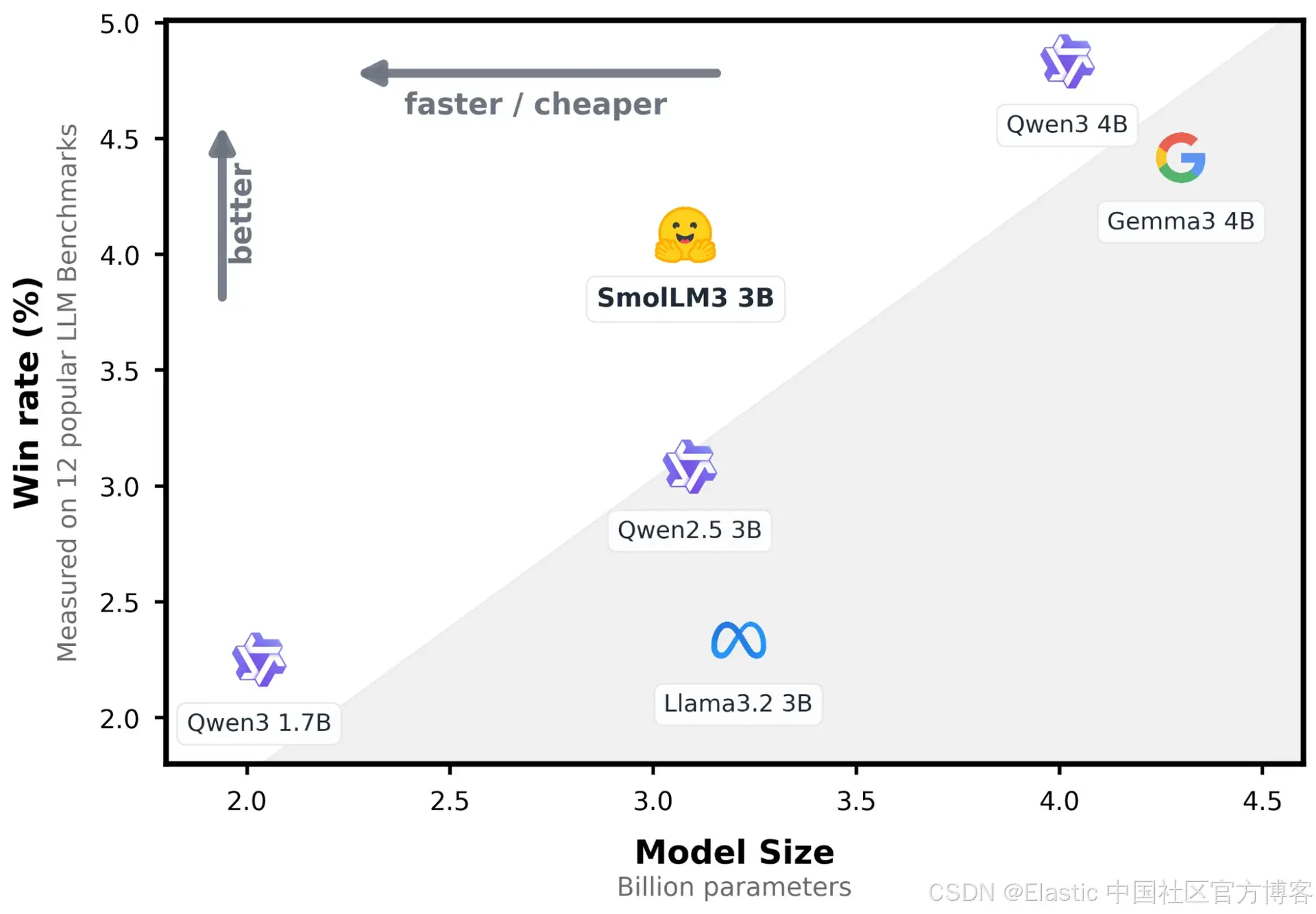
在最近的更新中,Elasticsearch 引入了原生集成,用于连接托管在 Hugging Face Inference Service 上的模型。在本文中,我们将探讨如何配置该集成,并通过简单的 API 调用使用大语言模型(LLM)执行推理。我们将使用 SmolLM3-3B,这是一款轻量级通用模型,在资源使用和回答质量之间取得了良好的平衡。
前提条件
- Elasticsearch 9.3 或 Elastic Cloud Serverless :你可以按照这些说明创建云部署,或者使用 start-local 快速启动。
- Python 3.12:在这里下载 Python。
- Hugging Face 访问令牌。
使用 Hugging Face inference endpoint 进行 completion
首先,我们将构建一个实际示例,将 Elasticsearch 连接到 Hugging Face inference endpoint,从一组博客文章中生成 AI 驱动的推荐。作为应用的知识库,我们将使用公司博客文章数据集,其中包含有价值但通常难以浏览的信息。
通过该 endpoint,语义搜索会为给定查询检索最相关的文章,而 Hugging Face LLM 则基于这些结果生成简短的上下文推荐。
让我们来看一下我们将构建的信息流的高层概览:
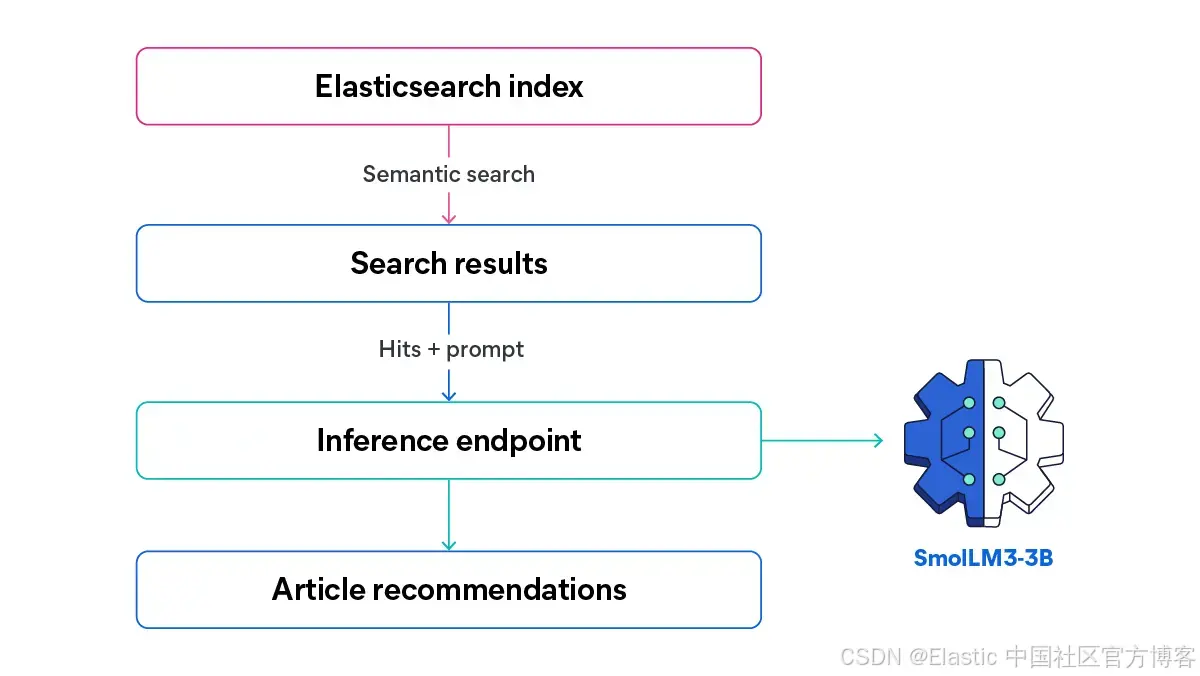
在本文中,我们将测试 SmolLM3-3B 在紧凑体积下结合强大多语言推理和 tool-calling 能力的表现。基于一个搜索查询,我们会将所有匹配的内容(包括 English 和 Spanish)发送给 LLM,以生成一个推荐文章列表,并基于搜索查询和结果生成定制描述。
以下是一个带有 AI 推荐生成系统的文章网站 UI 可能的样子。
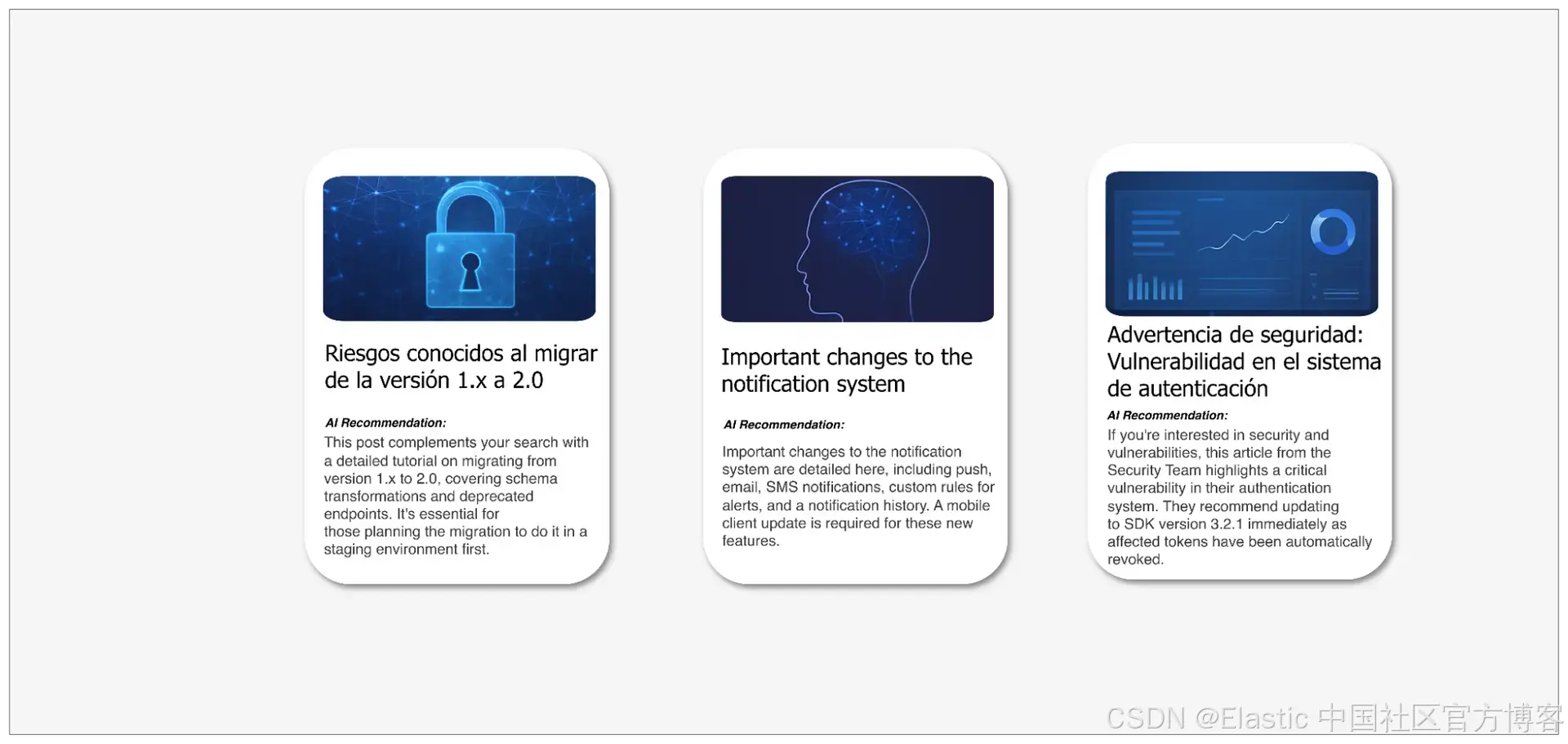
你可以在链接的 notebook 中找到该应用的完整实现。
配置 Elasticsearch inference endpoints
要使用 Elasticsearch 的 Hugging Face inference endpoint,我们需要两个重要元素:一个 Hugging Face API key 和一个正在运行的 Hugging Face endpoint URL。它应该类似这样:
PUT _inference/chat_completions/hugging-face-smollm3-3b
{
    "service": "hugging_face",
    "service_settings": {
        "api_key": "hugging-face-access-token",
        "url": "url-endpoint"
    }
}
Elasticsearch 中的 Hugging Face inference endpoint 支持不同的任务类型:text_embedding、completion、chat_completion 和 rerank。在本文中,我们使用 chat_completion,因为我们需要模型基于搜索结果和 system prompt 生成对话式推荐。该 endpoint 使我们能够通过 Elasticsearch API 以简单的方式直接从 Elasticsearch 执行聊天补全:
POST _inference/chat_completion/hugging-face-smollm3-3b/_stream
{
  "messages": [
      { "role": "user", "content": "<user prompt>" }
  ]
}
这将作为应用的核心,接收 prompt 和将传递给模型的搜索结果。在介绍完理论之后,让我们开始实现这个应用。
在 Hugging Face 上设置 inference endpoint
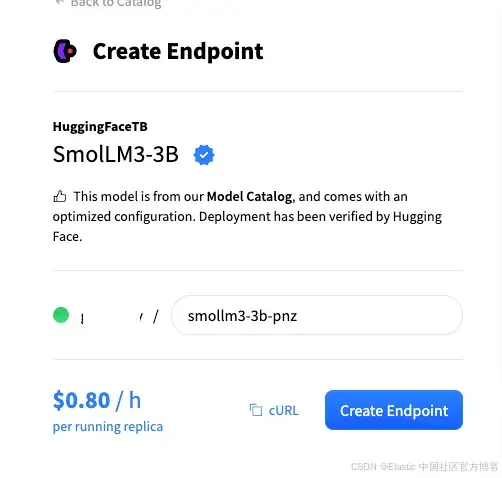
为了部署 Hugging Face 模型,我们将使用 Hugging Face 的 one-click deployments,这是一个用于部署模型 endpoint 的简单且快速的服务。请注意,这是一个付费服务,使用它可能会产生额外费用。此步骤将创建用于生成文章推荐的模型实例。
你可以从 one-click catalog 中选择一个模型:
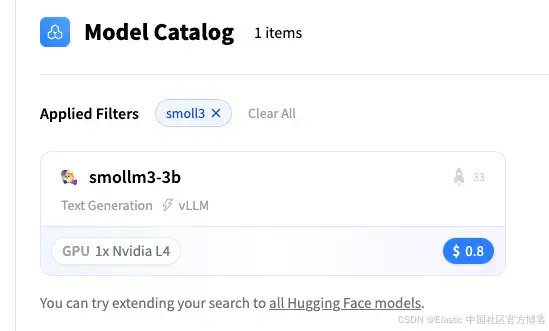
让我们选择 SmolLM3-3B 模型:
在这里,获取 Hugging Face endpoint URL:
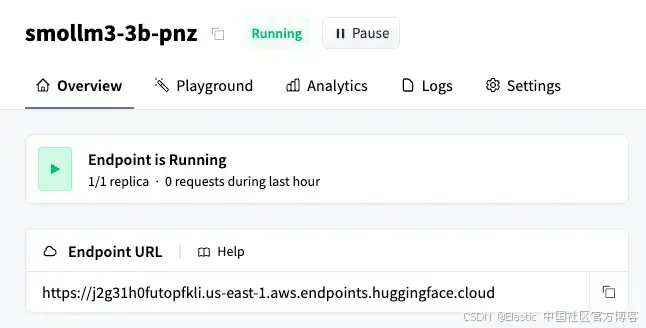
如 Elasticsearch Hugging Face inference endpoints 文档所述,文本生成需要与 OpenAI API 兼容的模型。因此,我们需要在 Hugging Face endpoint URL 后追加 /v1/chat/completions 子路径。最终结果将如下所示:
https://j2g31h0futopfkli.us-east-1.aws.endpoints.huggingface.cloud/v1/chat/completions有了这个 URL,我们就可以在 Python notebook 中开始编码了。
生成 Hugging Face API key
创建一个 Hugging Face 账号,并按照这些说明获取 API token。你可以在三种 token 类型中选择:
- fine-grained(推荐用于生产环境,因为它仅提供对特定资源的访问权限);
- read(只读访问);
- write(读写访问)。
对于本教程,read token 就足够了,因为我们只需要调用 inference endpoint。请保存此 key 以供下一步使用。
设置 Elasticsearch inference endpoint
首先,让我们声明一个 Elasticsearch Python 客户端:
os.environ["ELASTICSEARCH_API_KEY"] = "your-elasticsearch-api-key"
os.environ["ELASTICSEARCH_URL"] = "https://xxxx.us-central1.gcp.cloud.es.io:443"

es_client = Elasticsearch(
    os.environ["ELASTICSEARCH_URL"], api_key=os.environ["ELASTICSEARCH_API_KEY"]
)
接下来,让我们创建一个使用 Hugging Face 模型的 Elasticsearch inference endpoint。该 endpoint 将允许我们基于博客文章和传递给模型的 prompt 生成响应。
INFERENCE_ENDPOINT_ID = "smollm3-3b-pnz"

os.environ["HUGGING_FACE_INFERENCE_ENDPOINT_URL"] = (
 "https://j2g31h0futopfkli.us-east-1.aws.endpoints.huggingface.cloud/v1/chat/completions"
)
os.environ["HUGGING_FACE_API_KEY"] = "hf_xxxxx"

resp = es_client.inference.put(
        task_type="chat_completion",
        inference_id=INFERENCE_ENDPOINT_ID,
        body={
            "service": "hugging_face",
            "service_settings": {
                "api_key": os.environ["HUGGING_FACE_API_KEY"],
                "url": os.environ["HUGGING_FACE_INFERENCE_ENDPOINT_URL"],
            },
        },
    )
数据集
该数据集包含将被查询的博客文章,代表整个工作流中使用的多语言内容集合:
// Articles dataset document example:
{
    "id": "6",
    "title": "Complete guide to the new API: Endpoints and examples",
    "author": "Tomas Hernandez",
    "date": "2025-11-06",
    "category": "tutorial",
    "content": "This guide describes in detail all endpoints of the new API v2. It includes code examples in Python, JavaScript, and cURL for each endpoint. We cover authentication, resource creation, queries, updates, and deletion. We also explain error handling, rate limiting, and best practices. Complete documentation is available on our developer portal."
  }
Elasticsearch 映射
在定义数据集之后,我们需要创建一个适合博客文章结构的数据 schema。以下索引映射将用于在 Elasticsearch 中存储数据:
INDEX_NAME = "blog-posts"

mapping = {
    "mappings": {
        "properties": {
            "id": {"type": "keyword"},
            "title": {
                "type": "object",
                "properties": {
                    "original": {
                        "type": "text",
                        "copy_to": "semantic_field",
                        "fields": {"keyword": {"type": "keyword"}},
                    },
                    "translated_title": {
                        "type": "text",
                        "fields": {"keyword": {"type": "keyword"}},
                    },
                },
            },
            "author": {"type": "keyword", "copy_to": "semantic_field"},
            "category": {"type": "keyword", "copy_to": "semantic_field"},
            "content": {"type": "text", "copy_to": "semantic_field"},
            "date": {"type": "date"},
            "semantic_field": {"type": "semantic_text"},
        }
    }
}


es_client.indices.create(index=INDEX_NAME, body=mapping)在这里,我们可以更清楚地看到数据的结构。我们将使用语义搜索根据自然语言检索结果,并使用 copy_to 属性将字段内容复制到 semantic_text 字段。此外,title 字段包含两个子字段:original 子字段存储文章的原始标题(English 或 Spanish,取决于文章原始语言);translated_title 子字段仅在 Spanish 文章中存在,存储原始标题的 English 翻译。
数据导入
以下代码片段使用 bulk API 将博客文章数据集导入 Elasticsearch:
def build_data(json_file, index_name):
    with open(json_file, "r") as f:
        data = json.load(f)

    for doc in data:
        action = {"_index": index_name, "_source": doc}
        yield action


try:
    success, failed = helpers.bulk(
        es_client,
        build_data("dataset.json", INDEX_NAME),
    )
    print(f"{success} documents indexed successfully")

    if failed:
        print(f"Errors: {failed}")
except Exception as e:
    print(f"Error: {str(e)}")
现在我们已经将文章导入 Elasticsearch,需要创建一个函数,用于针对 semantic_text 字段进行搜索:
def perform_semantic_search(query_text, index_name=INDEX_NAME, size=5):
    try:
        query = {
            "query": {
                "match": {
                    "semantic_field": {
                        "query": query_text,
                    }
                }
            },
            "size": size,
        }

        response = es_client.search(index=index_name, body=query)
        hits = response["hits"]["hits"]

        return hits
    except Exception as e:
        print(f"Semantic search error: {str(e)}")
        return []
我们还需要一个函数来调用 inference endpoint。在本例中,我们将使用 chat_completion 任务类型调用该 endpoint,以获取流式响应:
def stream_chat_completion(messages: list, inference_id: str = INFERENCE_ENDPOINT_ID):
    url = f"{ELASTICSEARCH_URL}/_inference/chat_completion/{inference_id}/_stream"
    payload = {"messages": messages}
    headers = {
        "Authorization": f"ApiKey {ELASTICSEARCH_API_KEY}",
        "Content-Type": "application/json",
    }

    try:
        response = requests.post(url, json=payload, headers=headers, stream=True)
        response.raise_for_status()

        for line in response.iter_lines(decode_unicode=True):
            if line:
                line = line.strip()

                if line.startswith("event:"):
                    continue

                if line.startswith("data: "):
                    data_content = line[6:]

                    if not data_content.strip() or data_content.strip() == "[DONE]":
                        continue

                    try:
                        chunk_data = json.loads(data_content)

                        if "choices" in chunk_data and len(chunk_data["choices"]) > 0:
                            choice = chunk_data["choices"][0]
                            if "delta" in choice and "content" in choice["delta"]:
                                content = choice["delta"]["content"]
                                if content:
                                    yield content

                    except json.JSONDecodeError as json_err:
                        print(f"\nJSON decode error: {json_err}")
                        print(f"Problematic data: {data_content}")
                        continue

    except requests.exceptions.RequestException as e:
        yield f"Error: {str(e)}"
现在我们可以编写一个函数,调用语义搜索函数,同时调用 chat_completions inference endpoint 和 recommendations endpoint,以生成将显示在卡片中的数据:
def recommend_articles(search_query, index_name=INDEX_NAME, max_articles=5):
    print(f"\n{'='*80}")
    print(f"🔍 Search Query: {search_query}")
    print(f"{'='*80}\n")

    articles = perform_semantic_search(search_query, index_name, size=max_articles)

    if not articles:
        print("❌ No relevant articles found.")
        return None, None

    print(f"✅ Found {len(articles)} relevant articles\n")

    # Build context with found articles
    context = "Available blog articles:\n\n"
    for i, article in enumerate(articles, 1):
        source = article.get("_source", article)
        context += f"Article {i}:\n"
        context += f"- Title: {source.get('title', 'N/A')}\n"
        context += f"- Author: {source.get('author', 'N/A')}\n"
        context += f"- Category: {source.get('category', 'N/A')}\n"
        context += f"- Date: {source.get('date', 'N/A')}\n"
        context += f"- Content: {source.get('content', 'N/A')}\n\n"

    system_prompt = """You are an expert content curator that recommends blog articles.

    Write recommendations in a conversational style starting with phrases like:
    - "If you're interested in [topic], this article..."
    - "This post complements your search with..."
    - "For those looking into [topic], this article provides..."


    FORMAT REQUIREMENTS:
    - Return ONLY a JSON array
    - Each element must have EXACTLY these three fields: "article_number", "title", "recommendation"
    - If the original title is in spanish, use the "translated_title" subfield in the "title" field

    Keep each recommendation concise (2-3 sentences max) and focused on VALUE to the reader.

    EXAMPLE OF CORRECT FORMAT:
    [
        {"article_number": 1, "title": "Article title in english", "recommendation": "If you are interested in [topic], this article provides..."},
        {"article_number": 2, "title": "Article title in english", "recommendation": " for those looking into [topic], this article provides..."}
    ]

    Return ONLY the JSON array following this exact structure."""

    user_prompt = f"""Search query: "{search_query}"

    Generate recommendations for the following articles: {context}
    """

    messages = [
        {"role": "system", "content": "/no_think"},
        {"role": "system", "content": system_prompt},
        {"role": "user", "content": user_prompt},
    ]

    # LLM generation
    print(f"{'='*80}")
    print("🤖 Generating personalized recommendations...\n")

    full_response = ""

    for chunk in stream_chat_completion(messages):
        print(chunk, end="", flush=True)
        full_response += chunk

    return context, articles, full_response
最后,我们需要提取信息并将其格式化以便打印:
def display_recommendation_cards(articles, recommendations_text):
    print("\n" + "=" * 100)
    print("📇 RECOMMENDED ARTICLES".center(100))
    print("=" * 100 + "\n")

    # Parse JSON recommendations - clean tags and extract JSON
    recommendations_list = []
    try:

        # Clean up <think> tags
        cleaned_text = re.sub(
            r"<think>.*?</think>", "", recommendations_text, flags=re.DOTALL
        )
        # Remove markdown code blocks ( ... ``` or ``` ... ```)
        cleaned_text = re.sub(r"```(?:json)?", "", cleaned_text)
        cleaned_text = cleaned_text.strip()

        parsed = json.loads(cleaned_text)

        # Extract recommendations from list format
        for item in parsed:
            article_number = item.get("article_number")
            title = item.get("title", "")
            rec_text = item.get("recommendation", "")

            if article_number and rec_text:
                recommendations_list.append(
                    {
                        "article_number": article_number,
                        "title": title,
                        "recommendation": rec_text,
                    }
                )
    except json.JSONDecodeError as e:
        print(f"⚠️  Could not parse recommendations as JSON: {e}")
        return

    for i, article in enumerate(articles, 1):
        source = article.get("_source", article)

        # Card border
        print("┌" + "─" * 98 + "┐")

        # Find recommendation and title for this article number
        recommendation = None
        title = None
        for rec in recommendations_list:
            if rec.get("article_number") == i:
                recommendation = rec.get("recommendation")
                title = rec.get("title")
                break

        # Print title
        title_lines = textwrap.wrap(f"📌 {title}", width=94)
        for line in title_lines:
            print(f"│  {line}".ljust(99) + "│")

        # Card border
        print("├" + "─" * 98 + "┤")

        # Print recommendation
        if recommendation:
            recommendation_lines = textwrap.wrap(recommendation, width=94)
            for line in recommendation_lines:
                print(f"│  {line}".ljust(99) + "│")

        # Card bottom
        print("└" + "─" * 98 + "┘")
让我们通过提出一个关于安全博客文章的问题来测试一下:
search_query = "Security and vulnerabilities"

context, articles, recommendations = recommend_articles(search_query)

print("\nElasticsearch context:\n", context)

# Display visual cards
display_recommendation_cards(articles, recommendations)
在这里,我们可以在控制台中看到由工作流生成的卡片:
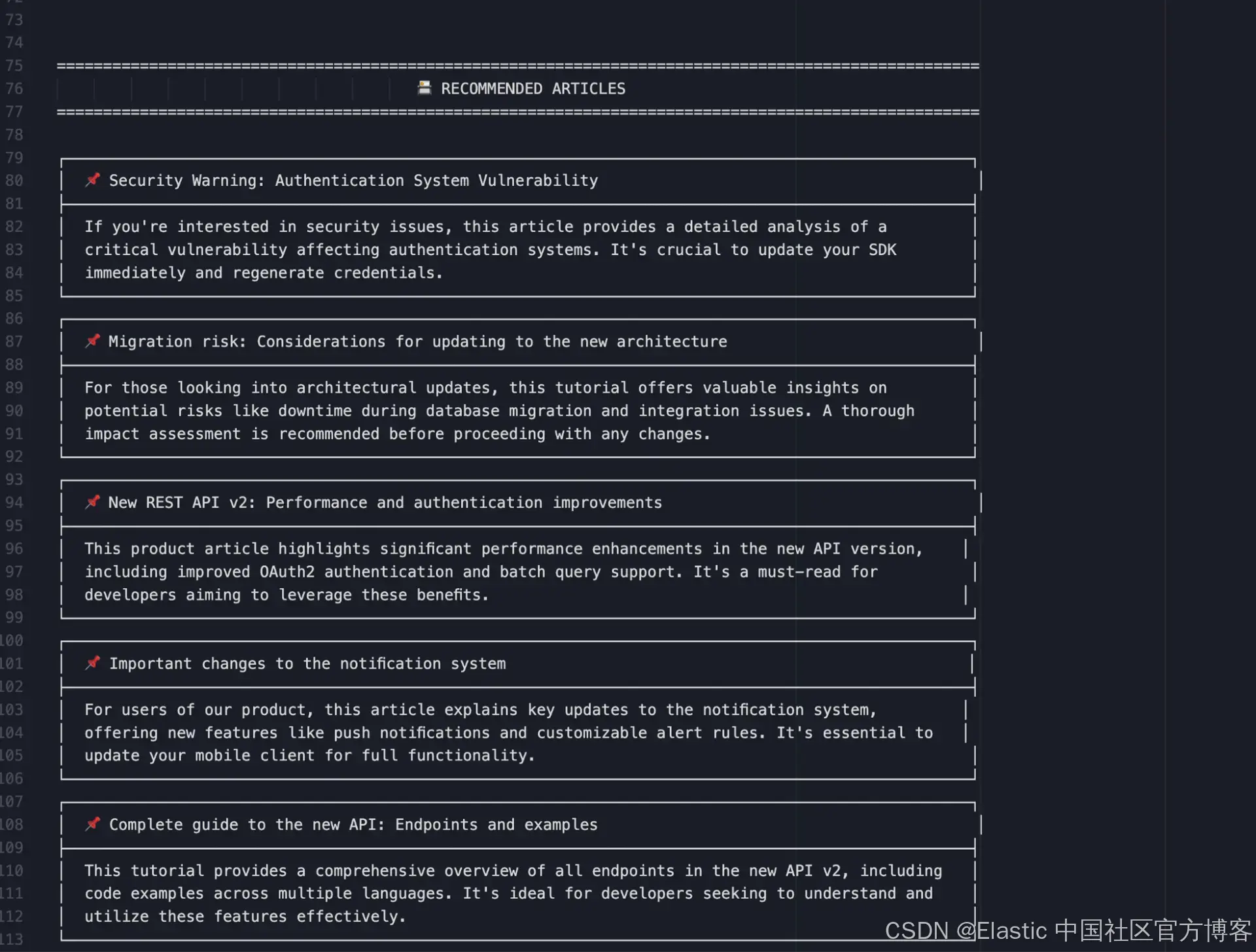
你可以在此文件中查看完整结果,包括所有命中项和 LLM 响应。
我们查询的主题是:"Security and vulnerabilities。" 这个问题作为搜索查询,用于检索存储在 Elasticsearch 中的文档。检索到的结果随后传递给模型,模型根据其内容生成推荐。如我们所见,模型在生成吸引人的短文本方面表现出色,能够激发读者点击的兴趣。
结论
该示例展示了如何将 Elasticsearch 与 Hugging Face 结合,创建一个快速高效的 AI 应用集中系统。这种方法减少了手动操作,并提供了灵活性,得益于 Hugging Face 的丰富模型目录。特别是使用 SmolLM3-3B 展示了紧凑、多语言模型在配合语义搜索时仍能提供有意义的推理和内容生成能力。结合使用这些工具,为构建智能内容分析和多语言应用提供了可扩展且高效的基础。
原文:https://www.elastic.co/search-labs/blog/hugging-face-elasticsearch-inference-api