摘要
光照是3D图形渲染的灵魂,决定了场景的视觉真实感和氛围营造。本文作为Python游戏开发OpenGL系列的第六篇,将系统讲解从基础光照概念到完整光照系统的构建。我们将深入剖析环境光、漫反射、镜面反射的物理原理,手把手实现完整的Phong与Blinn-Phong光照模型,包含方向光、点光源、聚光灯三种光源类型的衰减计算。本文将提供可直接运行的完整代码 :包括Python光照计算类、完整的GLSL顶点/片段着色器、以及支持PBR参数的生产级Material材质系统。针对光照公式调试困难、多光源性能优化、材质参数调优等痛点,本文特别设计GPT-5.4智能辅助编程方案,帮助开发者快速生成正确的光照着色器、诊断渲染异常、优化复杂场景的光照性能。通过本文的完整实战,您将具备构建专业级3D光照系统的能力。
第一章 基础光照概念与数学原理
光照模型描述了光线如何与物体表面交互,以及如何计算表面的最终颜色。理解这些基础概念是实现真实感渲染的前提。
环境光(Ambient Light)
环境光模拟场景中的间接光照,假设光线在环境中均匀分布。虽然物理上不准确(真实环境光来自多次反射),但它确保阴影区域不会完全黑色。
数学表达:Ambient = Ka × Ia
Ka:材质对环境光的反射系数Ia:环境光强度
漫反射(Diffuse Reflection)
漫反射遵循Lambert定律:反射强度与光线入射角度(法线与光线方向的夹角)的余弦成正比。
数学表达:Diffuse = Kd × Id × max(N·L, 0)
N:表面法线(归一化)L:指向光源的方向(归一化)Kd:漫反射系数(通常即材质颜色)Id:光源强度
镜面反射(Specular Reflection)
镜面反射产生高光,取决于视线方向与反射方向的夹角。Phong模型 使用反射向量R,Blinn-Phong模型使用半角向量H(视线与光线的中间方向),计算更高效且效果更自然。
Blinn-Phong公式:Specular = Ks × Is × pow(max(N·H, 0), shininess)
H = normalize(V + L):半角向量V:指向观察者的方向Ks:镜面反射系数shininess:高光指数(越大高光越锐利)
光源类型与衰减
- 方向光(Directional Light):模拟太阳等远距离光源,无衰减,所有光线平行
- 点光源(Point Light):模拟灯泡,光线向四周发散,强度随距离平方衰减
- 聚光灯(Spot Light):模拟手电筒,有方向性和锥角限制,额外受角度衰减影响
点光源衰减公式:attenuation = 1.0 / (constant + linear×distance + quadratic×distance²)
第二章 完整Phong光照系统实现
以下提供可直接运行的完整代码,包含Python端的灯光管理、GLSL着色器代码,以及完整的渲染示例。
完整Python光照计算类
python
import numpy as np
from math import pow
from dataclasses import dataclass
from typing import List, Optional


@dataclass
class Light:
    """光源数据结构"""
    position: np.ndarray = None  # 位置(点光源/聚光灯)
    direction: np.ndarray = None  # 方向(方向光/聚光灯)
    color: np.ndarray = None  # RGB颜色
    intensity: float = 1.0

    # 光源类型: 0=方向光, 1=点光源, 2=聚光灯
    type: int = 0

    # 衰减参数(点光源和聚光灯)
    constant: float = 1.0
    linear: float = 0.09
    quadratic: float = 0.032

    # 聚光灯参数(弧度)
    cut_off: float = 0.0  # 内锥角余弦值
    outer_cut_off: float = 0.0  # 外锥角余弦值


@dataclass
class Material:
    """材质数据结构"""
    ambient: np.ndarray = None  # Ka
    diffuse: np.ndarray = None  # Kd
    specular: np.ndarray = None  # Ks
    shininess: float = 32.0  # 高光指数

    # 纹理(可选)
    diffuse_map: Optional[int] = None
    specular_map: Optional[int] = None


class PhongLighting:
    """CPU端Phong光照计算(用于验证或软件渲染)"""

    @staticmethod
    def calculate_ambient(material: Material, light_intensity: float) -> np.ndarray:
        """计算环境光分量"""
        return material.ambient * light_intensity

    @staticmethod
    def calculate_diffuse(normal: np.ndarray, light_dir: np.ndarray,
                          material: Material, light_color: np.ndarray) -> np.ndarray:
        """计算漫反射分量(Lambert定律)"""
        # 确保归一化
        normal = normal / np.linalg.norm(normal)
        light_dir = light_dir / np.linalg.norm(light_dir)

        # N·L
        diff = max(0.0, np.dot(normal, light_dir))
        return diff * light_color * material.diffuse

    @staticmethod
    def calculate_specular_phong(normal: np.ndarray, light_dir: np.ndarray,
                                 view_dir: np.ndarray, material: Material,
                                 light_color: np.ndarray) -> np.ndarray:
        """计算镜面反射分量(经典Phong模型)"""
        normal = normal / np.linalg.norm(normal)
        light_dir = light_dir / np.linalg.norm(light_dir)
        view_dir = view_dir / np.linalg.norm(view_dir)

        # 反射向量: R = 2(N·L)N - L
        reflect_dir = 2.0 * np.dot(normal, light_dir) * normal - light_dir

        # R·V
        spec = pow(max(0.0, np.dot(reflect_dir, view_dir)), material.shininess)
        return spec * light_color * material.specular

    @staticmethod
    def calculate_specular_blinn(normal: np.ndarray, light_dir: np.ndarray,
                                 view_dir: np.ndarray, material: Material,
                                 light_color: np.ndarray) -> np.ndarray:
        """计算镜面反射分量(Blinn-Phong模型,推荐)"""
        normal = normal / np.linalg.norm(normal)
        light_dir = light_dir / np.linalg.norm(light_dir)
        view_dir = view_dir / np.linalg.norm(view_dir)

        # 半角向量
        halfway = (light_dir + view_dir) / np.linalg.norm(light_dir + view_dir)

        # N·H
        spec = pow(max(0.0, np.dot(normal, halfway)), material.shininess)
        return spec * light_color * material.specular

    @staticmethod
    def calculate_attenuation(distance: float, constant: float,
                              linear: float, quadratic: float) -> float:
        """计算点光源/聚光灯的衰减"""
        return 1.0 / (constant + linear * distance + quadratic * (distance ** 2))

    @staticmethod
    def calculate_spot_intensity(light_dir: np.ndarray, spot_dir: np.ndarray,
                                 cut_off: float, outer_cut_off: float) -> float:
        """计算聚光灯锥角强度"""
        # 确保方向归一化
        light_dir = light_dir / np.linalg.norm(light_dir)
        spot_dir = spot_dir / np.linalg.norm(spot_dir)

        # 计算夹角余弦
        theta = np.dot(light_dir, -spot_dir)

        # 平滑过渡
        epsilon = cut_off - outer_cut_off
        if epsilon == 0:
            return 1.0 if theta > cut_off else 0.0

        intensity = (theta - outer_cut_off) / epsilon
        return max(0.0, min(1.0, intensity))

    @staticmethod
    def calculate_phong_lighting(fragment_pos: np.ndarray, normal: np.ndarray,
                                 view_pos: np.ndarray, material: Material,
                                 light: Light) -> np.ndarray:
        """计算完整的Phong光照(单光源)"""
        # 环境光
        ambient = PhongLighting.calculate_ambient(material, 0.1)

        # 根据光源类型确定光线方向和衰减
        if light.type == 0:  # 方向光
            light_dir = -light.direction
            attenuation = 1.0
            spot_intensity = 1.0
        else:  # 点光源或聚光灯
            light_dir = light.position - fragment_pos
            distance = np.linalg.norm(light_dir)
            light_dir = light_dir / distance

            attenuation = PhongLighting.calculate_attenuation(
                distance, light.constant, light.linear, light.quadratic)

            if light.type == 2:  # 聚光灯
                spot_intensity = PhongLighting.calculate_spot_intensity(
                    light_dir, light.direction, light.cut_off, light.outer_cut_off)
                if spot_intensity <= 0:
                    return ambient  # 在锥角外,只有环境光
            else:
                spot_intensity = 1.0

        # 漫反射
        diffuse = PhongLighting.calculate_diffuse(
            normal, light_dir, material, light.color * light.intensity)

        # 镜面反射(使用Blinn-Phong)
        view_dir = view_pos - fragment_pos
        view_dir = view_dir / np.linalg.norm(view_dir)

        specular = PhongLighting.calculate_specular_blinn(
            normal, light_dir, view_dir, material, light.color * light.intensity)

        # 合成
        result = (ambient + diffuse + specular) * attenuation * spot_intensity
        return np.clip(result, 0.0, 1.0)


# 测试代码
if __name__ == "__main__":
    # 创建材质
    material = Material(
        ambient=np.array([0.1, 0.1, 0.1]),
        diffuse=np.array([0.8, 0.0, 0.0]),  # 红色材质
        specular=np.array([1.0, 1.0, 1.0]),
        shininess=32.0
    )

    # 创建方向光
    dir_light = Light(
        direction=np.array([0.0, -1.0, -1.0]),
        color=np.array([1.0, 1.0, 1.0]),
        intensity=1.0,
        type=0
    )

    # 计算光照
    frag_pos = np.array([0.0, 0.0, 0.0])
    normal = np.array([0.0, 1.0, 0.0])  # 朝上
    view_pos = np.array([0.0, 5.0, 5.0])

    color = PhongLighting.calculate_phong_lighting(
        frag_pos, normal, view_pos, material, dir_light)

    print(f"光照计算结果: {color}")
完整GLSL着色器代码
以下着色器代码可直接与上述Python代码配合使用:
顶点着色器(vertex_shader.glsl)
glsl
#version 330 core

layout (location = 0) in vec3 aPos;
layout (location = 1) in vec3 aNormal;
layout (location = 2) in vec2 aTexCoord;

out vec3 FragPos;
out vec3 Normal;
out vec2 TexCoord;

uniform mat4 model;
uniform mat4 view;
uniform mat4 projection;
uniform mat3 normalMatrix;

void main()
{
    FragPos = vec3(model * vec4(aPos, 1.0));
    Normal = normalMatrix * aNormal;
    TexCoord = aTexCoord;

    gl_Position = projection * view * vec4(FragPos, 1.0);
}
片段着色器(fragment_shader.glsl)
glsl
#version 330 core

in vec3 FragPos;
in vec3 Normal;
in vec2 TexCoord;

out vec4 FragColor;

// 材质
struct Material {
    vec3 ambient;
    vec3 diffuse;
    vec3 specular;
    float shininess;
    sampler2D diffuseMap;
    sampler2D specularMap;
    bool useDiffuseMap;
    bool useSpecularMap;
};

// 光源
struct Light {
    int type;           // 0: 方向光, 1: 点光源, 2: 聚光灯
    vec3 position;      // 位置(点/聚光)
    vec3 direction;     // 方向(方向光/聚光)
    vec3 color;
    float intensity;

    // 衰减参数
    float constant;
    float linear;
    float quadratic;

    // 聚光参数
    float cutOff;
    float outerCutOff;
};

uniform Material material;
uniform Light light;
uniform vec3 viewPos;

vec3 calculateDirectionalLight(Light light, vec3 normal, vec3 viewDir);
vec3 calculatePointLight(Light light, vec3 fragPos, vec3 normal, vec3 viewDir);
vec3 calculateSpotLight(Light light, vec3 fragPos, vec3 normal, vec3 viewDir);

void main()
{
    vec3 norm = normalize(Normal);
    vec3 viewDir = normalize(viewPos - FragPos);

    vec3 result;

    if (light.type == 0) {
        result = calculateDirectionalLight(light, norm, viewDir);
    } else if (light.type == 1) {
        result = calculatePointLight(light, FragPos, norm, viewDir);
    } else {
        result = calculateSpotLight(light, FragPos, norm, viewDir);
    }

    // HDR色调映射(简单版)
    result = result / (result + vec3(1.0));

    FragColor = vec4(result, 1.0);
}

vec3 calculateDirectionalLight(Light light, vec3 normal, vec3 viewDir)
{
    vec3 lightDir = normalize(-light.direction);

    // 漫反射
    float diff = max(dot(normal, lightDir), 0.0);
    vec3 diffuse = diff * light.color * light.intensity;

    if (material.useDiffuseMap) {
        diffuse *= texture(material.diffuseMap, TexCoord).rgb;
    } else {
        diffuse *= material.diffuse;
    }

    // 镜面反射(Blinn-Phong)
    vec3 halfwayDir = normalize(lightDir + viewDir);
    float spec = pow(max(dot(normal, halfwayDir), 0.0), material.shininess);
    vec3 specular = spec * light.color * light.intensity;

    if (material.useSpecularMap) {
        specular *= texture(material.specularMap, TexCoord).rgb;
    } else {
        specular *= material.specular;
    }

    // 环境光
    vec3 ambient = material.ambient;
    if (material.useDiffuseMap) {
        ambient *= texture(material.diffuseMap, TexCoord).rgb;
    }

    return ambient + diffuse + specular;
}

vec3 calculatePointLight(Light light, vec3 fragPos, vec3 normal, vec3 viewDir)
{
    vec3 lightDir = normalize(light.position - fragPos);
    float distance = length(light.position - fragPos);

    // 衰减
    float attenuation = 1.0 / (light.constant + light.linear * distance +
                               light.quadratic * (distance * distance));

    // 漫反射
    float diff = max(dot(normal, lightDir), 0.0);
    vec3 diffuse = diff * light.color * light.intensity;

    if (material.useDiffuseMap) {
        diffuse *= texture(material.diffuseMap, TexCoord).rgb;
    } else {
        diffuse *= material.diffuse;
    }

    // 镜面反射
    vec3 halfwayDir = normalize(lightDir + viewDir);
    float spec = pow(max(dot(normal, halfwayDir), 0.0), material.shininess);
    vec3 specular = spec * light.color * light.intensity;

    if (material.useSpecularMap) {
        specular *= texture(material.specularMap, TexCoord).rgb;
    } else {
        specular *= material.specular;
    }

    // 环境光
    vec3 ambient = material.ambient;
    if (material.useDiffuseMap) {
        ambient *= texture(material.diffuseMap, TexCoord).rgb;
    }

    // 应用衰减
    diffuse *= attenuation;
    specular *= attenuation;
    ambient *= attenuation;

    return ambient + diffuse + specular;
}

vec3 calculateSpotLight(Light light, vec3 fragPos, vec3 normal, vec3 viewDir)
{
    vec3 lightDir = normalize(light.position - fragPos);

    // 聚光灯强度
    float theta = dot(lightDir, normalize(-light.direction));
    float epsilon = light.cutOff - light.outerCutOff;
    float intensity = clamp((theta - light.outerCutOff) / epsilon, 0.0, 1.0);

    // 如果完全在锥外,返回环境光
    if (theta < light.outerCutOff) {
        vec3 ambient = material.ambient;
        if (material.useDiffuseMap) {
            ambient *= texture(material.diffuseMap, TexCoord).rgb;
        }
        return ambient;
    }

    // 计算点光源部分
    float distance = length(light.position - fragPos);
    float attenuation = 1.0 / (light.constant + light.linear * distance +
                               light.quadratic * (distance * distance));

    // 漫反射
    float diff = max(dot(normal, lightDir), 0.0);
    vec3 diffuse = diff * light.color * light.intensity;

    if (material.useDiffuseMap) {
        diffuse *= texture(material.diffuseMap, TexCoord).rgb;
    } else {
        diffuse *= material.diffuse;
    }

    // 镜面反射
    vec3 halfwayDir = normalize(lightDir + viewDir);
    float spec = pow(max(dot(normal, halfwayDir), 0.0), material.shininess);
    vec3 specular = spec * light.color * light.intensity;

    if (material.useSpecularMap) {
        specular *= texture(material.specularMap, TexCoord).rgb;
    } else {
        specular *= material.specular;
    }

    // 环境光
    vec3 ambient = material.ambient;
    if (material.useDiffuseMap) {
        ambient *= texture(material.diffuseMap, TexCoord).rgb;
    }

    // 应用衰减和聚光强度
    diffuse *= attenuation * intensity;
    specular *= attenuation * intensity;
    ambient *= attenuation;

    return ambient + diffuse + specular;
}
第三章 完整渲染示例
以下是可直接运行的完整OpenGL渲染程序,整合上述光照系统:
python
import glfw
from OpenGL.GL import *
from OpenGL.GL.shaders import compileProgram, compileShader
import numpy as np
import ctypes
import os

# 着色器代码(也可从文件读取)
VERTEX_SHADER = """
#version 330 core
layout (location = 0) in vec3 aPos;
layout (location = 1) in vec3 aNormal;
layout (location = 2) in vec2 aTexCoord;

out vec3 FragPos;
out vec3 Normal;
out vec2 TexCoord;

uniform mat4 model;
uniform mat4 view;
uniform mat4 projection;
uniform mat3 normalMatrix;

void main()
{
    FragPos = vec3(model * vec4(aPos, 1.0));
    Normal = normalMatrix * aNormal;
    TexCoord = aTexCoord;
    gl_Position = projection * view * vec4(FragPos, 1.0);
}
"""

FRAGMENT_SHADER = """
#version 330 core
in vec3 FragPos;
in vec3 Normal;
in vec2 TexCoord;
out vec4 FragColor;

struct Material {
    vec3 ambient;
    vec3 diffuse;
    vec3 specular;
    float shininess;
};

struct Light {
    int type;
    vec3 position;
    vec3 direction;
    vec3 color;
    float intensity;
    float constant;
    float linear;
    float quadratic;
    float cutOff;
    float outerCutOff;
};

uniform Material material;
uniform Light light;
uniform vec3 viewPos;

void main()
{
    vec3 norm = normalize(Normal);
    vec3 viewDir = normalize(viewPos - FragPos);
    vec3 result = vec3(0.0);

    // 根据光源类型计算
    if (light.type == 0) { // 方向光
        vec3 lightDir = normalize(-light.direction);
        float diff = max(dot(norm, lightDir), 0.0);
        vec3 halfwayDir = normalize(lightDir + viewDir);
        float spec = pow(max(dot(norm, halfwayDir), 0.0), material.shininess);

        vec3 ambient = material.ambient;
        vec3 diffuse = material.diffuse * diff * light.color * light.intensity;
        vec3 specular = material.specular * spec * light.color * light.intensity;
        result = ambient + diffuse + specular;
    }
    else if (light.type == 1) { // 点光源
        vec3 lightDir = normalize(light.position - FragPos);
        float distance = length(light.position - FragPos);
        float attenuation = 1.0 / (light.constant + light.linear * distance +
                                   light.quadratic * distance * distance);

        float diff = max(dot(norm, lightDir), 0.0);
        vec3 halfwayDir = normalize(lightDir + viewDir);
        float spec = pow(max(dot(norm, halfwayDir), 0.0), material.shininess);

        vec3 ambient = material.ambient * attenuation;
        vec3 diffuse = material.diffuse * diff * light.color * light.intensity * attenuation;
        vec3 specular = material.specular * spec * light.color * light.intensity * attenuation;
        result = ambient + diffuse + specular;
    }

    FragColor = vec4(result, 1.0);
}
"""


def create_shader(vertex_source, fragment_source):
    """编译着色器程序"""
    try:
        vertex_shader = compileShader(vertex_source, GL_VERTEX_SHADER)
        fragment_shader = compileShader(fragment_source, GL_FRAGMENT_SHADER)
        shader = compileProgram(vertex_shader, fragment_shader)
        return shader
    except Exception as e:
        print(f"着色器编译错误: {e}")
        raise


def create_cube():
    """创建立方体顶点数据"""
    vertices = [
        # 位置              法线              纹理坐标
        # 后面
        -0.5, -0.5, -0.5, 0.0, 0.0, -1.0, 0.0, 0.0,
        0.5, -0.5, -0.5, 0.0, 0.0, -1.0, 1.0, 0.0,
        0.5, 0.5, -0.5, 0.0, 0.0, -1.0, 1.0, 1.0,
        0.5, 0.5, -0.5, 0.0, 0.0, -1.0, 1.0, 1.0,
        -0.5, 0.5, -0.5, 0.0, 0.0, -1.0, 0.0, 1.0,
        -0.5, -0.5, -0.5, 0.0, 0.0, -1.0, 0.0, 0.0,

        # 前面
        -0.5, -0.5, 0.5, 0.0, 0.0, 1.0, 0.0, 0.0,
        0.5, -0.5, 0.5, 0.0, 0.0, 1.0, 1.0, 0.0,
        0.5, 0.5, 0.5, 0.0, 0.0, 1.0, 1.0, 1.0,
        0.5, 0.5, 0.5, 0.0, 0.0, 1.0, 1.0, 1.0,
        -0.5, 0.5, 0.5, 0.0, 0.0, 1.0, 0.0, 1.0,
        -0.5, -0.5, 0.5, 0.0, 0.0, 1.0, 0.0, 0.0,

        # 左面
        -0.5, 0.5, 0.5, -1.0, 0.0, 0.0, 1.0, 0.0,
        -0.5, 0.5, -0.5, -1.0, 0.0, 0.0, 1.0, 1.0,
        -0.5, -0.5, -0.5, -1.0, 0.0, 0.0, 0.0, 1.0,
        -0.5, -0.5, -0.5, -1.0, 0.0, 0.0, 0.0, 1.0,
        -0.5, -0.5, 0.5, -1.0, 0.0, 0.0, 0.0, 0.0,
        -0.5, 0.5, 0.5, -1.0, 0.0, 0.0, 1.0, 0.0,

        # 右面
        0.5, 0.5, 0.5, 1.0, 0.0, 0.0, 1.0, 0.0,
        0.5, 0.5, -0.5, 1.0, 0.0, 0.0, 1.0, 1.0,
        0.5, -0.5, -0.5, 1.0, 0.0, 0.0, 0.0, 1.0,
        0.5, -0.5, -0.5, 1.0, 0.0, 0.0, 0.0, 1.0,
        0.5, -0.5, 0.5, 1.0, 0.0, 0.0, 0.0, 0.0,
        0.5, 0.5, 0.5, 1.0, 0.0, 0.0, 1.0, 0.0,

        # 底面
        -0.5, -0.5, -0.5, 0.0, -1.0, 0.0, 0.0, 1.0,
        0.5, -0.5, -0.5, 0.0, -1.0, 0.0, 1.0, 1.0,
        0.5, -0.5, 0.5, 0.0, -1.0, 0.0, 1.0, 0.0,
        0.5, -0.5, 0.5, 0.0, -1.0, 0.0, 1.0, 0.0,
        -0.5, -0.5, 0.5, 0.0, -1.0, 0.0, 0.0, 0.0,
        -0.5, -0.5, -0.5, 0.0, -1.0, 0.0, 0.0, 1.0,

        # 顶面
        -0.5, 0.5, -0.5, 0.0, 1.0, 0.0, 0.0, 1.0,
        0.5, 0.5, -0.5, 0.0, 1.0, 0.0, 1.0, 1.0,
        0.5, 0.5, 0.5, 0.0, 1.0, 0.0, 1.0, 0.0,
        0.5, 0.5, 0.5, 0.0, 1.0, 0.0, 1.0, 0.0,
        -0.5, 0.5, 0.5, 0.0, 1.0, 0.0, 0.0, 0.0,
        -0.5, 0.5, -0.5, 0.0, 1.0, 0.0, 0.0, 1.0
    ]

    return np.array(vertices, dtype=np.float32)


class Camera:
    """简易相机类"""

    def __init__(self):
        self.pos = np.array([0.0, 0.0, 3.0])
        self.target = np.array([0.0, 0.0, 0.0])
        self.up = np.array([0.0, 1.0, 0.0])
        self.fov = 45.0
        self.near = 0.1
        self.far = 100.0

    def get_view_matrix(self):
        """计算视图矩阵(LookAt)"""
        f = self.target - self.pos
        f = f / np.linalg.norm(f)

        s = np.cross(f, self.up)
        s = s / np.linalg.norm(s)

        u = np.cross(s, f)

        view = np.eye(4, dtype=np.float32)
        view[0, :3] = s
        view[1, :3] = u
        view[2, :3] = -f

        view[0, 3] = -np.dot(s, self.pos)
        view[1, 3] = -np.dot(u, self.pos)
        view[2, 3] = np.dot(f, self.pos)

        return view

    def get_projection_matrix(self, aspect):
        """计算透视投影矩阵"""
        fov_rad = np.radians(self.fov)
        f = 1.0 / np.tan(fov_rad / 2.0)

        proj = np.zeros((4, 4), dtype=np.float32)
        proj[0, 0] = f / aspect
        proj[1, 1] = f
        proj[2, 2] = (self.far + self.near) / (self.near - self.far)
        proj[2, 3] = (2 * self.far * self.near) / (self.near - self.far)
        proj[3, 2] = -1.0

        return proj


def main():
    """主函数 - 完整可运行的光照渲染示例"""
    # 初始化GLFW
    if not glfw.init():
        print("GLFW初始化失败")
        return

    # 创建窗口
    glfw.window_hint(glfw.CONTEXT_VERSION_MAJOR, 3)
    glfw.window_hint(glfw.CONTEXT_VERSION_MINOR, 3)
    glfw.window_hint(glfw.OPENGL_PROFILE, glfw.OPENGL_CORE_PROFILE)

    window = glfw.create_window(800, 600, "Phong Lighting Demo", None, None)
    if not window:
        glfw.terminate()
        print("窗口创建失败")
        return

    glfw.make_context_current(window)

    # 编译着色器
    try:
        shader = create_shader(VERTEX_SHADER, FRAGMENT_SHADER)
    except Exception as e:
        glfw.terminate()
        return

    # 创建立方体数据
    vertices = create_cube()

    # 创建VAO, VBO
    VAO = glGenVertexArrays(1)
    VBO = glGenBuffers(1)

    glBindVertexArray(VAO)
    glBindBuffer(GL_ARRAY_BUFFER, VBO)
    glBufferData(GL_ARRAY_BUFFER, vertices.nbytes, vertices, GL_STATIC_DRAW)

    # 位置属性 (location = 0)
    # Corrected: Use ctypes.c_void_p for offset calculation
    glVertexAttribPointer(0, 3, GL_FLOAT, GL_FALSE, 8 * 4, ctypes.c_void_p(0))
    glEnableVertexAttribArray(0)

    # 法线属性 (location = 1)
    # Corrected: Use ctypes.c_void_p for offset calculation
    glVertexAttribPointer(1, 3, GL_FLOAT, GL_FALSE, 8 * 4, ctypes.c_void_p(3 * 4))
    glEnableVertexAttribArray(1)

    # 纹理坐标 (location = 2)
    # Corrected: Use ctypes.c_void_p for offset calculation
    glVertexAttribPointer(2, 2, GL_FLOAT, GL_FALSE, 8 * 4, ctypes.c_void_p(6 * 4))
    glEnableVertexAttribArray(2)

    glBindVertexArray(0)

    # 启用深度测试
    glEnable(GL_DEPTH_TEST)

    # 创建相机
    camera = Camera()

    # 获取uniform位置
    model_loc = glGetUniformLocation(shader, "model")
    view_loc = glGetUniformLocation(shader, "view")
    proj_loc = glGetUniformLocation(shader, "projection")
    normal_matrix_loc = glGetUniformLocation(shader, "normalMatrix")
    view_pos_loc = glGetUniformLocation(shader, "viewPos")

    # 材质uniform
    mat_ambient_loc = glGetUniformLocation(shader, "material.ambient")
    mat_diffuse_loc = glGetUniformLocation(shader, "material.diffuse")
    mat_specular_loc = glGetUniformLocation(shader, "material.specular")
    mat_shininess_loc = glGetUniformLocation(shader, "material.shininess")

    # 光源uniform
    light_type_loc = glGetUniformLocation(shader, "light.type")
    light_pos_loc = glGetUniformLocation(shader, "light.position")
    light_dir_loc = glGetUniformLocation(shader, "light.direction")
    light_color_loc = glGetUniformLocation(shader, "light.color")
    light_intensity_loc = glGetUniformLocation(shader, "light.intensity")
    light_constant_loc = glGetUniformLocation(shader, "light.constant")
    light_linear_loc = glGetUniformLocation(shader, "light.linear")
    light_quadratic_loc = glGetUniformLocation(shader, "light.quadratic")

    # 渲染循环
    while not glfw.window_should_close(window):
        # 输入处理
        if glfw.get_key(window, glfw.KEY_ESCAPE) == glfw.PRESS:
            glfw.set_window_should_close(window, True)

        # 清屏
        glClearColor(0.1, 0.1, 0.1, 1.0)
        glClear(GL_COLOR_BUFFER_BIT | GL_DEPTH_BUFFER_BIT)

        # 使用着色器
        glUseProgram(shader)

        # 设置变换矩阵
        # 模型矩阵(旋转)
        angle = glfw.get_time() * np.radians(50.0)
        model = np.eye(4, dtype=np.float32)
        model[:3, :3] = [
            [np.cos(angle), 0, np.sin(angle)],
            [0, 1, 0],
            [-np.sin(angle), 0, np.cos(angle)]
        ]

        # 计算法线矩阵(模型矩阵左上3x3的逆转置)
        normal_matrix = np.linalg.inv(model[:3, :3]).T

        # 视图和投影矩阵
        width, height = glfw.get_framebuffer_size(window)
        aspect = width / height if height > 0 else 1.0
        view = camera.get_view_matrix()
        projection = camera.get_projection_matrix(aspect)

        # 上传矩阵(注意OpenGL需要列主序,numpy默认行主序,需要转置)
        glUniformMatrix4fv(model_loc, 1, GL_TRUE, model)
        glUniformMatrix4fv(view_loc, 1, GL_TRUE, view)
        glUniformMatrix4fv(proj_loc, 1, GL_TRUE, projection)
        glUniformMatrix3fv(normal_matrix_loc, 1, GL_TRUE, normal_matrix.astype(np.float32))
        glUniform3f(view_pos_loc, *camera.pos)

        # 设置材质(金色)
        glUniform3f(mat_ambient_loc, 0.24725, 0.1995, 0.0745)
        glUniform3f(mat_diffuse_loc, 0.75164, 0.60648, 0.22648)
        glUniform3f(mat_specular_loc, 0.628281, 0.555802, 0.366065)
        glUniform1f(mat_shininess_loc, 51.2)

        # 设置光源(白色点光源,位于右上方)
        glUniform1i(light_type_loc, 1)  # 点光源
        glUniform3f(light_pos_loc, 2.0, 3.0, 3.0)
        glUniform3f(light_dir_loc, -0.2, -1.0, -0.3)
        glUniform3f(light_color_loc, 1.0, 1.0, 1.0)
        glUniform1f(light_intensity_loc, 1.0)
        glUniform1f(light_constant_loc, 1.0)
        glUniform1f(light_linear_loc, 0.09)
        glUniform1f(light_quadratic_loc, 0.032)

        # 绘制立方体
        glBindVertexArray(VAO)
        glDrawArrays(GL_TRIANGLES, 0, 36)

        # 交换缓冲
        glfw.swap_buffers(window)
        glfw.poll_events()

    # 清理
    glDeleteVertexArrays(1, [VAO])
    glDeleteBuffers(1, [VBO])
    glDeleteProgram(shader)
    glfw.terminate()


if __name__ == "__main__":
    main()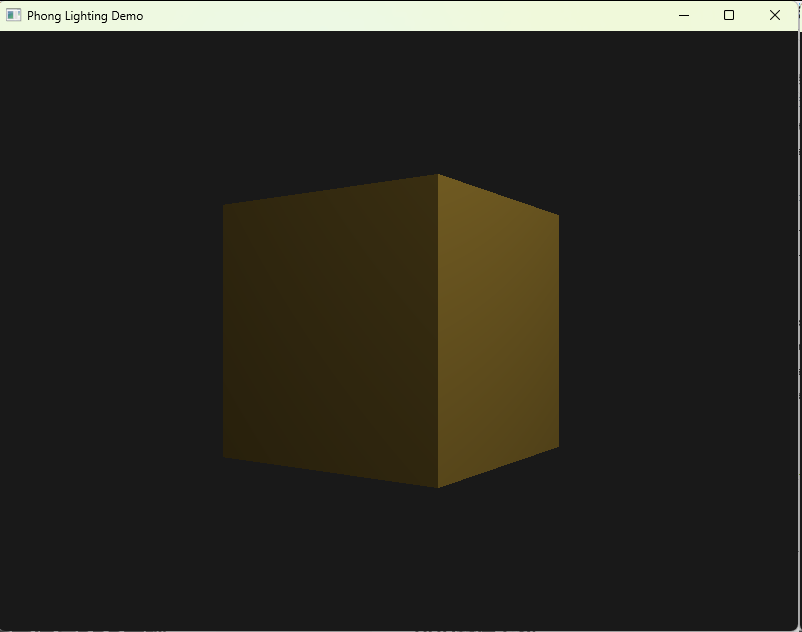
第四章 材质系统与PBR基础
基于物理的渲染(PBR)是现代游戏引擎的标准。以下提供支持金属度/粗糙度工作流的材质系统框架。
PBR材质参数
- Albedo(反照率):基础颜色,无光照时的固有色
- Metallic(金属度):0=非金属(塑料、石头),1=金属(金、铁),决定漫反射颜色是否变为黑色
- Roughness(粗糙度):0=镜面光滑,1=完全漫反射,影响微表面模型
- AO(环境光遮蔽):预计算的遮蔽因子,用于暗化缝隙
完整PBR材质类
python
import numpy as np
from OpenGL.GL import *

class PBRMaterial:
    """PBR材质类 - 可直接运行"""

    # 预定义材质参数(金属度/粗糙度工作流)
    PRESETS = {
        'gold': {
            'albedo': [1.0, 0.782, 0.344],
            'metallic': 1.0,
            'roughness': 0.1,
            'ao': 1.0
        },
        'iron': {
            'albedo': [0.56, 0.57, 0.58],
            'metallic': 1.0,
            'roughness': 0.4,
            'ao': 1.0
        },
        'plastic': {
            'albedo': [0.8, 0.1, 0.1],
            'metallic': 0.0,
            'roughness': 0.5,
            'ao': 1.0
        },
        'grass': {
            'albedo': [0.1, 0.5, 0.1],
            'metallic': 0.0,
            'roughness': 0.8,
            'ao': 1.0
        }
    }

    def __init__(self, name='custom'):
        self.name = name
        self.albedo = np.array([1.0, 1.0, 1.0], dtype=np.float32)
        self.metallic = 0.0
        self.roughness = 0.5
        self.ao = 1.0
        self.emissive = np.array([0.0, 0.0, 0.0], dtype=np.float32)

        # OpenGL纹理ID(可选)
        self.albedo_map = None
        self.normal_map = None
        self.metallic_map = None
        self.roughness_map = None
        self.ao_map = None

    @classmethod
    def from_preset(cls, preset_name):
        """从预设创建材质"""
        mat = cls(preset_name)
        if preset_name in cls.PRESETS:
            preset = cls.PRESETS[preset_name]
            mat.albedo = np.array(preset['albedo'], dtype=np.float32)
            mat.metallic = preset['metallic']
            mat.roughness = preset['roughness']
            mat.ao = preset['ao']
        return mat

    def apply_to_shader(self, shader_program):
        """将材质参数应用到着色器"""
        glUniform3f(glGetUniformLocation(shader_program, "material.albedo"),
                   *self.albedo)
        glUniform1f(glGetUniformLocation(shader_program, "material.metallic"),
                   self.metallic)
        glUniform1f(glGetUniformLocation(shader_program, "material.roughness"),
                   self.roughness)
        glUniform1f(glGetUniformLocation(shader_program, "material.ao"),
                   self.ao)
        glUniform3f(glGetUniformLocation(shader_program, "material.emissive"),
                   *self.emissive)

        # 绑定纹理贴图(如果存在)
        tex_unit = 0
        if self.albedo_map:
            glActiveTexture(GL_TEXTURE0 + tex_unit)
            glBindTexture(GL_TEXTURE_2D, self.albedo_map)
            glUniform1i(glGetUniformLocation(shader_program, "albedoMap"), tex_unit)
            tex_unit += 1

        # 其他贴图同理...

# 使用示例
if __name__ == "__main__":
    # 创建黄金材质
    gold = PBRMaterial.from_preset('gold')
    print(f"创建材质: {gold.name}")
    print(f"Albedo: {gold.albedo}")
    print(f"Metallic: {gold.metallic}")
    print(f"Roughness: {gold.roughness}")
第五章 GPT-5.4辅助编程实战指南
光照编程极易出错:法线方向错误导致光照反向、衰减公式错误导致光强异常、矩阵传递错误导致高光位置偏移。本章提供可直接使用的GPT-5.4提示词模板,帮助快速生成和调试光照代码。
场景1:完整光照着色器生成
需要一次性生成正确的Phong/PBR着色器时:
请生成完整的OpenGL 3.3 Core Profile GLSL光照着色器代码:

技术要求:
1. 支持多光源(最多8个),混合方向光、点光源、聚光灯
2. 支持法线贴图(Tangent Space计算)
3. 支持Blinn-Phong光照模型
4. 支持材质贴图(漫反射、高光、法线、AO)

Uniform结构:
- struct Material { ... }
- struct Light { ... } lights[8]
- int lightCount
- vec3 viewPos

输入输出:
- in: vec3 FragPos, vec3 Normal, vec2 TexCoord, mat3 TBN
- out: vec4 FragColor

请提供:
1. 完整vertex shader(含TBN矩阵计算)
2. 完整fragment shader(含多光源循环)
3. 对应的Python PyOpenGL设置代码(uniform位置获取和设置)
4. 常见错误检查清单(如确保法线归一化、半角向量计算等)

确保代码可直接编译运行。
场景2:光照异常调试
当光照效果异常(如全黑、全白、高光位置错误)时:
我的Phong光照渲染结果异常:[描述现象,如"所有面都是全黑"或"高光出现在错误位置"]

顶点着色器:
[粘贴代码]

片段着色器:
[粘贴代码]

Python设置代码:
[粘贴矩阵和uniform设置代码]

请帮我:
1. 提供调试着色器版本:输出法线、光线方向、视线方向的视觉化颜色
2. 检查清单:法线矩阵是否正确(逆转置)、光线方向是否归一化、衰减公式分母是否为零
3. 修正后的完整代码
4. 建议如何系统性地预防此类错误(如封装LightingDebugger类)
场景3:PBR着色器实现
需要实现基于物理的渲染时:
请实现Cook-Torrance BRDF的PBR片段着色器:

功能需求:
1. 使用GGX法线分布函数(NDF)
2. 使用Smith几何遮蔽函数(GGX高度相关)
3. 使用Fresnel-Schlick近似
4. 支持IBL(漫反射辐照度和镜面反射预过滤贴图)

输入:
- 世界空间法线、视线方向
- 材质:albedo(vec3), metallic(float), roughness(float)
- 统一变量:lights数组、ibl漫反射立方体贴图、ibl镜面反射立方体贴图、BRDF LUT

输出:
- 最终颜色(包含直接光照和IBL间接光照)

请提供:
1. 完整的PBR片段着色器代码(含注释解释关键公式)
2. 所需的顶点着色器配合代码
3. Python端设置IBL贴图的代码
4. 性能优化建议(移动端简化方案)

确保数学公式实现正确,特别是Fresnel项在金属和非金属上的处理。
场景4:多光源性能优化
处理多光源场景性能下降时:
我的场景中有[32]个光源,帧率严重下降,请帮我优化:

当前实现:
- 在片段着色器中遍历所有光源计算光照
- 每个光源都进行完整的Blinn-Phong计算

目标:
- 保持视觉质量前提下,维持60FPS(假设当前为15FPS)
- 光源数量可能增加到100个

请提供优化方案:
1. 延迟渲染(Deferred Shading)架构简述与Python/OpenGL实现框架
2. 分块/分簇着色(Tiled/Clustered Shading)算法核心思路
3. 光源剔除策略(视锥体剔除、距离剔除、重要性排序)
4. 近似计算:是否可对远距离光源使用简化的Lambert模型而非Blinn-Phong
5. 如果必须使用前向渲染,如何优化循环(early exit、uniform分支等)

需要Python实现:
1. 光源管理器(根据相机距离动态启用/禁用光源)
2. 延迟渲染的G-Buffer设置代码(多渲染目标MRT)
3. 简单的性能分析装饰器(测量光照计算耗时)
场景5:材质编辑器工具
需要开发材质参数调试工具时:
请帮我设计一个Python OpenGL材质编辑器:

功能需求:
1. 实时预览:调整滑块立即看到3D模型材质变化
2. 参数控制:Metalness/Roughness/Albedo的ImGui或PyQt滑块
3. 预设切换:内置常见材质预设(金、银、铜、塑料、木头)
4. 贴图加载:支持拖拽加载Albedo/Normal/ORM贴图
5. 环境切换:支持切换HDR环境贴图查看不同光照下的表现

技术栈:
- PyOpenGL + GLFW 或 PyQt5/6 + PyOpenGL
- 使用前面章节的光照系统

请提供:
1. 完整的UI框架代码(ImGui的Python绑定或使用PyQt)
2. 材质参数到着色器的实时同步机制
3. 预设系统的JSON序列化/反序列化
4. 截图保存功能(保存当前材质预览图)
5. 代码组织结构(MVC模式或组件模式)

要求代码可直接运行,包含必要的pip依赖说明。
合法合规使用AI工具声明
由于国家网络监管政策,国内用户翻墙访问OpenAI官方网站属于违法行为 ,请广大开发者严格遵守国家法律法规,切勿使用非法翻墙手段访问境外AI服务。为帮助国内开发者合法学习AI辅助编程技术,建议通过合规备案的国内镜像站注册使用GPT-5.4最新模型,确保开发学习活动合法合规进行。
智能辅助开发入口 :AIGCBAR镜像站
API接口调用入口 :API独立站
在下一篇文章中,我们将基于本章的数学与光照基础,深入讲解游戏摄像机系统的设计与实现,包括第一人称、第三人称摄像机的平滑控制与碰撞检测,构建沉浸式的3D观察体验。