康耐视 VisionPro 多目标动态检测 代码笔记
一、项目整体功能概述
基于康耐视 VisionPro 工具块,实现多目标动态定位 + 质量检测:
- 先用Blob 工具(斑点分析) 定位图像中所有目标的中心坐标;
- 遍历每个 Blob 目标,动态移动卡尺工具到目标中心;
- 运行卡尺检测边缘,根据检测结果标记Good/Bad;
- 将检测结果图形叠加显示在原图上。
适用场景:黑底白点、多目标批量定位 + 边缘质量检测。
二、前置工具配置(关键参数)
1. CogBlobTool1(斑点检测工具)
表格
| 配置项 | 参数值 | 作用 |
|---|---|---|
| 模式 | 硬阈值(固定) | 固定阈值分割图像,区分前景 / 背景 |
| 极性 | 黑底白点 | 识别黑色背景上的白色斑点 |
| 测量 | ConnectivityLabel | 连通域标记,区分独立目标 |
| 过滤 / 排除 | 0,0 | 不过滤尺寸,保留所有检测到的 Blob |
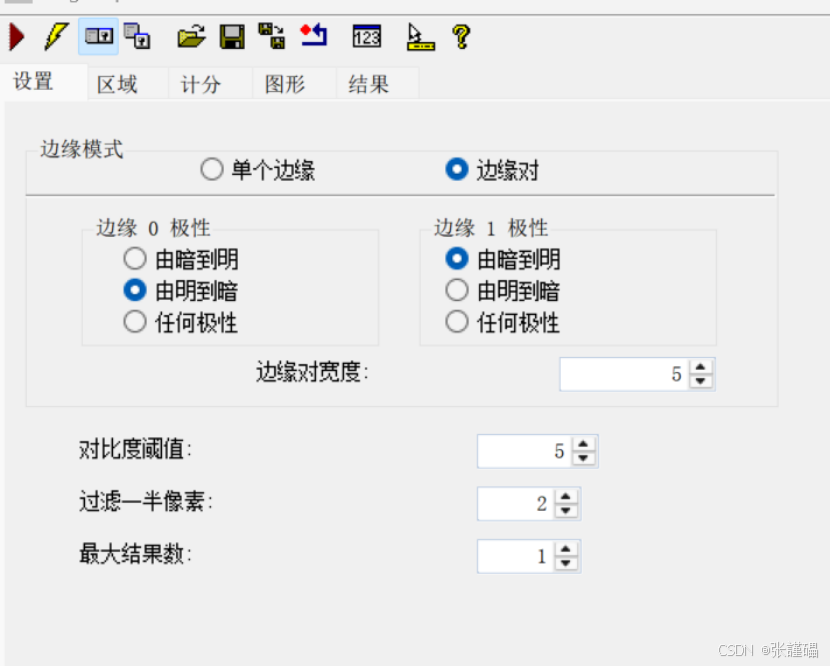
2. CogCaliperTool1(卡尺测量工具)
表格
| 配置项 | 参数值 | 作用 |
|---|---|---|
| 边缘对 | 由明到暗 + 由暗到明 | 检测双向边缘,适配目标轮廓 |
| 边缘对宽度 | 5 | 边缘对的搜索宽度 |
| 对比阈值 | 2 | 边缘对比度阈值,区分有效边缘 |
| 最大结果数 | 1 | 每个目标只返回 1 组边缘结果 |
三、代码结构拆解(三大部分)
第一部分:命名空间 + 私有变量定义
c#
#region namespace imports
using System;
using System.Collections;
using System.Drawing;
using System.IO;
using System.Windows.Forms;
using Cognex.VisionPro;           // 核心VisionPro库
using Cognex.VisionPro.ToolBlock;  // 工具块
using Cognex.VisionPro3D;
using Cognex.VisionPro.Blob;       // Blob工具专用
using Cognex.VisionPro.Caliper;   // 卡尺工具专用
using System.Collections.Generic;  // 泛型集合(存储标签)
#endregion

#region Private Member Variables
// 工具块核心对象(VisionPro脚本固定变量)
private Cognex.VisionPro.ToolBlock.CogToolBlock mToolBlock;
// 存储所有Good/Bad标签,统一绘制到图像
List<CogGraphicLabel> labels = new List<CogGraphicLabel>();
#endregion核心作用:
- 导入所有依赖库,让代码能调用 VisionPro 工具;
- 定义全局标签列表,用于缓存所有检测结果文字。
第二部分:工具运行 + 核心检测逻辑(最关键)
c#
// 1. 运行工具块内所有工具(Blob+卡尺初始化)
foreach(ICogTool tool in mToolBlock.Tools)
  mToolBlock.RunTool(tool, ref message, ref result);

// 2. 获取Blob工具对象
CogBlobTool blobTool = mToolBlock.Tools["CogBlobTool1"] as CogBlobTool;
// 3. 获取所有Blob检测结果(所有目标集合)
CogBlobResultCollection blobResult = blobTool.Results.GetBlobs() as CogBlobResultCollection;

// 4. 获取卡尺工具对象
CogCaliperTool caliperTool = mToolBlock.Tools["CogCaliperTool1"] as CogCaliperTool;
// 5. 获取卡尺的ROI区域(可旋转矩形)
CogRectangleAffine caliperRectange = caliperTool.Region as CogRectangleAffine;

// 清空上一次的标签,避免重复绘制
labels.Clear();

// 6. 遍历每一个Blob目标(多目标核心循环)
foreach(CogBlobResult blob in blobResult)
{
  // 动态修改卡尺中心 = 当前Blob的质心坐标
  caliperRectange.CenterX = blob.CenterOfMassX;
  caliperRectange.CenterY = blob.CenterOfMassY;

  // 卡尺位置更新后,重新运行卡尺工具
  mToolBlock.RunTool(caliperTool,ref message,ref result);

  // 创建标签,标记检测结果
  CogGraphicLabel mylabel = new CogGraphicLabel();
  // 判断:卡尺是否检测到有效边缘
  if( caliperTool.Results.Count > 0 )
  {
    // 检测成功:绿色Good
    mylabel.SetXYText(blob.CenterOfMassX,blob.CenterOfMassY,"Good");
    mylabel.Color = CogColorConstants.Green;
  }
  else
  {
    // 检测失败:红色Bad
    mylabel.SetXYText(blob.CenterOfMassX, blob.CenterOfMassY, "Bad");
    mylabel.Color = CogColorConstants.Red;
  }
  // 将标签加入列表
  labels.Add(mylabel);
}
return false;核心逻辑(必记):
- 先运行所有工具:完成初始图像加载、Blob 检测;
- 遍历 Blob 目标 :实现多目标动态适配(有多少目标就检测多少次);
- 动态移动卡尺:卡尺 ROI 中心跟随 Blob 质心移动,无需手动固定位置;
- 单次卡尺运行:每个目标独立检测,互不干扰;
- 结果判定:卡尺有结果 = Good,无结果 = Bad。
第三部分:图形叠加显示
c#
// 遍历所有标签,添加到运行记录,显示在原图上
foreach(CogGraphicLabel label in labels )
{
  mToolBlock.AddGraphicToRunRecord(
    label,                // 要显示的标签
    lastRecord,           // 上一次运行记录
    "CogBlobTool1.InputImage",  // 叠加到Blob工具的输入原图
    ""
  );
}
作用 :将所有Good/Bad绿色 / 红色文字,叠加显示在原始图像上,直观查看检测结果。
四、核心知识点总结
1. 动态卡尺核心原理
- 卡尺工具的ROI 区域(CogRectangleAffine) 支持运行时动态修改坐标;
- 无需创建多个卡尺,一个卡尺工具遍历所有目标,节省资源。
2. 多目标检测关键
- 依赖
Blob工具获取所有目标的质心坐标; - 通过
foreach循环遍历BlobResultCollection,实现批量检测。
3. 结果图形显示
- 用
CogGraphicLabel创建文字标注; - 用
AddGraphicToRunRecord将标注叠加到图像; - 支持自定义颜色、位置、文字内容。
4. 脚本固定规范
mToolBlock:VisionPro 脚本的核心工具块对象;RunTool():手动运行工具的标准方法;List<CogGraphicLabel>:批量管理图形标注的最佳方式。
五、常见优化点(可扩展)
- Blob 过滤:增加面积 / 长宽过滤,排除干扰斑点;
- 卡尺参数动态调整:可根据 Blob 大小自动修改卡尺宽度;
- 结果输出:将 Good/Bad 数量、坐标输出到工具块终端;
- 异常处理 :添加
if(blobResult==null)判断,避免空指针报错。
总结
- 这套代码是VisionPro 多目标动态检测的标准模板:Blob 定位 + 动态卡尺检测;
- 核心是遍历 Blob + 动态移动卡尺 ROI,一个工具完成多目标检测;
- 图形标签统一管理、叠加显示,结果直观易懂;
- 适配黑底白点、批量小目标的边缘 / 质量检测场景。
工具:
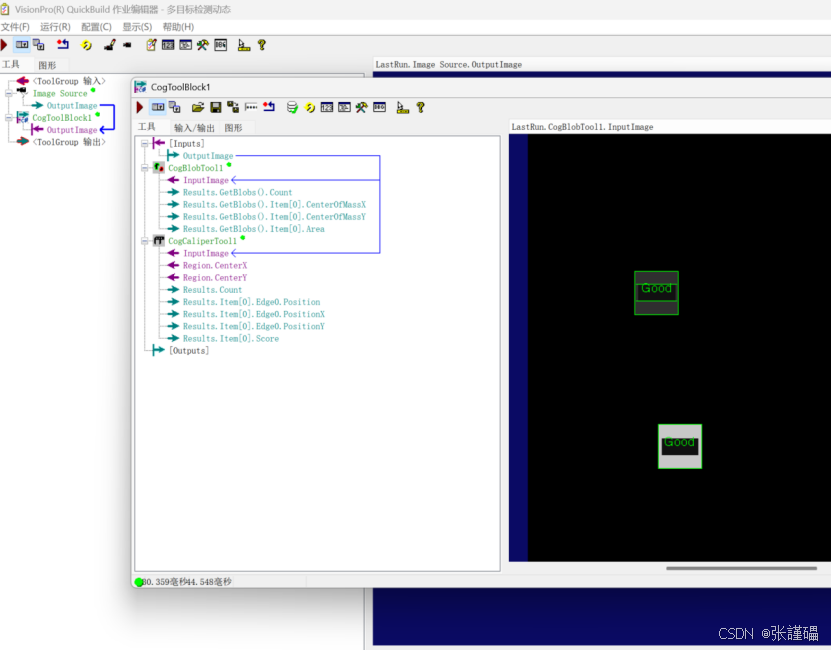
参数:
CogBlobTool1
设置:模式:硬阀值(固定),极性:黑底白点,
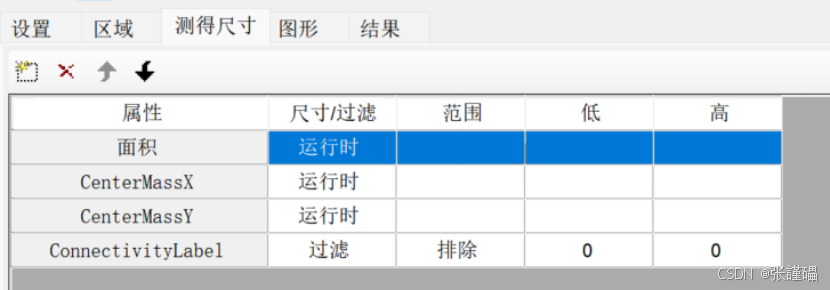
测量:ConnectivityLabel,过滤,排除,0,0
CogCaliperTool1
设置:
边缘对:由明到暗,由暗到明
边缘对宽度:5
对比阀值:2
最大结果数:1
脚本:
#region namespace imports
using System;
using System.Collections;
using System.Drawing;
using System.IO;
using System.Windows.Forms;
using Cognex.VisionPro;
using Cognex.VisionPro.ToolBlock;
using Cognex.VisionPro3D;
using Cognex.VisionPro.Blob;
using Cognex.VisionPro.Caliper;
using System.Collections.Generic;
#endregion
第一部分:
#region Private Member Variables
private Cognex.VisionPro.ToolBlock.CogToolBlock mToolBlock;
List<CogGraphicLabel> labels = new List<CogGraphicLabel>();
#endregion
第二部分:
// Run each tool using the RunTool function
foreach(ICogTool tool in mToolBlock.Tools)
mToolBlock.RunTool(tool, ref message, ref result);
CogBlobTool blobTool = mToolBlock.Tools"CogBlobTool1" as CogBlobTool;
CogBlobResultCollection blobResult = blobTool.Results.GetBlobs() as CogBlobResultCollection;
CogCaliperTool caliperTool = mToolBlock.Tools"CogCaliperTool1" as CogCaliperTool;
CogRectangleAffine caliperRectange = caliperTool.Region as CogRectangleAffine;
labels.Clear();
foreach(CogBlobResult blob in blobResult)
{
caliperRectange.CenterX = blob.CenterOfMassX;
caliperRectange.CenterY = blob.CenterOfMassY;
mToolBlock.RunTool(caliperTool,ref message,ref result);
CogGraphicLabel mylabel = new CogGraphicLabel();
if( caliperTool.Results.Count > 0 )
{
mylabel.SetXYText(blob.CenterOfMassX,blob.CenterOfMassY,"Good");
mylabel.Color = CogColorConstants.Green;
}
else
{
mylabel.SetXYText(blob.CenterOfMassX, blob.CenterOfMassY, "Bad");
mylabel.Color = CogColorConstants.Red;
}
labels.Add(mylabel);
}
return false;
第三部分:
foreach(CogGraphicLabel label in labels )
{
mToolBlock.AddGraphicToRunRecord(label, lastRecord, "CogBlobTool1.InputImage","");
}
完整代码:
cs
#region namespace imports
using System;
using System.Collections;
using System.Drawing;
using System.IO;
using System.Windows.Forms;
using Cognex.VisionPro;
using Cognex.VisionPro.ToolBlock;
using Cognex.VisionPro3D;
using Cognex.VisionPro.Blob;
using Cognex.VisionPro.Caliper;
using System.Collections.Generic;
#endregion

public class CogToolBlockAdvancedScript : CogToolBlockAdvancedScriptBase
{
  #region Private Member Variables
  private Cognex.VisionPro.ToolBlock.CogToolBlock mToolBlock;
  List<CogGraphicLabel> labels = new List<CogGraphicLabel>();
  #endregion

  /// <summary>
  /// Called when the parent tool is run.
  /// Add code here to customize or replace the normal run behavior.
  /// </summary>
  /// <param name="message">Sets the Message in the tool's RunStatus.</param>
  /// <param name="result">Sets the Result in the tool's RunStatus</param>
  /// <returns>True if the tool should run normally,
  ///          False if GroupRun customizes run behavior</returns>
  public override bool GroupRun(ref string message, ref CogToolResultConstants result)
  {
    // To let the execution stop in this script when a debugger is attached, uncomment the following lines.
    // #if DEBUG
    // if (System.Diagnostics.Debugger.IsAttached) System.Diagnostics.Debugger.Break();
    // #endif


    // Run each tool using the RunTool function
    foreach(ICogTool tool in mToolBlock.Tools)
      mToolBlock.RunTool(tool, ref message, ref result);

    CogBlobTool blobTool = mToolBlock.Tools["CogBlobTool1"] as CogBlobTool;

    CogBlobResultCollection blobResult = blobTool.Results.GetBlobs() as CogBlobResultCollection;

    CogCaliperTool caliperTool = mToolBlock.Tools["CogCaliperTool1"] as CogCaliperTool;

    CogRectangleAffine caliperRectange = caliperTool.Region as CogRectangleAffine;

    labels.Clear();

    foreach(CogBlobResult blob in blobResult)
    {
      caliperRectange.CenterX = blob.CenterOfMassX;
      caliperRectange.CenterY = blob.CenterOfMassY;

      mToolBlock.RunTool(caliperTool,ref message,ref result);
      CogGraphicLabel mylabel = new CogGraphicLabel();
      if( caliperTool.Results.Count > 0 )
      {
        mylabel.SetXYText(blob.CenterOfMassX,blob.CenterOfMassY,"Good");
        mylabel.Color = CogColorConstants.Green;
      }
      else
      {
        mylabel.SetXYText(blob.CenterOfMassX, blob.CenterOfMassY, "Bad");
        mylabel.Color = CogColorConstants.Red;
      }
      labels.Add(mylabel);
    }

    return false;
  }

  #region When the Current Run Record is Created
  /// <summary>
  /// Called when the current record may have changed and is being reconstructed
  /// </summary>
  /// <param name="currentRecord">
  /// The new currentRecord is available to be initialized or customized.</param>
  public override void ModifyCurrentRunRecord(Cognex.VisionPro.ICogRecord currentRecord)
  {
  }
  #endregion

  #region When the Last Run Record is Created
  /// <summary>
  /// Called when the last run record may have changed and is being reconstructed
  /// </summary>
  /// <param name="lastRecord">
  /// The new last run record is available to be initialized or customized.</param>
  public override void ModifyLastRunRecord(Cognex.VisionPro.ICogRecord lastRecord)
  {

    foreach(CogGraphicLabel label in labels )
    {
      mToolBlock.AddGraphicToRunRecord(label, lastRecord, "CogBlobTool1.InputImage","");
    }


  }
  #endregion

  #region When the Script is Initialized
  /// <summary>
  /// Perform any initialization required by your script here
  /// </summary>
  /// <param name="host">The host tool</param>
  public override void Initialize(Cognex.VisionPro.ToolGroup.CogToolGroup host)
  {
    // DO NOT REMOVE - Call the base class implementation first - DO NOT REMOVE
    base.Initialize(host);


    // Store a local copy of the script host
    this.mToolBlock = ((Cognex.VisionPro.ToolBlock.CogToolBlock)(host));
  }
  #endregion

}