文章目录
前言:为什么我会学这个问题
上篇我们区分了 Function Call 和 Agent 工具调用,但那只是"调用方式"的区别,没解决更根本的问题------当一个复杂任务需要多步骤时,Agent 内部是怎么组织这些步骤的?
我第一次看 LangGraph 代码时,看到 State 、Node 、Edge 三个东西混在一起,完全不知道它们各自负责什么。这篇就用大白话把它们的协作关系讲清楚。
前文关联:本文接续《Function Call 和 Agent 工具调用到底有什么区别?》,在上文理解 Agent 工具调用的基础上,深入探讨 Agent 内部的流程编排机制。
一、问题背景
假设你要实现一个客服 Agent,它的工作流程是:
- 接收用户问题
- 判断是技术问题还是售后问题
- 技术问题 → 查文档;售后问题 → 查订单
- 根据查询结果组织回复
这个流程里,有分支、有顺序、有数据传递。怎么用代码组织这种流程?LangGraph 提供了 State、Node、Edge 三个概念来描述这种流程。
二、核心概念
State 是什么?
State = 流转的数据。就像工厂流水线上的产品,每个工位加工后产品状态会变化,最后变成成品。
在 LangGraph 里,State 是一个 dict,包含了在整个流程中传递的所有数据:
python
from typing import TypedDict

class CustomerServiceState(TypedDict):
    """客服 Agent 的状态"""
    user_question: str          # 用户问题
    question_type: str          # 问题类型:tech / aftersales / unknown
    retrieved_info: str         # 查询到的信息
    response: str               # 最终回复
    step_count: int            # 走了几步(用于调试)
Node 是什么?
Node = 处理步骤。每个 Node 接收当前 State,做一些处理,然后返回新的 State。
就像工厂里的工位:输入一个半成品,输出一个加工后的半成品。
python
def classify_question(state: CustomerServiceState) -> CustomerServiceState:
    """Node 1: 判断问题类型"""
    question = state["user_question"]

    # 简单规则判断(实际项目用 LLM)
    if "怎么" in question or "如何" in question:
        qtype = "tech"
    elif "订单" in question or "快递" in question:
        qtype = "aftersales"
    else:
        qtype = "unknown"

    return {"question_type": qtype, "step_count": state["step_count"] + 1}
Edge 是什么?
Edge = 流转规则。决定了下一步应该走哪个 Node。
就像工厂里的传送带和分流器:不是简单地从 A 到 B,而是根据产品状态决定去 A1 还是 A2。
python
from langgraph.graph import StateGraph

# 构建图
graph = StateGraph(CustomerServiceState)

# 添加 Node(工位)
graph.add_node("classify", classify_question)
graph.add_node("query_docs", query_technical_docs)
graph.add_node("query_orders", query_order_status)
graph.add_node("generate_response", generate_response)

# 添加 Edge(流转规则)
graph.add_edge("classify", "query_docs", condition=lambda s: s["question_type"] == "tech")
graph.add_edge("classify", "query_orders", condition=lambda s: s["question_type"] == "aftersales")
graph.add_edge("classify", "generate_response", condition=lambda s: s["question_type"] == "unknown")
三、协作流程图
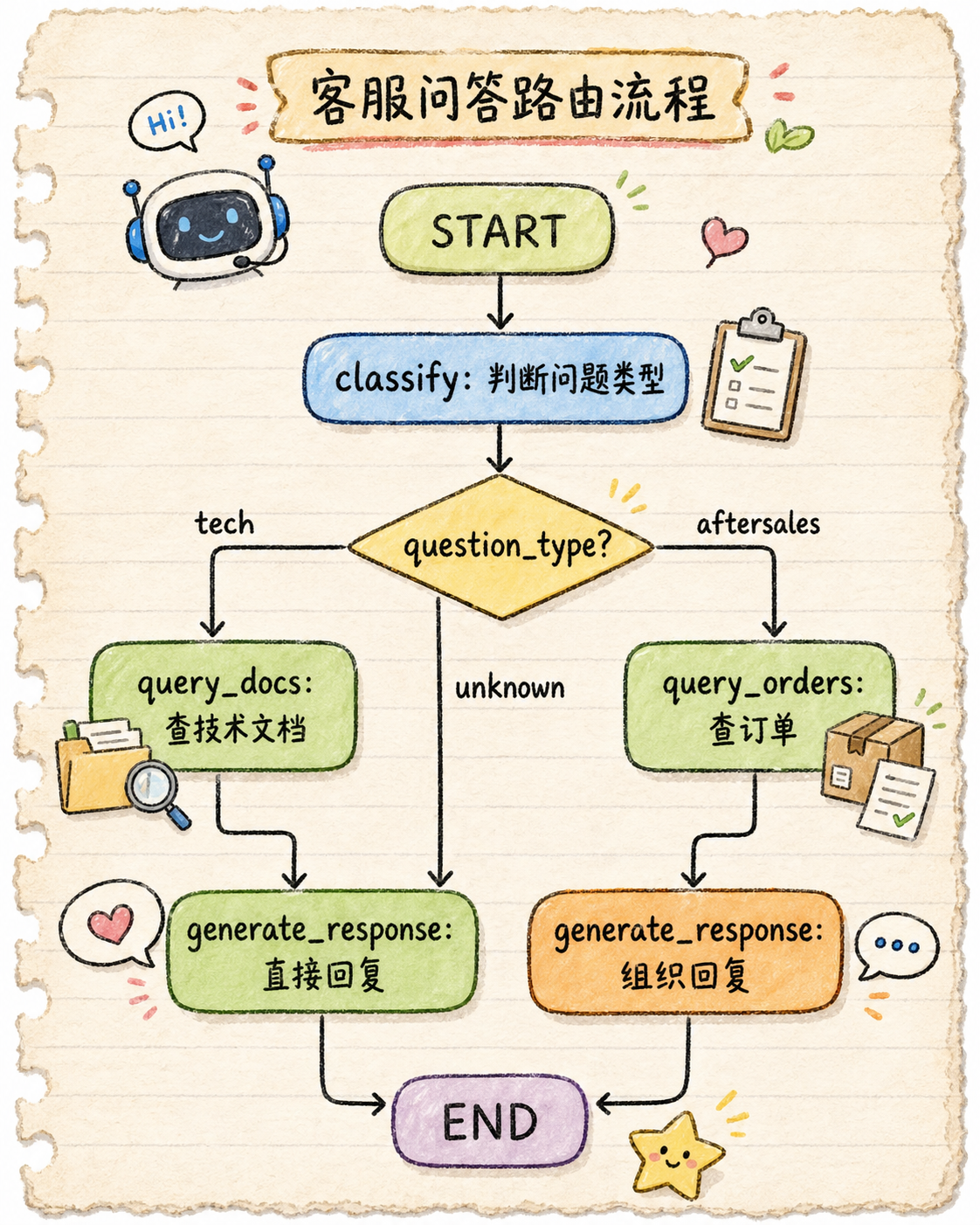
关键点:State 在整个流程中流转,每个 Node 读写 State,Edge 根据 State 决定下一步走哪里。
四、错误理解 / 常见误区
误区1:State 是全局变量
错。State 不是共享的全局变量,而是消息传递的载体。每个 Node 接收上一个 Node 返回的 State,不是直接读写共享内存。
误区2:Node 执行顺序就是代码添加顺序
错。Node 的执行顺序完全由 Edge 决定,跟代码里 add_node 的顺序无关。你完全可以先加 Node F 再加 Node A,但让 Edge 指向 A 先执行。
误区3:Edge 只能是简单的 if-else
不完全对。Edge 的 condition 可以是任意函数,只要返回目标 Node 名称就行。可以是复杂的 LLM 决策,可以是规则引擎,可以是任何逻辑。
误区4:State 必须包含所有字段
错。State 可以包含可选字段,Node 可以只读写需要的字段,其他字段保持不变。
五、代码示例
完整可运行的客服 Agent 示例
python
from typing import TypedDict
from langgraph.graph import StateGraph

# ========== 1. 定义 State ==========
class CustomerServiceState(TypedDict):
    """客服 Agent 状态"""
    user_question: str
    question_type: str  # tech / aftersales / unknown
    retrieved_info: str
    response: str
    step_count: int

# ========== 2. 定义 Node ==========

def classify_question(state: CustomerServiceState) -> CustomerServiceState:
    """Node 1: 判断问题类型"""
    question = state["user_question"]

    if any(k in question for k in ["怎么", "如何", "设置", "配置"]):
        qtype = "tech"
    elif any(k in question for k in ["订单", "快递", "发货"]):
        qtype = "aftersales"
    else:
        qtype = "unknown"

    print(f"  [classify] 问题: {question} -> 类型: {qtype}")
    return {"question_type": qtype, "step_count": state["step_count"] + 1}

def query_technical_docs(state: CustomerServiceState) -> CustomerServiceState:
    """Node 2: 查技术文档"""
    print(f"  [query_docs] 正在查询技术文档...")
    docs = "技术文档:根据您的问题,我们推荐您查看 XXX 配置文档。"
    return {"retrieved_info": docs, "step_count": state["step_count"] + 1}

def query_order_status(state: CustomerServiceState) -> CustomerServiceState:
    """Node 3: 查订单状态"""
    print(f"  [query_orders] 正在查询订单...")
    order_info = "订单状态:您的订单已于昨天发货,预计明天送达。"
    return {"retrieved_info": order_info, "step_count": state["step_count"] + 1}

def generate_response(state: CustomerServiceState) -> CustomerServiceState:
    """Node 4: 组织回复"""
    info = state.get("retrieved_info", "")
    if info:
        response = f"您好!根据您的问题:{info}"
    else:
        response = "您好!您的问题已收到,我会尽力帮助您。"

    print(f"  [generate] 最终回复: {response}")
    return {"response": response, "step_count": state["step_count"] + 1}

# ========== 3. 构建 Graph ==========
graph = StateGraph(CustomerServiceState)

# 添加 Node
graph.add_node("classify", classify_question)
graph.add_node("query_docs", query_technical_docs)
graph.add_node("query_orders", query_order_status)
graph.add_node("generate_response", generate_response)

# 设置起点和终点
graph.set_entry_point("classify")
graph.set_finish_point("generate_response")

# 添加条件边(根据 question_type 决定下一步)
graph.add_conditional_edges(
    "classify",
    lambda s: s["question_type"],
    {
        "tech": "query_docs",
        "aftersales": "query_orders",
        "unknown": "generate_response"
    }
)

# query_docs 和 query_orders 之后都去 generate_response
graph.add_edge("query_docs", "generate_response")
graph.add_edge("query_orders", "generate_response")

# 编译
app = graph.compile()

# ========== 4. 运行 ==========
if __name__ == "__main__":
    print("=== 测试技术问题 ===")
    result = app.invoke({
        "user_question": "怎么配置 API 密钥?",
        "question_type": "",
        "retrieved_info": "",
        "response": "",
        "step_count": 0
    })
    print(f"最终状态: question_type={result['question_type']}, response={result['response']}")
    print()

    print("=== 测试售后问题 ===")
    result = app.invoke({
        "user_question": "我的订单什么时候发货?",
        "question_type": "",
        "retrieved_info": "",
        "response": "",
        "step_count": 0
    })
    print(f"最终状态: question_type={result['question_type']}, response={result['response']}")
六、运行结果 / 流程图
运行结果:
=== 测试技术问题 ===
  [classify] 问题: 怎么配置 API 密钥? -> 类型: tech
  [query_docs] 正在查询技术文档...
  [generate] 最终回复: 您好!根据您的问题:技术文档:根据您的问题,我们推荐您查看 XXX 配置文档。

最终状态: question_type=tech, response=您好!根据您的问题:技术文档:根据您的问题,我们推荐您查看 XXX 配置文档。

=== 测试售后问题 ===
  [classify] 问题: 我的订单什么时候发货? -> 类型: aftersales
  [query_orders] 正在查询订单...
  [generate] 最终回复: 您好!根据您的问题:订单状态:您的订单已于昨天发货,预计明天送达。

最终状态: question_type=aftersales, response=您好!根据您的问题:订单状态:您的订单已于昨天发货,预计明天送达。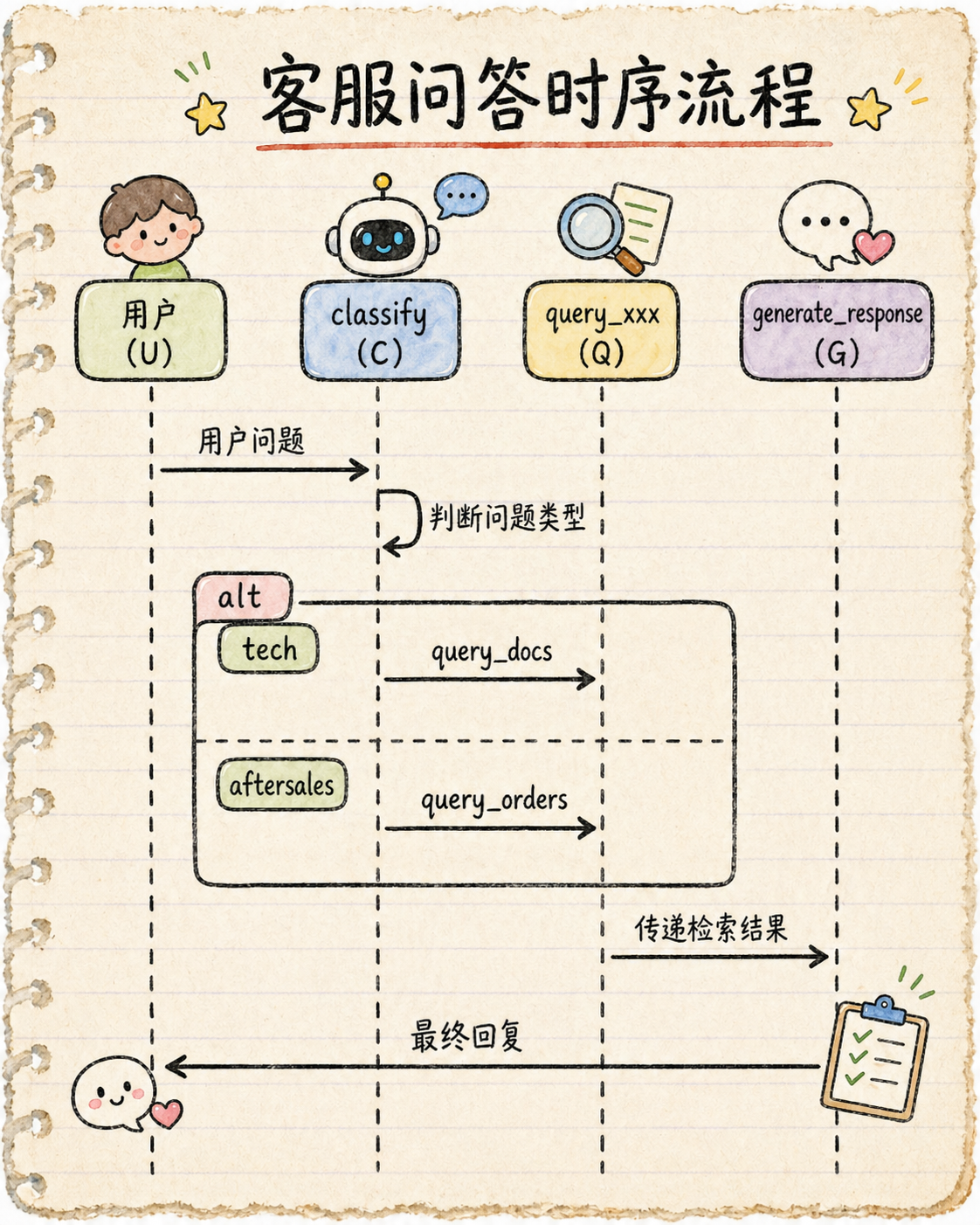
七、项目中怎么用
实际场景:
- 客服机器人:根据问题类型走不同流程
- 数据分析 Agent:清洗 → 分析 → 可视化
- 代码审查 Agent:接收代码 → 审查 → 输出报告
最佳实践:
- State 要精简:只传递必要数据,避免过大的 State
- Node 要原子化:每个 Node 只做一件事,便于调试和复用
- Edge 逻辑要清晰:condition 函数最好单独定义,不要写太复杂的 lambda
- 添加 step_count:方便追踪流程走了多少步,也用于防止死循环
系列关联:本文讲了 LangGraph 的核心组件。下篇《Agent 为什么需要 Checkpoint?》会讲到,当 Agent 执行到一半被打断(断电、超时),没有 Checkpoint 的话 State 就丢了,流程得从头来。
八、总结 + 下篇预告
核心要点:
- State = 流程中传递的数据,像流水线上的产品
- Node = 处理步骤,接收 State、返回新的 State
- Edge = 流转规则,根据当前 State 决定下一步走哪个 Node
- 三者配合:Node 处理数据,Edge 控制流向,State 承载数据
下篇预告:下一篇我们将探讨《Agent 为什么需要 Checkpoint?》,理解当 Agent 执行中断时,Checkpoint 如何帮助恢复状态,避免从头开始。
延伸阅读: