1、基础环境
这次测试使用的是天启的RK3576开发板,开发板使用debian根文件系统和xfce4的桌面软件,内部chromium浏览器,浏览器的版本是132.0.6843.83。打开浏览器运行chrom://gpu显示如下:
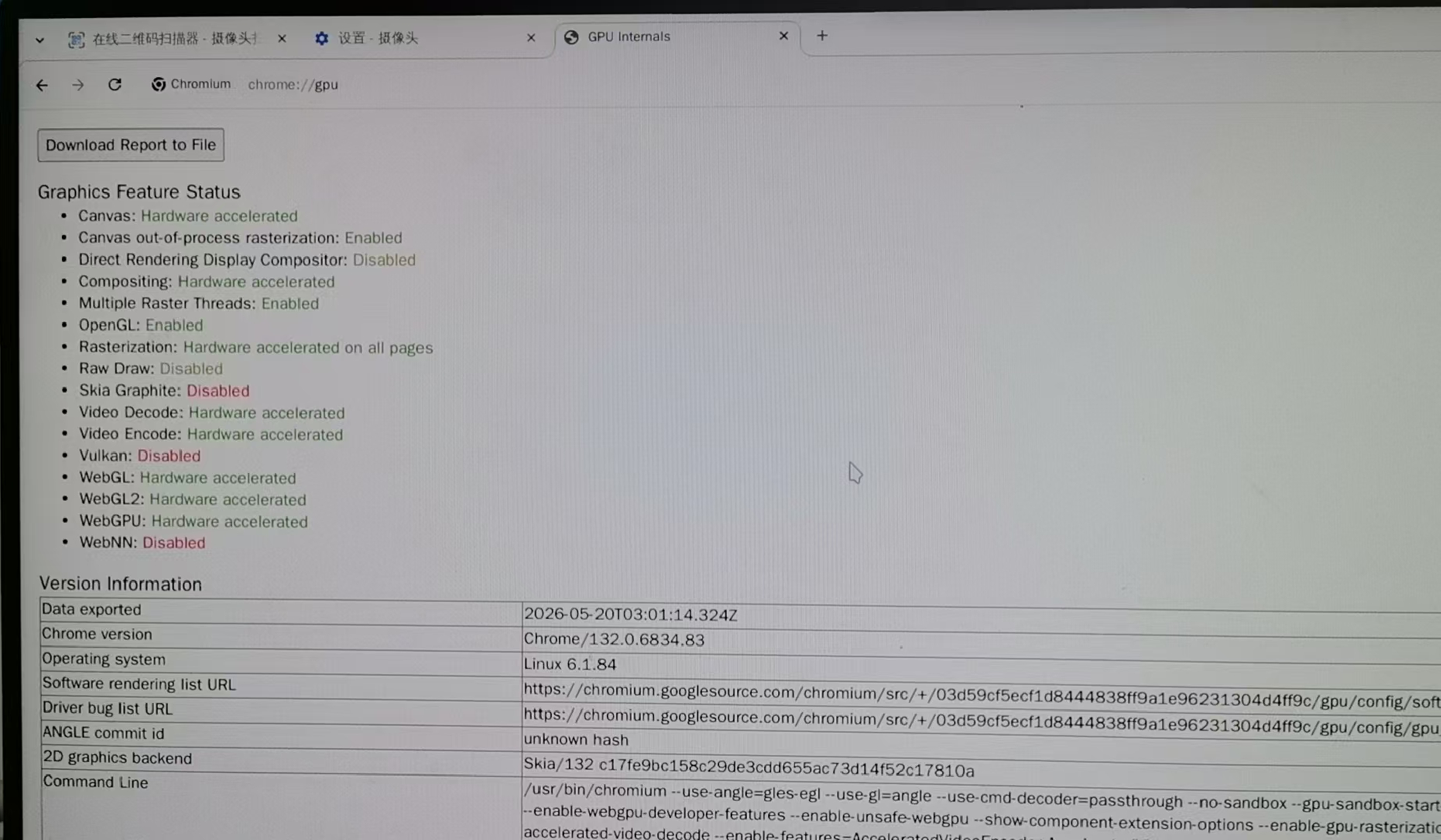
以上说明整个系统的GPU功能是正常,同时打开一个GPU的测试网站:https://webglsamples.org/aquarium/aquarium.html 测试在500个fish情况下,fps:50左右。
2、electron的功能测试
在rk3576上面安装了electron, nodejs, 编写一个测试程序,显示chrom://gpu的消息,正常的默认的electron配置的是不会调用ARM上的GPU的,使用软件来进行图像显示合成,无法实现加速.
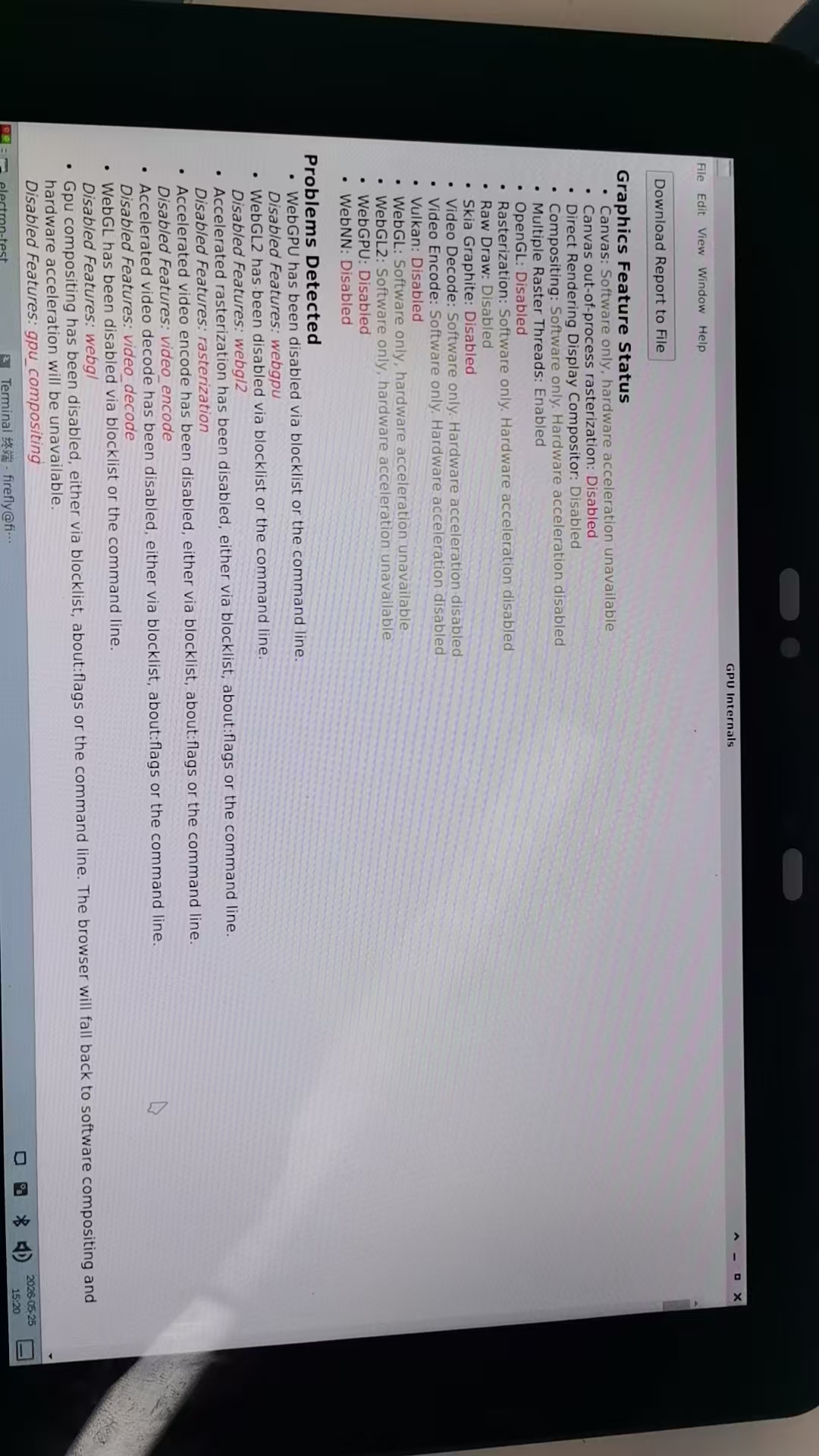
由于系统中带有的chrome是具有GPU加速功能,那就分析系统的chrome是怎么设置,主要参考了/usr/lib/chromium/chromium-wrapper文件的启动设置。
bash
firefly@firefly:/usr/lib/chromium$ cat chromium-wrapper
#!/bin/bash
#
# Copyright 2011 The Chromium Authors
# Use of this source code is governed by a BSD-style license that can be
# found in the LICENSE file.

# Let the wrapped binary know that it has been run through the wrapper.
export CHROME_WRAPPER="`readlink -f "$0"`"

HERE="`dirname "$CHROME_WRAPPER"`"

# We include some xdg utilities next to the binary, and we want to prefer them
# over the system versions when we know the system versions are very old. We
# detect whether the system xdg utilities are sufficiently new to be likely to
# work for us by looking for xdg-settings. If we find it, we leave $PATH alone,
# so that the system xdg utilities (including any distro patches) will be used.
if ! command -v xdg-settings &> /dev/null; then
  # Old xdg utilities. Prepend $HERE to $PATH to use ours instead.
  export PATH="$HERE:$PATH"
else
  # Use system xdg utilities. But first create mimeapps.list if it doesn't
  # exist; some systems have bugs in xdg-mime that make it fail without it.
  xdg_app_dir="${XDG_DATA_HOME:-$HOME/.local/share/applications}"
  mkdir -p "$xdg_app_dir"
  [ -f "$xdg_app_dir/mimeapps.list" ] || touch "$xdg_app_dir/mimeapps.list"
fi

export CHROME_VERSION_EXTRA="stable"

# We don't want bug-buddy intercepting our crashes. http://crbug.com/24120
export GNOME_DISABLE_CRASH_DIALOG=SET_BY_GOOGLE_CHROME

# for Chromium 132
export LD_LIBRARY_PATH="$HERE:$LD_LIBRARY_PATH"

# Sanitize std{in,out,err} because they'll be shared with untrusted child
# processes (http://crbug.com/376567).
exec < /dev/null
exec > >(exec cat)
exec 2> >(exec cat >&2)

CHROME_EXTRA_ARGS="         --use-angle=gles-egl                    --use-gl=angle --use-cmd-decoder=passthrough --no-sandbox --gpu-sandbox-start-early --ignore-gpu-blacklist --ignore-gpu-blocklist --enable-remote-extensions --enable-webgpu-developer-features --enable-unsafe-webgpu --show-component-extension-options --enable-gpu-rasterization --no-default-browser-check --disable-pings --media-router=0 --enable-accelerated-video-decode --enable-features=AcceleratedVideoEncoder,AcceleratedVideoDecoder,AcceleratedVideoDecodeLinuxGL,AcceleratedVideoDecodeLinuxZeroCopyGL"

# Note: exec -a below is a bashism.
exec -a "$0" "$HERE/chromium-bin" ${CHROME_EXTRA_ARGS} "$@"
最后分析出来chrome的启动参数如下:
bash
exec -a "/usr/bin/chromium" \
/usr/lib/chromium/chromium-bin \
--use-angle=gles-egl \
--use-gl=angle \
--use-cmd-decoder=passthrough \
--no-sandbox \
--gpu-sandbox-start-early \
--ignore-gpu-blacklist \
--ignore-gpu-blocklist \
--enable-remote-extensions \
--enable-webgpu-developer-features \
--enable-unsafe-webgpu \
--show-component-extension-options \
--enable-gpu-rasterization \
--no-default-browser-check \
--disable-pings \
--media-router=0 \
--enable-accelerated-video-decode \
--enable-features=AcceleratedVideoEncoder,AcceleratedVideoDecoder,AcceleratedVideoDecodeLinuxGL,AcceleratedVideoDecodeLinuxZeroCopyGL \
"$@"
3. electron调用GPU
根据上面的分析,修改测试程序中的对chrom浏览器的设置,最后成功的设置如下:
javascript
firefly@firefly:~/electron-test$ cat main.js
const { app, BrowserWindow, ipcMain } = require('electron');

/* =========================
 * GPU 强制配置(最关键)
 * ========================= */

// 强制 ANGLE 使用 EGL/GLES
app.commandLine.appendSwitch('use-angle', 'gles-egl');

// 强制 Chromium 使用 ANGLE
app.commandLine.appendSwitch('use-gl', 'angle');

app.commandLine.appendSwitch('use-cmd-decoder, passthrough');

app.commandLine.appendSwitch('enable-unsafe-webgpu');

app.commandLine.appendSwitch('enable-webgpu-developer-features');


// 忽略 GPU 黑名单
app.commandLine.appendSwitch('ignore-gpu-blocklist');

// 开启 GPU Raster
app.commandLine.appendSwitch('enable-gpu-rasterization');

// 开启零拷贝
app.commandLine.appendSwitch('enable-zero-copy');

// 开启原生 GPU memory buffer
app.commandLine.appendSwitch('enable-native-gpu-memory-buffers');

// 视频硬解
app.commandLine.appendSwitch(
  'enable-features',
  [
    'AcceleratedVideoDecoder',
    'AcceleratedVideoEncoder',
    'VaapiVideoDecoder',
    'VaapiVideoEncoder',
    'AcceleratedVideoDecodeLinuxGL',
    'AcceleratedVideoDecodeLinuxZeroCopyGL'
  ].join(',')
);

// 禁用 Vulkan(非常关键)
app.commandLine.appendSwitch('disable-vulkan');

// 禁用软件渲染 fallback
app.commandLine.appendSwitch('disable-software-rasterizer');


const path = require('path');

let mainWindow;
let browserWindow;

function createMainWindow() {
    mainWindow = new BrowserWindow({
        width: 800,
        height: 600,
        webPreferences: {
            preload: path.join(__dirname, 'preload.js'), // 使用预加载脚本
            contextIsolation: true, // 启用上下文隔离(安全最佳实践)
            nodeIntegration: false  // 禁用 nodeIntegration
        }
    });

    mainWindow.loadFile('index.html');
    // 直接加载 chrome://gpu
    //mainWindow.loadURL('chrome://gpu');
}

function createBrowserWindow() {
    browserWindow = new BrowserWindow({
        width: 1280,
        height: 720,
        webPreferences: {
            // 注意:webviewTag 在较新版本 Electron 中已弃用,建议使用 <iframe> 或单独窗口
            // 这里为了简单演示"输入网址加载",我们使用一个简单的 input + iframe 方案
            // 如果必须加载任意外部网站且需要完整功能,通常建议直接 loadURL 到主窗口
            // 但为了符合"新窗口+地址栏"的需求,我们在 HTML 中实现逻辑
            contextIsolation: true,
            nodeIntegration: false
        }
    });

    browserWindow.loadFile('browser.html');
}

app.whenReady().then(() => {
    // 输出 GPU 信息
    console.log(app.getGPUFeatureStatus());

    createMainWindow();
    createBrowserWindow();

    app.on('activate', () => {
        if (BrowserWindow.getAllWindows().length === 0) {
            createMainWindow();
            createBrowserWindow();
        }
    });
});

app.on('window-all-closed', () => {
    if (process.platform !== 'darwin') {
        app.quit();
    }
});

// 监听渲染进程请求版本信息的消息
ipcMain.handle('get-versions', () => {
    return {
        electron: process.versions.electron,
        node: process.versions.node,
        chrome: process.versions.chrome
    };
});
通过以上的程序设置,在electron中显示GPU消息如下:
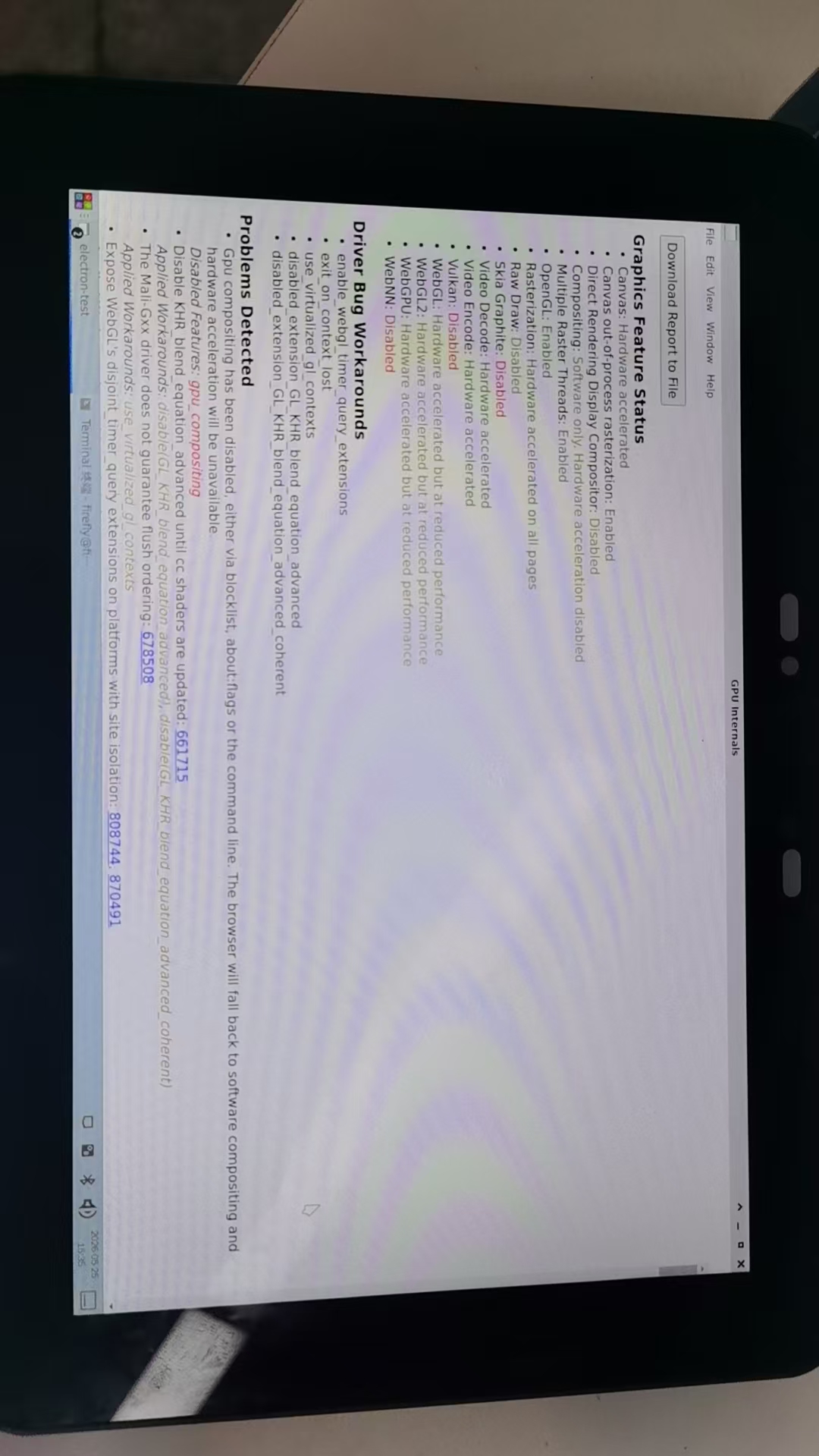
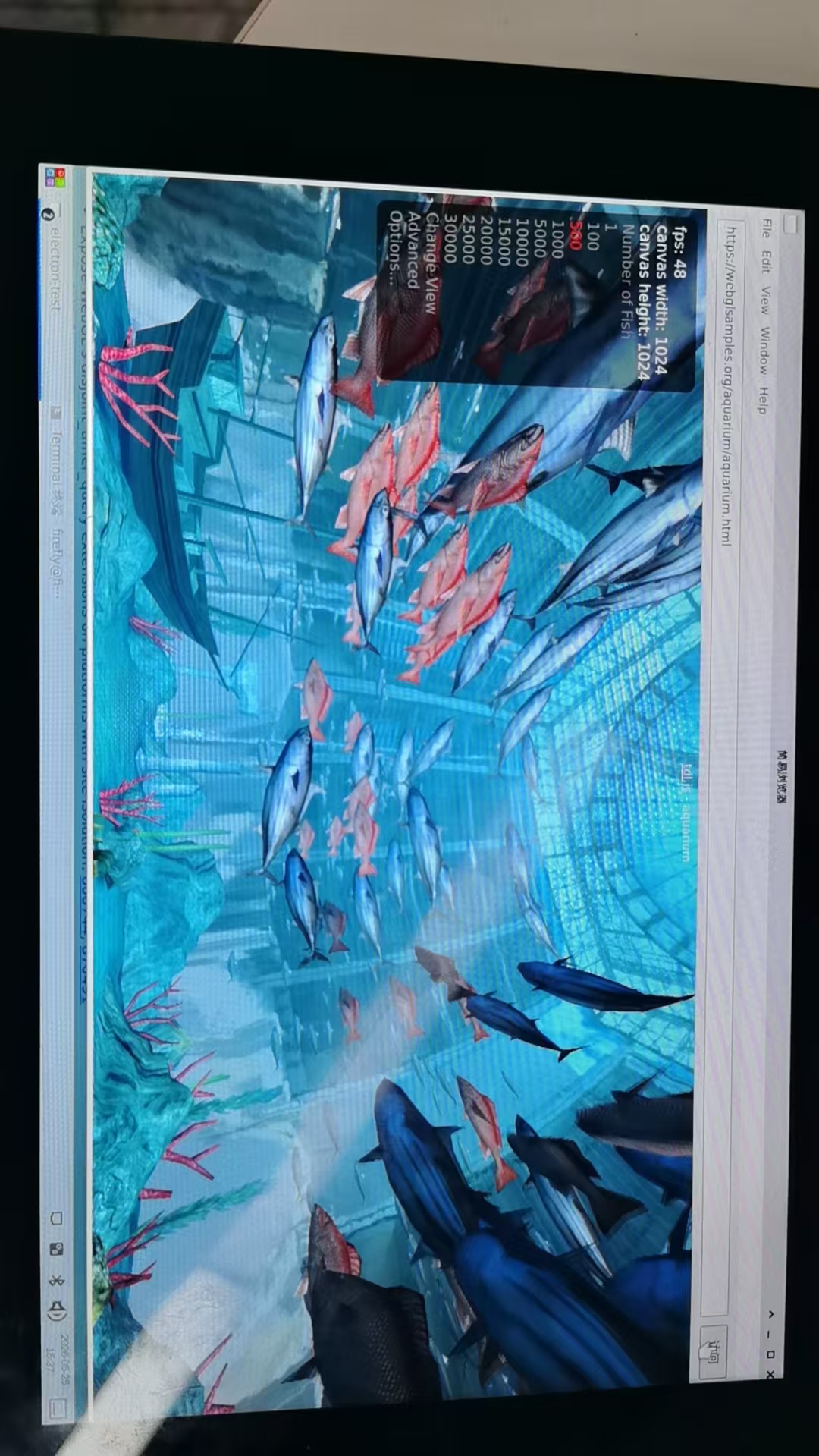
可以看到GPU加速功能已经启用,但是性能受限的,使用https://webglsamples.org/aquarium/aquarium.html来测试GPU的性能 fps:46,比本机的上的chrom性能稍差。
4、GPU性能差异分析:
系统上自带的chromium浏览器是rockchip原厂移植的,对GPU调用流程进行优化,而electron内的chromium是一个官方发布的通用版本,未针对RK3576芯片进行优化,所以GPU性能还是受限,总之是GPU能调用起来。如果要达到同样的性能,需要下载electron的源码,针对GPU部分把rockchip的补丁打上才行,这个任务的工作量很大。