Chet.Admin 权限模型:菜单级 + 按钮级 + 行级三层防护 🎯
《Chet.Admin 全栈实战》系列第 6 篇
前言
做后台系统,权限 是绕不开的核心。
你是不是也遇到过这些坑?
- ❌ 只控菜单,按钮随便点
- ❌ 同一个接口,A 部门能看全公司数据,B 部门只能看自己
- ❌ 前端隐藏了按钮,后端没拦,F12 一抓包照样能调
- ❌ 角色越多越乱,最后没人知道谁有啥权限
Chet.Admin 用经典的 RBAC 模型,把权限分成 三层:
- 🎯 菜单级:控制能不能进这个页面
- 🎯 按钮级:控制页面里能不能点这个按钮
- 🎯 行级:控制能看到哪几行数据
三层叠加,从粗到细,覆盖企业 90% 的权限场景。
一、RBAC 数据模型设计 🗂️
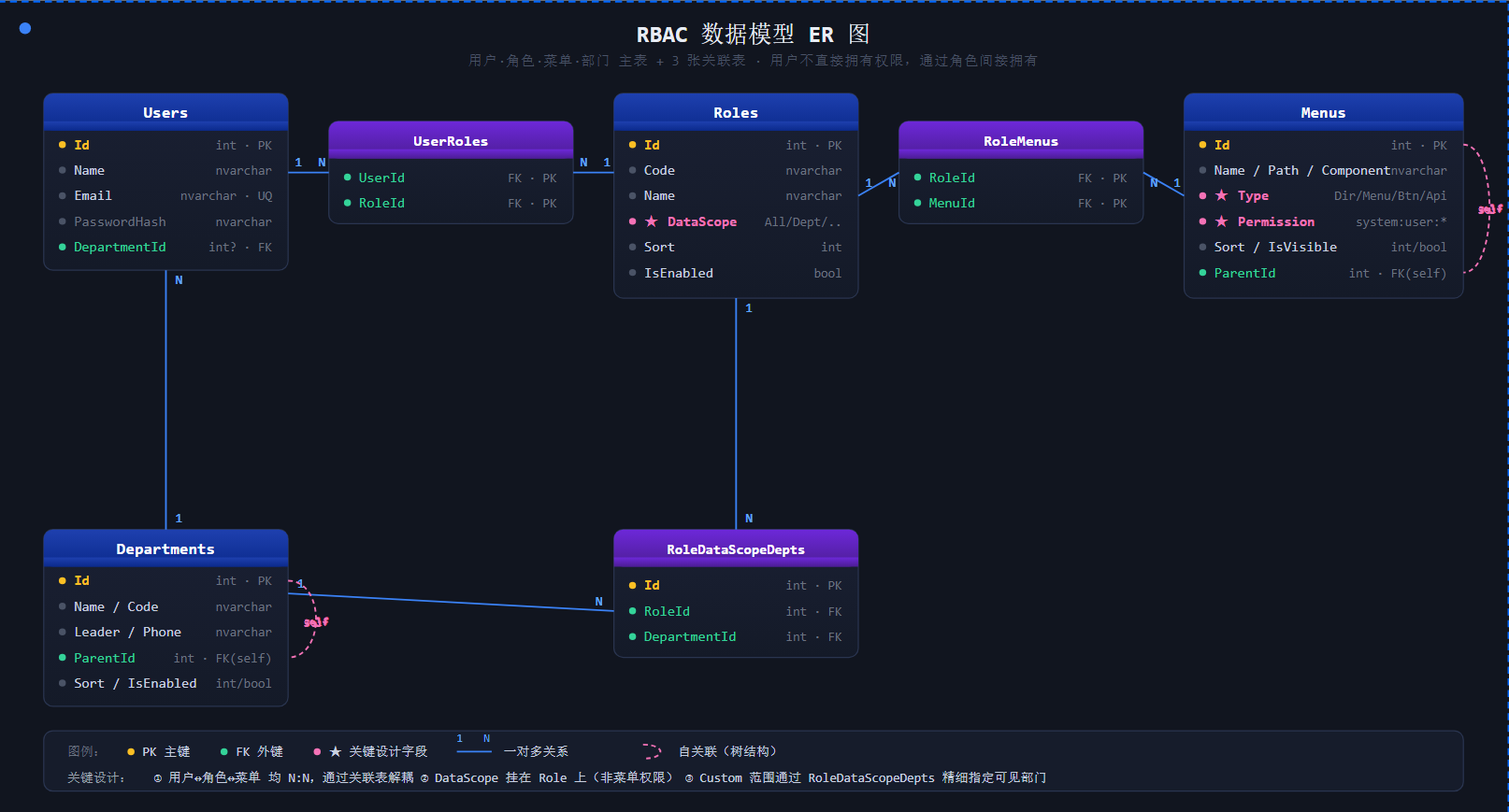
RBAC (Role-Based Access Control)的核心思想:用户不直接拥有权限,而是通过角色间接拥有。
1.1 五张核心表
Chet.Admin 的权限模型由 5 张表 组成:
| 表名 | 作用 | 关键字段 |
|---|---|---|
Users |
用户表 | Id、Name、Email、DepartmentId |
Roles |
角色表 | Id、Code、Name、DataScope |
Menus |
菜单/权限表 | Id、Name、Path、Type、Permission |
UserRoles |
用户-角色关联 | UserId、RoleId |
RoleMenus |
角色-菜单关联 | RoleId、MenuId |
RoleDataScopeDepts |
角色-自定义部门关联 | RoleId、DepartmentId |
💡 关键设计 :用户和权限多对多,通过角色解耦。一个用户可以有多个角色,一个角色可以分配多个菜单。
1.2 角色实体 RoleEntity
先看角色表的字段设计:
csharp
public class RoleEntity : BaseEntity
{
    /// 角色编码(如 admin, user)
    public string Code { get; set; } = string.Empty;

    /// 角色名称
    public string Name { get; set; } = string.Empty;

    /// 角色描述
    public string? Description { get; set; }

    /// 排序号
    public int Sort { get; set; }

    /// 是否启用
    public bool IsEnabled { get; set; } = true;

    /// 数据权限范围:All/Dept/DeptAndChild/Self/Custom
    public string DataScope { get; set; } = "All";

    /// 用户角色关联
    public List<UserRoleEntity> UserRoles { get; set; } = [];

    /// 角色菜单关联
    public List<RoleMenuEntity> RoleMenus { get; set; } = [];

    /// 角色自定义数据权限部门关联
    public List<RoleDataScopeDeptEntity> RoleDataScopeDepts { get; set; } = [];
}
注意 DataScope 字段,它直接挂在角色上 ------这意味着数据权限是角色的属性,而不是单独的菜单权限。这是 Chet.Admin 的关键设计决策。
1.3 关联表设计
用户-角色关联表(无独立主键,用复合主键):
csharp
public class UserRoleEntity
{
    public int UserId { get; set; }
    public int RoleId { get; set; }
    public UserEntity User { get; set; } = null!;
    public RoleEntity Role { get; set; } = null!;
}
角色-菜单关联表同理:
csharp
public class RoleMenuEntity
{
    public int RoleId { get; set; }
    public int MenuId { get; set; }
    public RoleEntity Role { get; set; } = null!;
    public MenuEntity Menu { get; set; } = null!;
}
📌 为什么用关联表而不是 JSON 字段存数组?
- 可建索引,查询快
- 支持外键约束,数据一致
- 容易做权限反查("这个菜单被哪些角色拥有?")
1.4 菜单实体:四种类型
菜单表通过 Type 字段区分 4 种类型,统一管理:
csharp
public class MenuEntity : BaseEntity
{
    public string Name { get; set; } = string.Empty;
    public string Path { get; set; } = string.Empty;
    public string? Component { get; set; }
    public int ParentId { get; set; }

    /// 菜单类型(Directory=目录, Menu=菜单, Button=按钮, Api=接口)
    public string Type { get; set; } = "Menu";

    /// 权限标识,如 system:user:create
    public string? Permission { get; set; }
}| Type | 含义 | 示例 |
|---|---|---|
Directory |
目录(容器) | 系统管理 |
Menu |
菜单页面 | 用户管理 |
Button |
按钮权限 | 新增按钮 |
Api |
接口权限 | 后端接口 |
💡 核心思想 :目录、菜单、按钮、接口都在同一张表 ,通过
ParentId形成树结构。按钮权限是菜单的子节点,挂在菜单下面。
二、第一层:菜单级权限 📋
菜单级权限控制用户能不能访问某个页面。
2.1 后端:返回用户的菜单树
登录后,前端调 /auth/user-info 获取用户信息,其中包含 roles(角色编码列表) 和 permissions(权限码列表):
csharp
public async Task<UserInfoDto> GetUserInfoAsync(int userId)
{
    var user = await _unitOfWork.Users.GetByIdAsync(userId);

    // 获取角色
    var roles = await _roleRepository.GetRolesByUserIdAsync(userId);
    // 获取权限码(按钮级别)
    var permissions = await _menuRepository.GetPermissionCodesByUserIdAsync(userId);

    return new UserInfoDto
    {
        Id = user.Id,
        Name = user.Name,
        Email = user.Email,
        Roles = roles.Select(r => r.Code).ToList(),
        Permissions = permissions,
    };
}
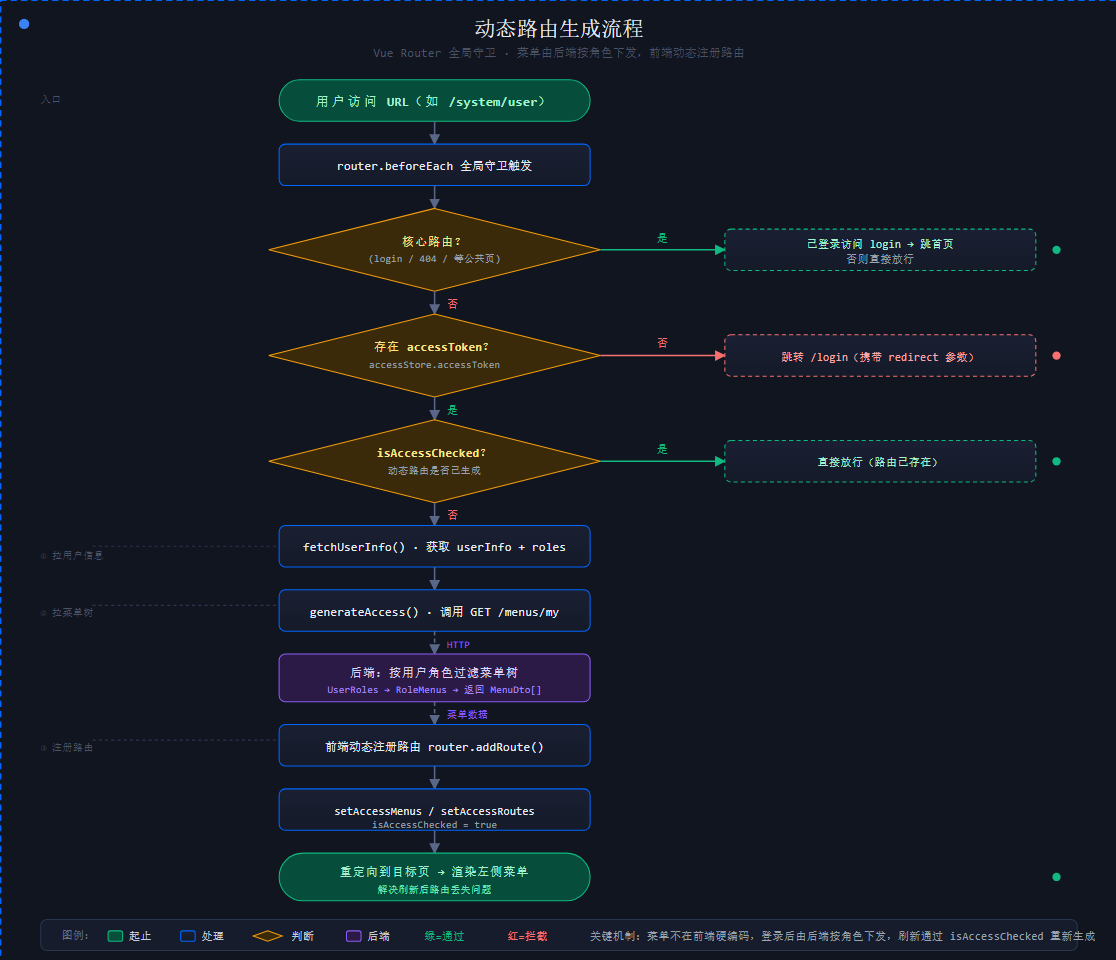
前端还会单独调 /menus/my 拿到当前用户可见的菜单树,用于动态生成路由。
2.2 前端:路由守卫拦截
Vue Router 的全局守卫是菜单权限的第一道闸门:
typescript
function setupAccessGuard(router: Router) {
  router.beforeEach(async (to, from) => {
    const accessStore = useAccessStore();
    const userStore = useUserStore();
    const authStore = useAuthStore();

    // 1. 公共路由(登录页等)直接放行
    if (coreRouteNames.includes(to.name as string)) {
      if (!accessStore.accessToken || accessStore.isAccessChecked) {
        return true;
      }
    }

    // 2. 没有 Token,跳登录页
    if (!accessStore.accessToken) {
      if (to.meta.ignoreAccess) return true;
      return { path: LOGIN_PATH, query: { redirect: encodeURIComponent(to.fullPath) }, replace: true };
    }

    // 3. 已生成过动态路由,直接放行
    if (accessStore.isAccessChecked) return true;

    // 4. 关键:生成动态路由
    const userInfo = userStore.userInfo || (await authStore.fetchUserInfo());
    const { accessibleMenus, accessibleRoutes } = await generateAccess({
      roles: userInfo.roles ?? [],
      router,
      routes: accessRoutes,
    });

    accessStore.setAccessMenus(accessibleMenus);
    accessStore.setAccessRoutes(accessibleRoutes);
    accessStore.setIsAccessChecked(true);

    // 5. 跳转到目标页(解决刷新后路由丢失问题)
    return { ...router.resolve(decodeURIComponent(redirectPath)), replace: true };
  });
}
2.3 动态路由生成
generateAccess 通过后端菜单数据动态注册路由:
typescript
async function generateAccess(options: GenerateMenuAndRoutesOptions) {
  const pageMap: ComponentRecordType = import.meta.glob('../views/**/*.vue');

  return await generateAccessible(preferences.app.accessMode, {
    ...options,
    // 关键:从后端拉取菜单树
    fetchMenuListAsync: async () => {
      message.loading({ content: `${$t('common.loadingMenu')}...`, duration: 1.5 });
      return await getMyMenusApi();
    },
    forbiddenComponent, // 无权限跳 403
    layoutMap,
    pageMap,
  });
}
🎯 核心机制:
- 菜单不在前端硬编码,而是登录后从后端拉取
- 后端按用户角色过滤,只返回有权限的菜单
- 前端动态注册路由,渲染左侧菜单
- 用户访问没权限的 URL,会被守卫拦截或跳 403
三、第二层:按钮级权限 🔘
菜单级只控制能不能进页面 ,进了页面后能不能点新增/删除按钮,就是按钮级权限的事。
3.1 后端:把权限码塞进 JWT
登录签发 Token 时,把用户所有权限码作为 Claim 写入:
csharp
public async Task<string> GenerateAccessTokenAsync(UserEntity user)
{
    var claims = new List<Claim>
    {
        new Claim(JwtRegisteredClaimNames.Sub, user.Id.ToString()),
        new Claim(JwtRegisteredClaimNames.Email, user.Email),
        new Claim(JwtRegisteredClaimNames.Jti, Guid.NewGuid().ToString()),
        new Claim(ClaimTypes.Name, user.Name),
    };

    // 添加角色 Claims
    var roles = await _roleRepository.GetRolesByUserIdAsync(user.Id);
    foreach (var role in roles)
    {
        claims.Add(new Claim(ClaimTypes.Role, role.Code));
    }

    // 关键:添加权限码 Claims
    var permissions = await _menuRepository.GetPermissionCodesByUserIdAsync(user.Id);
    foreach (var permission in permissions)
    {
        claims.Add(new Claim("permission", permission));
    }

    // ... 签发 JWT
}
💡 权限码格式约定 :
模块:资源:操作,如system:user:create、system:role:delete
3.2 前端:v-access 指令
Chet.Admin 用一个全局指令 v-access 控制按钮显隐:
vue
<!-- 单个权限码 -->
<a-button v-access:code="'system:user:create'">新增</a-button>

<!-- 多个权限码(满足其一即可) -->
<a-button v-access:code="['system:user:update', 'system:user:delete']">操作</a-button>
指令实现非常精简:
typescript
function isAccessible(el: Element, binding: DirectiveBinding<string | string[]>) {
  const { accessMode, hasAccessByCodes, hasAccessByRoles } = useAccess();
  const value = binding.value;
  if (!value) return;

  // 根据参数决定按角色还是按权限码判断
  const authMethod =
    accessMode.value === 'frontend' && binding.arg === 'role'
      ? hasAccessByRoles
      : hasAccessByCodes;

  const values = Array.isArray(value) ? value : [value];

  // 无权限直接从 DOM 移除
  if (!authMethod(values)) {
    el?.remove();
  }
}

const authDirective: Directive = { mounted: isAccessible };

export function registerAccessDirective(app: App) {
  app.directive('access', authDirective);
}
3.3 权限判断核心:useAccess
hasAccessByCodes 用 Set 做集合交集判断,性能 O(n):
typescript
function useAccess() {
  const accessStore = useAccessStore();
  const userStore = useUserStore();

  /// 基于角色判断
  function hasAccessByRoles(roles: string[]) {
    const userRoleSet = new Set(userStore.userRoles);
    return roles.filter((r) => userRoleSet.has(r)).length > 0;
  }

  /// 基于权限码判断
  function hasAccessByCodes(codes: string[]) {
    const userCodesSet = new Set(accessStore.accessCodes);
    return codes.filter((c) => userCodesSet.has(c)).length > 0;
  }

  return { hasAccessByCodes, hasAccessByRoles };
}
3.4 表格操作列的权限控制
在 VxeTable 的操作列里,每个按钮都用 auth 属性挂权限码:
vue
<VbenTableAction
  :actions="[
    { text: '编辑', auth: 'system:user:update', onClick: () => onEdit(row) },
    { text: '修改密码', auth: 'system:user:update', onClick: () => onChangePwd(row) },
  ]"
  :dropdown-actions="[
    { text: '删除', auth: 'system:user:delete', danger: true, popConfirm: { title: '确认删除?', confirm: () => onDelete(row) } }
  ]"
/>
工具栏的新增按钮则用 hasAccessByCodes 函数式判断:
vue
<Button v-if="hasAccessByCodes(['system:user:create'])" type="primary" @click="onCreate">
  <Plus class="mr-2 size-4" />新增
</Button>
⚠️ 重要提醒 :前端隐藏按钮只是体验优化,绝不能依赖它做安全防护!后端必须再校验一次。
四、第三层:行级权限(数据权限) 🔒
这是最容易被忽略、也最难做的一层。
场景:同一个用户列表接口
- 总经理能看全公司
- 部门经理只能看本部门及下属
- 普通员工只能看自己
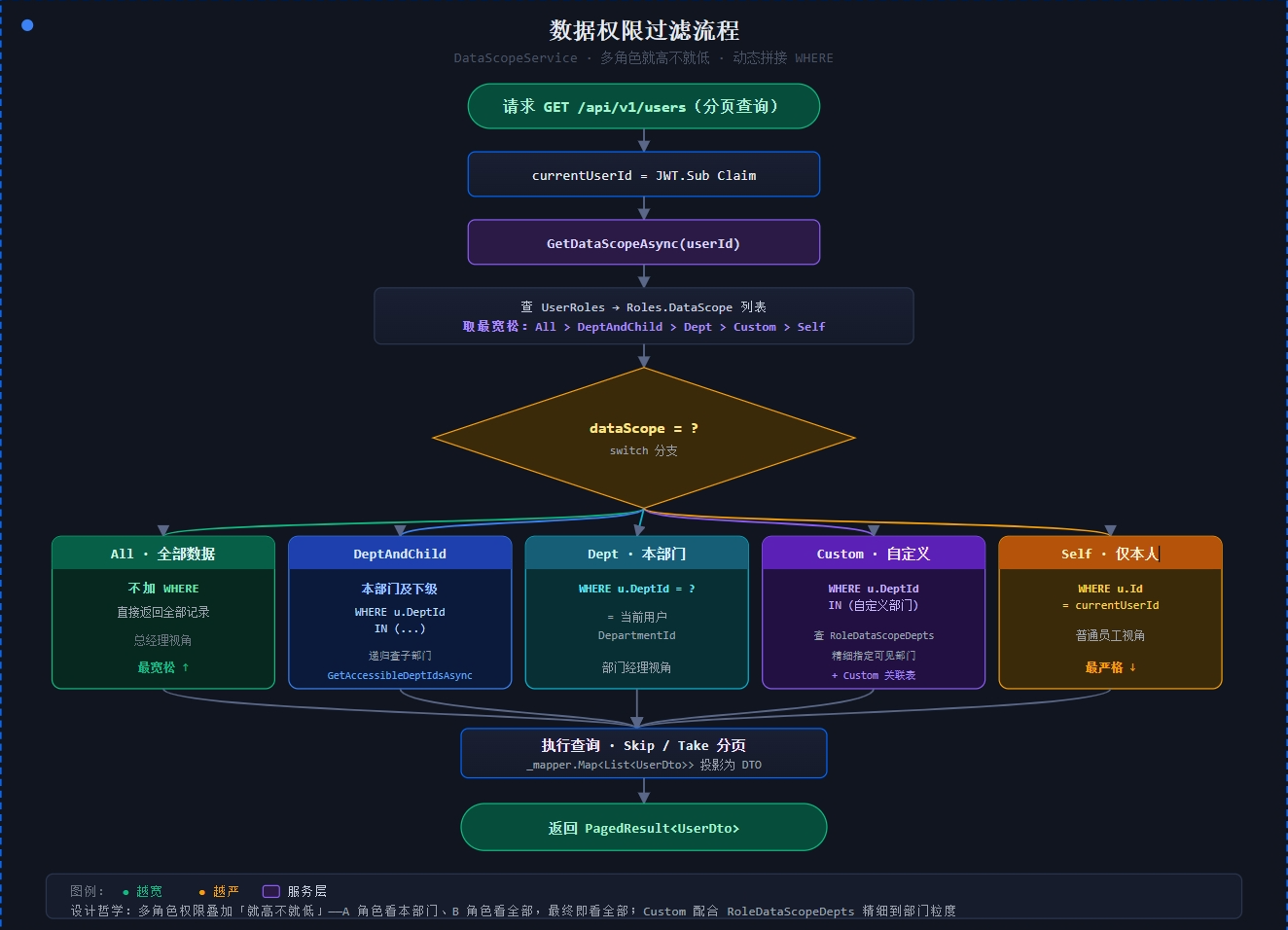
4.1 五种数据权限范围
RoleEntity.DataScope 字段定义 5 种范围:
| DataScope | 含义 | SQL 过滤效果 |
|---|---|---|
All |
全部数据 | 不加 WHERE |
Dept |
本部门 | WHERE dept_id = currentUserDept |
DeptAndChild |
本部门及下级 | WHERE dept_id IN (本部门+所有子部门) |
Self |
仅本人 | WHERE id = currentUserId |
Custom |
自定义部门 | WHERE dept_id IN (customDeptIds) |
📌
Custom范围配合RoleDataScopeDepts关联表,精细指定这个角色能看哪些部门的数据。
4.2 DataScopeService:核心实现
DataScopeService 负责计算用户可访问的部门 ID 列表:
csharp
public class DataScopeService : IDataScopeService
{
    /// 获取用户可访问的部门ID列表
    public async Task<List<int>> GetAccessibleDeptIdsAsync(int userId)
    {
        // 1. 拿到用户的所有角色
        var roleIds = await _dbContext.UserRoles
            .AsNoTracking()
            .Where(ur => ur.UserId == userId)
            .Select(ur => ur.RoleId)
            .ToListAsync();

        if (roleIds.Count == 0) return new List<int>();

        // 2. 拿到这些角色的 DataScope
        var roles = await _dbContext.Roles
            .AsNoTracking()
            .Where(r => roleIds.Contains(r.Id))
            .Select(r => new { r.Id, r.DataScope })
            .ToListAsync();

        // 3. 任一角色是 All,直接返回所有部门
        if (roles.Any(r => r.DataScope == "All"))
            return await _dbContext.Departments.AsNoTracking().Select(d => d.Id).ToListAsync();

        var result = new HashSet<int>();
        var user = await _dbContext.Users.AsNoTracking().FirstOrDefaultAsync(u => u.Id == userId);

        // 4. 遍历每个角色,按范围收集部门ID
        foreach (var role in roles)
        {
            switch (role.DataScope)
            {
                case "Dept":
                    if (user.DepartmentId.HasValue)
                        result.Add(user.DepartmentId.Value);
                    break;

                case "DeptAndChild":
                    if (user.DepartmentId.HasValue)
                    {
                        result.Add(user.DepartmentId.Value);
                        await AddChildDeptsAsync(user.DepartmentId.Value, result);
                    }
                    break;

                case "Self":
                    // Self 不添加任何部门
                    break;

                case "Custom":
                    var customDepts = await _dbContext.RoleDataScopeDepts
                        .AsNoTracking()
                        .Where(rd => rd.RoleId == role.Id)
                        .Select(rd => rd.DepartmentId)
                        .ToListAsync();
                    foreach (var d in customDepts) result.Add(d);
                    break;
            }
        }

        return result.ToList();
    }

    /// 递归获取所有子部门
    private async Task AddChildDeptsAsync(int parentId, HashSet<int> result)
    {
        var children = await _dbContext.Departments
            .AsNoTracking()
            .Where(d => d.ParentId == parentId)
            .Select(d => d.Id)
            .ToListAsync();

        foreach (var child in children)
        {
            if (result.Add(child)) // 避免重复
            {
                await AddChildDeptsAsync(child, result);
            }
        }
    }
}
4.3 取最宽松范围:GetDataScopeAsync
一个用户有多个角色时,取最宽松的范围:
csharp
public async Task<string> GetDataScopeAsync(int userId)
{
    var scopes = await _dbContext.Roles
        .AsNoTracking()
        .Where(r => roleIds.Contains(r.Id))
        .Select(r => r.DataScope)
        .ToListAsync();

    // 从宽到严:All > DeptAndChild > Dept > Custom > Self
    if (scopes.Contains("All")) return "All";
    if (scopes.Contains("DeptAndChild")) return "DeptAndChild";
    if (scopes.Contains("Dept")) return "Dept";
    if (scopes.Contains("Custom")) return "Custom";
    return "Self";
}
💡 设计哲学 :用户多角色叠加权限就高不就低------A 角色能看本部门,B 角色能看全部,最终就是能看全部。这符合"权限只增不减"的常识。
4.4 在 UserService 里应用过滤
GetPagedUsersAsync 根据 dataScope 动态拼接 WHERE:
csharp
public async Task<PagedResult<UserDto>> GetPagedUsersAsync(PagedRequest request, int? currentUserId)
{
    var dataScope = await _dataScopeService.GetDataScopeAsync(currentUserId.Value);

    // All 不做过滤
    if (dataScope == "All")
        return await GetPagedUsersAsync(request);

    IQueryable<UserEntity> query = dbContext.Users.AsNoTracking()
        .Include(u => u.UserRoles).ThenInclude(ur => ur.Role);

    switch (dataScope)
    {
        case "Self":
            query = query.Where(u => u.Id == currentUserId.Value);
            break;

        case "Dept":
            var currentUserDept = await dbContext.Users
                .AsNoTracking()
                .Where(u => u.Id == currentUserId.Value)
                .Select(u => u.DepartmentId)
                .FirstOrDefaultAsync();
            query = query.Where(u => u.DepartmentId == currentUserDept);
            break;

        case "DeptAndChild":
        case "Custom":
            var accessibleDeptIds = await _dataScopeService.GetAccessibleDeptIdsAsync(currentUserId.Value);
            query = query.Where(u => accessibleDeptIds.Contains(u.DepartmentId.Value));
            break;
    }

    var totalCount = await query.CountAsync();
    var items = await query.Skip(request.Skip).Take(request.PageSize).ToListAsync();
    return new PagedResult<UserDto>(_mapper.Map<List<UserDto>>(items), request.PageNumber, request.PageSize, totalCount);
}
五、后端基于 Claim 的权限校验 ⚙️
5.1 JWT Claim 全量打包
回顾前面 GenerateAccessTokenAsync,JWT 里的 Claim 包含三类:
| Claim Type | 值 | 用途 |
|---|---|---|
Sub |
用户 ID | 标识用户 |
ClaimTypes.Role |
角色编码 | 角色判断 |
permission |
权限码 | 按钮判断 |
5.2 JWT 验证 + 强制下线
JwtConfiguration 配置了令牌验证回调 ,顺便实现强制下线:
csharp
options.Events = new JwtBearerEvents
{
    OnTokenValidated = context =>
    {
        var jwtToken = context.SecurityToken as JwtSecurityToken;
        var userIdClaim = context.Principal?.FindFirst(ClaimTypes.NameIdentifier)
                      ?? context.Principal?.FindFirst(JwtRegisteredClaimNames.Sub);
        if (userIdClaim == null || !int.TryParse(userIdClaim.Value, out var userId))
            return Task.CompletedTask;

        var onlineUserService = context.HttpContext.RequestServices.GetService<IOnlineUserService>();
        // 检查令牌是否已被吊销(签发时间早于吊销时间则拒绝)
        if (onlineUserService.IsTokenRevoked(userId, jwtToken.ValidFrom))
        {
            context.Fail("Token has been revoked");
        }
        return Task.CompletedTask;
    },
};
🎯 这就是 Chet.Admin 强制下线 的实现原理:管理员在"在线用户"页面把用户踢下线,本质是记录吊销时间 ,后续请求带旧 Token 进来时,
ValidFrom早于吊销时间就被拒绝。
5.3 控制器层的 Authorize
Chet.Admin 的所有管理类控制器都加 [Authorize] 特性:
csharp
[ApiController]
[Route("api/v{version:apiVersion}/[controller]")]
[Authorize]  // 必须登录
public class UsersController : ControllerBase
💡 扩展思路 :要更细粒度的接口权限,可以自定义
[HasPermission("system:user:delete")]特性 +IAuthorizationHandler,从 Claim 里读permission类型校验。Chet.Admin 当前用前端按钮控制 + JWT Claim 暴露权限码的方式,足够大多数场景。
六、三层防护全景图 🗺️
把三层串起来看一个完整请求:
#mermaid-svg-eg0ciidOek8yRkwS{font-family:"trebuchet ms",verdana,arial,sans-serif;font-size:16px;fill:#333;}@keyframes edge-animation-frame{from{stroke-dashoffset:0;}}@keyframes dash{to{stroke-dashoffset:0;}}#mermaid-svg-eg0ciidOek8yRkwS .edge-animation-slow{stroke-dasharray:9,5!important;stroke-dashoffset:900;animation:dash 50s linear infinite;stroke-linecap:round;}#mermaid-svg-eg0ciidOek8yRkwS .edge-animation-fast{stroke-dasharray:9,5!important;stroke-dashoffset:900;animation:dash 20s linear infinite;stroke-linecap:round;}#mermaid-svg-eg0ciidOek8yRkwS .error-icon{fill:#552222;}#mermaid-svg-eg0ciidOek8yRkwS .error-text{fill:#552222;stroke:#552222;}#mermaid-svg-eg0ciidOek8yRkwS .edge-thickness-normal{stroke-width:1px;}#mermaid-svg-eg0ciidOek8yRkwS .edge-thickness-thick{stroke-width:3.5px;}#mermaid-svg-eg0ciidOek8yRkwS .edge-pattern-solid{stroke-dasharray:0;}#mermaid-svg-eg0ciidOek8yRkwS .edge-thickness-invisible{stroke-width:0;fill:none;}#mermaid-svg-eg0ciidOek8yRkwS .edge-pattern-dashed{stroke-dasharray:3;}#mermaid-svg-eg0ciidOek8yRkwS .edge-pattern-dotted{stroke-dasharray:2;}#mermaid-svg-eg0ciidOek8yRkwS .marker{fill:#333333;stroke:#333333;}#mermaid-svg-eg0ciidOek8yRkwS .marker.cross{stroke:#333333;}#mermaid-svg-eg0ciidOek8yRkwS svg{font-family:"trebuchet ms",verdana,arial,sans-serif;font-size:16px;}#mermaid-svg-eg0ciidOek8yRkwS p{margin:0;}#mermaid-svg-eg0ciidOek8yRkwS .label{font-family:"trebuchet ms",verdana,arial,sans-serif;color:#333;}#mermaid-svg-eg0ciidOek8yRkwS .cluster-label text{fill:#333;}#mermaid-svg-eg0ciidOek8yRkwS .cluster-label span{color:#333;}#mermaid-svg-eg0ciidOek8yRkwS .cluster-label span p{background-color:transparent;}#mermaid-svg-eg0ciidOek8yRkwS .label text,#mermaid-svg-eg0ciidOek8yRkwS span{fill:#333;color:#333;}#mermaid-svg-eg0ciidOek8yRkwS .node rect,#mermaid-svg-eg0ciidOek8yRkwS .node circle,#mermaid-svg-eg0ciidOek8yRkwS .node ellipse,#mermaid-svg-eg0ciidOek8yRkwS .node polygon,#mermaid-svg-eg0ciidOek8yRkwS .node path{fill:#ECECFF;stroke:#9370DB;stroke-width:1px;}#mermaid-svg-eg0ciidOek8yRkwS .rough-node .label text,#mermaid-svg-eg0ciidOek8yRkwS .node .label text,#mermaid-svg-eg0ciidOek8yRkwS .image-shape .label,#mermaid-svg-eg0ciidOek8yRkwS .icon-shape .label{text-anchor:middle;}#mermaid-svg-eg0ciidOek8yRkwS .node .katex path{fill:#000;stroke:#000;stroke-width:1px;}#mermaid-svg-eg0ciidOek8yRkwS .rough-node .label,#mermaid-svg-eg0ciidOek8yRkwS .node .label,#mermaid-svg-eg0ciidOek8yRkwS .image-shape .label,#mermaid-svg-eg0ciidOek8yRkwS .icon-shape .label{text-align:center;}#mermaid-svg-eg0ciidOek8yRkwS .node.clickable{cursor:pointer;}#mermaid-svg-eg0ciidOek8yRkwS .root .anchor path{fill:#333333!important;stroke-width:0;stroke:#333333;}#mermaid-svg-eg0ciidOek8yRkwS .arrowheadPath{fill:#333333;}#mermaid-svg-eg0ciidOek8yRkwS .edgePath .path{stroke:#333333;stroke-width:2.0px;}#mermaid-svg-eg0ciidOek8yRkwS .flowchart-link{stroke:#333333;fill:none;}#mermaid-svg-eg0ciidOek8yRkwS .edgeLabel{background-color:rgba(232,232,232, 0.8);text-align:center;}#mermaid-svg-eg0ciidOek8yRkwS .edgeLabel p{background-color:rgba(232,232,232, 0.8);}#mermaid-svg-eg0ciidOek8yRkwS .edgeLabel rect{opacity:0.5;background-color:rgba(232,232,232, 0.8);fill:rgba(232,232,232, 0.8);}#mermaid-svg-eg0ciidOek8yRkwS .labelBkg{background-color:rgba(232, 232, 232, 0.5);}#mermaid-svg-eg0ciidOek8yRkwS .cluster rect{fill:#ffffde;stroke:#aaaa33;stroke-width:1px;}#mermaid-svg-eg0ciidOek8yRkwS .cluster text{fill:#333;}#mermaid-svg-eg0ciidOek8yRkwS .cluster span{color:#333;}#mermaid-svg-eg0ciidOek8yRkwS div.mermaidTooltip{position:absolute;text-align:center;max-width:200px;padding:2px;font-family:"trebuchet ms",verdana,arial,sans-serif;font-size:12px;background:hsl(80, 100%, 96.2745098039%);border:1px solid #aaaa33;border-radius:2px;pointer-events:none;z-index:100;}#mermaid-svg-eg0ciidOek8yRkwS .flowchartTitleText{text-anchor:middle;font-size:18px;fill:#333;}#mermaid-svg-eg0ciidOek8yRkwS rect.text{fill:none;stroke-width:0;}#mermaid-svg-eg0ciidOek8yRkwS .icon-shape,#mermaid-svg-eg0ciidOek8yRkwS .image-shape{background-color:rgba(232,232,232, 0.8);text-align:center;}#mermaid-svg-eg0ciidOek8yRkwS .icon-shape p,#mermaid-svg-eg0ciidOek8yRkwS .image-shape p{background-color:rgba(232,232,232, 0.8);padding:2px;}#mermaid-svg-eg0ciidOek8yRkwS .icon-shape .label rect,#mermaid-svg-eg0ciidOek8yRkwS .image-shape .label rect{opacity:0.5;background-color:rgba(232,232,232, 0.8);fill:rgba(232,232,232, 0.8);}#mermaid-svg-eg0ciidOek8yRkwS .label-icon{display:inline-block;height:1em;overflow:visible;vertical-align:-0.125em;}#mermaid-svg-eg0ciidOek8yRkwS .node .label-icon path{fill:currentColor;stroke:revert;stroke-width:revert;}#mermaid-svg-eg0ciidOek8yRkwS :root{--mermaid-font-family:"trebuchet ms",verdana,arial,sans-serif;} 通过
用户点了按钮
通过
第三层:行级(数据权限)
DELETE /api/v1/users/5
后端校验:用户能否操作 ID=5 的用户?
检查 dataScope 和部门归属
第二层:按钮级(v-access 指令)
删除按钮的 auth=system:user:delete
查 accessStore.accessCodes 里有没有
没有就从 DOM 移除
第一层:菜单级(路由守卫)
用户能不能进 /system/user 页面?
看后端返回的菜单树里有没有这条
用户点击 删除用户 按钮
执行删除 ✅
七、设计要点总结 ✨
7.1 三层分工
| 层级 | 控制粒度 | 实现方式 | 性能影响 |
|---|---|---|---|
| 菜单级 | 页面级 | 后端菜单树 + 前端动态路由 | 登录时一次 |
| 按钮级 | 操作级 | JWT Claim + v-access 指令 | 几乎为零(Set 查询) |
| 行级 | 数据级 | DataScopeService 动态 WHERE | 每次查询都要算 |
7.2 关键设计决策
- ✅ 权限码统一在菜单表管理,按钮权限作为菜单的子节点
- ✅ DataScope 挂在角色上,而不是菜单权限里,避免混淆
- ✅ 多角色权限叠加就高不就低
- ✅ JWT 里塞 permission Claim,前端直接从 Token 拿
- ✅ 前端隐藏 + 后端校验,双重保险
7.3 适用场景
- ✅ 中后台管理系统(用户数 < 10w)
- ✅ 权限规则相对固定
- ✅ 数据权限按部门维度划分
- ❌ 不适合:需要字段级权限(如某列不能看)
- ❌ 不适合:动态权限规则(如"只能操作自己创建的数据")------ 需要更复杂的 ABAC 模型
下篇预告
下一篇我们拆解 认证登录全流程:注册、登录、验证码、Token Rotation、密码过期策略,一步步看 Chet.Admin 是怎么把登录这件事做扎实的 🔑
开源地址
- 官网:https://qiect.github.io/docs.chet.admin/
- GitHub:https://github.com/qiect/Chet.Admin
- Gitee:https://gitee.com/qiect/Chet.Admin
觉得有帮助的话,点个 Star ⭐ 支持一下吧!你的 Star 是我持续更新的动力~
互动
你的项目里权限是怎么做的?菜单级 + 按钮级 + 行级 三层都覆盖了吗?评论区聊聊~👇
🔗 GitHub:https://github.com/qiect/Chet.Admin
🔗 Gitee:https://gitee.com/qiect/Chet.Admin
⭐ 觉得不错的话,点个 Star 支持一下吧!
#ChetAdmin #RBAC #权限模型 #.NET10 #Vue3 #数据权限 #开源项目