OpenCV 算术运算四件套:NOT/AND/OR 位运算与图像混合
OpenCV 图像处理课程 · 第 5 章「Arithmetic Operation」学习笔记
环境:Python 3.10 + opencv-python 4.5.5.64 + PyCharm(
chapter5目录)包含 4 课:Not / AND / OR 位运算 + 图像混合
章节总览
| 课 | 主题 | 核心函数 | 文件 |
|---|---|---|---|
| 01 | 非操作 NOT | cv2.bitwise_not() |
not_operation.py |
| 02 | 与操作 AND | cv2.bitwise_and() |
and_operation.py |
| 03 | 或操作 OR | cv2.bitwise_or() |
or_operation.py |
| 04 | 图像混合 | cv2.addWeighted() |
image_blending.py |
本章说明 :位运算用于图像掩码(masking) ,提取图像关键部分。多个输入图像的尺寸必须相同,输出尺寸与输入一致,逐像素运算。
第 1 课 · 非操作 NOT(cv2.bitwise_not)
真值表
| 输入 | 输出 |
|---|---|
| 0 | 1 |
| 1 | 0 |
概念
- 常用于二值图像(像素只有 0 和 255 两个值:黑/白)
cv2.bitwise_not输出图像的反色:0→255,255→0
函数签名
python
cv2.bitwise_not(src, dst=None, mask=None)src:输入二值图像dst/mask:可选,一般传 None(可省略)
完整代码(not_operation.py)
python
import cv2

image_path = "../data/mask.jpg"
image = cv2.imread(image_path)

not_image = cv2.bitwise_not(image)

cv2.imshow("image", image)
cv2.imshow("not image", not_image)
cv2.waitKey(0)
cv2.destroyAllWindows()
演示结果
- 输入黑色像素(0)→ 输出白色像素(255)
- 输入白色像素(255)→ 输出黑色像素(0)
#mermaid-svg-jolaS1Eew2QJRSaN{font-family:"trebuchet ms",verdana,arial,sans-serif;font-size:16px;fill:#333;}@keyframes edge-animation-frame{from{stroke-dashoffset:0;}}@keyframes dash{to{stroke-dashoffset:0;}}#mermaid-svg-jolaS1Eew2QJRSaN .edge-animation-slow{stroke-dasharray:9,5!important;stroke-dashoffset:900;animation:dash 50s linear infinite;stroke-linecap:round;}#mermaid-svg-jolaS1Eew2QJRSaN .edge-animation-fast{stroke-dasharray:9,5!important;stroke-dashoffset:900;animation:dash 20s linear infinite;stroke-linecap:round;}#mermaid-svg-jolaS1Eew2QJRSaN .error-icon{fill:#552222;}#mermaid-svg-jolaS1Eew2QJRSaN .error-text{fill:#552222;stroke:#552222;}#mermaid-svg-jolaS1Eew2QJRSaN .edge-thickness-normal{stroke-width:1px;}#mermaid-svg-jolaS1Eew2QJRSaN .edge-thickness-thick{stroke-width:3.5px;}#mermaid-svg-jolaS1Eew2QJRSaN .edge-pattern-solid{stroke-dasharray:0;}#mermaid-svg-jolaS1Eew2QJRSaN .edge-thickness-invisible{stroke-width:0;fill:none;}#mermaid-svg-jolaS1Eew2QJRSaN .edge-pattern-dashed{stroke-dasharray:3;}#mermaid-svg-jolaS1Eew2QJRSaN .edge-pattern-dotted{stroke-dasharray:2;}#mermaid-svg-jolaS1Eew2QJRSaN .marker{fill:#333333;stroke:#333333;}#mermaid-svg-jolaS1Eew2QJRSaN .marker.cross{stroke:#333333;}#mermaid-svg-jolaS1Eew2QJRSaN svg{font-family:"trebuchet ms",verdana,arial,sans-serif;font-size:16px;}#mermaid-svg-jolaS1Eew2QJRSaN p{margin:0;}#mermaid-svg-jolaS1Eew2QJRSaN .label{font-family:"trebuchet ms",verdana,arial,sans-serif;color:#333;}#mermaid-svg-jolaS1Eew2QJRSaN .cluster-label text{fill:#333;}#mermaid-svg-jolaS1Eew2QJRSaN .cluster-label span{color:#333;}#mermaid-svg-jolaS1Eew2QJRSaN .cluster-label span p{background-color:transparent;}#mermaid-svg-jolaS1Eew2QJRSaN .label text,#mermaid-svg-jolaS1Eew2QJRSaN span{fill:#333;color:#333;}#mermaid-svg-jolaS1Eew2QJRSaN .node rect,#mermaid-svg-jolaS1Eew2QJRSaN .node circle,#mermaid-svg-jolaS1Eew2QJRSaN .node ellipse,#mermaid-svg-jolaS1Eew2QJRSaN .node polygon,#mermaid-svg-jolaS1Eew2QJRSaN .node path{fill:#ECECFF;stroke:#9370DB;stroke-width:1px;}#mermaid-svg-jolaS1Eew2QJRSaN .rough-node .label text,#mermaid-svg-jolaS1Eew2QJRSaN .node .label text,#mermaid-svg-jolaS1Eew2QJRSaN .image-shape .label,#mermaid-svg-jolaS1Eew2QJRSaN .icon-shape .label{text-anchor:middle;}#mermaid-svg-jolaS1Eew2QJRSaN .node .katex path{fill:#000;stroke:#000;stroke-width:1px;}#mermaid-svg-jolaS1Eew2QJRSaN .rough-node .label,#mermaid-svg-jolaS1Eew2QJRSaN .node .label,#mermaid-svg-jolaS1Eew2QJRSaN .image-shape .label,#mermaid-svg-jolaS1Eew2QJRSaN .icon-shape .label{text-align:center;}#mermaid-svg-jolaS1Eew2QJRSaN .node.clickable{cursor:pointer;}#mermaid-svg-jolaS1Eew2QJRSaN .root .anchor path{fill:#333333!important;stroke-width:0;stroke:#333333;}#mermaid-svg-jolaS1Eew2QJRSaN .arrowheadPath{fill:#333333;}#mermaid-svg-jolaS1Eew2QJRSaN .edgePath .path{stroke:#333333;stroke-width:2.0px;}#mermaid-svg-jolaS1Eew2QJRSaN .flowchart-link{stroke:#333333;fill:none;}#mermaid-svg-jolaS1Eew2QJRSaN .edgeLabel{background-color:rgba(232,232,232, 0.8);text-align:center;}#mermaid-svg-jolaS1Eew2QJRSaN .edgeLabel p{background-color:rgba(232,232,232, 0.8);}#mermaid-svg-jolaS1Eew2QJRSaN .edgeLabel rect{opacity:0.5;background-color:rgba(232,232,232, 0.8);fill:rgba(232,232,232, 0.8);}#mermaid-svg-jolaS1Eew2QJRSaN .labelBkg{background-color:rgba(232, 232, 232, 0.5);}#mermaid-svg-jolaS1Eew2QJRSaN .cluster rect{fill:#ffffde;stroke:#aaaa33;stroke-width:1px;}#mermaid-svg-jolaS1Eew2QJRSaN .cluster text{fill:#333;}#mermaid-svg-jolaS1Eew2QJRSaN .cluster span{color:#333;}#mermaid-svg-jolaS1Eew2QJRSaN div.mermaidTooltip{position:absolute;text-align:center;max-width:200px;padding:2px;font-family:"trebuchet ms",verdana,arial,sans-serif;font-size:12px;background:hsl(80, 100%, 96.2745098039%);border:1px solid #aaaa33;border-radius:2px;pointer-events:none;z-index:100;}#mermaid-svg-jolaS1Eew2QJRSaN .flowchartTitleText{text-anchor:middle;font-size:18px;fill:#333;}#mermaid-svg-jolaS1Eew2QJRSaN rect.text{fill:none;stroke-width:0;}#mermaid-svg-jolaS1Eew2QJRSaN .icon-shape,#mermaid-svg-jolaS1Eew2QJRSaN .image-shape{background-color:rgba(232,232,232, 0.8);text-align:center;}#mermaid-svg-jolaS1Eew2QJRSaN .icon-shape p,#mermaid-svg-jolaS1Eew2QJRSaN .image-shape p{background-color:rgba(232,232,232, 0.8);padding:2px;}#mermaid-svg-jolaS1Eew2QJRSaN .icon-shape .label rect,#mermaid-svg-jolaS1Eew2QJRSaN .image-shape .label rect{opacity:0.5;background-color:rgba(232,232,232, 0.8);fill:rgba(232,232,232, 0.8);}#mermaid-svg-jolaS1Eew2QJRSaN .label-icon{display:inline-block;height:1em;overflow:visible;vertical-align:-0.125em;}#mermaid-svg-jolaS1Eew2QJRSaN .node .label-icon path{fill:currentColor;stroke:revert;stroke-width:revert;}#mermaid-svg-jolaS1Eew2QJRSaN :root{--mermaid-font-family:"trebuchet ms",verdana,arial,sans-serif;} 输出图像(反色)
cv2.bitwise_not
输入图像(二值)
黑 (0)
白 (255)
逐像素取反
白 (255)
黑 (0)
真实演示图(用遮罩图测试反色):
| 输入(二值遮罩) | 输出(NOT 反色) |
|---|---|
 |
 |
白色(255)区域 → 变黑;黑色(0)区域 → 变白。
第 2 课 · 与操作 AND(cv2.bitwise_and)
真值表
| 输入 A | 输入 B | 输出 |
|---|---|---|
| 0 | 0 | 0 |
| 0 | 1 | 0 |
| 1 | 0 | 0 |
| 1 | 1 | 1 |
只有当两个像素都大于 0 时结果为真。
概念
- 逐像素 AND:任一输入像素为 0,输出就为 0(黑色)
- 用于掩码:保留两图都亮(>0)的区域,遮掉其他
函数签名
python
cv2.bitwise_and(src1, src2, dst=None, mask=None)src1/src2:两个输入数组/标量- 两个输入图像形状必须相同,否则报错
完整代码(and_operation.py)
python
import cv2

image_path1 = "../data/mask.jpg"
image_path2 = "../data/horse.jpg"
image_one = cv2.imread(image_path1)
image_two = cv2.imread(image_path2)

image_and = cv2.bitwise_and(image_one, image_two)

cv2.imshow("image_one", image_one)
cv2.imshow("image_two", image_two)
cv2.imshow("image and", image_and)
cv2.waitKey(0)
cv2.destroyAllWindows()
要点
- 两图交点:亮度>0 的区域保留,否则变黑
- 例:用
mask.jpg(黑白遮罩)对horse.jpg做 AND → 只显示马匹区域 - 形状必须一致,否则抛错
#mermaid-svg-LAKRQm964kqBUyr7{font-family:"trebuchet ms",verdana,arial,sans-serif;font-size:16px;fill:#333;}@keyframes edge-animation-frame{from{stroke-dashoffset:0;}}@keyframes dash{to{stroke-dashoffset:0;}}#mermaid-svg-LAKRQm964kqBUyr7 .edge-animation-slow{stroke-dasharray:9,5!important;stroke-dashoffset:900;animation:dash 50s linear infinite;stroke-linecap:round;}#mermaid-svg-LAKRQm964kqBUyr7 .edge-animation-fast{stroke-dasharray:9,5!important;stroke-dashoffset:900;animation:dash 20s linear infinite;stroke-linecap:round;}#mermaid-svg-LAKRQm964kqBUyr7 .error-icon{fill:#552222;}#mermaid-svg-LAKRQm964kqBUyr7 .error-text{fill:#552222;stroke:#552222;}#mermaid-svg-LAKRQm964kqBUyr7 .edge-thickness-normal{stroke-width:1px;}#mermaid-svg-LAKRQm964kqBUyr7 .edge-thickness-thick{stroke-width:3.5px;}#mermaid-svg-LAKRQm964kqBUyr7 .edge-pattern-solid{stroke-dasharray:0;}#mermaid-svg-LAKRQm964kqBUyr7 .edge-thickness-invisible{stroke-width:0;fill:none;}#mermaid-svg-LAKRQm964kqBUyr7 .edge-pattern-dashed{stroke-dasharray:3;}#mermaid-svg-LAKRQm964kqBUyr7 .edge-pattern-dotted{stroke-dasharray:2;}#mermaid-svg-LAKRQm964kqBUyr7 .marker{fill:#333333;stroke:#333333;}#mermaid-svg-LAKRQm964kqBUyr7 .marker.cross{stroke:#333333;}#mermaid-svg-LAKRQm964kqBUyr7 svg{font-family:"trebuchet ms",verdana,arial,sans-serif;font-size:16px;}#mermaid-svg-LAKRQm964kqBUyr7 p{margin:0;}#mermaid-svg-LAKRQm964kqBUyr7 .label{font-family:"trebuchet ms",verdana,arial,sans-serif;color:#333;}#mermaid-svg-LAKRQm964kqBUyr7 .cluster-label text{fill:#333;}#mermaid-svg-LAKRQm964kqBUyr7 .cluster-label span{color:#333;}#mermaid-svg-LAKRQm964kqBUyr7 .cluster-label span p{background-color:transparent;}#mermaid-svg-LAKRQm964kqBUyr7 .label text,#mermaid-svg-LAKRQm964kqBUyr7 span{fill:#333;color:#333;}#mermaid-svg-LAKRQm964kqBUyr7 .node rect,#mermaid-svg-LAKRQm964kqBUyr7 .node circle,#mermaid-svg-LAKRQm964kqBUyr7 .node ellipse,#mermaid-svg-LAKRQm964kqBUyr7 .node polygon,#mermaid-svg-LAKRQm964kqBUyr7 .node path{fill:#ECECFF;stroke:#9370DB;stroke-width:1px;}#mermaid-svg-LAKRQm964kqBUyr7 .rough-node .label text,#mermaid-svg-LAKRQm964kqBUyr7 .node .label text,#mermaid-svg-LAKRQm964kqBUyr7 .image-shape .label,#mermaid-svg-LAKRQm964kqBUyr7 .icon-shape .label{text-anchor:middle;}#mermaid-svg-LAKRQm964kqBUyr7 .node .katex path{fill:#000;stroke:#000;stroke-width:1px;}#mermaid-svg-LAKRQm964kqBUyr7 .rough-node .label,#mermaid-svg-LAKRQm964kqBUyr7 .node .label,#mermaid-svg-LAKRQm964kqBUyr7 .image-shape .label,#mermaid-svg-LAKRQm964kqBUyr7 .icon-shape .label{text-align:center;}#mermaid-svg-LAKRQm964kqBUyr7 .node.clickable{cursor:pointer;}#mermaid-svg-LAKRQm964kqBUyr7 .root .anchor path{fill:#333333!important;stroke-width:0;stroke:#333333;}#mermaid-svg-LAKRQm964kqBUyr7 .arrowheadPath{fill:#333333;}#mermaid-svg-LAKRQm964kqBUyr7 .edgePath .path{stroke:#333333;stroke-width:2.0px;}#mermaid-svg-LAKRQm964kqBUyr7 .flowchart-link{stroke:#333333;fill:none;}#mermaid-svg-LAKRQm964kqBUyr7 .edgeLabel{background-color:rgba(232,232,232, 0.8);text-align:center;}#mermaid-svg-LAKRQm964kqBUyr7 .edgeLabel p{background-color:rgba(232,232,232, 0.8);}#mermaid-svg-LAKRQm964kqBUyr7 .edgeLabel rect{opacity:0.5;background-color:rgba(232,232,232, 0.8);fill:rgba(232,232,232, 0.8);}#mermaid-svg-LAKRQm964kqBUyr7 .labelBkg{background-color:rgba(232, 232, 232, 0.5);}#mermaid-svg-LAKRQm964kqBUyr7 .cluster rect{fill:#ffffde;stroke:#aaaa33;stroke-width:1px;}#mermaid-svg-LAKRQm964kqBUyr7 .cluster text{fill:#333;}#mermaid-svg-LAKRQm964kqBUyr7 .cluster span{color:#333;}#mermaid-svg-LAKRQm964kqBUyr7 div.mermaidTooltip{position:absolute;text-align:center;max-width:200px;padding:2px;font-family:"trebuchet ms",verdana,arial,sans-serif;font-size:12px;background:hsl(80, 100%, 96.2745098039%);border:1px solid #aaaa33;border-radius:2px;pointer-events:none;z-index:100;}#mermaid-svg-LAKRQm964kqBUyr7 .flowchartTitleText{text-anchor:middle;font-size:18px;fill:#333;}#mermaid-svg-LAKRQm964kqBUyr7 rect.text{fill:none;stroke-width:0;}#mermaid-svg-LAKRQm964kqBUyr7 .icon-shape,#mermaid-svg-LAKRQm964kqBUyr7 .image-shape{background-color:rgba(232,232,232, 0.8);text-align:center;}#mermaid-svg-LAKRQm964kqBUyr7 .icon-shape p,#mermaid-svg-LAKRQm964kqBUyr7 .image-shape p{background-color:rgba(232,232,232, 0.8);padding:2px;}#mermaid-svg-LAKRQm964kqBUyr7 .icon-shape .label rect,#mermaid-svg-LAKRQm964kqBUyr7 .image-shape .label rect{opacity:0.5;background-color:rgba(232,232,232, 0.8);fill:rgba(232,232,232, 0.8);}#mermaid-svg-LAKRQm964kqBUyr7 .label-icon{display:inline-block;height:1em;overflow:visible;vertical-align:-0.125em;}#mermaid-svg-LAKRQm964kqBUyr7 .node .label-icon path{fill:currentColor;stroke:revert;stroke-width:revert;}#mermaid-svg-LAKRQm964kqBUyr7 :root{--mermaid-font-family:"trebuchet ms",verdana,arial,sans-serif;} AND 运算结果
原图 horse
遮罩 mask(黑白)
白色区域
(255, 保留)
黑色区域
(0, 遮掉)
马匹区域
背景区域
只保留白色遮罩覆盖区
= 马匹
背景被遮成黑
真实演示图(遮罩对场景图做 AND 抠取):
| 输入1(遮罩) | 输入2(场景图) | 输出(AND) |
|---|---|---|
|
 |
 |
白色遮罩区域内的内容(蓝色矩形+红圆)被保留,黑色遮罩区域被遮成黑色。
第 3 课 · 或操作 OR(cv2.bitwise_or)
真值表
| 输入 A | 输入 B | 输出 |
|---|---|---|
| 0 | 0 | 0 |
| 0 | 1 | 1 |
| 1 | 0 | 1 |
| 1 | 1 | 1 |
只要任一个像素大于 0 结果就为真。
概念
- 逐像素 OR:任一像素为 255,输出就为 255(白)
- 用于合并/取消掩码区域:两图像素都 >0 则保留
函数签名
python
cv2.bitwise_or(src1, src2, dst=None, mask=None)src1/src2形状必须相同
完整代码(or_operation.py)
python
import cv2

image_path1 = "../data/mask.jpg"
image_path2 = "../data/horse.jpg"
image_one = cv2.imread(image_path1)
image_two = cv2.imread(image_path2)

image_or = cv2.bitwise_or(image_one, image_two)

cv2.imshow("image_one", image_one)
cv2.imshow("image_two", image_two)
cv2.imshow("image or", image_or)
cv2.waitKey(0)
cv2.destroyAllWindows()
要点
- 两图中任意亮度>0 的区域都被合并保留
- 两图像素都为 0 才是黑色
#mermaid-svg-DfmVvdxZEhQuwVyk{font-family:"trebuchet ms",verdana,arial,sans-serif;font-size:16px;fill:#333;}@keyframes edge-animation-frame{from{stroke-dashoffset:0;}}@keyframes dash{to{stroke-dashoffset:0;}}#mermaid-svg-DfmVvdxZEhQuwVyk .edge-animation-slow{stroke-dasharray:9,5!important;stroke-dashoffset:900;animation:dash 50s linear infinite;stroke-linecap:round;}#mermaid-svg-DfmVvdxZEhQuwVyk .edge-animation-fast{stroke-dasharray:9,5!important;stroke-dashoffset:900;animation:dash 20s linear infinite;stroke-linecap:round;}#mermaid-svg-DfmVvdxZEhQuwVyk .error-icon{fill:#552222;}#mermaid-svg-DfmVvdxZEhQuwVyk .error-text{fill:#552222;stroke:#552222;}#mermaid-svg-DfmVvdxZEhQuwVyk .edge-thickness-normal{stroke-width:1px;}#mermaid-svg-DfmVvdxZEhQuwVyk .edge-thickness-thick{stroke-width:3.5px;}#mermaid-svg-DfmVvdxZEhQuwVyk .edge-pattern-solid{stroke-dasharray:0;}#mermaid-svg-DfmVvdxZEhQuwVyk .edge-thickness-invisible{stroke-width:0;fill:none;}#mermaid-svg-DfmVvdxZEhQuwVyk .edge-pattern-dashed{stroke-dasharray:3;}#mermaid-svg-DfmVvdxZEhQuwVyk .edge-pattern-dotted{stroke-dasharray:2;}#mermaid-svg-DfmVvdxZEhQuwVyk .marker{fill:#333333;stroke:#333333;}#mermaid-svg-DfmVvdxZEhQuwVyk .marker.cross{stroke:#333333;}#mermaid-svg-DfmVvdxZEhQuwVyk svg{font-family:"trebuchet ms",verdana,arial,sans-serif;font-size:16px;}#mermaid-svg-DfmVvdxZEhQuwVyk p{margin:0;}#mermaid-svg-DfmVvdxZEhQuwVyk .label{font-family:"trebuchet ms",verdana,arial,sans-serif;color:#333;}#mermaid-svg-DfmVvdxZEhQuwVyk .cluster-label text{fill:#333;}#mermaid-svg-DfmVvdxZEhQuwVyk .cluster-label span{color:#333;}#mermaid-svg-DfmVvdxZEhQuwVyk .cluster-label span p{background-color:transparent;}#mermaid-svg-DfmVvdxZEhQuwVyk .label text,#mermaid-svg-DfmVvdxZEhQuwVyk span{fill:#333;color:#333;}#mermaid-svg-DfmVvdxZEhQuwVyk .node rect,#mermaid-svg-DfmVvdxZEhQuwVyk .node circle,#mermaid-svg-DfmVvdxZEhQuwVyk .node ellipse,#mermaid-svg-DfmVvdxZEhQuwVyk .node polygon,#mermaid-svg-DfmVvdxZEhQuwVyk .node path{fill:#ECECFF;stroke:#9370DB;stroke-width:1px;}#mermaid-svg-DfmVvdxZEhQuwVyk .rough-node .label text,#mermaid-svg-DfmVvdxZEhQuwVyk .node .label text,#mermaid-svg-DfmVvdxZEhQuwVyk .image-shape .label,#mermaid-svg-DfmVvdxZEhQuwVyk .icon-shape .label{text-anchor:middle;}#mermaid-svg-DfmVvdxZEhQuwVyk .node .katex path{fill:#000;stroke:#000;stroke-width:1px;}#mermaid-svg-DfmVvdxZEhQuwVyk .rough-node .label,#mermaid-svg-DfmVvdxZEhQuwVyk .node .label,#mermaid-svg-DfmVvdxZEhQuwVyk .image-shape .label,#mermaid-svg-DfmVvdxZEhQuwVyk .icon-shape .label{text-align:center;}#mermaid-svg-DfmVvdxZEhQuwVyk .node.clickable{cursor:pointer;}#mermaid-svg-DfmVvdxZEhQuwVyk .root .anchor path{fill:#333333!important;stroke-width:0;stroke:#333333;}#mermaid-svg-DfmVvdxZEhQuwVyk .arrowheadPath{fill:#333333;}#mermaid-svg-DfmVvdxZEhQuwVyk .edgePath .path{stroke:#333333;stroke-width:2.0px;}#mermaid-svg-DfmVvdxZEhQuwVyk .flowchart-link{stroke:#333333;fill:none;}#mermaid-svg-DfmVvdxZEhQuwVyk .edgeLabel{background-color:rgba(232,232,232, 0.8);text-align:center;}#mermaid-svg-DfmVvdxZEhQuwVyk .edgeLabel p{background-color:rgba(232,232,232, 0.8);}#mermaid-svg-DfmVvdxZEhQuwVyk .edgeLabel rect{opacity:0.5;background-color:rgba(232,232,232, 0.8);fill:rgba(232,232,232, 0.8);}#mermaid-svg-DfmVvdxZEhQuwVyk .labelBkg{background-color:rgba(232, 232, 232, 0.5);}#mermaid-svg-DfmVvdxZEhQuwVyk .cluster rect{fill:#ffffde;stroke:#aaaa33;stroke-width:1px;}#mermaid-svg-DfmVvdxZEhQuwVyk .cluster text{fill:#333;}#mermaid-svg-DfmVvdxZEhQuwVyk .cluster span{color:#333;}#mermaid-svg-DfmVvdxZEhQuwVyk div.mermaidTooltip{position:absolute;text-align:center;max-width:200px;padding:2px;font-family:"trebuchet ms",verdana,arial,sans-serif;font-size:12px;background:hsl(80, 100%, 96.2745098039%);border:1px solid #aaaa33;border-radius:2px;pointer-events:none;z-index:100;}#mermaid-svg-DfmVvdxZEhQuwVyk .flowchartTitleText{text-anchor:middle;font-size:18px;fill:#333;}#mermaid-svg-DfmVvdxZEhQuwVyk rect.text{fill:none;stroke-width:0;}#mermaid-svg-DfmVvdxZEhQuwVyk .icon-shape,#mermaid-svg-DfmVvdxZEhQuwVyk .image-shape{background-color:rgba(232,232,232, 0.8);text-align:center;}#mermaid-svg-DfmVvdxZEhQuwVyk .icon-shape p,#mermaid-svg-DfmVvdxZEhQuwVyk .image-shape p{background-color:rgba(232,232,232, 0.8);padding:2px;}#mermaid-svg-DfmVvdxZEhQuwVyk .icon-shape .label rect,#mermaid-svg-DfmVvdxZEhQuwVyk .image-shape .label rect{opacity:0.5;background-color:rgba(232,232,232, 0.8);fill:rgba(232,232,232, 0.8);}#mermaid-svg-DfmVvdxZEhQuwVyk .label-icon{display:inline-block;height:1em;overflow:visible;vertical-align:-0.125em;}#mermaid-svg-DfmVvdxZEhQuwVyk .node .label-icon path{fill:currentColor;stroke:revert;stroke-width:revert;}#mermaid-svg-DfmVvdxZEhQuwVyk :root{--mermaid-font-family:"trebuchet ms",verdana,arial,sans-serif;} OR 运算结果
图像二
图像一
亮区 (255, 保留)
暗区 (0)
亮区 (255, 保留)
暗区 (0)
任一图亮即保留
= 两图内容合并
都暗才为黑
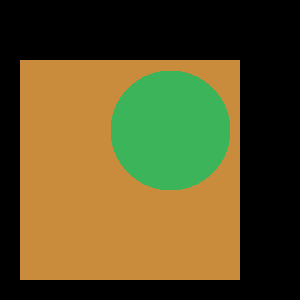
真实演示图(两图合并):
| 输入1 | 输入2 | 输出(OR) |
|---|---|---|
|
 |
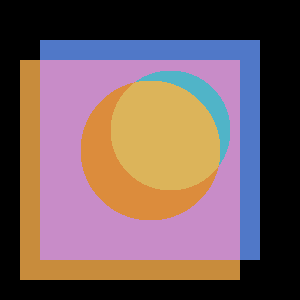 |
两图中任一可见的区域都被合并保留,只有两图都是黑的区域才为黑。
第 4 课 · 图像混合(cv2.addWeighted)
概念
- 图像混合 :把两个图像的对应像素值按权重相加,生成新图像
- 用处:让两图内容同时出现在输出里(叠加/透明效果)
- 公式:
输出 = alpha × img1 + beta × img2 + gamma
函数签名
python
cv2.addWeighted(src1, alpha, src2, beta, gamma)| 参数 | 含义 |
|---|---|
src1 / src2 |
两个输入图像 |
alpha |
src1 的权重(通常 0~1) |
beta |
src2 的权重(通常 0~1) |
gamma |
加到所有像素的静态权值 |
通常
alpha + beta = 1。两图尺寸必须一致。
完整代码(image_blending.py)
python
import cv2

image_path1 = "../data/horse.jpg"
image_path2 = "../data/horse1.jpg"

image_one = cv2.imread(image_path1)
image_two = cv2.imread(image_path2)

print("image1 shape:", image_one.shape)   # (360, 540, 3)
print("image2 shape:", image_two.shape)   # 尺寸不同!

# 若两图尺寸不同,先把 img2 缩放到 img1 尺寸
height, width, channels = image_one.shape
image_two = cv2.resize(image_two, (width, height))

blend_image = cv2.addWeighted(image_one, 0.5, image_two, 0.5, 0)

cv2.imshow("image_one", image_one)
cv2.imshow("image_two", image_two)
cv2.imshow("blend image", blend_image)
cv2.waitKey(0)
cv2.destroyAllWindows()
要点
alpha=0.5, beta=0.5→ 两图各占一半透明叠加- 调 beta :
beta=0.1→ 图2 很淡;beta=0→ 图2 完全消失 - 尺寸不同要先 resize (用
cv2.resize(image_two, (width, height))),否则抛错
#mermaid-svg-f1sgpg6sXftCsOcW{font-family:"trebuchet ms",verdana,arial,sans-serif;font-size:16px;fill:#333;}@keyframes edge-animation-frame{from{stroke-dashoffset:0;}}@keyframes dash{to{stroke-dashoffset:0;}}#mermaid-svg-f1sgpg6sXftCsOcW .edge-animation-slow{stroke-dasharray:9,5!important;stroke-dashoffset:900;animation:dash 50s linear infinite;stroke-linecap:round;}#mermaid-svg-f1sgpg6sXftCsOcW .edge-animation-fast{stroke-dasharray:9,5!important;stroke-dashoffset:900;animation:dash 20s linear infinite;stroke-linecap:round;}#mermaid-svg-f1sgpg6sXftCsOcW .error-icon{fill:#552222;}#mermaid-svg-f1sgpg6sXftCsOcW .error-text{fill:#552222;stroke:#552222;}#mermaid-svg-f1sgpg6sXftCsOcW .edge-thickness-normal{stroke-width:1px;}#mermaid-svg-f1sgpg6sXftCsOcW .edge-thickness-thick{stroke-width:3.5px;}#mermaid-svg-f1sgpg6sXftCsOcW .edge-pattern-solid{stroke-dasharray:0;}#mermaid-svg-f1sgpg6sXftCsOcW .edge-thickness-invisible{stroke-width:0;fill:none;}#mermaid-svg-f1sgpg6sXftCsOcW .edge-pattern-dashed{stroke-dasharray:3;}#mermaid-svg-f1sgpg6sXftCsOcW .edge-pattern-dotted{stroke-dasharray:2;}#mermaid-svg-f1sgpg6sXftCsOcW .marker{fill:#333333;stroke:#333333;}#mermaid-svg-f1sgpg6sXftCsOcW .marker.cross{stroke:#333333;}#mermaid-svg-f1sgpg6sXftCsOcW svg{font-family:"trebuchet ms",verdana,arial,sans-serif;font-size:16px;}#mermaid-svg-f1sgpg6sXftCsOcW p{margin:0;}#mermaid-svg-f1sgpg6sXftCsOcW .label{font-family:"trebuchet ms",verdana,arial,sans-serif;color:#333;}#mermaid-svg-f1sgpg6sXftCsOcW .cluster-label text{fill:#333;}#mermaid-svg-f1sgpg6sXftCsOcW .cluster-label span{color:#333;}#mermaid-svg-f1sgpg6sXftCsOcW .cluster-label span p{background-color:transparent;}#mermaid-svg-f1sgpg6sXftCsOcW .label text,#mermaid-svg-f1sgpg6sXftCsOcW span{fill:#333;color:#333;}#mermaid-svg-f1sgpg6sXftCsOcW .node rect,#mermaid-svg-f1sgpg6sXftCsOcW .node circle,#mermaid-svg-f1sgpg6sXftCsOcW .node ellipse,#mermaid-svg-f1sgpg6sXftCsOcW .node polygon,#mermaid-svg-f1sgpg6sXftCsOcW .node path{fill:#ECECFF;stroke:#9370DB;stroke-width:1px;}#mermaid-svg-f1sgpg6sXftCsOcW .rough-node .label text,#mermaid-svg-f1sgpg6sXftCsOcW .node .label text,#mermaid-svg-f1sgpg6sXftCsOcW .image-shape .label,#mermaid-svg-f1sgpg6sXftCsOcW .icon-shape .label{text-anchor:middle;}#mermaid-svg-f1sgpg6sXftCsOcW .node .katex path{fill:#000;stroke:#000;stroke-width:1px;}#mermaid-svg-f1sgpg6sXftCsOcW .rough-node .label,#mermaid-svg-f1sgpg6sXftCsOcW .node .label,#mermaid-svg-f1sgpg6sXftCsOcW .image-shape .label,#mermaid-svg-f1sgpg6sXftCsOcW .icon-shape .label{text-align:center;}#mermaid-svg-f1sgpg6sXftCsOcW .node.clickable{cursor:pointer;}#mermaid-svg-f1sgpg6sXftCsOcW .root .anchor path{fill:#333333!important;stroke-width:0;stroke:#333333;}#mermaid-svg-f1sgpg6sXftCsOcW .arrowheadPath{fill:#333333;}#mermaid-svg-f1sgpg6sXftCsOcW .edgePath .path{stroke:#333333;stroke-width:2.0px;}#mermaid-svg-f1sgpg6sXftCsOcW .flowchart-link{stroke:#333333;fill:none;}#mermaid-svg-f1sgpg6sXftCsOcW .edgeLabel{background-color:rgba(232,232,232, 0.8);text-align:center;}#mermaid-svg-f1sgpg6sXftCsOcW .edgeLabel p{background-color:rgba(232,232,232, 0.8);}#mermaid-svg-f1sgpg6sXftCsOcW .edgeLabel rect{opacity:0.5;background-color:rgba(232,232,232, 0.8);fill:rgba(232,232,232, 0.8);}#mermaid-svg-f1sgpg6sXftCsOcW .labelBkg{background-color:rgba(232, 232, 232, 0.5);}#mermaid-svg-f1sgpg6sXftCsOcW .cluster rect{fill:#ffffde;stroke:#aaaa33;stroke-width:1px;}#mermaid-svg-f1sgpg6sXftCsOcW .cluster text{fill:#333;}#mermaid-svg-f1sgpg6sXftCsOcW .cluster span{color:#333;}#mermaid-svg-f1sgpg6sXftCsOcW div.mermaidTooltip{position:absolute;text-align:center;max-width:200px;padding:2px;font-family:"trebuchet ms",verdana,arial,sans-serif;font-size:12px;background:hsl(80, 100%, 96.2745098039%);border:1px solid #aaaa33;border-radius:2px;pointer-events:none;z-index:100;}#mermaid-svg-f1sgpg6sXftCsOcW .flowchartTitleText{text-anchor:middle;font-size:18px;fill:#333;}#mermaid-svg-f1sgpg6sXftCsOcW rect.text{fill:none;stroke-width:0;}#mermaid-svg-f1sgpg6sXftCsOcW .icon-shape,#mermaid-svg-f1sgpg6sXftCsOcW .image-shape{background-color:rgba(232,232,232, 0.8);text-align:center;}#mermaid-svg-f1sgpg6sXftCsOcW .icon-shape p,#mermaid-svg-f1sgpg6sXftCsOcW .image-shape p{background-color:rgba(232,232,232, 0.8);padding:2px;}#mermaid-svg-f1sgpg6sXftCsOcW .icon-shape .label rect,#mermaid-svg-f1sgpg6sXftCsOcW .image-shape .label rect{opacity:0.5;background-color:rgba(232,232,232, 0.8);fill:rgba(232,232,232, 0.8);}#mermaid-svg-f1sgpg6sXftCsOcW .label-icon{display:inline-block;height:1em;overflow:visible;vertical-align:-0.125em;}#mermaid-svg-f1sgpg6sXftCsOcW .node .label-icon path{fill:currentColor;stroke:revert;stroke-width:revert;}#mermaid-svg-f1sgpg6sXftCsOcW :root{--mermaid-font-family:"trebuchet ms",verdana,arial,sans-serif;} 混合图像
cv2.addWeighted
两个输入图像(先 resize 对齐尺寸)
image_one
horse.jpg
image_two
horse1.jpg
输出 = α·img1 + β·img2 + γ
(α=0.5, β=0.5, γ=0)
两图各占 50% 半透明叠加
真实演示图(50% 加权混合):
| 输入1 (α=0.5) | 输入2 (β=0.5) | 输出(混合) |
|---|---|---|
|
|
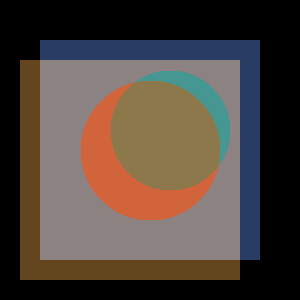 |
两图各贡献 50%,两个场景内容都能看到(半透明叠加)。
本章小结(速查表)
| 运算 | 函数 | 真值逻辑 | 用途 |
|---|---|---|---|
| NOT | cv2.bitwise_not(src) |
0↔1 | 反色 |
| AND | cv2.bitwise_and(s1, s2) |
都>0 才真 | 掩码/抠局部 |
| OR | cv2.bitwise_or(s1, s2) |
任一>0 即真 | 合并区域 |
| 混合 | cv2.addWeighted(s1,a,s2,b,γ) |
加权相加 | 图像叠加 |
核心易错点
- 位运算输入尺寸必须相同(不同会抛错)
- 颜色/像素都是 BGR,位运算是逐像素的
addWeighted的 alpha+beta 通常=1,gamma 加在全体像素上- 混合前若两图尺寸不同,先
cv2.resize对齐