1.制作选项的UI
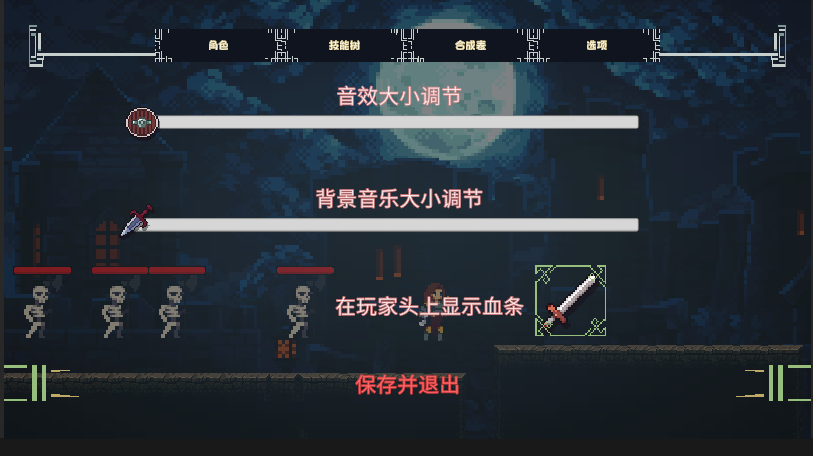
两个滑块和两个按钮,在玩家头上显示血条的按钮需要绑定函数,用来激活玩家头上的血条对象
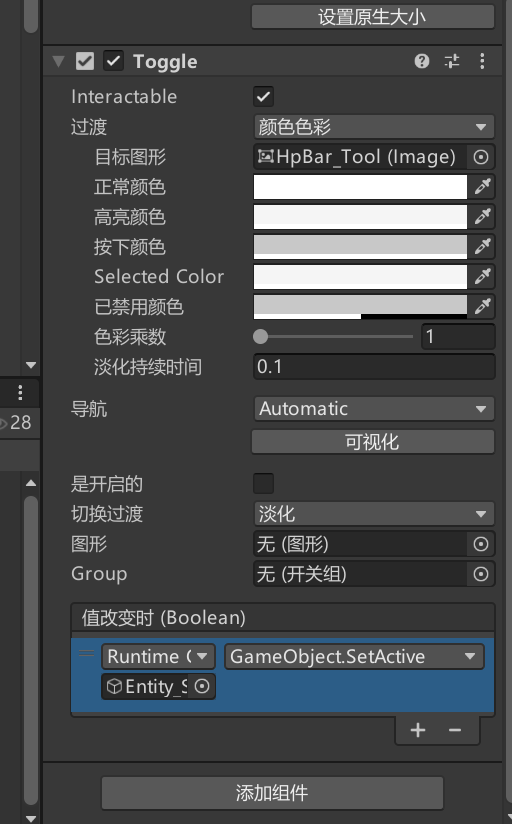 删除Button组件添加Toogle当被点击时调用血条setactive
2.修改提示工具的显示
创建UI_ToolTip脚本:
SerializeField private float xLimit=960;
SerializeField private float yLimit=540;
SerializeField private float xOffest=150;
SerializeField private float yOffest=150;
SerializeField public int DefaultFontSize;
protected virtual void AdjustToolPosition()//和之前调整位置的方法一致
{
Vector2 mousePosition = Input.mousePosition;
float newxOffest = 0;
float newyOffest = 0;
if (mousePosition.x > xLimit)
{
newxOffest = -xOffest;
}
else
newxOffest = xOffest;
if (mousePosition.y > yLimit)
{
newyOffest = -yOffest;
}
else
{
newyOffest = yOffest;
}
transform.position = new Vector2(mousePosition.x + newxOffest, mousePosition.y + newyOffest);
}
protected virtual void AdjustFontSize(TextMeshProUGUI _text)//设置文本大小,防止过大
{
if(_text.text.Length>12)
{
_text.fontSize =_text.fontSize*.8f;
}
}
UI_SkillToolTip脚本:
public class UI_SkillToolTip : UI_ToolTip//继承
SerializeField private TextMeshProUGUI skillCost;//设置价格的文本
public void ShowSkillToolTip(string _description,string _skillName,string _skillCost)
{
skillName.text = _skillName;
skillDescription.text = _description;
skillCost.text = "花费灵魂: "+_skillCost;
AdjustToolPosition();//设置
AdjustFontSize(skillName);
gameObject.SetActive(true);
}
public void HideSkillToolTip()
{
skillName.fontSize = DefaultFontSize;//恢复默认文本
gameObject.SetActive(false);
}
UI_ItemTip脚本:
public void ShowToolTip(ItemData_Equipment item)
{
if (item == null) return;
itemStringName.text = item.ItemName;
itemTypeName.text = item.equipmentType.ToString();
itemDescription.text = item.GetDescription();
AdjustFontSize(itemTypeName);//同样,物品提示框
AdjustToolPosition();
gameObject.SetActive(true);
}
ItemEffect脚本:
TextArea
public string itemEffectDescription;//为每个独特效果添加描述
for(int i=0;i<itemEffects.Length;i++)//描述显示
{
if (itemEffectsi.itemEffectDescription.Length>0)
{
sb.AppendLine();
sb.Append("独特效果:"+ itemEffectsi.itemEffectDescription);
DescriptionLength++;
}
}
UI_StatToolTip脚本:
public void ShowStatToolTip(string _text)
{
statDescription.text = _text;
AdjustToolPosition();//调整状态提示框的位置
gameObject.SetActive(true);
}
3.制作存储系统
创建GameData脚本:
System.Serializable
public class GameData
{
public int currency;//储存当前的游戏数据
public GameData()
{
this.currency = 0;
}
}
创建ISaveManager脚本:
public interface ISaveManager //接口
{
void LoadDate(GameData gameData);
void SaveDate(ref GameData gameData);
}
创建FileDataHandler脚本:
public class FileDataHandler
{
private string dataDirPath = "";//路径
private string FileName = "";//文件名称
public FileDataHandler(string _dataDirPath, string _fileName)
{
dataDirPath = _dataDirPath;
FileName = _fileName;
}
public void Save(GameData data)
{
string fullPath = Path.Combine(dataDirPath, FileName);//合并路径
try
{
Directory.CreateDirectory(Path.GetDirectoryName(fullPath));//创建目录
string dataToStore = JsonUtility.ToJson(data);//转化数据为json
using (FileStream stream = new FileStream(fullPath, FileMode.Create))
{
using (StreamWriter writer = new StreamWriter(stream))
{
writer.Write(dataToStore);//写入数据
}
}
}
catch (Exception e)
{
Debug.LogError(e.Message);
}
}
public GameData Load()
{
string fullPath =Path.Combine(dataDirPath, FileName);
GameData loadData = null;
if(File.Exists(fullPath))//如果存在文件
{
string dataToload = " ";
try
{
using (FileStream stream = new FileStream(fullPath, FileMode.Open))
{
using(StreamReader reader = new StreamReader(stream))
{
dataToload = reader.ReadToEnd();//写入文本
}
}
}
catch (Exception e)
{
Debug.LogError(e.Message);
}
loadData = JsonUtility.FromJson<GameData>(dataToload);反json化
}
return loadData;
}
创建SaveManager脚本:
public static SaveManager instance;//单例化处理
SerializeField private string fileName;
private GameData gameData;//游戏数据
private List<ISaveManager> saveManagers ;//所有保存管理器
private FileDataHandler dataHandler;//数据处理器
private void Awake()
{
if (instance != null)
{
Destroy(gameObject);
}
else
{
instance = this;
}
}
void Start()
{
saveManagers = FindAllSaveManagers();//初始化
dataHandler = new FileDataHandler(Application.persistentDataPath, fileName);//设置Window的默认文件位置来储存文件
LoadData();
}
public void NewGame()//初始化数据
{
gameData =new GameData();
}
public void LoadData()//加载
{
gameData = dataHandler.Load();
if(this.gameData==null)
{
NewGame();
}
foreach (ISaveManager manager in saveManagers)//依次处理所有实现了接口的函数
{
manager.LoadDate(gameData);
}
}
public void SaveData()
{
foreach (ISaveManager manager in saveManagers)//同理
{
manager.SaveDate(ref gameData);//引用可以修改
}
dataHandler.Save(gameData);
}
private void OnApplicationQuit()//退出播放模式自动保存
{
SaveData();
}
private List<ISaveManager> FindAllSaveManagers()//获取所有实现接口的管理器
{
IEnumerable<ISaveManager> saveManagers =FindObjectsOfType<MonoBehaviour>().OfType<ISaveManager>();
return new List<ISaveManager>(saveManagers);
}
PlayerManage脚本:
实现ISaveManager接口
public void LoadDate(GameData gameData)//加载货币和保存货币
{
this.currency = gameData.currency;
}
public void SaveDate(ref GameData gameData)
{
gameData.currency = this.currency;
}