1.相机数据封装
这里以大恒的水星相机为例,下图是相机回调委托定义:

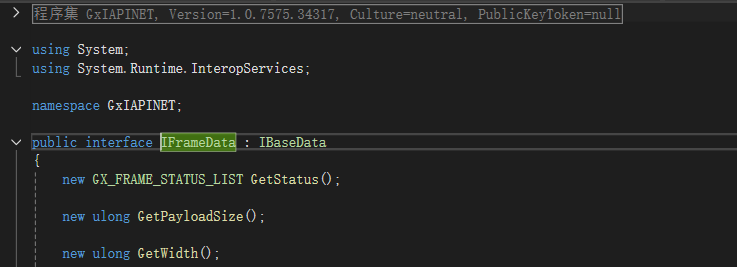
1).定义相机数据实体
cs
public class ImageData
{
    public IntPtr GrayPixel { get; set; }

    public int Width { get; set; }

    public int Height { get; set; }
}
其中GrayPixel 表示相机图像数据,是指向字节数组的指针;Width和Height分别表示图像的宽度和高度;
2).填充相机数据实体
cs
 //IFrameData data
//data是大恒相机回调方法的参数
var w = data.GetWidth();
var h = data.GetHeight();
//定义字节数组接受相机数据
byte[]  imgbuffer = new byte[w * h];
//赋值
Marshal.Copy(data.GetBuffer(), imgbuffer, 0, (int)(imgw * imgh));
var imageData = new ImageData()
{
    //获得一个数组的第某个元素的内存地址
    GrayPixel = Marshal.UnsafeAddrOfPinnedArrayElement(imgbuffer, 0),
    Width = (int)w ,
    Height =(int)h
};
2.利用映射内存生成位图数据
cs
 /// <summary>
 /// 图像source
 /// </summary>
 private InteropBitmap iBitmap;

 /// <summary>
 /// 图像数据
 /// </summary>
 private IntPtr iBitmapData;

 /// <summary>
 /// 映射文件句柄
 /// </summary>
 private IntPtr bitmapSection;

//Alpha通道数据指针
private IntPtr oneChannelAlpha;
/// <summary>
/// 控件对象
/// </summary>
internal Image imageHost;

/// <summary>
/// 生成映射文件然后转换为WPF支持的位图
/// </summary>
/// <param name="width"></param>
/// <param name="height"></param>
private void CreateInteropBitmap(int width, int height)
{
    if (iBitmapData != IntPtr.Zero)
    {
        UnmapViewOfFile(iBitmapData);
        iBitmapData = IntPtr.Zero;
    }
    if (bitmapSection != IntPtr.Zero)
    {
        CloseHandle(bitmapSection);
        bitmapSection = IntPtr.Zero;
    }
    //目前仅仅是灰度图像,这里把容量*4,为待会儿转换为bgra做准备
    var imageSize = (uint)(width * height * 4);
    // 获取文件映像对象句柄
    bitmapSection = CreateFileMapping(new IntPtr(-1), IntPtr.Zero, 0x04, 0, imageSize, null);
    //非托管资源gc获取不到数据
    //GCHandle handle = GCHandle.FromIntPtr(bitmapSection);
    // 将内存映射文件映射到进程的虚拟地址中,iBitmapData 现在指向可读写的内存区域
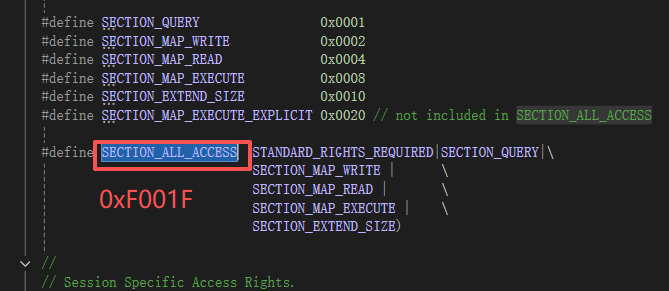
    iBitmapData = MapViewOfFile(bitmapSection, 0xF001F, 0, 0, imageSize);
    //从非托管内存获取位图,把共享内存中的数组转换为图片
    iBitmap = Imaging.CreateBitmapSourceFromMemorySection(bitmapSection, width, height, PixelFormats.Pbgra32, width * 4, 0) as InteropBitmap;
}


 #region DllImport
 [DllImport("msvcrt.dll", EntryPoint = "memcpy", CallingConvention = CallingConvention.Cdecl, SetLastError = false)]
 internal static extern unsafe IntPtr memcpy(IntPtr dst, IntPtr src, int count);

 [DllImport("msvcrt.dll", EntryPoint = "memset", CallingConvention = CallingConvention.Cdecl, SetLastError = false)]
 internal static extern void memset(IntPtr dst, int filler, int count);

 [DllImport("Simd.dll", EntryPoint = "SimdInterleaveBgra", PreserveSig = false)]
 internal static extern void SimdInterleaveBgra(IntPtr b, uint bStride, IntPtr g, uint gStride, IntPtr r, uint rStride, IntPtr a, uint aStride, uint width, uint height, IntPtr bgra, uint bgraStride);

 [DllImport("Simd.dll", EntryPoint = "SimdBayerToBgra", PreserveSig = false)]
 internal static extern void SimdBayerToBgra(IntPtr bayer, uint width, uint height, uint bayerStride, SimdPixelFormatType format, IntPtr bgra, uint bgraStride, byte alpha);

 [DllImport("Simd.dll", EntryPoint = "SimdDeinterleaveBgr", PreserveSig = false)]
 internal static extern void SimdDeinterleaveBgr(IntPtr bgr, uint bgrStride, uint width, uint height, IntPtr b, uint bStride, IntPtr g, uint gStride, IntPtr r, uint rStride);

 [DllImport("Simd.dll")]
 private static extern IntPtr SimdAllocate(uint size, uint align);

 [DllImport("Simd.dll")]
 private static extern void SimdFree(IntPtr ptr);

 // some ideas/code borowed from CL NUI sample CLNUIImage.cs
 [DllImport("kernel32.dll", CharSet = CharSet.Unicode)]
 private static extern IntPtr CreateFileMapping(IntPtr hFile, IntPtr lpFileMappingAttributes, uint flProtect, uint dwMaximumSizeHigh, uint dwMaximumSizeLow, string lpName);
 [DllImport("kernel32.dll")]
 private static extern IntPtr MapViewOfFile(IntPtr hFileMappingObject, uint dwDesiredAccess, uint dwFileOffsetHigh, uint dwFileOffsetLow, uint dwNumberOfBytesToMap);
 [DllImport("kernel32.dll")]
 private static extern bool UnmapViewOfFile(IntPtr hMap);
 [DllImport("kernel32.dll")]
 private static extern bool CloseHandle(IntPtr hHandle);
cs
 //映射文件和位图处理
 CreateInteropBitmap(width, height);
 if (oneChannelAlpha != IntPtr.Zero)
 {
     Marshal.FreeHGlobal(oneChannelAlpha);
 }
 //申请内存
 oneChannelAlpha = Marshal.AllocHGlobal(width * height);
 //给每个字节赋值255
 memset(oneChannelAlpha, 255, width * height);
 //iBitmapData 在CreateInteropBitmap方法中已经指向了bgra图像数据
 var pixelData = iBitmapData;
 //将 8 位蓝色、绿色、红色和 Alpha 平面图像交错合并为一个 32 位 BGRA 交错图像。
 //imageData是图像数据实体里面的指针:GrayPixel
 SimdInterleaveBgra(imageData, (uint)width, imageData, (uint)width, imageData, (uint)width, oneChannelAlpha, (uint)width, (uint)width, (uint)height, pixelData , (uint)width * 4);

 if (imageHost.Source != iBitmap)
 {
     imageHost.Source = iBitmap;
 }
 //触发图像绘制
 iBitmap.Invalidate();
tips:
调用dll的小知识:
以CreateFileMapping为例,原型:
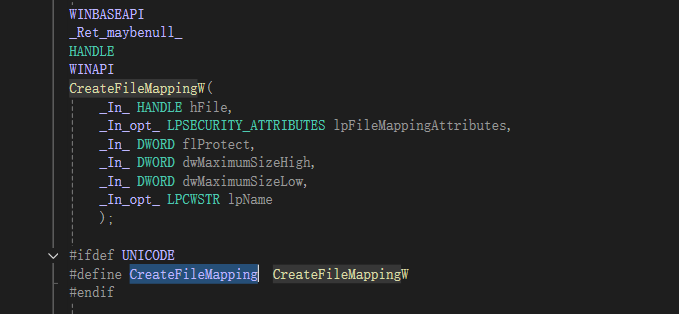
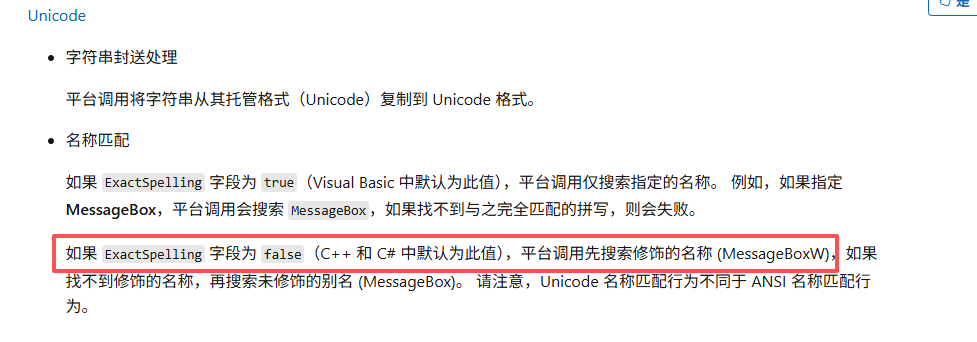
因为调用的时候指定了Unicode,所以在C#中才可以使用CreateFileMapping而不是CreateFileMappingW。
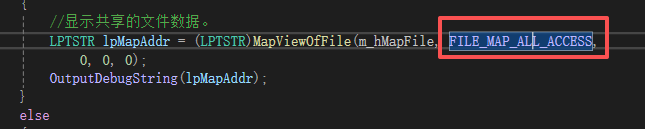
C#引用时方法参数也是根据原型中定义的枚举设置的:

感觉图像处理的话C++要比C#方便一点。
引用: