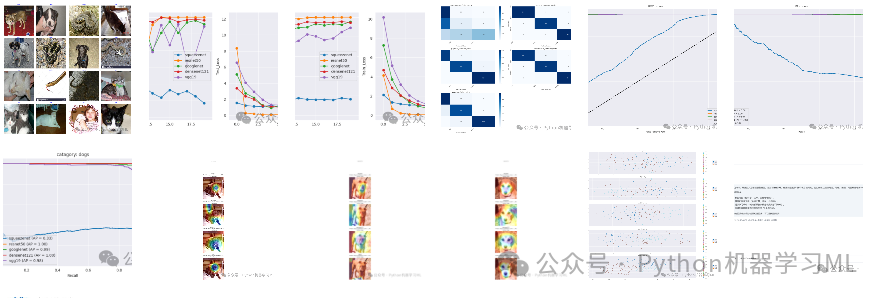
论文示例
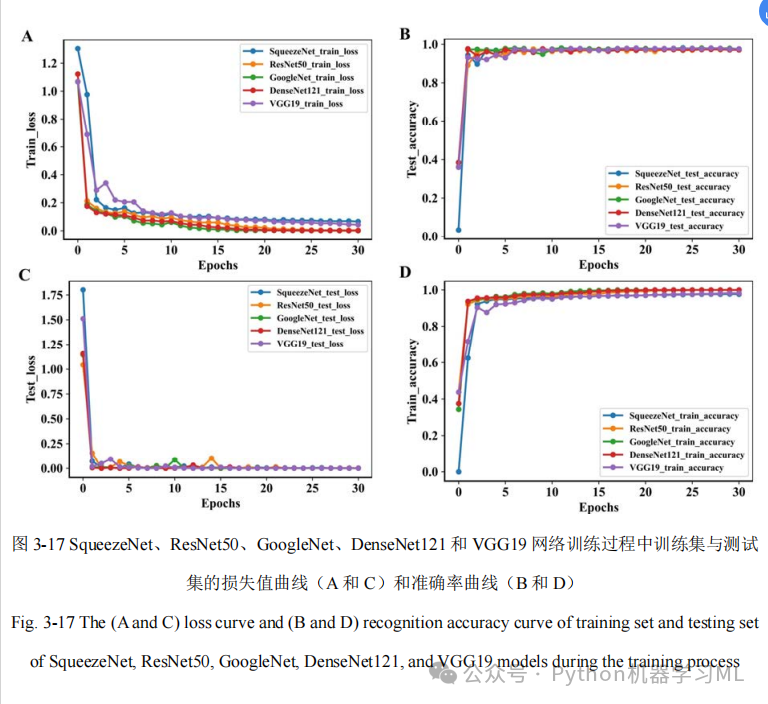
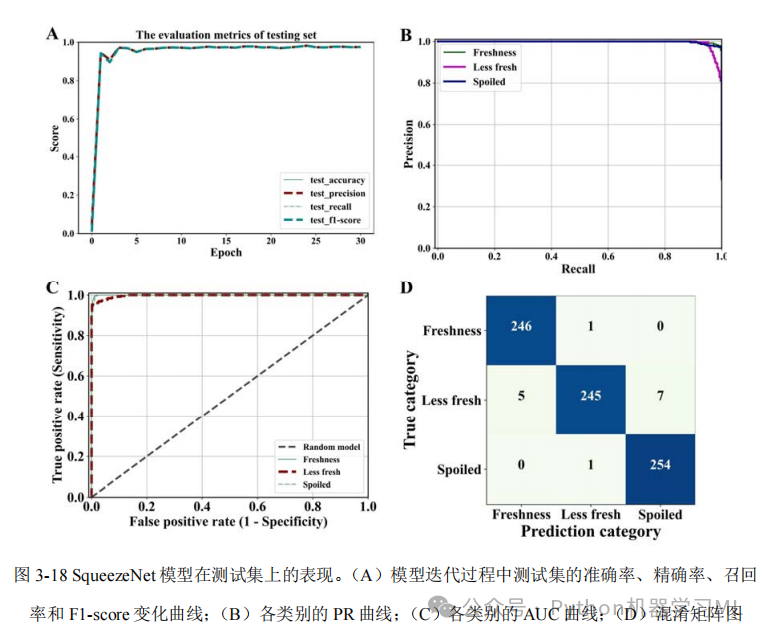
项目流程
该项目旨在对动物图像进行分类,并通过对比多种深度学习模型的性能,深入分析不同模型在图像分类任务上的优劣。项目流程可概括为:数据准备、模型构建与训练、性能评估与对比分析、高级可视化分析。
1. 数据准备与加载:
项目从指定目录加载动物图像数据集,并划分为训练集、验证集和测试集。利用ImageDataGenerator对图像进行批量处理,包括将图像大小统一调整为224x224像素,以及其他数据增强操作(未在摘要中明确提及,但通常ImageDataGenerator会包含数据增强)。
2. 模型构建与训练:
项目实现了多个深度学习模型,涵盖自定义模型和预训练模型:
-
自定义模型:
SqueezeNet (简化版)
-
预训练模型:
ResNet50, GoogLeNet/InceptionV3, DenseNet121, VGG19
为了提升模型的泛化能力和稳定性,代码中应用了多种正则化技术,例如:
-
批归一化 (Batch Normalization)
-
Dropout
-
L2权重正则化
优化器采用学习率衰减策略,所有模型均训练20个轮次。
3. 性能评估与对比分析:
项目采用多种指标全面评估模型性能:
-
准确率 (Accuracy)
-
精确率 (Precision)
-
召回率 (Recall)
-
F1分数 (F1-score)
-
AUC值 (Area Under the Curve)
通过以下可视化手段进行模型性能的对比分析:
-
训练过程中的准确率和损失函数曲线
-
混淆矩阵热力图
-
ROC曲线 (Receiver Operating Characteristic curve)
-
PR曲线 (Precision-Recall curve),包括总体PR曲线和每个类别的单独PR曲线。
4. 高级可视化分析:
为了深入理解模型的决策过程,项目采用了高级可视化技术:
-
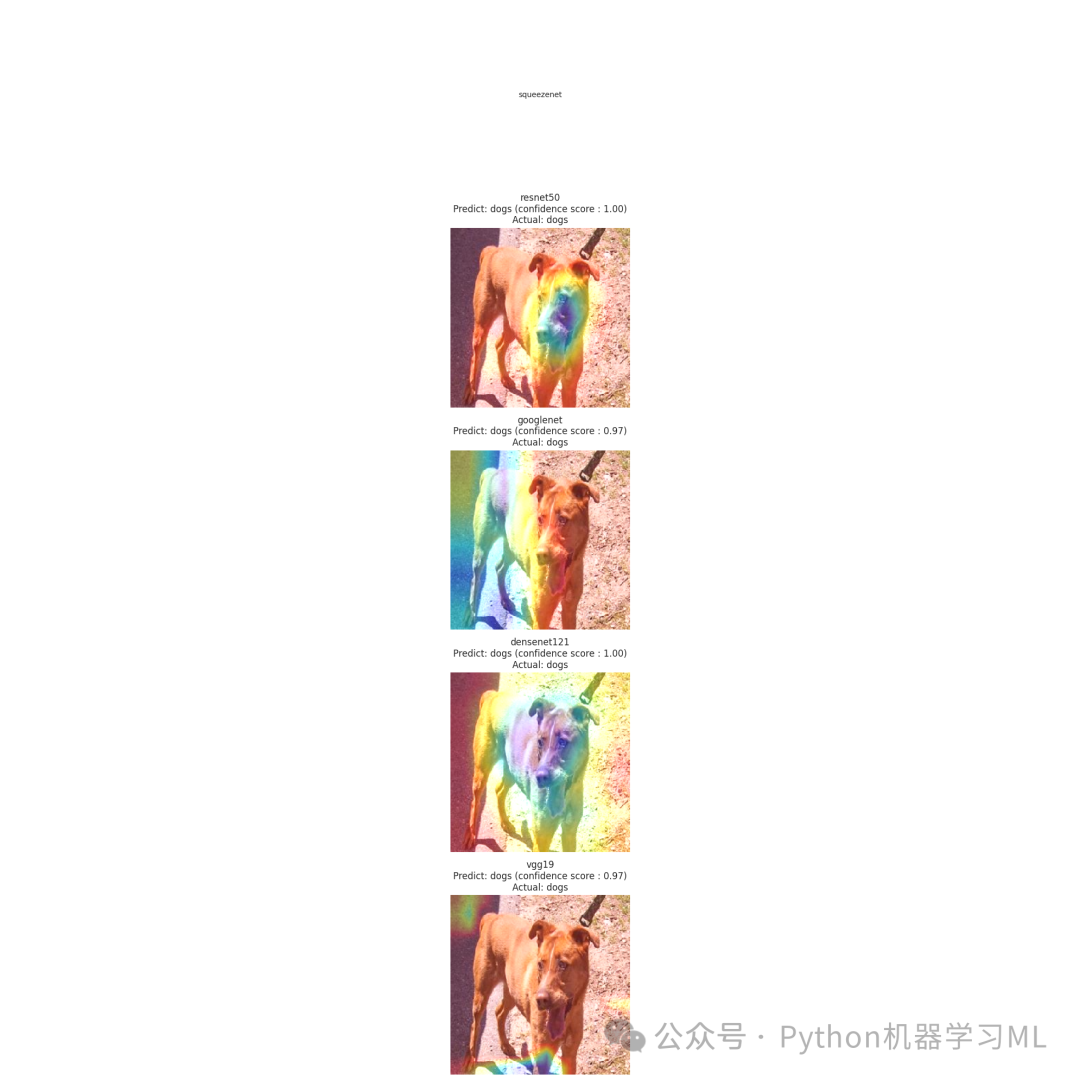
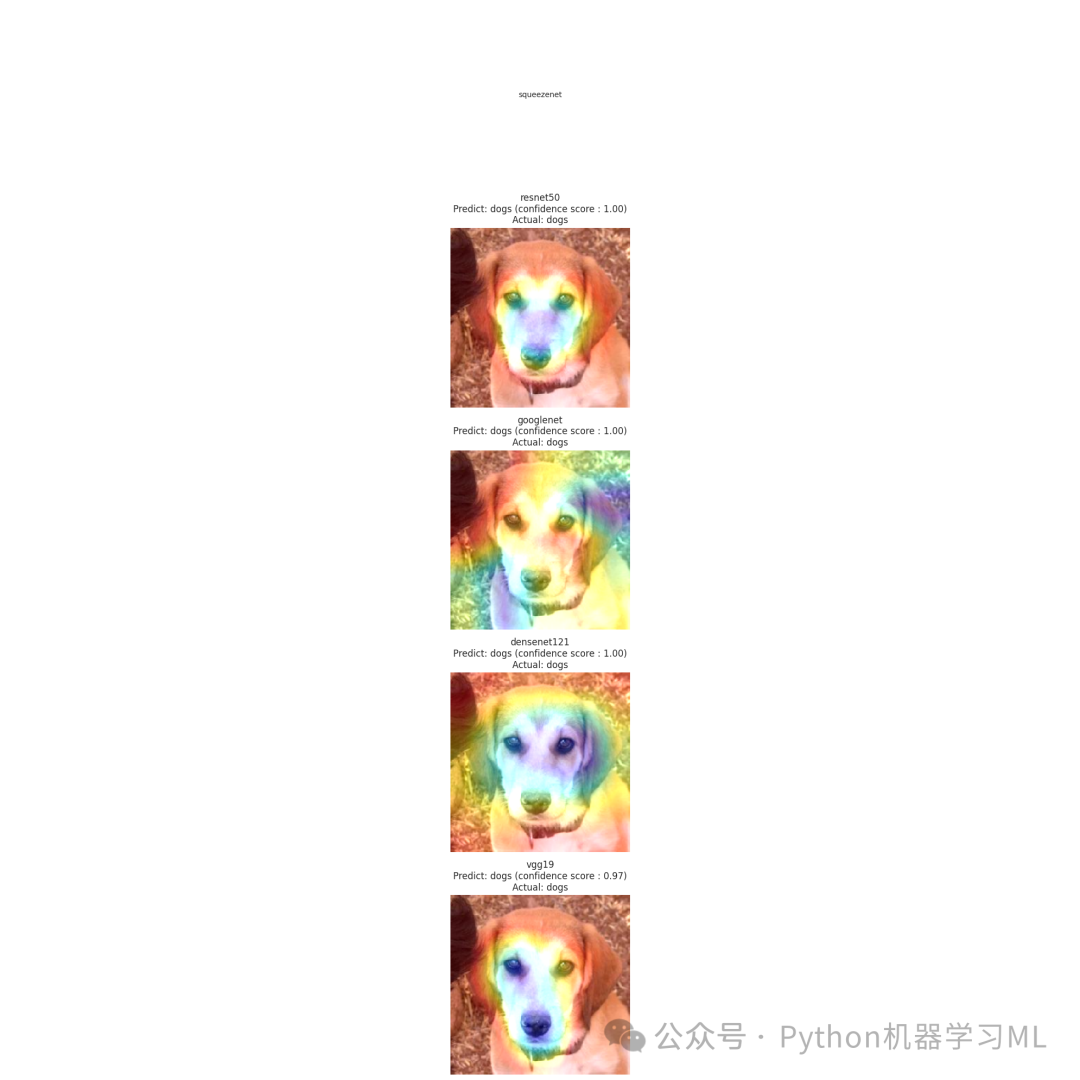
Grad-CAM (Gradient-weighted Class Activation Mapping):
可视化模型关注的图像区域,解释模型判断依据。
-
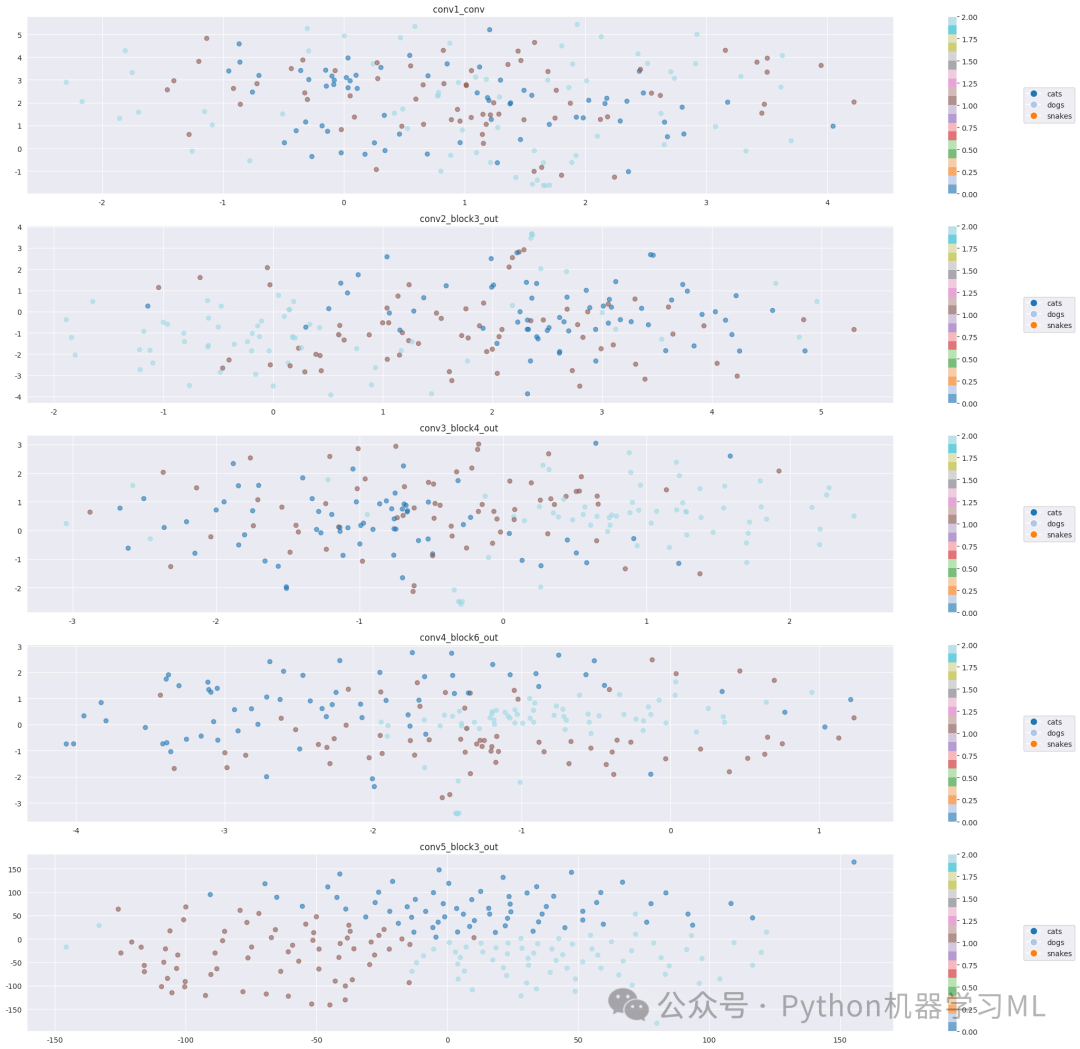
t-SNE (t-distributed Stochastic Neighbor Embedding):
对ResNet50的不同卷积层特征进行降维可视化,观察特征的抽象程度变化,了解模型如何逐步提取图像特征。
第一阶段:导入必要的库和模块
# 导入系统库
import os # 用于操作文件和目录
import itertools # 提供高效的循环迭代工具
from PIL import Image # pillow库,用于图像处理
`
导入数据处理工具`
import numpy as np # 用于数值计算的基础库
import pandas as pd # 用于数据分析和处理的库
import seaborn as sns # 基于matplotlib的数据可视化库
sns.set_style('darkgrid') # 设置seaborn的绘图风格为darkgrid
import matplotlib.pyplot as plt # 绘图库
from sklearn.model_selection import train_test_split # 用于划分训练集和测试集
from tensorflow.keras.layers import BatchNormalization, Activation, Dropout # Keras层组件
from sklearn.metrics import confusion_matrix, classification_report # 用于模型评估的工具
`
导入深度学习库`
import tensorflow as tf # TensorFlow深度学习框架
from tensorflow import keras # Keras高级API
from tensorflow.keras.models import Sequential # 序贯模型API
from tensorflow.keras.optimizers import Adam, Adamax # 优化器
from tensorflow.keras.preprocessing.image import ImageDataGenerator # 图像数据增强工具
from tensorflow.keras.layers import Conv2D, MaxPooling2D, Flatten, Dense # 卷积神经网络的基本层
print('modules loaded') # 打印提示,表示所有模块已加载完成
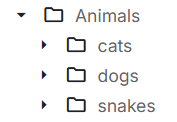
可更换为自己的数据集,数据集结构如图。这一阶段的目的是导入项目所需的所有Python库和模块。这些库涵盖了系统操作、数据处理、可视化、机器学习和深度学习等多个方面,为后续的图像分类任务提供必要的工具支持。
第二阶段:数据准备和加载
# 生成训练数据路径和标签
train_data_dir = '2025-3-18公众python机器学习ml-Animals/Animals'# 训练数据目录
filepaths = [] # 存储文件路径的列表
labels = [] # 存储标签的列表
folds = os.listdir(train_data_dir) # 获取训练数据目录下的所有文件夹(每个文件夹代表一个类别)
`
print(folds) # 打印所有类别文件夹(已注释)`
`
遍历每个类别文件夹,收集文件路径和对应标签`
for fold in folds:
foldpath = os.path.join(train_data_dir, fold) # 构建完整的文件夹路径
filelist = os.listdir(foldpath) # 获取该文件夹下的所有文件
for file in filelist:
fpath = os.path.join(foldpath, file) # 构建完整的文件路径
filepaths.append(fpath) # 添加文件路径到列表
labels.append(fold) # 添加对应的标签到列表
`
将文件路径和标签合并为一个DataFrame`
Fseries = pd.Series(filepaths, name='filepaths') # 创建文件路径Series
Lseries = pd.Series(labels, name='labels') # 创建标签Series
train_df = pd.concat([Fseries, Lseries], axis=1) # 横向合并为DataFrame
`
加载测试数据`
test_data_dir = '2025-3-18公众python机器学习ml-Animals/Animals'# 测试数据目录
filepaths = [] # 重置文件路径列表
labels = [] # 重置标签列表
folds = os.listdir(test_data_dir) # 获取测试数据目录下的所有文件夹
`
遍历每个类别文件夹,收集文件路径和对应标签`
for fold in folds:
`
构建完整的文件夹路径`
fold_path = os.path.join(test_data_dir, fold)
`
确保是目录`
if os.path.isdir(fold_path):
`
获取该文件夹下的所有文件`
file_list = os.listdir(fold_path)
for file in file_list:
`
构建完整的文件路径`
file_path = os.path.join(fold_path, file)
filepaths.append(file_path) # 添加文件路径到列表
labels.append(fold) # 添加对应的标签到列表
`
将测试数据的文件路径和标签合并为一个DataFrame`
Fseries = pd.Series(filepaths, name='filepaths') # 创建文件路径Series
Lseries = pd.Series(labels, name='labels') # 创建标签Series
test_df = pd.concat([Fseries, Lseries], axis=1) # 横向合并为DataFrame
`
将测试数据划分为验证集和测试集`
valid_df, test_df = train_test_split(test_df, train_size=0.5, shuffle=True, random_state=123) # 50%作为验证集,50%作为测试集
这一阶段的目的是准备和加载数据。代码首先从指定目录读取训练数据和测试数据,将文件路径和对应的类别标签组织成DataFrame格式。然后将测试数据进一步划分为验证集和测试集,以便在模型训练过程中进行验证和最终评估。
第三阶段:数据生成器配置
# 设置裁剪后的图像大小和批次大小
batch_size = 32# 每批处理32张图像
img_size = (224, 224) # 图像调整为224x224像素
`
创建用于训练、验证和测试的ImageDataGenerator`
tr_gen = ImageDataGenerator() # 训练数据生成器,不进行数据增强
ts_gen = ImageDataGenerator() # 测试数据生成器,不进行数据增强
`
从DataFrame创建训练数据生成器`
train_gen = tr_gen.flow_from_dataframe(
train_df, # 训练数据DataFrame
x_col='filepaths', # 文件路径列名
y_col='labels', # 标签列名
target_size=img_size, # 目标图像大小
class_mode='categorical', # 多分类模式
color_mode='rgb', # RGB彩色图像
shuffle=True, # 打乱数据
batch_size=batch_size # 批次大小
)
`
从DataFrame创建验证数据生成器`
valid_gen = ts_gen.flow_from_dataframe(
valid_df, # 验证数据DataFrame
x_col='filepaths', # 文件路径列名
y_col='labels', # 标签列名
target_size=img_size, # 目标图像大小
class_mode='categorical', # 多分类模式
color_mode='rgb', # RGB彩色图像
shuffle=True, # 打乱数据
batch_size=batch_size # 批次大小
)
`
从DataFrame创建测试数据生成器`
test_gen = ts_gen.flow_from_dataframe(
test_df, # 测试数据DataFrame
x_col='filepaths', # 文件路径列名
y_col='labels', # 标签列名
target_size=img_size, # 目标图像大小
class_mode='categorical', # 多分类模式
color_mode='rgb', # RGB彩色图像
shuffle=False, # 不打乱数据,保持原顺序
batch_size=batch_size # 批次大小
)
`
获取类别信息`
g_dict = train_gen.class_indices # 获取类别索引字典,形式为{'类别名': 索引}
classes = list(g_dict.keys()) # 获取所有类别名称列表
modules loadedFound 3000 validated image filenames belonging to 3 classes.Found 1500 validated image filenames belonging to 3 classes.Found 1500 validated image filenames belonging to 3 classes.这一阶段的目的是配置数据生成器。代码使用Keras的ImageDataGenerator创建了训练、验证和测试数据的生成器,这些生成器可以从磁盘中按需加载图像,并进行必要的预处理(如调整大小、格式转换等)。这种方式可以有效处理大量图像数据,避免一次性将所有图像加载到内存中。
第四阶段:数据可视化
# 显示一些带标签的图像样本
images, labels = next(train_gen) # 获取一批训练图像和标签
plt.figure(figsize=(20, 20)) # 创建一个大的图形
`
显示16张图像`
for i inrange(16):
plt.subplot(4, 4, i + 1) # 创建4x4的子图布局
image = images[i] / 255# 将像素值缩放到0-1范围
plt.imshow(image) # 显示图像
index = np.argmax(labels[i]) # 获取标签的索引(最大值的位置)
class_name = classes[index] # 获取对应的类别名称
plt.title(class_name, color='blue', fontsize=12) # 设置标题为类别名称
plt.axis('off') # 关闭坐标轴
plt.tight_layout() # 调整子图布局
plt.show() # 显示图形
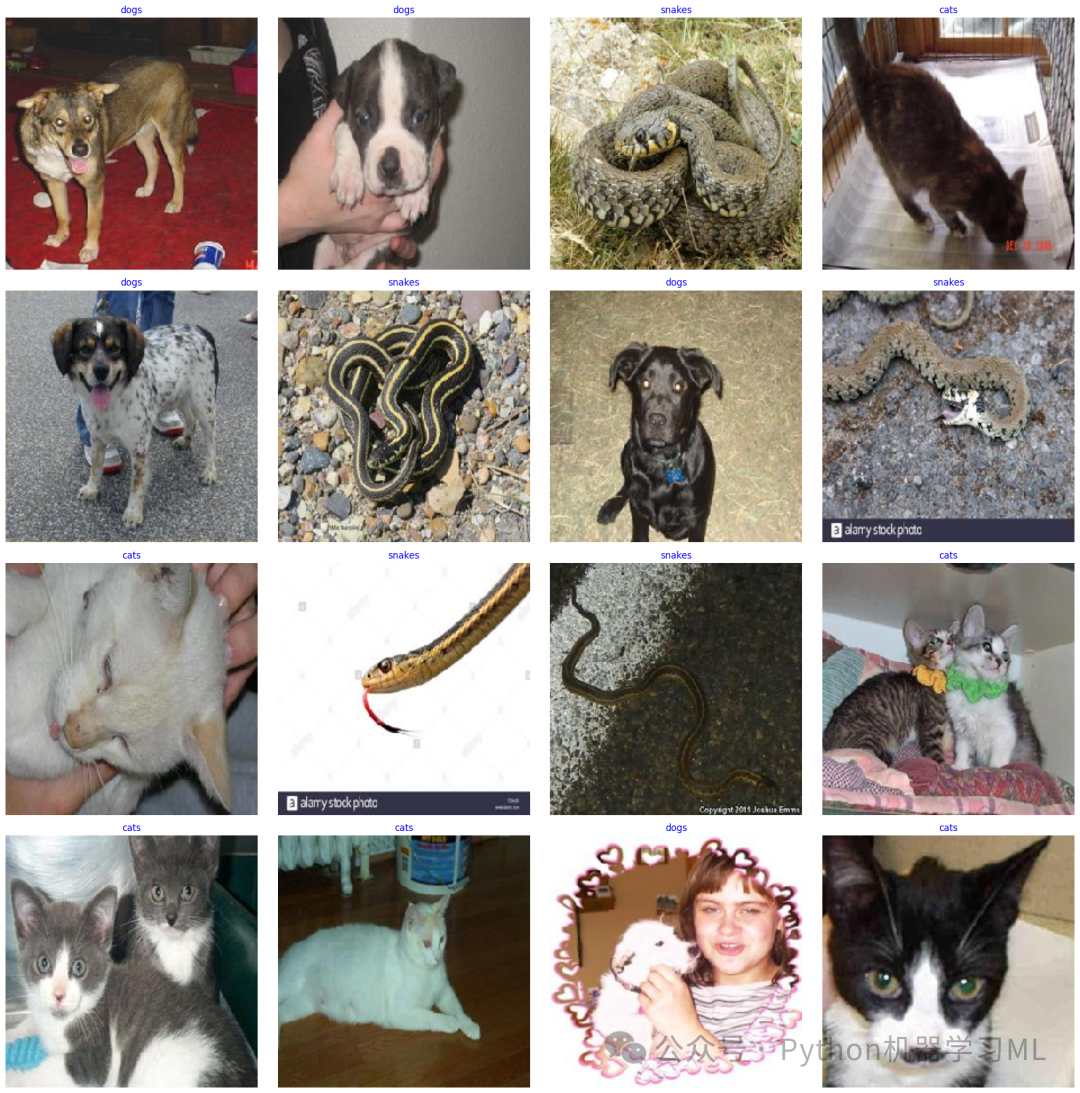
这一阶段的目的是可视化部分训练数据,以便直观了解数据集的内容。代码从训练数据生成器中获取一批图像和标签,然后以4x4的网格布局显示16张图像,每张图像上方标注其类别名称。这有助于确认数据加载正确,并了解数据集中图像的特点。
第五阶段:模型定义
from tensorflow.keras.applications import ResNet50, VGG19, DenseNet121
import tensorflow.keras.applications as apps
from tensorflow.keras.layers import GlobalAveragePooling2D
from tensorflow.keras.models import Model
defcreate_model(model_name, input_shape, num_classes):
"""
创建指定的模型架构,增加正则化以避免过拟合
Args:
model_name: 模型名称
input_shape: 输入形状
num_classes: 类别数量
Returns:
编译好的模型
"""
if model_name == 'squeezenet':
`
改进的SqueezeNet实现`
model = Sequential([
`
初始卷积层`
Conv2D(64, 3, strides=2, padding='same', input_shape=input_shape), # 第一个卷积层,64个3x3卷积核
BatchNormalization(), # 批归一化,加速训练并提高稳定性
Activation('relu'), # ReLU激活函数
Dropout(0.2), # 20%的Dropout,防止过拟合
MaxPooling2D(pool_size=3, strides=2, padding='same'), # 最大池化层
`
Fire模块 1`
Conv2D(16, 1, padding='same', kernel_regularizer=tf.keras.regularizers.l2(0.01)), # 瓶颈层,16个1x1卷积核
Activation('relu'), # ReLU激活函数
Conv2D(64, 1, padding='same', kernel_regularizer=tf.keras.regularizers.l2(0.01)), # 扩展层,64个1x1卷积核
Activation('relu'), # ReLU激活函数
Conv2D(64, 3, padding='same', kernel_regularizer=tf.keras.regularizers.l2(0.01)), # 扩展层,64个3x3卷积核
Activation('relu'), # ReLU激活函数
Dropout(0.2), # 20%的Dropout,防止过拟合
`
Fire模块 2`
Conv2D(16, 1, padding='same', kernel_regularizer=tf.keras.regularizers.l2(0.01)), # 瓶颈层,16个1x1卷积核
Activation('relu'), # ReLU激活函数
Conv2D(64, 1, padding='same', kernel_regularizer=tf.keras.regularizers.l2(0.01)), # 扩展层,64个1x1卷积核
Activation('relu'), # ReLU激活函数
Conv2D(64, 3, padding='same', kernel_regularizer=tf.keras.regularizers.l2(0.01)), # 扩展层,64个3x3卷积核
Activation('relu'), # ReLU激活函数
Dropout(0.2), # 20%的Dropout,防止过拟合
GlobalAveragePooling2D(), # 全局平均池化,减少参数量
Dense(num_classes, activation='softmax', kernel_regularizer=tf.keras.regularizers.l2(0.01)) # 输出层,使用softmax激活
])
elif model_name == 'resnet50':
`
使用预训练的ResNet50模型`
base_model = ResNet50(weights='imagenet', include_top=False, input_shape=input_shape) # 加载预训练的ResNet50
`
冻结部分基础层`
for layer in base_model.layers[:-30]: # 冻结除最后30层外的所有层
layer.trainable = False
x = GlobalAveragePooling2D()(base_model.output) # 全局平均池化
x = Dropout(0.5)(x) # 50%的Dropout,防止过拟合
x = Dense(512, activation='relu', kernel_regularizer=tf.keras.regularizers.l2(0.01))(x) # 全连接层
x = Dropout(0.3)(x) # 30%的Dropout,防止过拟合
x = Dense(num_classes, activation='softmax')(x) # 输出层,使用softmax激活
model = Model(inputs=base_model.input, outputs=x) # 创建模型
elif model_name == 'googlenet':
`
使用预训练的InceptionV3模型(GoogleNet的改进版)`
base_model = apps.InceptionV3(weights='imagenet', include_top=False, input_shape=input_shape) # 加载预训练的InceptionV3
`
冻结部分基础层`
for layer in base_model.layers[:-50]: # 冻结除最后50层外的所有层
layer.trainable = False
x = GlobalAveragePooling2D()(base_model.output) # 全局平均池化
x = Dropout(0.5)(x) # 50%的Dropout,防止过拟合
x = Dense(512, activation='relu', kernel_regularizer=tf.keras.regularizers.l2(0.01))(x) # 全连接层
x = BatchNormalization()(x) # 批归一化
x = Dropout(0.3)(x) # 30%的Dropout,防止过拟合
x = Dense(num_classes, activation='softmax')(x) # 输出层,使用softmax激活
model = Model(inputs=base_model.input, outputs=x) # 创建模型
elif model_name == 'densenet121':
`
使用预训练的DenseNet121模型`
base_model = DenseNet121(weights='imagenet', include_top=False, input_shape=input_shape) # 加载预训练的DenseNet121
`
冻结部分基础层`
for layer in base_model.layers[:-40]: # 冻结除最后40层外的所有层
layer.trainable = False
x = GlobalAveragePooling2D()(base_model.output) # 全局平均池化
x = Dropout(0.5)(x) # 50%的Dropout,防止过拟合
x = Dense(512, activation='relu', kernel_regularizer=tf.keras.regularizers.l2(0.01))(x) # 全连接层
x = BatchNormalization()(x) # 批归一化
x = Dropout(0.3)(x) # 30%的Dropout,防止过拟合
x = Dense(num_classes, activation='softmax')(x) # 输出层,使用softmax激活
model = Model(inputs=base_model.input, outputs=x) # 创建模型
elif model_name == 'vgg19':
`
使用预训练的VGG19模型`
base_model = VGG19(weights='imagenet', include_top=False, input_shape=input_shape) # 加载预训练的VGG19
`
冻结部分基础层`
for layer in base_model.layers[:-8]: # 冻结除最后8层外的所有层
layer.trainable = False
x = GlobalAveragePooling2D()(base_model.output) # 全局平均池化
x = Dropout(0.5)(x) # 50%的Dropout,防止过拟合
x = Dense(1024, activation='relu', kernel_regularizer=tf.keras.regularizers.l2(0.01))(x) # 全连接层
x = BatchNormalization()(x) # 批归一化
x = Dropout(0.4)(x) # 40%的Dropout,防止过拟合
x = Dense(512, activation='relu', kernel_regularizer=tf.keras.regularizers.l2(0.01))(x) # 全连接层
x = BatchNormalization()(x) # 批归一化
x = Dropout(0.3)(x) # 30%的Dropout,防止过拟合
x = Dense(num_classes, activation='softmax')(x) # 输出层,使用softmax激活
model = Model(inputs=base_model.input, outputs=x) # 创建模型
`
使用学习率衰减策略`
initial_learning_rate = 0.001# 初始学习率
decay_steps = 1000# 衰减步数
decay_rate = 0.9# 衰减率
learning_rate_schedule = tf.keras.optimizers.schedules.ExponentialDecay(
initial_learning_rate, decay_steps, decay_rate # 指数衰减学习率
)
`
编译模型`
model.compile(
optimizer=Adam(learning_rate=learning_rate_schedule), # Adam优化器,使用学习率衰减
loss='categorical_crossentropy', # 分类交叉熵损失函数
metrics=['accuracy'] # 使用准确率作为评估指标
)
return model
这一阶段的目的是定义不同的深度学习模型架构。代码创建了一个函数,可以根据指定的名称创建不同类型的卷积神经网络模型,包括SqueezeNet、ResNet50、GoogleNet(InceptionV3)、DenseNet121和VGG19。对于预训练模型,代码采用了迁移学习的方法,冻结部分基础层,只训练顶层和部分高级特征层,并添加了正则化技术(如Dropout、L2正则化和批归一化)以防止过拟合。
第六阶段:模型训练和评估
# 设置中文显示
plt.rcParams['font.sans-serif'] = ['SimHei'] # 设置中文字体
plt.rcParams['axes.unicode_minus'] = False# 正确显示负号
`
忽略警告`
import warnings
warnings.filterwarnings('ignore') # 忽略所有警告信息
`
创建模型列表`
model_names = ['squeezenet', 'resnet50', 'googlenet', 'densenet121', 'vgg19'] # 要训练的模型名称列表
models_history = {} # 存储每个模型的训练历史
`
训练每个模型`
for model_name in model_names:
print(f"\n训练 {model_name} 模型...") # 打印当前训练的模型名称
model = create_model(model_name, (224, 224, 3), len(classes)) # 创建模型
history = model.fit(
train_gen, # 训练数据生成器
epochs=20, # 训练20个周期
validation_data=valid_gen, # 验证数据
shuffle=False# 不再次打乱数据(数据生成器已经打乱)
)
models_history[model_name] = history # 存储训练历史
`
评估模型`
test_loss, test_accuracy = model.evaluate(test_gen) # 在测试集上评估模型
print(f"{model_name} 测试集准确率: {test_accuracy:.4f}") # 打印测试准确率
这一阶段的目的是训练和评估不同的模型。代码遍历模型名称列表,为每个模型创建相应的架构,然后使用训练数据进行训练,并在验证数据上监控性能。训练完成后,在测试集上评估模型的性能,并打印测试准确率。训练历史被存储在字典中,以便后续分析。
第七阶段:模型性能评估
# 导入性能评估工具
from sklearn.metrics import classification_report, roc_auc_score
from sklearn.preprocessing import label_binarize
from sklearn.metrics import accuracy_score, precision_score, recall_score, f1_score
`
定义一个函数来获取模型性能指标`
defget_model_performance(model, test_gen):
"""
计算模型的各项性能指标
Args:
model: 训练好的模型
test_gen: 测试数据生成器
Returns:
accuracy, precision, recall, f1, auc: 各项性能指标
"""
`
获取预测结果`
y_pred = model.predict(test_gen) # 模型预测
y_pred_classes = np.argmax(y_pred, axis=1) # 获取预测的类别索引
y_true = test_gen.classes # 获取真实的类别索引
`
将真实标签转换为one-hot编码,用于计算AUC`
y_true_bin = label_binarize(y_true, classes=range(len(test_gen.class_indices))) # 将真实标签二值化
`
计算各项指标`
accuracy = accuracy_score(y_true, y_pred_classes) # 准确率
precision = precision_score(y_true, y_pred_classes, average='macro') # 宏平均精确率
recall = recall_score(y_true, y_pred_classes, average='macro') # 宏平均召回率
f1 = f1_score(y_true, y_pred_classes, average='macro') # 宏平均F1分数
`
计算多分类AUC (one-vs-rest)`
auc = roc_auc_score(y_true_bin, y_pred, average='macro', multi_class='ovr') # 多分类ROC AUC
return accuracy, precision, recall, f1, auc
`
获取每个模型的性能指标`
model_performance = {} # 存储每个模型的性能指标
for model_name, history in models_history.items():
model = history.model # 获取训练好的模型
accuracy, precision, recall, f1, auc = get_model_performance(model, test_gen) # 计算性能指标
`
存储性能指标`
model_performance[model_name] = {
'accuracy': accuracy,
'precision': precision,
'recall': recall,
'f1': f1,
'auc': auc
}
`
将性能指标转换为DataFrame并格式化显示`
performance_df = pd.DataFrame.from_dict(model_performance, orient='index') # 创建性能指标DataFrame
performance_df = performance_df.round(4) # 保留4位小数
`
打印性能指标`
print("\n各模型性能指标对比:")
print("="*80)
print(performance_df) # 打印性能指标表格
print("\n指标说明:")
print("准确率(Accuracy): 正确预测的样本数占总样本数的比例")
print("精确率(Precision): 在所有被预测为正类的样本中,真正为正类的比例")
print("召回率(Recall): 在所有真实为正类的样本中,被正确预测为正类的比例")
print("F1分数(F1-Score): 精确率和召回率的调和平均值")
print("AUC值: ROC曲线下的面积,越接近1表示模型性能越好")
print(performance_df.to_csv("各模型性能指标对比.csv")) # 将性能指标保存为CSV文件
这一阶段的目的是全面评估每个模型的性能。代码定义了一个函数,用于计算模型在测试集上的多种性能指标,包括准确率、精确率、召回率、F1分数和AUC值。然后对每个训练好的模型应用这个函数,将结果存储在字典中,并转换为DataFrame进行格式化显示。最后,打印性能指标表格并提供指标说明,同时将结果保存为CSV文件。
第八阶段:可视化训练过程
# 绘制所有模型的对比图
plt.figure(figsize=(15, 5)) # 创建一个宽15高5的图形
`
训练集准确率对比`
plt.subplot(1, 2, 1) # 创建1行2列的子图,选择第1个
for model_name in models_history:
plt.plot(models_history[model_name].history['accuracy'], label=model_name, marker='o') # 绘制训练准确率曲线
plt.title('Training Accuracy') # 设置标题
plt.xlabel('Epochs') # 设置x轴标签
plt.ylabel('Train_Accuracy') # 设置y轴标签
plt.legend() # 显示图例
`
训练集损失值对比`
plt.subplot(1, 2, 2) # 创建1行2列的子图,选择第2个
for model_name in models_history:
plt.plot(models_history[model_name].history['loss'], label=model_name, marker='o') # 绘制训练损失曲线
plt.title('Training Loss') # 设置标题
plt.xlabel('Epochs') # 设置x轴标签
plt.ylabel('Train_Loss') # 设置y轴标签
plt.legend() # 显示图例
plt.tight_layout() # 调整子图布局
plt.show() # 显示图形
`
创建新的图形,用于验证集性能对比`
plt.figure(figsize=(15, 5)) # 创建一个宽15高5的图形
`
验证集准确率对比`
plt.subplot(1, 2, 1) # 创建1行2列的子图,选择第1个
for model_name in models_history:
plt.plot(models_history[model_name].history['val_accuracy'], label=model_name, marker='o') # 绘制验证准确率曲线
plt.title('Test Accuracy') # 设置标题
plt.xlabel('Epochs') # 设置x轴标签
plt.ylabel('Test_Accuracy') # 设置y轴标签
plt.legend() # 显示图例
`
验证集损失值对比`
plt.subplot(1, 2, 2) # 创建1行2列的子图,选择第2个
for model_name in models_history:
plt.plot(models_history[model_name].history['val_loss'], label=model_name, marker='o') # 绘制验证损失曲线
plt.title('Test Loss') # 设置标题
plt.xlabel('Epochs') # 设置x轴标签
plt.ylabel('Test_Loss') # 设置y轴标签
plt.legend() # 显示图例
plt.tight_layout() # 调整子图布局
plt.show() # 显示图形
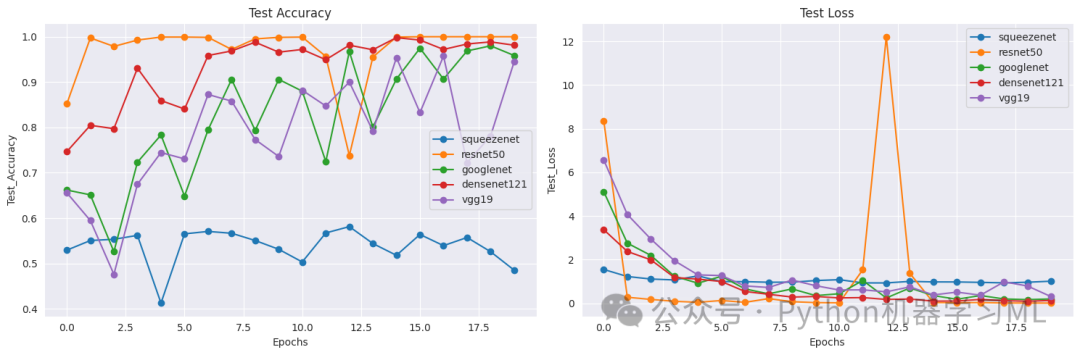
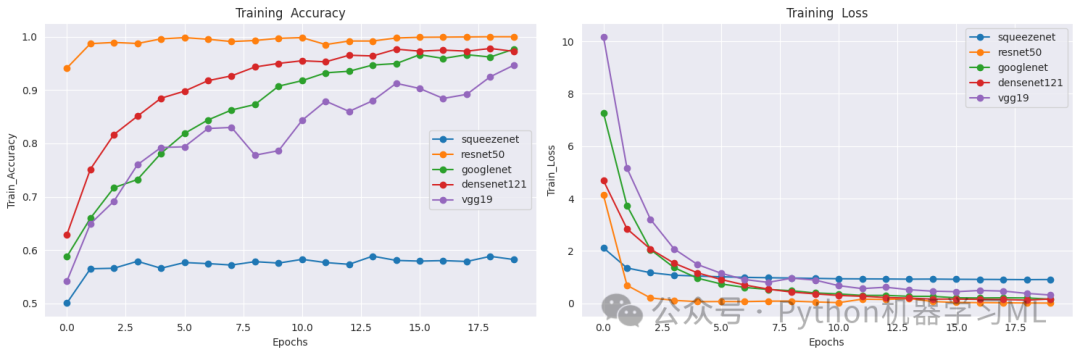
这一阶段的目的是可视化每个模型的训练过程。代码创建了两组图表:第一组显示所有模型在训练集上的准确率和损失曲线,第二组显示所有模型在验证集上的准确率和损失曲线。这些图表可以帮助我们比较不同模型的学习速度、收敛性和泛化能力,从而选择最适合的模型。每个数据点都用圆点标记,使曲线更加清晰可辨。
第九阶段:混淆矩阵分析
# 不同模型混淆矩阵热力图对比
from sklearn.metrics import confusion_matrix
`
定义一个函数来获取混淆矩阵`
defget_confusion_matrix(model, test_gen):
"""
计算模型的混淆矩阵
Args:
model: 训练好的模型
test_gen: 测试数据生成器
Returns:
cm: 混淆矩阵
"""
`
获取预测结果`
y_pred = model.predict(test_gen) # 模型预测
y_pred_classes = np.argmax(y_pred, axis=1) # 获取预测的类别索引
y_true = test_gen.classes # 获取真实的类别索引
`
计算混淆矩阵`
cm = confusion_matrix(y_true, y_pred_classes) # 使用sklearn的confusion_matrix函数
return cm
`
创建一个字典来存储所有模型`
models = {}
for model_name in model_names:
print(f"\n加载 {model_name} 模型...")
`
创建模型`
model = create_model(model_name, (224, 224, 3), len(classes))
`
加载训练好的权重`
try:
`
从models_history中获取训练好的模型`
trained_model = models_history[model_name].model
`
复制权重到新模型`
model.set_weights(trained_model.get_weights())
print(f"成功加载 {model_name} 模型权重")
except Exception as e:
print(f"加载 {model_name} 模型权重时出错: {str(e)}")
continue
`
将加载好权重的模型添加到字典中`
models[model_name] = model
`
评估模型性能`
print(f"评估 {model_name} 在测试集上的性能...")
test_loss, test_accuracy = model.evaluate(test_gen, verbose=0)
print(f"{model_name} 测试集准确率: {test_accuracy:.4f}")
`
获取每个模型的混淆矩阵`
confusion_matrices = {}
for model_name, model in models.items():
confusion_matrices[model_name] = get_confusion_matrix(model, test_gen)
`
绘制混淆矩阵热力图`
plt.figure(figsize=(20, 15)) # 创建一个大的图形
for idx, (model_name, cm) inenumerate(confusion_matrices.items(), 1):
plt.subplot(3, 2, idx) # 创建3行2列的子图布局
sns.heatmap(cm, annot=True, fmt='d', cmap='Blues') # 绘制热力图,显示数值,使用Blues配色
plt.title(f'{model_name}_confusion_matrix') # 设置标题
plt.xlabel('Predicted labels') # 设置x轴标签
plt.ylabel('True labes ') # 设置y轴标签
plt.xticks(range(len(classes)), classes, rotation=45) # 设置x轴刻度为类别名称,旋转45度
plt.yticks(range(len(classes)), classes) # 设置y轴刻度为类别名称
plt.tight_layout() # 调整子图布局
plt.show() # 显示图形
加载 squeezenet 模型...成功加载 squeezenet 模型权重评估 squeezenet 在测试集上的性能...squeezenet 测试集准确率: 0.5100加载 resnet50 模型...成功加载 resnet50 模型权重评估 resnet50 在测试集上的性能...resnet50 测试集准确率: 1.0000加载 googlenet 模型...成功加载 googlenet 模型权重评估 googlenet 在测试集上的性能...googlenet 测试集准确率: 0.9667加载 densenet121 模型...成功加载 densenet121 模型权重评估 densenet121 在测试集上的性能...densenet121 测试集准确率: 0.9813加载 vgg19 模型...成功加载 vgg19 模型权重评估 vgg19 在测试集上的性能...vgg19 测试集准确率: 0.9467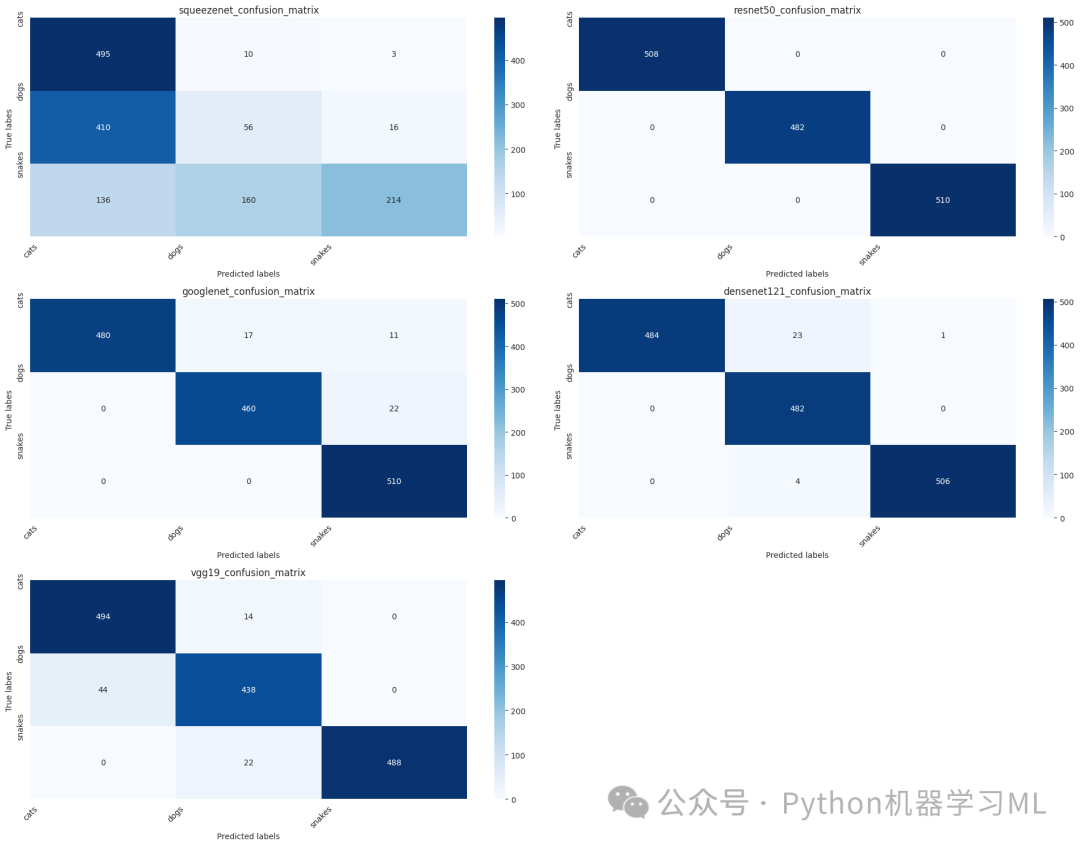
这一阶段的目的是通过混淆矩阵分析每个模型的分类性能。代码首先定义了一个函数,用于计算模型在测试集上的混淆矩阵。然后,它创建了一个新的模型字典,并从之前训练的模型中加载权重。接着,计算每个模型的混淆矩阵,并使用热力图可视化这些矩阵。混淆矩阵可以帮助我们了解每个类别的预测情况,识别模型容易混淆的类别,从而有针对性地改进模型。
第十阶段:ROC曲线分析
# 绘制ROC曲线对比
from sklearn.metrics import roc_curve, auc
from sklearn.preprocessing import label_binarize
defplot_roc_curves(models, test_gen):
"""
绘制所有模型的ROC曲线
Args:
models: 模型字典
test_gen: 测试数据生成器
"""
plt.figure(figsize=(15, 10)) # 创建一个宽15高10的图形
`
获取真实标签`
y_true = test_gen.classes # 获取真实的类别索引
n_classes = len(test_gen.class_indices) # 获取类别数量
`
将真实标签转换为one-hot编码`
y_true_bin = label_binarize(y_true, classes=range(n_classes)) # 将真实标签二值化
`
为每个模型计算并绘制ROC曲线`
for model_name, model in models.items():
`
获取预测概率`
y_pred = model.predict(test_gen) # 模型预测
`
计算每个类别的ROC曲线`
fpr = dict() # 存储假正例率
tpr = dict() # 存储真正例率
roc_auc = dict() # 存储AUC值
`
计算每个类的ROC曲线和AUC值`
for i inrange(n_classes):
fpr[i], tpr[i], _ = roc_curve(y_true_bin[:, i], y_pred[:, i]) # 计算ROC曲线
roc_auc[i] = auc(fpr[i], tpr[i]) # 计算AUC值
`
计算微平均ROC曲线`
fpr["micro"], tpr["micro"], _ = roc_curve(y_true_bin.ravel(), y_pred.ravel()) # 计算微平均ROC曲线
roc_auc["micro"] = auc(fpr["micro"], tpr["micro"]) # 计算微平均AUC值
`
绘制ROC曲线`
plt.plot(
fpr["micro"],
tpr["micro"],
label=f'{model_name} (AUC = {roc_auc["micro"]:.2f})', # 标签包含模型名称和AUC值
lw=2# 线宽
)
`
添加对角线`
plt.plot([0, 1], [0, 1], 'k--', lw=2) # 绘制对角线(随机猜测的基准线)
plt.xlim([0.0, 1.0]) # 设置x轴范围
plt.ylim([0.0, 1.05]) # 设置y轴范围
plt.xlabel('False Positive Rate') # 设置x轴标签
plt.ylabel('True Positive Rate') # 设置y轴标签
plt.title('ROC curves') # 设置标题
plt.legend(loc="lower right") # 显示图例,位置在右下角
plt.grid(True) # 显示网格
plt.show() # 显示图形
`
使用之前创建的models字典绘制ROC曲线`
plot_roc_curves(models, test_gen)
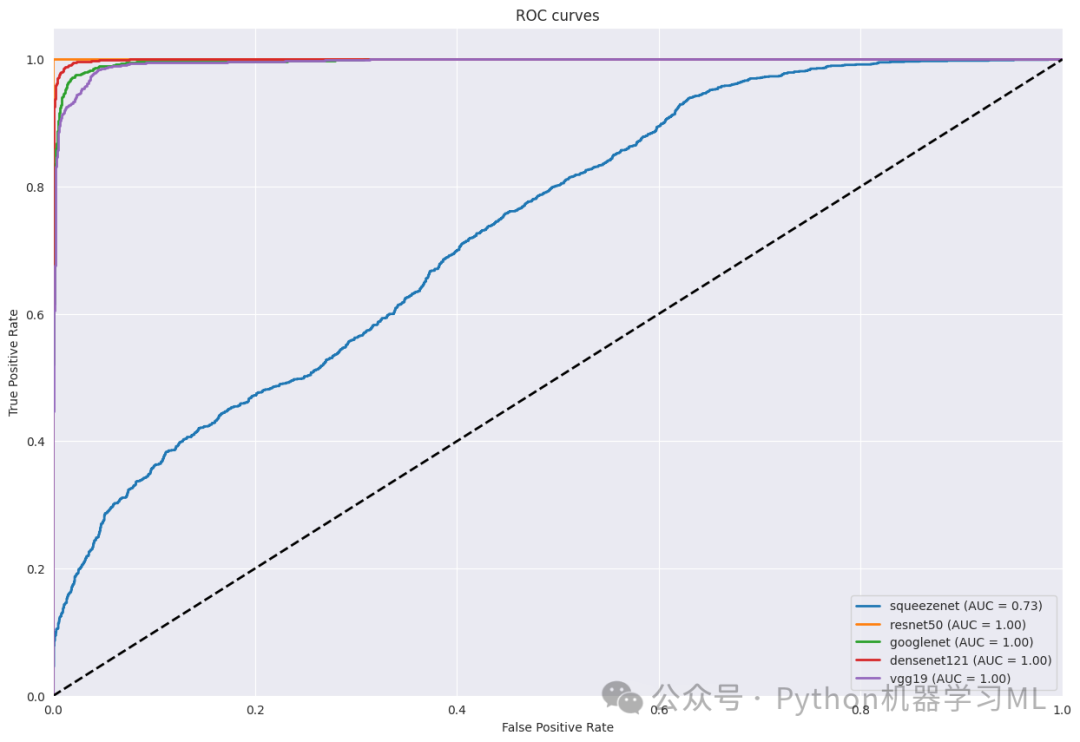
这一阶段的目的是通过ROC曲线分析每个模型的分类性能。代码定义了一个函数,用于计算并绘制每个模型的ROC曲线。ROC曲线展示了模型在不同阈值下的真正例率和假正例率的权衡关系,而曲线下面积(AUC)则是模型性能的一个综合指标。通过比较不同模型的ROC曲线和AUC值,我们可以评估哪个模型在区分不同类别方面表现更好。
第十一阶段:PR曲线分析
# 绘制PR曲线对比
from sklearn.metrics import precision_recall_curve, average_precision_score
defplot_pr_curves(models, test_gen):
"""
绘制所有模型的PR曲线
Args:
models: 模型字典
test_gen: 测试数据生成器
"""
plt.figure(figsize=(15, 10)) # 创建一个宽15高10的图形
`
获取真实标签`
y_true = test_gen.classes # 获取真实的类别索引
n_classes = len(test_gen.class_indices) # 获取类别数量
`
将真实标签转换为one-hot编码`
y_true_bin = label_binarize(y_true, classes=range(n_classes)) # 将真实标签二值化
`
为每个模型计算并绘制PR曲线`
for model_name, model in models.items():
`
获取预测概率`
y_pred = model.predict(test_gen) # 模型预测
`
计算每个类别的PR曲线`
precision = dict() # 存储精确率
recall = dict() # 存储召回率
average_precision = dict() # 存储平均精确率
`
计算每个类的PR曲线和平均精确率`
for i inrange(n_classes):
precision[i], recall[i], _ = precision_recall_curve(y_true_bin[:, i], y_pred[:, i]) # 计算PR曲线
average_precision[i] = average_precision_score(y_true_bin[:, i], y_pred[:, i]) # 计算平均精确率
`
计算微平均PR曲线`
precision["micro"], recall["micro"], _ = precision_recall_curve(
y_true_bin.ravel(), y_pred.ravel() # 将多标签问题转换为二分类问题
)
average_precision["micro"] = average_precision_score(
y_true_bin.ravel(), y_pred.ravel(), average="micro"# 计算微平均平均精确率
)
`
绘制PR曲线`
plt.plot(
recall["micro"],
precision["micro"],
label=f'{model_name} (AP = {average_precision["micro"]:.2f})', # 标签包含模型名称和AP值
lw=2# 线宽
)
plt.xlim([0.0, 1.0]) # 设置x轴范围
plt.ylim([0.0, 1.05]) # 设置y轴范围
plt.xlabel('Recall') # 设置x轴标签
plt.ylabel('Precision') # 设置y轴标签
plt.title('PR curves') # 设置标题
plt.legend(loc="lower left") # 显示图例,位置在左下角
plt.grid(True) # 显示网格
plt.show() # 显示图形
`
打印每个模型的平均精确率`
print("\n各模型的平均精确率(AP):")
print("="*50)
for model_name, model in models.items():
y_pred = model.predict(test_gen) # 模型预测
ap = average_precision_score(y_true_bin.ravel(), y_pred.ravel(), average="micro") # 计算微平均平均精确率
print(f"{model_name}: {ap:.4f}") # 打印模型名称和AP值
`
绘制每个类别的PR曲线`
defplot_class_pr_curves(models, test_gen, class_names):
"""
为每个类别绘制所有模型的PR曲线
Args:
models: 模型字典
test_gen: 测试数据生成器
class_names: 类别名称列表
"""
n_classes = len(class_names) # 获取类别数量
n_cols = 3# 每行显示3个子图
n_rows = (n_classes + n_cols - 1) // n_cols # 计算需要的行数
plt.figure(figsize=(20, 5*n_rows)) # 创建一个大的图形
`
获取真实标签`
y_true = test_gen.classes # 获取真实的类别索引
y_true_bin = label_binarize(y_true, classes=range(n_classes)) # 将真实标签二值化
for i inrange(n_classes):
plt.subplot(n_rows, n_cols, i+1) # 创建子图
for model_name, model in models.items():
`
获取预测概率`
y_pred = model.predict(test_gen) # 模型预测
`
计算PR曲线`
precision, recall, _ = precision_recall_curve(y_true_bin[:, i], y_pred[:, i]) # 计算PR曲线
ap = average_precision_score(y_true_bin[:, i], y_pred[:, i]) # 计算平均精确率
`
绘制PR曲线`
plt.plot(
recall,
precision,
label=f'{model_name} (AP = {ap:.2f})', # 标签包含模型名称和AP值
lw=2# 线宽
)
plt.xlim([0.0, 1.0]) # 设置x轴范围
plt.ylim([0.0, 1.05]) # 设置y轴范围
plt.xlabel('Recall') # 设置x轴标签
plt.ylabel('Precision') # 设置y轴标签
plt.title(f'catagory: {class_names[i]}') # 设置标题为类别名称
plt.legend(loc="lower left") # 显示图例,位置在左下角
plt.grid(True) # 显示网格
plt.tight_layout() # 调整子图布局
plt.show() # 显示图形
`
执行PR曲线分析`
print("\n开始绘制PR曲线分析...")
print("="*50)
print("1. 绘制所有模型的整体PR曲线")
plot_pr_curves(models, test_gen)
print("\n2. 绘制每个类别的PR曲线")
plot_class_pr_curves(models, test_gen, classes)
print("\nPR曲线分析说明:")
print("1. PR曲线展示了精确率(Precision)和召回率(Recall)之间的权衡关系")
print("2. 曲线越接近右上角,表示模型性能越好")
print("3. AP(Average Precision)值是PR曲线下的面积,越大越好")
print("4. 对于类别不平衡的数据集,PR曲线比ROC曲线更能反映模型的实际性能")
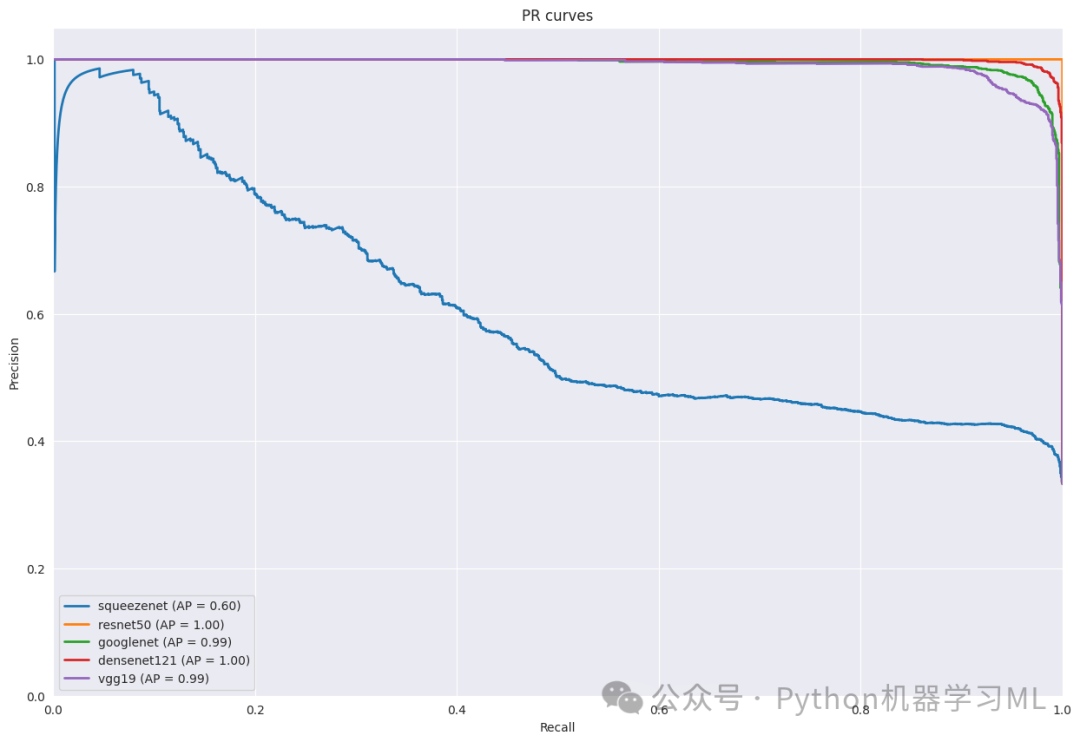
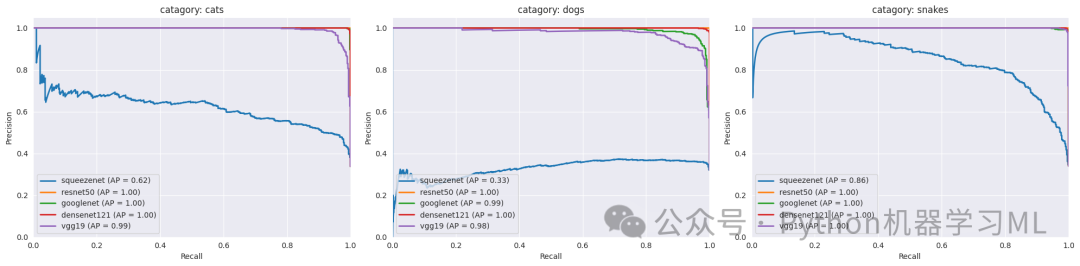
这一阶段的目的是通过PR曲线(精确率-召回率曲线)分析每个模型的分类性能。代码定义了两个函数:一个用于绘制所有模型的整体PR曲线,另一个用于绘制每个类别的PR曲线。PR曲线展示了模型在不同阈值下的精确率和召回率的权衡关系,对于类别不平衡的数据集尤为重要。通过比较不同模型的PR曲线和平均精确率(AP),我们可以评估哪个模型在处理每个类别时表现更好。
第十二阶段:Grad-CAM可视化分析
# Grad-CAM可视化分析import tensorflow as tfimport numpy as npimport cv2
def get_img_array(img_array, size):    """    处理输入的图像数组    """    # 如果输入已经是numpy数组,只需要确保尺寸正确    if isinstance(img_array, np.ndarray):        # 调整图像大小        if img_array.shape[:2] != size:            img_array = tf.image.resize(img_array, size)        # 确保批次维度        if len(img_array.shape) == 3:            img_array = np.expand_dims(img_array, axis=0)        return img_array
    # 原始的文件路径处理逻辑    img = tf.keras.preprocessing.image.load_img(img_array, target_size=size)    array = tf.keras.preprocessing.image.img_to_array(img)    array = np.expand_dims(array, axis=0)    return array
def make_gradcam_heatmap(img_array, model, last_conv_layer_name, pred_index=None):    """    生成Grad-CAM热力图    """    # 首先,创建一个模型,将最后一个卷积层和模型的输出作为输出    grad_model = tf.keras.models.Model(        inputs=model.inputs,  # 修改这里:使用model.inputs而不是[model.inputs]        outputs=[            model.get_layer(last_conv_layer_name).output,            model.output        ]    )
    # 计算类别相对于特征图的梯度    with tf.GradientTape() as tape:        conv_outputs, predictions = grad_model(img_array)        if pred_index is None:            pred_index = tf.argmax(predictions[0])        class_channel = predictions[:, pred_index]
    # 获取梯度    grads = tape.gradient(class_channel, conv_outputs)    pooled_grads = tf.reduce_mean(grads, axis=(0, 1, 2))
    # 将特征图与权重相乘    conv_outputs = conv_outputs[0]    heatmap = conv_outputs @ pooled_grads[..., tf.newaxis]    heatmap = tf.squeeze(heatmap)
    # 归一化热力图    heatmap = tf.maximum(heatmap, 0) / tf.math.reduce_max(heatmap)    return heatmap.numpy()
def save_and_display_gradcam(img_array, heatmap, alpha=0.4):    """    将热力图叠加到原始图像上    """    # 确保图像数据在0-255范围内    img = img_array.astype(np.float32)    if img.max() <= 1:        img *= 255
    # 调整热力图大小以匹配原始图像    heatmap = np.uint8(255 * heatmap)    heatmap = cv2.resize(heatmap, (img.shape[1], img.shape[0]))    heatmap = cv2.applyColorMap(heatmap, cv2.COLORMAP_JET)
    # 叠加热力图    superimposed_img = heatmap * alpha + img    superimposed_img = np.clip(superimposed_img, 0, 255).astype(np.uint8)
    return superimposed_img
def visualize_model_attention(model, model_name, img_array, last_conv_layer_name):    """    可视化模型对图像的关注区域    """    # 生成类激活热力图    heatmap = make_gradcam_heatmap(img_array, model, last_conv_layer_name)
    # 叠加热力图到原始图像    superimposed_img = save_and_display_gradcam(img_array[0], heatmap)
    return superimposed_img
def get_last_conv_layer_name(model, model_name):    """    动态获取模型最后一个卷积层的名称    """    # 获取所有层的名称    layer_names = [layer.name for layer in model.layers]
    # 根据不同模型类型查找最后的卷积层    if model_name == 'resnet50':        # 查找最后的残差块        conv_blocks = [name for name in layer_names if 'conv5_block' in name.lower()]        return conv_blocks[-1] if conv_blocks else None    elif model_name == 'googlenet':        # 查找最后的混合层        mixed_layers = [name for name in layer_names if 'mixed' in name.lower()]        return mixed_layers[-1] if mixed_layers else None    elif model_name == 'densenet121':        # 查找最后的密集块        dense_blocks = [name for name in layer_names if 'conv5_block' in name.lower()]        return dense_blocks[-1] if dense_blocks else None    elif model_name == 'vgg19':        # 查找最后的卷积层        conv_layers = [name for name in layer_names if 'conv' in name.lower()]        return conv_layers[-1] if conv_layers else None
    # 如果没有找到匹配的层,返回最后一个卷积层    conv_layers = [name for name in layer_names if 'conv' in name.lower()]    return conv_layers[-1] if conv_layers else None
def visualize_model_predictions(models, test_gen, num_images=5):    """    可视化多个模型对同一图像的预测和关注区域    """    # 获取一些测试图像    test_images = []    batch = next(test_gen)    images = batch[0]  # 图像数组    labels = batch[1]  # 标签
    for i in range(min(num_images, len(images))):        test_images.append((images[i], np.argmax(labels[i])))
    for img_array, true_label_idx in test_images:        plt.figure(figsize=(20, 4*len(models)))        true_label = classes[true_label_idx]
        for idx, (model_name, model) in enumerate(models.items()):            try:                # 获取模型预测                processed_img = get_img_array(img_array, size=(224, 224))                preds = model.predict(processed_img, verbose=0)                pred_label = classes[np.argmax(preds[0])]
                # 动态获取最后一个卷积层的名称                last_conv_layer = get_last_conv_layer_name(model, model_name)                if last_conv_layer is None:                    print(f"警告:无法找到{model_name}的最后一个卷积层")                    continue
                # 生成Grad-CAM可视化                heatmap = make_gradcam_heatmap(processed_img, model, last_conv_layer)                superimposed_img = save_and_display_gradcam(processed_img[0], heatmap)
                # 显示结果                plt.subplot(len(models), 1, idx+1)                plt.imshow(superimposed_img)                plt.title(f'{model_name}\nPredict: {pred_label} (confidence score : {np.max(preds[0]):.2f})\nActual: {true_label}')                plt.axis('off')
            except Exception as e:                print(f"警告:处理{model_name}时出错: {str(e)}")                if idx < len(models):                    plt.subplot(len(models), 1, idx+1)                    plt.text(0.5, 0.5, f'{model_name}',                             horizontalalignment='center',                            verticalalignment='center')                    plt.axis('off')                continue
        plt.tight_layout()        plt.show()

# 执行Grad-CAM可视化分析print("\n开始Grad-CAM可视化分析...")print("="*50)print("为每个模型生成类激活热力图,展示模型关注的图像区域")visualize_model_predictions(models, test_gen, num_images=5)
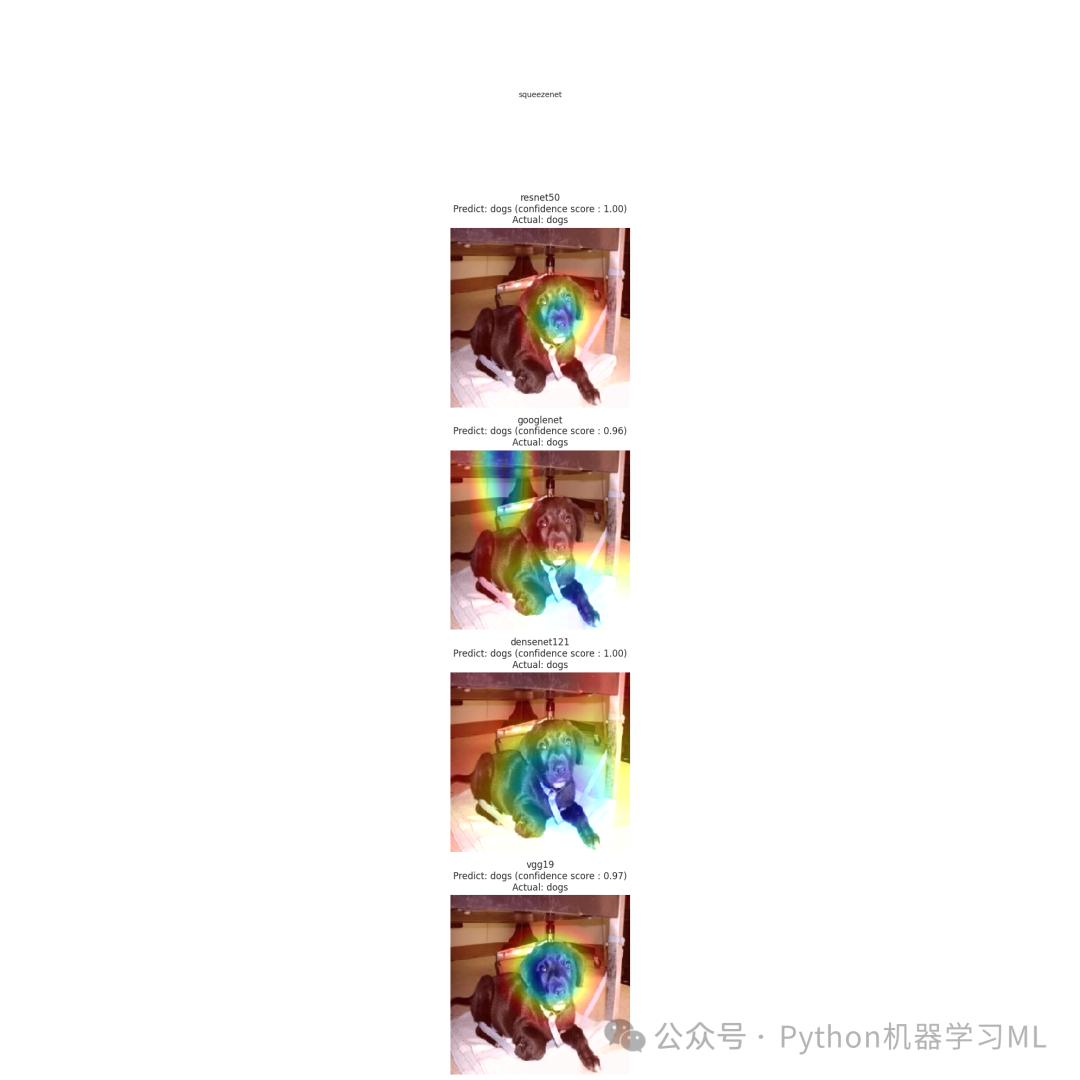
print("\nGrad-CAM分析说明:")print("1. 热力图显示了模型在做出预测时最关注的图像区域")print("2. 红色区域表示模型高度关注的部分,蓝色区域表示较少关注的部分")print("3. 通过比较不同模型的热力图,我们可以理解各个模型的决策依据")print("4. 好的模型通常会关注对象的关键特征,而不是背景或无关区域")
这一阶段的目的是使用Grad-CAM(梯度加权类激活映射)技术可视化每个模型在做出预测时关注的图像区域。代码定义了多个函数,用于生成热力图并将其叠加到原始图像上。对于每个测试图像,代码会显示每个模型的预测结果和关注区域,帮助我们理解模型的决策依据。通过比较不同模型的热力图,我们可以看到哪些模型能够更好地关注对象的关键特征,而不是背景或无关区域。
第十三阶段:t-SNE特征可视化分析
#基于Resnet-50各卷积层获得的特征的t-sne方法的可视化
# t-SNE可视化分析from sklearn.manifold import TSNEfrom sklearn.preprocessing import StandardScaler
def get_layer_outputs(model, layer_names, input_data):    """    获取指定层的输出特征    """    # 创建用于提取特征的模型    feature_models = []    for layer_name in layer_names:        feature_model = tf.keras.models.Model(            inputs=model.input,            outputs=model.get_layer(layer_name).output        )        feature_models.append(feature_model)
    # 获取特征    features = []    for feature_model in feature_models:        layer_output = feature_model.predict(input_data, verbose=0)        # 将特征展平为2D        if len(layer_output.shape) > 2:            layer_output = layer_output.reshape(layer_output.shape[0], -1)        features.append(layer_output)
    return features
def perform_tsne(features, n_components=2, perplexity=30):    """    执行t-SNE降维    """    # 标准化特征    scaler = StandardScaler()    features_normalized = scaler.fit_transform(features)
    # 执行t-SNE    tsne = TSNE(n_components=n_components, perplexity=perplexity, random_state=42)    features_tsne = tsne.fit_transform(features_normalized)
    return features_tsne
def visualize_tsne_features(model, test_gen, num_samples=200):  # 减少样本数量    """    可视化ResNet-50不同层的特征分布    """    print("\n开始t-SNE特征可视化分析...")    print("="*50)
    # 收集数据样本    images = []    labels = []    class_counts = {i: 0 for i in range(len(classes))}    samples_per_class = num_samples // len(classes)  # 每个类别更少的样本
    while min(class_counts.values()) < samples_per_class:        batch = next(test_gen)        batch_images, batch_labels = batch        for img, label in zip(batch_images, batch_labels):            label_idx = np.argmax(label)            if class_counts[label_idx] < samples_per_class:                images.append(img)                labels.append(label_idx)                class_counts[label_idx] += 1
    images = np.array(images)    labels = np.array(labels)
    # 选择更少的目标层进行分析    target_layers = [        'conv1_conv',  # 第一个卷积层        'conv2_block3_out',  # 第二个卷积块的输出        'conv3_block4_out',  # 第三个卷积块的输出        'conv4_block6_out',  # 第四个卷积块的输出        'conv5_block3_out'   # 最后的卷积层    ]
    # 获取每一层的特征时使用批处理    print("提取特征...")    batch_size = 32  # 设置较小的批处理大小    features_list = []
    for layer_name in target_layers:        feature_model = tf.keras.models.Model(            inputs=model.input,            outputs=model.get_layer(layer_name).output        )
        # 分批处理数据        features = []        for i in range(0, len(images), batch_size):            batch = images[i:i + batch_size]            layer_output = feature_model.predict(batch, verbose=0)            if len(layer_output.shape) > 2:                layer_output = layer_output.reshape(layer_output.shape[0], -1)            features.append(layer_output)
        features = np.concatenate(features, axis=0)        features_list.append(features)
    # 为每一层执行t-SNE并可视化    plt.figure(figsize=(25, 4*len(target_layers)))  # 增加图形宽度以适应右侧图例
    for idx, (features, layer_name) in enumerate(zip(features_list, target_layers)):        print(f"处理层 {layer_name}...")
        # 执行t-SNE        features_tsne = perform_tsne(features)
        # 创建子图并调整位置以留出图例空间        plt.subplot(len(target_layers), 1, idx+1)        scatter = plt.scatter(features_tsne[:, 0], features_tsne[:, 1],                             c=labels, cmap='tab20', alpha=0.6)        plt.title(f'{layer_name} ')        plt.colorbar(scatter)
        # 添加图例并放置在右侧        legend_elements = [plt.Line2D([0], [0], marker='o', color='w',                                     markerfacecolor=plt.cm.tab20(i/20),                                     label=classes[i], markersize=10)                         for i in range(len(classes))]        plt.legend(handles=legend_elements,                   bbox_to_anchor=(1.15, 0.5),  # 调整到右侧中间位置                  loc='center left',  # 图例左对齐                  borderaxespad=0.)
    plt.tight_layout(rect=[0, 0, 0.85, 1])  # 调整布局,为右侧图例留出空间    plt.show()
    print("\nt-SNE分析说明:")    print("1. 每个点代表一个样本,颜色表示类别")    print("2. 距离相近的点表示特征相似")    print("3. 聚类效果好表示该层能够很好地区分不同类别")    print("4. 从浅层到深层,可以观察特征的抽象程度变化")
# 执行t-SNE分析if 'resnet50' in models:    print("\n开始ResNet-50特征分析...")    visualize_tsne_features(models['resnet50'], test_gen)else:    print("错误:未找到ResNet-50模型")
这段代码的主要作用是使用 t-distributed Stochastic Neighbor Embedding (t-SNE) 技术,对预训练的 ResNet-50 模型在不同卷积层提取的特征进行可视化。通过将高维特征降维到二维空间,并用散点图展示,可以直观地观察到模型不同层对数据的表征能力,以及不同类别样本在特征空间中的分布情况。
往期回顾
论文复现------肺癌预测数据分析与逻辑回归、朴素贝叶斯、支持向量机、随机森林、K近邻、XGBoost、深度神经网络模型评估代码解析
机器学习------材料力学XGBoost 分类,SHAP可视化分析、SMOTE解决不平衡、PCA降维、统计分析完整代码解析
机器学习------SHAP可解释分析、EDA、逻辑回归、支持向量机(SVM)电动车数据集Python完整代码
机器学习------集成学习、线性模型、支持向量机、K近邻、决策树、朴素贝叶斯、虚拟分类器分析电动车数据集Python完整代码
深度学习与图像分类:基于鸟类图片分类项目的实践python完整代码
机器学习------二元Logistic回归算法实战:从数据预处理到模型评估python完整代码
机器学习------使用Lazypredict选择最优模型、Optuna调优、PCA降维进行客户信息数据分类分析python完整代码
机器学习------处理多元分类数据的 7 种可视化方法Python 完整代码
机器学习------基于颜色直方图和 SVM 分类水果图像代码解析python
机器学习------漏斗图、雷达图、地图可视化、桑基图、树状图、词云、瀑布图、网络图、旭日图python代码示例
机器学习------PCA(主成分分析)和多个机器学习模型(如SVM、KNN、决策树)进行水果分类python代码
机器学习------数据可视化的艺术(箱线图、小提琴图、密度图、直方图、面积图、维恩图)python代码示例
机器学习------20种数据图表、数据可视化的艺术-1(sklearn)
机器学习------深入浅出:利用LazyPredict进行多种模型的风险评分预测的实践示例解析(sklearn)
机器学习------对材料力学性能预测,构建多个模型,利用交叉验证、测试集表现以及可解释性分析(SHAP值)完整代码解析