知识问答游戏是一个有趣的交互式功能。这篇文章我们来实现一个完整的问答游戏系统,包括分类选择、题目加载、答题交互、以及结果统计。通过这个功能,我们能展示如何构建一个完整的游戏流程 。
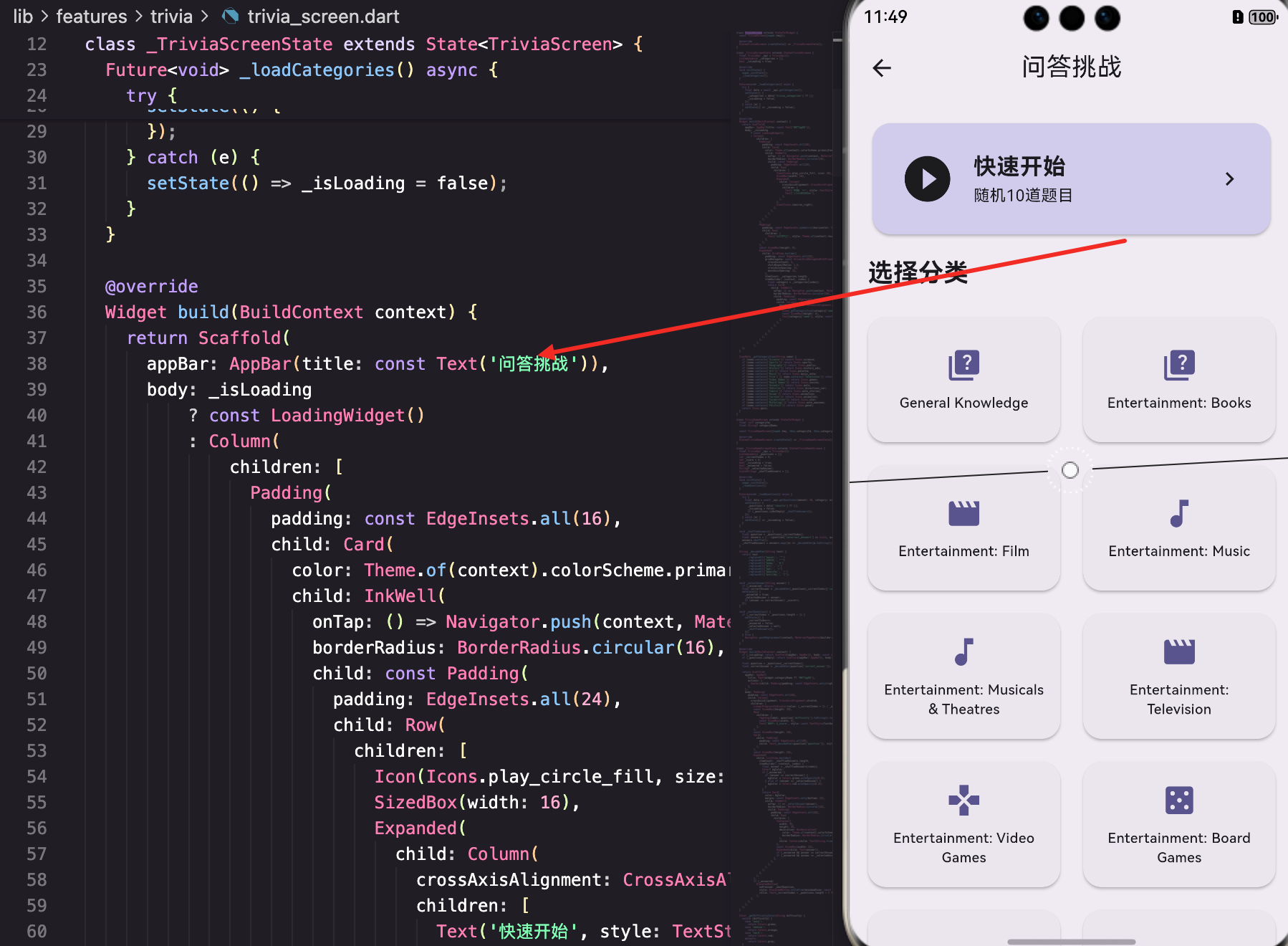
页面的基本结构
TriviaScreen是主页面,展示分类选择和快速开始选项:
dart
class TriviaScreen extends StatefulWidget {
  const TriviaScreen({super.key});

  @override
  State<TriviaScreen> createState() => _TriviaScreenState();
}

class _TriviaScreenState extends State<TriviaScreen> {
  final TriviaApi _api = TriviaApi();
  List<dynamic> _categories = [];
  bool _isLoading = true;

  @override
  void initState() {
    super.initState();
    _loadCategories();
  }

  Future<void> _loadCategories() async {
    try {
      final data = await _api.getCategories();
      setState(() {
        _categories = data['trivia_categories'] ?? [];
        _isLoading = false;
      });
    } catch (e) {
      setState(() => _isLoading = false);
    }
  }
在initState中加载所有问答分类。
快速开始卡片
快速开始用一个高亮的Card展示:
dart
                Padding(
                  padding: const EdgeInsets.all(16),
                  child: Card(
                    color: Theme.of(context).colorScheme.primaryContainer,
                    child: InkWell(
                      onTap: () => Navigator.push(context, MaterialPageRoute(builder: (_) => const TriviaGameScreen())),
                      borderRadius: BorderRadius.circular(16),
                      child: const Padding(
                        padding: EdgeInsets.all(24),
                        child: Row(
                          children: [
                            Icon(Icons.play_circle_fill, size: 48),
                            SizedBox(width: 16),
                            Expanded(
                              child: Column(
                                crossAxisAlignment: CrossAxisAlignment.start,
                                children: [
                                  Text('快速开始', style: TextStyle(fontSize: 20, fontWeight: FontWeight.bold)),
                                  Text('随机10道题目'),
                                ],
                              ),
                            ),
                            Icon(Icons.chevron_right),
                          ],
                        ),
                      ),
                    ),
                  ),
                ),
快速开始用一个大的Card展示,包含播放图标和说明文字。
分类网格
分类用GridView展示,每个分类有对应的图标:
dart
                Expanded(
                  child: GridView.builder(
                    padding: const EdgeInsets.all(12),
                    gridDelegate: const SliverGridDelegateWithFixedCrossAxisCount(
                      crossAxisCount: 2,
                      childAspectRatio: 1.5,
                      crossAxisSpacing: 12,
                      mainAxisSpacing: 12,
                    ),
                    itemCount: _categories.length,
                    itemBuilder: (context, index) {
                      final category = _categories[index];
                      return Card(
                        child: InkWell(
                          onTap: () => Navigator.push(context, MaterialPageRoute(builder: (_) => TriviaGameScreen(categoryId: category['id'], categoryName: category['name']))),
                          borderRadius: BorderRadius.circular(16),
                          child: Padding(
                            padding: const EdgeInsets.all(12),
                            child: Column(
                              mainAxisAlignment: MainAxisAlignment.center,
                              children: [
                                Icon(_getCategoryIcon(category['name']), size: 32, color: Theme.of(context).colorScheme.primary),
                                const SizedBox(height: 8),
                                Text(category['name'], style: const TextStyle(fontWeight: FontWeight.w500, fontSize: 12), textAlign: TextAlign.center, maxLines: 2, overflow: TextOverflow.ellipsis),
                              ],
                            ),
                          ),
                        ),
                      );
                    },
                  ),
                ),
每个分类用一个Card展示,包含对应的图标和名称。
_getCategoryIcon方法根据分类名称返回对应的图标:
dart
  IconData _getCategoryIcon(String name) {
    if (name.contains('Science')) return Icons.science;
    if (name.contains('Sports')) return Icons.sports;
    if (name.contains('Geography')) return Icons.public;
    if (name.contains('History')) return Icons.history_edu;
    if (name.contains('Art')) return Icons.palette;
    if (name.contains('Music')) return Icons.music_note;
    if (name.contains('Film') || name.contains('Television')) return Icons.movie;
    if (name.contains('Video Games')) return Icons.games;
    if (name.contains('Board Games')) return Icons.casino;
    if (name.contains('Animals')) return Icons.pets;
    if (name.contains('Vehicles')) return Icons.directions_car;
    if (name.contains('Comics')) return Icons.auto_stories;
    if (name.contains('Anime')) return Icons.animation;
    if (name.contains('Cartoon')) return Icons.animation;
    if (name.contains('Celebrities')) return Icons.star;
    if (name.contains('Mythology')) return Icons.auto_awesome;
    if (name.contains('Politics')) return Icons.gavel;
    return Icons.quiz;
  }
根据分类名称的关键词来选择合适的图标。
游戏页面
TriviaGameScreen是游戏的主要页面:
dart
class TriviaGameScreen extends StatefulWidget {
  final int? categoryId;
  final String? categoryName;

  const TriviaGameScreen({super.key, this.categoryId, this.categoryName});

  @override
  State<TriviaGameScreen> createState() => _TriviaGameScreenState();
}

class _TriviaGameScreenState extends State<TriviaGameScreen> {
  final TriviaApi _api = TriviaApi();
  List<dynamic> _questions = [];
  int _currentIndex = 0;
  int _score = 0;
  bool _isLoading = true;
  bool _answered = false;
  String? _selectedAnswer;
  List<String> _shuffledAnswers = [];
_currentIndex追踪当前题目的索引。
_score记录正确答题的数量。
_answered表示当前题目是否已经被回答。
题目加载和答案打乱
_loadQuestions方法加载题目:
dart
  Future<void> _loadQuestions() async {
    try {
      final data = await _api.getQuestions(amount: 10, category: widget.categoryId);
      setState(() {
        _questions = data['results'] ?? [];
        _isLoading = false;
        if (_questions.isNotEmpty) _shuffleAnswers();
      });
    } catch (e) {
      setState(() => _isLoading = false);
    }
  }
调用API获取10道题目。
_shuffleAnswers方法打乱答案顺序:
dart
  void _shuffleAnswers() {
    final question = _questions[_currentIndex];
    final answers = [...(question['incorrect_answers'] as List), question['correct_answer']];
    answers.shuffle();
    _shuffledAnswers = answers.map((a) => _decodeHtml(a.toString())).toList();
  }
把错误答案和正确答案混合,然后打乱顺序。
_decodeHtml方法解码HTML实体:
dart
String _decodeHtml(String text) {
return text
.replaceAll('"', '"')
.replaceAll(''', "'")
.replaceAll('&', '&')
.replaceAll('<', '<')
.replaceAll('>', '>')
.replaceAll('é', 'é')
.replaceAll('ñ', 'ñ');
}API返回的文本包含HTML实体,需要解码。
答题交互
_selectAnswer方法处理用户选择答案:
dart
  void _selectAnswer(String answer) {
    if (_answered) return;
    final correctAnswer = _decodeHtml(_questions[_currentIndex]['correct_answer']);
    setState(() {
      _answered = true;
      _selectedAnswer = answer;
      if (answer == correctAnswer) _score++;
    });
  }
如果已经回答过就直接返回。
检查答案是否正确,如果正确就增加得分。
_nextQuestion方法进入下一题:
dart
  void _nextQuestion() {
    if (_currentIndex < _questions.length - 1) {
      setState(() {
        _currentIndex++;
        _answered = false;
        _selectedAnswer = null;
        _shuffleAnswers();
      });
    } else {
      Navigator.pushReplacement(context, MaterialPageRoute(builder: (_) => TriviaResultScreen(score: _score, total: _questions.length)));
    }
  }
如果还有下一题就进入下一题。
如果已经是最后一题就进入结果页面。
游戏UI
游戏页面显示题目、难度、得分和答案选项:
dart
            LinearProgressIndicator(value: (_currentIndex + 1) / _questions.length),
            const SizedBox(height: 24),
            Row(
              children: [
                TagChip(label: question['difficulty'].toString().toUpperCase(), color: _getDifficultyColor(question['difficulty'])),
                const SizedBox(width: 8),
                Text('得分: $_score', style: const TextStyle(fontWeight: FontWeight.bold)),
              ],
            ),
            const SizedBox(height: 24),
            Card(
              child: Padding(
                padding: const EdgeInsets.all(20),
                child: Text(_decodeHtml(question['question']), style: Theme.of(context).textTheme.titleLarge, textAlign: TextAlign.center),
              ),
            ),
进度条显示当前进度。
难度标签用不同的颜色表示。
题目用Card展示。
答案选项
答案选项用ListView展示,支持交互反馈:
dart
            Expanded(
              child: ListView.builder(
                itemCount: _shuffledAnswers.length,
                itemBuilder: (context, index) {
                  final answer = _shuffledAnswers[index];
                  Color? bgColor;
                  if (_answered) {
                    if (answer == correctAnswer) {
                      bgColor = Colors.green.withOpacity(0.3);
                    } else if (answer == _selectedAnswer) {
                      bgColor = Colors.red.withOpacity(0.3);
                    }
                  }
                  return Card(
                    color: bgColor,
                    margin: const EdgeInsets.only(bottom: 12),
                    child: InkWell(
                      onTap: () => _selectAnswer(answer),
                      borderRadius: BorderRadius.circular(16),
                      child: Padding(
                        padding: const EdgeInsets.all(16),
                        child: Row(
                          children: [
                            Container(
                              width: 32,
                              height: 32,
                              decoration: BoxDecoration(
                                color: Theme.of(context).colorScheme.primaryContainer,
                                borderRadius: BorderRadius.circular(8),
                              ),
                              child: Center(child: Text(String.fromCharCode(65 + index), style: const TextStyle(fontWeight: FontWeight.bold))),
                            ),
                            const SizedBox(width: 12),
                            Expanded(child: Text(answer)),
                            if (_answered && answer == correctAnswer) const Icon(Icons.check_circle, color: Colors.green),
                            if (_answered && answer == _selectedAnswer && answer != correctAnswer) const Icon(Icons.cancel, color: Colors.red),
                          ],
                        ),
                      ),
                    ),
                  );
                },
              ),
            ),
答题前,所有选项都是中立的颜色。
答题后,正确答案显示绿色,错误答案显示红色。
每个选项前面有一个字母标签(A、B、C、D)。
结果页面
TriviaResultScreen展示最终结果:
dart
class TriviaResultScreen extends StatelessWidget {
  final int score;
  final int total;

  const TriviaResultScreen({super.key, required this.score, required this.total});

  @override
  Widget build(BuildContext context) {
    final percentage = (score / total * 100).round();
    String message;
    IconData icon;
    Color color;

    if (percentage >= 80) {
      message = '太棒了!';
      icon = Icons.emoji_events;
      color = Colors.amber;
    } else if (percentage >= 60) {
      message = '不错!';
      icon = Icons.thumb_up;
      color = Colors.green;
    } else if (percentage >= 40) {
      message = '继续加油!';
      icon = Icons.sentiment_satisfied;
      color = Colors.orange;
    } else {
      message = '再接再厉!';
      icon = Icons.sentiment_dissatisfied;
      color = Colors.red;
    }
根据正确率显示不同的消息和图标。
总结
这篇文章我们实现了一个完整的知识问答游戏系统。涉及到的知识点包括:
- 分类管理 - 加载和展示问答分类
- 题目加载 - 从API加载题目
- 答案打乱 - 随机打乱答案顺序
- HTML解码 - 解码API返回的HTML实体
- 交互反馈 - 答题后显示正确/错误反馈
- 结果统计 - 计算正确率并显示结果
知识问答游戏展示了如何构建一个完整的游戏流程 。通过合理的UI设计、流畅的交互、以及完善的反馈机制,我们能为用户提供一个有趣的游戏体验。
欢迎加入开源鸿蒙跨平台社区:https://openharmonycrossplatform.csdn.net