作者:来自 Elastic Tomás Murúa
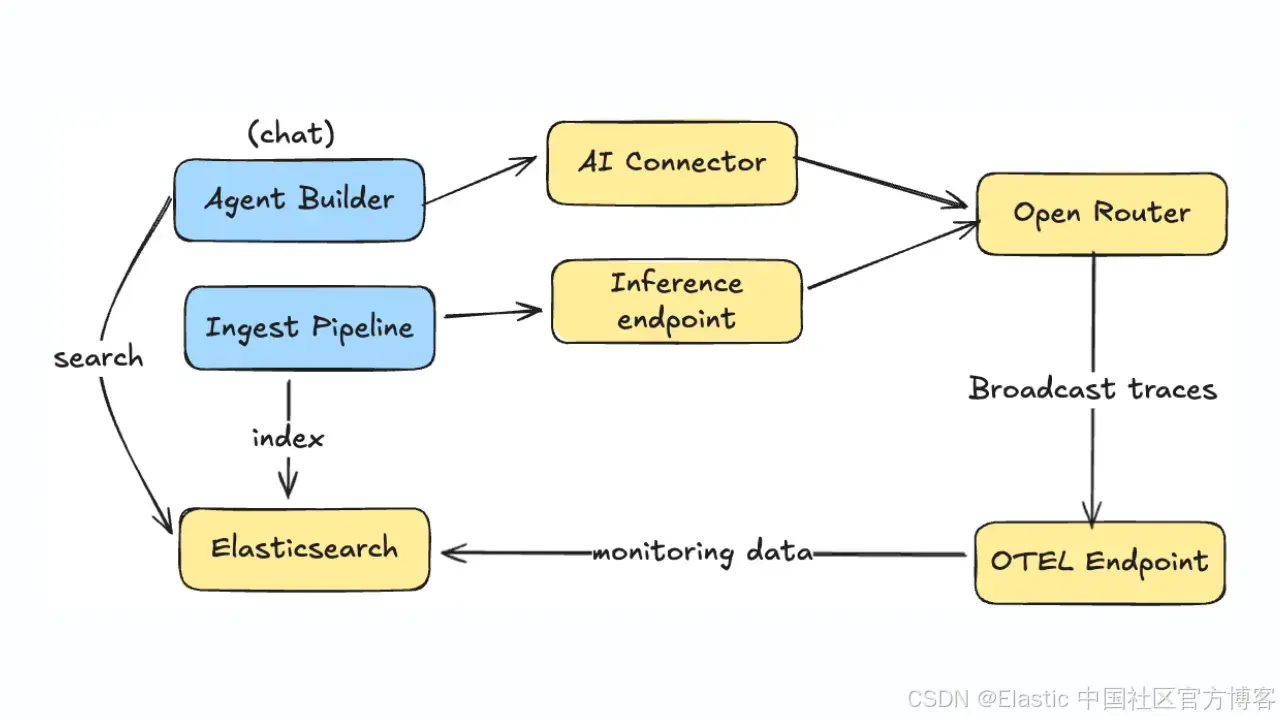
学习如何使用 OpenRouter 的 OpenTelemetry 广播和 Elastic APM 来监控 Agent Builder 和推理流水线中的 LLM 使用情况、成本和性能。
Agent Builder 现已作为技术预览提供。通过 Elastic Cloud Trial 开始使用,并在此查看 Agent Builder 的文档。
每周都会发布新模型,在智能性、速度或成本方面超越之前的模型。这使供应商锁定变得有风险,并让管理多个连接器、计费账户和 API 变得不必要地复杂。每个模型在行为上都不同,包括 token 消耗、响应延迟,以及与特定工具集的兼容性。
在本文中,我们将构建一个 AI 增强的音频产品目录,将其连接到 Elastic Agent Builder,并使用 OpenRouter 访问不同模型,同时在整个工作流中监控它们的性能,从数据摄取到 agent 交互。
前提条件
- Elastic Cloud 9.2 或 Elastic Cloud Serverless
- 启用 APM 的集成服务器
- OpenRouter 账户和 API Key
- Python 3.9+
什么是 OpenRouter?
OpenRouter 是一个平台,通过单一账户和 API 统一访问来自多个提供商的 500 多个模型。你无需分别管理 OpenAI、Anthropic、Google 等的独立账户,而是通过 OpenRouter 访问它们全部。
OpenRouter 负责在不同提供商之间进行负载均衡,自动将请求路由到延迟最低且错误最少的提供商。你也可以手动选择提供商,或配置回退链。OpenRouter 兼容标准 API、代码助手、集成开发环境( IDEs )等。
其中一个关键特性是 Broadcast,它会将你的模型使用情况追踪发送到外部可观测性系统。由于 OpenRouter 支持 OpenTelemetry,我们可以在 Elastic Stack 中监控完整流水线以及任何其他 OpenRouter 使用成本。
架构概览
我们将使用一个音频产品目录,通过推理摄取流水线使用 AI 生成新字段,然后创建一个 agent,使其能够基于已索引的产品数据回答问题
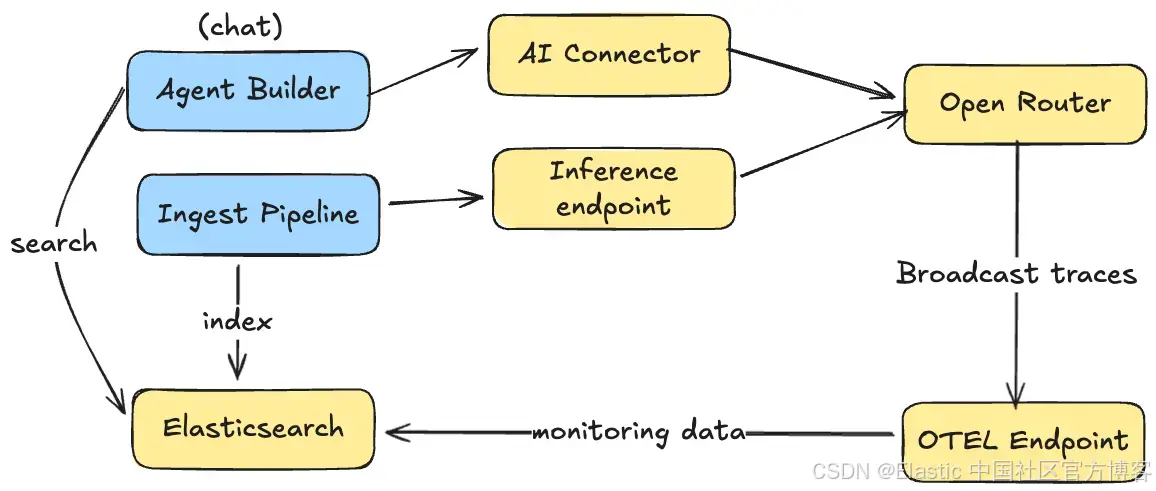
在摄取数据时,摄取流水线使用 OpenRouter 推理端点,基于产品的非结构化描述生成新的属性字段,这会触发 OpenRouter 将该次推理的日志发送到 Elasticsearch。
类似地,当与使用这些数据的 Agent Builder 进行对话时,日志也会被发送到 Elasticsearch 用于可视化。
我们将为 Agent Builder 和摄取流程使用不同的 OpenRouter API key:
- OPENROUTER_API_KEY 用于 Agent Builder 交互
- OPENROUTER_INGESTION_KEY 用于推理流水线
这样可以在监控仪表板中区分不同流量,并将成本归因到具体的工作流。
设置
首先,我们需要创建一个 AI 连接器,用于让 agent 与 大语言模型( LLM )交互,并为摄取流水线创建一个推理端点,用于从描述中提取字段。两者都通过同一个 API 连接到 OpenRouter(但可以使用不同的 key 以便监控区分)。
创建 AI 连接器
AI 连接器允许 Agent Builder 与 LLM 通信。我们将其配置为使用 OpenRouter 作为提供商:
import requests
import os

ELASTIC_URL = os.getenv("ELASTIC_URL")
KIBANA_URL = os.environ["KIBANA_URL"]
ELASTIC_API_KEY = os.environ["ELASTIC_API_KEY"]
OPENROUTER_API_KEY = os.environ["OPENROUTER_AGENT_KEY"]
OPENROUTER_INGESTION_KEY = os.environ.get("OPENROUTER_INGESTION_KEY", OPENROUTER_API_KEY)

# Create AI Connector for Agent Builder
connector_payload = {
    "name": "OpenRouter Agent Connector",
    "connector_type_id": ".gen-ai",
    "config": {
        "apiProvider": "Other",
        "apiUrl": "https://openrouter.ai/api/v1/chat/completions",
        "defaultModel": "openai/gpt-5.2",
        "enableNativeFunctionCalling": True
    },
    "secrets": {
        "apiKey": OPENROUTER_API_KEY
    }
}

response = requests.post(
    f"{KIBANA_URL}/api/actions/connector",
    headers={
        "kbn-xsrf": "true",
        "Authorization": f"ApiKey {ELASTIC_API_KEY}",
        "Content-Type": "application/json"
    },
    json=connector_payload
)

connector = response.json()
print(f"Connector created: {connector['id']}")
我们为 agent 使用具备推理能力的模型,例如 GPT-5.2,因为它需要处理复杂查询和工具编排。
创建推理端点
推理端点允许 Elasticsearch 在数据处理过程中调用 LLMs:
from elasticsearch import Elasticsearch

es = Elasticsearch(
    hosts=[ELASTIC_URL],
    api_key=ELASTIC_API_KEY,
    request_timeout=60  # Higher timeout for inference operations
)

# Create inference endpoint for ingestion
inference_config = {
    "service": "openai",
    "service_settings": {
        "model_id": "openai/gpt-4.1-mini",
        "api_key": OPENROUTER_INGESTION_KEY,
        "url": "https://openrouter.ai/api/v1/chat/completions"
    }
}

response = es.inference.put(
    inference_id="openrouter-inference-endpoint",
    task_type="completion",
    body=inference_config
)

print(f"Inference endpoint created: {response['inference_id']}")
我们为批量摄取任务使用更快、更便宜的模型,例如 GPT-4.1 Mini,因为这些任务不需要高级推理能力。
数据 pipeline
我们来配置摄取 pipeline(ingest pipeline)。它将从产品描述字段读取数据,并提取 Agent Builder 可用于过滤和聚合的结构化类别。
例如,给定以下产品描述:
"Premium wireless Bluetooth headphones with active noise cancellation, 30-hour battery life, and premium leather ear cushions. Perfect for travel and office use."
我们可以提取:
- **Category/**类别:Headphones
- **Features/**特性:"wireless","noise_cancellation","long_battery"
- **Use case/**使用场景:Travel
关键在于向 LLM 提供可能取值作为 enum,这样它才能进行一致的分组。否则,可能会得到诸如"noise cancellation""ANC""noise-canceling"等不同变体,从而更难进行聚合。
# Define the extraction prompt
EXTRACTION_PROMPT = (
    "Extract audio product information from this description. "
    "Return raw JSON only, no markdown, no explanation. Fields: "
    "category (string, one of: Headphones/Earbuds/Speakers/Microphones/Accessories), "
    "features (array of strings from: wireless/noise_cancellation/long_battery/waterproof/voice_assistant/fast_charging/portable/surround_sound), "
    "use_case (string, one of: Travel/Office/Home/Fitness/Gaming/Studio). "
    "Description: "
)

# Create the enrichment pipeline
pipeline_config = {
    "processors": [
        {
            "script": {
                "source": f"ctx.prompt = '{EXTRACTION_PROMPT}' + ctx.description"
            }
        },
        {
            "inference": {
                "model_id": "openrouter-inference-endpoint",
                "input_output": {
                    "input_field": "prompt",
                    "output_field": "ai_response"
                }
            }
        },
        {
            "json": {
                "field": "ai_response",
                "add_to_root": True  # Parses JSON and adds fields to document root
            }
        },
        {
            "remove": {
                "field": ["prompt", "ai_response"]
            }
        }
    ]
}

es.ingest.put_pipeline(
    id="product-enrichment-pipeline",
    body=pipeline_config
)

print("Pipeline created: product-enrichment-pipeline")
在使用 OpenAI 提取包含新属性的 JSON 之后,我们使用json 处理器将它们展开为新的字段。
现在让我们索引一些示例音频产品:
# Sample audio product data
products = [
    {
        "name": "Wireless Noise-Canceling Headphones",
        "description": "Premium wireless Bluetooth headphones with active noise cancellation, 30-hour battery life, and premium leather ear cushions. Perfect for travel and office use.",
        "price": 299.99
    },
    {
        "name": "Portable Bluetooth Speaker",
        "description": "Compact waterproof speaker with 360-degree surround sound. 20-hour battery life, perfect for outdoor adventures and pool parties.",
        "price": 149.99
    },
    {
        "name": "Studio Condenser Microphone",
        "description": "Professional USB microphone with noise cancellation and voice assistant compatibility. Ideal for podcasting, streaming, and home studio recording.",
        "price": 199.99
    }
]

# Create index with mapping
es.indices.create(
    index="products-enriched",
    body={
        "mappings": {
            "properties": {
                "name": {"type": "text"},
                "description": {"type": "text"},
                "price": {"type": "float"},
                "category": {"type": "keyword"},
                "features": {"type": "keyword"},
                "use_case": {"type": "keyword"}
            }
        }
    },
    ignore=400  # Ignore if already exists
)

# Index products using the enrichment pipeline
for i, product in enumerate(products):
    es.index(
        index="products-enriched",
        id=i,
        body=product,
        pipeline="product-enrichment-pipeline"
    )
    print(f"Indexed: {product['name']}")

# Refresh to make documents searchable
es.indices.refresh(index="products-enriched")
Agent Builder
现在我们可以创建一个 Agent Builder agent,使用该索引,并利用我们创建的新字段来回答文本问题和分析型查询:
# Create Agent Builder agent
agent_payload = {
    "id": "audio-product-assistant",
    "name": "Audio Product Assistant",
    "description": "Answers questions about audio product catalog using semantic search and analytics",
    "labels": ["audio"],
    "avatar_color": "#BFDBFF",
    "avatar_symbol": "AU",
    "configuration": {
        "tools": [
            {
                "tool_ids": [
                    "platform.core.search",
                    "platform.core.list_indices",
                    "platform.core.get_index_mapping",
                    "platform.core.execute_esql"
                ]
            }
        ],
        "instructions": """You are an audio product assistant that helps users find and analyze audio equipment.

Use the products-enriched index for all queries. The extracted fields are:
- category: Headphones, Earbuds, Speakers, Microphones, or Accessories
- features: array of product features like wireless, noise_cancellation, long_battery
- use_case: Travel, Office, Home, Fitness, Gaming, or Studio

For analytical questions, use ESQL to aggregate data.
For product searches, use semantic search on the description field."""
    }
}

response = requests.post(
    f"{KIBANA_URL}/api/agent_builder/agents",
    headers={
        "kbn-xsrf": "true",
        "Authorization": f"ApiKey {ELASTIC_API_KEY}",
        "Content-Type": "application/json"
    },
    json=agent_payload
)

agent = response.json()
print(f"Agent created: {agent['id']}")
对于工具,我们使用 search 进行语义查询,并使用 Elasticsearch Query Language( ES|QL )进行分析型查询:
现在你可以与 agent 对话,并提出如下问题:
- "What headphones do we have for travel?/我们有哪些适合旅行的耳机?"
- "Show me products with noise cancellation under 200/展示价格低于 200 且具备降噪的产品"
- "What's the average price by category?/按类别的平均价格是多少?"
agent 使用 AI 增强字段来提供更好的过滤和聚合。
实现 OpenRouter Broadcast
现在我们来设置推理监控。首先,我们需要 OpenTelemetry 端点 URL。请在 Kibana 中导航到 APM 教程:
https://<your_kibana_url>/app/observabilityOnboarding/otel-apm/?category=application从 OpenTelemetry 选项卡中收集 URL 和认证 token:
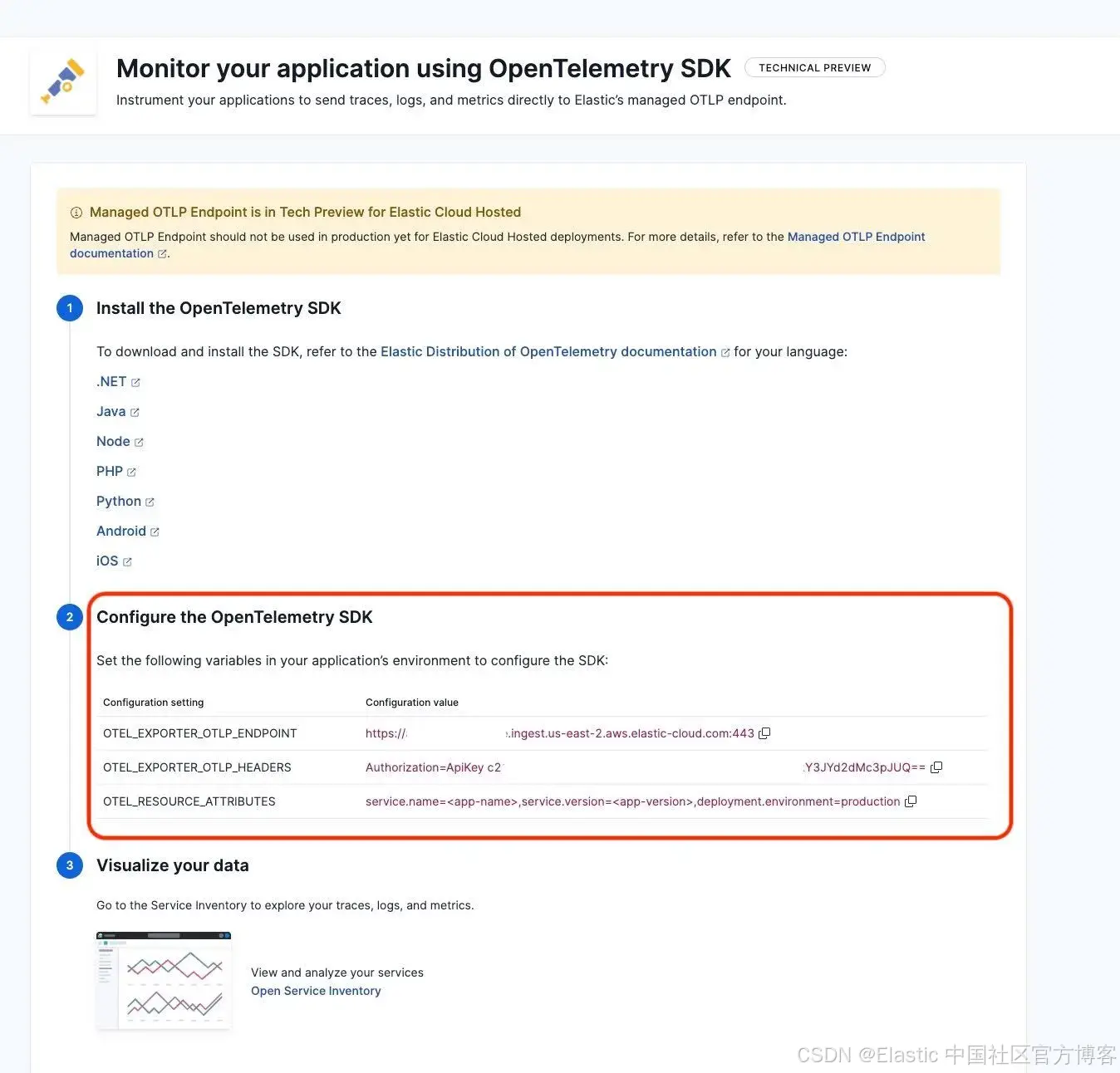
重要提示:你的 Kibana server 需要能通过公网访问,以便接收来自 OpenRouter 的数据。
在 OpenRouter 中,进入 Broadcast 设置,并为"OpenTelemetry Collector" 添加一个新目的地:
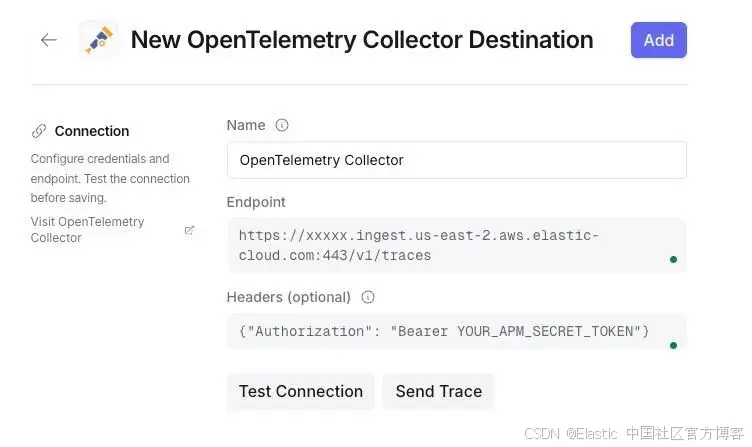
重要提示:配置端点时使用 /v1/traces 路径和认证 headers:
Endpoint: https://xxxxx.ingest.us-east-2.aws.elastic-cloud.com:443/v1/traces

Headers: {"Authorization": "Bearer YOUR_APM_SECRET_TOKEN"}
点击 Test connection,你应该会看到成功消息。
在 Elastic 中监控
使用 OpenRouter 模型后,你应该开始在 Kibana 中看到文档。已索引的文档位于数据流 traces-generic.otel-default 中,service.name 为 "openrouter",并包含以下信息:
- Request and response details.
- Token usage (prompt, completion, total).
- Cost (in USD).
- Latency (time to first token, total).
- Model information.
从现在开始,推理流水线和 Agent Builder 与 LLM 使用相关的活动将被记录在 OpenRouter 中,并发送到 Elastic。
默认 APM 仪表板
你可以在 Kibana 中通过 Observability > Applications > Service Inventory > openrouter 查看默认仪表板:
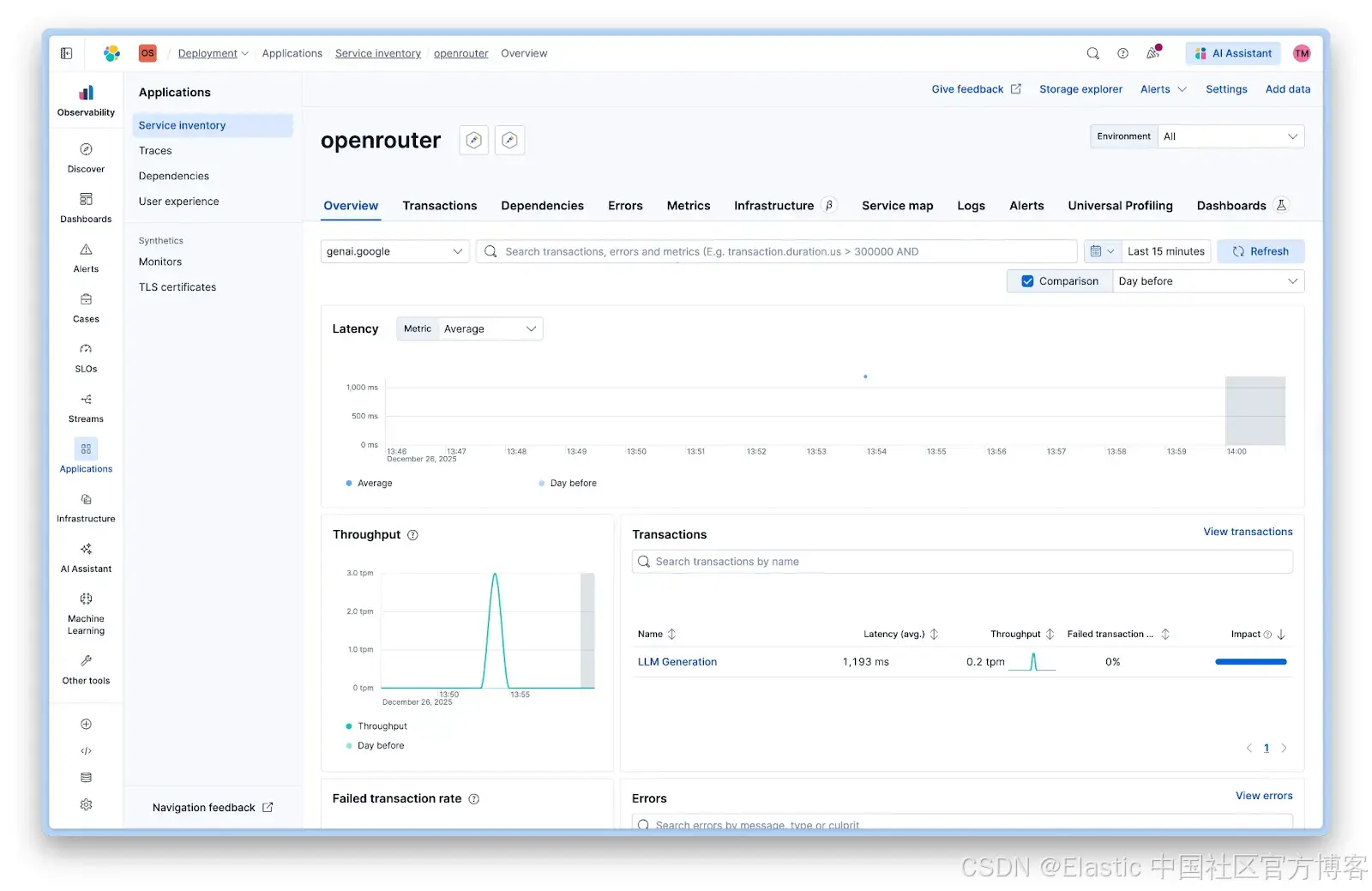
服务视图显示:
- **Latency/**延迟:所有调用的平均响应时间
- **Throughput/**吞吐量:每分钟请求数
- **Failed transactions/**失败事务:错误率
- **Transactions/**事务:按操作类型的细分
自定义 LLM 监控仪表板
为了更好地控制显示的信息,你可以创建自定义仪表板。我们创建了一个,可以区分摄取和 agent 聊天,并衡量相关参数,如 token 使用量和成本,以及 Elastic 外的使用情况,例如通过 API key 过滤的代码助手:
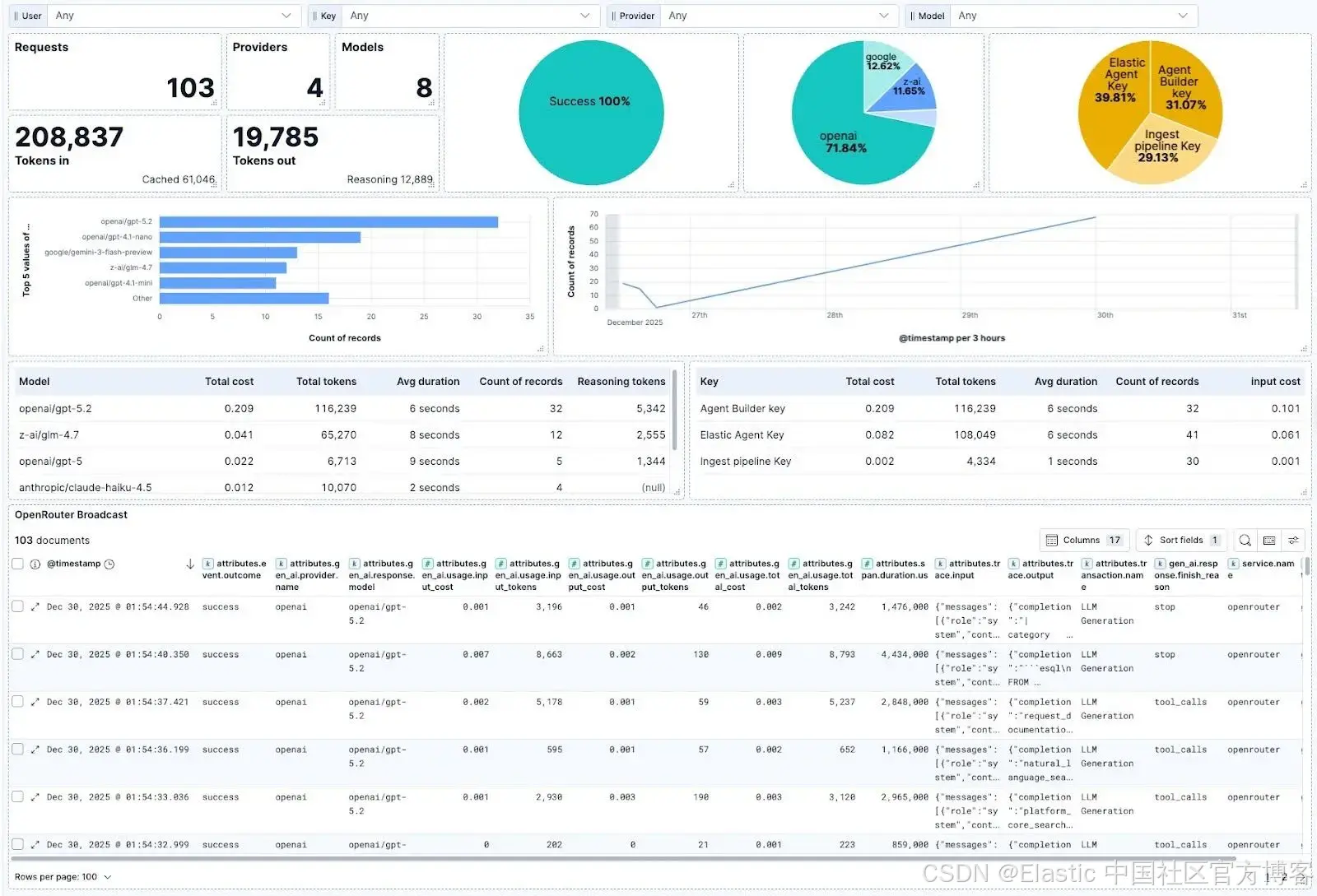
仪表板显示:
- 按工作流类型的成功率
- 按模型的 token 使用量
- 按 API key 的成本细分
- 随时间变化的延迟趋势
- 模型对比指标
你可以在此下载仪表板,并通过 Saved Objects 导入到你的 Kibana 实例中。
结论
OpenRouter 让你可以快速操作,并使用相同的 API 和计费账户测试多个模型和提供商,方便比较不同类型的模型 ------ 大参数、小参数、商业、开源等。
使用 OpenRouter Broadcast,我们可以轻松监控这些模型在摄取流水线中的表现或通过 Agent Builder 聊天时的性能,同时结合 OpenRouter 的其他使用情况,如代码 agent 和应用程序。
原文:https://www.elastic.co/search-labs/blog/llm-monitoring-openrouter-agent-builder