[root@master ~ 13:41:19]# kubectl -h
kubectl controls the Kubernetes cluster manager.

 Find more information at: https://kubernetes.io/docs/reference/kubectl/

Basic Commands (Beginner):
  create          Create a resource from a file or from stdin
  expose          Take a replication controller, service, deployment or pod and expose it as a new
Kubernetes service
  run             在集群上运行特定镜像
  set             为对象设置指定特性

Basic Commands (Intermediate):
  explain         Get documentation for a resource
  get             显示一个或多个资源
  edit            编辑服务器上的资源
  delete          Delete resources by file names, stdin, resources and names, or by resources and
label selector

Deploy Commands:
  rollout         Manage the rollout of a resource
  scale           Set a new size for a deployment, replica set, or replication controller
  autoscale       Auto-scale a deployment, replica set, stateful set, or replication controller

Cluster Management Commands:
  certificate     Modify certificate resources
  cluster-info    Display cluster information
  top             Display resource (CPU/memory) usage
  cordon          标记节点为不可调度
  uncordon        标记节点为可调度
  drain           清空节点以准备维护
  taint           更新一个或者多个节点上的污点

Troubleshooting and Debugging Commands:
  describe        显示特定资源或资源组的详细信息
  logs            打印 Pod 中容器的日志
  attach          挂接到一个运行中的容器
  exec            在某个容器中执行一个命令
  port-forward    将一个或多个本地端口转发到某个 Pod
  proxy           运行一个指向 Kubernetes API 服务器的代理
  cp              Copy files and directories to and from containers
  auth            Inspect authorization
  debug           Create debugging sessions for troubleshooting workloads and nodes
  events          List events

Advanced Commands:
  diff            Diff the live version against a would-be applied version
  apply           Apply a configuration to a resource by file name or stdin
  patch           Update fields of a resource
  replace         Replace a resource by file name or stdin
  wait            Experimental: Wait for a specific condition on one or many resources
  kustomize       Build a kustomization target from a directory or URL

Settings Commands:
  label           更新某资源上的标签
  annotate        更新一个资源的注解
  completion      Output shell completion code for the specified shell (bash, zsh, fish, or
powershell)

Other Commands:
  api-resources   Print the supported API resources on the server
  api-versions    Print the supported API versions on the server, in the form of "group/version"
  config          修改 kubeconfig 文件
  plugin          Provides utilities for interacting with plugins
  version         输出客户端和服务端的版本信息

Usage:
  kubectl [flags] [options]

Use "kubectl <command> --help" for more information about a given command.
Use "kubectl options" for a list of global command-line options (applies to all commands).
[root@master ~ 17:29:03]# kubectl explain deployment
GROUP:      apps
KIND:       Deployment
VERSION:    v1

DESCRIPTION:
    Deployment enables declarative updates for Pods and ReplicaSets.

FIELDS:
  apiVersion	<string>
    APIVersion defines the versioned schema of this representation of an object.
    Servers should convert recognized schemas to the latest internal value, and
    may reject unrecognized values. More info:
    https://git.k8s.io/community/contributors/devel/sig-architecture/api-conventions.md#resources

  kind	<string>
    Kind is a string value representing the REST resource this object
    represents. Servers may infer this from the endpoint the client submits
    requests to. Cannot be updated. In CamelCase. More info:
    https://git.k8s.io/community/contributors/devel/sig-architecture/api-conventions.md#types-kinds

  metadata	<ObjectMeta>
    Standard object's metadata. More info:
    https://git.k8s.io/community/contributors/devel/sig-architecture/api-conventions.md#metadata

  spec	<DeploymentSpec>
    Specification of the desired behavior of the Deployment.

  status	<DeploymentStatus>
    Most recently observed status of the Deployment.

# 还可以继续深入
[root@master ~ 17:29:40]# kubectl explain deployment.spec
GROUP:      apps
KIND:       Deployment
VERSION:    v1

FIELD: spec <DeploymentSpec>

DESCRIPTION:
    Specification of the desired behavior of the Deployment.
    DeploymentSpec is the specification of the desired behavior of the
    Deployment.

FIELDS:
  minReadySeconds	<integer>
    Minimum number of seconds for which a newly created pod should be ready
    without any of its container crashing, for it to be considered available.
    Defaults to 0 (pod will be considered available as soon as it is ready)

  paused	<boolean>
    Indicates that the deployment is paused.

  progressDeadlineSeconds	<integer>
    The maximum time in seconds for a deployment to make progress before it is
    considered to be failed. The deployment controller will continue to process
    failed deployments and a condition with a ProgressDeadlineExceeded reason
    will be surfaced in the deployment status. Note that progress will not be
    estimated during the time a deployment is paused. Defaults to 600s.

  replicas	<integer>
    Number of desired pods. This is a pointer to distinguish between explicit
    zero and not specified. Defaults to 1.

  revisionHistoryLimit	<integer>
    The number of old ReplicaSets to retain to allow rollback. This is a pointer
    to distinguish between explicit zero and not specified. Defaults to 10.

  selector	<LabelSelector> -required-
    Label selector for pods. Existing ReplicaSets whose pods are selected by
    this will be the ones affected by this deployment. It must match the pod
    template's labels.

  strategy	<DeploymentStrategy>
    The deployment strategy to use to replace existing pods with new ones.

  template	<PodTemplateSpec> -required-
    Template describes the pods that will be created. The only allowed
    template.spec.restartPolicy value is "Always".
# 可以把不再使用的pod删除
kubectl delete pod pod_name -n ns_name
# 强制删除
kubectl delete pod pod_name -n ns_name --grace-period=0 --force
查看资源创建过程
bash复制代码
[root@master ~ 17:13:27]# kubectl describe pod metrics-server-57999c5cf7-56szn -n kube-system
现在可以使用kubectl top 查看资源了
bash复制代码
# pod
[root@master ~ 18:42:32]# kubectl top pod -n kube-system
NAME                                       CPU(cores)   MEMORY(bytes)
calico-kube-controllers-658d97c59c-dnj7l   2m           72Mi
calico-node-b2nrt                          17m          96Mi
calico-node-d74vl                          14m          86Mi
calico-node-z8w5n                          18m          128Mi
coredns-66f779496c-nzpjw                   1m           18Mi
coredns-66f779496c-wzrkp                   1m           66Mi
etcd-master                                12m          154Mi
kube-apiserver-master                      28m          279Mi
kube-controller-manager-master             7m           153Mi
kube-proxy-qjz9p                           4m           81Mi
kube-proxy-stz98                           3m           81Mi
kube-proxy-tzsgh                           4m           82Mi
kube-scheduler-master                      3m           74Mi
metrics-server-57999c5cf7-56szn            2m           21Mi

# 指定pod
[root@master ~ 17:17:12]# kubectl top pod kube-apiserver-master -n kube-system
NAME                    CPU(cores)   MEMORY(bytes)
kube-apiserver-master   28m          282Mi

# node
[root@master ~ 17:18:29]# kubectl top node node1
NAME    CPU(cores)   CPU%   MEMORY(bytes)   MEMORY%
node1   61m          1%     1295Mi          33%
[root@master ~ 17:19:36]# kubectl top node node2
NAME    CPU(cores)   CPU%   MEMORY(bytes)   MEMORY%
node2   59m          1%     1398Mi          36%
显示集群信息
bash复制代码
[root@master ~ 18:42:13]# kubectl cluster-info
Kubernetes control plane is running at https://192.168.108.128:6443
CoreDNS is running at https://192.168.108.128:6443/api/v1/namespaces/kube-system/services/kube-dns:dns/proxy

To further debug and diagnose cluster problems, use 'kubectl cluster-info dump'.
[root@master ~ 18:55:56]# kubectl version
Client Version: v1.28.0
Kustomize Version: v5.0.4-0.20230601165947-6ce0bf390ce3
Server Version: v1.28.0
集群Node管理
查看集群信息
bash复制代码
[root@master ~ 18:56:02]# kubectl cluster-info
Kubernetes control plane is running at https://192.168.108.128:6443
CoreDNS is running at https://192.168.108.128:6443/api/v1/namespaces/kube-system/services/kube-dns:dns/proxy

To further debug and diagnose cluster problems, use 'kubectl cluster-info dump'.
查看节点信息
bash复制代码
# 查看集群节点信息
[root@master ~ 18:57:14]# kubectl get nodes
NAME     STATUS   ROLES           AGE   VERSION
master   Ready    control-plane   29h   v1.28.0
node1    Ready    <none>          29h   v1.28.0
node2    Ready    <none>          29h   v1.28.0

# 查看集群节点详细信息
[root@master ~ 18:57:44]# kubectl get nodes -o wide
NAME     STATUS   ROLES           AGE   VERSION   INTERNAL-IP       EXTERNAL-IP   OS-IMAGE                KERNEL-VERSION                 CONTAINER-RUNTIME
master   Ready    control-plane   29h   v1.28.0   192.168.108.128   <none>        CentOS Linux 7 (Core)   3.10.0-1160.119.1.el7.x86_64   docker://26.1.4
node1    Ready    <none>          29h   v1.28.0   192.168.108.129   <none>        CentOS Linux 7 (Core)   3.10.0-1160.119.1.el7.x86_64   docker://26.1.4
node2    Ready    <none>          29h   v1.28.0   192.168.108.136   <none>        CentOS Linux 7 (Core)   3.10.0-1160.119.1.el7.x86_64   docker://26.1.4

# 查看节点描述详细信息
[root@master ~ 18:58:15]# kubectl describe node master
Name:               master
Roles:              control-plane
Labels:             beta.kubernetes.io/arch=amd64
                    beta.kubernetes.io/os=linux
                    kubernetes.io/arch=amd64
                    kubernetes.io/hostname=master
                    kubernetes.io/os=linux
                    node-role.kubernetes.io/control-plane=
                    node.kubernetes.io/exclude-from-external-load-balancers=
Annotations:        kubeadm.alpha.kubernetes.io/cri-socket: unix:///var/run/cri-dockerd.sock
                    node.alpha.kubernetes.io/ttl: 0
                    projectcalico.org/IPv4Address: 192.168.108.128/24
                    projectcalico.org/IPv4IPIPTunnelAddr: 10.244.219.64
                    volumes.kubernetes.io/controller-managed-attach-detach: true
CreationTimestamp:  Wed, 14 Jan 2026 13:18:45 +0800
Taints:             node-role.kubernetes.io/control-plane:NoSchedule
Unschedulable:      false
Lease:
  HolderIdentity:  master
  AcquireTime:     <unset>
  RenewTime:       Thu, 15 Jan 2026 19:00:28 +0800
Conditions:
  Type                 Status  LastHeartbeatTime                 LastTransitionTime                Reason                       Message
  ----                 ------  -----------------                 ------------------                ------                       -------
  NetworkUnavailable   False   Thu, 15 Jan 2026 17:24:43 +0800   Thu, 15 Jan 2026 17:24:43 +0800   CalicoIsUp                   Calico is running on this node
  MemoryPressure       False   Thu, 15 Jan 2026 18:58:04 +0800   Wed, 14 Jan 2026 13:18:43 +0800   KubeletHasSufficientMemory   kubelet has sufficient memory available
  DiskPressure         False   Thu, 15 Jan 2026 18:58:04 +0800   Wed, 14 Jan 2026 13:18:43 +0800   KubeletHasNoDiskPressure     kubelet has no disk pressure
  PIDPressure          False   Thu, 15 Jan 2026 18:58:04 +0800   Wed, 14 Jan 2026 13:18:43 +0800   KubeletHasSufficientPID      kubelet has sufficient PID available
  Ready                True    Thu, 15 Jan 2026 18:58:04 +0800   Wed, 14 Jan 2026 13:36:01 +0800   KubeletReady                 kubelet is posting ready status
Addresses:
  InternalIP:  192.168.108.128
  Hostname:    master
Capacity:
  cpu:                2
  ephemeral-storage:  51175Mi
  hugepages-1Gi:      0
  hugepages-2Mi:      0
  memory:             4025936Ki
  pods:               110
Allocatable:
  cpu:                2
  ephemeral-storage:  48294789041
  hugepages-1Gi:      0
  hugepages-2Mi:      0
  memory:             3923536Ki
  pods:               110
System Info:
  Machine ID:                 a2577c64b416419ab2e1e8bc9dd8a71d
  System UUID:                3D344D56-B458-78AB-81FF-4DAD0293F9D6
  Boot ID:                    770c6db9-3cf2-429e-b878-2ad476a86431
  Kernel Version:             3.10.0-1160.119.1.el7.x86_64
  OS Image:                   CentOS Linux 7 (Core)
  Operating System:           linux
  Architecture:               amd64
  Container Runtime Version:  docker://26.1.4
  Kubelet Version:            v1.28.0
  Kube-Proxy Version:         v1.28.0
PodCIDR:                      10.244.0.0/24
PodCIDRs:                     10.244.0.0/24
Non-terminated Pods:          (9 in total)
  Namespace                   Name                                        CPU Requests  CPU Limits  Memory Requests  Memory Limits  Age
  ---------                   ----                                        ------------  ----------  ---------------  -------------  ---
  kube-system                 calico-kube-controllers-658d97c59c-dnj7l    0 (0%)        0 (0%)      0 (0%)           0 (0%)         29h
  kube-system                 calico-node-d74vl                           250m (12%)    0 (0%)      0 (0%)           0 (0%)         95m
  kube-system                 coredns-66f779496c-nzpjw                    100m (5%)     0 (0%)      70Mi (1%)        170Mi (4%)     29h
  kube-system                 coredns-66f779496c-wzrkp                    100m (5%)     0 (0%)      70Mi (1%)        170Mi (4%)     29h
  kube-system                 etcd-master                                 100m (5%)     0 (0%)      100Mi (2%)       0 (0%)         29h
  kube-system                 kube-apiserver-master                       250m (12%)    0 (0%)      0 (0%)           0 (0%)         29h
  kube-system                 kube-controller-manager-master              200m (10%)    0 (0%)      0 (0%)           0 (0%)         29h
  kube-system                 kube-proxy-stz98                            0 (0%)        0 (0%)      0 (0%)           0 (0%)         29h
  kube-system                 kube-scheduler-master                       100m (5%)     0 (0%)      0 (0%)           0 (0%)         29h
Allocated resources:
  (Total limits may be over 100 percent, i.e., overcommitted.)
  Resource           Requests     Limits
  --------           --------     ------
  cpu                1100m (55%)  0 (0%)
  memory             240Mi (6%)   340Mi (8%)
  ephemeral-storage  0 (0%)       0 (0%)
  hugepages-1Gi      0 (0%)       0 (0%)
  hugepages-2Mi      0 (0%)       0 (0%)
Events:              <none>
Worker Node节点管理集群
在工作节点使用kubeadm安装,在node节点管理就会报错
bash复制代码
[root@node1 ~ 19:02:18]# kubectl get nodes
E0115 19:02:31.739224   80489 memcache.go:265] couldn't get current server API group list: Get "http://localhost:8080/api?timeout=32s": dial tcp [::1]:8080: connect: connection refused
E0115 19:02:31.740080   80489 memcache.go:265] couldn't get current server API group list: Get "http://localhost:8080/api?timeout=32s": dial tcp [::1]:8080: connect: connection refused
E0115 19:02:31.741875   80489 memcache.go:265] couldn't get current server API group list: Get "http://localhost:8080/api?timeout=32s": dial tcp [::1]:8080: connect: connection refused
E0115 19:02:31.743474   80489 memcache.go:265] couldn't get current server API group list: Get "http://localhost:8080/api?timeout=32s": dial tcp [::1]:8080: connect: connection refused
E0115 19:02:31.745347   80489 memcache.go:265] couldn't get current server API group list: Get "http://localhost:8080/api?timeout=32s": dial tcp [::1]:8080: connect: connection refused
The connection to the server localhost:8080 was refused - did you specify the right host or port?
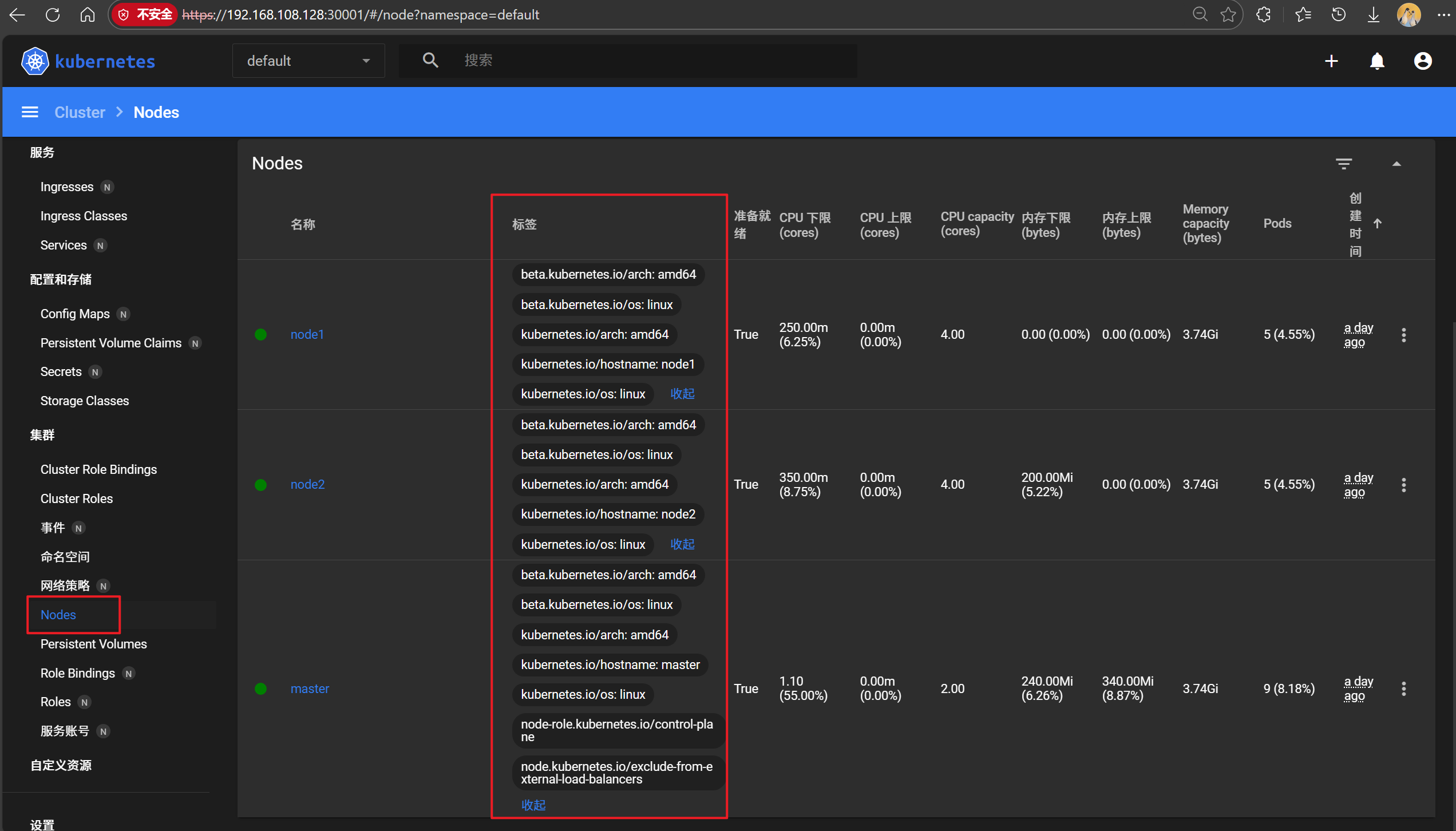
[root@master ~ 19:40:18]# kubectl get nodes --show-labels
NAME     STATUS   ROLES           AGE   VERSION   LABELS
master   Ready    control-plane   30h   v1.28.0   beta.kubernetes.io/arch=amd64,beta.kubernetes.io/os=linux,kubernetes.io/arch=amd64,kubernetes.io/hostname=master,kubernetes.io/os=linux,node-role.kubernetes.io/control-plane=,node.kubernetes.io/exclude-from-external-load-balancers=
node1    Ready    <none>          30h   v1.28.0   beta.kubernetes.io/arch=amd64,beta.kubernetes.io/os=linux,kubernetes.io/arch=amd64,kubernetes.io/hostname=node1,kubernetes.io/os=linux
node2    Ready    <none>          30h   v1.28.0   beta.kubernetes.io/arch=amd64,beta.kubernetes.io/os=linux,kubernetes.io/arch=amd64,kubernetes.io/hostname=node2,kubernetes.io/os=linux
设置节点标签信息
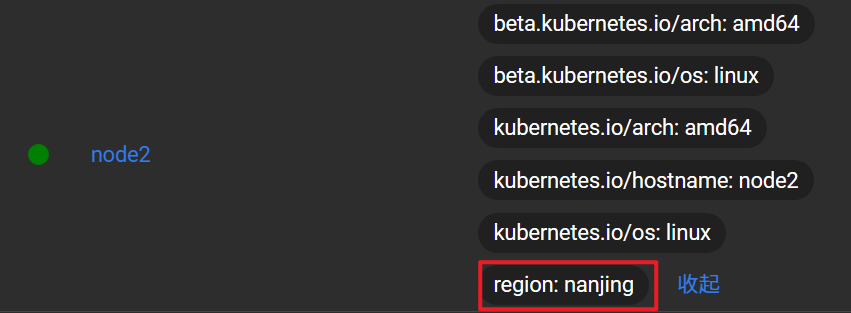
为节点node2打上一个region=nanjing的标签
bash复制代码
[root@master ~ 19:42:32]# kubectl label node node2 region=nanjing
node/node2 labeled

# 查看标签
[root@master ~ 19:45:15]# kubectl get nodes --show-labels
NAME     STATUS   ROLES           AGE   VERSION   LABELS
... ...
node2    Ready    <none>          30h   v1.28.0   beta.kubernetes.io/arch=amd64,beta.kubernetes.io/os=linux,kubernetes.io/arch=amd64,kubernetes.io/hostname=node2,kubernetes.io/os=linux,region=nanjing
查看所有节点带region的标签
bash复制代码
[root@master ~ 19:47:10]# kubectl get nodes -L region
NAME     STATUS   ROLES           AGE   VERSION   REGION
master   Ready    control-plane   30h   v1.28.0
node1    Ready    <none>          30h   v1.28.0
node2    Ready    <none>          30h   v1.28.0   nanjing
多维度标签
设置多维度标签,用于不同的需要区分的场景
比如把node1标签为合肥,南区机房,测试环境,AI业务
bash复制代码
[root@master ~ 19:47:18]# kubectl get nodes node1 --show-labels NAME    STATUS   ROLES    AGE   VERSION   LABELS
node1   Ready    <none>   30h   v1.28.0   beta.kubernetes.io/arch=amd64,beta.kubernetes.io/os=linux,kubernetes.io/arch=amd64,kubernetes.io/hostname=node1,kubernetes.io/os=linux

[root@master ~ 19:48:20]# kubectl label node node1 region=hefei zone=south env=test bussiness=AI
node/node1 labeled

[root@master ~ 19:49:46]# kubectl get nodes node1 --show-labels NAME    STATUS   ROLES    AGE   VERSION   LABELS
node1   Ready    <none>   30h   v1.28.0   beta.kubernetes.io/arch=amd64,beta.kubernetes.io/os=linux,bussiness=AI,env=test,kubernetes.io/arch=amd64,kubernetes.io/hostname=node1,kubernetes.io/os=linux,region=hefei,zone=south
显示节点的相应标签
-L大写L只需要写键名即可
bash复制代码
[root@master ~ 19:50:07]# kubectl get nodes -L region,zone,env
NAME     STATUS   ROLES           AGE   VERSION   REGION    ZONE    ENV
master   Ready    control-plane   30h   v1.28.0
node1    Ready    <none>          30h   v1.28.0   hefei     south   test
node2    Ready    <none>          30h   v1.28.0   nanjing
键值匹配标签-l小写的L(键值对用小写l;键名用大写L)
需要键值写全
bash复制代码
[root@master ~ 19:52:19]# kubectl get nodes -l region=hefei
NAME    STATUS   ROLES    AGE   VERSION
node1   Ready    <none>   30h   v1.28.0
标签修改(overwrite:使用复写功能)
bash复制代码
[root@master test_dir 15:59:13]# kubectl label nodes node1 zone=west --overwrite
node/node1 labeled
[root@master test_dir 16:02:41]# kubectl get nodes node1 -L zone
NAME    STATUS   ROLES    AGE    VERSION   ZONE
node1   Ready    <none>   2d2h   v1.28.0   west
标签删除
使用key后面加-减号的写法来取消标签
bash复制代码
[root@master test_dir 16:03:26]# kubectl get node node1 --show-labels
NAME    STATUS   ROLES    AGE    VERSION   LABELS
node1   Ready    <none>   2d2h   v1.28.0   beta.kubernetes.io/arch=amd64,beta.kubernetes.io/os=linux,bussiness=AI,env=test,kubernetes.io/arch=amd64,kubernetes.io/hostname=node1,kubernetes.io/os=linux,region=hefei,zone=west

# 批量删除标签
[root@master test_dir 16:04:59]# kubectl label node node1 env- bussiness- region- zone-
node/node1 unlabeled

# 查看标签
[root@master test_dir 16:06:04]# kubectl get node node1 --show-labels
NAME    STATUS   ROLES    AGE    VERSION   LABELS
node1   Ready    <none>   2d2h   v1.28.0   beta.kubernetes.io/arch=amd64,beta.kubernetes.io/os=linux,kubernetes.io/arch=amd64,kubernetes.io/hostname=node1,kubernetes.io/os=linux
标签选择
用于筛选匹配到特定标签的资源,主要分两类:
等值匹配(Equality-based)
精确匹配键值:app=nginx(匹配 app 值为 nginx 的资源)
排除匹配:env!=dev(排除 env=dev 的资源)
集合匹配(Set-based)
"key in (value1, value2)":匹配值在集合中的资源
"key notin (value1)":拆除指定值
存在性检查:key(仅检查键时候存在)
bash复制代码
[root@master test_dir 16:06:07]# kubectl label node node1 env=test1
node/node1 labeled
[root@master test_dir 17:07:06]# kubectl label node node2 env=test2
node/node2 labeled
[root@master test_dir 17:07:20]# kubectl get nodes -l env!=test1
NAME     STATUS   ROLES           AGE    VERSION
master   Ready    control-plane   2d3h   v1.28.0
node2    Ready    <none>          2d3h   v1.28.0
[root@master test_dir 17:07:46]# kubectl get nodes -l "env in(test1,test2)"
NAME    STATUS   ROLES    AGE    VERSION
node1   Ready    <none>   2d3h   v1.28.0
node2   Ready    <none>   2d3h   v1.28.0
[root@master test_dir 18:00:53]# kubectl apply -f namespace.yaml
namespace/web-test created
[root@master test_dir 18:01:02]# kubectl get ns
NAME                   STATUS   AGE
default                Active   2d4h
kube-node-lease        Active   2d4h
kube-public            Active   2d4h
kube-system            Active   2d4h
kubernetes-dashboard   Active   2d2h
web-test               Active   22s
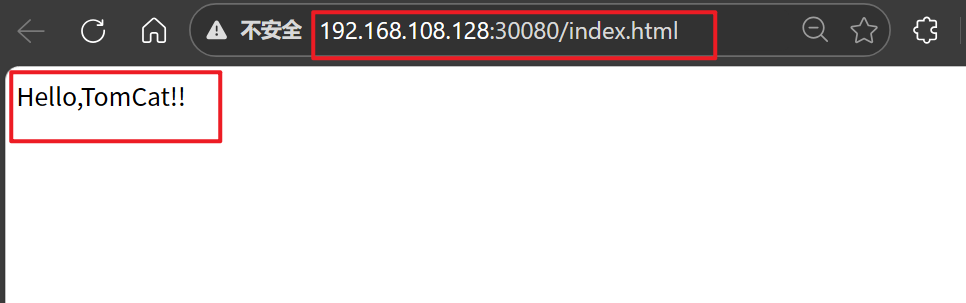
[root@master test_dir 18:15:05]# kubectl apply -f tomcat.yaml
configmap/tomcat-web-content created
deployment.apps/tomcat-test created
service/tomcat-service created
[root@master ~ 09:14:14]# kubectl get namespaces
# namespaces可以简写成namespace或ns
NAME                   STATUS   AGE
default                Active   4d20h	# 所有未指定Namespace的对象都会被默认分配在default命名空间
kube-node-lease        Active   4d20h
kube-public            Active   4d20h	# 此命名空间下的资源可以被所有人访问
kube-system            Active   4d20h	# 所有由Kubernetes系统创建的资源都处于这个命名空间
kubernetes-dashboard   Active   4d18h
web-test               Active   2d15h
查看namespace中的资源
命令kubectl get all --namespace=命名空间名称 可以查看此命名空间下的所有资源
[root@master ~ 10:04:49]# kubectl create namespace web1
namespace/web1 created
[root@master ~ 10:05:00]# kubectl get ns
NAME                   STATUS   AGE
default                Active   4d20h
kube-node-lease        Active   4d20h
kube-public            Active   4d20h
kube-system            Active   4d20h
kubernetes-dashboard   Active   4d18h
web-test               Active   2d16h
web1                   Active   6s
[root@master ~ 10:10:09]# cd test_dir/
[root@master test_dir 10:10:16]# vim create_web2.yaml
apiVersion: v1		# api版本
kind: Namespace		# 类型为namespace
metadata:			# 定义namespace的元数据
  name: web2		# 定义名称为web2

[root@master test_dir 10:11:23]# kubectl apply -f create_web2.yaml
namespace/web2 created
[root@master test_dir 10:12:28]# kubectl get ns
NAME                   STATUS   AGE
default                Active   4d20h
kube-node-lease        Active   4d20h
kube-public            Active   4d20h
kube-system            Active   4d20h
kubernetes-dashboard   Active   4d18h
web-test               Active   2d16h
web1                   Active   7m36s
web2                   Active   8s
[root@master test_dir 10:12:39]# kubectl delete namespaces web1
namespace "web1" deleted
[root@master test_dir 10:14:09]# kubectl get ns
NAME                   STATUS   AGE
default                Active   4d20h
kube-node-lease        Active   4d20h
kube-public            Active   4d20h
kube-system            Active   4d20h
kubernetes-dashboard   Active   4d18h
web-test               Active   2d16h
web2                   Active   108s
YAML文件删除
bash复制代码
[root@master test_dir 10:14:16]# kubectl delete -f create_web2.yaml
namespace "web2" deleted
[root@master test_dir 10:14:50]# kubectl get ns
NAME                   STATUS   AGE
default                Active   4d20h
kube-node-lease        Active   4d20h
kube-public            Active   4d20h
kube-system            Active   4d20h
kubernetes-dashboard   Active   4d18h
web-test               Active   2d16h