
一、前言
大家好!今天我们来系统梳理《计算机操作系统》第七章 "文件管理" 的核心知识点,从基础概念到代码实现,力求通俗易懂,每个核心知识点都会搭配实战案例和架构图 / 流程图,帮助大家彻底吃透文件管理的底层逻辑。所有代码均采用C++98 标准编写,可直接编译运行,注释详尽,方便动手实操。
二、核心知识点讲解
7.1 文件和文件系统
1. 核心概念
文件:是操作系统中存储信息的基本单位,由一系列字符 / 字节组成,具有唯一文件名,存储在外部存储介质(磁盘、U 盘等)上。文件系统:是操作系统中负责管理和存储文件信息的软件集合,核心功能包括文件创建 / 删除、读写、目录管理、权限控制等。
2. 架构图
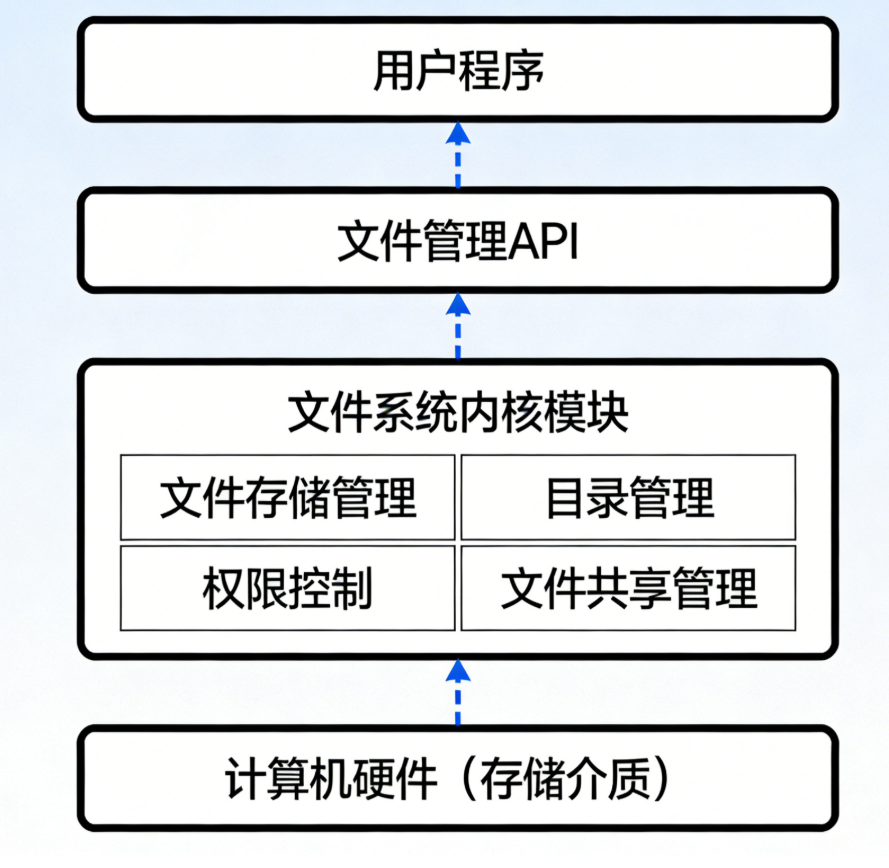
3. 实战案例:模拟文件系统基础结构(C++98)
cpp
#include <iostream>
#include <string>
#include <ctime>
using namespace std;
// 遵循C++98标准,模拟文件的基本属性和操作
// 文件属性结构体(对应文件系统中文件的元数据)
struct FileAttribute {
string fileName; // 文件名
int fileSize; // 文件大小(字节)
time_t createTime; // 创建时间
time_t modifyTime; // 修改时间
string fileType; // 文件类型(文本/二进制等)
};
// 文件系统基础类
class FileSystem {
public:
// 构造函数:初始化文件系统
FileSystem() {
cout << "文件系统初始化完成!" << endl;
}
// 创建文件:初始化文件属性
void createFile(const string& name, const string& type, int size) {
FileAttribute file;
file.fileName = name;
file.fileSize = size;
file.fileType = type;
// 获取当前时间作为创建/修改时间(先赋值给变量,再取地址)
file.createTime = time(NULL);
file.modifyTime = file.createTime;
cout << "文件创建成功!" << endl;
cout << "文件名:" << file.fileName << endl;
cout << "文件大小:" << file.fileSize << " 字节" << endl;
cout << "文件类型:" << file.fileType << endl;
cout << "创建时间:" << ctime(&file.createTime);
}
// 删除文件
void deleteFile(const string& name) {
cout << "文件 " << name << " 删除成功!" << endl;
}
// 读取文件(模拟)
void readFile(const string& name) {
cout << "正在读取文件:" << name << endl;
cout << "文件内容(模拟):Hello, File System!" << endl;
}
// 写入文件(模拟)- 修复临时值取地址问题
void writeFile(const string& name, const string& content) {
cout << "向文件 " << name << " 写入内容:" << content << endl;
// 修复点:先将time(NULL)的结果赋值给变量(左值),再取地址
time_t currentTime = time(NULL);
cout << "文件修改时间更新为:" << ctime(¤tTime);
}
};
// 主函数:测试文件系统基础操作
int main() {
// 创建文件系统实例
FileSystem fs;
// 创建文本文件
fs.createFile("test.txt", "文本文件", 1024);
// 读取文件
fs.readFile("test.txt");
// 写入文件
fs.writeFile("test.txt", "这是测试文件的内容!");
// 删除文件
fs.deleteFile("test.txt");
return 0;
}
4. 代码说明
- 定义
FileAttribute结构体模拟文件元数据(文件名、大小、时间等),对应文件系统中存储的文件属性; FileSystem类封装文件系统核心操作(创建、删除、读写),符合 C++98 语法规范;- 主函数中完成完整的文件操作流程,可直接编译运行(g++ -std=c++98 文件名.cpp -o 可执行文件)。
7.2 文件的逻辑结构
1. 核心概念
文件的逻辑结构是用户视角下文件的组织形式,分为两类:
- 流式文件:无结构,由字符 / 字节流组成(如.txt 文件);
- 记录式文件:有结构,由多条记录组成(如数据库表、CSV 文件)。
2. 流程图
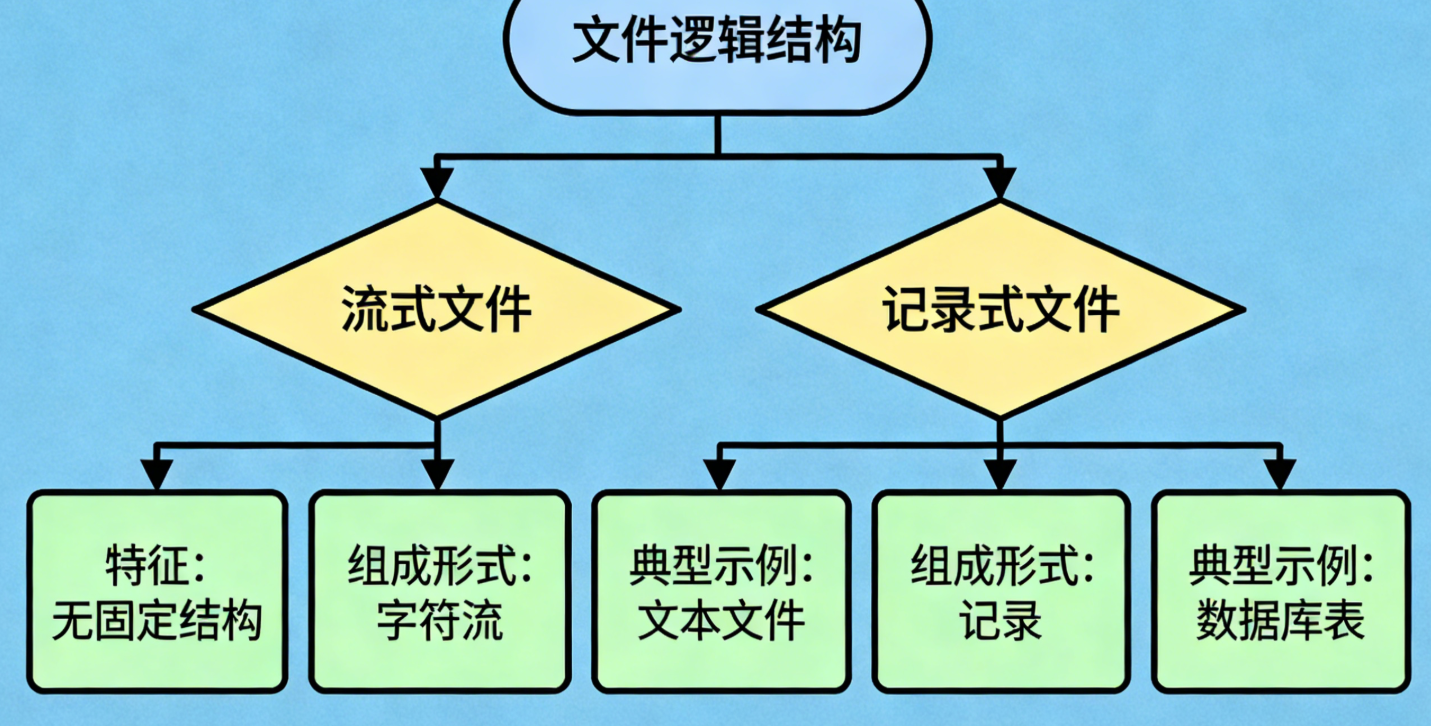
3. 实战案例:模拟流式文件和记录式文件(C++98)
#include <iostream>
#include <string>
#include <vector>
#include <iomanip>
using namespace std;

// 遵循C++98标准,模拟两种文件逻辑结构

// 1. 流式文件类(无结构,字节流)
class StreamFile {
private:
    string fileName;
    string content;  // 字节流形式存储内容
public:
    StreamFile(const string& name) : fileName(name) {}

    // 写入字节流(流式文件核心操作)
    void writeStream(const string& data) {
        content += data;  // 直接追加,无结构限制
        cout << "流式文件 " << fileName << " 写入成功,当前内容长度:" << content.size() << " 字节" << endl;
    }

    // 读取字节流
    string readStream() {
        cout << "读取流式文件 " << fileName << " 内容:" << endl;
        return content;
    }
};

// 2. 记录式文件:单条记录结构体
struct Record {
    int id;         // 记录ID
    string name;    // 姓名
    int age;        // 年龄
};

// 记录式文件类
class RecordFile {
private:
    string fileName;
    vector<Record> records;  // 按记录组织内容(C++98支持vector)
public:
    RecordFile(const string& name) : fileName(name) {}

    // 添加记录(记录式文件核心操作,有固定结构)
    void addRecord(int id, const string& name, int age) {
        Record r;
        r.id = id;
        r.name = name;
        r.age = age;
        records.push_back(r);
        cout << "记录式文件 " << fileName << " 添加记录成功,当前记录数:" << records.size() << endl;
    }

    // 读取指定记录
    Record readRecord(int id) {
        for (vector<Record>::iterator it = records.begin(); it != records.end(); ++it) {  // C++98迭代器写法
            if (it->id == id) {
                cout << "找到记录 ID=" << id << ":" << endl;
                return *it;
            }
        }
        cout << "未找到记录 ID=" << id << endl;
        return Record();  // 返回空记录
    }

    // 打印所有记录
    void printAllRecords() {
        cout << "记录式文件 " << fileName << " 所有记录:" << endl;
        cout << setw(5) << "ID" << setw(10) << "姓名" << setw(5) << "年龄" << endl;
        for (vector<Record>::iterator it = records.begin(); it != records.end(); ++it) {
            cout << setw(5) << it->id << setw(10) << it->name << setw(5) << it->age << endl;
        }
    }
};

// 主函数:测试两种文件逻辑结构
int main() {
    // 1. 测试流式文件
    StreamFile sFile("stream.txt");
    sFile.writeStream("Hello, Stream File!");
    sFile.writeStream("这是流式文件的追加内容,无结构限制。");
    cout << sFile.readStream() << endl << endl;

    // 2. 测试记录式文件
    RecordFile rFile("record.csv");
    rFile.addRecord(1, "张三", 20);
    rFile.addRecord(2, "李四", 22);
    rFile.printAllRecords();
    Record r = rFile.readRecord(1);
    cout << "读取到的记录:ID=" << r.id << ",姓名=" << r.name << ",年龄=" << r.age << endl;

    return 0;
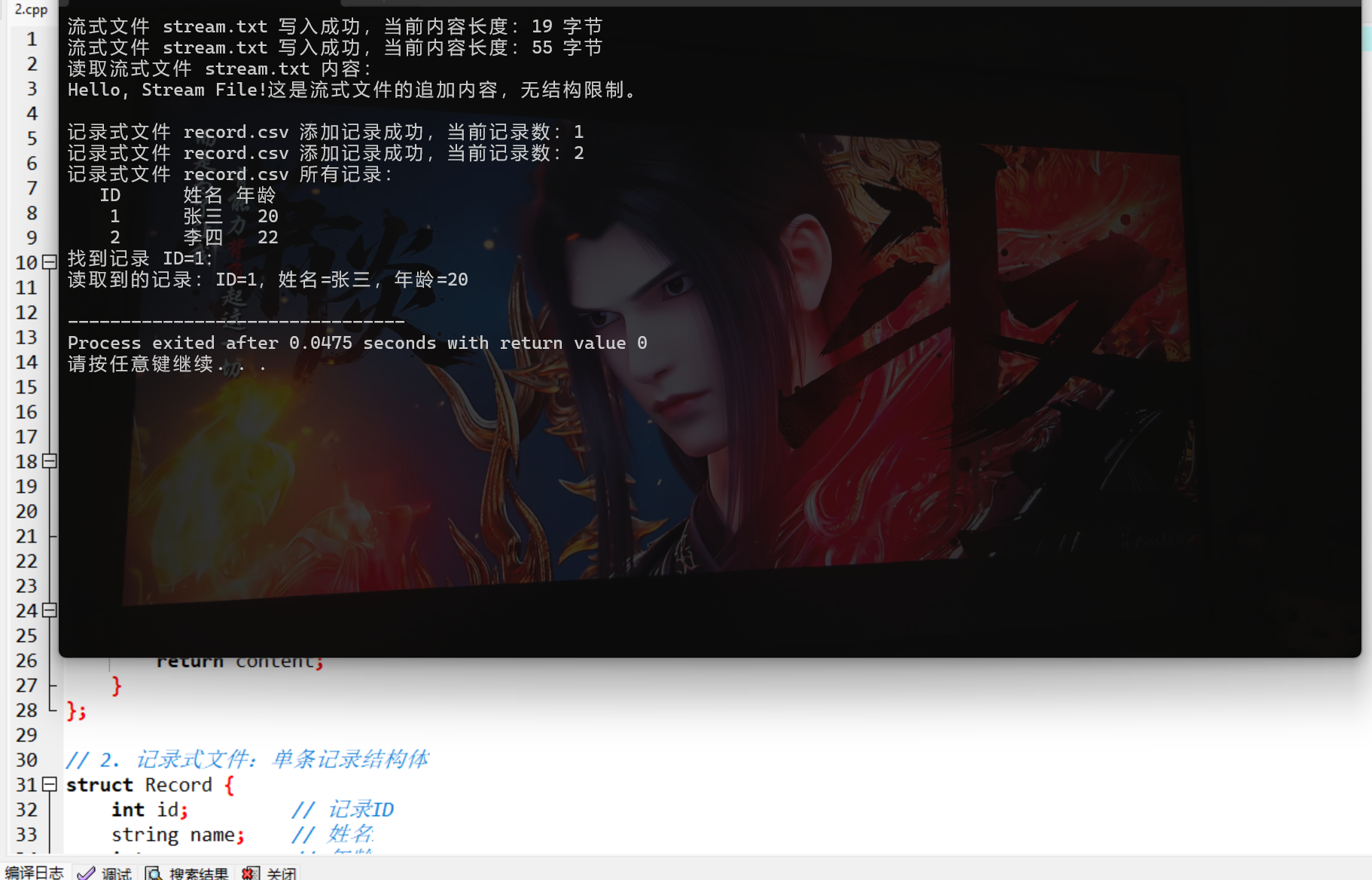
}
4. 代码说明
- 流式文件类
StreamFile:通过字符串直接存储字节流,写入时无结构限制,模拟.txt 等无结构文件; - 记录式文件类
RecordFile:通过vector存储固定结构的Record结构体,模拟 CSV / 数据库表等有结构文件; - 全部采用 C++98 语法(如迭代器写法、无 C++11 的 auto 关键字),可直接编译运行。
7.3 文件目录
1. 核心概念
文件目录(文件夹)是操作系统为管理文件而建立的索引结构,核心作用是映射文件名和文件物理存储地址,常见结构:
- 单级目录:所有文件存于一个目录,无层级;
- 两级目录:分为用户目录和文件目录;
- 树形目录(最常用):多级层级结构(如 Windows 的 C:\Users\XXX)。
2. 思维导图
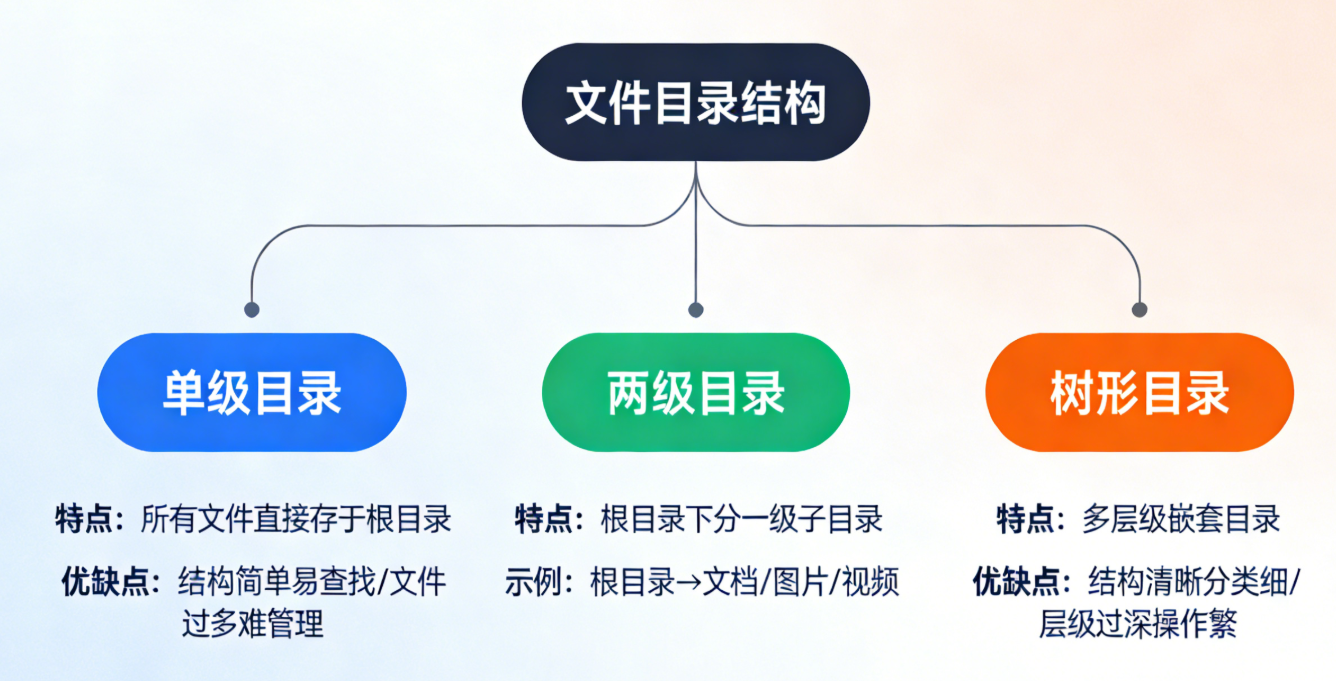
3. 实战案例:模拟树形文件目录(C++98)
#include <iostream>
#include <string>
#include <vector>
using namespace std;

// 遵循C++98标准,模拟树形文件目录结构

// 目录节点类(可包含文件或子目录)
class DirNode {
private:
    string name;                // 目录/文件名
    bool isDir;                 // 是否为目录(true=目录,false=文件)
    DirNode* parent;            // 父目录指针
    vector<DirNode*> children;  // 子节点(文件/子目录)

public:
    // 构造函数:初始化节点
    DirNode(const string& name, bool isDir, DirNode* parent)
        : name(name), isDir(isDir), parent(parent) {}

    // 析构函数:释放子节点内存(C++98手动管理内存)
    ~DirNode() {
        for (vector<DirNode*>::iterator it = children.begin(); it != children.end(); ++it) {
            delete *it;
        }
    }

    // 添加子节点(文件/子目录)
    void addChild(const string& childName, bool isChildDir) {
        DirNode* child = new DirNode(childName, isChildDir, this);
        children.push_back(child);
        cout << (isChildDir ? "目录" : "文件") << " " << childName << " 创建成功!" << endl;
    }

    // 遍历当前目录下的所有节点
    void listChildren() {
        cout << "当前目录 " << name << " 下的内容:" << endl;
        for (vector<DirNode*>::iterator it = children.begin(); it != children.end(); ++it) {
            cout << ((*it)->isDir ? "[目录] " : "[文件] ") << (*it)->name << endl;
        }
    }

    // 查找子节点(返回指针,用于进入子目录)
    DirNode* findChild(const string& childName) {
        for (vector<DirNode*>::iterator it = children.begin(); it != children.end(); ++it) {
            if ((*it)->name == childName && (*it)->isDir) {
                return *it;
            }
        }
        cout << "未找到目录 " << childName << endl;
        return NULL;
    }

    // 获取当前节点名称
    string getName() { return name; }
};

// 主函数:模拟树形目录操作(如Linux/macOS的cd、ls、mkdir、touch)
int main() {
    // 1. 创建根目录(/)
    DirNode* root = new DirNode("/", true, NULL);
    DirNode* currentDir = root;  // 当前工作目录

    // 2. 在根目录创建子目录和文件
    currentDir->addChild("home", true);    // 创建home目录
    currentDir->addChild("etc", true);     // 创建etc目录
    currentDir->addChild("readme.txt", false);  // 创建readme.txt文件
    currentDir->listChildren();
    cout << "------------------------" << endl;

    // 3. 进入home目录
    currentDir = currentDir->findChild("home");
    cout << "当前目录切换到:" << currentDir->getName() << endl;

    // 4. 在home目录创建用户目录和文件
    currentDir->addChild("user1", true);   // 创建user1目录
    currentDir->addChild("user2", true);   // 创建user2目录
    currentDir->addChild("profile.cfg", false);  // 创建配置文件
    currentDir->listChildren();

    // 5. 释放内存
    delete root;

    return 0;
}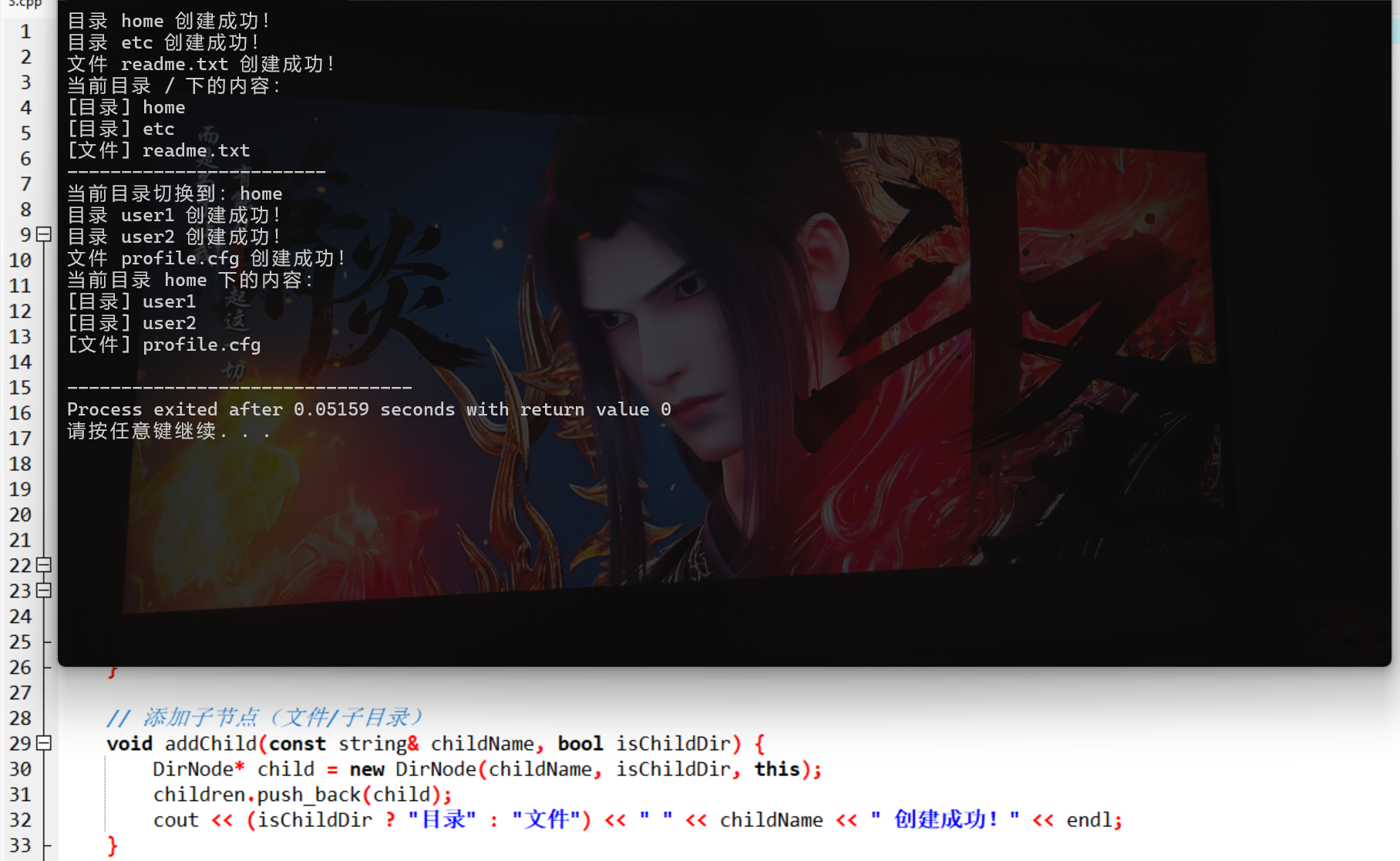
4. 代码说明
DirNode类模拟目录节点,包含名称、类型(目录 / 文件)、父节点、子节点列表;- 实现添加子节点、遍历目录、切换目录等核心操作,模拟树形目录的层级管理;
- 手动管理内存(析构函数释放子节点),符合 C++98 的内存管理规范。
7.4 文件共享
1. 核心概念
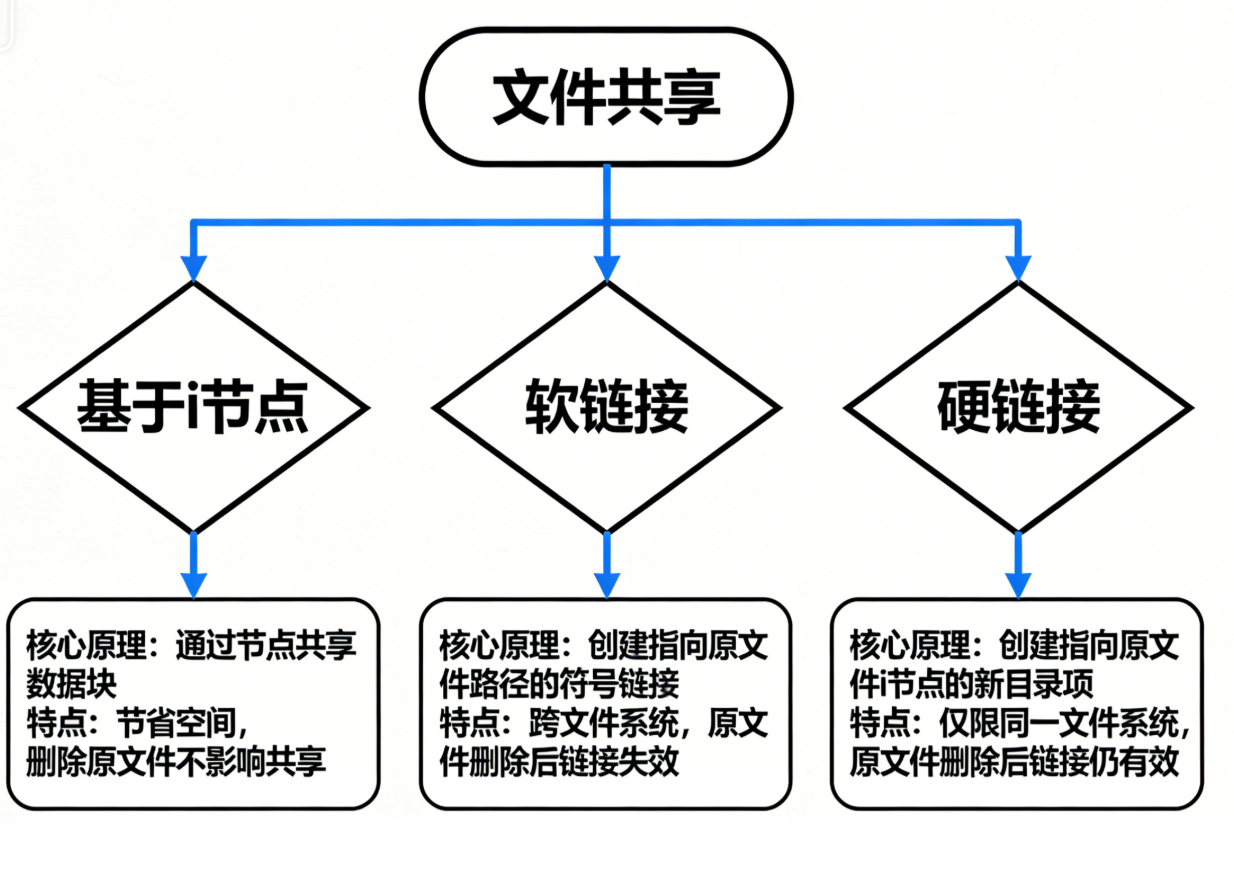
文件共享是指多个用户 / 进程同时访问同一个文件,常见实现方式:
- 基于索引节点(i 节点):多个目录项指向同一个 i 节点(存储文件元数据);
- 符号链接(软链接):创建指向原文件的快捷方式;
- 硬链接:多个文件名指向同一物理存储。
2. 流程图
3. 实战案例:模拟文件共享(C++98)
cpp
#include <iostream>
#include <string>
#include <map>
using namespace std;

// 遵循C++98标准,模拟文件共享(i节点+硬链接+软链接)

// 模拟i节点(存储文件元数据,不存储文件名)
struct INode {
    string fileData;  // 文件实际内容
    int linkCount;    // 硬链接计数
    string filePath;  // 文件物理路径
};

// 文件共享管理器
class FileShareManager {
private:
    map<int, INode> inodeMap;        // i节点表(i节点ID→i节点)
    map<string, int> fileNameToInode;// 文件名→i节点ID(硬链接)
    map<string, string> symLinkMap;  // 软链接表(链接名→原文件名)
    int nextInodeId;                 // 下一个可用i节点ID

public:
    FileShareManager() : nextInodeId(1) {}

    // 创建文件,初始化i节点
    void createFile(const string& fileName, const string& data) {
        INode inode;
        inode.fileData = data;
        inode.linkCount = 1;
        inode.filePath = "/disk/" + fileName;

        int inodeId = nextInodeId++;
        inodeMap[inodeId] = inode;
        fileNameToInode[fileName] = inodeId;

        cout << "文件 " << fileName << " 创建成功,i节点ID:" << inodeId << endl;
    }

    // 创建硬链接:新增文件名→同一i节点
    void createHardLink(const string& linkName, const string& origName) {
        if (fileNameToInode.find(origName) == fileNameToInode.end()) {
            cout << "原文件 " << origName << " 不存在!" << endl;
            return;
        }

        int inodeId = fileNameToInode[origName];
        fileNameToInode[linkName] = inodeId;
        inodeMap[inodeId].linkCount++;  // 硬链接计数+1

        cout << "硬链接 " << linkName << " 指向 " << origName << " 创建成功!" << endl;
        cout << "当前i节点 " << inodeId << " 硬链接数:" << inodeMap[inodeId].linkCount << endl;
    }

    // 创建软链接:存储原文件路径(不关联i节点)
    void createSymLink(const string& linkName, const string& origName) {
        if (fileNameToInode.find(origName) == fileNameToInode.end()) {
            cout << "原文件 " << origName << " 不存在!" << endl;
            return;
        }

        symLinkMap[linkName] = origName;
        cout << "软链接 " << linkName << " 指向 " << origName << " 创建成功!" << endl;
    }

    // 读取文件(支持硬链接/软链接)- 修复const参数修改问题
    void readFile(const string& fileName) {
        // 修复点:创建临时变量存储文件名,避免修改const参数
        string actualFileName = fileName;

        // 1. 先判断是否是软链接
        if (symLinkMap.find(actualFileName) != symLinkMap.end()) {
            string origName = symLinkMap[actualFileName];
            cout << "软链接 " << actualFileName << " 指向原文件:" << origName << endl;
            actualFileName = origName;  // 修改临时变量,而非const参数
        }

        // 2. 判断是否是硬链接/原文件
        if (fileNameToInode.find(actualFileName) == fileNameToInode.end()) {
            cout << "文件 " << actualFileName << " 不存在!" << endl;
            return;
        }

        int inodeId = fileNameToInode[actualFileName];
        cout << "读取文件 " << actualFileName << "(i节点ID:" << inodeId << ")内容:" << endl;
        cout << inodeMap[inodeId].fileData << endl;
    }

    // 删除文件(硬链接计数为0时才真正删除i节点)
    void deleteFile(const string& fileName) {
        if (fileNameToInode.find(fileName) == fileNameToInode.end()) {
            cout << "文件 " << fileName << " 不存在!" << endl;
            return;
        }

        int inodeId = fileNameToInode[fileName];
        fileNameToInode.erase(fileName);  // 删除文件名映射
        inodeMap[inodeId].linkCount--;    // 硬链接计数-1

        cout << "文件 " << fileName << " 已删除,当前i节点 " << inodeId << " 硬链接数:" << inodeMap[inodeId].linkCount << endl;

        // 硬链接计数为0,删除i节点
        if (inodeMap[inodeId].linkCount == 0) {
            inodeMap.erase(inodeId);
            cout << "i节点 " << inodeId << " 已释放!" << endl;
        }
    }
};

// 主函数:测试文件共享
int main() {
    FileShareManager fsm;

    // 1. 创建原文件
    fsm.createFile("data.txt", "这是共享文件的内容!");

    // 2. 创建硬链接
    fsm.createHardLink("data_hardlink.txt", "data.txt");

    // 3. 创建软链接
    fsm.createSymLink("data_symlink.txt", "data.txt");

    // 4. 读取硬链接/软链接
    cout << "------------------------" << endl;
    fsm.readFile("data_hardlink.txt");
    cout << "------------------------" << endl;
    fsm.readFile("data_symlink.txt");

    // 5. 删除原文件(硬链接仍可用)
    cout << "------------------------" << endl;
    fsm.deleteFile("data.txt");
    fsm.readFile("data_hardlink.txt");  // 硬链接仍可读取

    // 6. 删除硬链接(i节点释放)
    cout << "------------------------" << endl;
    fsm.deleteFile("data_hardlink.txt");

    // 7. 软链接失效
    cout << "------------------------" << endl;
    fsm.readFile("data_symlink.txt");

    return 0;
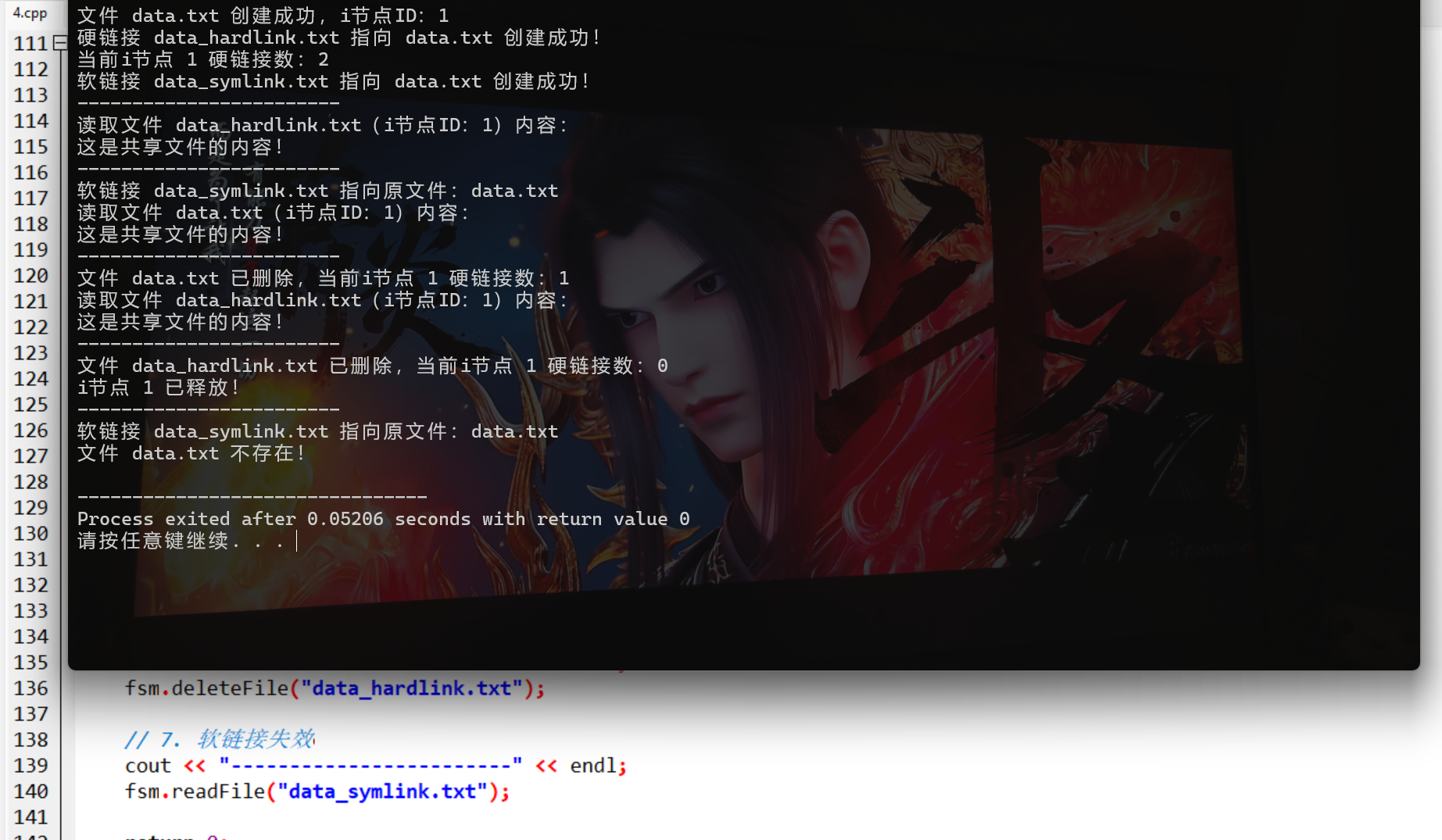
}
4. 代码说明
- 用
INode结构体模拟 i 节点,存储文件实际内容和硬链接计数; - 硬链接:多个文件名映射到同一 i 节点 ID,计数 > 0 时文件不真正删除;
- 软链接:单独存储链接名→原文件名,原文件删除则链接失效;
- 全部操作符合 C++98 标准,模拟 Linux 系统的文件共享逻辑。
7.5 文件保护
1. 核心概念
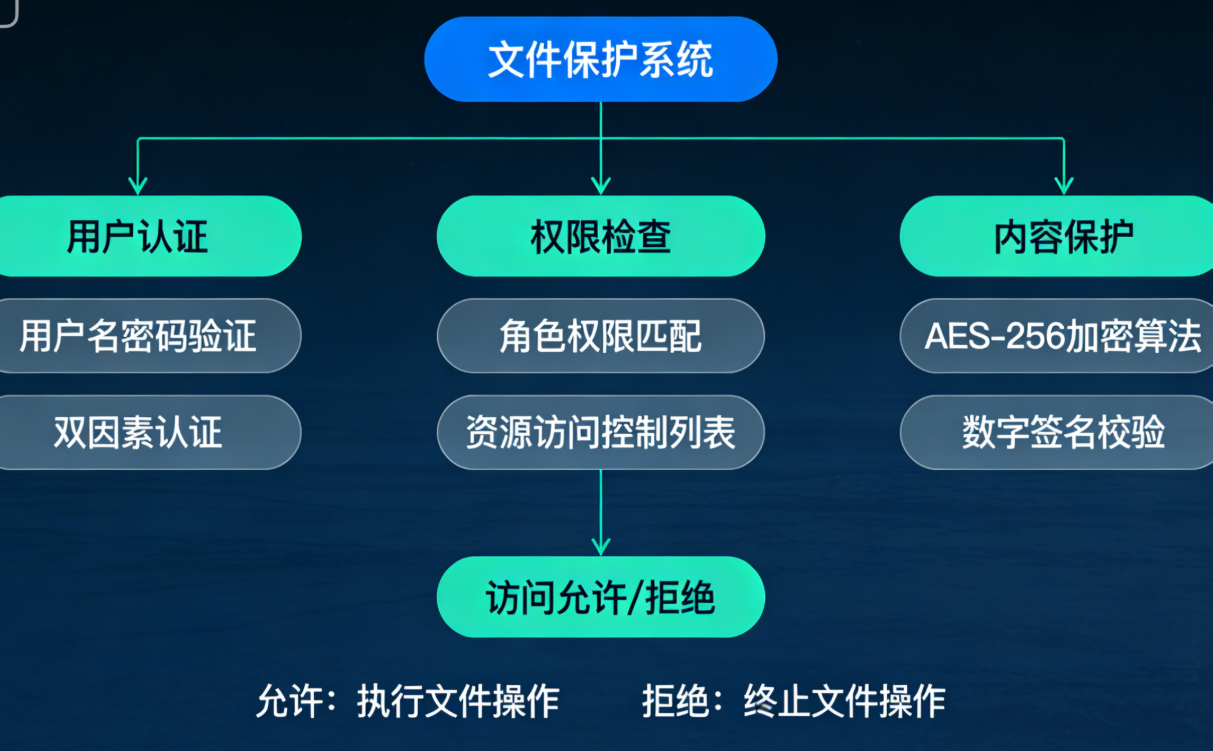
文件保护是防止文件被未授权访问 / 修改,常见方式:
- 访问控制列表(ACL):为每个文件指定用户 / 组的访问权限(读 R、写 W、执行 X);
- 口令保护:访问文件需输入口令;
- 加密保护:文件内容加密存储,只有解密后才能访问。
2. 架构图
3. 实战案例:模拟文件权限保护(C++98)
cpp
#include <iostream>
#include <string>
#include <map>
using namespace std;

// 遵循C++98标准,模拟文件访问权限保护(ACL)

// 用户类型枚举(C++98支持enum)
enum UserType {
    OWNER,   // 文件所有者
    GROUP,   // 同组用户
    OTHER    // 其他用户
};

// 文件权限结构体
struct FilePermission {
    bool read;   // 读权限
    bool write;  // 写权限
    bool exec;   // 执行权限

    // C++98兼容:添加默认构造函数(避免初始化问题)
    FilePermission() : read(false), write(false), exec(false) {}

    // 带参数的构造函数(方便初始化)
    FilePermission(bool r, bool w, bool e) : read(r), write(w), exec(e) {}
};

// 文件保护管理器
class FileProtectManager {
private:
    // 修复点1:C++98要求嵌套模板的>>必须分开写为> >
    map<string, map<UserType, FilePermission> > permMap;
    // 用户-文件所有者映射
    map<string, string> userFileOwnerMap;
    // 模拟用户口令
    map<string, string> userPwdMap;

public:
    // 初始化:添加测试用户和口令
    FileProtectManager() {
        userPwdMap["user1"] = "123456";  // 文件所有者
        userPwdMap["user2"] = "654321";  // 同组用户
        userPwdMap["user3"] = "000000";  // 其他用户
    }

    // 创建文件并设置权限(所有者默认拥有全部权限)
    void createFileWithPerm(const string& fileName, const string& owner) {
        // 记录文件所有者
        userFileOwnerMap[fileName] = owner;

        // 设置所有者权限(R/W/X)- 使用C++98的构造函数初始化
        FilePermission ownerPerm(true, true, true);
        // 设置同组用户权限(R/X)
        FilePermission groupPerm(true, false, true);
        // 设置其他用户权限(仅R)
        FilePermission otherPerm(true, false, false);

        permMap[fileName][OWNER] = ownerPerm;
        permMap[fileName][GROUP] = groupPerm;
        permMap[fileName][OTHER] = otherPerm;

        cout << "文件 " << fileName << " 创建成功!" << endl;
        cout << "所有者:" << owner << endl;
        cout << "权限设置:" << endl;
        cout << "  所有者:读(R)=是,写(W)=是,执行(X)=是" << endl;
        cout << "  同组用户:读(R)=是,写(W)=否,执行(X)=是" << endl;
        cout << "  其他用户:读(R)=是,写(W)=否,执行(X)=否" << endl;
    }

    // 用户登录验证
    bool userLogin(const string& userName, const string& pwd) {
        if (userPwdMap.find(userName) == userPwdMap.end()) {
            cout << "用户 " << userName << " 不存在!" << endl;
            return false;
        }
        if (userPwdMap[userName] != pwd) {
            cout << "口令错误!" << endl;
            return false;
        }
        cout << "用户 " << userName << " 登录成功!" << endl;
        return true;
    }

    // 判断用户对文件的权限
    FilePermission checkPerm(const string& userName, const string& fileName) {
        if (permMap.find(fileName) == permMap.end()) {
            cout << "文件 " << fileName << " 不存在!" << endl;
            // 修复点2:使用C++98的构造函数返回空权限,而非列表初始化
            return FilePermission(false, false, false);
        }

        // 判断用户类型
        string owner = userFileOwnerMap[fileName];
        UserType ut;
        if (userName == owner) {
            ut = OWNER;
        } else if (userName == "user2") {  // 模拟同组用户
            ut = GROUP;
        } else {
            ut = OTHER;
        }

        cout << "用户 " << userName << " 对文件 " << fileName << " 的权限类型:"
             << (ut == OWNER ? "所有者" : (ut == GROUP ? "同组用户" : "其他用户")) << endl;
        return permMap[fileName][ut];
    }

    // 执行文件操作(检查权限)
    void doFileOperation(const string& userName, const string& fileName, const string& op) {
        FilePermission perm = checkPerm(userName, fileName);
        bool allowed = false;

        if (op == "read" && perm.read) {
            allowed = true;
        } else if (op == "write" && perm.write) {
            allowed = true;
        } else if (op == "exec" && perm.exec) {
            allowed = true;
        }

        if (allowed) {
            cout << "允许执行 " << op << " 操作!" << endl;
        } else {
            cout << "拒绝执行 " << op << " 操作:权限不足!" << endl;
        }
    }
};

// 主函数:测试文件保护
int main() {
    FileProtectManager fpm;

    // 1. 创建文件,指定所有者为user1
    fpm.createFileWithPerm("app.exe", "user1");
    cout << "------------------------" << endl;

    // 2. 用户1登录,测试所有操作
    if (fpm.userLogin("user1", "123456")) {
        fpm.doFileOperation("user1", "app.exe", "read");
        fpm.doFileOperation("user1", "app.exe", "write");
        fpm.doFileOperation("user1", "app.exe", "exec");
    }
    cout << "------------------------" << endl;

    // 3. 用户2(同组)登录,测试操作
    if (fpm.userLogin("user2", "654321")) {
        fpm.doFileOperation("user2", "app.exe", "read");
        fpm.doFileOperation("user2", "app.exe", "write");  // 无写权限
        fpm.doFileOperation("user2", "app.exe", "exec");
    }
    cout << "------------------------" << endl;

    // 4. 用户3(其他)登录,测试操作
    if (fpm.userLogin("user3", "000000")) {
        fpm.doFileOperation("user3", "app.exe", "read");
        fpm.doFileOperation("user3", "app.exe", "write");  // 无写权限
        fpm.doFileOperation("user3", "app.exe", "exec");  // 无执行权限
    }

    return 0;
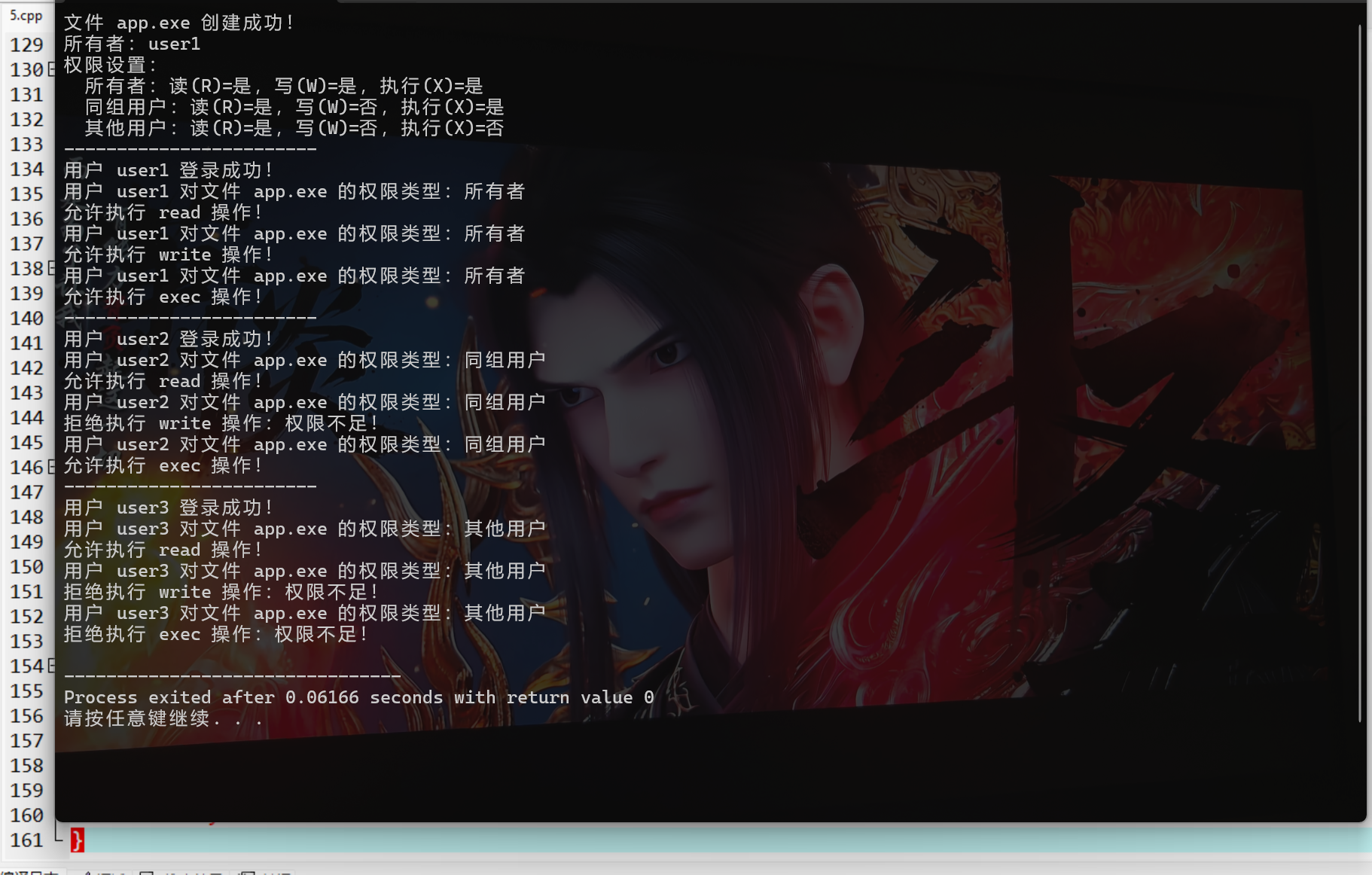
}
4. 代码说明
- 用
UserType枚举区分用户类型(所有者 / 同组 / 其他),FilePermission存储 R/W/X 权限; FileProtectManager实现用户登录、权限检查、操作鉴权核心逻辑;- 模拟不同用户的权限差异,符合操作系统中文件权限管理的核心思想。
三、习题
基础题
- 简述文件的逻辑结构分类及各自特点,结合 7.2 的代码说明流式文件和记录式文件的实现差异。
- 解释硬链接和软链接的区别,结合 7.4 的代码说明为何硬链接删除原文件后仍可访问,而软链接不行。
- 操作系统中文件目录的核心作用是什么?树形目录相比单级目录有哪些优势?
编程题
基于 7.5 的文件保护代码,扩展功能:
- 添加 "修改文件权限" 的函数,允许文件所有者修改同组 / 其他用户的 R/W/X 权限;
- 增加 "用户组管理" 功能,支持将用户加入 / 移出指定组,动态判断用户权限类型。
四、代码运行说明
-
编译命令(确保编译器支持 C++98):
g++ -std=c++98 文件名.cpp -o 可执行文件名
-
运行命令:
./可执行文件名 # Linux/macOS
或
可执行文件名.exe # Windows
-
所有代码无第三方依赖,仅依赖 C++98 标准库,可直接编译运行。
总结
- 文件管理核心包括文件 / 文件系统基础、逻辑结构、目录管理、共享、保护五大模块,每个模块均对应操作系统的核心功能;
- 实战代码基于 C++98 标准实现,模拟了各模块的核心逻辑(如树形目录、i 节点共享、ACL 权限控制),可直接编译运行;
- 各知识点配套架构图 / 流程图(Mermaid 格式),可直接复制到 Mermaid 编辑器生成可视化图形,辅助理解概念。