RF-DETR:第一个在COCO上突破60AP的DETR
- 论文题目:RF-DETR: NEURAL ARCHITECTURE SEARCH FOR REAL-TIME DETECTION TRANSFORMERS
- 论文链接:https://arxiv.org/abs/2511.09554
- 项目链接:https://rfdetr.roboflow.com/latest/
- Github链接:https://github.com/roboflow/rf-detr
一、简介
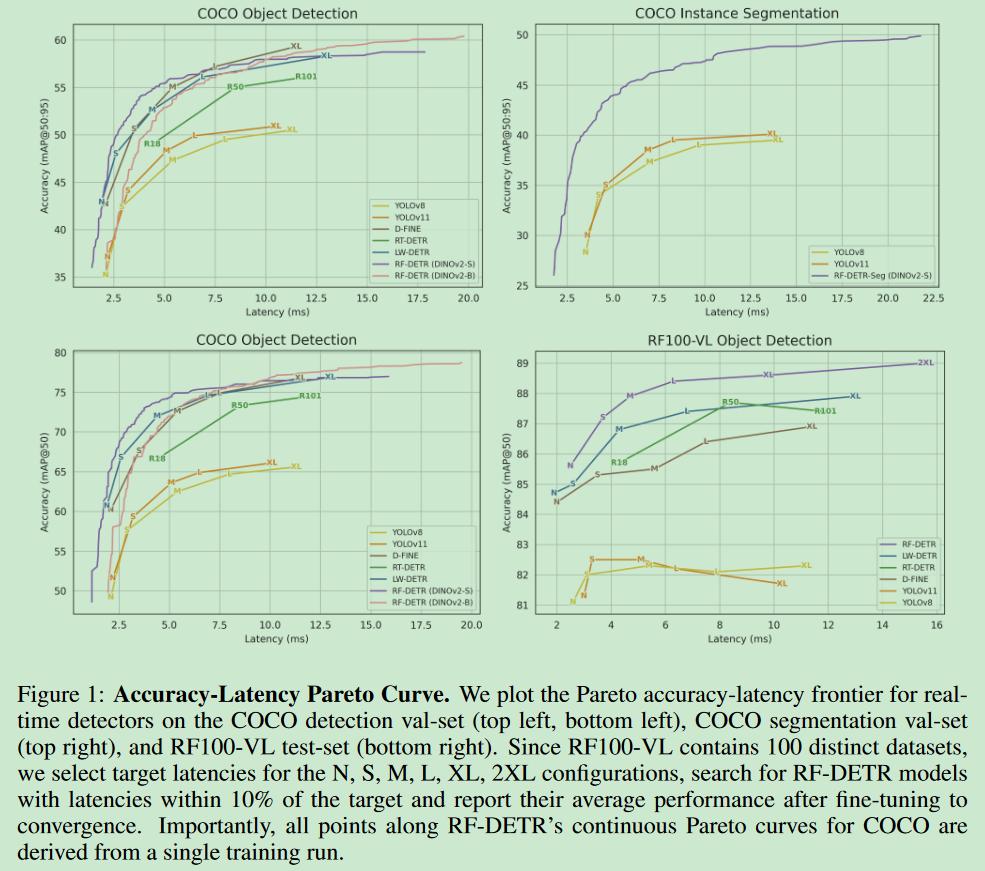
开放词汇检测器在COCO数据集上取得了令人印象深刻的表现,但在分布外类别真实世界数据集上通常无法泛化,因为这些类别在其预训练中并不常见。我们不是简单地针对新领域微调重量级视觉-语言模型(VLM),而是引入了RF-DETR,这是一种轻量级专业检测转换器,通过权重共享神经架构搜索(NAS)为任何目标数据集发现准确率-延迟帕累托曲线。我们的方法在一个目标数据集上微调预训练的基础网络,并评估数千个具有不同准确率-延迟权衡的网络配置,而无需重新训练。此外,我们重新审视了NAS的"可调节参数",以提高DETR在多样化目标领域的可转移性。值得注意的是,RF-DETR在COCO和Roboflow100-VL上显著优于之前的最先进实时方法。RF-DETR(nano)在COCO上实现了48.0的AP,比D-FINE(nano)在类似延迟下高出5.3 AP,而RF-DETR(2x-large)在Roboflow100-VL上比GroundingDINO(tiny)高出1.2 AP,同时运行速度快20倍。据我们所知,RF-DETR(2x-large)是第一个在COCO上突破60 AP的实时检测器。
目录
二、创新点及性能表现
1、问题
专家检测器是否对COCO过度优化?
目标检测的持续进展在很大程度上归功于像PASCAL VOC (Everingham等, 2015)和COCO (Lin等, 2014)这样的标准化基准。然而,我们发现最近的专家检测器隐式地过度拟合COCO,以牺牲现实世界性能为代价,使用定制的模型架构、学习率调度器和增强调度器。值得注意的是,像YOLOv8 (Jocher等, 2023)这样的最先进目标检测器对与COCO数据分布显著不同的现实世界数据集的泛化能力很差(例如,每张图像的物体数量、类别数量和数据集规模)。
重新思考DETR的神经架构搜索(NAS)
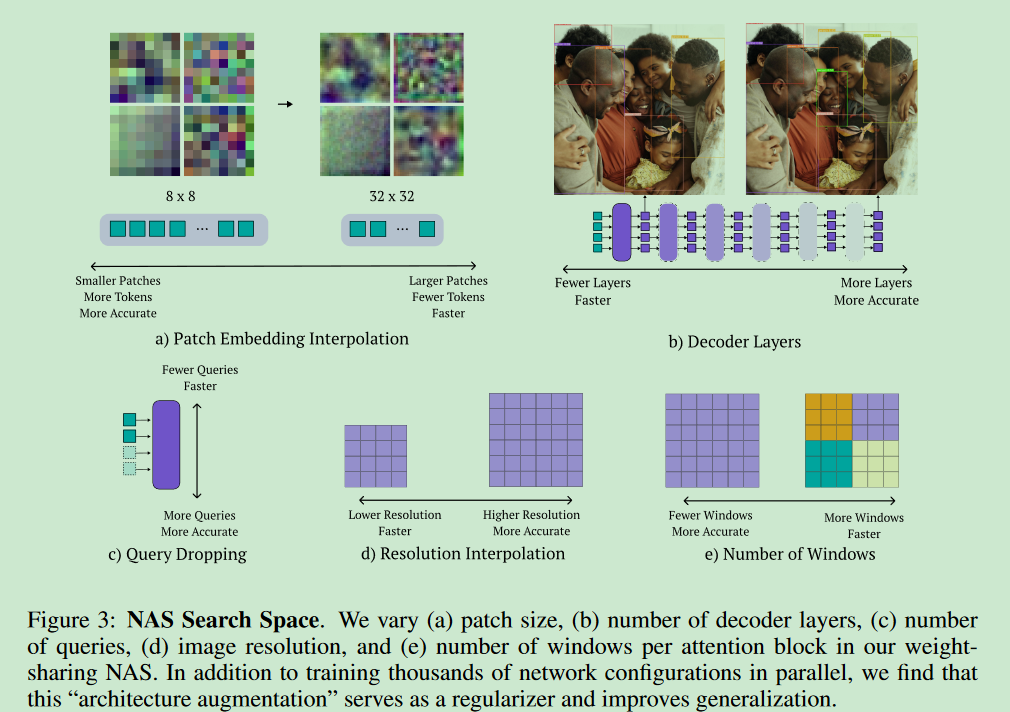
NAS通过探索预定义搜索空间内的架构变体来发现准确率-延迟权衡。与之前的工作不同,探索了目标检测和分割的端到端权重共享NAS。可以在训练期间改变模型输入如图像分辨率,以及patch大小等架构组件。此外,权重共享NAS允许我们修改推理配置,如解码器层数和查询标记数,在不需要微调的情况下专业化强基础模型。我们在验证集上用网格搜索评估所有模型配置。该方法在基础模型完全在目标数据集上训练完成之前不会评估搜索空间。因此,所有可能的子网(即搜索空间内的模型配置)都能在无需进一步微调的情况下达到良好性能,显著降低了为新硬件优化的计算成本。有趣的是,我们发现训练期间未明确见过的子网仍然能达到高性能,这表明RF-DETR可以泛化到未见过的架构(参见H)。扩展RF-DETR用于分割也相对简单,只需要添加一个轻量级实例分割头。我们将此模型称为RF-DETR-Seg。
标准化延迟评估。
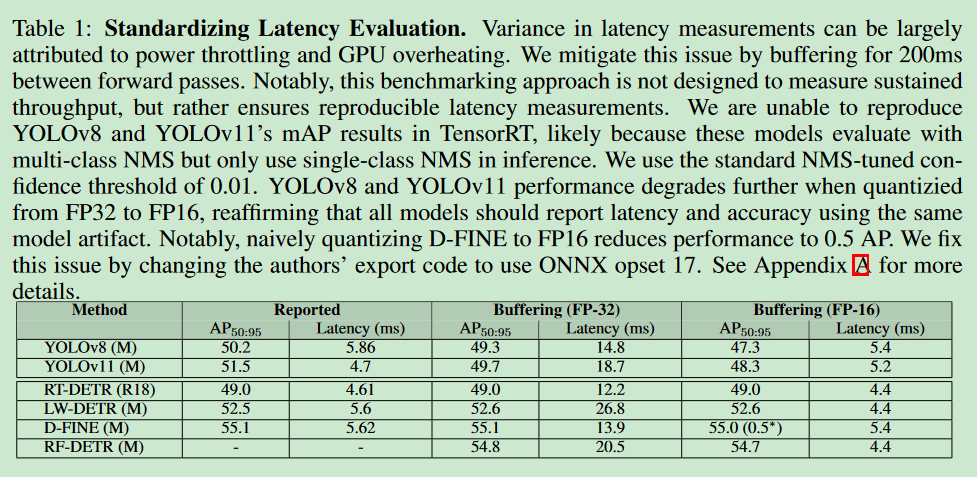
在COCO(Lin等, 2014)和Roboflow100-VL(RF100-VL)(Robicheaux等, 2025)上评估我们的方法,并在实时检测器中实现了最先进的性能。RF-DETR(nano)在COCO上以相当的运行时间比D-FINE(nano)高出5%的AP,而RF-DETR(2x-large)在RF100-VL上比GroundingDINO(tiny)表现更好,花一小部分运行时间。RF-DETR-Seg(nano)在COCO上超越了YOLOv11-Seg(x-large),同时运行速度快4倍。然而,将RF-DETR的延迟与先前工作进行比较仍然具有挑战性,因为各论文中报告的延迟评估差异很大 。值得注意的是,每个新模型都会为公平比较而在其硬件上重新基准测试先前工作的延迟。例如,DFINE对LW-DETR(Chen等, 2024a)的延迟评估比最初报告的快25%。我们发现这种不可重现性的主要原因是在推理过程中GPU功率限制 。我们发现,前向传递之间的缓冲限制了功率过度消耗并标准化了延迟评估(参见表1)。
2、创新点
-
融入互联网规模先验
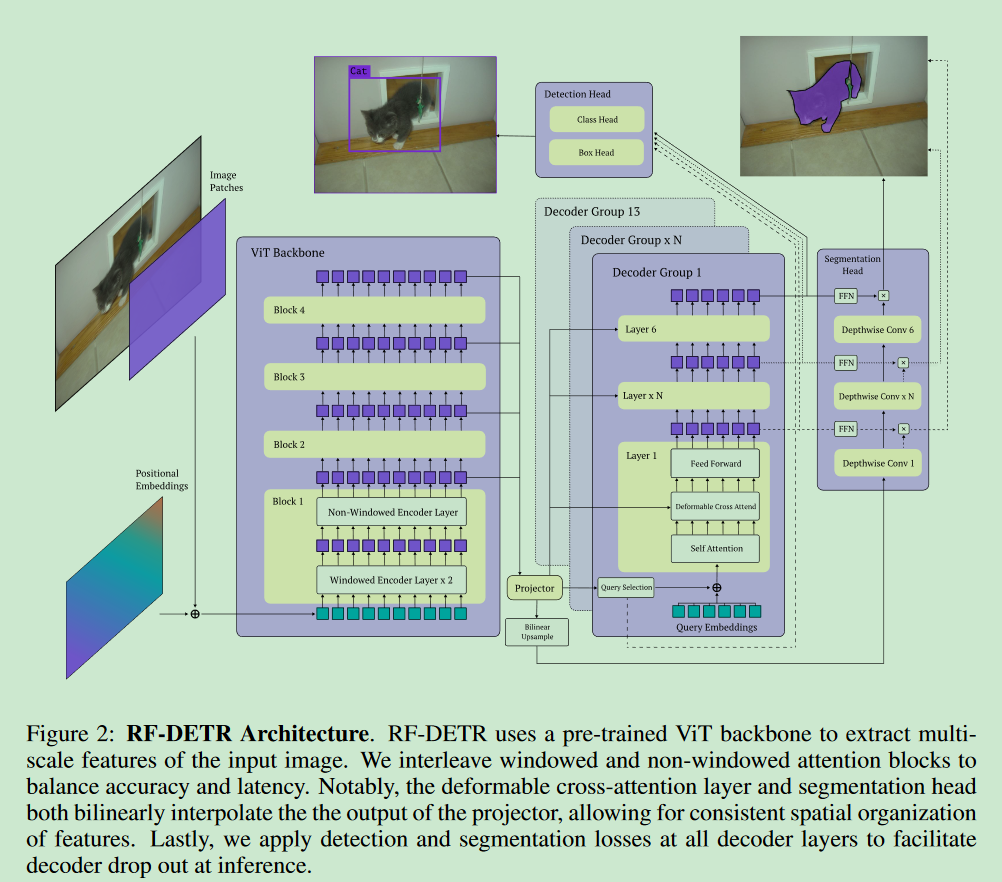
RF-DETR通过简化LW-DETR(Chen等, 2024a)的架构和训练流程来实现,提高对多样化目标领域的泛化能力。首先,我们用DINOv2(Oquab等, 2023)替换了LW-DETR的CAEv2(Zhang等, 2022b)骨干网络。我们发现,用DINOv2的预训练权重初始化我们的骨干网络显著提高了小数据集上的检测精度。值得注意的是,CAEv2的编码器有10层,patch大小为16,而DINOv2的编码器有12层。我们的DINOv2骨干网络层数更多,比CAEv2慢,但我们通过使用NAS(接下来讨论)来弥补这一延迟。最后,我们通过在多尺度投影器中使用层归一化而不是批归一化,通过梯度累积来促进消费级GPU上的训练。
-
实时实例分割
添加了一个
轻量级实例分割头来联合预测高质量分割掩码。学习分割头双线性插值编码器的输出,并学习一个轻量级投影器来生成像素嵌入图。具体来说,我们将检测和分割头的相同低分辨率特征图进行上采样,以确保其包含相关的空间信息。不在分割头中加入多尺度骨干特征以最小化延迟。最后,我们计算所有投影查询标记嵌入(每个解码器层输出经过FFN变换)与像素嵌入图的点积来生成分割掩码。 -
端到端神经架构搜索
权重共享NAS评估了数千种具有不同输入图像分辨率、patch大小、窗口注意力块、解码器层和查询标记的不同模型配置。在每次训练迭代中,均匀随机采样一个模型配置并执行梯度更新。这使得模型能够并行高效训练数千个子网,类似于dropout的集成学习。发现这种权重共享NAS方法在训练期间也起到正则化的作用,有效地执行"架构增强"。
RF-DETR是首个应用于目标检测和分割的端到端权重共享NAS。1)多维度优化 :同时调整图像分辨率、patch大小、解码器层数、查询标记数量和窗口注意力块数量;
(2)高效训练策略 :通过随机采样不同配置进行训练,实现数千个子网的并行训练;
(3)灵活的架构调整 :可以根据需要在推理时动态调整架构组件,如完全移除解码器将模型转为单阶段检测器;
(4)正则化效果 :权重共享NAS在训练中起到正则化作用,提高模型泛化能力;
(5)实用性强:通过调整参数可以控制检测性能与推理速度的平衡,适用于不同硬件平台需求。
在推理时,选择一个特定的模型配置来选择准确率-延迟帕累托曲线上的工作点。不同的模型配置可能具有相似的参数量但显著不同的延迟。
- 训练策略优化
(1)调度器局限性 :传统的余弦调度器假设固定优化范围,不适合多样化数据集
(2)增强策略影响 :激进的数据增强可能引入偏差,如垂直翻转在安全关键应用中可能产生误检
(3)实际应用考虑 :针对不同应用场景选择合适的数据增强策略
(4)效率优化 :RF-DETR采用批次级别的图像缩放,减少填充像素和计算浪费
(5)公平性保证:确保训练时所有分辨率的位置编码都有相等的出现机会
目标检测任务各模型性能表现如下:
| Size | RF-DETR package class | Inference package alias | COCO AP50 | COCO AP50:95 | Latency (ms) | Params (M) | Resolution | License |
|---|---|---|---|---|---|---|---|---|
| N | RFDETRNano | rfdetr-nano | 67.6 | 48.4 | 2.3 | 30.5 | 384x384 | Apache 2.0 |
| S | RFDETRSmall | rfdetr-small | 72.1 | 53.0 | 3.5 | 32.1 | 512x512 | Apache 2.0 |
| M | RFDETRMedium | rfdetr-medium | 73.6 | 54.7 | 4.4 | 33.7 | 576x576 | Apache 2.0 |
| L | RFDETRLarge | rfdetr-large | 75.1 | 56.5 | 6.8 | 33.9 | 704x704 | Apache 2.0 |
| XL | RFDETRXLarge | rfdetr-xlarge | 77.4 | 58.6 | 11.5 | 126.4 | 700x700 | PML 1.0 |
| 2XL | RFDETR2XLarge | rfdetr-2xlarge | 78.5 | 60.1 | 17.2 | 126.9 | 880x880 | PML 1.0 |
图像分割任务各模型性能表现如下:
| Size | RF-DETR package class | Inference package alias | COCO AP50 | COCO AP50:95 | Latency (ms) | Params (M) | Resolution | License |
|---|---|---|---|---|---|---|---|---|
| N | RFDETRSegNano | rfdetr-seg-nano | 63.0 | 40.3 | 3.4 | 33.6 | 312x312 | Apache 2.0 |
| S | RFDETRSegSmall | rfdetr-seg-small | 66.2 | 43.1 | 4.4 | 33.7 | 384x384 | Apache 2.0 |
| M | RFDETRSegMedium | rfdetr-seg-medium | 68.4 | 45.3 | 5.9 | 35.7 | 432x432 | Apache 2.0 |
| L | RFDETRSegLarge | rfdetr-seg-large | 70.5 | 47.1 | 8.8 | 36.2 | 504x504 | Apache 2.0 |
| XL | RFDETRSegXLarge | rfdetr-seg-xlarge | 72.2 | 48.8 | 13.5 | 38.1 | 624x624 | Apache 2.0 |
| 2XL | RFDETRSeg2XLarge | rfdetr-seg-2xlarge | 73.1 | 49.9 | 21.8 | 38.6 | 768x768 | Apache 2.0 |
神经架构搜索NAS结构 如下所示:
模型结构图 如下所示:
三、测试结果
1、安装
RF-DETR官方要求使用Python3.10以上版本,提供了两种安装方式:
- 第一种
shell
pip install rfdetr- 第二种
shell
pip install https://github.com/roboflow/rf-detr/archive/refs/heads/develop.zip2、模型下载
官网可提供了模型下载形式和下载地址("模型文件名称":"下载地址"),建议提前下载对应的模型,具体模型文件名称及下载地址如下:
- RFDETRBase
python
# main.py
    "rf-detr-base.pth": "https://storage.googleapis.com/rfdetr/rf-detr-base-coco.pth",
    "rf-detr-base-o365.pth": "https://storage.googleapis.com/rfdetr/top-secret-1234/lwdetr_dinov2_small_o365_checkpoint.pth",
    # below is a less converged model that may be better for finetuning but worse for inference
    "rf-detr-base-2.pth": "https://storage.googleapis.com/rfdetr/rf-detr-base-2.pth",
- RFDETRLarge
python
	# below is a less converged model that may be better for finetuning but worse for inference
    "rf-detr-large.pth": "https://storage.googleapis.com/rfdetr/rf-detr-large.pth",
    "rf-detr-large-2026.pth": "https://storage.googleapis.com/rfdetr/rf-detr-large-2026.pth",
- RFDETRNano
python
"rf-detr-nano.pth": "https://storage.googleapis.com/rfdetr/nano_coco/checkpoint_best_regular.pth",- RFDETRSmall
python
"rf-detr-small.pth": "https://storage.googleapis.com/rfdetr/small_coco/checkpoint_best_regular.pth",- RFDETRMedium
python
"rf-detr-medium.pth": "https://storage.googleapis.com/rfdetr/medium_coco/checkpoint_best_regular.pth",- RFDETRSegPreview
python
"rf-detr-seg-preview.pt": "https://storage.googleapis.com/rfdetr/rf-detr-seg-preview.pt",- RFDETRXLarge
python
"rf-detr-xlarge.pth": "https://storage.googleapis.com/rfdetr/rf-detr-xl-ft.pth", - RFDETR2XLarge
python
"rf-detr-xxlarge.pth": "https://storage.googleapis.com/rfdetr/rf-detr-2xl-ft.pth",- RFDETRSegNano
python
    "rf-detr-seg-nano.pth": "https://storage.googleapis.com/rfdetr/rf-detr-seg-n-ft.pth",
    "rf-detr-seg-nano.pt": "https://storage.googleapis.com/rfdetr/rf-detr-seg-nano.pt",
- RFDETRSegSmall
python
"rf-detr-seg-small.pth": "https://storage.googleapis.com/rfdetr/rf-detr-seg-s-ft.pth",- RFDETRSegMedium
python
"rf-detr-seg-medium.pth": "https://storage.googleapis.com/rfdetr/rf-detr-seg-m-ft.pth",- RFDETRSegLarge
python
"rf-detr-seg-large.pth": "https://storage.googleapis.com/rfdetr/rf-detr-seg-l-ft.pth",- RFDETRSegXLarge
python
"rf-detr-seg-xlarge.pth": "https://storage.googleapis.com/rfdetr/rf-detr-seg-xl-ft.pth",- RFDETRSeg2XLarge
python
"rf-detr-seg-xxlarge.pth": "https://storage.googleapis.com/rfdetr/rf-detr-seg-2xl-ft.pth",3、目标检测
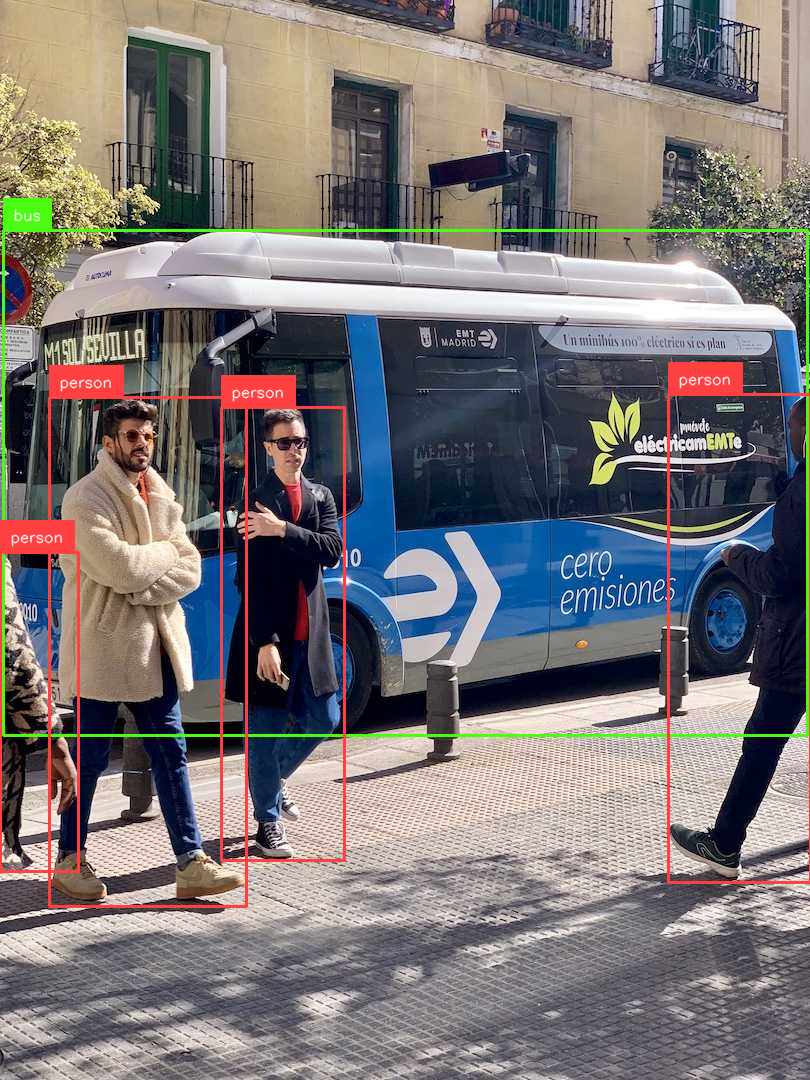
bus.jpg在https://ultralytics.com/assets/bus.jpg。
目标检测代码如下,可根据需求调整模型及加载方式:
python
import requests
import cv2
import numpy as np
import supervision as sv
from PIL import Image
from rfdetr import RFDETRBase
from rfdetr.util.coco_classes import COCO_CLASSES

model = RFDETRBase(pretrain_weights='rf-detr-base.pth', device='cuda')  # 需要提前下载对应的模型到本地,没有会自动下载
# model = RFDETRBase(device='cuda')    # 远程拉取模型,使用cuda
# model = RFDETRBase()   # 远程拉取模型,模型自适应选择运行设备

# Check if optimization method exists and apply it
# if hasattr(model, 'optimize_for_inference'):
#     model.optimize_for_inference()

image = Image.open('bus.jpg')
# model.optimize_for_inference()
detections = model.predict(image, threshold=0.5)

labels = [
    f"{COCO_CLASSES[class_id]}"
    for class_id
    in detections.class_id
]

annotated_image = sv.BoxAnnotator().annotate(image, detections)
annotated_image = sv.LabelAnnotator().annotate(annotated_image.copy(), detections, labels)

# Convert PIL Image to numpy array if needed
if isinstance(annotated_image, Image.Image):
    annotated_image = np.array(annotated_image)
    # Convert RGB to BGR for OpenCV compatibility
    annotated_image = cv2.cvtColor(annotated_image, cv2.COLOR_RGB2BGR)

sv.plot_image(annotated_image)
cv2.imwrite('result.png', annotated_image)
运行结果如下所示:
视频检测运行命令如下:
python
import cv2
import supervision as sv
from rfdetr import RFDETRBase
from rfdetr.util.coco_classes import COCO_CLASSES

model = RFDETRBase(pretrain_weights='rf-detr-base.pth', device='cuda')

SOURCE_VIDEO_PATH = "demo.mp4"  # 0: usb
video_capture = cv2.VideoCapture(SOURCE_VIDEO_PATH)

if not video_capture.isOpened():
    raise RuntimeError(f"Failed to open video source: <{SOURCE_VIDEO_PATH}>")

# 设置输出视频参数
fps = int(video_capture.get(cv2.CAP_PROP_FPS))
width = int(video_capture.get(cv2.CAP_PROP_FRAME_WIDTH))
height = int(video_capture.get(cv2.CAP_PROP_FRAME_HEIGHT))

# 创建VideoWriter对象保存结果
output_path = "output_video_with_detections.mp4"
fourcc = cv2.VideoWriter_fourcc(*'mp4v')
out = cv2.VideoWriter(output_path, fourcc, fps, (width, height))

frame_count = 0
while True:
    success, frame_bgr = video_capture.read()
    if not success:
        break

    frame_rgb = cv2.cvtColor(frame_bgr, cv2.COLOR_BGR2RGB)
    detections = model.predict(frame_rgb, threshold=0.5)

    labels = [
        COCO_CLASSES[class_id]
        for class_id in detections.class_id
    ]

    annotated_frame = sv.BoxAnnotator().annotate(frame_bgr, detections)
    annotated_frame = sv.LabelAnnotator().annotate(annotated_frame, detections, labels)

    # 写入输出视频
    out.write(annotated_frame)

    frame_count += 1
    if frame_count % 50 == 0:  # 每50帧打印一次进度
        print(f"Processed {frame_count} frames...")

video_capture.release()
out.release()
print(f"Output saved to {output_path}")
4、图像分割
图像分割代码如下,可根据需求调整模型及加载方式:
python
import requests
import cv2
import numpy as np
import supervision as sv
from PIL import Image
from rfdetr import RFDETRSegNano
from rfdetr.util.coco_classes import COCO_CLASSES

model = RFDETRSegNano(pretrain_weights='rf-detr-seg-nano.pth', device='cuda')   # 需要提前下载对应的模型到本地,没有会自动下载
# model = RFDETRSegNano(pretrain_weights='rf-detr-seg-n-ft.pth', device='cuda')   # 推荐
# model = RFDETRSegNano(device='cuda')    # 远程拉取模型,使用cuda
# model = RFDETRSegNano()   # 远程拉取模型,模型自适应选择运行设备

# image = Image.open(requests.get('https://media.roboflow.com/dog.jpg', stream=True).raw)
image = Image.open('bus.jpg')
detections = model.predict(image, threshold=0.5)

labels = [
    f"{COCO_CLASSES[class_id]}"
    for class_id
    in detections.class_id
]

annotated_image = sv.MaskAnnotator().annotate(image, detections)
annotated_image = sv.LabelAnnotator().annotate(annotated_image, detections, labels)

# Convert PIL Image to numpy array if needed
if isinstance(annotated_image, Image.Image):
    annotated_image = np.array(annotated_image)
    # Convert RGB to BGR for OpenCV compatibility
    annotated_image = cv2.cvtColor(annotated_image, cv2.COLOR_RGB2BGR)

sv.plot_image(annotated_image)
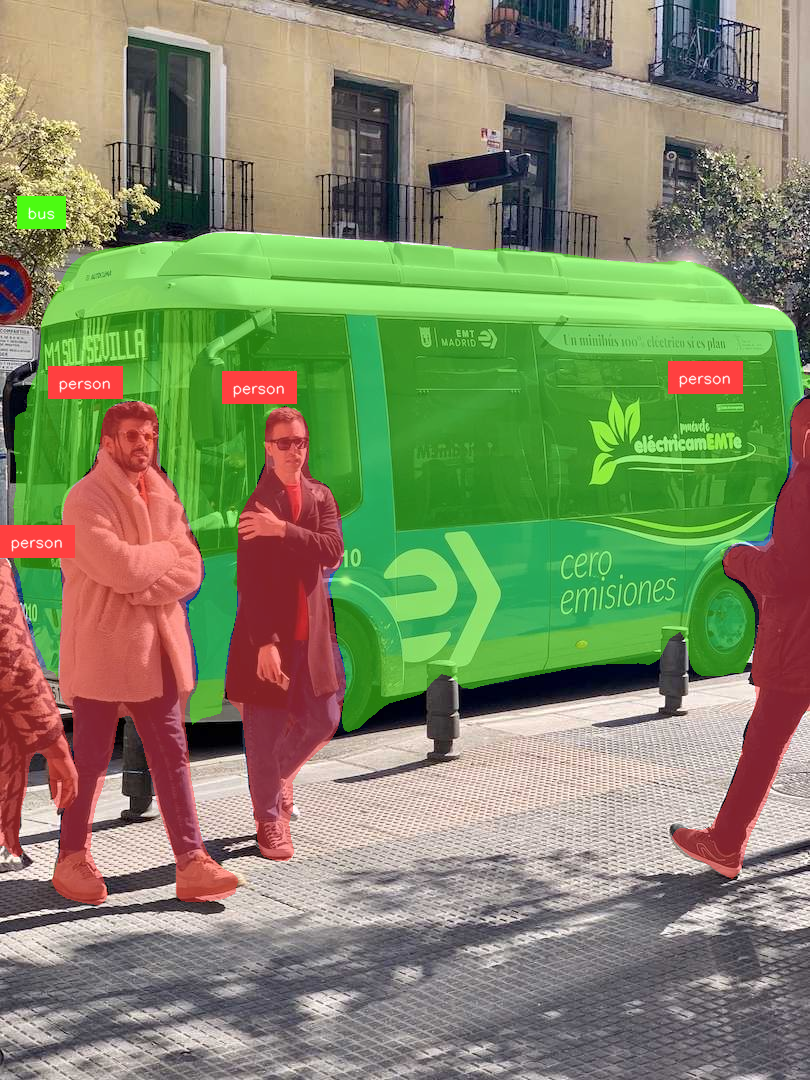
cv2.imwrite('result.png', annotated_image)rf-detr-seg-nano.pth运行结果如下所示:
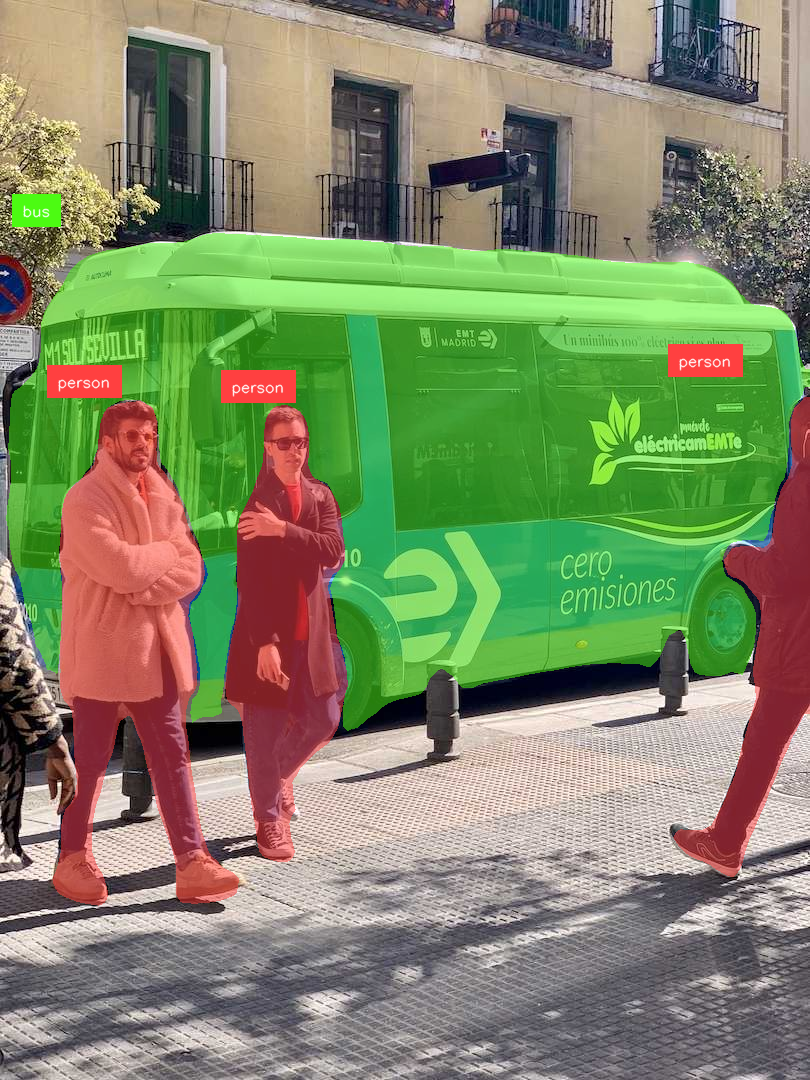
适合微调的模型能取得更好的性能表现(官方时说带'ft'的模型可能适合微调,但在推理方面表现较差),rf-detr-seg-n-ft.pth运行结果如下所示: