|------------|------|-----------|---|
| 项目名称 | 抽奖 | 版本号 | / |
| 发布类型 | 分级发布 | 测试负责人 | |
| 测试完成日期 | 3.15 | 联系方式 | |
项目背景:
项目背景与意义:
• 随着互联网的发展,博客平台成为技术交流、知识分享的重要载体。CSDN作为国内知名的技术社区,为广大开发者提供了丰富的学习与交流资源。作为一名CSDN博主,我在日常写作和交流中深刻体会到一个高效、便捷、安全的博客系统对于个人成长和技术传播的重要性。因此,我以CSDN为参考,设计并开发了**"校园星愿抽奖互动平台"**项目,旨在打造一个简洁易用、功能完善的个人博客平台,便于回顾所学的知识。
• 本项目的创建不仅是对抽奖平台功能的实践和复现,更是对Web开发全流程的系统学习和能力提升。通过项目开发,我深入掌握了Java、Spring Boot、前端技术、JWT 令牌加密等关键技能,并在实际应用中强化了对安全性、用户体验、系统可维护性的理解,实现将自己所学的知识融会贯通到项目中,加深自己对技术的理解。
若有不足或改进之处,也希望大家指出☺️~
项目概述
本项目实现了一个基于前后端分离架构的校园星愿抽奖互动平台,采用 MySQL 存储用户、活动及抽奖记录数据,结合 Redis 实现防重复抽奖与幂等性控制,通过 RabbitMQ 异步处理抽奖结果通知等任务,并部署在本地开发环境中。系统前端主要由活动管理、奖品管理、人员管理等核心页面组成,后端基于 Spring Boot 构建,支持用户认证、高并发抽奖、库存扣减与消息推送等能力,整体模拟实现了一个稳定、安全的企业级抽奖互动平台。
已实现的主要功能包括:
- 用户认证与权限控制基于 JWT 实现用户登录、身份校验与权限管控,未登录状态无法访问核心抽奖与管理接口。
- 抽奖活动管理支持后台新增、编辑、上下线抽奖活动,配置活动时间、参与限制、奖品池与中奖规则。
- 奖品管理与库存控制实现奖品创建、状态管理、库存扣减与防超卖逻辑,保证高并发下奖品数据一致。
- 幂等性与防重复抽奖通过 Redis + 唯一请求 ID 实现幂等性保障,同一用户在同一活动内只能抽奖一次,防止重复请求与恶意刷奖。
- 高并发与性能优化利用 Redis 缓存热点数据、异步消息队列(RabbitMQ)削峰,提升系统在高并发抽奖场景下的稳定性与响应速度。
- 接口测试与兼容性验证基于 Postman 完成接口自动化测试,使用 JMeter 模拟高并发场景,确保接口层与业务层的正确性与兼容性。
当前系统存在的不足:
- 安全防护不够全面尚未实现完整的风控与频率限制,对恶意高频请求、脚本刷奖的防御能力较弱。
- 前端页面未完全完善前端页面框架已搭建,但部分页面(如活动统计、抽奖结果可视化、数据大屏)尚未实现动态展示与交互美化
- 数据统计较基础后端统计仅满足基本业务需求,未做更细粒度的日活、参与率、中奖率、渠道分析等数据统计。
校园星愿抽奖互动平台 - 系统功能说明
1. 登录功能
- 用户需输入已存在于数据库中的用户名和密码进行登录
- 登录成功后跳转至活动管理页
- 未登录状态下点击 "活动管理""奖品管理" 等菜单,将强制跳转至登录页
2. 注册功能
- 未登录状态下可访问注册页面,登录状态下点击 "注册用户" 也可进入
- 用户需输入用户名、密码、确认密码、角色(普通用户 / 管理员)等信息
- 用户名需满足唯一性校验,密码需符合复杂度要求(如长度≥6 位、包含数字 / 字母)
- 点击 "提交注册" 按钮后,信息验证通过则完成注册,跳转至登录页;验证失败则提示具体错误(如用户名已存在、密码不一致)
- 注册成功后,用户信息将同步至人员管理列表
3. 活动管理页
- 展示活动列表,包括活动名称、活动时间、参与限制、状态等信息
- 左侧显示当前登录用户的操作菜单(活动列表、新建抽奖活动等)
- 右上角提供核心操作按钮:
- 新建活动:跳转至新建抽奖活动页
- 编辑:修改当前活动配置,编辑后返回活动列表页
- 删除:删除当前活动,删除后返回活动列表页
- 注销:退出当前用户,返回登录页
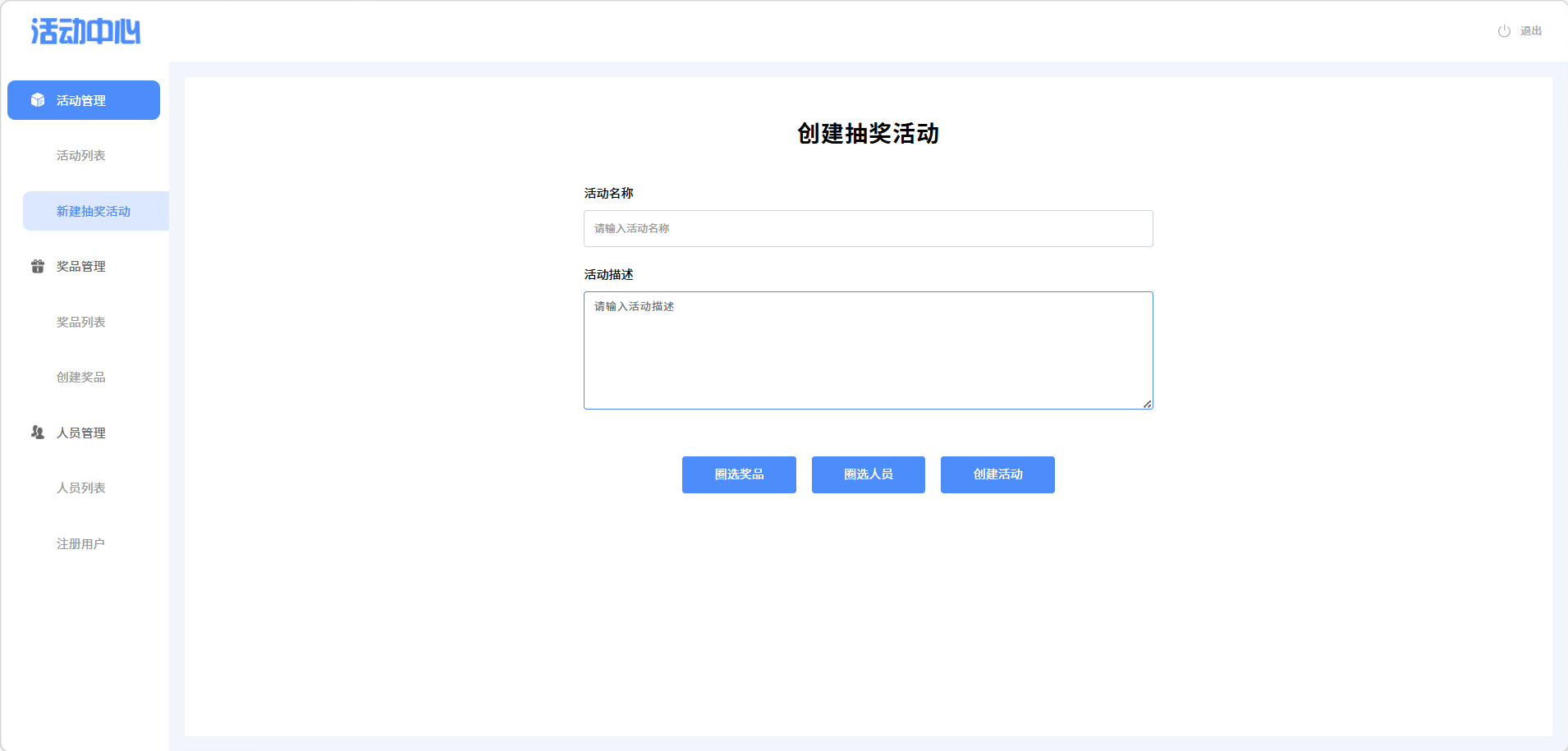
4. 新建抽奖活动页
- 登录状态下点击 "新建抽奖活动" 按钮进入编辑页
- 用户可输入活动名称、活动起止时间、每人限抽次数、奖品池配置等信息
- 点击 "保存活动" 按钮后,活动将被保存并发布,随后跳转至活动列表页
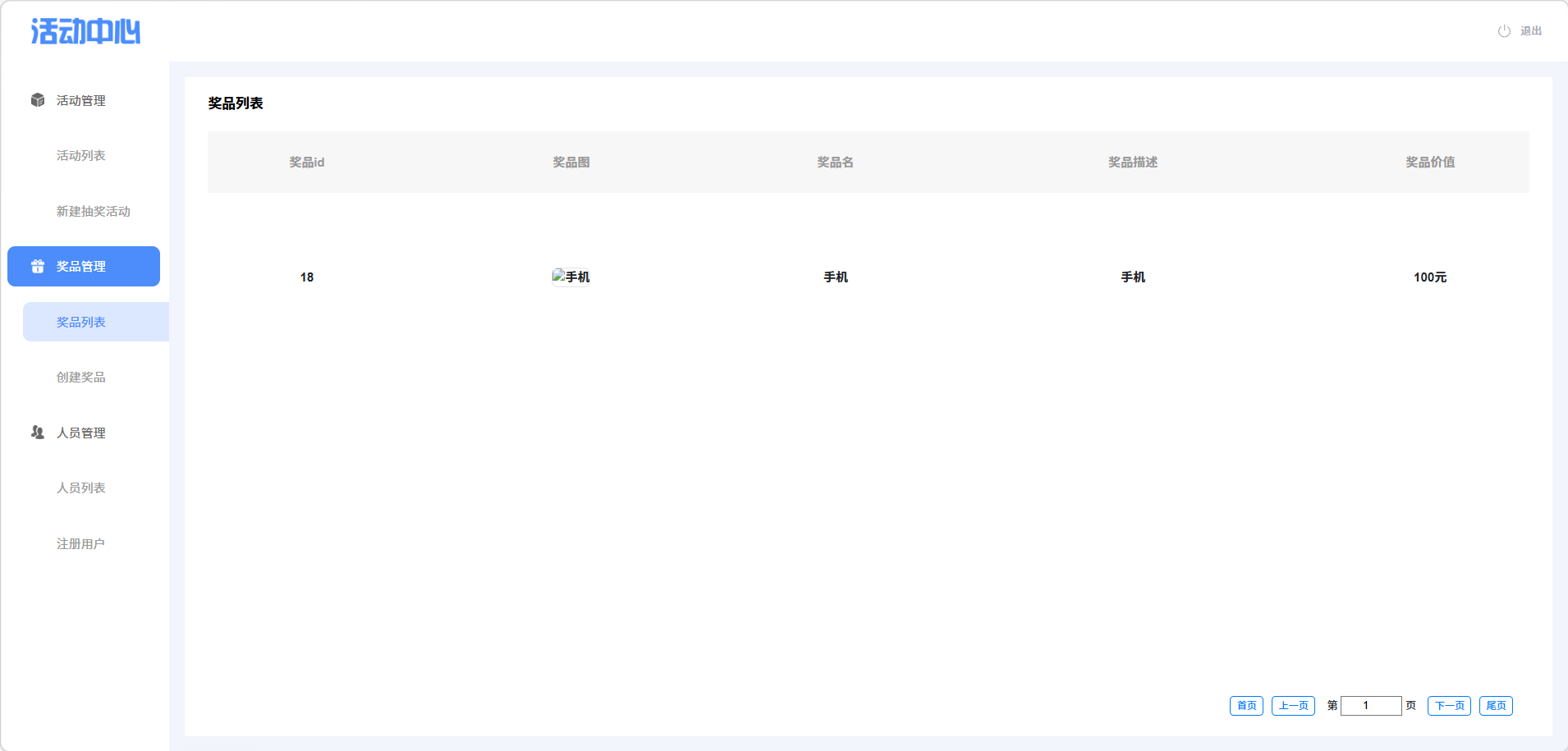
5. 奖品管理页
- 展示奖品列表,包括奖品名称、库存、中奖概率、关联活动等信息
- 左侧显示当前登录用户的操作菜单(奖品列表、创建奖品等)
- 右上角提供核心操作按钮:
- 创建奖品:跳转至创建奖品页
- 编辑:修改当前奖品信息,编辑后返回奖品列表页
- 删除:删除当前奖品,删除后返回奖品列表页
- 注销:退出当前用户,返回登录页
6. 创建奖品页
- 登录状态下点击 "创建奖品" 按钮进入编辑页
- 用户可输入奖品名称、库存数量、中奖概率、关联活动等信息
- 点击 "保存奖品" 按钮后,奖品将被保存,随后跳转至奖品列表页
7. 人员管理页
- 展示人员列表,包括用户名、角色、注册时间、注册状态等信息
- 左侧显示当前登录用户的操作菜单(人员列表、注册用户等)
- 右上角提供核心操作按钮:
- 注册用户:跳转至注册用户页(与独立注册功能共用页面)
- 编辑:修改当前用户信息,编辑后返回人员列表页
- 删除:删除当前用户,删除后返回人员列表页
- 注销:退出当前用户,返回登录页
测试目标
- 目标:核心业务模块(抽奖、防重、幂等性)测试覆盖率达到 95%
测试安排
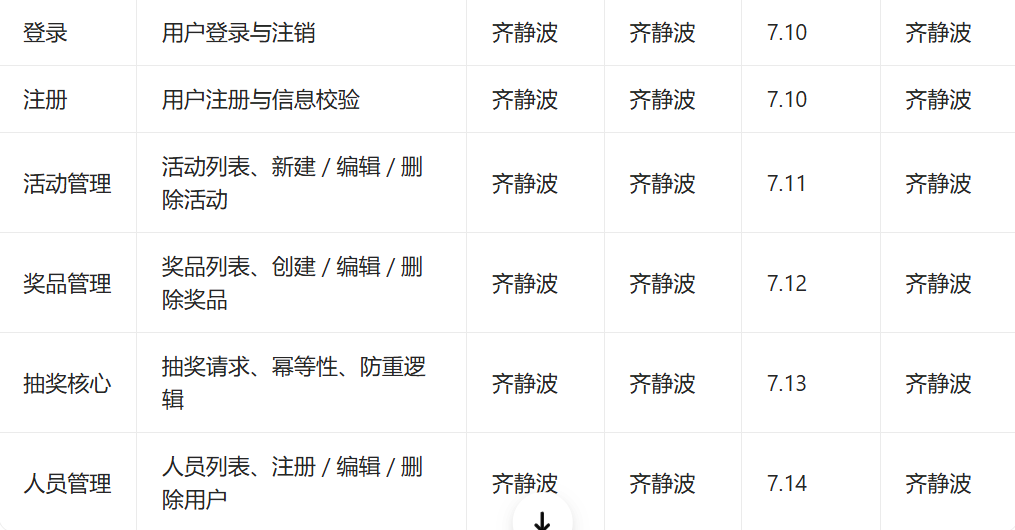
测试分类:
(1)功能测试
- 功能测试结果:测试用例 100%通过
(2)自动化测试
(1)编写Web测试用例:
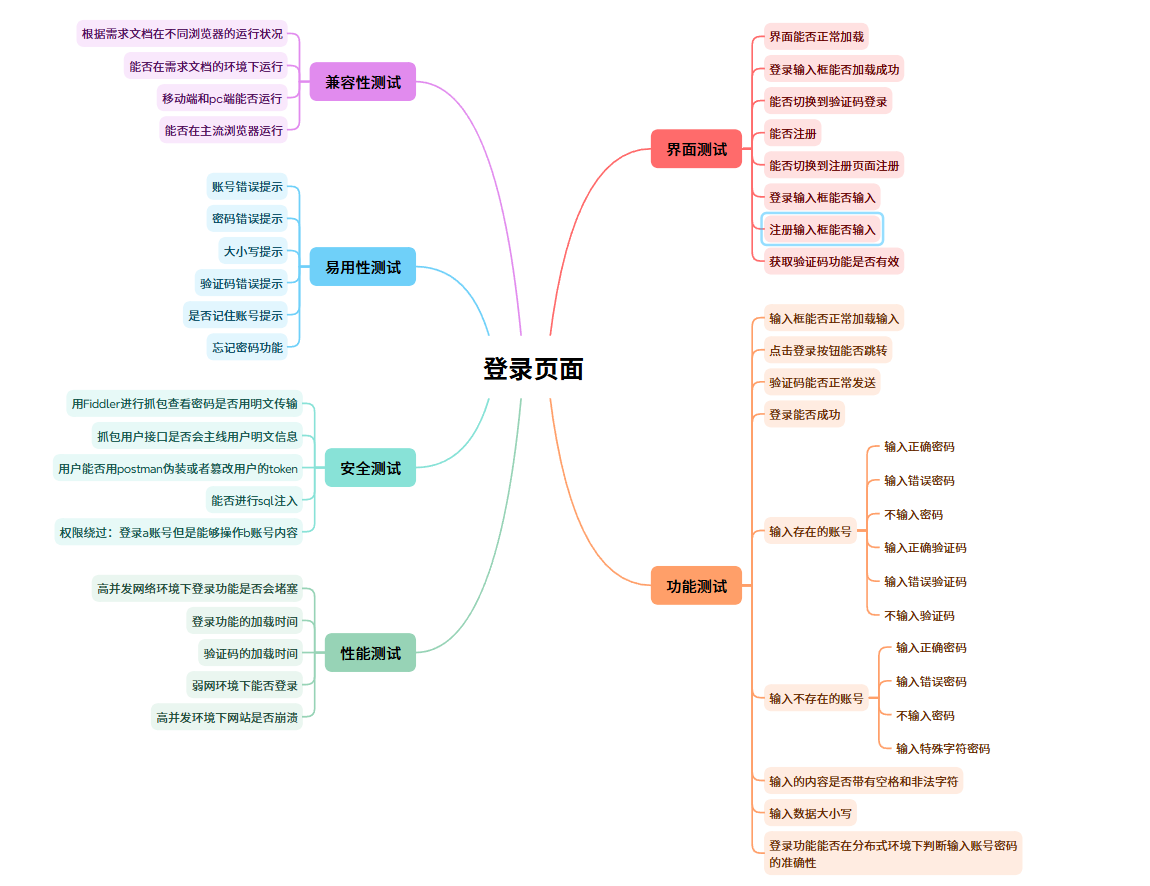
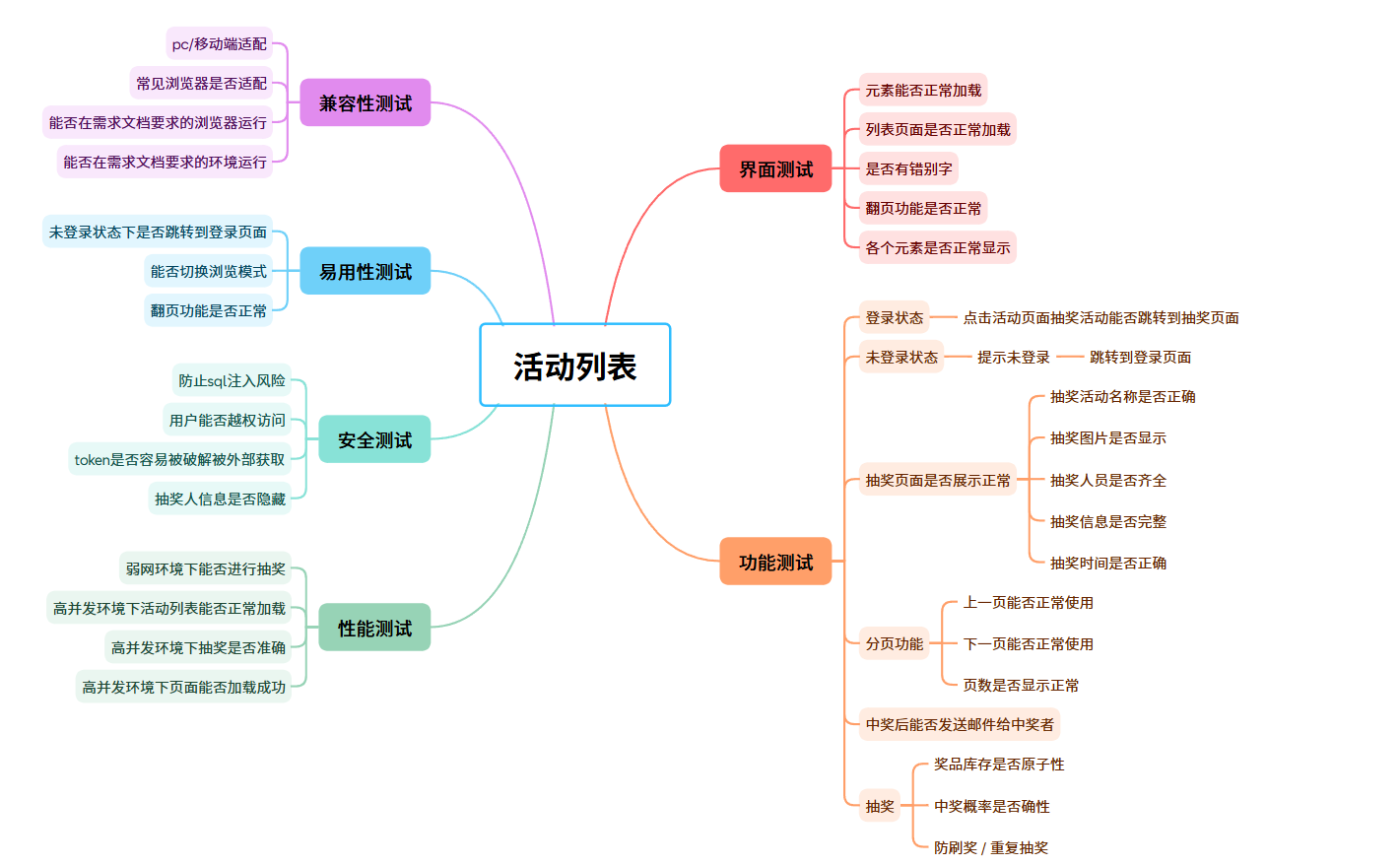
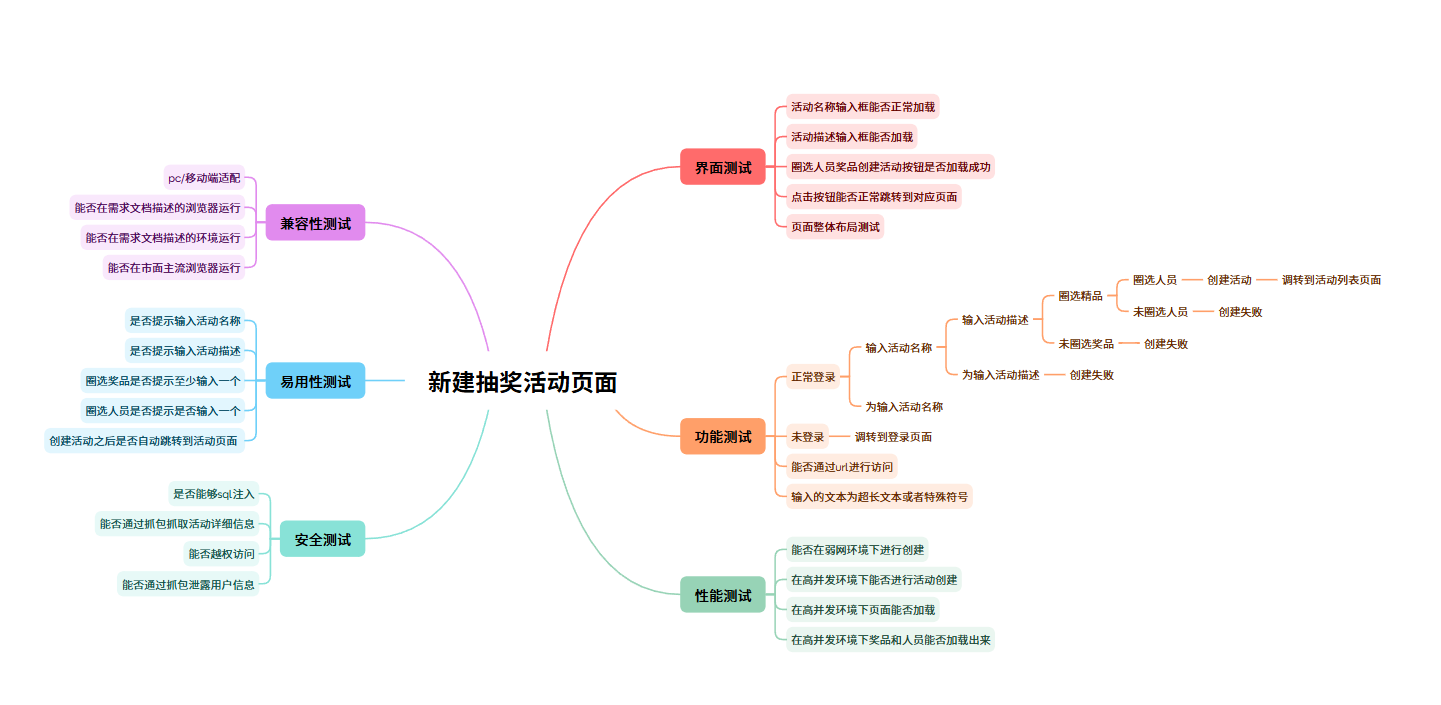
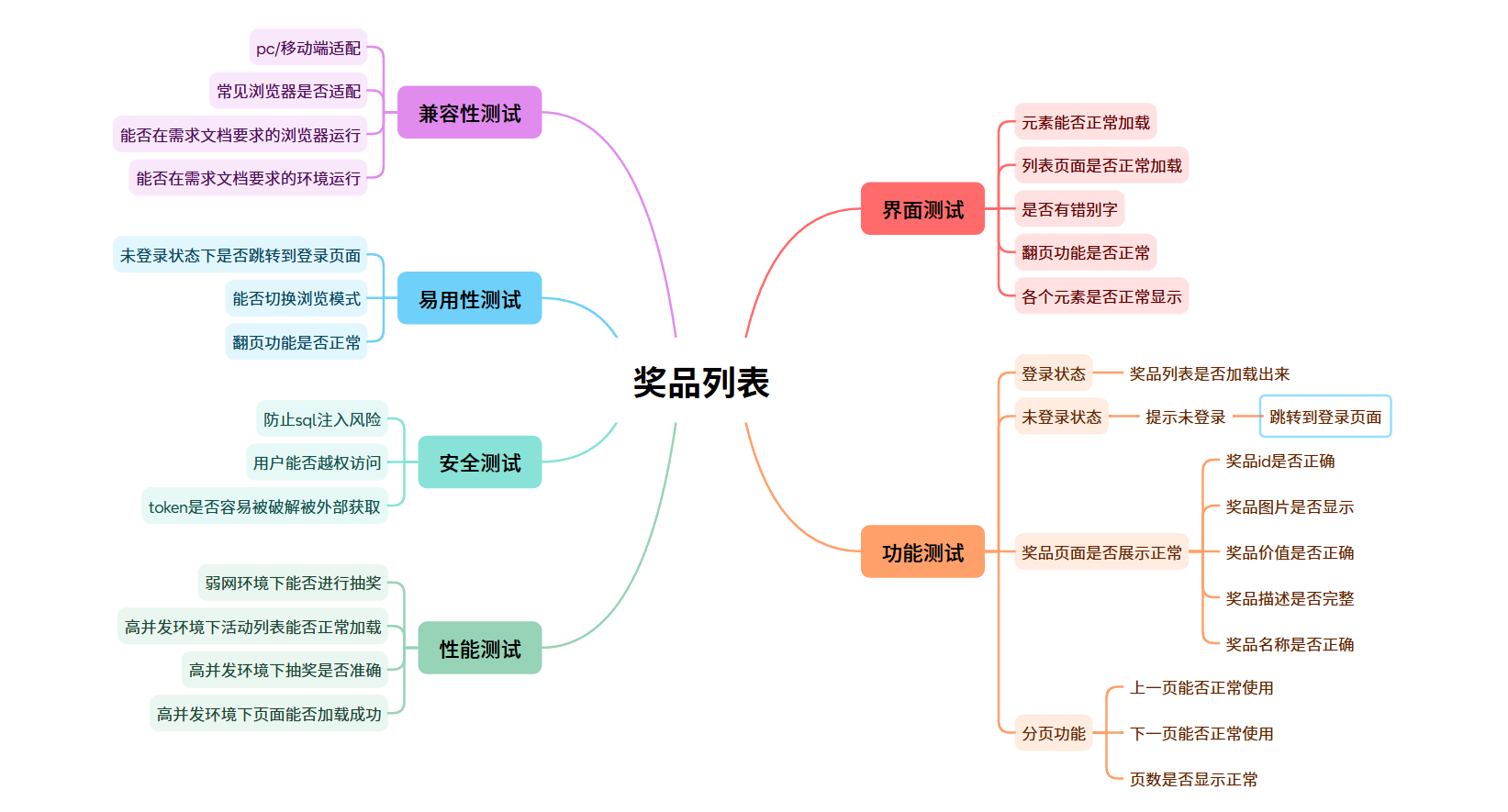
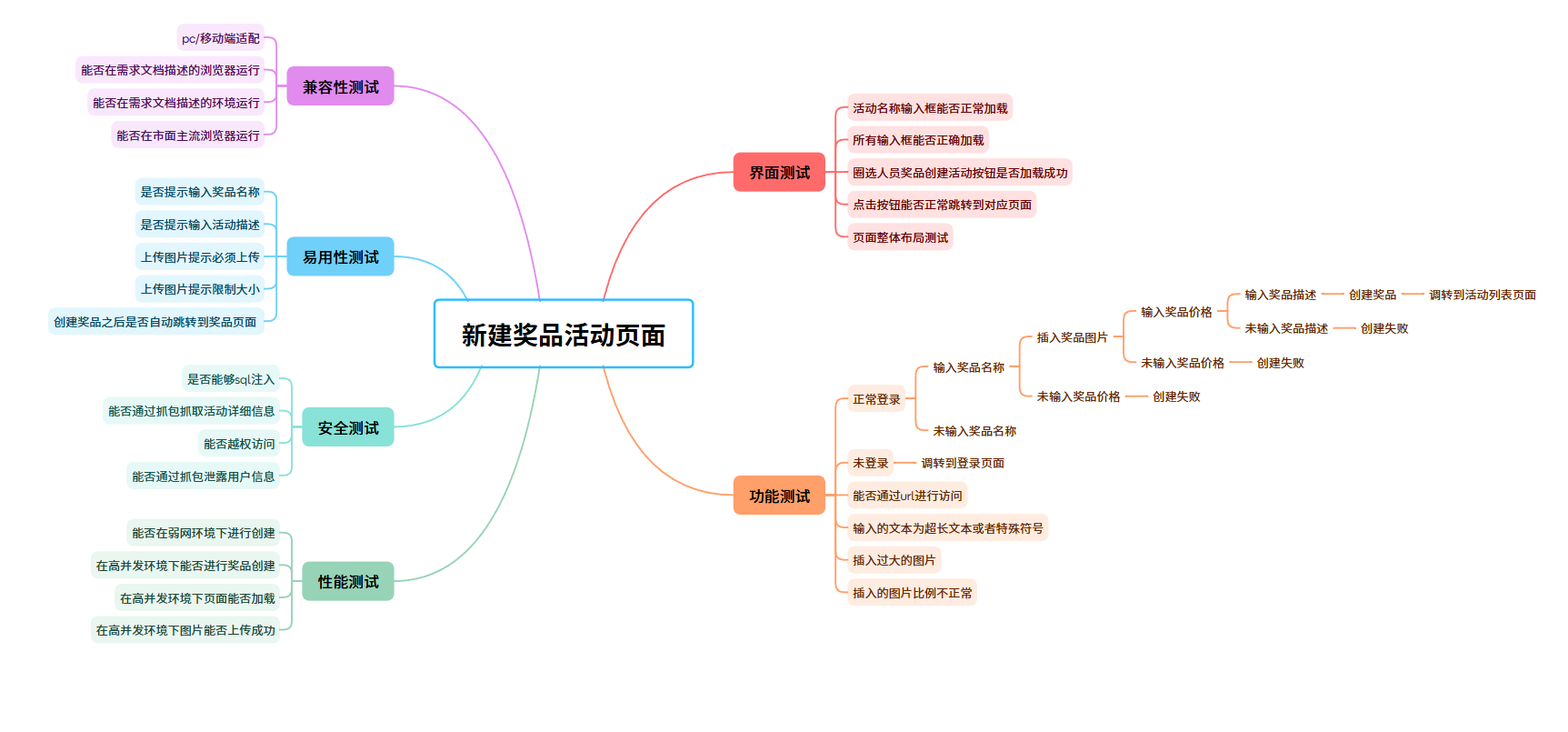
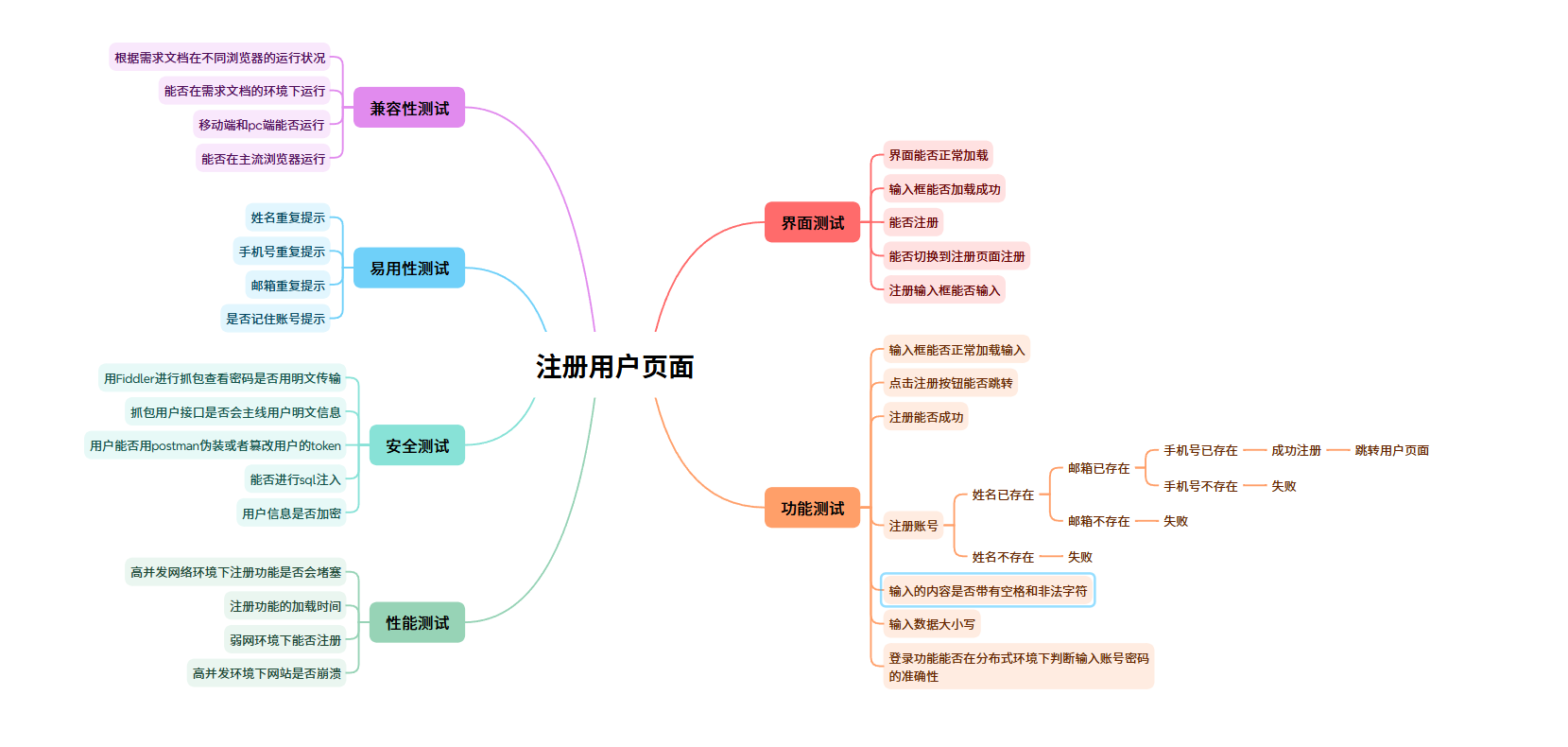
配置准备:添加需要的pom.xml依赖
XML
<dependency>
  <groupId>io.github.bonigarcia</groupId>
  <artifactId>webdrivermanager</artifactId>
  <version>5.8.0</version>
  <scope>test</scope>
</dependency>

<dependency>
  <groupId>org.seleniumhq.selenium</groupId>
  <artifactId>selenium-java</artifactId>
  <version>4.0.0</version>
</dependency>

<dependency>
  <groupId>commons-io</groupId>
  <artifactId>commons-io</artifactId>
  <version>2.6</version>
</dependency>
(2)页面测试
①登录页面
- 登录页面的基本功能测试:只有账号和密码匹配才能正常登录,其他情况都登录失败。
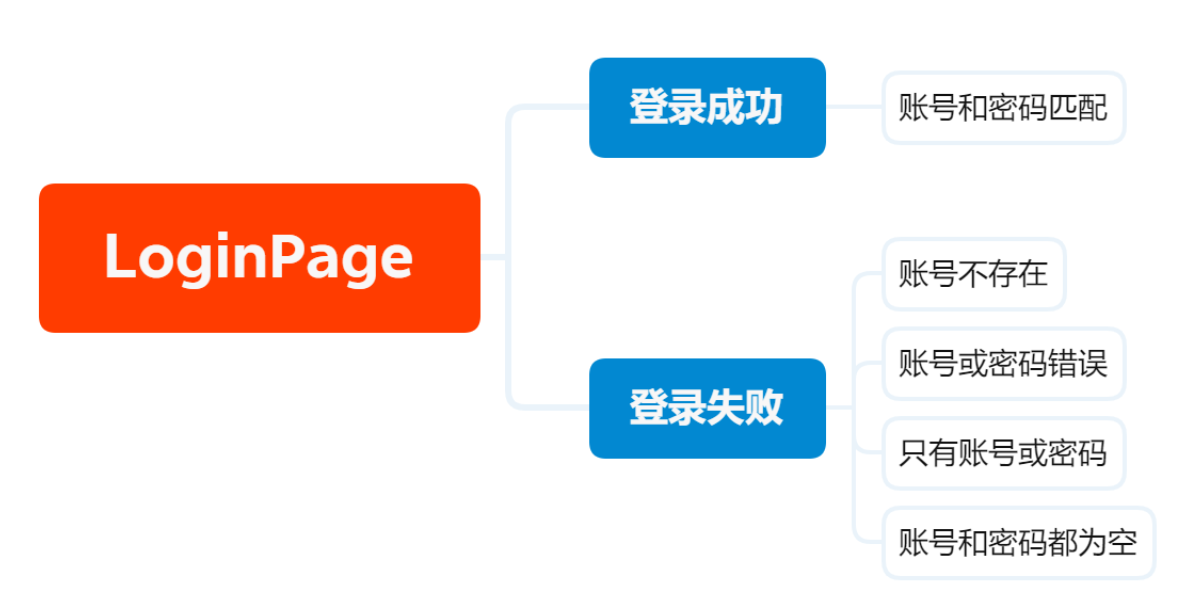
检测页面的正常加载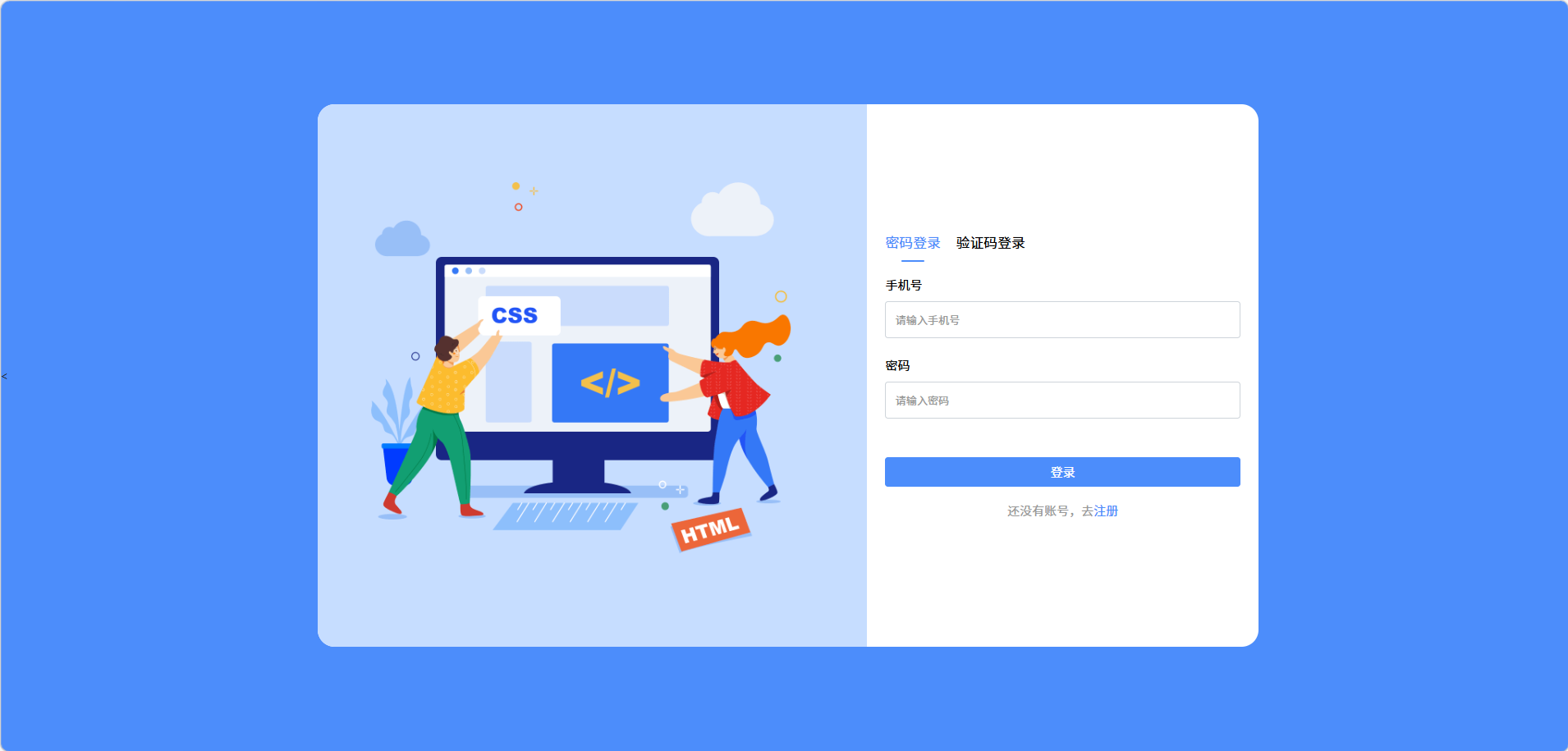
编写测试脚本
java
package com.test.tests;

import com.test.common.DriverUtils;
import org.openqa.selenium.By;
import org.openqa.selenium.WebDriver;
import org.openqa.selenium.WebElement;
import org.openqa.selenium.support.ui.ExpectedConditions;
import org.openqa.selenium.support.ui.WebDriverWait;
import java.time.Duration;

public class LoginPage {
    String url = "http://localhost:8080/blogin.html";
    WebDriver driver = DriverUtils.createDriver(url);

    //验证元素是否正确加载
    public void pageElementsLoaded(){
        WebDriverWait wait = new WebDriverWait(driver, Duration.ofSeconds(10));
        try{

            // 验证账号
            WebElement nameInput = wait.until(ExpectedConditions.visibilityOfElementLocated(
                    By.cssSelector("#phoneNumber")));
            assert nameInput.isDisplayed() : "活动名称输入框未显示" ;

            // 验证密码
            WebElement descInput = wait.until(ExpectedConditions.visibilityOfElementLocated(
                    By.cssSelector("#password")));
            assert descInput.isDisplayed() : "活动描述文本域未显示";

            // 验证登录按钮
            WebElement login = wait.until(ExpectedConditions.visibilityOfElementLocated(By.cssSelector("#loginForm > button")));
            assert login.isDisplayed() : "登录按钮未显示";

        }catch (Exception e){
            System.out.println("登陆页面功能显示有误");
            e.printStackTrace();
        }finally {
            System.out.println("显示正常");
            driver.quit();
        }
    }


}
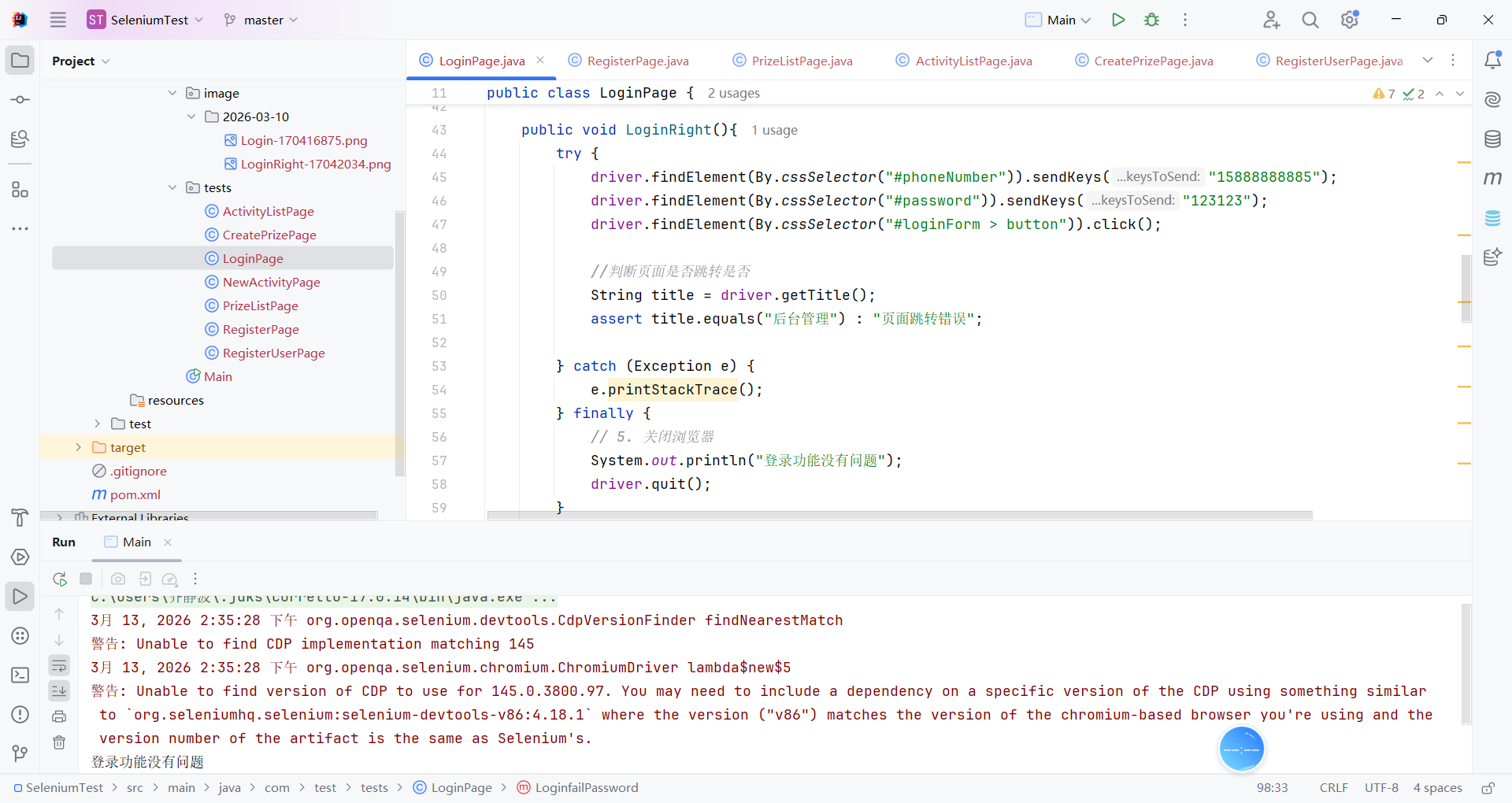
检测成功登录
java
public void LoginRight(){
        try {
            driver.findElement(By.cssSelector("#phoneNumber")).sendKeys("15888888885");
            driver.findElement(By.cssSelector("#password")).sendKeys("123123");
            driver.findElement(By.cssSelector("#loginForm > button")).click();

            //判断页面是否跳转是否
            String title = driver.getTitle();
            assert title.equals("后台管理") : "页面跳转错误";

        } catch (Exception e) {
            e.printStackTrace();
        } finally {
            // 5. 关闭浏览器
            System.out.println("登录功能没有问题");
            driver.quit();
        }

    }
检测失败登录
java
/*
    空白账号
     */
    public void LoginfailAccount(){
        try {
            driver.findElement(By.cssSelector("#phoneNumber")).sendKeys("");
            driver.findElement(By.cssSelector("#password")).sendKeys("123123");
            driver.findElement(By.cssSelector("#loginForm > button")).click();

            //获取失败的弹窗内容,将它和预期的错误信息进行比较
            String alertText = driver.switchTo().alert().getText();
            String expectedAlertText = "用户不存在";
            assert alertText.equals(expectedAlertText);
            //接受弹窗
            driver.switchTo().alert().accept();

            //判断页面是否跳转是否
            String title = driver.getTitle();
            assert title.equals("后台管理") : "页面跳转错误";

        } catch (Exception e) {
            e.printStackTrace();
        } finally {
            // 5. 关闭浏览器
            System.out.println("登录功能没有问题");
            driver.quit();
        }
    }
    /*
        空白密码
    */
    public void LoginfailPassword(){
        try {
            driver.findElement(By.cssSelector("#phoneNumber")).sendKeys("15888888885");
            driver.findElement(By.cssSelector("#password")).sendKeys("");
            driver.findElement(By.cssSelector("#loginForm > button")).click();

            //获取失败的弹窗内容,将它和预期的错误信息进行比较
            String alertText = driver.switchTo().alert().getText();
            String expectedAlertText = "用户不存在";
            assert alertText.equals(expectedAlertText);
            //接受弹窗
            driver.switchTo().alert().accept();
            //判断页面是否跳转是否
            String title = driver.getTitle();
            assert title.equals("后台管理") : "页面跳转错误";

        } catch (Exception e) {
            e.printStackTrace();
        } finally {
            // 5. 关闭浏览器
            System.out.println("登录功能没有问题");
            driver.quit();
        }
    }
②列表页面测试:
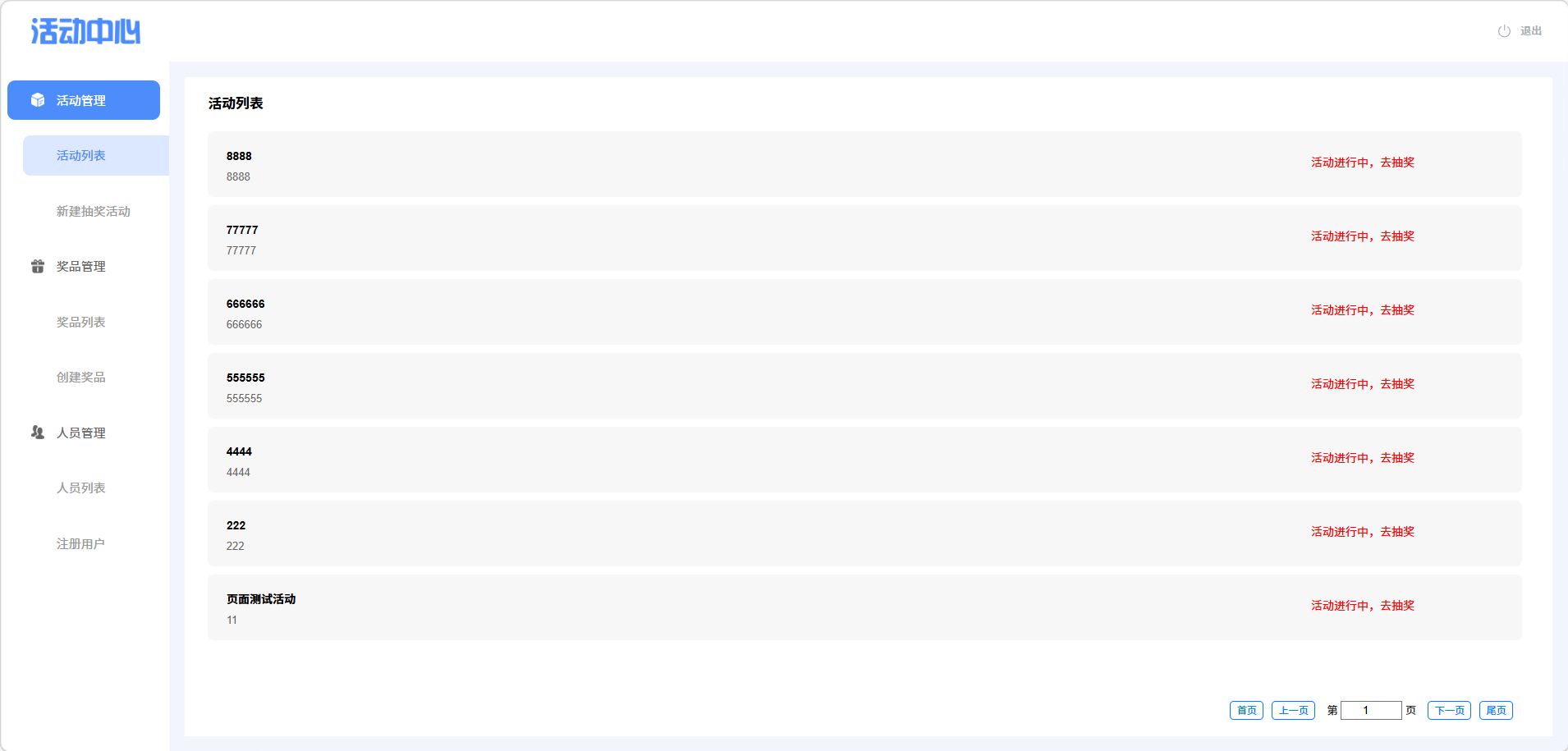
成功登录检测元素是否正常加载和活动列表是否正确显示
java
package com.test.tests;

import com.test.common.DriverUtils;
import org.openqa.selenium.By;
import org.openqa.selenium.WebDriver;
import org.openqa.selenium.WebElement;
import org.openqa.selenium.support.ui.ExpectedConditions;
import org.openqa.selenium.support.ui.WebDriverWait;

import java.time.Duration;

public class ActivityListPage {
    String url = "http://localhost:8080/blogin.html";
    private static final int WAIT_SECONDS = 10;
    WebDriver driver = DriverUtils.createDriver(url);
    /*
    此方法是为了检测登陆后是否跳转到活动列表这个页面
     */

    //验证元素是否正确加载
    public void pageElementsLoaded(){
        WebDriverWait wait = new WebDriverWait(driver, Duration.ofSeconds(10));
        try{

            wait.until(ExpectedConditions.elementToBeClickable(By.cssSelector("#phoneNumber")))
                    .sendKeys("15888888885");
            wait.until(ExpectedConditions.elementToBeClickable(By.cssSelector("#password")))
                    .sendKeys("123123");
            wait.until(ExpectedConditions.elementToBeClickable(By.cssSelector("#loginForm > button")))
                    .click();

            WebElement paginationIframe = wait.until(ExpectedConditions.presenceOfElementLocated(
                    By.xpath("//iframe") // 若有多个iframe,需补充id/name缩小范围,如//iframe[@id='mainFrame']
            ));
            driver.switchTo().frame(paginationIframe);

            // 验证首页按钮
            WebElement firstpage = wait.until(ExpectedConditions.visibilityOfElementLocated(
                    By.cssSelector("body > div > div.pagination > button:nth-child(1)")));
            assert firstpage.isDisplayed() : "活动名称输入框未显示" ;

            // 验证上一页按钮
            WebElement prePage = wait.until(ExpectedConditions.visibilityOfElementLocated(
                    By.cssSelector("body > div > div.pagination > button:nth-child(2)")));
            assert prePage.isDisplayed() : "上一页按钮未显示";

            // 验证第?页按钮
            WebElement pageShow = wait.until(ExpectedConditions.visibilityOfElementLocated(By.cssSelector("#pageInput")));
            assert pageShow.isDisplayed() : "第?页输入框未显示";

            // 验证下一页按钮
            WebElement nextPage = wait.until(ExpectedConditions.visibilityOfElementLocated(By.cssSelector("body > div > div.pagination > button:nth-child(4)")));
            assert nextPage.isDisplayed() : "下一页按钮未显示";

            // 验证尾页按钮
            WebElement lastPage = wait.until(ExpectedConditions.visibilityOfElementLocated(By.cssSelector("body > div > div.pagination > button:nth-child(5)")));
            assert lastPage.isDisplayed() : "尾页按钮未显示";

        }catch (Exception e){
            System.out.println("登陆页面功能显示有误");
            e.printStackTrace();
        }finally {
            System.out.println("显示正常");
            driver.quit();
        }
    }

    public void ActivityListPageLoad(){

        WebDriverWait wait = new WebDriverWait(driver, Duration.ofSeconds(WAIT_SECONDS));
        try{
            wait.until(ExpectedConditions.elementToBeClickable(By.cssSelector("#phoneNumber")))
                    .sendKeys("15888888885");
            wait.until(ExpectedConditions.elementToBeClickable(By.cssSelector("#password")))
                    .sendKeys("123123");
            wait.until(ExpectedConditions.elementToBeClickable(By.cssSelector("#loginForm > button")))
                    .click();

            String title = driver.getTitle();
            assert title.equals("后台管理") : "登录失败,页面标题不正确!";
        }
        catch(Exception e){
            e.printStackTrace();
        }finally{
            System.out.println("活动列表页面没有问题");
            driver.quit();
        }

    }

}
不成功登录界面显示
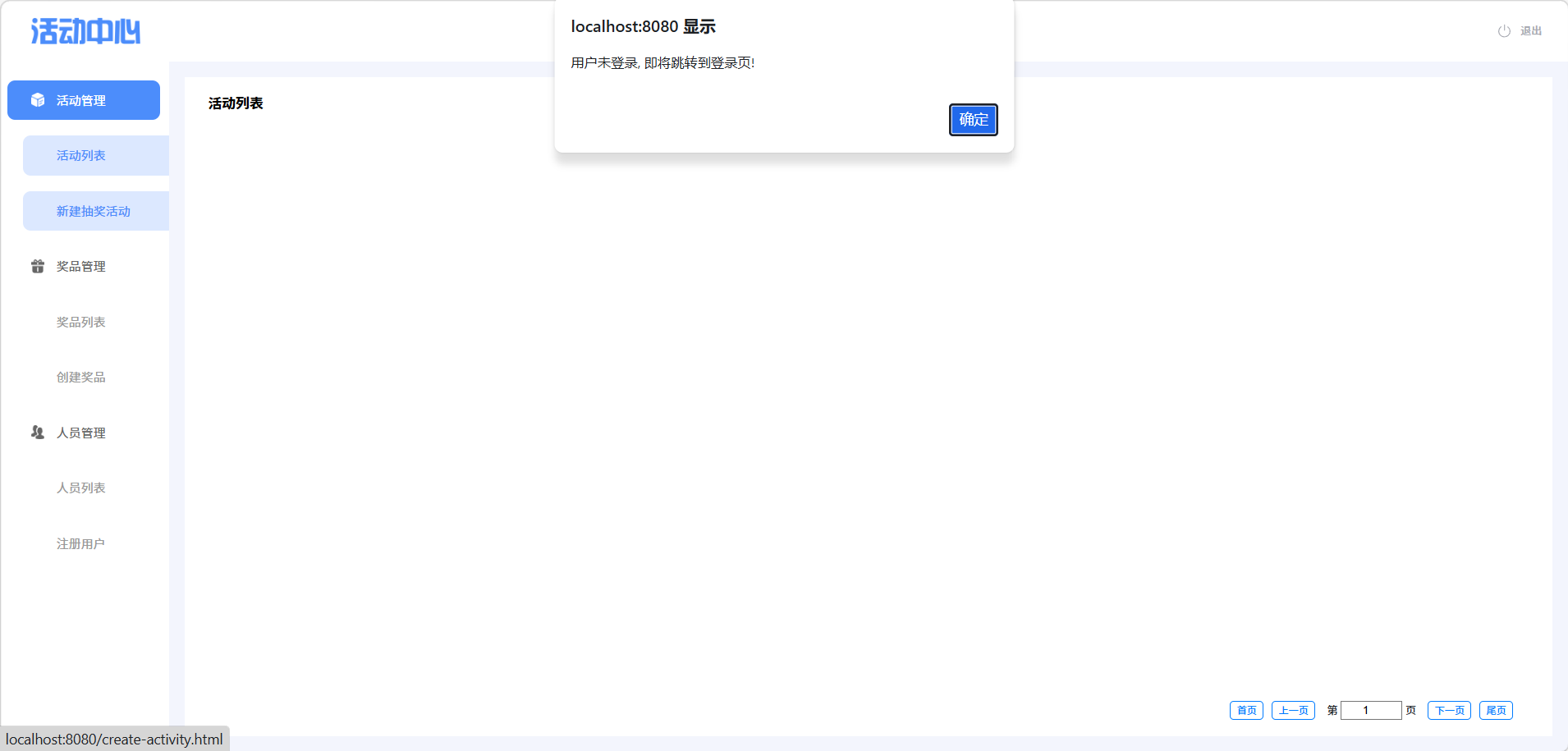
java
public void ListNoLogin()
{
    //处理弹窗警告
    Alert alert = driver.switchTo().alert();
    alert.accept();

    //跳转到登录页面,通过获取标题来检查是否跳转成功
    String exceptTitle = driver.getTitle();

    assert exceptTitle.equals("后台管理");

    driver.quit();
}
③新建抽奖活动页面 :
java
package com.test.tests;

import com.test.common.DriverUtils;
import org.openqa.selenium.By;
import org.openqa.selenium.WebDriver;
import org.openqa.selenium.WebElement;
import org.openqa.selenium.support.ui.ExpectedConditions;
import org.openqa.selenium.support.ui.WebDriverWait;

import java.time.Duration;

public class NewActivityPage {
    String url = "http://localhost:8080/blogin.html";
    WebDriver driver = DriverUtils.createDriver(url);
    private final int TIME_SECOND = 10;
    private final int LONG_TIME_SECOND = 20;
    private WebDriverWait wait;
    private WebDriverWait longWait;
    private boolean isTestPass = true;

    // 构造方法初始化等待器
    public NewActivityPage() {
        wait = new WebDriverWait(driver, Duration.ofSeconds(TIME_SECOND));
        longWait = new WebDriverWait(driver, Duration.ofSeconds(LONG_TIME_SECOND));
    }

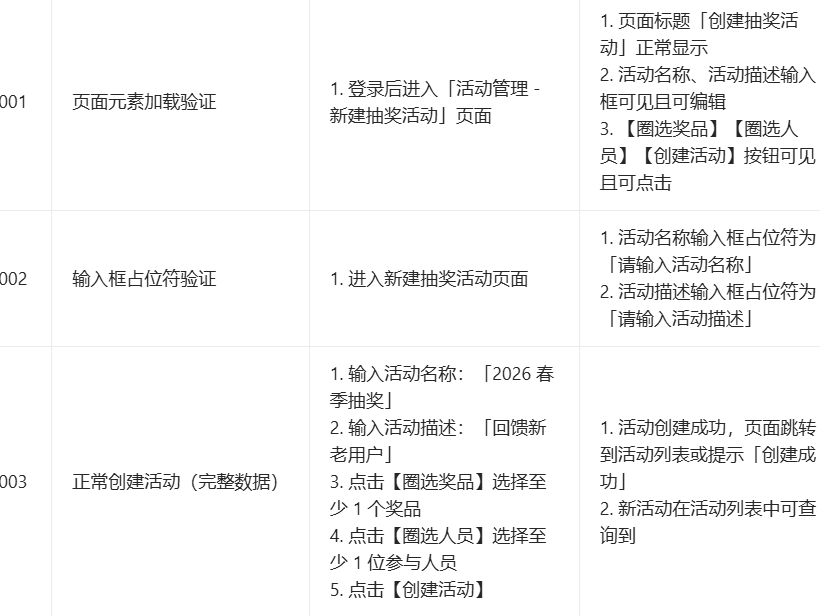
    // ========== 001 页面元素加载验证 ==========
    public void testPageElementsLoaded() {
        try {
            // 1. 登录
            login();
            // 2. 进入新建抽奖活动页面
            enterNewActivityPage();
            // 3. 切换iframe
            switchToIframe();

            // 验证页面标题
            WebElement pageTitle = longWait.until(ExpectedConditions.visibilityOfElementLocated(
                    By.xpath("//h1[text()='创建抽奖活动']")));
            assert pageTitle.isDisplayed() : "页面标题「创建抽奖活动」未显示";

            // 验证活动名称输入框
            WebElement activityNameInput = longWait.until(ExpectedConditions.visibilityOfElementLocated(
                    By.id("activityName")));
            assert activityNameInput.isDisplayed() && activityNameInput.isEnabled() : "活动名称输入框不可见或不可编辑";

            // 验证活动描述输入框
            WebElement activityDescInput = longWait.until(ExpectedConditions.visibilityOfElementLocated(
                    By.id("description")));
            assert activityDescInput.isDisplayed() && activityDescInput.isEnabled() : "活动描述输入框不可见或不可编辑";

            // 验证按钮可见可点击
            WebElement selectPrizeBtn = wait.until(ExpectedConditions.visibilityOfElementLocated(
                    By.xpath("//button[text()='圈选奖品']")));
            assert selectPrizeBtn.isDisplayed() && selectPrizeBtn.isEnabled() : "【圈选奖品】按钮不可见或不可点击";

            WebElement selectUserBtn = wait.until(ExpectedConditions.visibilityOfElementLocated(
                    By.xpath("//button[text()='圈选人员']")));
            assert selectUserBtn.isDisplayed() && selectUserBtn.isEnabled() : "【圈选人员】按钮不可见或不可点击";

            WebElement createActivityBtn = wait.until(ExpectedConditions.visibilityOfElementLocated(
                    By.xpath("//button[text()='创建活动']")));
            assert createActivityBtn.isDisplayed() && createActivityBtn.isEnabled() : "【创建活动】按钮不可见或不可点击";

            System.out.println("001 页面元素加载验证通过");
        } catch (Exception e) {
            isTestPass = false;
            System.out.println("001 页面元素加载验证失败:" + e.getMessage());
            e.printStackTrace();
        } finally {
            tearDown();
        }
    }

    // ========== 002 输入框占位符验证 ==========
    public void testInputPlaceholders() {
        try {
            login();
            enterNewActivityPage();
            switchToIframe();

            // 验证活动名称占位符
            WebElement activityNameInput = longWait.until(ExpectedConditions.visibilityOfElementLocated(
                    By.id("activityName")));
            String namePlaceholder = activityNameInput.getAttribute("placeholder");
            assert namePlaceholder.equals("请输入活动名称") : "活动名称占位符错误,实际:" + namePlaceholder;

            // 验证活动描述占位符
            WebElement activityDescInput = longWait.until(ExpectedConditions.visibilityOfElementLocated(
                    By.id("description")));
            String descPlaceholder = activityDescInput.getAttribute("placeholder");
            assert descPlaceholder.equals("请输入活动描述") : "活动描述占位符错误,实际:" + descPlaceholder;

            System.out.println("002 输入框占位符验证通过");
        } catch (Exception e) {
            isTestPass = false;
            System.out.println("002 输入框占位符验证失败:" + e.getMessage());
            e.printStackTrace();
        } finally {
            tearDown();
        }
    }

    // ========== 003 正常创建活动(完整数据) ==========
    public void testCreateActivityWithValidData() {
        try {
            login();
            enterNewActivityPage();
            switchToIframe();

            // 1. 输入活动名称和描述
            WebElement activityNameInput = longWait.until(ExpectedConditions.visibilityOfElementLocated(
                    By.id("activityName")));
            activityNameInput.clear();
            activityNameInput.sendKeys("2026春季抽奖");

            WebElement activityDescInput = longWait.until(ExpectedConditions.visibilityOfElementLocated(
                    By.id("description")));
            activityDescInput.clear();
            activityDescInput.sendKeys("回馈新老用户");

            // 2. 圈选奖品
            WebElement selectPrizeBtn = wait.until(ExpectedConditions.elementToBeClickable(
                    By.xpath("//button[text()='圈选奖品']")));
            selectPrizeBtn.click();
            // 切换到奖品弹窗iframe(如果有)
            // 这里假设弹窗内有可勾选的奖品,替换为实际选择逻辑
            wait.until(ExpectedConditions.elementToBeClickable(
                    By.xpath("//div[contains(@class,'prize-item')][1]//input"))).click();
            wait.until(ExpectedConditions.elementToBeClickable(
                    By.xpath("//button[text()='确认选择']"))).click();

            // 3. 圈选人员
            WebElement selectUserBtn = wait.until(ExpectedConditions.elementToBeClickable(
                    By.xpath("//button[text()='圈选人员']")));
            selectUserBtn.click();
            // 切换到人员弹窗iframe(如果有)
            wait.until(ExpectedConditions.elementToBeClickable(
                    By.xpath("//div[contains(@class,'user-item')][1]//input"))).click();
            wait.until(ExpectedConditions.elementToBeClickable(
                    By.xpath("//button[text()='确认选择']"))).click();

            // 4. 点击创建活动
            WebElement createActivityBtn = wait.until(ExpectedConditions.elementToBeClickable(
                    By.xpath("//button[text()='创建活动']")));
            createActivityBtn.click();

            // 5. 验证创建成功(两种场景)
            try {
                // 场景1:跳转到活动列表页
                wait.until(ExpectedConditions.titleContains("活动列表"));
                System.out.println("003 正常创建活动验证通过(跳转验证)");
            } catch (Exception e) {
                // 场景2:页面显示成功提示
                WebElement successMsg = wait.until(ExpectedConditions.visibilityOfElementLocated(
                        By.xpath("//div[contains(@class,'success-tip')]")));
                assert successMsg.getText().contains("创建成功") : "创建成功提示未显示";
                System.out.println("003 正常创建活动验证通过(提示验证)");
            }
        } catch (Exception e) {
            isTestPass = false;
            System.out.println(" 003 正常创建活动验证失败:" + e.getMessage());
            e.printStackTrace();
        } finally {
            tearDown();
        }
    }

    // ========== 辅助方法 ==========

    // 登录操作
    private void login() {
        wait.until(ExpectedConditions.elementToBeClickable(By.cssSelector("#phoneNumber")))
                .sendKeys("15888888885");
        wait.until(ExpectedConditions.elementToBeClickable(By.cssSelector("#password")))
                .sendKeys("123123");
        wait.until(ExpectedConditions.elementToBeClickable(By.cssSelector("#loginForm > button")))
                .click();
        wait.until(ExpectedConditions.titleContains("活动中心")); // 等待登录后页面加载
    }

    // 进入新建抽奖活动页面
    private void enterNewActivityPage() throws InterruptedException {
        driver.switchTo().defaultContent();
        // 点击活动管理菜单(如果需要展开)
        wait.until(ExpectedConditions.elementToBeClickable(
                By.cssSelector("body > div.cont-box > div.sidebar > ul > li:nth-child(1)"))).click();
        Thread.sleep(500);
        // 点击新建抽奖活动
        wait.until(ExpectedConditions.elementToBeClickable(
                By.xpath("//a[text()='新建抽奖活动']"))).click();
        Thread.sleep(2000); // 等待页面加载
    }

    // 切换到iframe
    private void switchToIframe() {
        try {
            driver.switchTo().frame(0);
            System.out.println("已切换到frame(0)");
        } catch (Exception e) {
            System.out.println("页面无iframe,直接在主页面定位");
        }
    }

    // 清理资源
    private void tearDown() {
        if (driver != null) {
            driver.switchTo().defaultContent();
            driver.quit();
        }
        if (isTestPass) {
            System.out.println("=== 所有测试用例执行完成:全部通过 ===");
        } else {
            System.out.println("=== 所有测试用例执行完成:存在失败用例 ===");
        }
    }
}
④奖品列表
java
package com.test.tests;

import com.test.common.DriverUtils;
import org.openqa.selenium.By;
import org.openqa.selenium.WebDriver;
import org.openqa.selenium.WebElement;
import org.openqa.selenium.support.ui.ExpectedConditions;
import org.openqa.selenium.support.ui.WebDriverWait;

import java.time.Duration;

public class PrizeListPage {
    String url = "http://localhost:8080/blogin.html";
    private static final int WAIT_SECONDS = 20;
    WebDriver driver = DriverUtils.createDriver(url);
    WebDriverWait wait = new WebDriverWait(driver, Duration.ofSeconds(WAIT_SECONDS));
    private WebElement paginationIframe;
    private boolean isTestPass = true;

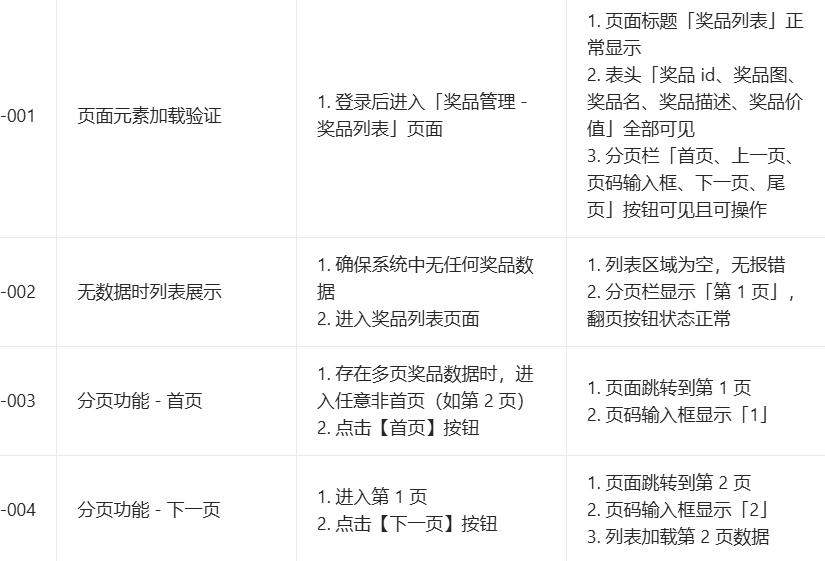
    // 原有方法:页面元素加载验证(-001)
    public void pageElementsLoaded() {
        try {
            // 登录
            login();
            // 进入奖品列表页面
            enterPrizeListPage();
            // 切换iframe
            switchToIframe();

            // 验证表头
            WebElement tableTitle = wait.until(ExpectedConditions.visibilityOfElementLocated(
                    By.cssSelector("body > div > h3")));
            assert tableTitle.getText().equals("奖品列表") : "页面标题「奖品列表」未显示";

            WebElement colId = wait.until(ExpectedConditions.visibilityOfElementLocated(
                    By.cssSelector("body > div > table > thead > tr > th:nth-child(1)")));
            assert colId.getText().equals("奖品id") : "表头「奖品id」未显示";

            WebElement colImg = wait.until(ExpectedConditions.visibilityOfElementLocated(
                    By.cssSelector("body > div > table > thead > tr > th:nth-child(2)")));
            assert colImg.getText().equals("奖品图") : "表头「奖品图」未显示";

            WebElement colName = wait.until(ExpectedConditions.visibilityOfElementLocated(
                    By.cssSelector("body > div > table > thead > tr > th:nth-child(3)")));
            assert colName.getText().equals("奖品名") : "表头「奖品名」未显示";

            WebElement colDesc = wait.until(ExpectedConditions.visibilityOfElementLocated(
                    By.cssSelector("body > div > table > thead > tr > th:nth-child(4)")));
            assert colDesc.getText().equals("奖品描述") : "表头「奖品描述」未显示";

            WebElement colValue = wait.until(ExpectedConditions.visibilityOfElementLocated(
                    By.cssSelector("body > div > table > thead > tr > th:nth-child(5)")));
            assert colValue.getText().equals("奖品价值") : "表头「奖品价值」未显示";

            // 验证分页按钮
            WebElement firstpage = wait.until(ExpectedConditions.visibilityOfElementLocated(
                    By.cssSelector("body > div > div.pagination > button:nth-child(1)")));
            assert firstpage.isDisplayed() && firstpage.isEnabled() : "首页按钮不可见或不可操作";

            WebElement prePage = wait.until(ExpectedConditions.visibilityOfElementLocated(
                    By.cssSelector("body > div > div.pagination > button:nth-child(2)")));
            assert prePage.isDisplayed() && prePage.isEnabled() : "上一页按钮不可见或不可操作";

            WebElement pageShow = wait.until(ExpectedConditions.visibilityOfElementLocated(By.cssSelector("#pageInput")));
            assert pageShow.isDisplayed() && pageShow.isEnabled() : "页码输入框不可见或不可操作";

            WebElement nextPage = wait.until(ExpectedConditions.visibilityOfElementLocated(
                    By.cssSelector("body > div > div.pagination > button:nth-child(4)")));
            assert nextPage.isDisplayed() && nextPage.isEnabled() : "下一页按钮不可见或不可操作";

            WebElement lastPage = wait.until(ExpectedConditions.visibilityOfElementLocated(
                    By.cssSelector("body > div > div.pagination > button:nth-child(5)")));
            assert lastPage.isDisplayed() && lastPage.isEnabled() : "尾页按钮不可见或不可操作";

        } catch (Exception e) {
            isTestPass = false;
            System.out.println("页面元素加载验证失败");
            e.printStackTrace();
        } finally {
            switchToDefaultContent();
            printResult();
            driver.quit();
        }
    }

    // -002 无数据时列表展示
    public void testEmptyDataList() {
        try {
            login();
            enterPrizeListPage();
            switchToIframe();

            // 验证列表区域为空
            WebElement tableBody = wait.until(ExpectedConditions.visibilityOfElementLocated(
                    By.cssSelector("body > div > table > tbody")));
            assert tableBody.findElements(By.tagName("tr")).isEmpty() : "列表区域不为空";

            // 验证分页状态
            WebElement pageInput = wait.until(ExpectedConditions.visibilityOfElementLocated(By.cssSelector("#pageInput")));
            assert pageInput.getAttribute("value").equals("1") : "分页栏未显示「第1页」";

            WebElement prePage = wait.until(ExpectedConditions.visibilityOfElementLocated(
                    By.cssSelector("body > div > div.pagination > button:nth-child(2)")));
            assert !prePage.isEnabled() : "无数据时上一页按钮应置灰不可点击";

            WebElement nextPage = wait.until(ExpectedConditions.visibilityOfElementLocated(
                    By.cssSelector("body > div > div.pagination > button:nth-child(4)")));
            assert !nextPage.isEnabled() : "无数据时下一页按钮应置灰不可点击";

        } catch (Exception e) {
            isTestPass = false;
            System.out.println("无数据时列表展示验证失败");
            e.printStackTrace();
        } finally {
            switchToDefaultContent();
            printResult();
            driver.quit();
        }
    }

    // -003 分页功能 - 首页
    public void testPaginationFirstPage() {
        try {
            login();
            enterPrizeListPage();
            switchToIframe();

            // 先跳转到第2页(确保有多页数据)
            WebElement nextPageBtn = wait.until(ExpectedConditions.elementToBeClickable(
                    By.cssSelector("body > div > div.pagination > button:nth-child(4)")));
            nextPageBtn.click();
            Thread.sleep(1000);

            // 点击首页按钮
            WebElement firstPageBtn = wait.until(ExpectedConditions.elementToBeClickable(
                    By.cssSelector("body > div > div.pagination > button:nth-child(1)")));
            firstPageBtn.click();
            Thread.sleep(1000);

            // 验证跳转到第1页
            WebElement pageInput = wait.until(ExpectedConditions.visibilityOfElementLocated(By.cssSelector("#pageInput")));
            assert pageInput.getAttribute("value").equals("1") : "点击首页后未跳转到第1页";

        } catch (Exception e) {
            isTestPass = false;
            System.out.println("分页功能-首页验证失败");
            e.printStackTrace();
        } finally {
            switchToDefaultContent();
            printResult();
            driver.quit();
        }
    }

    // -004 分页功能 - 下一页
    public void testPaginationNextPage() {
        try {
            login();
            enterPrizeListPage();
            switchToIframe();

            // 记录当前页码(默认第1页)
            WebElement pageInput = wait.until(ExpectedConditions.visibilityOfElementLocated(By.cssSelector("#pageInput")));
            String currentPage = pageInput.getAttribute("value");
            assert currentPage.equals("1") : "初始页面不是第1页";

            // 点击下一页
            WebElement nextPageBtn = wait.until(ExpectedConditions.elementToBeClickable(
                    By.cssSelector("body > div > div.pagination > button:nth-child(4)")));
            nextPageBtn.click();
            Thread.sleep(1000);

            // 验证跳转到第2页
            pageInput = wait.until(ExpectedConditions.visibilityOfElementLocated(By.cssSelector("#pageInput")));
            assert pageInput.getAttribute("value").equals("2") : "点击下一页后未跳转到第2页";

            // 验证列表加载第2页数据
            WebElement tableBody = wait.until(ExpectedConditions.visibilityOfElementLocated(
                    By.cssSelector("body > div > table > tbody")));
            assert !tableBody.findElements(By.tagName("tr")).isEmpty() : "第2页数据未加载";

        } catch (Exception e) {
            isTestPass = false;
            System.out.println("分页功能-下一页验证失败");
            e.printStackTrace();
        } finally {
            switchToDefaultContent();
            printResult();
            driver.quit();
        }
    }

    // ========== 辅助方法 ==========
    private void login() throws InterruptedException {
        wait.until(ExpectedConditions.elementToBeClickable(By.cssSelector("#phoneNumber")))
                .sendKeys("15888888885");
        wait.until(ExpectedConditions.elementToBeClickable(By.cssSelector("#password")))
                .sendKeys("123123");
        wait.until(ExpectedConditions.elementToBeClickable(By.cssSelector("#loginForm > button")))
                .click();
        Thread.sleep(1000);
    }

    private void enterPrizeListPage() throws InterruptedException {
        WebElement prizeMenu = wait.until(ExpectedConditions.elementToBeClickable(
                By.cssSelector("body > div.cont-box > div.sidebar > ul > li:nth-child(2)")));
        prizeMenu.click();
        Thread.sleep(500);

        WebElement prizeListLink = wait.until(ExpectedConditions.elementToBeClickable(
                By.cssSelector("body > div.cont-box > div.sidebar > ul > li:nth-child(2) > ul > li:nth-child(1) > a")));
        prizeListLink.click();
        Thread.sleep(2000);
    }

    private void switchToIframe() {
        paginationIframe = wait.until(ExpectedConditions.presenceOfElementLocated(
                By.xpath("//iframe[@id='contentFrame']") // 建议替换为实际iframe ID
        ));
        driver.switchTo().frame(paginationIframe);
    }

    private void switchToDefaultContent() {
        if (paginationIframe != null) {
            try {
                driver.switchTo().defaultContent();
            } catch (Exception e) {
                System.out.println("切换回主文档失败:" + e.getMessage());
            }
        }
    }

    private void printResult() {
        if (isTestPass) {
            System.out.println("测试通过");
        } else {
            System.out.println("测试失败");
        }
    }
}
java
public void testPaginationFunction() {
        try {
            // 1. 登录操作
            wait.until(ExpectedConditions.elementToBeClickable(By.cssSelector("#phoneNumber")))
                    .sendKeys("15888888885");
            wait.until(ExpectedConditions.elementToBeClickable(By.cssSelector("#password")))
                    .sendKeys("123123");
            wait.until(ExpectedConditions.elementToBeClickable(By.cssSelector("#loginForm > button")))
                    .click();

            // 2. 进入奖品列表页面
            wait.until(ExpectedConditions.elementToBeClickable(
                    By.cssSelector("body > div.cont-box > div.sidebar > ul > li:nth-child(2) > ul > li:nth-child(1) > a")))
                    .click();

            // 3. 切换到分页所在的iframe
            WebElement paginationIframe = wait.until(ExpectedConditions.presenceOfElementLocated(
                    By.xpath("//iframe") // 若有多个iframe,需补充id/name,如//iframe[@id='mainFrame']
            ));
            driver.switchTo().frame(paginationIframe);

            // 4. 测试【首页】按钮
            WebElement firstPageBtn = wait.until(ExpectedConditions.elementToBeClickable(
                    By.cssSelector("body > div > div.pagination > button:nth-child(1)")));
            firstPageBtn.click();
            WebElement currentPageInput = wait.until(ExpectedConditions.visibilityOfElementLocated(By.cssSelector("#pageInput")));
            assert currentPageInput.getAttribute("value").equals("1") : "点击首页后,当前页不是第1页";

            // 5. 测试【下一页】按钮
            WebElement nextPageBtn = wait.until(ExpectedConditions.elementToBeClickable(
                    By.cssSelector("body > div > div.pagination > button:nth-child(4)")));
            nextPageBtn.click();
            currentPageInput = wait.until(ExpectedConditions.visibilityOfElementLocated(By.cssSelector("#pageInput")));
            assert currentPageInput.getAttribute("value").equals("2") : "点击下一页后,当前页不是第2页";

            // 6. 测试【上一页】按钮
            WebElement prePageBtn = wait.until(ExpectedConditions.elementToBeClickable(
                    By.cssSelector("body > div > div.pagination > button:nth-child(2)")));
            prePageBtn.click();
            currentPageInput = wait.until(ExpectedConditions.visibilityOfElementLocated(By.cssSelector("#pageInput")));
            assert currentPageInput.getAttribute("value").equals("1") : "点击上一页后,当前页不是第1页";

            // 7. 测试【尾页】按钮
            WebElement lastPageBtn = wait.until(ExpectedConditions.elementToBeClickable(
                    By.cssSelector("body > div > div.pagination > button:nth-child(5)")));
            lastPageBtn.click();

            currentPageInput = wait.until(ExpectedConditions.visibilityOfElementLocated(By.cssSelector("#pageInput")));
            assert !currentPageInput.getAttribute("value").equals("1") : "点击尾页后,当前页仍为第1页,尾页功能异常";

            // 8. 测试指定页码跳转
            currentPageInput.clear();
            currentPageInput.sendKeys("1");
            currentPageInput.submit(); // 或点击跳转按钮,若有单独跳转按钮需替换为点击操作
            currentPageInput = wait.until(ExpectedConditions.visibilityOfElementLocated(By.cssSelector("#pageInput")));
            assert currentPageInput.getAttribute("value").equals("1") : "指定页码跳转失败";

        } catch (Exception e) {
            System.out.println("奖品列表翻页功能测试异常");
            e.printStackTrace();
        } finally {
            System.out.println("翻页功能测试完成");
            driver.quit();
        }
    }
⑤创建奖品页面
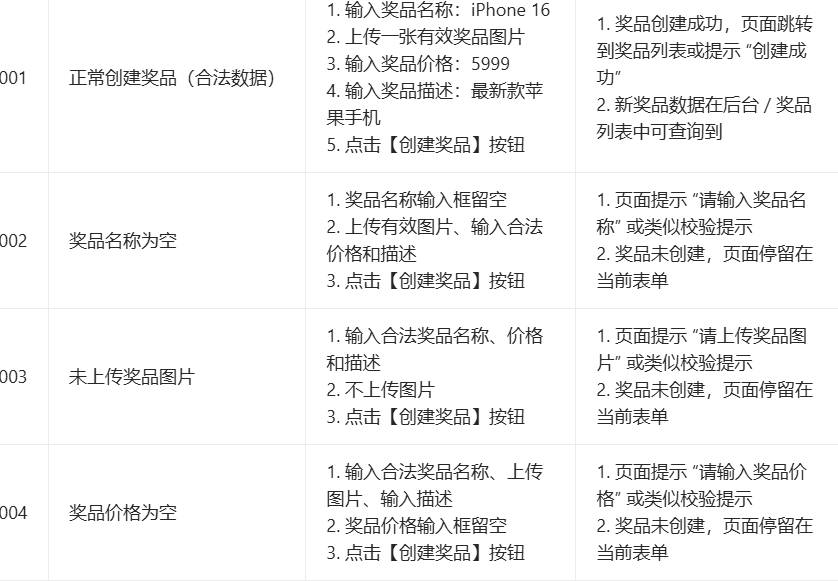
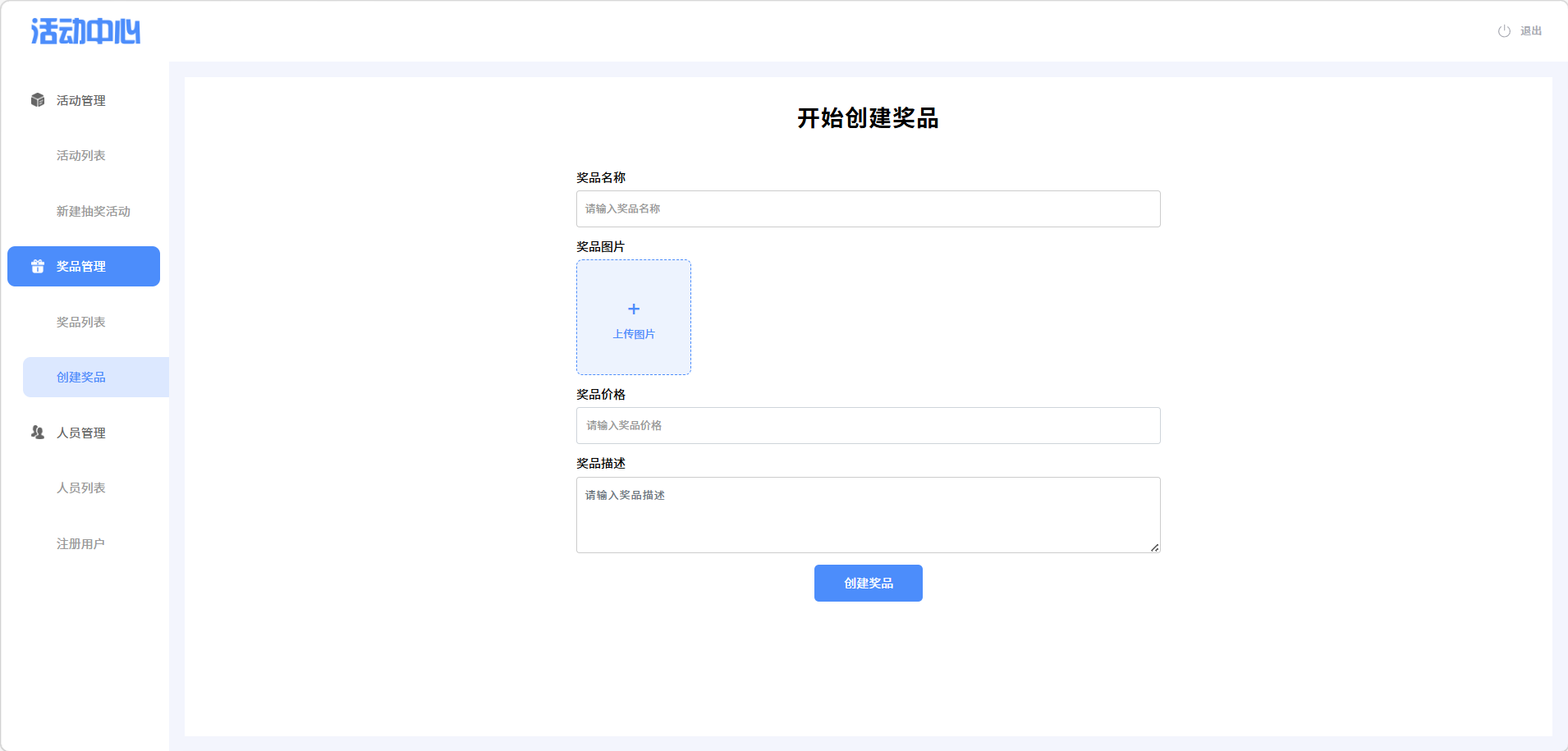
java
/**
     * PRIZE-001:正常创建奖品(合法数据)
     */
    public void testCreatePrizeWithValidData() {
        boolean isSuccess = false;
        try {
            // 前置操作:登录+进入创建奖品页面+切换iframe
            login();
            enterCreatePrizePage();
            switchToPrizeIframe();

            // 清空输入框
            clearAllInputs();

            // 输入合法数据
            wait.until(ExpectedConditions.elementToBeClickable(By.cssSelector("#prizeName")))
                    .sendKeys("iPhone 16");
            // 上传图片(替换为你的本地图片路径)
            wait.until(ExpectedConditions.presenceOfElementLocated(By.cssSelector("#prizeImageUrl")))
                    .sendKeys("C:\\test\\iphone16.png");
            wait.until(ExpectedConditions.elementToBeClickable(By.cssSelector("#price")))
                    .sendKeys("5999");
            wait.until(ExpectedConditions.elementToBeClickable(By.cssSelector("#description")))
                    .sendKeys("最新款苹果手机");

            // 点击创建按钮
            wait.until(ExpectedConditions.elementToBeClickable(By.cssSelector("#createPrizeBtn")))
                    .click();

            // 验证创建成功(两种场景适配)
            try {
                // 场景1:跳转到奖品列表页
                wait.until(ExpectedConditions.titleContains("奖品列表"));
                isSuccess = true;
            } catch (Exception e) {
                // 场景2:页面显示成功提示
                WebElement successMsg = wait.until(ExpectedConditions.visibilityOfElementLocated(
                        By.cssSelector(".success-tip")));
                isSuccess = successMsg.isDisplayed() && successMsg.getText().contains("创建成功");
            }

            if (isSuccess) {
                System.out.println(" 正常创建奖品测试通过");
            } else {
                throw new RuntimeException("创建奖品成功验证失败");
            }

        } catch (Exception e) {
            System.out.println(" 正常创建奖品测试失败:" + e.getMessage());
            e.printStackTrace();
        } finally {
            switchToDefaultContent();
            driver.quit();
        }
    }

    /**
     * PRIZE-002:奖品名称为空
     */
    public void testCreatePrizeWithEmptyName() {
        try {
            login();
            enterCreatePrizePage();
            switchToPrizeIframe();
            clearAllInputs();

            // 名称为空,其他字段正常
            wait.until(ExpectedConditions.presenceOfElementLocated(By.cssSelector("#prizeImageUrl")))
                    .sendKeys("C:\\test\\iphone16.png");
            wait.until(ExpectedConditions.elementToBeClickable(By.cssSelector("#price")))
                    .sendKeys("5999");
            wait.until(ExpectedConditions.elementToBeClickable(By.cssSelector("#description")))
                    .sendKeys("最新款苹果手机");

            // 点击创建按钮
            wait.until(ExpectedConditions.elementToBeClickable(By.cssSelector("#createPrizeBtn")))
                    .click();

            // 验证错误提示
            WebElement errorMsg = wait.until(ExpectedConditions.visibilityOfElementLocated(
                    By.cssSelector(".error-tip")));
            assert errorMsg.getText().contains("请输入奖品名称") : "奖品名称为空提示错误";
            System.out.println(" 奖品名称为空测试通过");

        } catch (Exception e) {
            System.out.println(" 奖品名称为空测试失败:" + e.getMessage());
            e.printStackTrace();
        } finally {
            switchToDefaultContent();
            driver.quit();
        }
    }

    /**
     * PRIZE-004:奖品价格为空
     */
    public void testCreatePrizeWithEmptyPrice() {
        try {
            login();
            enterCreatePrizePage();
            switchToPrizeIframe();
            clearAllInputs();

            // 价格为空,其他字段正常
            wait.until(ExpectedConditions.elementToBeClickable(By.cssSelector("#prizeName")))
                    .sendKeys("iPhone 16");
            wait.until(ExpectedConditions.presenceOfElementLocated(By.cssSelector("#prizeImageUrl")))
                    .sendKeys("C:\\test\\iphone16.png");
            wait.until(ExpectedConditions.elementToBeClickable(By.cssSelector("#description")))
                    .sendKeys("最新款苹果手机");

            // 点击创建按钮
            wait.until(ExpectedConditions.elementToBeClickable(By.cssSelector("#createPrizeBtn")))
                    .click();

            // 验证错误提示
            WebElement errorMsg = wait.until(ExpectedConditions.visibilityOfElementLocated(
                    By.cssSelector(".error-tip")));
            assert errorMsg.getText().contains("请输入奖品价格") : "奖品价格为空提示错误";
            System.out.println(" 奖品价格为空测试通过");

        } catch (Exception e) {
            System.out.println(" 奖品价格为空测试失败:" + e.getMessage());
            e.printStackTrace();
        } finally {
            switchToDefaultContent();
            driver.quit();
        }
    }

    /**
     * PRIZE-005:奖品价格为非数字
     */
    public void testCreatePrizeWithNonNumericPrice() {
        try {
            login();
            enterCreatePrizePage();
            switchToPrizeIframe();
            clearAllInputs();

            // 价格为非数字,其他字段正常
            wait.until(ExpectedConditions.elementToBeClickable(By.cssSelector("#prizeName")))
                    .sendKeys("iPhone 16");
            wait.until(ExpectedConditions.presenceOfElementLocated(By.cssSelector("#prizeImageUrl")))
                    .sendKeys("C:\\test\\iphone16.png");
            wait.until(ExpectedConditions.elementToBeClickable(By.cssSelector("#price")))
                    .sendKeys("abc"); // 非数字价格
            wait.until(ExpectedConditions.elementToBeClickable(By.cssSelector("#description")))
                    .sendKeys("最新款苹果手机");

            // 点击创建按钮
            wait.until(ExpectedConditions.elementToBeClickable(By.cssSelector("#createPrizeBtn")))
                    .click();

            // 验证错误提示
            WebElement errorMsg = wait.until(ExpectedConditions.visibilityOfElementLocated(
                    By.cssSelector(".error-tip")));
            assert errorMsg.getText().contains("数字") || errorMsg.getText().contains("有效的价格") : "价格非数字提示错误";
            System.out.println(" 奖品价格为非数字测试通过");

        } catch (Exception e) {
            System.out.println(" 奖品价格为非数字测试失败:" + e.getMessage());
            e.printStackTrace();
        } finally {
            switchToDefaultContent();
            driver.quit();
        }
    }

    /**
     * PRIZE-008:所有字段为空
     */
    public void testCreatePrizeWithAllEmptyFields() {
        try {
            login();
            enterCreatePrizePage();
            switchToPrizeIframe();
            clearAllInputs();

            // 所有字段为空,直接点击创建
            wait.until(ExpectedConditions.elementToBeClickable(By.cssSelector("#createPrizeBtn")))
                    .click();

            // 验证错误提示
            WebElement errorMsg = wait.until(ExpectedConditions.visibilityOfElementLocated(
                    By.cssSelector(".error-tip")));
            assert errorMsg.getText().contains("请输入") || errorMsg.getText().contains("必填") : "所有字段为空无提示";
            System.out.println(" 所有字段为空测试通过");

        } catch (Exception e) {
            System.out.println(" 所有字段为空测试失败:" + e.getMessage());
            e.printStackTrace();
        } finally {
            switchToDefaultContent();
            driver.quit();
        }
    }

    // ========== 新增辅助方法(复用逻辑,减少冗余) ==========

    /**
     * 登录操作(提取为独立方法,方便复用)
     */
    private void login() throws InterruptedException {
        wait.until(ExpectedConditions.elementToBeClickable(By.cssSelector("#phoneNumber")))
                .sendKeys("15888888885");
        wait.until(ExpectedConditions.elementToBeClickable(By.cssSelector("#password")))
                .sendKeys("123123");
        wait.until(ExpectedConditions.elementToBeClickable(By.cssSelector("#loginForm > button")))
                .click();
    }

    /**
     * 进入创建奖品页面(提取为独立方法)
     */
    private void enterCreatePrizePage() throws InterruptedException {
        WebElement prizeMenu = wait.until(ExpectedConditions.elementToBeClickable(
                By.cssSelector("body > div.cont-box > div.sidebar > ul > li:nth-child(2)")));
        prizeMenu.click();
        Thread.sleep(500);

        WebElement createPrizeLink = wait.until(ExpectedConditions.elementToBeClickable(
                By.cssSelector("body > div.cont-box > div.sidebar > ul > li:nth-child(2) > ul > li:nth-child(2) > a")));
        createPrizeLink.click();
        Thread.sleep(2000);
    }

    /**
     * 切换到奖品页面的iframe
     */
    private void switchToPrizeIframe() {
        paginationIframe = wait.until(ExpectedConditions.presenceOfElementLocated(By.id("contentFrame")));
        driver.switchTo().frame(paginationIframe);
    }

    /**
     * 切回主文档
     */
    private void switchToDefaultContent() {
        if (paginationIframe != null) {
            try {
                driver.switchTo().defaultContent();
            } catch (Exception e) {
                System.out.println("切换回主文档失败:" + e.getMessage());
            }
        }
    }

    /**
     * 清空所有输入框
     */
    private void clearAllInputs() {
        try {
            WebElement prizeNameInput = wait.until(ExpectedConditions.visibilityOfElementLocated(By.cssSelector("#prizeName")));
            prizeNameInput.clear();

            WebElement priceInput = wait.until(ExpectedConditions.visibilityOfElementLocated(By.cssSelector("#price")));
            priceInput.clear();

            WebElement descInput = wait.until(ExpectedConditions.visibilityOfElementLocated(By.cssSelector("#description")));
            descInput.clear();
        } catch (Exception e) {
            System.out.println("清空输入框失败:" + e.getMessage());
        }
    }
⑥注册用户页面
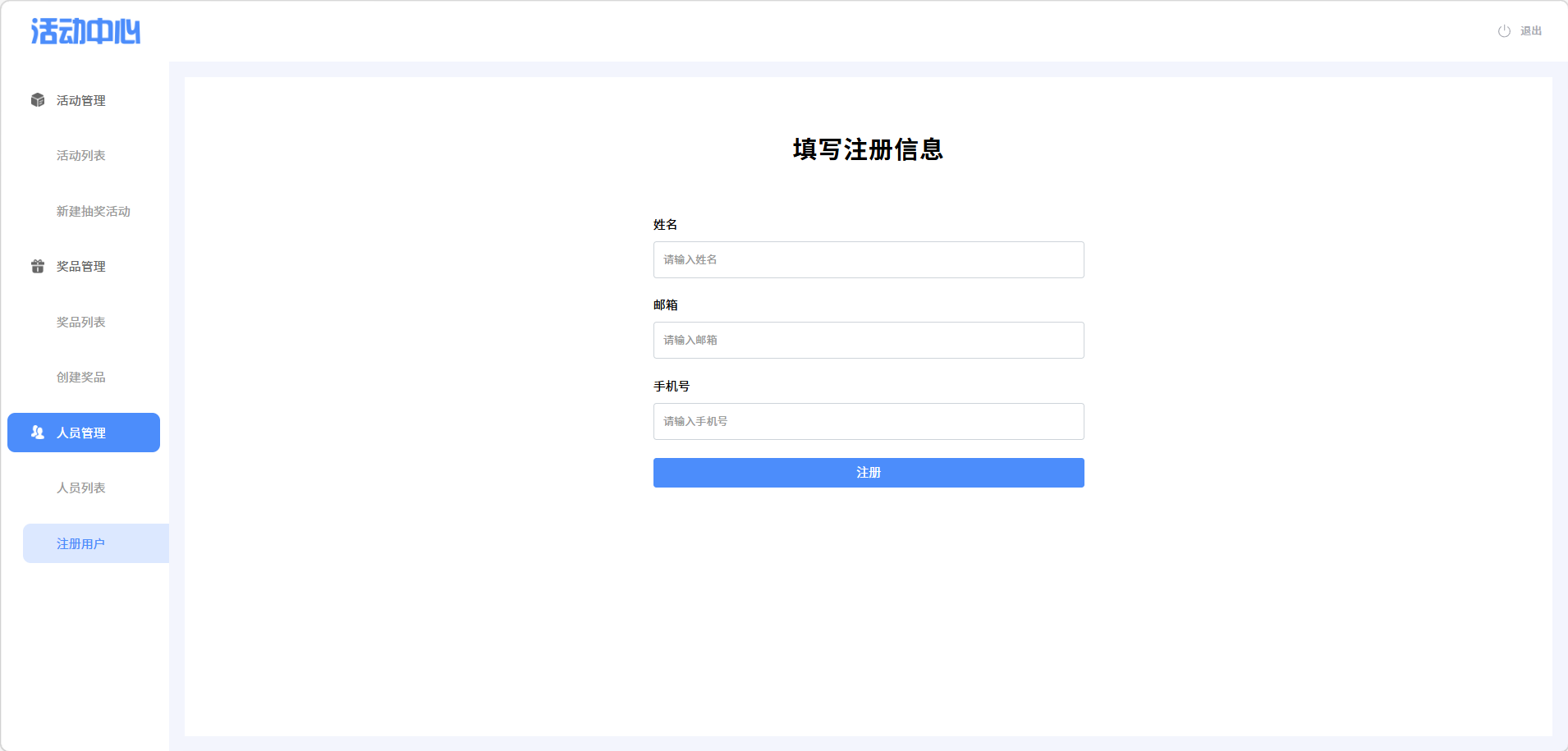
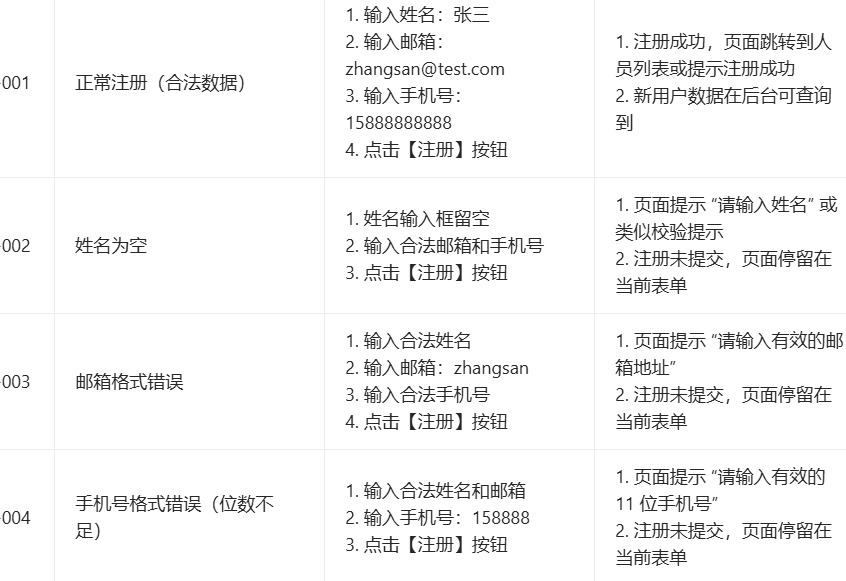
java
/**
     * 001 正常注册(合法数据)
     */
    private void testNormalRegister() {
        try {
            System.out.println("=== 执行用例001:正常注册(合法数据) ===");
            clearAllInputs();

            // 输入合法数据
            wait.until(ExpectedConditions.elementToBeClickable(By.cssSelector("#name")))
                    .sendKeys("张三");
            wait.until(ExpectedConditions.elementToBeClickable(By.cssSelector("#email")))
                    .sendKeys("zhangsan@test.com");
            wait.until(ExpectedConditions.elementToBeClickable(By.cssSelector("#phone")))
                    .sendKeys("15888888888");

            // 点击注册按钮
            wait.until(ExpectedConditions.elementToBeClickable(By.cssSelector("#registerBtn")))
                    .click();

            // 验证注册成功(页面跳转或提示)
            wait.until(ExpectedConditions.or(
                    ExpectedConditions.titleContains("人员列表"),
                    ExpectedConditions.visibilityOfElementLocated(By.cssSelector(".success-tip"))
            ));
            System.out.println("用例001执行通过");
        } catch (Exception e) {
            isTestPass = false;
            System.out.println("用例001执行失败:" + e.getMessage());
        }
    }

    /**
     * 002 姓名为空
     */
    private void testNameEmpty() {
        try {
            System.out.println("=== 执行用例002:姓名为空 ===");
            clearAllInputs();

            // 姓名留空,只输入邮箱和手机号
            wait.until(ExpectedConditions.elementToBeClickable(By.cssSelector("#email")))
                    .sendKeys("zhangsan@test.com");
            wait.until(ExpectedConditions.elementToBeClickable(By.cssSelector("#phone")))
                    .sendKeys("15888888888");

            // 点击注册按钮
            wait.until(ExpectedConditions.elementToBeClickable(By.cssSelector("#registerBtn")))
                    .click();

            // 验证错误提示
            WebElement errorMsg = wait.until(ExpectedConditions.visibilityOfElementLocated(By.cssSelector(".error-tip")));
            assert errorMsg.getText().contains("请输入姓名") : "姓名为空时未提示正确错误信息";
            assert driver.getCurrentUrl().contains("register") : "页面不应跳转";
            System.out.println("用例002执行通过");
        } catch (Exception e) {
            isTestPass = false;
            System.out.println("用例002执行失败:" + e.getMessage());
        }
    }

    /**
     * 003 邮箱格式错误
     */
    private void testEmailFormatError() {
        try {
            System.out.println("=== 执行用例003:邮箱格式错误 ===");
            clearAllInputs();

            wait.until(ExpectedConditions.elementToBeClickable(By.cssSelector("#name")))
                    .sendKeys("张三");
            wait.until(ExpectedConditions.elementToBeClickable(By.cssSelector("#email")))
                    .sendKeys("zhangsan"); // 错误邮箱格式
            wait.until(ExpectedConditions.elementToBeClickable(By.cssSelector("#phone")))
                    .sendKeys("15888888888");

            // 点击注册按钮
            wait.until(ExpectedConditions.elementToBeClickable(By.cssSelector("#registerBtn")))
                    .click();

            // 验证错误提示
            WebElement errorMsg = wait.until(ExpectedConditions.visibilityOfElementLocated(By.cssSelector(".error-tip")));
            assert errorMsg.getText().contains("有效的邮箱地址") : "邮箱格式错误提示不正确";
            System.out.println("用例003执行通过");
        } catch (Exception e) {
            isTestPass = false;
            System.out.println("用例003执行失败:" + e.getMessage());
        }
    }

    /**
     * 004 手机号格式错误(位数不足)
     */
    private void testPhoneLengthError() {
        try {
            System.out.println("=== 执行用例004:手机号格式错误(位数不足) ===");
            clearAllInputs();

            wait.until(ExpectedConditions.elementToBeClickable(By.cssSelector("#name")))
                    .sendKeys("张三");
            wait.until(ExpectedConditions.elementToBeClickable(By.cssSelector("#email")))
                    .sendKeys("zhangsan@test.com");
            wait.until(ExpectedConditions.elementToBeClickable(By.cssSelector("#phone")))
                    .sendKeys("158888"); // 仅6位,位数不足

            // 点击注册按钮
            wait.until(ExpectedConditions.elementToBeClickable(By.cssSelector("#registerBtn")))
                    .click();

            // 验证错误提示
            WebElement errorMsg = wait.until(ExpectedConditions.visibilityOfElementLocated(By.cssSelector(".error-tip")));
            assert errorMsg.getText().contains("有效的11位手机号") : "手机号位数错误提示不正确";
            System.out.println("用例004执行通过");
        } catch (Exception e) {
            isTestPass = false;
            System.out.println("用例004执行失败:" + e.getMessage());
        }
    }

    /**
     * 清空所有输入框(辅助方法)
     */
    private void clearAllInputs() {
        wait.until(ExpectedConditions.visibilityOfElementLocated(By.cssSelector("#name"))).clear();
        wait.until(ExpectedConditions.visibilityOfElementLocated(By.cssSelector("#email"))).clear();
        wait.until(ExpectedConditions.visibilityOfElementLocated(By.cssSelector("#phone"))).clear();
    }
}
(3)性能测试
①登录页面
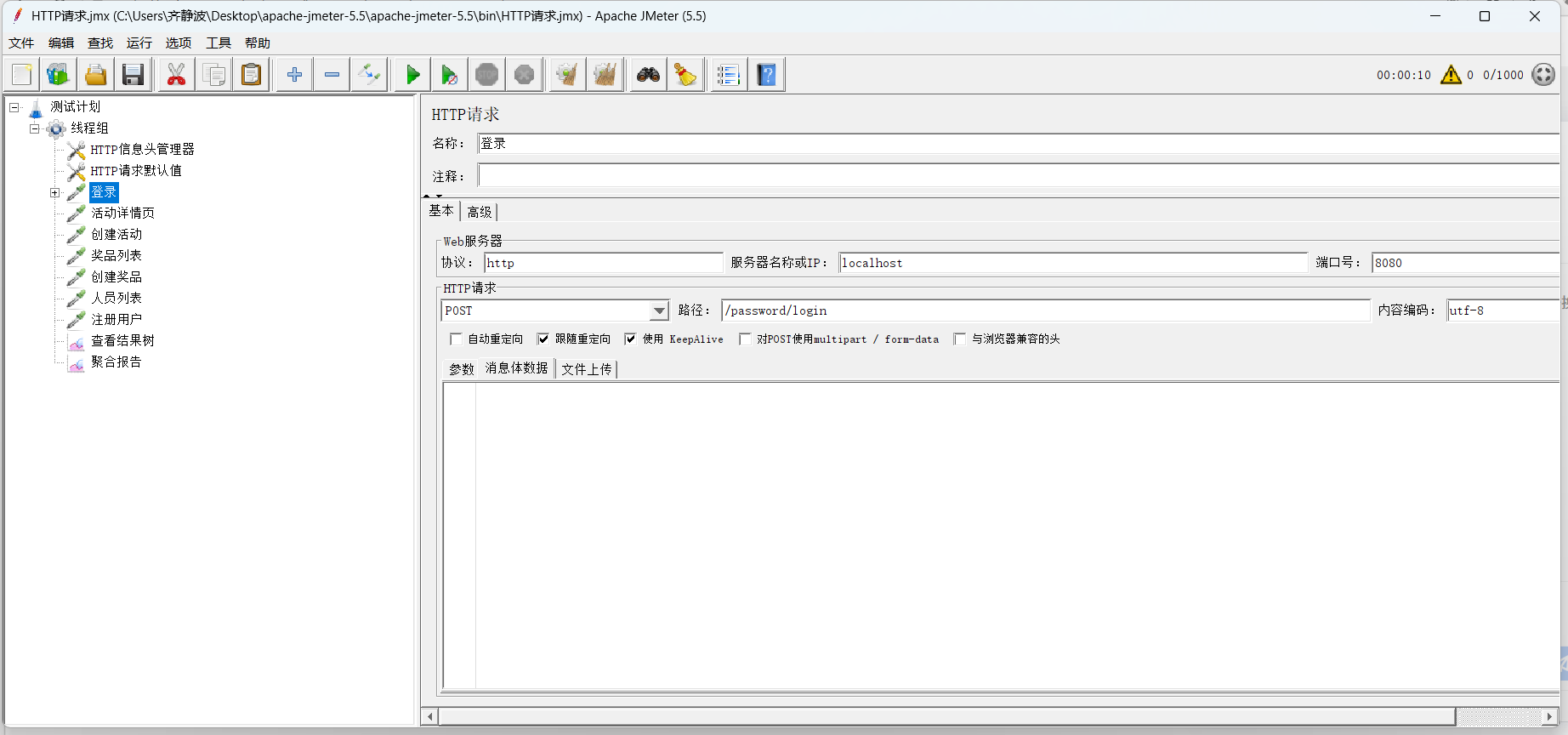
②列表页面测试:
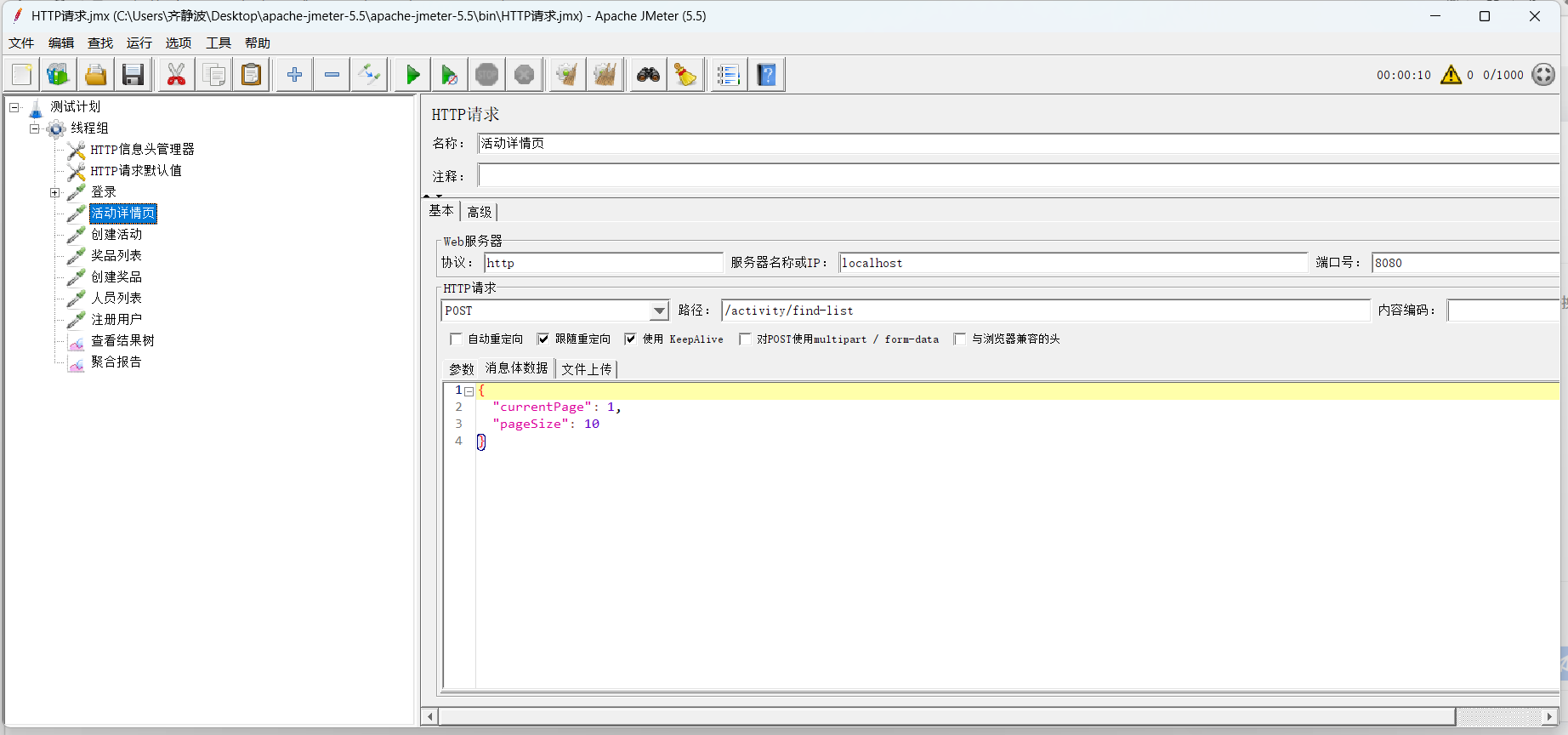
③新建抽奖活动页面 :
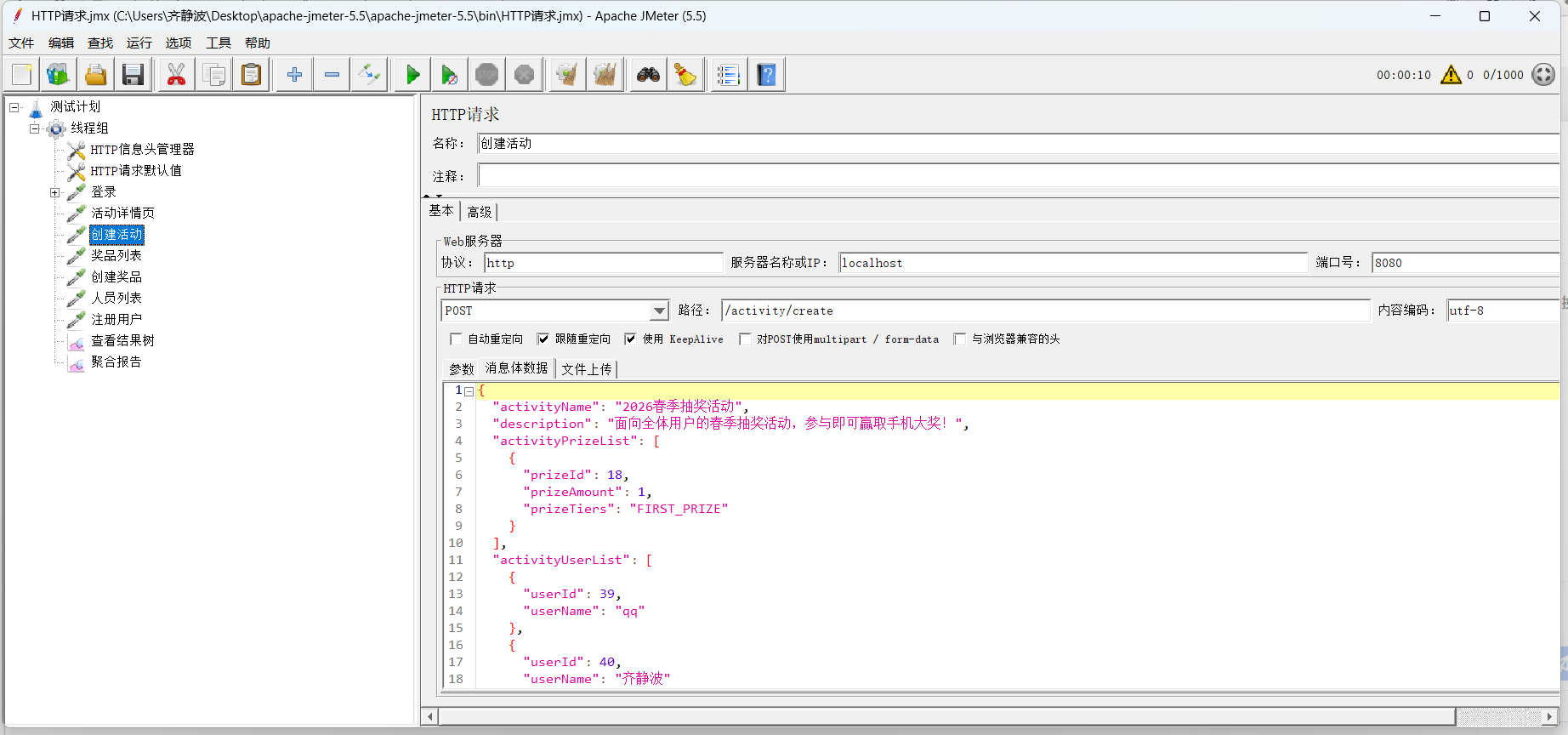
④奖品列表
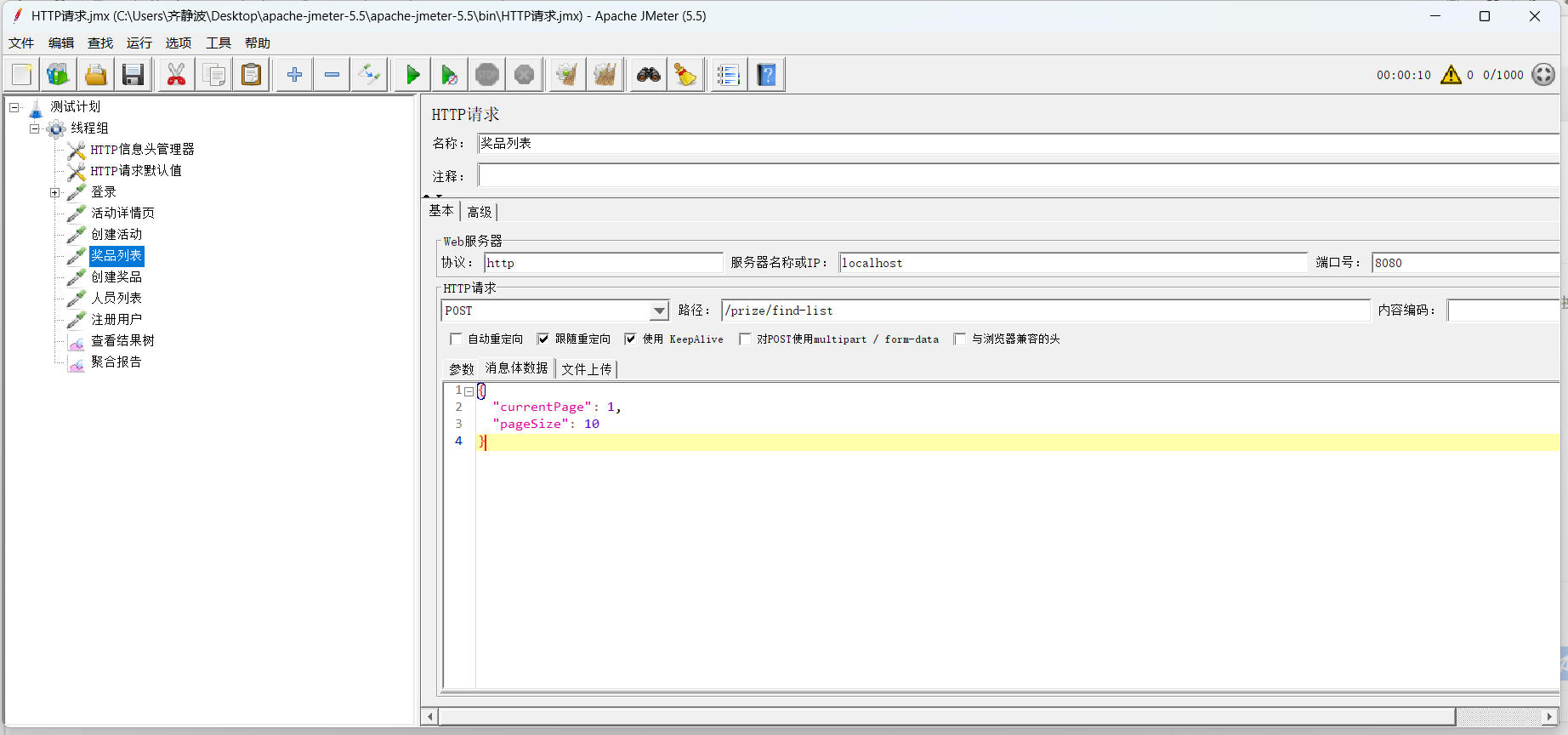
⑤创建奖品页面
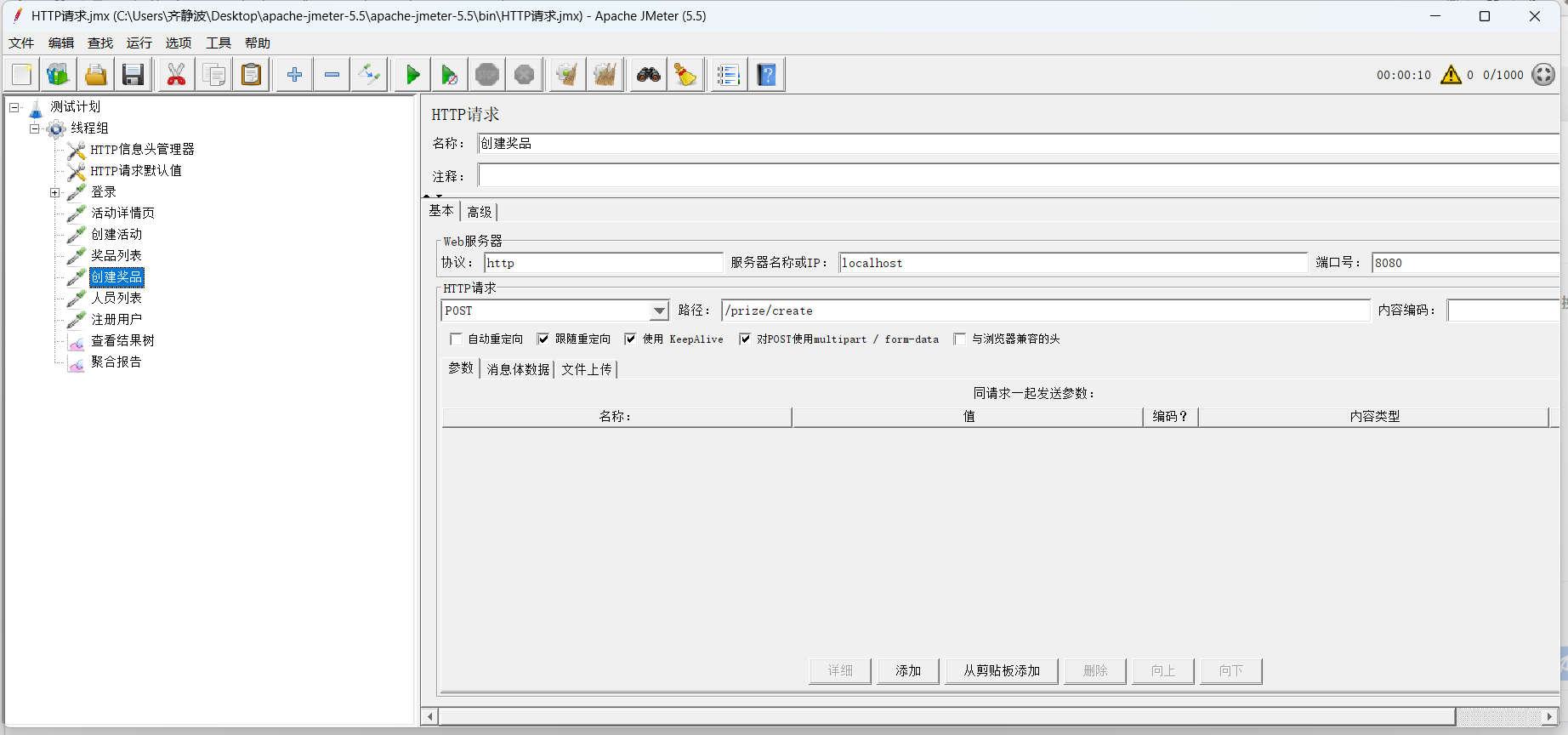
⑥人员列表页面
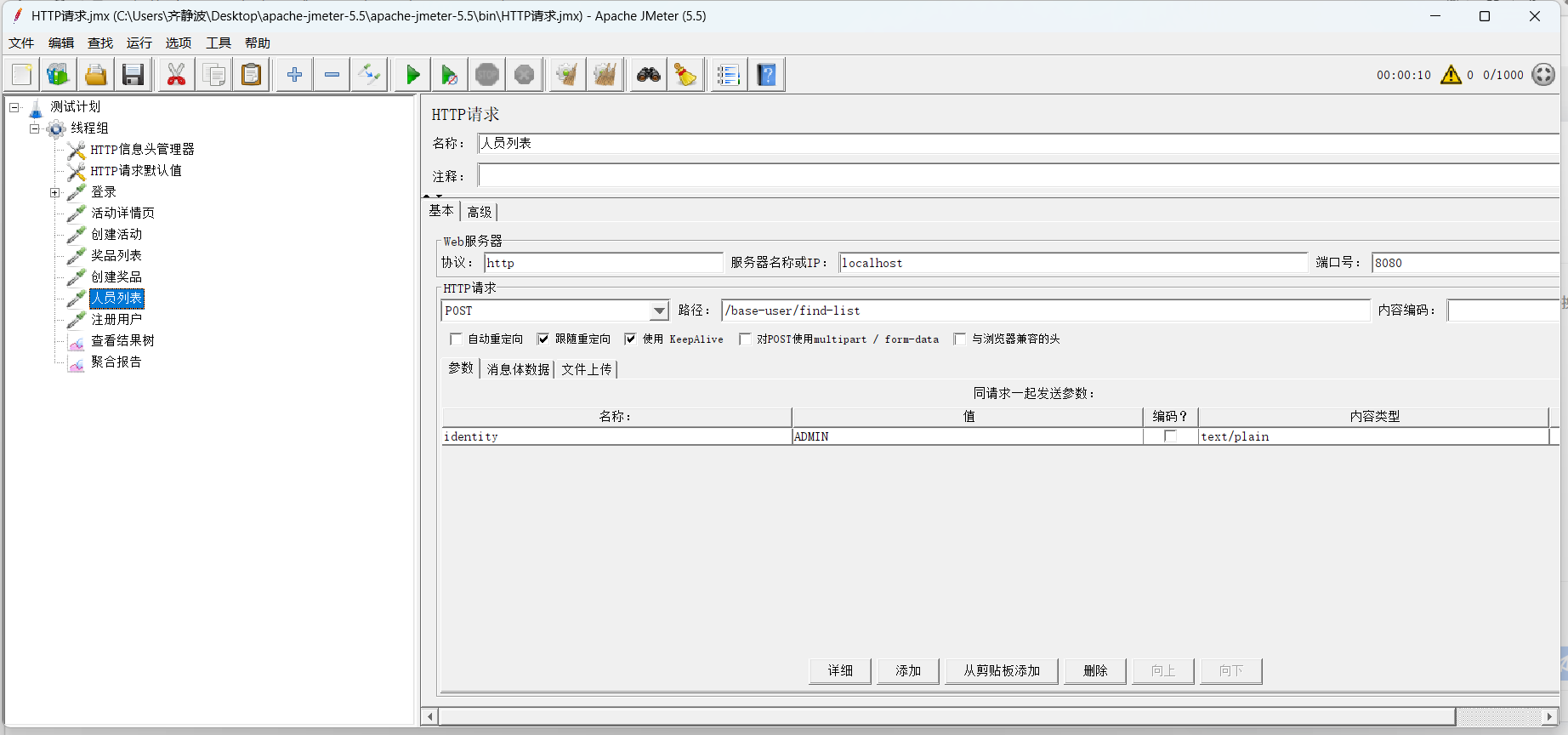
⑦注册用户页面
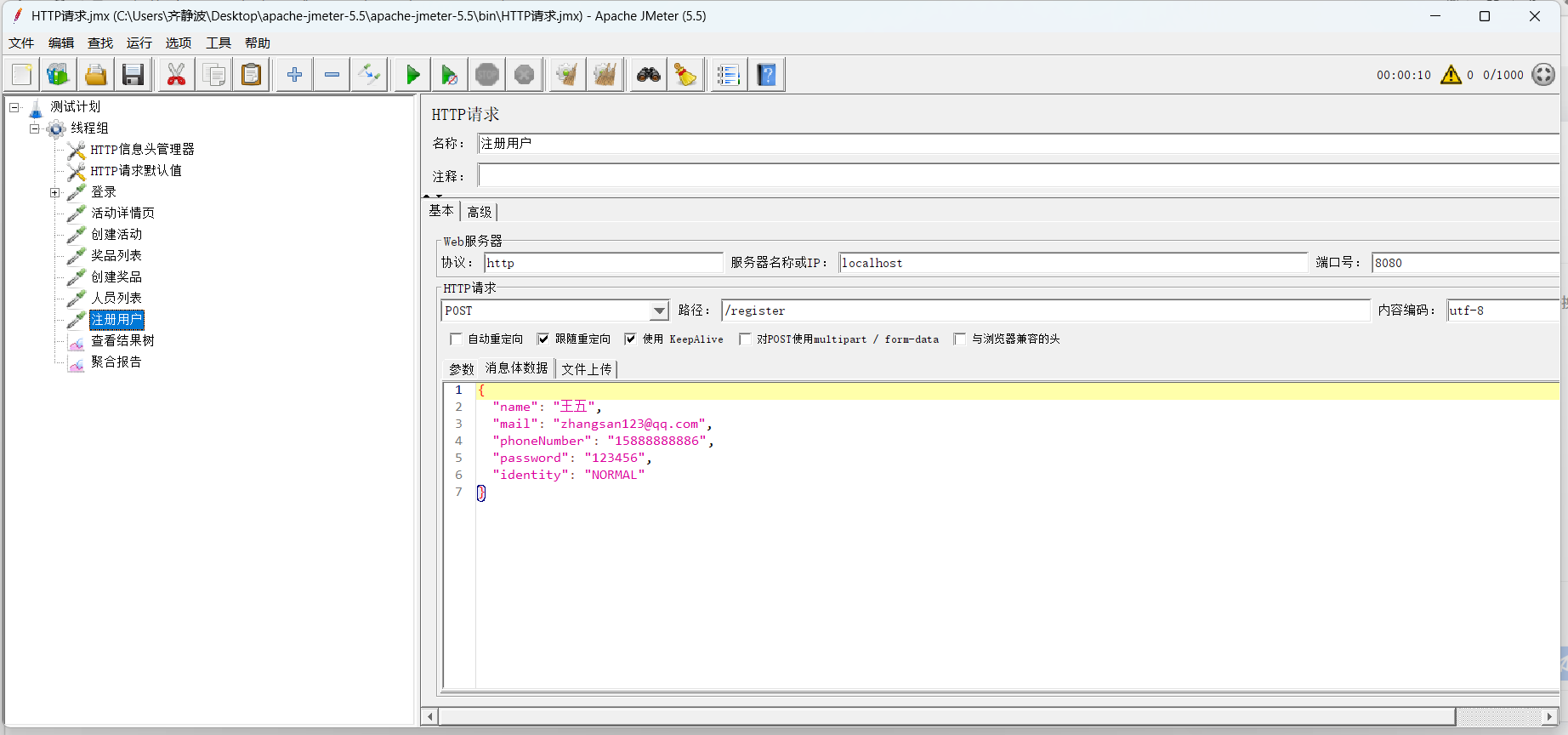
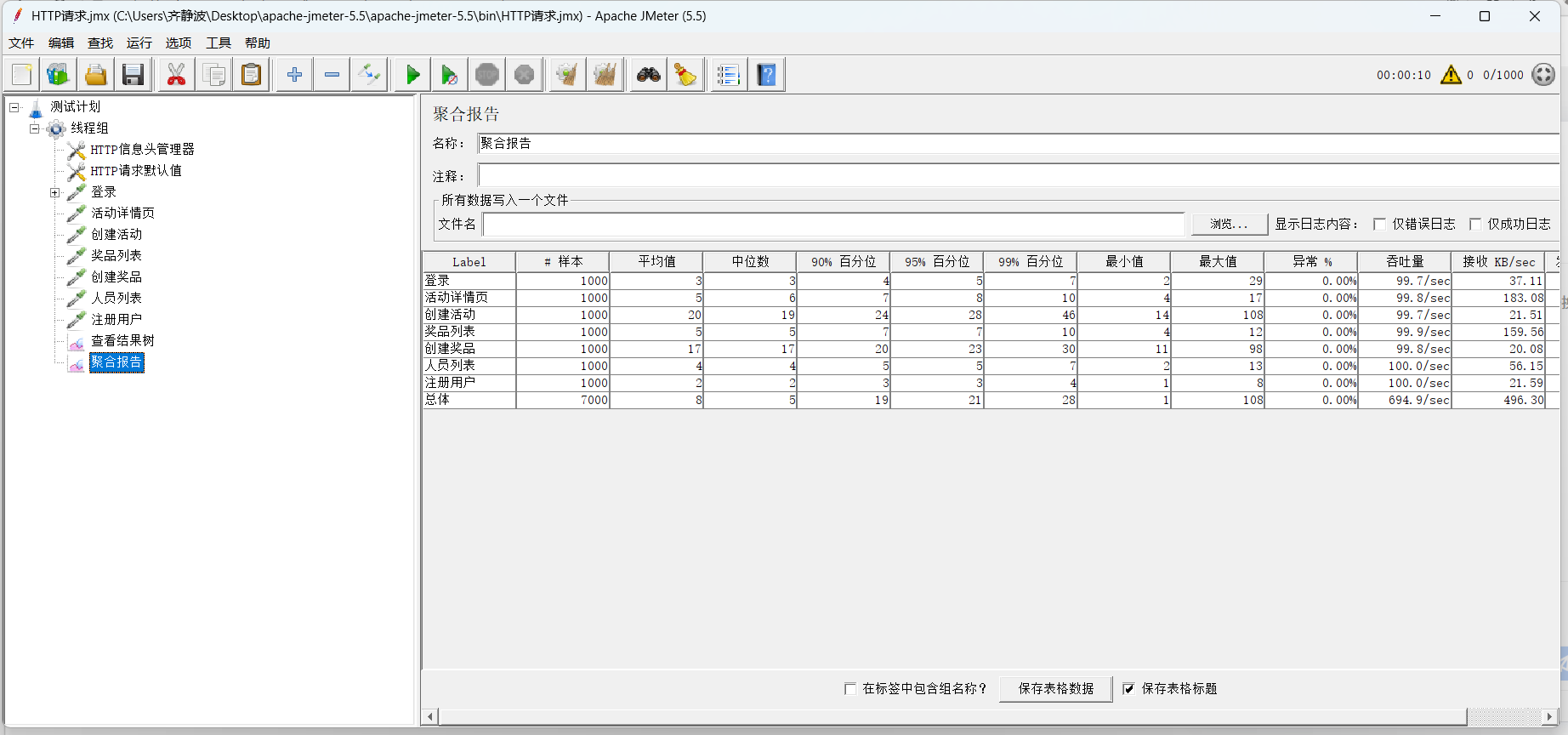
性能测试结果
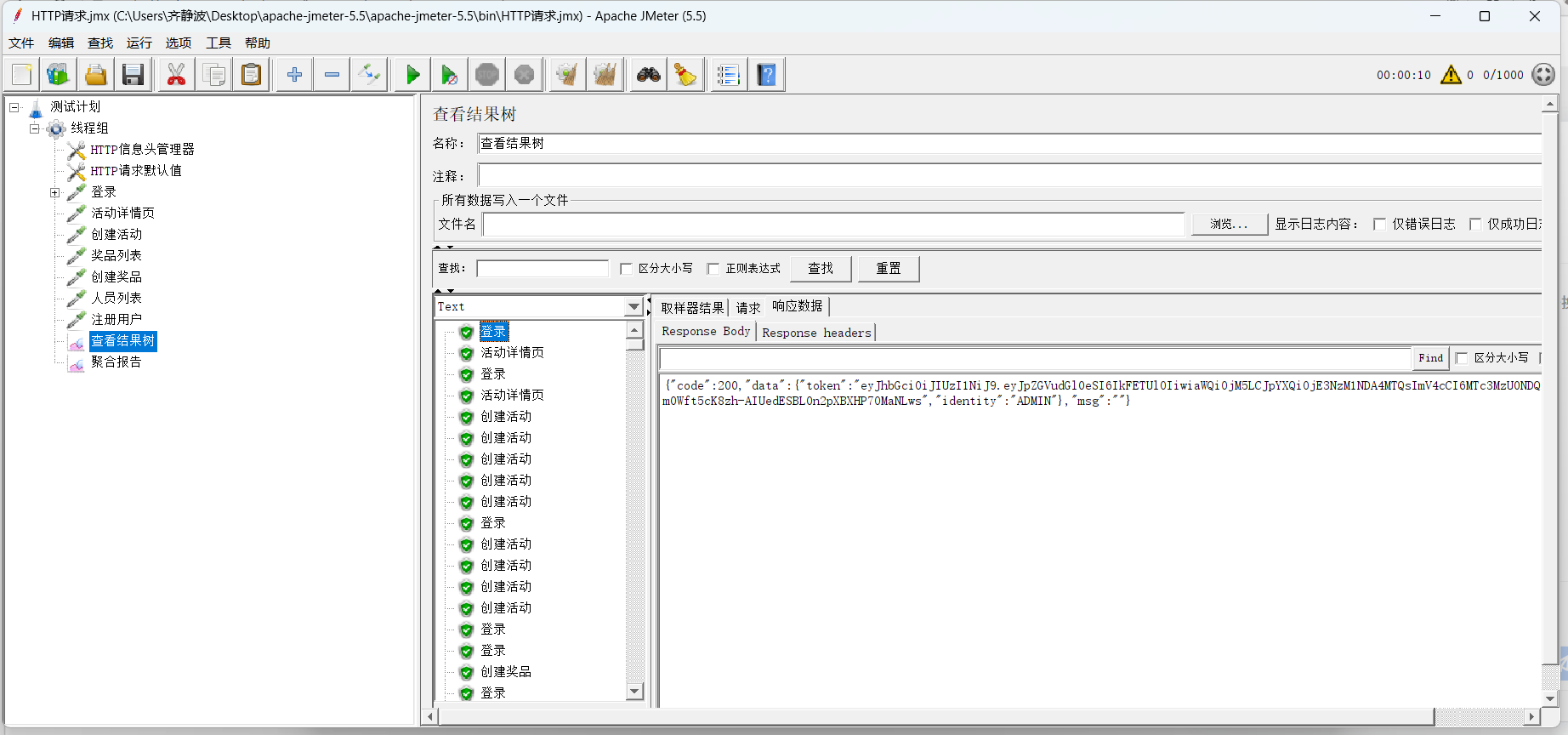
测试结论
- 系统在 1000 并发请求下整体稳定,无异常请求,核心查询接口性能优异,满足高并发场景下的基础性能要求。
- 写入类接口(创建活动、创建奖品)响应时间偏长,存在优化空间。