1、实例化方法
ChatPromptTemplate是创建聊天消息列表 的提示模版,他比普通的PromptTemplate更适合处理多角色、多轮次的对话场景。
他的实例化有两种方式:使用构造方法和from_messages(),列表参数格式是tuple(元组)类型。
方式一:使用构造方法
python
from langchain_core.prompts import ChatPromptTemplate

# 创建实例
chat_prompt_template = ChatPromptTemplate(
    messages = [
        ("system","你是一个AI助手,你的名字叫{name}"),
        ("human","我的问题是{question}")
    ],
    input_variables = ["name","question"]
)

response = chat_prompt_template.invoke(input = {"name":"小智","question":"你是哪个公司旗下的产品?"})
print(response)
方式二:使用from_messages()方法✅️
python
from langchain_core.prompts import ChatPromptTemplate

# 创建实例
chat_prompt_template = ChatPromptTemplate.from_messages(
    messages = [
        ("system","你是一个AI助手,你的名字叫{name}"),
        ("human","我的问题是{question}")
    ]
)

response = chat_prompt_template.invoke(input = {"name":"小智","question":"你是哪个公司旗下的产品?"})
print(response)
print(type(response)) #ChatPromptValue
2、提示词调用模版的方法
调用模版共有四种方式:
- invoke():参数传入的是字典,返回的是ChatPromptValue;
- format():参数传入的是变量的值,返回字符串str;
- format_messages():参数传入的是变量的值,返回消息构成的列表list;
- format_prompt():参数传入的是变量的值,返回ChatPromptValue.
对于第一种方式,在前文的实例化章节中已经应用。
示例2:format()
python
from langchain_core.prompts import ChatPromptTemplate

# 创建实例
chat_prompt_template = ChatPromptTemplate.from_messages(
    messages = [
        ("system","你是一个AI助手,你的名字叫{name}"),
        ("human","我的问题是{question}")
    ]
)

response = chat_prompt_template.format(name = "小智",question = "你是哪个公司旗下的产品?")
print(response)
print(type(response)) #str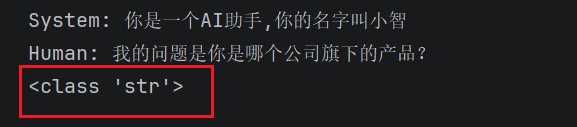
示例3:format_messages()
python
from langchain_core.prompts import ChatPromptTemplate

# 创建实例
chat_prompt_template = ChatPromptTemplate.from_messages(
    messages = [
        ("system","你是一个AI助手,你的名字叫{name}"),
        ("human","我的问题是{question}")
    ]
)

response = chat_prompt_template.format_messages(name = "小智",question = "你是哪个公司旗下的产品?")
print(response)
print(type(response)) #list
示例4:format_prompt()
python
from langchain_core.prompts import ChatPromptTemplate

# 创建实例
chat_prompt_template = ChatPromptTemplate.from_messages(
    messages = [
        ("system","你是一个AI助手,你的名字叫{name}"),
        ("human","我的问题是{question}")
    ]
)

response = chat_prompt_template.format_prompt(name = "小智",question = "你是哪个公司旗下的产品?")
print(response)
print(type(response)) #ChatPromptValue
3、实现输出类型的转换
以下示例中的response为调用模版时候的示例4,返回值类型是ChatPromptValue。
(1)ChatPromptValue->list
python
response_message = response.to_messages() # ChatPromptValue转换为list
print(type(response))
print(response_message)
print(type(response_message))
(2)ChatPromptValue->str
python
response_string = response.to_string() # ChatPromptValue转换为string
print(type(response))
print(response_string)
print(type(response_string))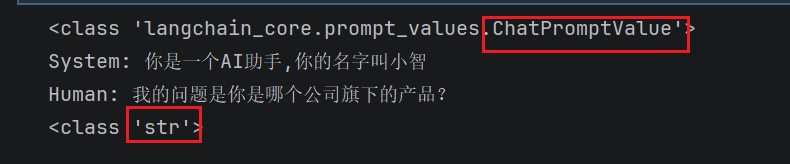
4、其他实例化参数类型
无论是采用构造方法还是from_messages()来构建ChatPromptTemplate的实例,本质上都是传入消息构成的列表 。 从调用上来说,不管使用构造方法还是from_messages(),messages的参数类型都是列表,但是列表的元素类型多样,可以是:++字符串类型、字典类型、消息类型、元组构成的列表✅️、Chat提示词模版类型、消息提示词模版类型++。
示例4(消息类型)和示例6(消息提示词模版类型)都是消息,前者不用参数时使用,后者可以搭配参数使用。
示例1:元组构成的列表
python
from langchain_core.prompts import ChatPromptTemplate

# 创建实例
chat_prompt_template = ChatPromptTemplate([
        ("system","你是一个AI助手,你的名字叫{name}"),
        ("human","我的问题是{question}")
    ])

response = chat_prompt_template.invoke(input = {"name":"小智","question":"你是哪个公司旗下的产品?"})
print(response)
示例2:字符串类型
python
from langchain_core.prompts import ChatPromptTemplate

# 创建实例
chat_prompt_template = ChatPromptTemplate([
    "我的问题是{question}"
    ]) # 默认角色是Human

response = chat_prompt_template.invoke(input = {"question":"你是哪个公司旗下的产品?"})
print(response)
示例3:字典类型
python
from langchain_core.prompts import ChatPromptTemplate

# 创建实例
chat_prompt_template = ChatPromptTemplate([
    {"role":"system","content":"我是人工智能,名字叫{name}"},
    {"role":"human","content":"我的问题是{question}"},
    ])

response = chat_prompt_template.invoke(input = {"name":"小志","question":"你是哪个公司旗下的产品?"})
print(response)
示例4:消息类型
python
from langchain_core.messages import SystemMessage,HumanMessage
from langchain_core.prompts import ChatPromptTemplate

# 创建实例
chat_prompt_template = ChatPromptTemplate([
    SystemMessage(content = "我是人工智能,名字叫{name}"),
    HumanMessage(content = "我的问题是{question}")
    ])

#response = chat_prompt_template.invoke(input = {"name":"小志","question":"你是哪个公司旗下的产品?"})
response = chat_prompt_template.invoke(input = {})
print(response)
示例5:chat提示词模版
python
from langchain_core.prompts import ChatPromptTemplate

# 使用 BaseChatPromptTemplate(嵌套的 ChatPromptTemplate)
nested_prompt_template1 = ChatPromptTemplate.from_messages([
    ("system", "我是一个人工智能助手,我的名字叫{name}")
])
nested_prompt_template2 = ChatPromptTemplate.from_messages([
    ("human", "很高兴认识你,我的问题是{question}")
])

prompt_template = ChatPromptTemplate.from_messages([
    nested_prompt_template1,nested_prompt_template2
])

prompt_template.format_messages(name="小智",question="你为什么这么帅?")
示例6:消息提示词模版类型
python
# 导入聊天消息类模板
from langchain_core.prompts import ChatPromptTemplate, HumanMessagePromptTemplate,SystemMessagePromptTemplate

# 创建消息模板
system_template = "你是一个专家{role}"
system_message_prompt = SystemMessagePromptTemplate.from_template(system_template)

human_template = "给我解释{concept},用浅显易懂的语言"
human_message_prompt = HumanMessagePromptTemplate.from_template(human_template)

# 组合成聊天提示模板
chat_prompt = ChatPromptTemplate.from_messages([
    system_message_prompt, human_message_prompt
])

# 格式化提示
formatted_messages = chat_prompt.format_messages(
    role="物理学家",
    concept="相对论"
)

print(formatted_messages)
5、结合LLM
python
# 1、提供大模型
from langchain_openai import ChatOpenAI
from langchain_core.prompts import ChatPromptTemplate
import os
import dotenv

dotenv.load_dotenv()
os.environ["OPENAI_API_KEY"] = os.getenv("OPENAI_API_KEY")
os.environ["OPENAI_BASE_URL"] = os.getenv("OPENAI_BASE_URL")

chat_model = ChatOpenAI(
    model = "gpt-4o-mini"
)
# 2、通过提示词模版,创建提示词
chat_prompt_template = ChatPromptTemplate.from_messages([
    ("system","你是AI助手,你的名字是{name}"),
    ("human","我的问题是{question}")
])
# 3、通过LLM调用提示词,得到响应数据
prompt = chat_prompt_template.invoke(input={"name":"小志","question":"你是哪个公司旗下的?"})
response = chat_model.invoke(prompt)

print(response.content)
6、插入消息列表:MessagePlaceholder
适用场景:当ChatPromptTemplate模版中消息类型与个数不确定的时候,使用消息列表。
python
from langchain_core.messages import AIMessage
from langchain_core.prompts import ChatPromptTemplate
from langchain_core.prompts.chat import MessagesPlaceholder

chat_prompt_template = ChatPromptTemplate.from_messages([
    ("system","你是AI助手,你的名字是{name}"),
    MessagesPlaceholder(variable_name = "msgs")
])

chat_prompt_template.invoke(input = {
    "name":"小志",
    "msgs":[HumanMessage(content = "1+1=?"),AIMessage(content = "1+2=?")]  # HumanMessage AIMessage
})