文章目录
org.openpnp.vision.pipeline.stages.DrawTemplateMatches
功能
在图像上绘制模板匹配的结果。
主要用于调试和验证模板匹配(如 MatchTemplate、MatchPartTemplate 等阶段)的效果,便于直观查看匹配位置和置信度。
参数
| 参数 | 类型 | 说明 |
|---|---|---|
templateMatchesStageName |
String |
指定流水线中提供模板匹配结果(List<TemplateMatch>)的那个阶段的名称。如果为空或找不到对应结果,则跳过绘制。 |
color |
java.awt.Color |
可选,绘制矩形框和文本所用的颜色。如果不设置,会为每个匹配结果自动分配一个索引色(循环使用)。 |
例子
生成测试图片
bash
import cv2
import numpy as np

# 创建测试图片 (800x600)
width, height = 800, 600
img = np.ones((height, width, 3), dtype=np.uint8) * 255

# 绘制三个不同颜色的圆形作为待匹配目标
targets = [
    (200, 200, 60, (0, 0, 255)),   # 红色圆
    (500, 150, 50, (0, 255, 0)),   # 绿色圆
    (650, 450, 55, (255, 0, 0)),   # 蓝色圆
    (300, 500, 45, (0, 255, 255))  # 黄色圆
]

for x, y, r, color in targets:
    cv2.circle(img, (x, y), r, color, -1)

# 添加轻微噪声
noise = np.random.randint(0, 30, (height, width, 3), dtype=np.uint8)
img = cv2.addWeighted(img, 0.95, noise, 0.05, 0)

cv2.imwrite("test_matches.png", img)
print("测试图片已生成: test_matches.png")

# 生成模板图片:截取第一个红色圆形区域作为模板 (大小约 120x120)
template = img[140:260, 140:260]  # 根据圆心(200,200)和半径60,适当裁剪
cv2.imwrite("template.png", template)
print("模板图片已生成: template.png")
cv-pipeline config
bash
<cv-pipeline>
   <stages>
      <cv-stage class="org.openpnp.vision.pipeline.stages.ImageRead" name="template_read" enabled="true" file="D:\3rd\openpnp_prj\openpnp-official\openpnp-test-images\my_test\template.png" color-space="Bgr" handle-as-captured="false"/>
      <cv-stage class="org.openpnp.vision.pipeline.stages.ImageRead" name="read" enabled="true" file="D:\3rd\openpnp_prj\openpnp-official\openpnp-test-images\my_test\test_matches.png" color-space="Bgr" handle-as-captured="false"/>
      <cv-stage class="org.openpnp.vision.pipeline.stages.MatchTemplate" name="match" enabled="true" template-stage-name="template_read" threshold="0.7" corr="0.85" normalize="true" max-distance="10000" property-name=""/>
      <cv-stage class="org.openpnp.vision.pipeline.stages.ImageRecall" name="0" enabled="true" image-stage-name="read"/>
      <cv-stage class="org.openpnp.vision.pipeline.stages.DrawTemplateMatches" name="draw" enabled="true" template-matches-stage-name="match">
         <color r="51" g="51" b="0" a="255"/>
      </cv-stage>
      <cv-stage class="org.openpnp.vision.pipeline.stages.ImageWrite" name="save" enabled="true" file="output_matches.png"/>
   </stages>
</cv-pipeline>
效果
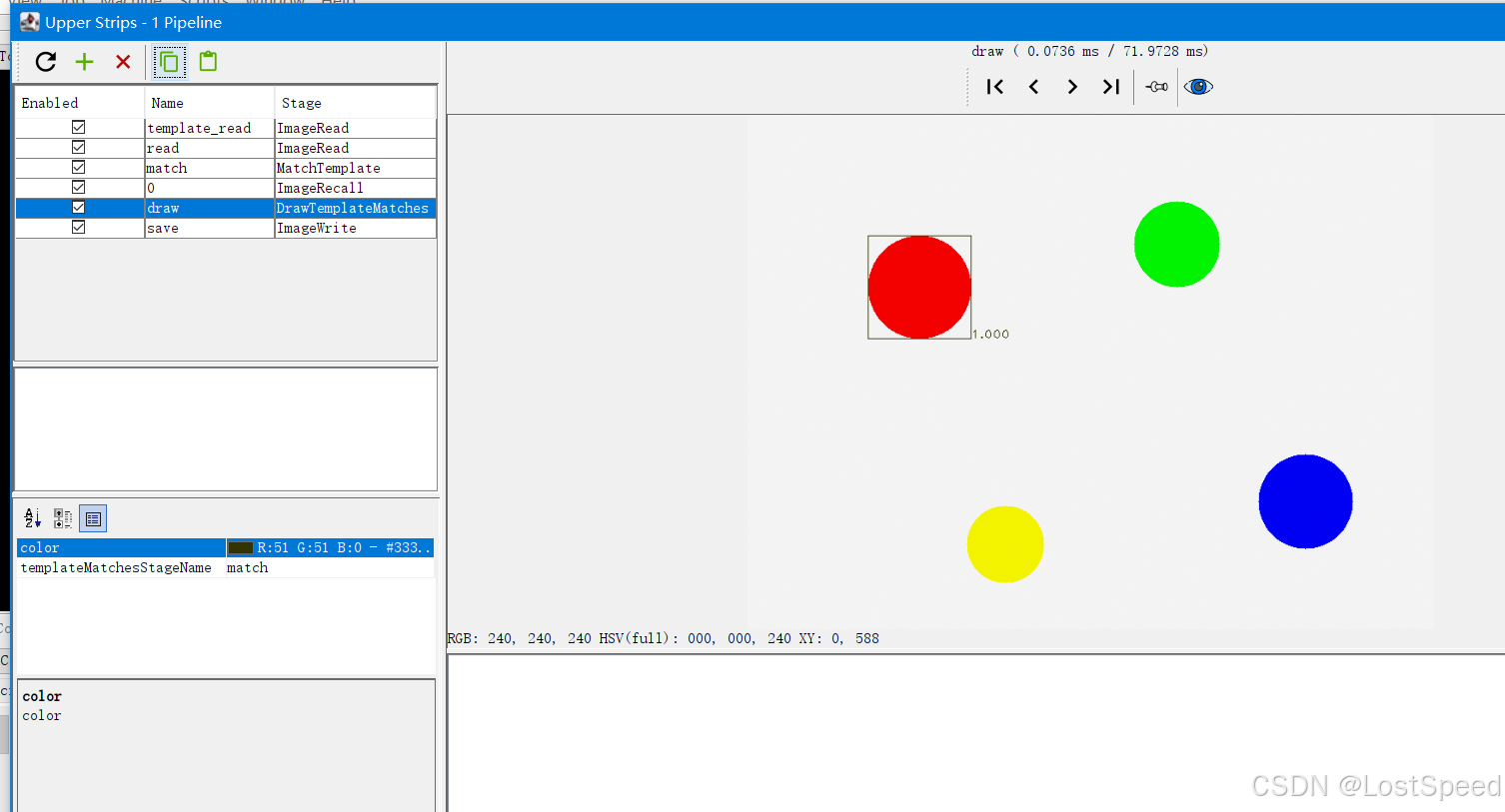
备注
DrawTemplateMatches 可以在一张原图中,找到模板图片,并框住。