文章目录
org.openpnp.vision.pipeline.stages.DilateModel
功能
对已有的模型(Model)进行膨胀或收缩。模型可以是单个 RotatedRect(旋转矩形)、单个 Result.Circle(圆),或者是它们的列表。该阶段不改变图像本身,只修改模型数据,并传递给后续阶段.
DilateModel 不修改原图:它只处理管道中的"模型"数据(例如 RotatedRect 或 Circle),对图像本身不做任何改变。
它仅调整模型尺寸:通过 dilate 参数扩大或缩小模型(矩形宽高或圆的直径),中心点和角度保持不变。
应用场景:例如检测到元件后,希望生成一个比实际元件稍大的"安全框"用于显示或后续处理,就可以先用 DilateModel 扩大模型,再用 DrawRotatedRects 绘制出来。
参数
| 参数 | 类型 | 默认值 | 说明 |
|---|---|---|---|
modelStageName |
String | null | 指定提供输入模型的 Stage 名称(如 "detect")。该 Stage 的结果必须包含 RotatedRect、Result.Circle 或它们的列表。 |
dilate |
int | 0 | 膨胀/收缩的像素数。正值扩大模型(宽高或直径增加 2*dilate),负值缩小模型。 |
例子
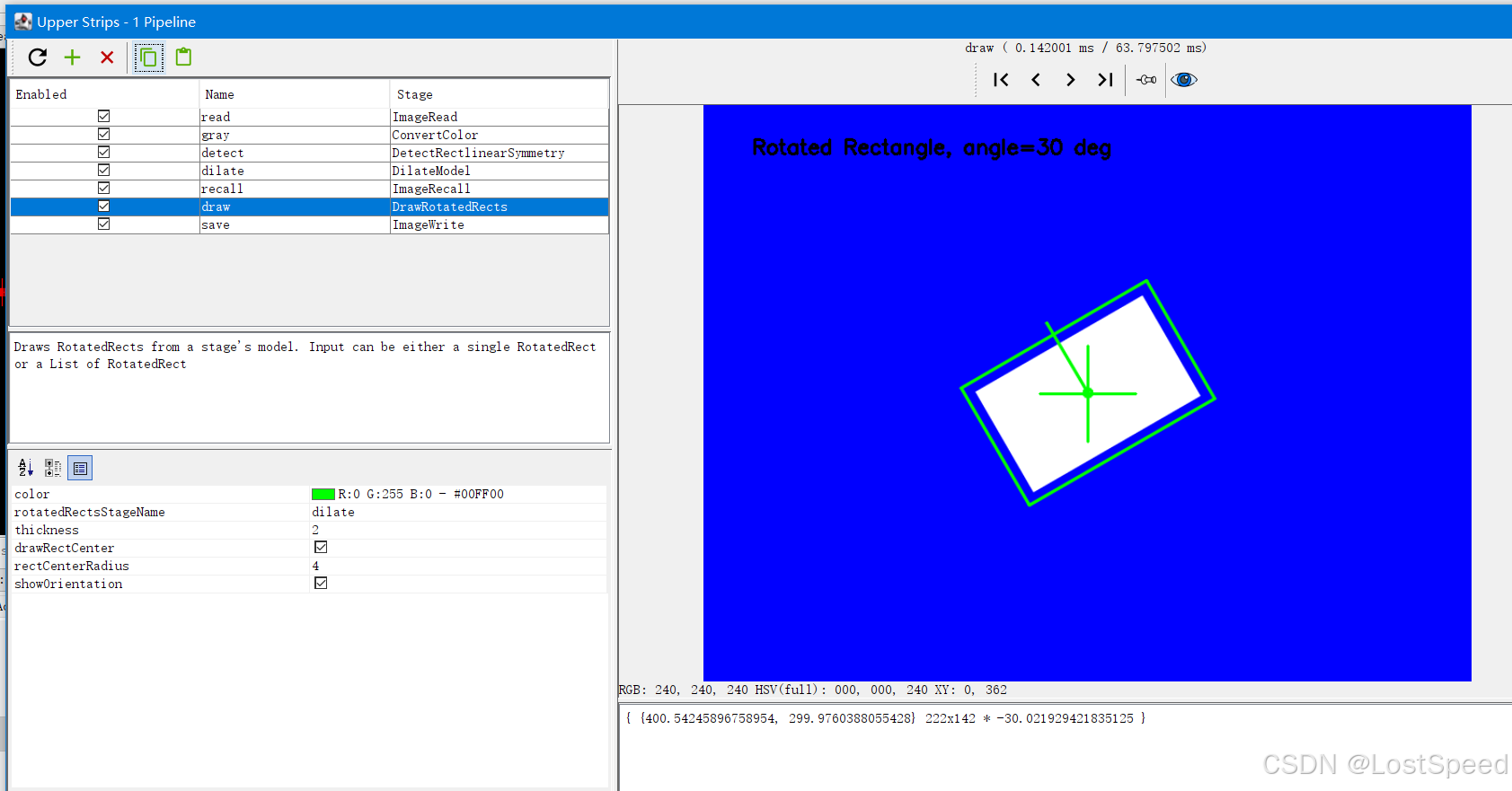
测试图像用的 org.openpnp.vision.pipeline.stages.DetectRectlinearSymmetry 笔记的。
bash
<cv-pipeline>
   <stages>
      <cv-stage class="org.openpnp.vision.pipeline.stages.ImageRead" name="read" enabled="true" file="D:\3rd\openpnp_prj\openpnp-official\openpnp-test-images\my_test\rotated_rectangle_v2.png" color-space="Bgr" handle-as-captured="false"/>
      <cv-stage class="org.openpnp.vision.pipeline.stages.ConvertColor" name="gray" enabled="true" conversion="Bgr2Gray"/>
      <cv-stage class="org.openpnp.vision.pipeline.stages.DetectRectlinearSymmetry" name="detect" enabled="true" expected-angle="30.0" search-distance="50.0" search-angle="20.0" max-width="250.0" max-height="180.0" symmetric-left-right="true" symmetric-upper-lower="true" symmetric-function="FullSymmetry" asymmetric-function="OutlineSymmetryMasked" min-symmetry="10.0" sub-sampling="4" super-sampling="2" smoothing="5" gamma="2.5" threshold="128" min-feature-size="20.0" diagnostics="true" diagnostics-map="false" property-name=""/>
      <cv-stage class="org.openpnp.vision.pipeline.stages.DilateModel" name="dilate" enabled="true" model-stage-name="detect" dilate="10"/>
      <cv-stage class="org.openpnp.vision.pipeline.stages.ImageRecall" name="recall" enabled="true" image-stage-name="read"/>
      <cv-stage class="org.openpnp.vision.pipeline.stages.DrawRotatedRects" name="draw" enabled="true" rotated-rects-stage-name="dilate" thickness="2" draw-rect-center="true" rect-center-radius="4" show-orientation="true">
         <color r="0" g="255" b="0" a="255"/>
      </cv-stage>
      <cv-stage class="org.openpnp.vision.pipeline.stages.ImageWrite" name="save" enabled="true" file="output_rotated_rectangle_dilated.png"/>
   </stages>
</cv-pipeline>
效果