系统和工具要求
ubuntu 24.04 LTS
STM32CubeProgrammer version: 2.22.0
Overview
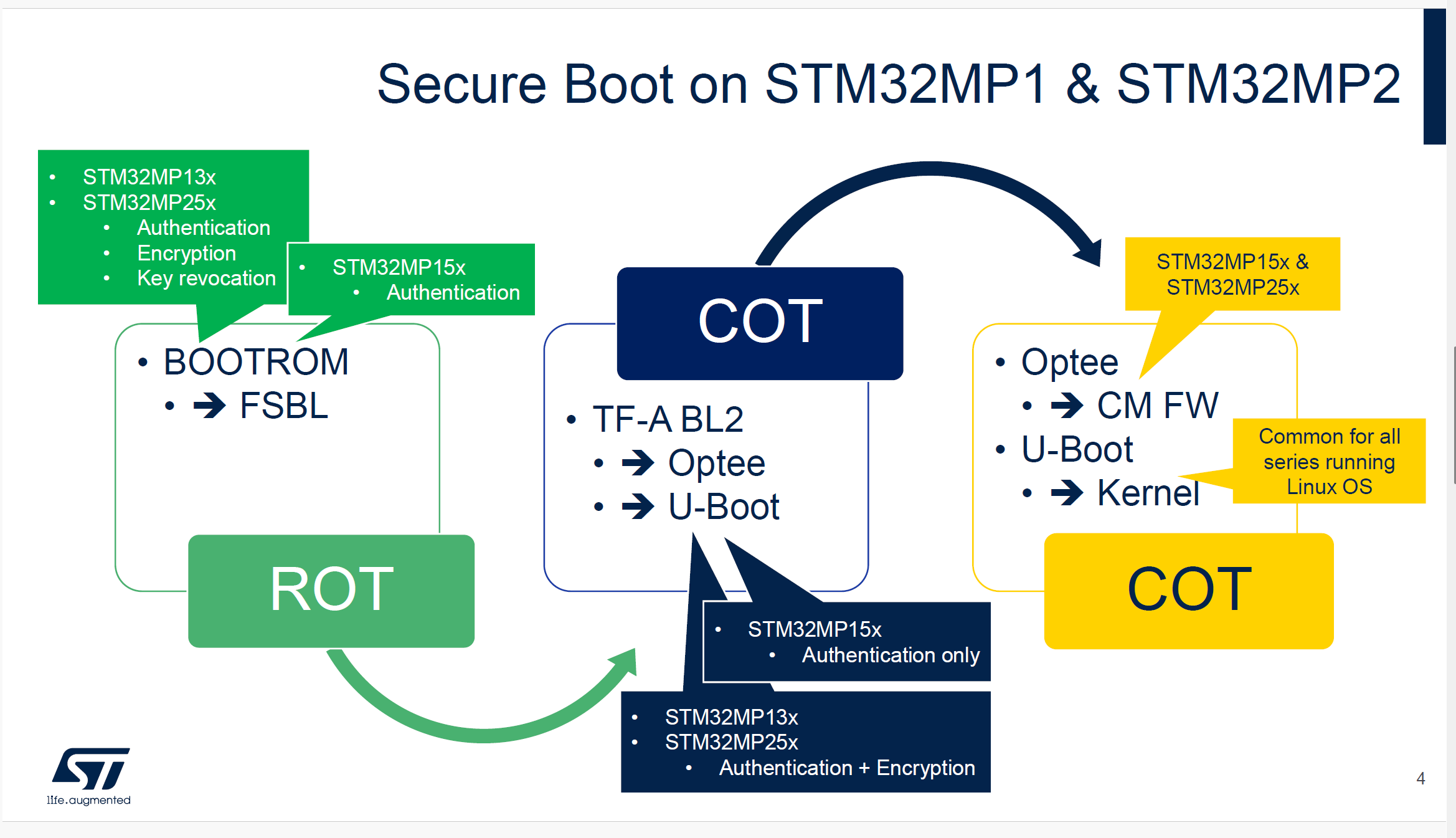
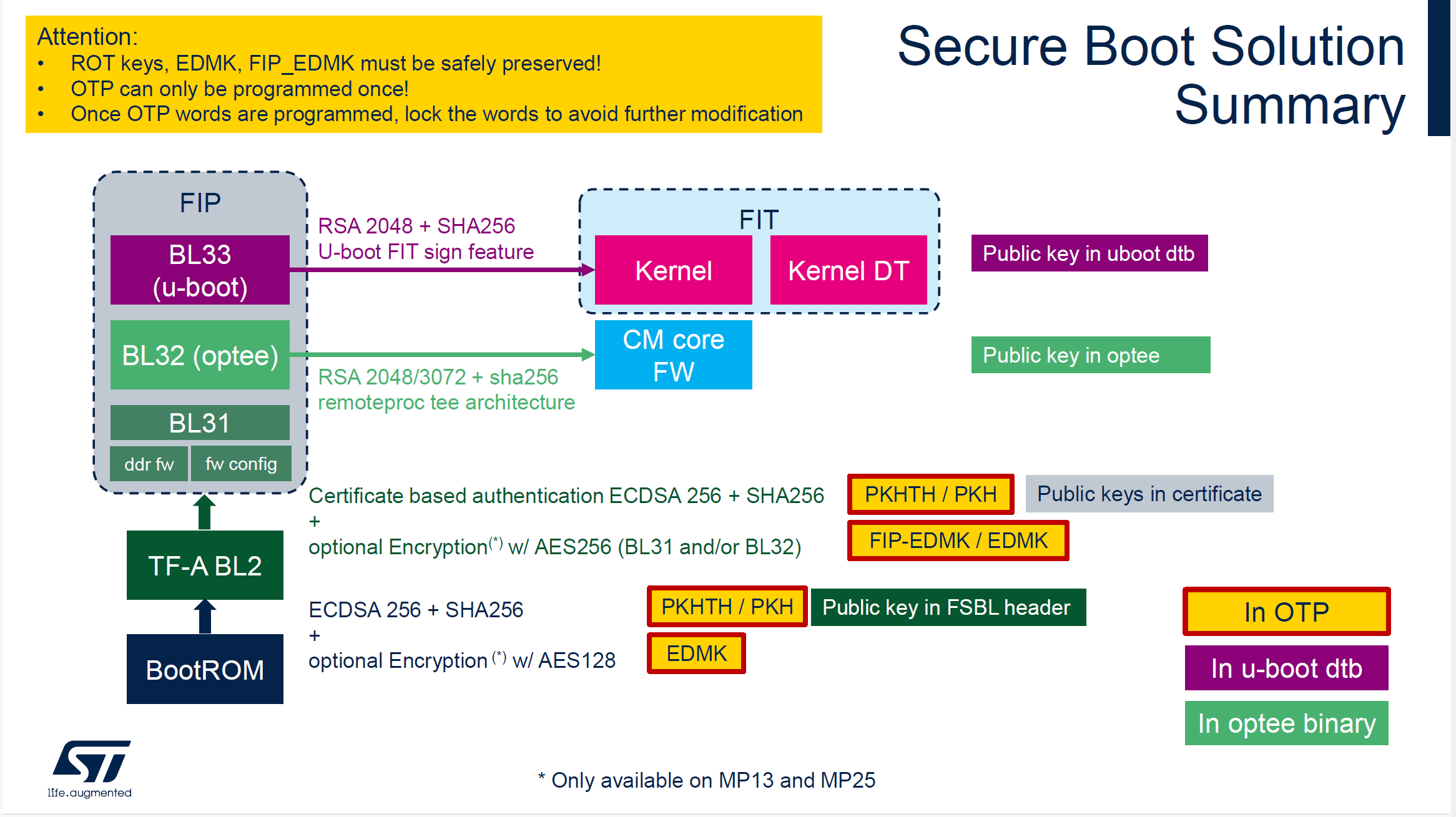
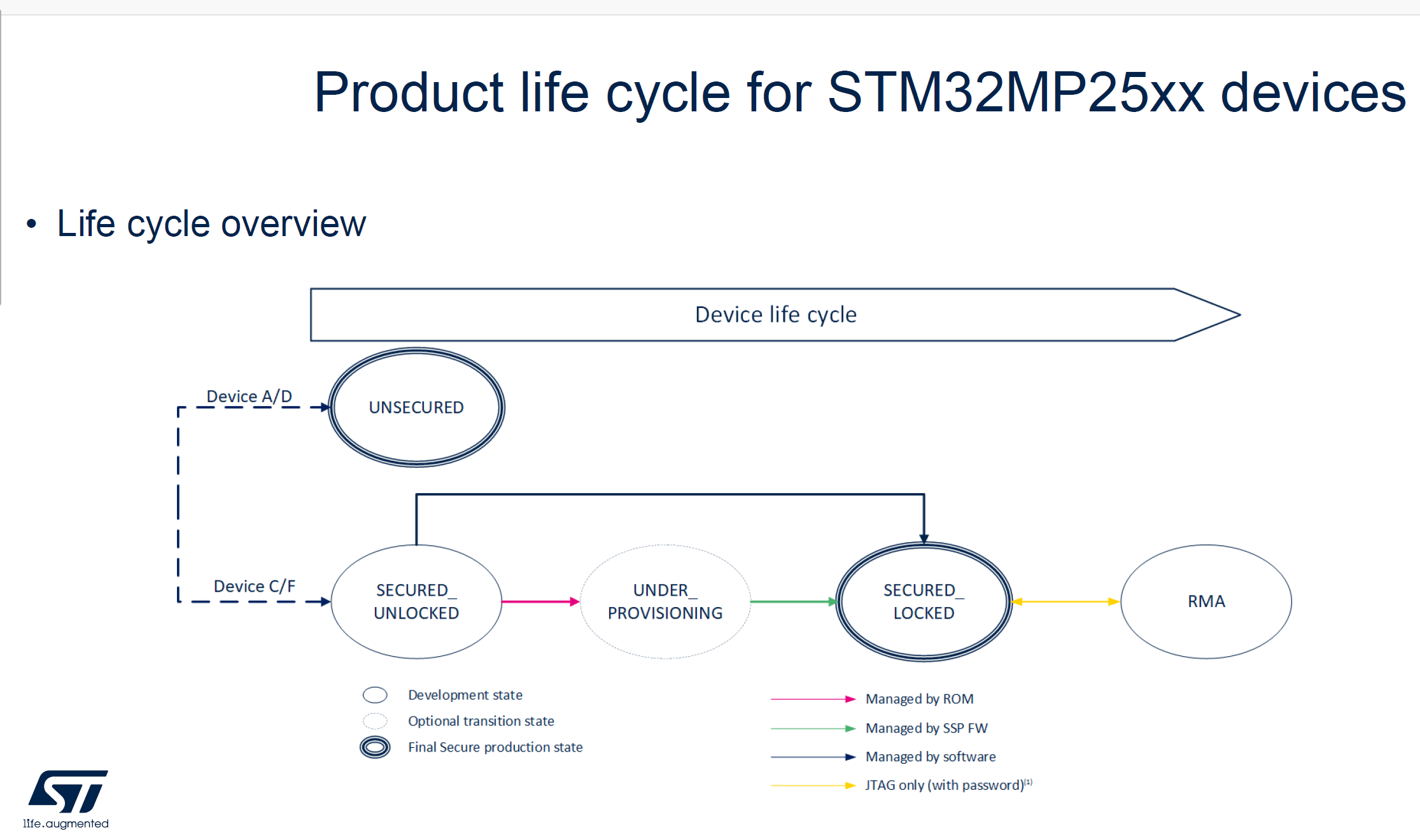
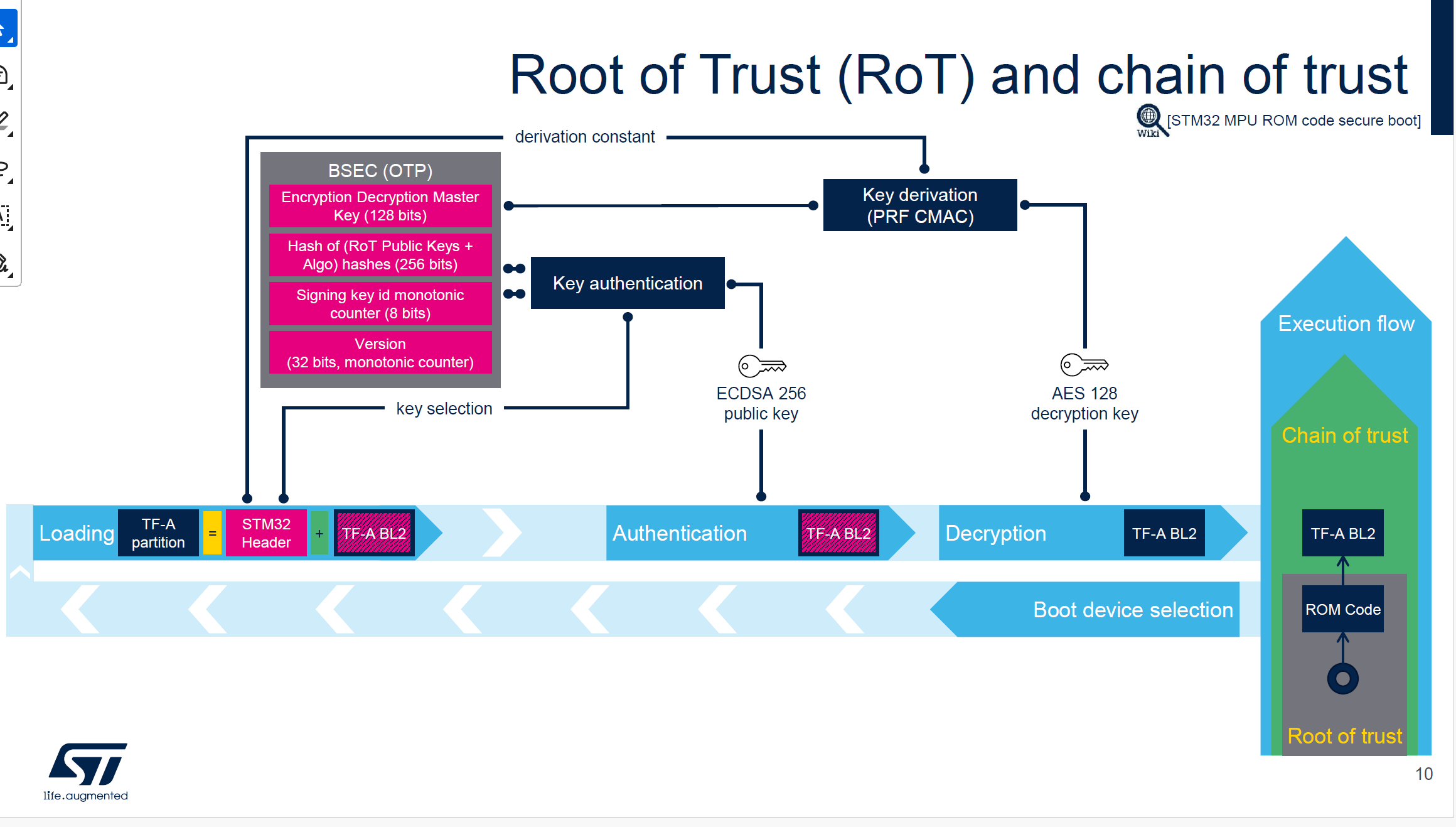
TODO: uboot features
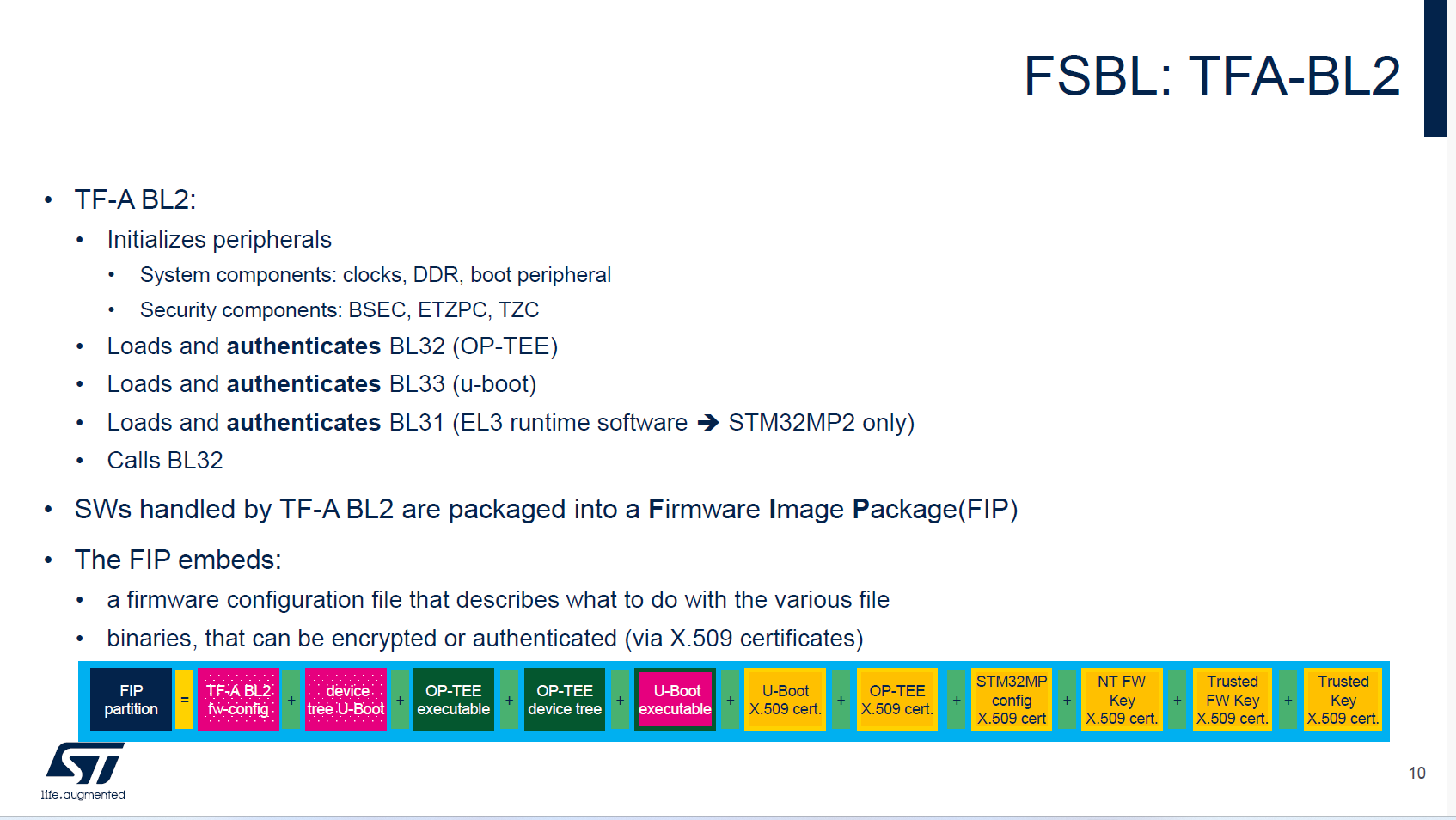
准备工作
声明环境变量
# 步骤1
source ~/sdk6.6_mp2
export PATH=/home/niuke/STMicroelectronics/STM32Cube/STM32CubeProgrammer/bin:$PATH
export rot_key=/home/niuke/develop/STM32MP2/Developer-Package/stm32mp-openstlinux-6.6-yocto-scarthgap-mpu-v25.08.27/sources/ostl-linux/FIP_artifacts/KeyGen
export cert_path=/home/niuke/develop/STM32MP2/Developer-Package/stm32mp-openstlinux-6.6-yocto-scarthgap-mpu-v25.08.27/sources/ostl-linux/FIP_artifacts/KeyGen/cert
export FIP_DEPLOYDIR_ROOT=/home/niuke/develop/STM32MP2/Developer-Package/stm32mp-openstlinux-6.6-yocto-scarthgap-mpu-v25.08.27/sources/ostl-linux/FIP_artifacts
export ITS_PATH=/home/niuke/develop/STM32MP2/Developer-Package/stm32mp-openstlinux-6.6-yocto-scarthgap-mpu-v25.08.27/sources/ostl-linux/u-boot-stm32mp-v2023.10-stm32mp-r2-r0/u-boot-stm32mp-v2023.10-stm32mp-r2/board/st/stm32mp2
export OUTPUT_BUILD_DIR=/home/niuke/develop/STM32MP2/Developer-Package/stm32mp-openstlinux-6.6-yocto-scarthgap-mpu-v25.08.27/sources/ostl-linux/linux-stm32mp-6.6.78-stm32mp-r2-r0/linux-6.6.78/../build
cd /home/niuke/develop/STM32MP2/Developer-Package/stm32mp-openstlinux-6.6-yocto-scarthgap-mpu-v25.08.27/sources/ostl-linux/FIP_artifacts/KeyGen
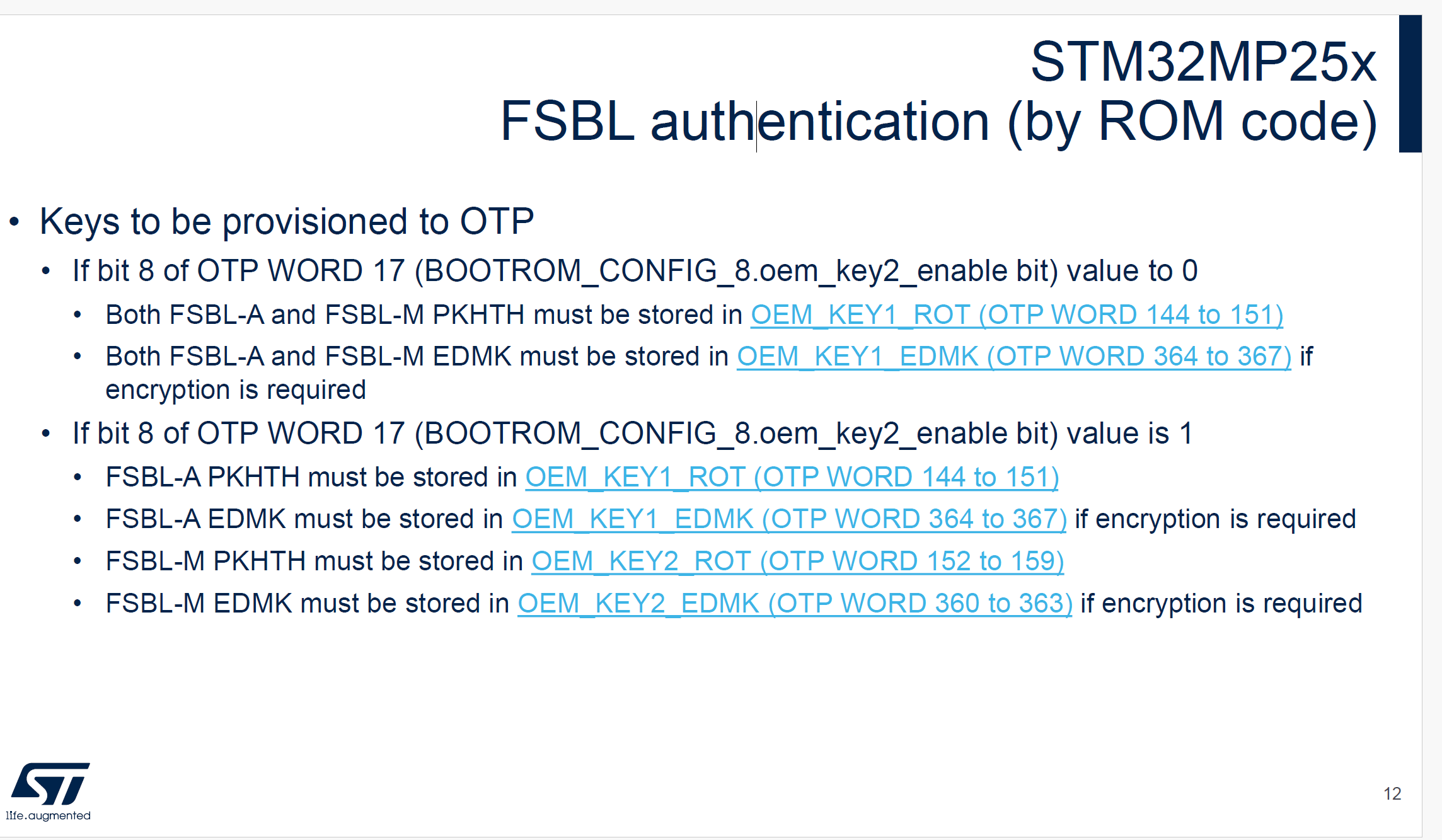
生成8组公钥 + 私钥 + publicKeysHashHashes.bin(只做一次)
#步骤2,如果已经生成,跳过
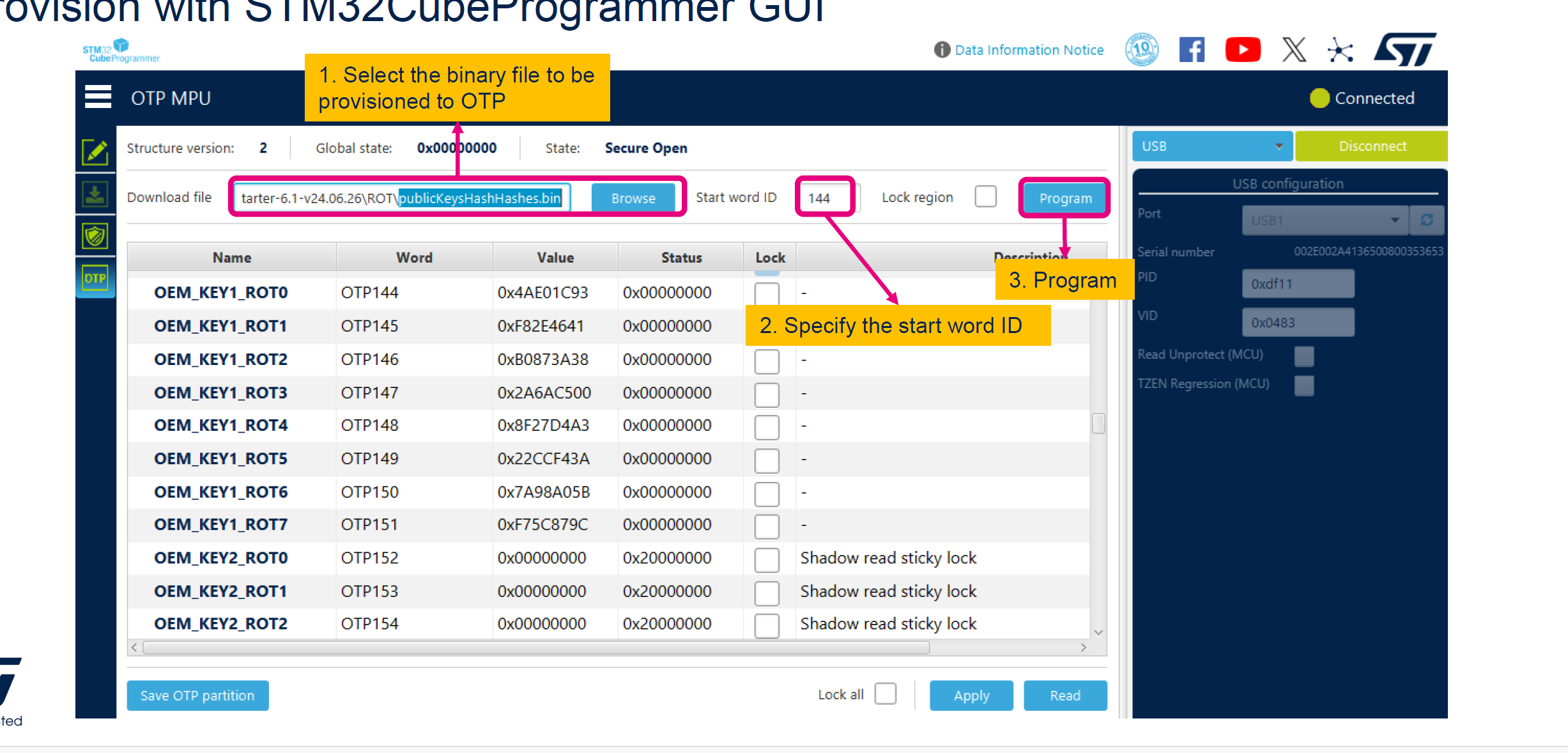
# 这个publicKeysHashHashes.bin文件需要烧录进OTP - PKHTH OTP144
# 8 public key files: publicKey0x{0..7}.pem
# 8 private key files: privateKey0x{0..7}.pem - One of the private key will be used for the image signing
# 1 file of PKHTH: publicKeysHashHashes.bin
STM32_KeyGen_CLI -abs . -pwd abc1 abc2 abc3 abc4 abc5 abc6 abc7 abc8 -n 8

# uboot读取OEM-KEY1
stm32key select OEM-KEY1
stm32key read 0xc4000000
stm32key fuse 0xc4000000
stm32key read

# uboot读取EDMK1
stm32key select EDMK1
stm32key read 0xc4000000
stm32key fuse 0xc4000000
stm32key read

# FSBL_ENCKEY.bin写入EDMK
# STM32_Programmer_CLI.exe -c port=usb1 -d flashlayout_st-image-weston\optee\otp.tsv -otp fwrite lock <your EDMK binary file> word=364
烧录PKHTH
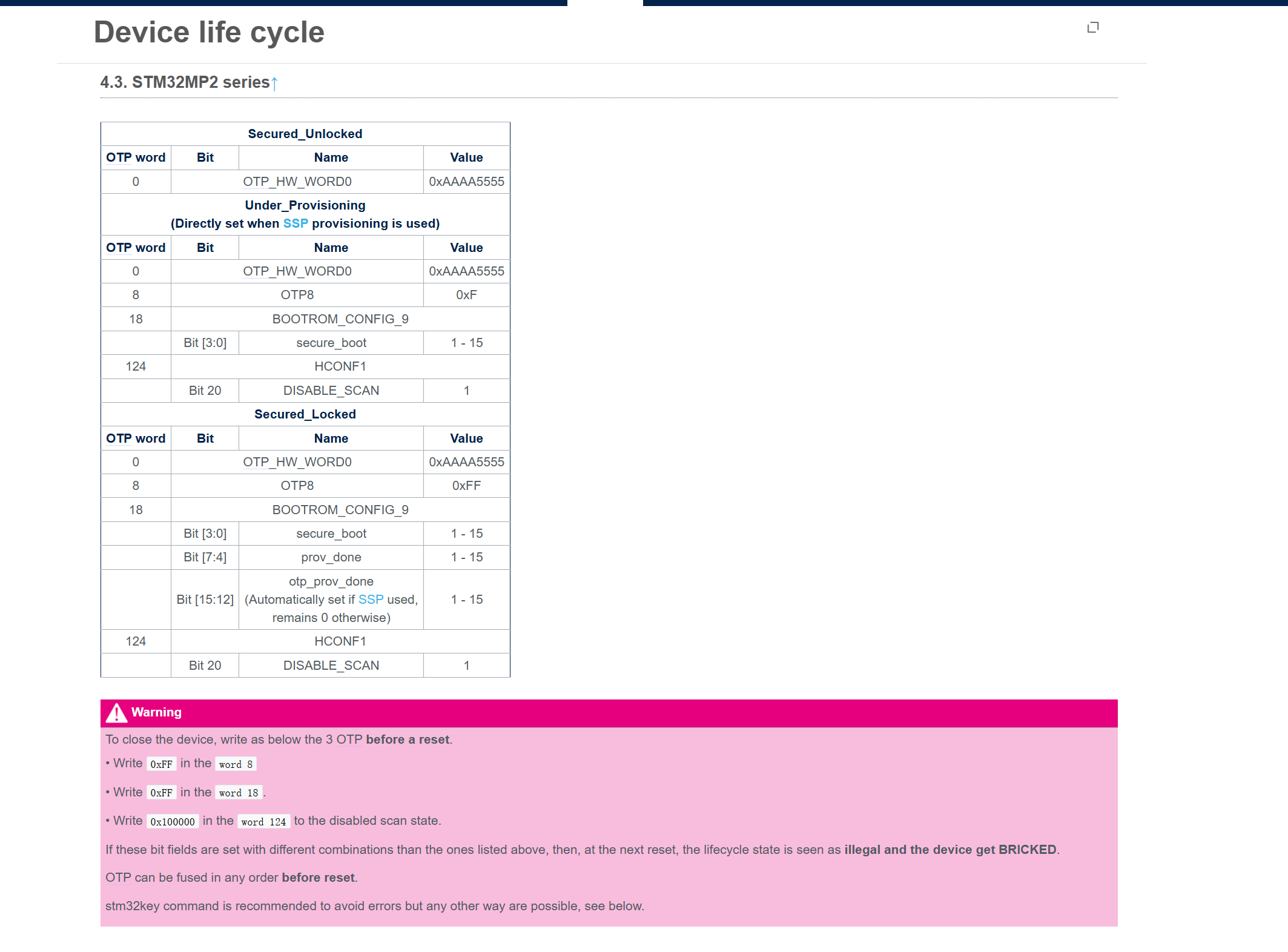
CLOSE/LOCK device
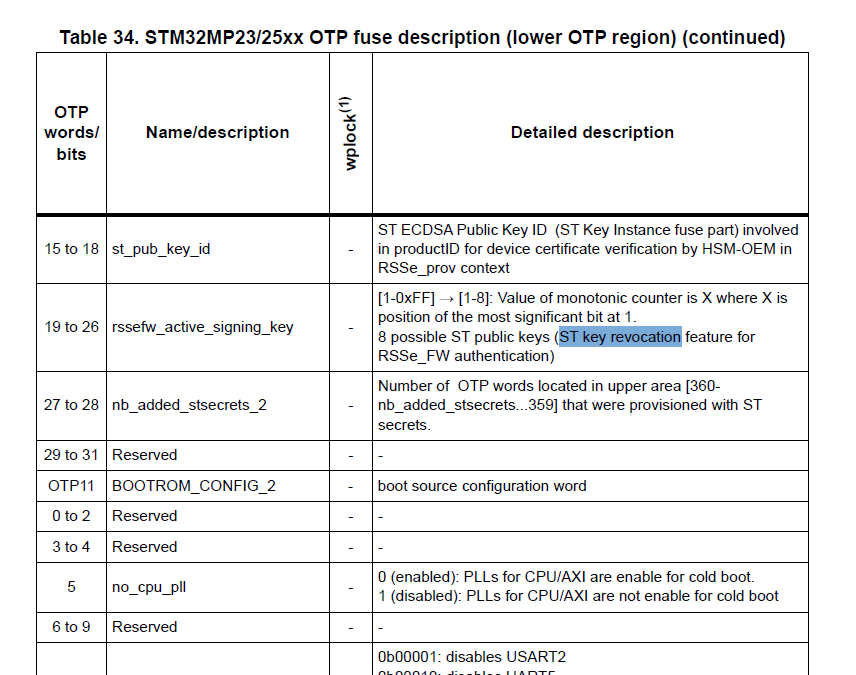
ST key revocation
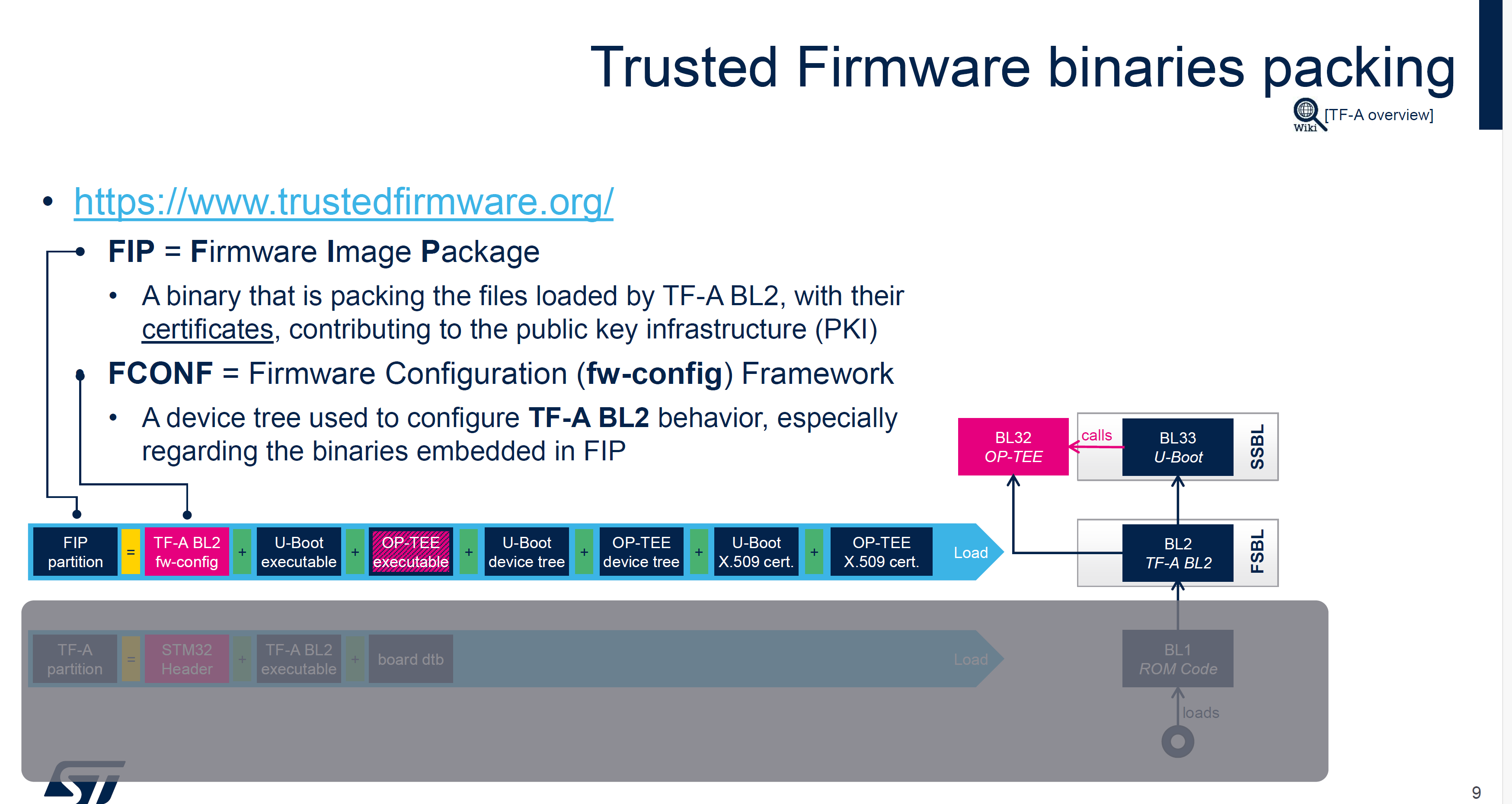
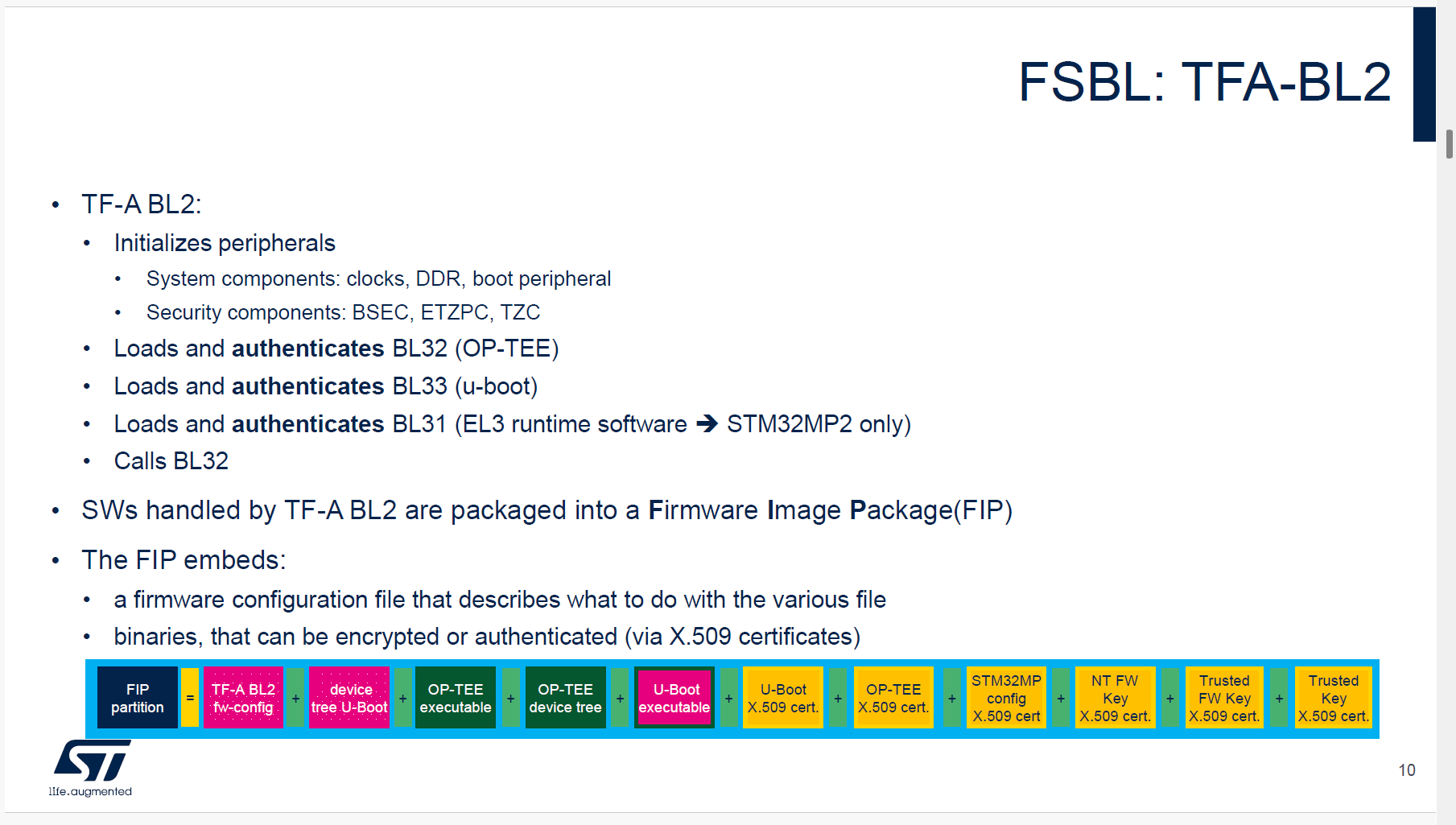
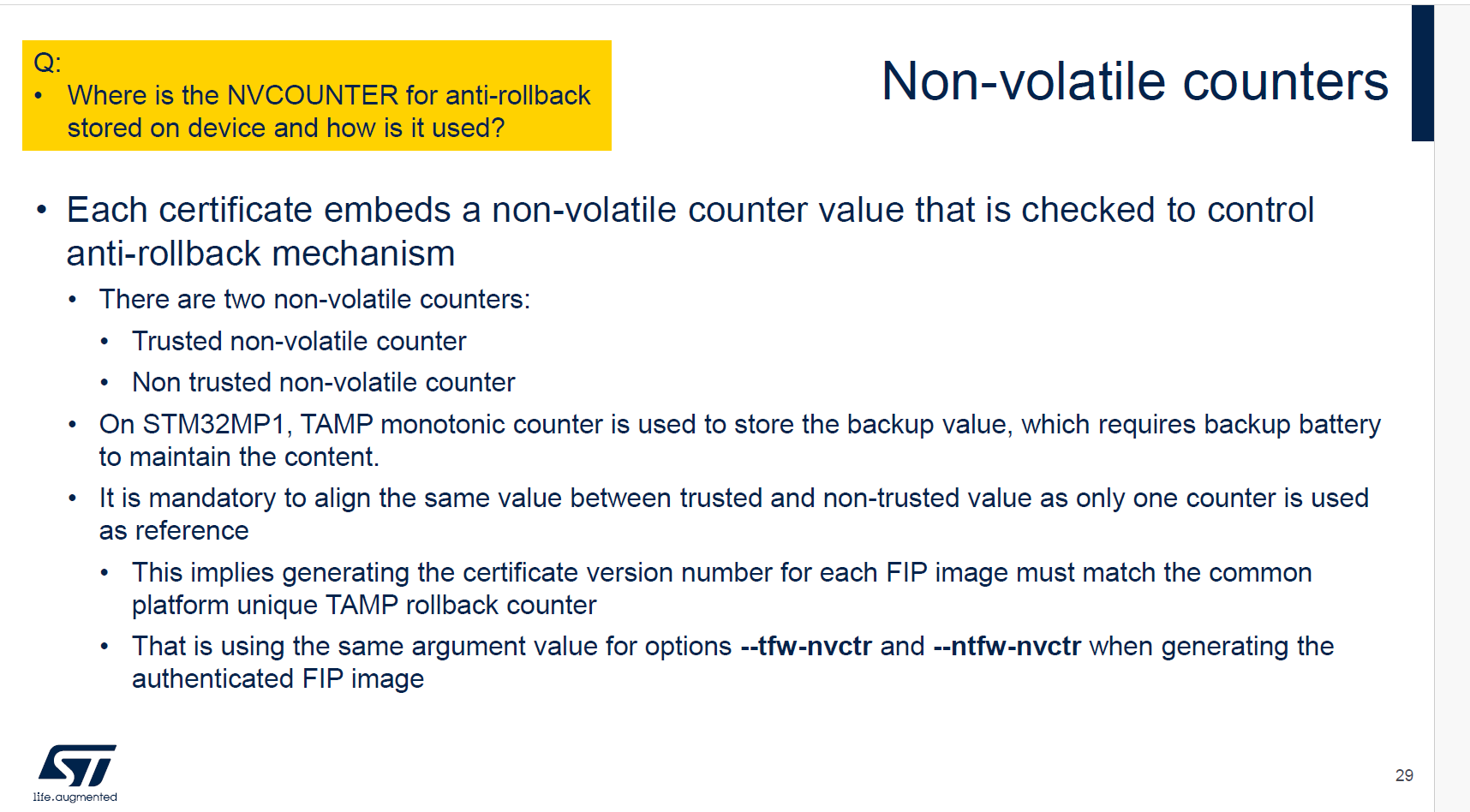
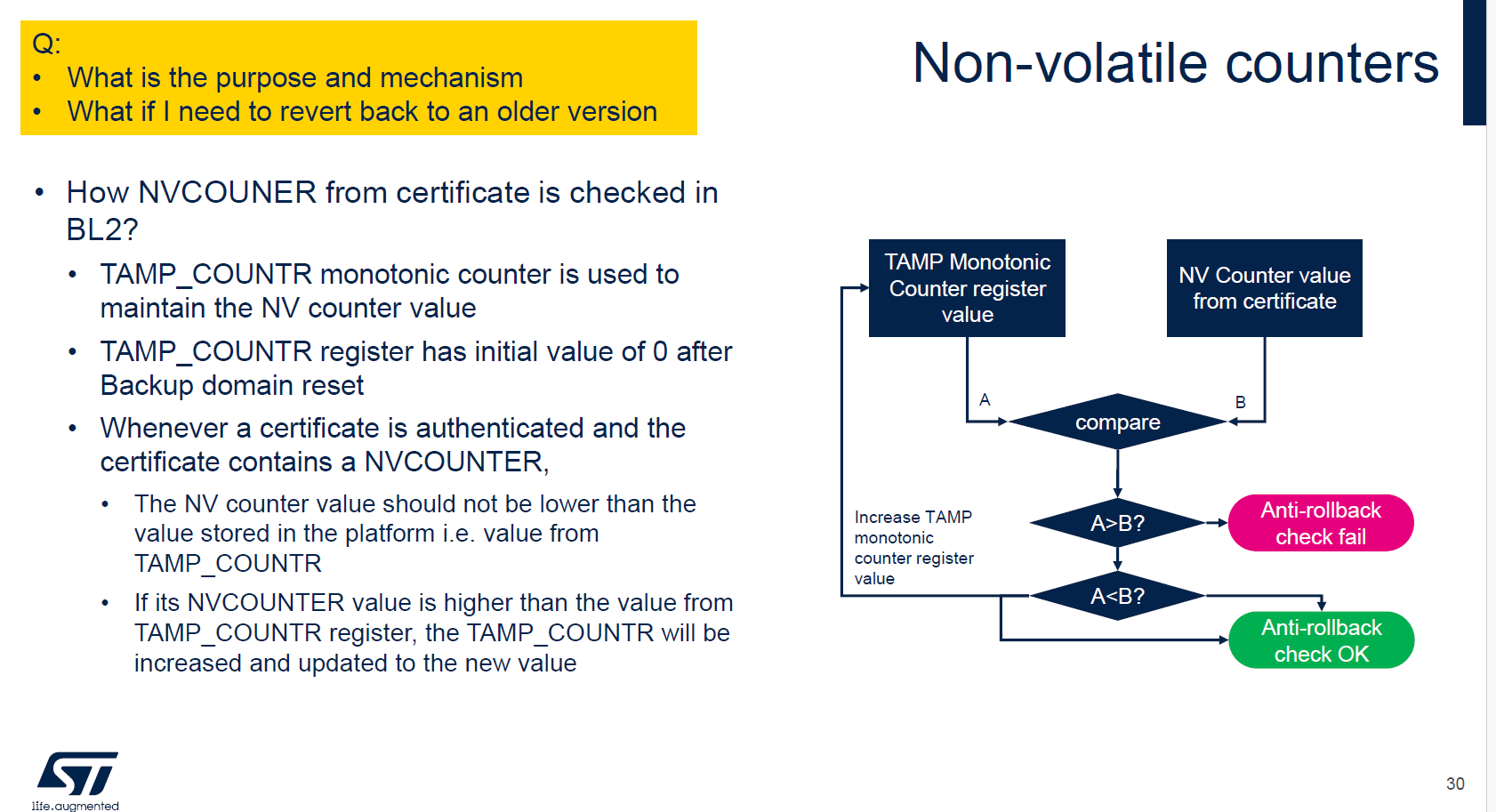
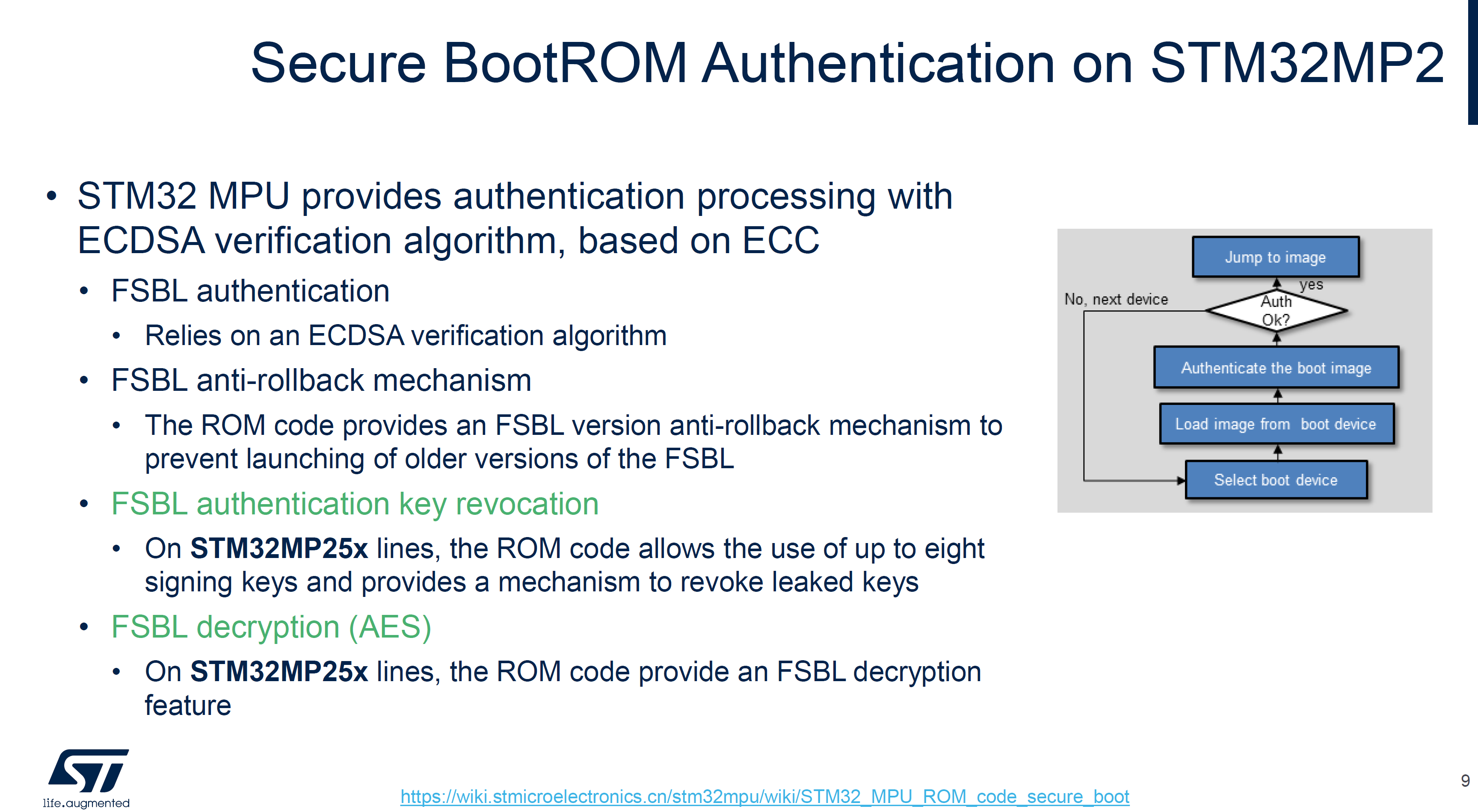
FSBL签名(TF-A BL2)
Sign FSBL image without Encryption
STM32_SigningTool_CLI -bin $FIP_DEPLOYDIR_ROOT/arm-trusted-firmware/tf-a-stm32mp257f-dk-optee-emmc.stm32 -pubk $rot_key/publicKey00.pem $rot_key/publicKey01.pem $rot_key/publicKey02.pem $rot_key/publicKey03.pem $rot_key/publicKey04.pem $rot_key/publicKey05.pem $rot_key/publicKey06.pem $rot_key/publicKey07.pem -prvk $rot_key/privateKey00.pem -pwd abc1 -iv 0x00000000 -of 0x80000001 -t fsbl -hv 2.2 -o $FIP_DEPLOYDIR_ROOT/arm-trusted-firmware/tf-a-stm32mp257f-dk-optee-emmc_Signed.stm32

# 查看信息
STM32_SigningTool_CLI -dump $FIP_DEPLOYDIR_ROOT/arm-trusted-firmware/tf-a-stm32mp257f-dk-optee-emmc_Signed.stm32
Sign FSBL image with Encryption
STM32_SigningTool_CLI -bin $FIP_DEPLOYDIR_ROOT/arm-trusted-firmware/tf-a-stm32mp257f-dk-optee-emmc.stm32 -pubk $rot_key/publicKey00.pem $rot_key/publicKey01.pem $rot_key/publicKey02.pem $rot_key/publicKey03.pem $rot_key/publicKey04.pem $rot_key/publicKey05.pem $rot_key/publicKey06.pem $rot_key/publicKey07.pem -prvk $rot_key/privateKey00.pem -pwd abc1 -iv 0x00000000 -of 0x80000003 -encdc 0x25205f0e -enck FSBL_ENCKEY.bin -t fsbl -hv 2.2

STM32_Programmer_CLI.exe -c port=usb1 -d flashlayout_st-image-weston\optee\otp.tsv -otp fwrite lock <your EDMK binary file> word=364

# 验证错误FSBL_ENCKEY.bin
STM32_SigningTool_CLI -bin $FIP_DEPLOYDIR_ROOT/arm-trusted-firmware/tf-a-stm32mp257f-dk-optee-emmc.stm32 -pubk $rot_key/publicKey00.pem $rot_key/publicKey01.pem $rot_key/publicKey02.pem $rot_key/publicKey03.pem $rot_key/publicKey04.pem $rot_key/publicKey05.pem $rot_key/publicKey06.pem $rot_key/publicKey07.pem -prvk $rot_key/privateKey00.pem -pwd abc1 -iv 0x00000000 -of 0x80000003 -encdc 0x25205f0e -enck FSBL_ENCKEY_1.bin -t fsbl -hv 2.2
将启动方式修改为EMMC后,串口无日志输出
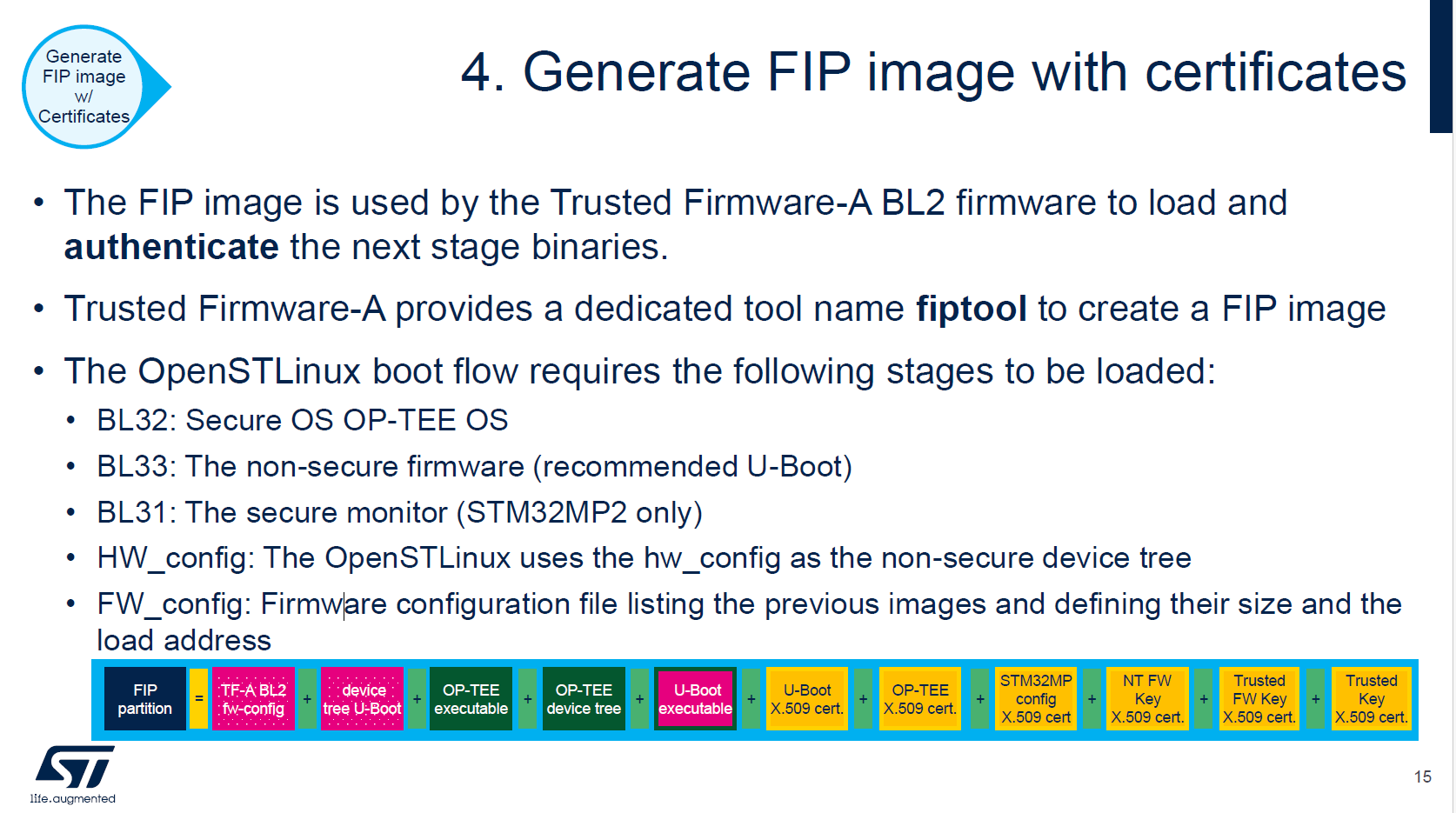
FIP支持的结构
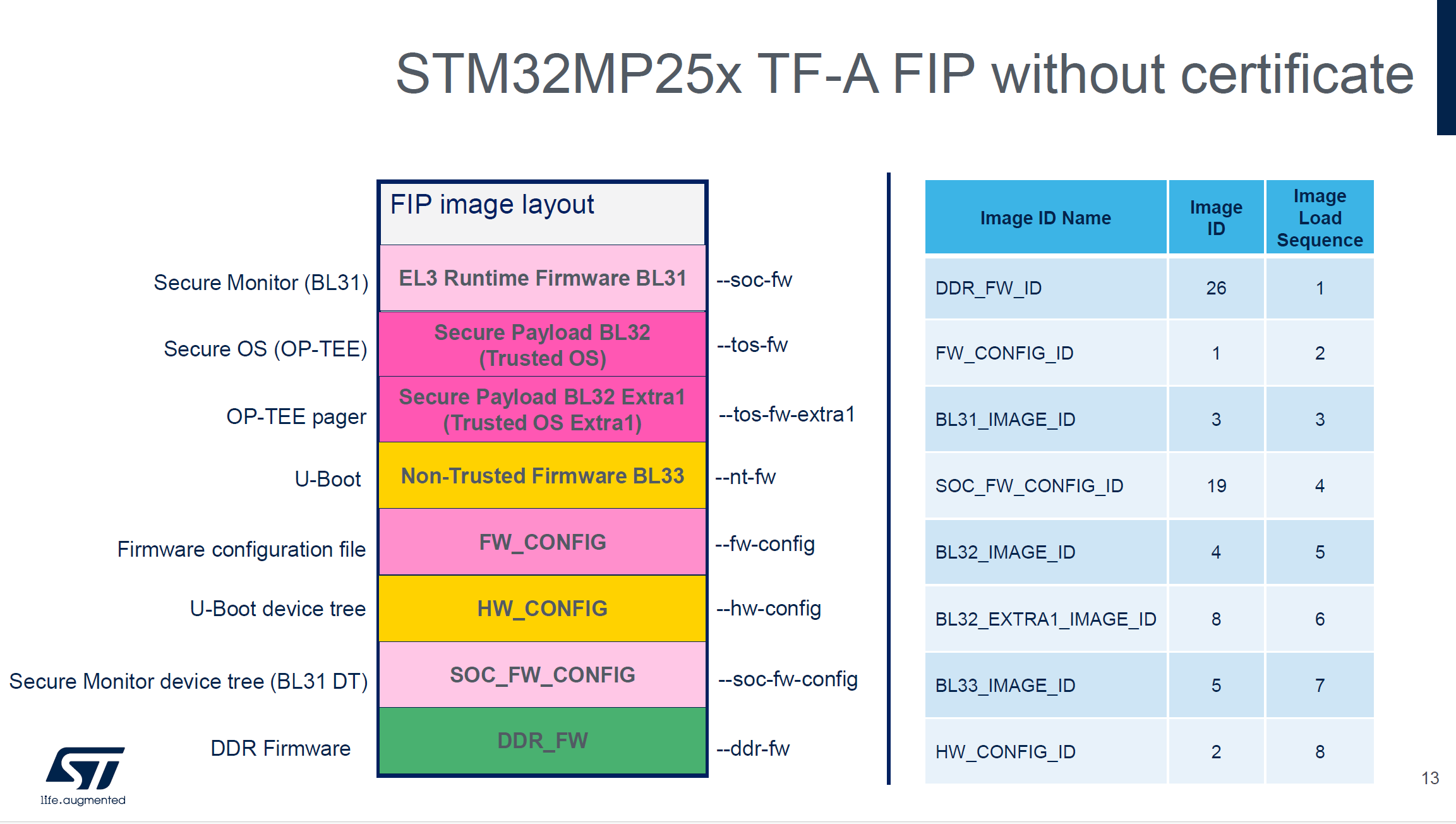
FIP: 证书+不加密
# cert generate
cert_create -n --rot-key $rot_key/privateKey00.pem --rot-key-pwd abc1 \
--tfw-nvctr 0 \
--ntfw-nvctr 0 \
--key-alg ecdsa --hash-alg sha256 \
--trusted-key-cert $cert_path/trusted_key.crt \
--tos-fw-key-cert $cert_path/tos_fw_key.crt \
--nt-fw-key-cert $cert_path/nt_fw_key.crt \
--soc-fw-key-cert $cert_path/soc_fw_key.crt \
--soc-fw-cert $cert_path/soc_fw_content.crt \
--tos-fw-cert $cert_path/tos_fw_content.crt \
--nt-fw-cert $cert_path/nt_fw_content.crt \
--stm32mp-cfg-cert $cert_path/stm32mp_cfg_cert.crt \
--tos-fw $FIP_DEPLOYDIR_ROOT/optee/tee-header_v2-stm32mp257f-dk-optee.bin \
--tos-fw-extra1 $FIP_DEPLOYDIR_ROOT/optee/tee-pager_v2-stm32mp257f-dk-optee.bin \
--hw-config $FIP_DEPLOYDIR_ROOT/u-boot/u-boot-stm32mp257f-dk-default.dtb \
--fw-config $FIP_DEPLOYDIR_ROOT/arm-trusted-firmware/fwconfig/stm32mp257f-dk-fw-config-optee-emmc.dtb \
--soc-fw-config $FIP_DEPLOYDIR_ROOT/arm-trusted-firmware/bl31/stm32mp257f-dk-bl31-optee-emmc.dtb \
--soc-fw $FIP_DEPLOYDIR_ROOT/arm-trusted-firmware/bl31/tf-a-bl31-stm32mp257f-dk-optee-emmc.bin \
--ddr-fw $FIP_DEPLOYDIR_ROOT/arm-trusted-firmware/ddr/ddr_pmu-stm32mp257f-dk.bin \
--nt-fw $FIP_DEPLOYDIR_ROOT/u-boot/u-boot-nodtb-stm32mp25-default.bin

# EMMC FIP
fiptool create \
--tos-fw $FIP_DEPLOYDIR_ROOT/optee/tee-header_v2-stm32mp257f-dk-optee.bin \
--tos-fw-extra1 $FIP_DEPLOYDIR_ROOT/optee/tee-pager_v2-stm32mp257f-dk-optee.bin \
--hw-config $FIP_DEPLOYDIR_ROOT/u-boot/u-boot-stm32mp257f-dk-default.dtb \
--fw-config $FIP_DEPLOYDIR_ROOT/arm-trusted-firmware/fwconfig/stm32mp257f-dk-fw-config-optee-emmc.dtb \
--soc-fw-config $FIP_DEPLOYDIR_ROOT/arm-trusted-firmware/bl31/stm32mp257f-dk-bl31-optee-emmc.dtb \
--soc-fw $FIP_DEPLOYDIR_ROOT/arm-trusted-firmware/bl31/tf-a-bl31-stm32mp257f-dk-optee-emmc.bin \
--ddr-fw $FIP_DEPLOYDIR_ROOT/arm-trusted-firmware/ddr/ddr_pmu-stm32mp257f-dk.bin \
--nt-fw $FIP_DEPLOYDIR_ROOT/u-boot/u-boot-nodtb-stm32mp25-default.bin \
--trusted-key-cert $cert_path/trusted_key.crt \
--tos-fw-key-cert $cert_path/tos_fw_key.crt \
--nt-fw-key-cert $cert_path/nt_fw_key.crt \
--soc-fw-key-cert $cert_path/soc_fw_key.crt \
--soc-fw-cert $cert_path/soc_fw_content.crt \
--tos-fw-cert $cert_path/tos_fw_content.crt \
--nt-fw-cert $cert_path/nt_fw_content.crt \
--stm32mp-cfg-cert $cert_path/stm32mp_cfg_cert.crt \
$FIP_DEPLOYDIR_ROOT/fip/fip-stm32mp257d-stm32mp257f-dk-optee-emmc_Signed.bin

fiptool info $FIP_DEPLOYDIR_ROOT/fip/fip-stm32mp257d-stm32mp257f-dk-optee-emmc_Signed.bin
FIP: 证书+加密BL31
STM32_KeyGen_CLI -rand 32 keys_mp2/FIP_EDMK.bin
STM32_KeyGen_CLI -rand 12 keys_mp2/FIP_NONCE.bin

# 查看生成的 key/nonce(用于下方 encrypt_fw 命令)
xxd -ps -c 32 keys_mp2/FIP_EDMK.bin
xxd -ps -c 12 keys_mp2/FIP_NONCE.bin

# cert generate(复用上一节相同命令,证书无需重新生成)
# 若 bl31 内容变更,需重新执行 cert_create 更新 soc_fw_content.crt

# ENCRYPT BL31 FIP
# 注意:以下 -k/-n 为示例值,请替换为 STM32_KeyGen_CLI 实际生成的 key/nonce
encrypt_fw -k dbe14d18173b165c59efab536d20bf663f2fe5e389ec8a37ad3b4eb4683f18e7 \
-n fe57ef088c3a1ff8bea00125 \
-i $FIP_DEPLOYDIR_ROOT/arm-trusted-firmware/bl31/tf-a-bl31-stm32mp257f-dk-optee-emmc.bin \
-o $FIP_DEPLOYDIR_ROOT/arm-trusted-firmware/bl31/tf-a-bl31-stm32mp257f-dk-optee-emmc.bin.enc

encrypt_fw -k dbe14d18173b165c59efab536d20bf663f2fe5e389ec8a37ad3b4eb4683f18e7 \
-n fe57ef088c3a1ff8bea00125 \
-i $FIP_DEPLOYDIR_ROOT/arm-trusted-firmware/bl31/stm32mp257f-dk-bl31-optee-emmc.dtb \
-o $FIP_DEPLOYDIR_ROOT/arm-trusted-firmware/bl31/stm32mp257f-dk-bl31-optee-emmc.dtb.enc

fiptool create \
--tos-fw $FIP_DEPLOYDIR_ROOT/optee/tee-header_v2-stm32mp257f-dk-optee.bin \
--tos-fw-extra1 $FIP_DEPLOYDIR_ROOT/optee/tee-pager_v2-stm32mp257f-dk-optee.bin \
--hw-config $FIP_DEPLOYDIR_ROOT/u-boot/u-boot-stm32mp257f-dk-default.dtb \
--fw-config $FIP_DEPLOYDIR_ROOT/arm-trusted-firmware/fwconfig/stm32mp257f-dk-fw-config-optee-emmc.dtb \
--soc-fw-config $FIP_DEPLOYDIR_ROOT/arm-trusted-firmware/bl31/stm32mp257f-dk-bl31-optee-emmc.dtb.enc \
--soc-fw $FIP_DEPLOYDIR_ROOT/arm-trusted-firmware/bl31/tf-a-bl31-stm32mp257f-dk-optee-emmc.bin.enc \
--ddr-fw $FIP_DEPLOYDIR_ROOT/arm-trusted-firmware/ddr/ddr_pmu-stm32mp257f-dk.bin \
--nt-fw $FIP_DEPLOYDIR_ROOT/u-boot/u-boot-nodtb-stm32mp25-default.bin \
--trusted-key-cert $cert_path/trusted_key.crt \
--tos-fw-key-cert $cert_path/tos_fw_key.crt \
--nt-fw-key-cert $cert_path/nt_fw_key.crt \
--soc-fw-key-cert $cert_path/soc_fw_key.crt \
--soc-fw-cert $cert_path/soc_fw_content.crt \
--tos-fw-cert $cert_path/tos_fw_content.crt \
--nt-fw-cert $cert_path/nt_fw_content.crt \
--stm32mp-cfg-cert $cert_path/stm32mp_cfg_cert.crt \
$FIP_DEPLOYDIR_ROOT/fip/fip-stm32mp257d-stm32mp257f-dk-optee-emmc_Signed.bin
FIP: 证书+加密BL31+加密BL32(STM32MP2支持的完整加密)
# 步骤4
# ENCRYPT BL31 + BL32 FIP
# 注意:以下 -k/-n 为示例值,请替换为 STM32_KeyGen_CLI 实际生成的 key/nonce
encrypt_fw -k dbe14d18173b165c59efab536d20bf663f2fe5e389ec8a37ad3b4eb4683f18e7 \
-n fe57ef088c3a1ff8bea00125 \
-i $FIP_DEPLOYDIR_ROOT/arm-trusted-firmware/bl31/tf-a-bl31-stm32mp257f-dk-optee-emmc.bin \
-o $FIP_DEPLOYDIR_ROOT/arm-trusted-firmware/bl31/tf-a-bl31-stm32mp257f-dk-optee-emmc.bin.enc

encrypt_fw -k dbe14d18173b165c59efab536d20bf663f2fe5e389ec8a37ad3b4eb4683f18e7 \
-n fe57ef088c3a1ff8bea00125 \
-i $FIP_DEPLOYDIR_ROOT/arm-trusted-firmware/bl31/stm32mp257f-dk-bl31-optee-emmc.dtb \
-o $FIP_DEPLOYDIR_ROOT/arm-trusted-firmware/bl31/stm32mp257f-dk-bl31-optee-emmc.dtb.enc

encrypt_fw -k dbe14d18173b165c59efab536d20bf663f2fe5e389ec8a37ad3b4eb4683f18e7 \
-n fe57ef088c3a1ff8bea00125 \
-i $FIP_DEPLOYDIR_ROOT/optee/tee-header_v2-stm32mp257f-dk-optee.bin \
-o $FIP_DEPLOYDIR_ROOT/optee/tee-header_v2-stm32mp257f-dk-optee.bin.enc

encrypt_fw -k dbe14d18173b165c59efab536d20bf663f2fe5e389ec8a37ad3b4eb4683f18e7 \
-n fe57ef088c3a1ff8bea00125 \
-i $FIP_DEPLOYDIR_ROOT/optee/tee-pager_v2-stm32mp257f-dk-optee.bin \
-o $FIP_DEPLOYDIR_ROOT/optee/tee-pager_v2-stm32mp257f-dk-optee.bin.enc

# cert generate
cert_create -n --rot-key $rot_key/privateKey00.pem --rot-key-pwd abc1 \
--tfw-nvctr 0 \
--ntfw-nvctr 0 \
--key-alg ecdsa --hash-alg sha256 \
--trusted-key-cert $cert_path/trusted_key.crt \
--tos-fw-key-cert $cert_path/tos_fw_key.crt \
--nt-fw-key-cert $cert_path/nt_fw_key.crt \
--soc-fw-key-cert $cert_path/soc_fw_key.crt \
--soc-fw-cert $cert_path/soc_fw_content.crt \
--tos-fw-cert $cert_path/tos_fw_content.crt \
--nt-fw-cert $cert_path/nt_fw_content.crt \
--stm32mp-cfg-cert $cert_path/stm32mp_cfg_cert.crt \
--tos-fw $FIP_DEPLOYDIR_ROOT/optee/tee-header_v2-stm32mp257f-dk-optee.bin \
--tos-fw-extra1 $FIP_DEPLOYDIR_ROOT/optee/tee-pager_v2-stm32mp257f-dk-optee.bin \
--hw-config $FIP_DEPLOYDIR_ROOT/u-boot/u-boot-stm32mp257f-dk-default.dtb \
--fw-config $FIP_DEPLOYDIR_ROOT/arm-trusted-firmware/fwconfig/stm32mp257f-dk-fw-config-optee-emmc.dtb \
--soc-fw-config $FIP_DEPLOYDIR_ROOT/arm-trusted-firmware/bl31/stm32mp257f-dk-bl31-optee-emmc.dtb \
--soc-fw $FIP_DEPLOYDIR_ROOT/arm-trusted-firmware/bl31/tf-a-bl31-stm32mp257f-dk-optee-emmc.bin \
--ddr-fw $FIP_DEPLOYDIR_ROOT/arm-trusted-firmware/ddr/ddr_pmu-stm32mp257f-dk.bin \
--nt-fw $FIP_DEPLOYDIR_ROOT/u-boot/u-boot-nodtb-stm32mp25-default.bin

fiptool create \
--tos-fw $FIP_DEPLOYDIR_ROOT/optee/tee-header_v2-stm32mp257f-dk-optee.bin.enc \
--tos-fw-extra1 $FIP_DEPLOYDIR_ROOT/optee/tee-pager_v2-stm32mp257f-dk-optee.bin.enc \
--hw-config $FIP_DEPLOYDIR_ROOT/u-boot/u-boot-stm32mp257f-dk-default.dtb \
--fw-config $FIP_DEPLOYDIR_ROOT/arm-trusted-firmware/fwconfig/stm32mp257f-dk-fw-config-optee-emmc.dtb \
--soc-fw-config $FIP_DEPLOYDIR_ROOT/arm-trusted-firmware/bl31/stm32mp257f-dk-bl31-optee-emmc.dtb.enc \
--soc-fw $FIP_DEPLOYDIR_ROOT/arm-trusted-firmware/bl31/tf-a-bl31-stm32mp257f-dk-optee-emmc.bin.enc \
--ddr-fw $FIP_DEPLOYDIR_ROOT/arm-trusted-firmware/ddr/ddr_pmu-stm32mp257f-dk.bin \
--nt-fw $FIP_DEPLOYDIR_ROOT/u-boot/u-boot-nodtb-stm32mp25-default.bin \
--trusted-key-cert $cert_path/trusted_key.crt \
--tos-fw-key-cert $cert_path/tos_fw_key.crt \
--nt-fw-key-cert $cert_path/nt_fw_key.crt \
--soc-fw-key-cert $cert_path/soc_fw_key.crt \
--soc-fw-cert $cert_path/soc_fw_content.crt \
--tos-fw-cert $cert_path/tos_fw_content.crt \
--nt-fw-cert $cert_path/nt_fw_content.crt \
--stm32mp-cfg-cert $cert_path/stm32mp_cfg_cert.crt \
$FIP_DEPLOYDIR_ROOT/fip/fip-stm32mp257d-stm32mp257f-dk-optee-emmc_Signed.bin

# 查看KEY
xxd -ps -c 32 xxx
OPTEE校验M33
TODO: 待补充
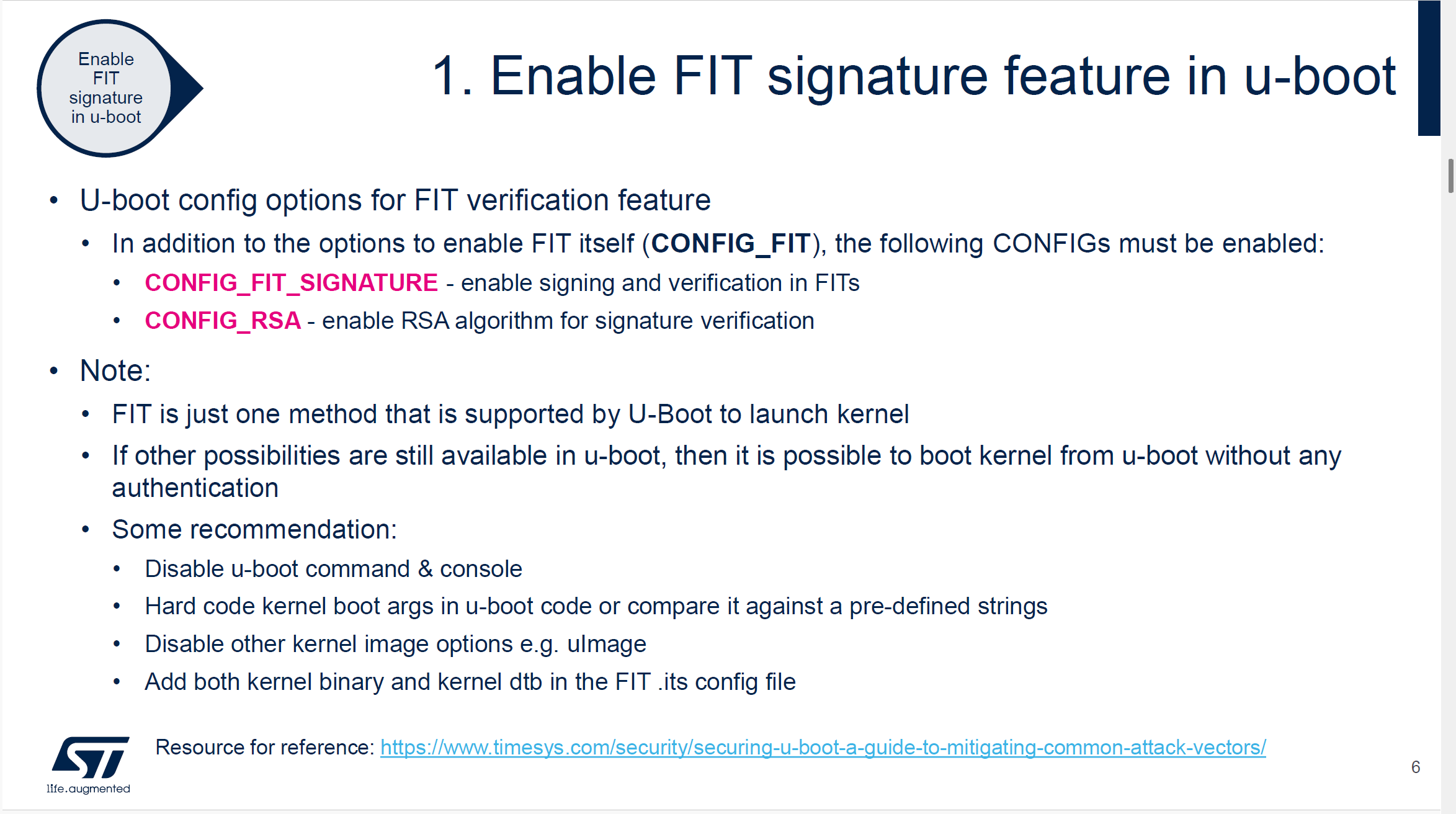
uboot校验kernel
# 步骤3
# 生成 RSA 私钥(签名用)
openssl genpkey -algorithm RSA -out $rot_key/uboot-sign-directory/dev.key -pkeyopt rsa_keygen_bits:2048 -pkeyopt rsa_keygen_pubexp:65537

# 生成自签名证书(公钥将嵌入 u-boot dtb)
openssl req -batch -new -x509 -key $rot_key/uboot-sign-directory/dev.key -out $rot_key/uboot-sign-directory/dev.crt

# 从 u-boot 构建目录拷贝 mkimage 到当前工作目录
cp /home/niuke/develop/STM32MP2/Developer-Package/stm32mp-openstlinux-6.6-yocto-scarthgap-mpu-v25.08.27/sources/ostl-linux/u-boot-stm32mp-v2023.10-stm32mp-r2-r0/build/stm32mp25_defconfig/tools/mkimage ./

# fit_kernel_dtb_sign_mp2.its 为 FIT image 描述文件,需手动编写
# 参考 $ITS_PATH 目录下的 .its 模板
# -K:将签名公钥写入 u-boot dtb(固化到设备)
# -k:签名私钥目录
# -r:要求所有镜像必须通过签名验证(mandatory)
./mkimage -f ./fit_kernel_dtb_sign_mp2.its -K $FIP_DEPLOYDIR_ROOT/u-boot/u-boot-stm32mp257f-dk-default.dtb -k $rot_key/uboot-sign-directory/ ./fitImage-signed.fit -r

# 验证 FIT image 签名信息
./mkimage -l fitImage-signed.fit

cp /home/niuke/develop/STM32MP2/Developer-Package/stm32mp-openstlinux-6.6-yocto-scarthgap-mpu-v25.08.27/sources/ostl-linux/linux-stm32mp-6.6.78-stm32mp-r2-r0/linux-6.6.78/../build/arch/arm64/boot/Image.gz /home/niuke/develop/STM32MP2/Developer-Package/stm32mp-openstlinux-6.6-yocto-scarthgap-mpu-v25.08.27/sources/ostl-linux/FIP_artifacts/KeyGen

cp /home/niuke/develop/STM32MP2/Developer-Package/stm32mp-openstlinux-6.6-yocto-scarthgap-mpu-v25.08.27/sources/ostl-linux/linux-stm32mp-6.6.78-stm32mp-r2-r0/linux-6.6.78/../build/arch/arm64/boot/dts/st/stm32mp257f-dk.dtb /home/niuke/develop/STM32MP2/Developer-Package/stm32mp-openstlinux-6.6-yocto-scarthgap-mpu-v25.08.27/sources/ostl-linux/FIP_artifacts/KeyGen

./mkimage -f ./fit_kernel_dtb_sign_mp2.its -k $rot_key/uboot-sign-directory/ ./fitImage-signed.fit -r


# TODO
cp /home/niuke/develop/STM32MP2/Developer-Package/stm32mp-openstlinux-6.6-yocto-scarthgap-mpu-v25.08.27/sources/ostl-linux/u-boot-stm32mp-v2023.10-stm32mp-r2-r0/build/stm32mp25_defconfig/tools/fit_check_sign ./

./fit_check_sign -f fitImage-signed.fit -k $FIP_DEPLOYDIR_ROOT/u-boot/u-boot-stm32mp257f-dk-default.dtb

setenv ipaddr 192.168.10.153
setenv gatewayip 192.168.10.1
setenv netmask 255.255.255.0
setenv ethaddr 00:11:22:33:44:55
setenv eth1addr 00:11:22:33:44:66
setenv serverip 192.168.10.185

tftp 0x88000000 fitImage-signed.fit
bootm 0x88000000

dtc -I dtb -O dts $FIP_DEPLOYDIR_ROOT/u-boot/u-boot-stm32mp257f-dk-default.dtb |less

cp ${OUTPUT_BUILD_DIR}/arch/${ARCH}/boot/${IMAGE_KERNEL} ~/tftpboot
cp ${OUTPUT_BUILD_DIR}/arch/${ARCH}/boot/dts/st/stm32mp257f-dk.dtb ~/tftpboot

BUILDROOT_OUT=/home/niuke/develop/buildroot/buildroot/output/target

# busybox(提供 sh, mount, dd, cat, cp, echo, switch_root 等)
cp ${BUILDROOT_OUT}/bin/busybox initramfs/bin/

# 关键工具
cp ${BUILDROOT_OUT}/bin/keyctl initramfs/bin/
cp ${BUILDROOT_OUT}/usr/sbin/dmsetup initramfs/bin/
cp ${BUILDROOT_OUT}/sbin/mke2fs initramfs/sbin/

# 动态库依赖(用 ldd 或 readelf 查看实际需要哪些)
cp ${BUILDROOT_OUT}/lib/ld-linux-aarch64.so.1 initramfs/lib/

cp ${BUILDROOT_OUT}/lib/libpthread.so* initramfs/lib/
# keyctl 可能还需要
cp ${BUILDROOT_OUT}/usr/lib/libkeyutils.so.1 initramfs/lib/
cp ${BUILDROOT_OUT}/usr/lib/libdevmapper.so.1.02 initramfs/lib/

cp ${BUILDROOT_OUT}/lib/libresolv.so.2 initramfs/lib/


cd initramfs
find . | sort | cpio --reproducible -o -H newc -R root:root | gzip > ../initramfs.cpio.gz
cd ..

setenv ipaddr 192.168.10.153
setenv gatewayip 192.168.10.1
setenv netmask 255.255.255.0
setenv ethaddr 00:11:22:33:44:55
setenv eth1addr 00:11:22:33:44:66
setenv serverip 192.168.10.185
setenv bootargs "console=ttySTM0,115200 root=/dev/nfs nfsroot=192.168.10.185:/home/niuke/nfsroot,nfsvers=3,tcp ip=192.168.10.153:192.168.10.185::255.255.255.0::eth0:off"
tftp 0x8A000000 Image.gz
tftp 0x90000000 stm32mp257f-dk.dtb
booti 0x8A000000 - 0x90000000