三大架构是递进关系 :主从复制 (基础:读写分离 / 数据备份)→ 哨兵模式 (高可用:自动故障转移)→ 集群模式(分布式:分片 / 扩容 / 高可用)
第一部分:Redis 主从复制(Master-Slave)
一、核心定义
主从复制 = 1 个主节点(Master)负责写,N 个从节点(Slave)负责读,数据从主节点异步同步到从节点
- Master:接收写命令(SET/DEL/INCR)
- Slave:只接收读命令(GET),默认只读
- 同步方式:异步复制
二、核心作用
- 读写分离:主写从读,提升并发性能
- 数据冗余:热备份,防止单点数据丢失
- 负载均衡:多从节点分摊读流量
- 高可用基石:哨兵、集群的底层依赖
三、主从架构 手绘原理图
┌─────────────┐
│  客户端     │──写请求──→┌─────────────┐
└─────────────┘           │ Master(主节点)│
                          │  192.168.72.10│
                          └──────┬──────┘
                                 │ 异步复制
          ┌─────────────────────┴─────────────────────┐
          │                                           │
┌─────────────┐                             ┌─────────────┐
│ Slave1(从节点)│←─────────────────────────┤ Slave2(从节点)│
│ 192.168.72.20│                             192.168.72.30│
└─────────────┘                             └─────────────┘
          │──读请求──┐
          └──────────┐
                     │
           ┌─────────────┐
           │   客户端     │
           └─────────────┘
四、主从复制完整流程
主从复制分2 个阶段,第一次连接必走全量,后续走增量:
1. 全量复制(首次同步 / 断开重连)
- Slave 发送
PSYNC命令给 Master,请求同步 - Master 执行
BGSAVE,fork 子进程生成 RDB 快照 - Master 将 RDB 文件发送给 Slave
- Slave 清空本地数据,加载 RDB 文件
- 全量复制完成
2. 增量复制(日常同步)
- Master 收到写命令,放入复制积压缓冲区
- Master 异步将命令发送给所有 Slave
- Slave 执行命令,保持数据一致
- 心跳检测:Master 每 10s 发心跳,Slave 回复 ACK
五、核心配置
Master 配置(redis.conf)
bind 0.0.0.0
port 6379
daemonize yes
dir /var/lib/redis
appendonly yes
requirepass 123456  # 主节点密码
Slave 配置(redis.conf)
bind 0.0.0.0
port 6379
daemonize yes
dir /var/lib/redis
appendonly yes
replicaof 192.168.72.10 6379  # 指向主节点
masterauth 123456            # 主节点密码
protected-mode no
slave-read-only yes           # 从节点只读(默认)
注意:
主节点有密码要告诉从节点密码,主节点无密码则不用管,还有重启Redis时如果没写service文件用redis-server重启要先清空原本的进程
pkill redis-server
redis-server /etc/redis.conf
或者一般来说用的是shutdown去断开redis的服务
127.0.0.1:6379> shutdown
(0.98s)
not connected> exit
[root@redis redis-8.6.3]# redis-server /etc/redis.conf
[root@redis redis-8.6.3]# redis-cli
127.0.0.1:6379>
防火墙和selinux设置:
这里不做selinux也没什么影响,大概是系统下载redis时已经放行了
主从节点都执行
# 放行Redis客户端端口
firewall-cmd --permanent --add-port=6379/tcp
firewall-cmd --reload


# 放行6379端口(SELinux允许redis绑定)
semanage port -a -t redis_port_t -p tcp 6379

# 【如果用默认数据目录】无需执行以下命令
# 【如果自定义数据目录(如/var/lib/redis)】执行:
semanage fcontext -a -t redis_var_lib_t "/var/lib/redis(/.*)?"
restorecon -Rv /var/lib/redis
六、搭建步骤
- 3 台服务器安装 Redis(源码编译)
- 配置 Master 并启动
- 配置 Slave(指定 replicaof)并启动
- 验证:
redis-cli -a 123456 info replication
成功结果:
127.0.0.1:6379> info replication
# Replication
role:master
connected_slaves:2
slave0:ip=192.168.24.43,port=6379,state=online,offset=588,lag=0,io-thread=0
slave1:ip=192.168.24.42,port=6379,state=online,offset=588,lag=0,io-thread=0
master_failover_state:no-failover
master_replid:24711f143d7aa72f51c4126f5cfab4d3d86c0be3
master_replid2:0000000000000000000000000000000000000000
master_repl_offset:588
second_repl_offset:-1
repl_backlog_active:1
repl_backlog_size:1048576
repl_backlog_first_byte_offset:1
repl_backlog_histlen:588
七、致命缺陷
- 主节点宕机 → 无自动故障转移
- 需手动切换主从,无法自动化
- 无集群扩容能力,仅单机读写分离
第二部分:Redis 哨兵模式(Sentinel)
这里你可以3台虚拟机分别是主从从,然后每台虚拟机上搭建哨兵。
也可以6台虚拟机,其中3台主从从,其余3台虚拟机上搭建哨兵。
一、核心定义
哨兵 = 独立监控进程,不存数据,专门监控主从节点,主节点宕机自动选举新主
- 哨兵集群:至少 3 个节点(奇数),避免脑裂
- 端口:默认
26379
二、核心作用和搭建流程
- 监控:实时检测 Master/Slave 状态
- 自动故障转移:主节点挂了,自动选新主
- 通知:将故障结果推送给客户端
- 配置提供者:客户端通过哨兵获取最新 Master 地址
创建目录:
在此之前配置ip,写主机映射,还有为了方便写免密登录,下载redis等工作都已经做完
1.创建对应目录和写配置文件:
mkdir -p /usr/local/redis/{conf,data,logs}

写配置文件
主节点:
[root@master ~]# cat /usr/local/redis/conf/redis-master.conf
bind 0.0.0.0
port 6379
daemonize yes
protected-mode no
pidfile /var/run/redis_server.pid
logfile "/usr/local/redis/logs/redis_server.log"
dir /usr/local/redis/data
save 900 1 300 10 60 100
rdbcompression yes
rdbchecksum yes
dbfilename dump.rdb

从节点:上面的配置加上一句就行
replicaof 192.168.24.41 6379
2.运行redis
[root@master redis]# redis-server /usr/local/redis/conf/redis-master.conf
[root@slave1 redis]# redis-server conf/slave1.conf
[root@slave1 redis]# redis-server conf/slave2.conf
3.查看主从状态
[root@master redis]# redis-cli
127.0.0.1:6379> info replication
# Replication
role:master
connected_slaves:2
slave0:ip=192.168.24.42,port=6379,state=online,offset=378,lag=1,io-thread=0
slave1:ip=192.168.24.43,port=6379,state=online,offset=378,lag=1,io-thread=0
master_failover_state:no-failover
master_replid:9c3a46ea760733208aeae2474af8190d00260742
master_replid2:9e7dbaf300e2dbc1e3d86a9e531d29b4d2ba48bf
master_repl_offset:378
second_repl_offset:351
repl_backlog_active:1
repl_backlog_size:1048576
repl_backlog_first_byte_offset:351
repl_backlog_histlen:28
4.配置哨兵
在每个节点上都编写一个哨兵的配置文件
每个节点都要做这个操作一样的
[root@master redis]# cat conf/sentinel.conf
bind 0.0.0.0
port 26379
daemonize  yes
pidfile /var/run/redis-sentinel.pid
logfile "/usr/local/redis/logs/sentinel.log"
sentinel monitor mymaster 192.168.24.41 6379 2
sentinel down-after-milliseconds mymaster 10000
sentinel failover-timeout mymaster 60000
sentinel parallel-syncs mymaster 1
5.启动哨兵
所有节点
redis-sentinel conf/sentinel.conf

[root@master redis]# ps -ef | grep -v grep | grep sentinel
root        2715       1  0 19:42 ?        00:00:00 redis-sentinel 0.0.0.0:26379 [sentinel]
6.查看集群状态
主节点信息
查看主节点信息,要在主从启动的基础上

[root@master redis]# redis-cli -p 26379 sentinel master mymaster
 1) "name"
 2) "mymaster"
 3) "ip"
 4) "192.168.24.41"
 5) "port"
 6) "6379"
 7) "runid"
 8) "4b89ae25b4c1ed576ad05a2b61bb793b377763b5"
 9) "flags"
10) "master"
11) "link-pending-commands"
12) "0"
13) "link-refcount"
14) "1"
15) "last-ping-sent"
16) "0"
17) "last-ok-ping-reply"
18) "337"
19) "last-ping-reply"
20) "337"
21) "down-after-milliseconds"
22) "10000"
23) "info-refresh"
24) "1519"
25) "role-reported"
26) "master"
27) "role-reported-time"
28) "633985"
29) "config-epoch"
30) "0"
31) "num-slaves"
32) "2"
33) "num-other-sentinels"
34) "2"
35) "quorum"
36) "2"
37) "failover-timeout"
38) "60000"
39) "parallel-syncs"
40) "1"
查看从节点信息
查看从节点信息
[root@master redis]# redis-cli -p 26379 sentinel slaves mymaster
1)  1) "name"
    2) "192.168.24.42:6379"
    3) "ip"
    4) "192.168.24.42"
    5) "port"
    6) "6379"
    7) "runid"
    8) "0acfd3ee9cba5680e0072cba288230160358dc91"
    9) "flags"
   10) "slave"
   11) "link-pending-commands"
   12) "0"
   13) "link-refcount"
   14) "1"
   15) "last-ping-sent"
   16) "0"
   17) "last-ok-ping-reply"
   18) "407"
   19) "last-ping-reply"
   20) "407"
   21) "down-after-milliseconds"
   22) "10000"
   23) "info-refresh"
   24) "3945"
   25) "role-reported"
   26) "slave"
   27) "role-reported-time"
   28) "104380"
   29) "master-link-down-time"
   30) "0"
   31) "master-link-status"
   32) "ok"
   33) "master-host"
   34) "192.168.24.41"
   35) "master-port"
   36) "6379"
   37) "slave-priority"
   38) "100"
   39) "slave-repl-offset"
   40) "23857"
   41) "replica-announced"
   42) "1"
2)  1) "name"
    2) "192.168.24.43:6379"
    3) "ip"
    4) "192.168.24.43"
    5) "port"
    6) "6379"
    7) "runid"
    8) "5841e3aa28394a77789509a8e38b154bf2de27db"
    9) "flags"
   10) "slave"
   11) "link-pending-commands"
   12) "0"
   13) "link-refcount"
   14) "1"
   15) "last-ping-sent"
   16) "0"
   17) "last-ok-ping-reply"
   18) "870"
   19) "last-ping-reply"
   20) "870"
   21) "down-after-milliseconds"
   22) "10000"
   23) "info-refresh"
   24) "3945"
   25) "role-reported"
   26) "slave"
   27) "role-reported-time"
   28) "94326"
   29) "master-link-down-time"
   30) "0"
   31) "master-link-status"
   32) "ok"
   33) "master-host"
   34) "192.168.24.41"
   35) "master-port"
   36) "6379"
   37) "slave-priority"
   38) "100"
   39) "slave-repl-offset"
   40) "23857"
   41) "replica-announced"
   42) "1"
查看哨兵节点信息
[root@master redis]# redis-cli -p 26379 sentinel sentinels mymaster
1)  1) "name"
    2) "26830fb06db4a0d39e00c5d8b178aa9677249a44"
    3) "ip"
    4) "192.168.24.43"
    5) "port"
    6) "26379"
    7) "runid"
    8) "26830fb06db4a0d39e00c5d8b178aa9677249a44"
    9) "flags"
   10) "sentinel"
   11) "link-pending-commands"
   12) "0"
   13) "link-refcount"
   14) "1"
   15) "last-ping-sent"
   16) "0"
   17) "last-ok-ping-reply"
   18) "177"
   19) "last-ping-reply"
   20) "177"
   21) "down-after-milliseconds"
   22) "10000"
   23) "last-hello-message"
   24) "792"
   25) "voted-leader"
   26) "?"
   27) "voted-leader-epoch"
   28) "0"
2)  1) "name"
    2) "85d3f06eb3027ef13740c8eb88b8de16ebba4e41"
    3) "ip"
    4) "192.168.24.42"
    5) "port"
    6) "26379"
    7) "runid"
    8) "85d3f06eb3027ef13740c8eb88b8de16ebba4e41"
    9) "flags"
   10) "sentinel"
   11) "link-pending-commands"
   12) "0"
   13) "link-refcount"
   14) "1"
   15) "last-ping-sent"
   16) "0"
   17) "last-ok-ping-reply"
   18) "177"
   19) "last-ping-reply"
   20) "177"
   21) "down-after-milliseconds"
   22) "10000"
   23) "last-hello-message"
   24) "365"
   25) "voted-leader"
   26) "?"
   27) "voted-leader-epoch"
   28) "0"
查看主节点
[root@slave1 redis]# redis-cli -p 26379 sentinel get-master-addr-by-name mymaster
1) "192.168.24.41"
2) "6379"
查看哨兵集群信息
[root@slave1 redis]# redis-cli -p 26379 info sentinel
# Sentinel
sentinel_masters:1
sentinel_tilt:0
sentinel_tilt_since_seconds:-1
sentinel_total_tilt:0
sentinel_running_scripts:0
sentinel_scripts_queue_length:0
sentinel_simulate_failure_flags:0
master0:name=mymaster,status=ok,address=192.168.24.41:6379,slaves=2,sentinels=3
7.验证故障转移
关闭主节点
[root@master redis]# redis-cli shutdown查看日志
其中详细的记录投票,故障转移
2715:X 18 May 2026 20:05:09.365 # +sdown slave 192.168.24.41:6379 192.168.24.41 6379 @ mymaster 192.168.24.42 6379
[root@master redis]# tail -20 /usr/local/redis/logs/sentinel.log
2715:X 18 May 2026 20:04:57.529 * 85d3f06eb3027ef13740c8eb88b8de16ebba4e41 voted for 904ff620aff88fa23f5946b52c4fbe10d3716b56 1
2715:X 18 May 2026 20:04:57.532 * 26830fb06db4a0d39e00c5d8b178aa9677249a44 voted for 904ff620aff88fa23f5946b52c4fbe10d3716b56 1
2715:X 18 May 2026 20:04:57.618 # +elected-leader master mymaster 192.168.24.41 6379
2715:X 18 May 2026 20:04:57.618 # +failover-state-select-slave master mymaster 192.168.24.41 6379
2715:X 18 May 2026 20:04:57.684 # +selected-slave slave 192.168.24.42:6379 192.168.24.42 6379 @ mymaster 192.168.24.41 6379
2715:X 18 May 2026 20:04:57.684 * +failover-state-send-slaveof-noone slave 192.168.24.42:6379 192.168.24.42 6379 @ mymaster 192.168.24.41 6379
2715:X 18 May 2026 20:04:57.785 * +failover-state-wait-promotion slave 192.168.24.42:6379 192.168.24.42 6379 @ mymaster 192.168.24.41 6379
2715:X 18 May 2026 20:04:58.209 * Sentinel new configuration saved on disk
2715:X 18 May 2026 20:04:58.209 # +promoted-slave slave 192.168.24.42:6379 192.168.24.42 6379 @ mymaster 192.168.24.41 6379
2715:X 18 May 2026 20:04:58.209 # +failover-state-reconf-slaves master mymaster 192.168.24.41 6379
2715:X 18 May 2026 20:04:58.260 * +slave-reconf-sent slave 192.168.24.43:6379 192.168.24.43 6379 @ mymaster 192.168.24.41 6379
2715:X 18 May 2026 20:04:58.634 # -odown master mymaster 192.168.24.41 6379
2715:X 18 May 2026 20:04:59.248 * +slave-reconf-inprog slave 192.168.24.43:6379 192.168.24.43 6379 @ mymaster 192.168.24.41 6379
2715:X 18 May 2026 20:04:59.248 * +slave-reconf-done slave 192.168.24.43:6379 192.168.24.43 6379 @ mymaster 192.168.24.41 6379
2715:X 18 May 2026 20:04:59.339 # +failover-end master mymaster 192.168.24.41 6379
2715:X 18 May 2026 20:04:59.339 # +switch-master mymaster 192.168.24.41 6379 192.168.24.42 6379
查看新的主节点
[root@slave1 redis]# redis-cli -p 26379 sentinel get-master-addr-by-name mymaster
1) "192.168.24.42"
2) "6379"
重新启动原本的主节点(发现主节点并不会还回去)
[root@master redis]# redis-server conf/redis-master.conf

[root@slave1 redis]# redis-cli -p 26379 sentinel get-master-addr-by-name mymaster
1) "192.168.24.42"
2) "6379"

[root@slave1 redis]# redis-cli -p 26379 info sentinel
# Sentinel
sentinel_masters:1
sentinel_tilt:0
sentinel_tilt_since_seconds:-1
sentinel_total_tilt:0
sentinel_running_scripts:0
sentinel_scripts_queue_length:0
sentinel_simulate_failure_flags:0
master0:name=mymaster,status=ok,address=192.168.24.42:6379,slaves=2,sentinels=3
退出哨兵模式
redis-cli -p 26379 shutdown三、哨兵架构 手绘原理图
哨兵会同时监控:主节点 + 从节点 + 其他哨兵节点(以下是简便画法)
┌─────────────┐    ┌─────────────┐    ┌─────────────┐
│ Sentinel 1  │◄──►│ Sentinel 2  │◄──►│ Sentinel 3  │
│  26379      │    │  26379      │    │  26379      │
└──────┬──────┘    └──────┬──────┘    └──────┬──────┘
       │                  │                  │
       │  监控所有节点     │        监控所有节点
┌──────▼──────┐    ┌──────▼──────┐    ┌──────▼──────┐
│  Master     │◄───┼────────────┼───►│  Slave      │
│  6379       │    │            │    │  6379       │
└─────────────┘    └─────────────┘    └─────────────┘
四、哨兵核心机制
1. 主观下线(SDOWN)
单个哨兵认为节点超时无响应,判定下线
- 配置:
sentinel down-after-milliseconds mymaster 5000(5 秒)
2. 客观下线(ODOWN)
≥quorum(仲裁数) 个哨兵都判定 Master 下线 → 触发故障转移
- 配置:
sentinel monitor mymaster 192.168.72.11 6379 2(2 个哨兵确认)
3. Leader 选举
哨兵集群通过 Raft 算法 选 1 个 Leader,由 Leader 执行故障转移
五、故障转移 完整流程图
1. Master 宕机
2. 单个哨兵检测 → 主观下线(SDOWN)
3. 哨兵间通信 → 达到quorum → 客观下线(ODOWN)
4. 选举 Sentinel Leader
5. Leader 挑选最优 Slave(复制最完整)
6. 发送 SLAVEOF NO ONE → Slave 升级为新 Master
7. 其他 Slave 改为复制新 Master
8. 哨兵更新配置,通知客户端
9. 旧 Master 重启 → 自动成为新 Master 的 Slave
六、哨兵核心配置(例子,刚刚的我没有设置密码,如果有密码如下)
port 26379
daemonize yes
pidfile /var/run/redis-sentinel.pid
logfile /var/log/redis-sentinel.log

# 核心:监控主节点(别名、IP、端口、仲裁数)
sentinel monitor mymaster 192.168.72.11 6379 2
# 主观下线超时:5秒
sentinel down-after-milliseconds mymaster 5000
# 故障转移超时:1分钟
sentinel failover-timeout mymaster 60000
# 主节点密码
sentinel auth-pass mymaster 123456
sentinel sentinel-pass "123456"
防火墙和selinux设置
数据节点(主 / 从):放行 6379
哨兵节点:放行 26379

firewall-cmd --permanent --add-port=6379/tcp
firewall-cmd --permanent --add-port=26379/tcp
firewall-cmd --reload


# 放行数据端口6379
semanage port -a -t redis_port_t -p tcp 6379
# 放行哨兵端口26379
semanage port -a -t redis_port_t -p tcp 26379

# 自定义哨兵日志/数据目录(如有)
semanage fcontext -a -t redis_var_lib_t "/var/lib/redis-sentinel(/.*)?"
restorecon -Rv /var/lib/redis-sentinel
七、客户端交互原理
- 客户端连接哨兵集群
- 执行命令:
SENTINEL get-master-addr-by-name mymaster - 哨兵返回最新 Master IP + 端口
- 客户端直接连接 Master 读写
- 故障转移后,客户端重新向哨兵获取地址
八、优缺点
✅ 优点:自动故障转移、高可用、无单点❌ 缺点:仅解决高可用,不支持数据分片 / 扩容
第三部分:Redis 集群模式(Cluster)
哨兵模式只能单主,这个可以多个主节点,每个主节点去管理从节点,主节点数据是不一致的,相当于每个主节点是一个房间,总共16384个座位去分配,这就数据分片
一、核心定义
Redis 集群 = 分布式架构,数据分片存储,支持水平扩容 + 自动故障转移
- 解决:主从 / 哨兵无法扩容、单机内存上限问题
- 核心:16384 个哈希槽、Gossip 协议
二、核心作用
- 数据分片:数据分散到多个主节点,突破单机内存限制
- 水平扩容:增加节点提升性能
- 高可用:主从自动切换,无需哨兵
- 高并发:多主节点并行处理请求
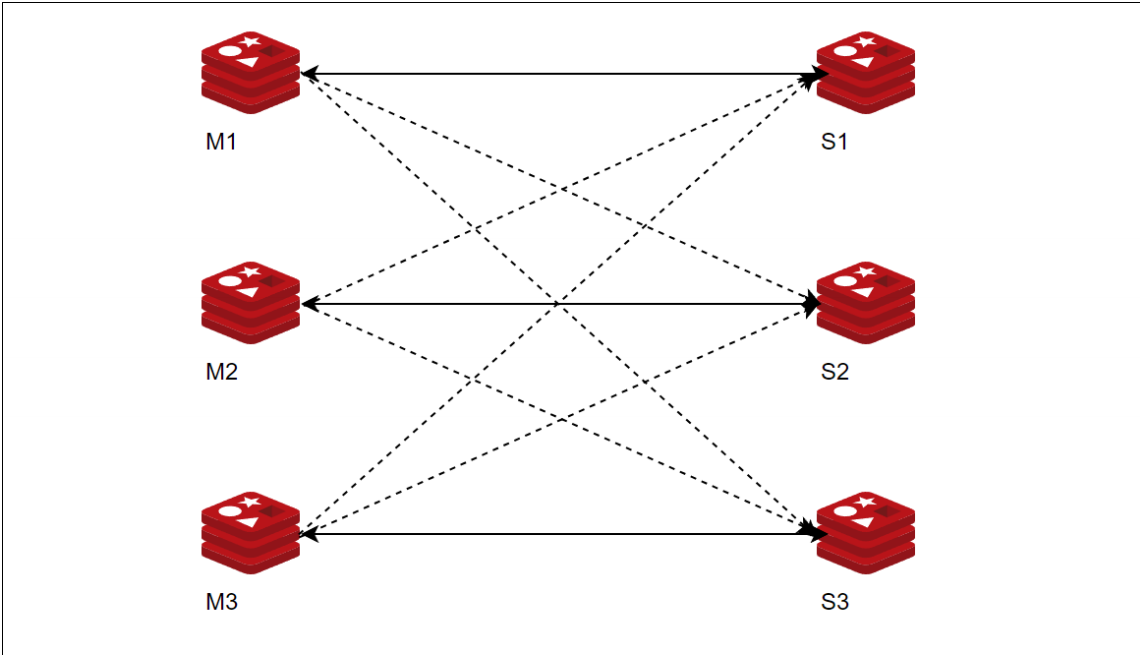
三、集群架构 手绘原理图(3 主 3 从,标准生产架构)
如果只有3台机器的话最好是源码安装,不然很麻烦
注意:s1不一定就是m1的从节点
四、集群核心原理
1. 哈希槽(Hash Slot)
- 集群共有 16384 个哈希槽
- 计算公式:
CRC16(key) % 16384→ 得到槽位 - 每个主节点负责一部分槽位,数据按槽存储
2. Gossip 协议
节点间互相通信,交换节点状态、槽信息、故障信息
3. 客户端寻址
- 客户端请求节点 → 节点查槽位 → 不在本机返回
MOVED - 客户端重定向到正确节点
五、集群完整流程
1. 数据写入流程
- 客户端计算 key 对应的哈希槽
- 连接对应主节点
- 主节点写入数据,异步同步给从节点
2. 故障转移流程
- 主节点宕机 → Gossip 协议扩散消息
- 集群选举该主节点的从节点为新主
- 新主接管槽位,继续提供服务
六、具体搭建流程
1.创建目录(所有节点)
mkdir -p /opt/redis/{6379,6380}/{conf,data,logs,pid}2.编写配置文件
当然能够只写一台然后用scp去传
scp -rp
r 是递归
p 是保留权限,文件修改时间等等
master(所有节点)
bind 0.0.0.0
protected-mode no
port 6379
daemonize yes
logfile /opt/redis/6379/logs/redis_6379.log
pidfile /opt/redis/6379/pid/redis_6379.pid
dbfilename "redis_6379.rdb"
dir /opt/redis/6379/data
cluster-enabled yes
cluster-config-file node_6379.conf
cluster-node-timeout 15000
slave(所有节点)
bind 0.0.0.0
protected-mode no
port 6380
daemonize yes
logfile /opt/redis/6379/logs/redis_6380.log
pidfile /opt/redis/6379/pid/redis_6380.pid
dbfilename "redis_6380.rdb"
dir /opt/redis/6380/data
cluster-enabled yes
cluster-config-file node_6380.conf
cluster-node-timeout 15000
3.启动redis(全部启动)
 redis-server /opt/redis/6379/conf/redis_6379.conf
 redis-server /opt/redis/6380/conf/redis_6380.conf

[root@redis01 redis]# ps -ef | grep redis
root        3023       1  0 21:01 ?        00:00:00 redis-server 0.0.0.0:6380 [cluster]
root        3039       1  0 21:04 ?        00:00:00 redis-server 0.0.0.0:6379 [cluster]
root        3046    2869  0 21:04 pts/0    00:00:00 grep --color=auto redis
4.连接redis-cli
[root@redis01 redis]# redis-cli -c -p 6379
127.0.0.1:6379> info cluster
# Cluster
cluster_enabled:1
5.查看管理集群命令
查看相关命令
redis-cli -c --help  或者 redis-cli --cluster --help
6.创建集群
可以从任意节点创建集群,按redis01为例

[root@redis01 redis]# redis-cli --cluster create \
> 192.168.24.41:6379 192.168.24.42:6379 192.168.24.43:6379 \
> 192.168.24.41:6380 192.168.24.42:6380 192.168.24.43:6380 \
> --cluster-replicas 1

把主节点写在前面,--cluster-replicas 1 这个1是从节点是主节点的倍数

>>> Performing hash slots allocation on 6 nodes...
Master[0] -> Slots 0 - 5460
Master[1] -> Slots 5461 - 10922
Master[2] -> Slots 10923 - 16383
Adding replica 192.168.24.42:6380 to 192.168.24.41:6379
Adding replica 192.168.24.43:6380 to 192.168.24.42:6379
Adding replica 192.168.24.41:6380 to 192.168.24.43:6379
M: 431af7846d843961f8560a32ab90eb4e0669d7fb 192.168.24.41:6379
   slots:[0-5460] (5461 slots) master
M: eb04d57125aa04657f180a3162c9b6f2737f88c3 192.168.24.42:6379
   slots:[5461-10922] (5462 slots) master
M: 9f9d9c3dc7b4ef737352a394b24f82493a014c34 192.168.24.43:6379
   slots:[10923-16383] (5461 slots) master
S: 6729f7f36c196a2f1fe600690d84f71befaacf55 192.168.24.41:6380
   replicates 9f9d9c3dc7b4ef737352a394b24f82493a014c34
S: c26cab07f149062e58efea24d0a5e81f25faeb6d 192.168.24.42:6380
   replicates 431af7846d843961f8560a32ab90eb4e0669d7fb
S: f028e988646476d0ab98a780384a59fb8fd235b7 192.168.24.43:6380
   replicates eb04d57125aa04657f180a3162c9b6f2737f88c3
Can I set the above configuration? (type 'yes' to accept):
出现问题和解决方法
出现情况1:
Can I set the above configuration? (type 'yes' to accept): yes
>>> Nodes configuration updated
>>> Assign a different config epoch to each node
>>> Sending CLUSTER MEET messages to join the cluster
Waiting for the cluster to join
............................................................^C

出现这个问题的原因是没有放行集群总线端口
# 放行集群总线端口(必开!少了这个集群永远起不来)
firewall-cmd --permanent --add-port=16379/tcp
firewall-cmd --permanent --add-port=16380/tcp


出现问题2:
[root@redis01 redis]# redis-cli --cluster create 192.168.24.41:6379 192.168.24.42:6379 192.168.24.43:6379 192.168.24.41:6380 192.168.24.42:6380 192.168.24.43:6380 --cluster-replicas 1
[ERR] Node 192.168.24.41:6379 is not empty. Either the node already knows other nodes (check with CLUSTER NODES) or contains some key in database 0.

1.关闭进程
pkill redis-server

2.删除核心残留文件
# 删除 6379 节点的集群配置 + 所有数据文件
rm -rf /opt/redis/6379/data/node_6379.conf
rm -rf /opt/redis/6379/data/*.rdb /opt/redis/6379/data/*.aof

# 删除 6380 节点的集群配置 + 所有数据文件
rm -rf /opt/redis/6380/data/node_6380.conf
rm -rf /opt/redis/6380/data/*.rdb /opt/redis/6380/data/*.aof

3.重启
# 启动 6379
redis-server /opt/redis/6379/conf/redis_6379.conf
# 启动 6380
redis-server /opt/redis/6380/conf/redis_6380.conf
7.查看集群状态,节点关系
状态
[root@redis01 redis]# redis-cli -c -h 192.168.24.41 -p 6379 cluster
infocluster_state:ok
cluster_slots_assigned:16384
cluster_slots_ok:16384
cluster_slots_pfail:0
cluster_slots_fail:0
cluster_known_nodes:6
cluster_size:3
cluster_current_epoch:6
cluster_my_epoch:1
cluster_stats_messages_ping_sent:151
cluster_stats_messages_pong_sent:150
cluster_stats_messages_sent:301
cluster_stats_messages_ping_received:145
cluster_stats_messages_pong_received:154
cluster_stats_messages_meet_received:5
cluster_stats_messages_received:304
total_cluster_links_buffer_limit_exceeded:0
cluster_slot_migration_active_tasks:0
cluster_slot_migration_active_trim_running:0
cluster_slot_migration_active_trim_current_job_keys:0
cluster_slot_migration_active_trim_current_job_trimmed:0
cluster_slot_migration_stats_active_trim_started:0
cluster_slot_migration_stats_active_trim_completed:0
cluster_slot_migration_stats_active_trim_cancelled:0
节点关系和主从节点信息
[root@redis01 redis]# redis-cli -c -h 192.168.24.41 -p 6379 cluster nodes
e2dcca82d8942be342e4eb149004b7d42419bb92 192.168.24.41:6380@16380 slave d99e99c36070f4e25b89c036e19cc59b4cbc46c5 0 1779111369773 3 connected
41eb58363649b0d464affd346654216c9f160000 192.168.24.42:6379@16379 master - 0 1779111368000 2 connected 5461-10922
e90f7ba483d018c204330c2ed8534cc1f593fb0c 192.168.24.41:6379@16379 myself,master - 0 0 1 connected 0-5460
ff42647c87863ac1ba4ab6c2271df25bb76c4de5 192.168.24.42:6380@16380 slave e90f7ba483d018c204330c2ed8534cc1f593fb0c 0 1779111367000 1 connected
d99e99c36070f4e25b89c036e19cc59b4cbc46c5 192.168.24.43:6379@16379 master - 0 1779111368767 3 connected 10923-16383
3987a6f95ca34e6a28ae3babd4d8728053703e41 192.168.24.43:6380@16380 slave 41eb58363649b0d464affd346654216c9f160000 0 1779111368000 2 connected
[root@redis01 redis]#


[root@redis01 redis]# redis-cli -c -h 192.168.24.41 -p 6379 info replication
# Replication
role:master
connected_slaves:1
slave0:ip=192.168.24.42,port=6380,state=online,offset=434,lag=1,io-thread=0
master_failover_state:no-failover
master_replid:3824d15dc7e315c76c659aa871397e000a9b3e8d
master_replid2:0000000000000000000000000000000000000000
master_repl_offset:434
second_repl_offset:-1
repl_backlog_active:1
repl_backlog_size:1048576
repl_backlog_first_byte_offset:1
repl_backlog_histlen:434

[root@redis01 redis]# redis-cli -c -h 192.168.24.41 -p 6380 info replication
# Replication
role:slave
master_host:192.168.24.43
master_port:6379
master_link_status:up
master_last_io_seconds_ago:8
master_sync_in_progress:0
slave_read_repl_offset:476
slave_repl_offset:476
replica_full_sync_buffer_size:0
replica_full_sync_buffer_peak:0
master_current_sync_attempts:1
master_total_sync_attempts:1
master_link_up_since_seconds:334
master_client_io_thread:0
total_disconnect_time_sec:0
slave_priority:100
slave_read_only:1
replica_announced:1
connected_slaves:0
master_failover_state:no-failover
master_replid:c1f2f733feb7d8d24a67adac6de4e49a50014583
master_replid2:0000000000000000000000000000000000000000
master_repl_offset:476
second_repl_offset:-1
repl_backlog_active:1
repl_backlog_size:1048576
repl_backlog_first_byte_offset:15
repl_backlog_histlen:462
8.验证集群是否可用
[root@redis01 redis]# redis-cli -c -h 192.168.24.41 -p 6379
192.168.24.41:6379> keys *
(empty array)
192.168.24.41:6379> set k1 v1
-> Redirected to slot [12706] located at 192.168.24.43:6379
OK
192.168.24.43:6379>


[root@redis03 redis]# redis-cli -c -h 192.168.24.43 -p 6379
192.168.24.43:6379> get k1
"v1"

[root@redis02 redis]# redis-cli -c -h 192.168.24.42 -p 6379
192.168.24.42:6379> get k1
-> Redirected to slot [12706] located at 192.168.24.43:6379
"v1"


你连接任意一个集群节点执行命令时,Redis 会通过哈希槽算法计算 k1 对应的槽位(12706),发现该槽位由 192.168.24.43:6379 节点负责,因此自动将命令重定向到目标节点执行;redis-cli -c 参数开启了集群自动重定向功能,所以无论你连接 41、42 哪个节点,最终都能精准找到存储数据的 43 节点并完成读写,这就是 Redis 集群分布式存储、自动寻址的标准表现。
防火墙和selinux设置
6379:客户端访问端口
16379:集群内部总线端口(= 客户端端口 + 10000)
firewall-cmd --permanent --add-port=6379/tcp
firewall-cmd --permanent --add-port=16379/tcp
firewall-cmd --reload


# 客户端端口6379
semanage port -a -t redis_port_t -p tcp 6379
# 集群总线端口16379
semanage port -a -t redis_port_t -p tcp 16379

# 自定义集群数据目录
semanage fcontext -a -t redis_var_lib_t "/opt/redis/6379/data(/.*)?"
restorecon -Rv /opt/redis/6379/data
七、集群扩容 / 缩容(任何节点上执行都行)
扩容
- 新增主从节点
- 迁移哈希槽
- 数据重新分配
详细步骤
1.初始化
首先扩容节点版本要和原集群的redis版本一致,将master节点和slave节点的配置文件复制到啊对应的目录,并启动服务
2.向集群添加节点
add-node       new_host:new_port existing_host:existing_port(已存在就行)
                 --cluster-slave                             (如果是从节点添加下两个参数)
                 --cluster-master-id <arg>

[root@redis ~]# redis-cli --cluster --add-node 192.168.24.44:6379 192.168.24.41:6379
Unknown --cluster subcommand
[root@redis ~]# redis-cli --cluster add-node 192.168.24.44:6379 192.168.24.41:6379
>>> Adding node 192.168.24.44:6379 to cluster 192.168.24.41:6379
>>> Performing Cluster Check (using node 192.168.24.41:6379)
M: e90f7ba483d018c204330c2ed8534cc1f593fb0c 192.168.24.41:6379
   slots:[0-5460] (5461 slots) master
   1 additional replica(s)
S: 3987a6f95ca34e6a28ae3babd4d8728053703e41 192.168.24.43:6380
   slots: (0 slots) slave
   replicates 41eb58363649b0d464affd346654216c9f160000
S: ff42647c87863ac1ba4ab6c2271df25bb76c4de5 192.168.24.42:6380
   slots: (0 slots) slave
   replicates e90f7ba483d018c204330c2ed8534cc1f593fb0c
M: d99e99c36070f4e25b89c036e19cc59b4cbc46c5 192.168.24.43:6379
   slots:[10923-16383] (5461 slots) master
   1 additional replica(s)
M: 41eb58363649b0d464affd346654216c9f160000 192.168.24.42:6379
   slots:[5461-10922] (5462 slots) master
   1 additional replica(s)
S: e2dcca82d8942be342e4eb149004b7d42419bb92 192.168.24.41:6380
   slots: (0 slots) slave
   replicates d99e99c36070f4e25b89c036e19cc59b4cbc46c5
[OK] All nodes agree about slots configuration.
>>> Check for open slots...
>>> Check slots coverage...
[OK] All 16384 slots covered.
>>> Getting functions from cluster
>>> Send FUNCTION LIST to 192.168.24.44:6379 to verify there is no functions in it
>>> Send FUNCTION RESTORE to 192.168.24.44:6379
>>> Send CLUSTER MEET to node 192.168.24.44:6379 to make it join the cluster.
[OK] New node added correctly.
3.检测集群
[root@redis ~]# redis-cli --cluster check 192.168.24.44:6379
192.168.24.44:6379 (07945116...) -> 0 keys | 0 slots | 0 slaves.
192.168.24.42:6379 (41eb5836...) -> 0 keys | 5462 slots | 1 slaves.
192.168.24.41:6379 (e90f7ba4...) -> 0 keys | 5461 slots | 1 slaves.
192.168.24.43:6379 (d99e99c3...) -> 0 keys | 5461 slots | 1 slaves.
[OK] 0 keys in 4 masters.
0.00 keys per slot on average.
>>> Performing Cluster Check (using node 192.168.24.44:6379)
M: 07945116b0d59b0dba74945ec4d1b45500f2b74c 192.168.24.44:6379
   slots: (0 slots) master
S: 3987a6f95ca34e6a28ae3babd4d8728053703e41 192.168.24.43:6380
   slots: (0 slots) slave
   replicates 41eb58363649b0d464affd346654216c9f160000
M: 41eb58363649b0d464affd346654216c9f160000 192.168.24.42:6379
   slots:[5461-10922] (5462 slots) master
   1 additional replica(s)
S: ff42647c87863ac1ba4ab6c2271df25bb76c4de5 192.168.24.42:6380
   slots: (0 slots) slave
   replicates e90f7ba483d018c204330c2ed8534cc1f593fb0c
S: e2dcca82d8942be342e4eb149004b7d42419bb92 192.168.24.41:6380
   slots: (0 slots) slave
   replicates d99e99c36070f4e25b89c036e19cc59b4cbc46c5
M: e90f7ba483d018c204330c2ed8534cc1f593fb0c 192.168.24.41:6379
   slots:[0-5460] (5461 slots) master
   1 additional replica(s)
M: d99e99c36070f4e25b89c036e19cc59b4cbc46c5 192.168.24.43:6379
   slots:[10923-16383] (5461 slots) master
   1 additional replica(s)
[OK] All nodes agree about slots configuration.
>>> Check for open slots...
>>> Check slots coverage...
[OK] All 16384 slots covered.
4.为新节点分配槽位(新加入节点无槽位无法使用)
 reshard        <host:port> or <host> <port> - separated by either colon or space
                 --cluster-from <arg>
                 --cluster-to <arg>
                 --cluster-slots <arg>
                 --cluster-yes
                 --cluster-timeout <arg>
                 --cluster-pipeline <arg>
                 --cluster-replace

[root@redis ~]# redis-cli --cluster reshard 192.168.24.44:6379
>>> Performing Cluster Check (using node 192.168.24.44:6379)
M: 07945116b0d59b0dba74945ec4d1b45500f2b74c 192.168.24.44:6379
   slots: (0 slots) master
S: 3987a6f95ca34e6a28ae3babd4d8728053703e41 192.168.24.43:6380
   slots: (0 slots) slave
   replicates 41eb58363649b0d464affd346654216c9f160000
M: 41eb58363649b0d464affd346654216c9f160000 192.168.24.42:6379
   slots:[5461-10922] (5462 slots) master
   1 additional replica(s)
S: ff42647c87863ac1ba4ab6c2271df25bb76c4de5 192.168.24.42:6380
   slots: (0 slots) slave
   replicates e90f7ba483d018c204330c2ed8534cc1f593fb0c
S: e2dcca82d8942be342e4eb149004b7d42419bb92 192.168.24.41:6380
   slots: (0 slots) slave
   replicates d99e99c36070f4e25b89c036e19cc59b4cbc46c5
M: e90f7ba483d018c204330c2ed8534cc1f593fb0c 192.168.24.41:6379
   slots:[0-5460] (5461 slots) master
   1 additional replica(s)
M: d99e99c36070f4e25b89c036e19cc59b4cbc46c5 192.168.24.43:6379
   slots:[10923-16383] (5461 slots) master
   1 additional replica(s)
[OK] All nodes agree about slots configuration.
>>> Check for open slots...
>>> Check slots coverage...
[OK] All 16384 slots covered.
How many slots do you want to move (from 1 to 16384)? 4096     #要分配多少插槽
What is the receiving node ID? 07945116b0d59b0dba74945ec4d1b45500f2b74c  #谁需要插槽
Please enter all the source node IDs.
  Type 'all' to use all the nodes as source nodes for the hash slots.
  Type 'done' once you entered all the source nodes IDs.
Source node #1: all        #all代表每个节点均匀分配所需插槽的一部分,done指定节点分配

Ready to move 4096 slots.
  Source nodes:
    M: 41eb58363649b0d464affd346654216c9f160000 192.168.24.42:6379
       slots:[5461-10922] (5462 slots) master
       1 additional replica(s)
    M: e90f7ba483d018c204330c2ed8534cc1f593fb0c 192.168.24.41:6379
       slots:[0-5460] (5461 slots) master
       1 additional replica(s)
    M: d99e99c36070f4e25b89c036e19cc59b4cbc46c5 192.168.24.43:6379
       slots:[10923-16383] (5461 slots) master
       1 additional replica(s)
  Destination node:
    M: 07945116b0d59b0dba74945ec4d1b45500f2b74c 192.168.24.44:6379
       slots: (0 slots) master
。。。。。。。。
5.再次检查节点
[root@redis ~]# redis-cli --cluster check 192.168.24.44:6379
192.168.24.44:6379 (07945116...) -> 0 keys | 4096 slots | 0 slaves.
192.168.24.42:6379 (41eb5836...) -> 0 keys | 4096 slots | 1 slaves.
192.168.24.41:6379 (e90f7ba4...) -> 0 keys | 4096 slots | 1 slaves.
192.168.24.43:6379 (d99e99c3...) -> 0 keys | 4096 slots | 1 slaves.
[OK] 0 keys in 4 masters.
0.00 keys per slot on average.
>>> Performing Cluster Check (using node 192.168.24.44:6379)
M: 07945116b0d59b0dba74945ec4d1b45500f2b74c 192.168.24.44:6379
   slots:[0-1364],[5461-6826],[10923-12287] (4096 slots) master
S: 3987a6f95ca34e6a28ae3babd4d8728053703e41 192.168.24.43:6380
   slots: (0 slots) slave
   replicates 41eb58363649b0d464affd346654216c9f160000
M: 41eb58363649b0d464affd346654216c9f160000 192.168.24.42:6379
   slots:[6827-10922] (4096 slots) master
   1 additional replica(s)
S: ff42647c87863ac1ba4ab6c2271df25bb76c4de5 192.168.24.42:6380
   slots: (0 slots) slave
   replicates e90f7ba483d018c204330c2ed8534cc1f593fb0c
S: e2dcca82d8942be342e4eb149004b7d42419bb92 192.168.24.41:6380
   slots: (0 slots) slave
   replicates d99e99c36070f4e25b89c036e19cc59b4cbc46c5
M: e90f7ba483d018c204330c2ed8534cc1f593fb0c 192.168.24.41:6379
   slots:[1365-5460] (4096 slots) master
   1 additional replica(s)
M: d99e99c36070f4e25b89c036e19cc59b4cbc46c5 192.168.24.43:6379
   slots:[12288-16383] (4096 slots) master
   1 additional replica(s)
[OK] All nodes agree about slots configuration.
>>> Check for open slots...
>>> Check slots coverage...
[OK] All 16384 slots covered.
6.为其分配从节点
[root@redis ~]# redis-cli --cluster add-node 192.168.24.44:6380 192.168.24.44:6379 --cluster-slave --cluster-master-id 07945116b0d59b0dba74945ec4d1b45500f2b74c
>>> Adding node 192.168.24.44:6380 to cluster 192.168.24.44:6379
>>> Performing Cluster Check (using node 192.168.24.44:6379)
M: 07945116b0d59b0dba74945ec4d1b45500f2b74c 192.168.24.44:6379
   slots:[0-1364],[5461-6826],[10923-12287] (4096 slots) master
S: 3987a6f95ca34e6a28ae3babd4d8728053703e41 192.168.24.43:6380
   slots: (0 slots) slave
   replicates 41eb58363649b0d464affd346654216c9f160000
M: 41eb58363649b0d464affd346654216c9f160000 192.168.24.42:6379
   slots:[6827-10922] (4096 slots) master
   1 additional replica(s)
S: ff42647c87863ac1ba4ab6c2271df25bb76c4de5 192.168.24.42:6380
   slots: (0 slots) slave
   replicates e90f7ba483d018c204330c2ed8534cc1f593fb0c
S: e2dcca82d8942be342e4eb149004b7d42419bb92 192.168.24.41:6380
   slots: (0 slots) slave
   replicates d99e99c36070f4e25b89c036e19cc59b4cbc46c5
M: e90f7ba483d018c204330c2ed8534cc1f593fb0c 192.168.24.41:6379
   slots:[1365-5460] (4096 slots) master
   1 additional replica(s)
M: d99e99c36070f4e25b89c036e19cc59b4cbc46c5 192.168.24.43:6379
   slots:[12288-16383] (4096 slots) master
   1 additional replica(s)
[OK] All nodes agree about slots configuration.
>>> Check for open slots...
>>> Check slots coverage...
[OK] All 16384 slots covered.
>>> Send CLUSTER MEET to node 192.168.24.44:6380 to make it join the cluster.
Waiting for the cluster to join

>>> Configure node as replica of 192.168.24.44:6379.
[OK] New node added correctly.
7.最后在检查一次
[root@redis ~]# redis-cli --cluster check 192.168.24.44:6379
192.168.24.44:6379 (07945116...) -> 0 keys | 4096 slots | 1 slaves.
192.168.24.42:6379 (41eb5836...) -> 0 keys | 4096 slots | 1 slaves.
192.168.24.41:6379 (e90f7ba4...) -> 0 keys | 4096 slots | 1 slaves.
192.168.24.43:6379 (d99e99c3...) -> 0 keys | 4096 slots | 1 slaves.
[OK] 0 keys in 4 masters.
0.00 keys per slot on average.
>>> Performing Cluster Check (using node 192.168.24.44:6379)
M: 07945116b0d59b0dba74945ec4d1b45500f2b74c 192.168.24.44:6379
   slots:[0-1364],[5461-6826],[10923-12287] (4096 slots) master
   1 additional replica(s)
S: 3987a6f95ca34e6a28ae3babd4d8728053703e41 192.168.24.43:6380
   slots: (0 slots) slave
   replicates 41eb58363649b0d464affd346654216c9f160000
M: 41eb58363649b0d464affd346654216c9f160000 192.168.24.42:6379
   slots:[6827-10922] (4096 slots) master
   1 additional replica(s)
S: ff42647c87863ac1ba4ab6c2271df25bb76c4de5 192.168.24.42:6380
   slots: (0 slots) slave
   replicates e90f7ba483d018c204330c2ed8534cc1f593fb0c
S: e2dcca82d8942be342e4eb149004b7d42419bb92 192.168.24.41:6380
   slots: (0 slots) slave
   replicates d99e99c36070f4e25b89c036e19cc59b4cbc46c5
M: e90f7ba483d018c204330c2ed8534cc1f593fb0c 192.168.24.41:6379
   slots:[1365-5460] (4096 slots) master
   1 additional replica(s)
M: d99e99c36070f4e25b89c036e19cc59b4cbc46c5 192.168.24.43:6379
   slots:[12288-16383] (4096 slots) master
   1 additional replica(s)
S: 4631dd070a2bad7feb57b84e9d362025297fc3f2 192.168.24.44:6380
   slots: (0 slots) slave
   replicates 07945116b0d59b0dba74945ec4d1b45500f2b74c
[OK] All nodes agree about slots configuration.
>>> Check for open slots...
>>> Check slots coverage...
[OK] All 16384 slots covered.
缩容
- 迁移目标节点槽位
- 删除节点
- 集群重新平衡
详细步骤
1.查看集群信息
[root@redis01 ~]# redis-cli --cluster check 192.168.24.41:6379
192.168.24.41:6379 (e90f7ba4...) -> 0 keys | 4096 slots | 1 slaves.
192.168.24.43:6379 (d99e99c3...) -> 0 keys | 4096 slots | 1 slaves.
192.168.24.42:6379 (41eb5836...) -> 0 keys | 4096 slots | 1 slaves.
192.168.24.44:6379 (07945116...) -> 0 keys | 4096 slots | 1 slaves.
[OK] 0 keys in 4 masters.
0.00 keys per slot on average.
>>> Performing Cluster Check (using node 192.168.24.41:6379)
M: e90f7ba483d018c204330c2ed8534cc1f593fb0c 192.168.24.41:6379
   slots:[1365-5460] (4096 slots) master
   1 additional replica(s)
S: 4631dd070a2bad7feb57b84e9d362025297fc3f2 192.168.24.44:6380
   slots: (0 slots) slave
   replicates 07945116b0d59b0dba74945ec4d1b45500f2b74c
M: d99e99c36070f4e25b89c036e19cc59b4cbc46c5 192.168.24.43:6379
   slots:[12288-16383] (4096 slots) master
   1 additional replica(s)
S: ff42647c87863ac1ba4ab6c2271df25bb76c4de5 192.168.24.42:6380
   slots: (0 slots) slave
   replicates e90f7ba483d018c204330c2ed8534cc1f593fb0c
S: e2dcca82d8942be342e4eb149004b7d42419bb92 192.168.24.41:6380
   slots: (0 slots) slave
   replicates d99e99c36070f4e25b89c036e19cc59b4cbc46c5
M: 41eb58363649b0d464affd346654216c9f160000 192.168.24.42:6379
   slots:[6827-10922] (4096 slots) master
   1 additional replica(s)
S: 3987a6f95ca34e6a28ae3babd4d8728053703e41 192.168.24.43:6380
   slots: (0 slots) slave
   replicates 41eb58363649b0d464affd346654216c9f160000
M: 07945116b0d59b0dba74945ec4d1b45500f2b74c 192.168.24.44:6379
   slots:[0-1364],[5461-6826],[10923-12287] (4096 slots) master
   1 additional replica(s)
[OK] All nodes agree about slots configuration.
>>> Check for open slots...
>>> Check slots coverage...
[OK] All 16384 slots covered.
2.删除44从节点
del-node       host:port node_id

[root@redis01 ~]# redis-cli --cluster del-node 192.168.24.44:6380 4631dd070a2bad7feb57b84e9d362025297fc3f2
>>> Removing node 4631dd070a2bad7feb57b84e9d362025297fc3f2 from cluster 192.168.24.44:6380
>>> Sending CLUSTER FORGET messages to the cluster...
>>> Sending CLUSTER RESET SOFT to the deleted node.
3.回收槽位
当某一主节点对应的从节点删除完成后,还需要对这个主节点的槽位回收
[root@redis01 ~]# redis-cli  -h 192.168.24.41 -p 6379 cluster nodes
e90f7ba483d018c204330c2ed8534cc1f593fb0c 192.168.24.41:6379@16379 myself,master - 0 0 1 connected 1365-5460
d99e99c36070f4e25b89c036e19cc59b4cbc46c5 192.168.24.43:6379@16379 master - 0 1779373471000 3 connected 12288-16383
ff42647c87863ac1ba4ab6c2271df25bb76c4de5 192.168.24.42:6380@16380 slave e90f7ba483d018c204330c2ed8534cc1f593fb0c 0 1779373468000 1 connected
e2dcca82d8942be342e4eb149004b7d42419bb92 192.168.24.41:6380@16380 slave d99e99c36070f4e25b89c036e19cc59b4cbc46c5 0 1779373471151 3 connected
41eb58363649b0d464affd346654216c9f160000 192.168.24.42:6379@16379 master - 0 1779373470000 2 connected 6827-10922
3987a6f95ca34e6a28ae3babd4d8728053703e41 192.168.24.43:6380@16380 slave 41eb58363649b0d464affd346654216c9f160000 0 1779373469000 2 connected
07945116b0d59b0dba74945ec4d1b45500f2b74c 192.168.24.44:6379@16379 master - 0 1779373469141 7 connected 0-1364 5461-6826 10923-12287

[root@redis01 ~]# redis-cli --cluster reshard 192.168.24.41:6379
>>> Performing Cluster Check (using node 192.168.24.41:6379)
M: e90f7ba483d018c204330c2ed8534cc1f593fb0c 192.168.24.41:6379
   slots:[1365-5460] (4096 slots) master
   1 additional replica(s)
M: d99e99c36070f4e25b89c036e19cc59b4cbc46c5 192.168.24.43:6379
   slots:[12288-16383] (4096 slots) master
   1 additional replica(s)
S: ff42647c87863ac1ba4ab6c2271df25bb76c4de5 192.168.24.42:6380
   slots: (0 slots) slave
   replicates e90f7ba483d018c204330c2ed8534cc1f593fb0c
S: e2dcca82d8942be342e4eb149004b7d42419bb92 192.168.24.41:6380
   slots: (0 slots) slave
   replicates d99e99c36070f4e25b89c036e19cc59b4cbc46c5
M: 41eb58363649b0d464affd346654216c9f160000 192.168.24.42:6379
   slots:[6827-10922] (4096 slots) master
   1 additional replica(s)
S: 3987a6f95ca34e6a28ae3babd4d8728053703e41 192.168.24.43:6380
   slots: (0 slots) slave
   replicates 41eb58363649b0d464affd346654216c9f160000
M: 07945116b0d59b0dba74945ec4d1b45500f2b74c 192.168.24.44:6379
   slots:[0-1364],[5461-6826],[10923-12287] (4096 slots) master
[OK] All nodes agree about slots configuration.
>>> Check for open slots...
>>> Check slots coverage...
[OK] All 16384 slots covered.
How many slots do you want to move (from 1 to 16384)? 4096    #分配多少
What is the receiving node ID? e90f7ba483d018c204330c2ed8534cc1f593fb0c  #谁接收
Please enter all the source node IDs.
  Type 'all' to use all the nodes as source nodes for the hash slots.
  Type 'done' once you entered all the source nodes IDs.
Source node #1: 07945116b0d59b0dba74945ec4d1b45500f2b74c   #all其实节点平分要划分的4096槽位,这里不行,是要把槽位给出去,指定给槽位的节点
Source node #2: done
4.查看集群信息
会发现44:6379变成41的从节点
[root@redis01 ~]# redis-cli --cluster check 192.168.24.41:6379
192.168.24.41:6379 (e90f7ba4...) -> 0 keys | 8192 slots | 2 slaves.
192.168.24.43:6379 (d99e99c3...) -> 0 keys | 4096 slots | 1 slaves.
192.168.24.42:6379 (41eb5836...) -> 0 keys | 4096 slots | 1 slaves.
[OK] 0 keys in 3 masters.
0.00 keys per slot on average.
>>> Performing Cluster Check (using node 192.168.24.41:6379)
M: e90f7ba483d018c204330c2ed8534cc1f593fb0c 192.168.24.41:6379
   slots:[0-6826],[10923-12287] (8192 slots) master
   2 additional replica(s)
M: d99e99c36070f4e25b89c036e19cc59b4cbc46c5 192.168.24.43:6379
   slots:[12288-16383] (4096 slots) master
   1 additional replica(s)
S: ff42647c87863ac1ba4ab6c2271df25bb76c4de5 192.168.24.42:6380
   slots: (0 slots) slave
   replicates e90f7ba483d018c204330c2ed8534cc1f593fb0c
S: e2dcca82d8942be342e4eb149004b7d42419bb92 192.168.24.41:6380
   slots: (0 slots) slave
   replicates d99e99c36070f4e25b89c036e19cc59b4cbc46c5
M: 41eb58363649b0d464affd346654216c9f160000 192.168.24.42:6379
   slots:[6827-10922] (4096 slots) master
   1 additional replica(s)
S: 3987a6f95ca34e6a28ae3babd4d8728053703e41 192.168.24.43:6380
   slots: (0 slots) slave
   replicates 41eb58363649b0d464affd346654216c9f160000
S: 07945116b0d59b0dba74945ec4d1b45500f2b74c 192.168.24.44:6379
   slots: (0 slots) slave
   replicates e90f7ba483d018c204330c2ed8534cc1f593fb0c
[OK] All nodes agree about slots configuration.
>>> Check for open slots...
>>> Check slots coverage...
[OK] All 16384 slots covered.
5.删除节点192.168.24.44:6379
[root@redis01 ~]# redis-cli --cluster del-node 192.168.24.44:6379 07945116b0d59b0dba74945ec4d1b45500f2b74c
>>> Removing node 07945116b0d59b0dba74945ec4d1b45500f2b74c from cluster 192.168.24.44:6379
>>> Sending CLUSTER FORGET messages to the cluster...
>>> Sending CLUSTER RESET SOFT to the deleted node.
[root@redis01 ~]# redis-cli --cluster check 192.168.24.41:6379
192.168.24.41:6379 (e90f7ba4...) -> 0 keys | 8192 slots | 1 slaves.
192.168.24.43:6379 (d99e99c3...) -> 0 keys | 4096 slots | 1 slaves.
192.168.24.42:6379 (41eb5836...) -> 0 keys | 4096 slots | 1 slaves.
[OK] 0 keys in 3 masters.
0.00 keys per slot on average.
>>> Performing Cluster Check (using node 192.168.24.41:6379)
M: e90f7ba483d018c204330c2ed8534cc1f593fb0c 192.168.24.41:6379
   slots:[0-6826],[10923-12287] (8192 slots) master
   1 additional replica(s)
M: d99e99c36070f4e25b89c036e19cc59b4cbc46c5 192.168.24.43:6379
   slots:[12288-16383] (4096 slots) master
   1 additional replica(s)
S: ff42647c87863ac1ba4ab6c2271df25bb76c4de5 192.168.24.42:6380
   slots: (0 slots) slave
   replicates e90f7ba483d018c204330c2ed8534cc1f593fb0c
S: e2dcca82d8942be342e4eb149004b7d42419bb92 192.168.24.41:6380
   slots: (0 slots) slave
   replicates d99e99c36070f4e25b89c036e19cc59b4cbc46c5
M: 41eb58363649b0d464affd346654216c9f160000 192.168.24.42:6379
   slots:[6827-10922] (4096 slots) master
   1 additional replica(s)
S: 3987a6f95ca34e6a28ae3babd4d8728053703e41 192.168.24.43:6380
   slots: (0 slots) slave
   replicates 41eb58363649b0d464affd346654216c9f160000
[OK] All nodes agree about slots configuration.
>>> Check for open slots...
>>> Check slots coverage...
[OK] All 16384 slots covered.
九、集群限制
- 不支持跨节点多键操作(MGET、SUNION 等)
- 不支持事务
- 不支持多层级嵌套结构
第四部分:三大架构 终极对比表
| 特性 | 主从复制 | 哨兵模式 | 集群模式 |
|---|---|---|---|
| 核心能力 | 读写分离 / 备份 | 自动故障转移 | 分片 / 扩容 / 高可用 |
| 数据存储 | 全量复制 | 全量复制 | 分片存储 |
| 故障处理 | 手动切换 | 自动切换 | 自动切换 |
| 扩容能力 | 无 | 无 | 水平扩容 |
| 节点数量 | 1 主 N 从 | 1 主 N 从 + 3 哨兵 | 3 主 N 从起 |
| 适用场景 | 读多写少、备份 | 高可用、小数据量 | 大数据量、高并发 |
第五部分:
- 主从复制原理?全量复制(RDB)+ 增量复制(积压缓冲区),异步同步。
- 为什么哨兵要 3 个节点?奇数节点,避免脑裂,满足 quorum 半数选举。
- 主观下线 vs 客观下线?单个哨兵判定 = 主观;半数以上 = 客观,触发转移。
- 集群哈希槽数量?16384 个,CRC16 (key)%16384。
- 集群为什么不支持事务?数据分片在不同节点,无法保证原子性。
- 主从、哨兵、集群的关系?主从是基础,哨兵解决高可用,集群解决分布式扩容。
- 集群 Gossip 协议作用?节点间通信,同步状态、槽位、故障信息。
- 哨兵故障转移流程?检测下线→选举 Leader→选新主→切换主从→通知客户端。
- 从节点默认只读吗?是,slave-read-only yes。
- 集群 MOVED 指令作用?告诉客户端 key 所在的正确节点,实现重定向。