医学图像分割一直以来都是计算机辅助诊断领域的研究热点。在医学图像的处理和分析中,对图像中感兴趣区域的准确分割尤其关键。要对感兴趣区域进行分类识别,首先要从图像中把感兴趣区域精确分割出来,然后有针对性地对感兴趣区域提取特征并分类。目前关于脑部MRI的分割主要的研究都集中在脑部的灰质,白质和脑脊液等组织的分割。
图像分割方法根据分割类型的不同,大致可以分为基于区域的分割方法和基于边界的分割方法。基于区域的分割方法一般是根据图像中点与点之间的灰度值、纹理特征等属性来判断它们的相似度,根据相似度来划分图像区域。基于边界的分割方法是以灰度变化的梯度大小来确定感兴趣区域的边界。在实际应用中,常常将这两种方法结合在一起使用。
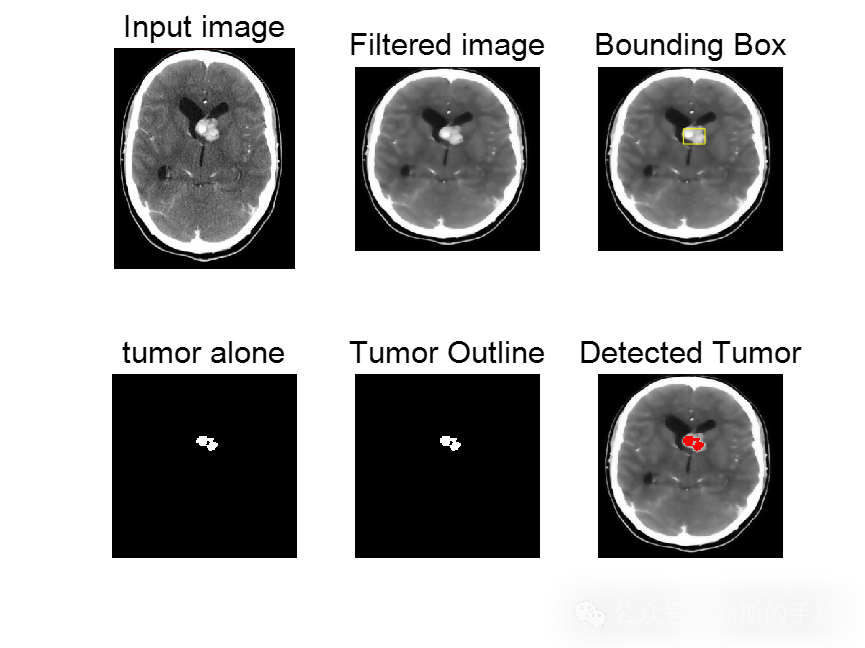
鉴于此,采用各向异性滤波器和图像处理方法进行脑肿瘤分割检测,运行环境为MATLAB 2018,主运行代码如下:
Matlab
%%filter
num_iter = 10;
    delta_t = 1/7;
    kappa = 15;
    option = 2;
    disp('Preprocessing image please wait . . .');
    inp = anisodiff(s,num_iter,delta_t,kappa,option);
    inp = uint8(inp);

inp=imresize(inp,[256,256]);
if size(inp,3)>1
    inp=rgb2gray(inp);
end
figure;
imshow(inp);
title('Filtered image','FontSize',20);

%%thresholding
sout=imresize(inp,[256,256]);
t0=60;
th=t0+((max(inp(:))+min(inp(:)))./2);
for i=1:1:size(inp,1)
    for j=1:1:size(inp,2)
        if inp(i,j)>th
            sout(i,j)=1;
        else
            sout(i,j)=0;
        end
    end
end

%morphologial operation
label=bwlabel(sout);
stats=regionprops(logical(sout),'Solidity','Area','BoundingBox');
density=[stats.Solidity];
area=[stats.Area];
high_dense_area=density>0.6;
max_area=max(area(high_dense_area));
tumor_label=find(area==max_area);
tumor=ismember(label,tumor_label);
if max_area>100
   figure;
   imshow(tumor)
   title('tumor alone','FontSize',20);
else
    h = msgbox('No Tumor!!','status');
    %disp('no tumor');
    return;
end

%%binding box
box = stats(tumor_label);
wantedBox = box.BoundingBox;
figure
imshow(inp);
title('Bounding Box','FontSize',20);
hold on;
rectangle('Position',wantedBox,'EdgeColor','y');
hold off;
%%getting tumor outline
dilationAmount = 5;
rad = floor(dilationAmount);
[r,c] = size(tumor);
filledImage = imfill(tumor, 'holes');
for i=1:r
   for j=1:c
       x1=i-rad;
       x2=i+rad;
       y1=j-rad;
       y2=j+rad;
       if x1<1
           x1=1;
       end
       if x2>r
           x2=r;
       end
       if y1<1
           y1=1;
       end
       if y2>c
           y2=c;
       end
       erodedImage(i,j) = min(min(filledImage(x1:x2,y1:y2)));
   end
end
figure
imshow(erodedImage);
title('eroded image','FontSize',20);

%%subtracting eroded image from bw image
tumorOutline=tumor;
tumorOutline(erodedImage)=0;
figure;
imshow(tumorOutline);
title('Tumor Outline','FontSize',20);

%%inserting outline
rgb = inp(:,:,[1 1 1]);
red = rgb(:,:,1);
red(tumorOutline)=255;
green = rgb(:,:,2);
green(tumorOutline)=0;
blue = rgb(:,:,3);
blue(tumorOutline)=0;
tumorOutlineInserted(:,:,1) = red;
tumorOutlineInserted(:,:,2) = green;
tumorOutlineInserted(:,:,3) = blue;
figure
imshow(tumorOutlineInserted);
title('Detected Tumer','FontSize',20);


%%to display
figure
subplot(231);imshow(s);
title('Input image','FontSize',15);
subplot(232);imshow(inp);
title('Filtered image','FontSize',15);
subplot(233);imshow(inp);
title('Bounding Box','FontSize',15);
hold on;
rectangle('Position',wantedBox,'EdgeColor','y');
hold off;
subplot(234);
imshow(tumor);
title('tumor alone','FontSize',15);
subplot(235);imshow(tumorOutline);
title('Tumor Outline','FontSize',15);
subplot(236);imshow(tumorOutlineInserted);
title('Detected Tumor','FontSize',15);

知乎学术咨询:
https://www.zhihu.com/consult/people/792359672131756032?isMe=1
工学博士,担任《Mechanical System and Signal Processing》《中国电机工程学报》《控制与决策》等期刊审稿专家,擅长领域:现代信号处理,机器学习,深度学习,数字孪生,时间序列分析,设备缺陷检测、设备异常检测、设备智能故障诊断与健康管理PHM等。


- 工学博士,担任《Mechanical System and Signal Processing》《中国电机工程学报》《控制与决策》等期刊审稿专家,擅长领域:现代信号处理,机器学习,深度学习,数字孪生,时间序列分析,设备缺陷检测、设备异常检测、设备智能故障诊断与健康管理PHM等。