
想象一下,我们如何搜索如下的一个问题:
Find a home within 10 miles of Miami, Florida that has 2 bedrooms, 2 bathrooms, central air, and tile floors, with a budget up to $300,000.这类问题存在于很多的电子商务网站搜索中。它也是一种非常实用的搜索方式之一。那么要实现这样的搜索方式,我们有如下的几种方式来实现:
- 使用 Python 代码实现工具,并让 LLM 来进行调用。我们需要调用 LLM 来提取我们搜索的参数。为了精准搜索,我们可以使用 template 来下继续搜索。详细的情况,可以参考文章 "统一 Elastic 向量数据库与 LLM 功能,实现智能查询"
- 我们可以为这个搜索用 Python 创建一个定制的 MCP 服务器,然后在客户端里进行调用。我们可以参考文章 "Elasticsearch:智能搜索的 MCP"
- 我们使用 AI Builder 及 Workflow 来实现。在 workflow 里实现类似于在 DSL 中的模版搜索从而达到精确搜索的目的。详细的使用说明,请参考文章 "Elasticsearch:智能搜索 - AI Builder 及 Workflow"。
- 我们使用 AI Builder,Workflow 及 Skills 来共同完成。我们使用 geocoding workflow 来完成地理位置的获取,详细的实现请参阅文章 "Elasticsearch:智能搜索 - AI builder,workflow 及 skills"。
在如上的四种种方案里,第四种方案的实现最为简捷,因为它不需要另外单独的编程。我们只需要在 Kibana 里创建 agent 及 workflow 来完成即可。维护起来也非常简单直接。那么我们有没有更为方便的方法呢?答案是肯定的。在即将推出的 Elastic Stack 9.4 中(目前在 Elastic Serverless cloud 中可用),我们可以使用 skill 来更进一步简化的目的。
在第四中方案里,我们也使用了 workflow 来完成 geocoding 的工作。我们是否可以直接省去这个环节,在 skill 里完成呢?答案是肯定的。我们下面来展示是如何完成的。
步骤一:写入数据
我们需要按照文章 "Elasticsearch:智能搜索的 MCP" 写入文档到 Elasticsearch 中。
步骤二:创建 property_search_skills
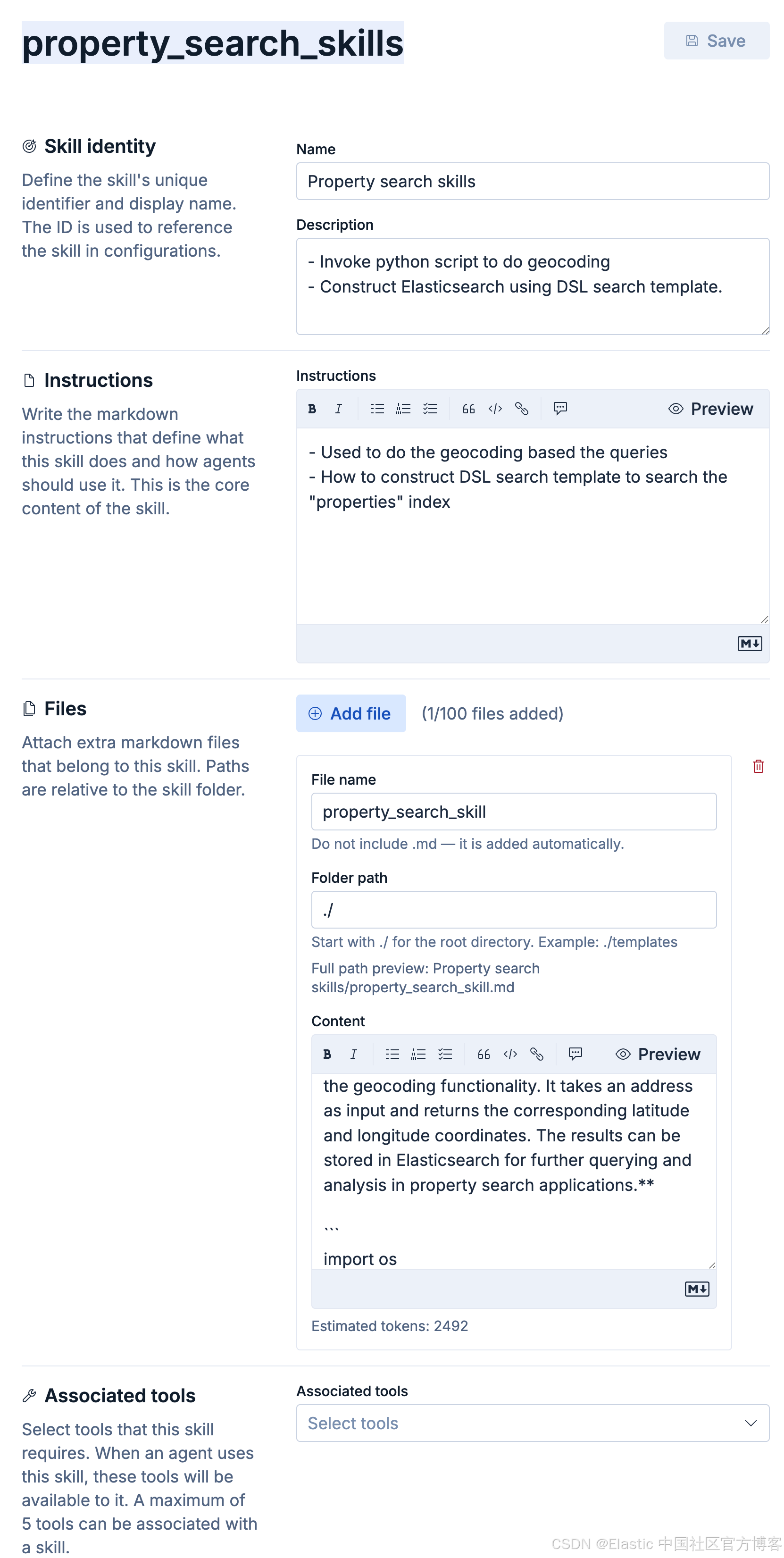
配置:
-
ID:property_search_skills
-
Name:Property search skills
-
Description:
- Invoke python script to do geocoding
- Construct Elasticsearch using DSL search template.
-
Instructions:
- Used to do the geocoding based the queries
- How to construct DSL search template to search the "properties" index
-
Files :
-
File name:property_search_skill
-
Folder path :
./ -
Content :
---
name: Property Search Skills
description: Skills related to property search functionality, including geocoding and location-based queries.
---

# Property Search Skills
This document outlines the skills and tools used for implementing property search functionality, particularly focusing on geocoding and location-based queries.

## Geocoding Tool
The geocoding tool is designed to convert addresses into geographic coordinates (latitude and longitude) using the Google Maps Geocoding API. This allows for location-based searches and queries in property search applications. The API to be used is the Google Maps Geocoding API, which requires an API key for authentication.

### Environment Variables
To use the geocoding tool, the following environment variables need to be set:
- `GOOGLE_MAPS_API_KEY`: Your Google Maps API key for accessing the Geocoding API.

**geocode_tool.py is the script that implements the geocoding functionality. It takes an address as input and returns the corresponding latitude and longitude coordinates. The results can be stored in Elasticsearch for further querying and analysis in property search applications.**

```
import os
import sys
import json
import argparse
import requests

GEOCODE_URL = "https://maps.googleapis.com/maps/api/geocode/json"


def geocode(address: str, api_key: str) -> dict:
    params = {
        "address": address,
        "key": api_key
    }

    resp = requests.get(GEOCODE_URL, params=params, timeout=10)
    resp.raise_for_status()
    data = resp.json()

    if data.get("status") != "OK":
        return {
            "success": False,
            "error": data.get("status"),
            "raw": data
        }

    result = data["results"][0]
    location = result["geometry"]["location"]

    return {
        "success": True,
        "formatted_address": result["formatted_address"],
        "location": {
            "lat": location["lat"],
            "lon": location["lng"]  # Google -> Elasticsearch format
        },
        "place_id": result.get("place_id"),
        "types": result.get("types")
    }


def main():
    parser = argparse.ArgumentParser(description="Geocode an address")
    parser.add_argument("--address", help="Address to geocode")

    args = parser.parse_args()

    try:
        # Determine input source (stdin takes priority)
        if not sys.stdin.isatty():
            payload = json.load(sys.stdin)
            address = payload.get("address")
        else:
            address = args.address

        if not address:
            raise ValueError("Missing address (provide via --address or stdin JSON)")

        api_key = "<Your Google API key>"

        # api_key = os.environ.get("GOOGLE_API_KEY")
        # if not api_key:
        #     raise ValueError("Missing GOOGLE_API_KEY environment variable")

        result = geocode(address, api_key)

        print(json.dumps(result))
        sys.exit(0 if result["success"] else 1)

    except Exception as e:
        print(json.dumps({
            "success": False,
            "error": str(e)
        }))
        sys.exit(1)


if __name__ == "__main__":
    main()
```

### Usage
To run the geocoding tool, use the following command in your terminal:
```bash
python geocode_tool.py --address "1600 Amphitheatre Parkway, Mountain View, CA"
```

This command will geocode the provided address and return the corresponding latitude and longitude coordinates. The results can then be stored in Elasticsearch for further querying and analysis in property search applications.

# DSL search templates
In addition to geocoding, property search applications often require the ability to perform complex queries on the indexed property data. This can be achieved using Elasticsearch's Domain Specific Language (DSL) for searching and filtering data based on various criteria such as location, price range, property type, etc.

The details for implementing a search template can be found at https://www.elastic.co/docs/solutions/search/search-templates.

For our search template, we need to use the following search template to do the DSL search:

{
    "_source": false,
    "size": 5,
    "fields": ["title", "tax", "maintenance_fee", "bathrooms", "bedrooms", "square_footage", "home_price", "property_features"],
    "retriever": {
        "standard": {
            "query": {
                "semantic": {
                    "field": "body_content_semantic_text",
                    "query": "{{query}}"
                }
            },
            "filter": {
                "bool": {
                    "must": [
                        {{#distance}}{
                            "geo_distance": {
                                "distance": "{{distance}}",
                                "location": {
                                    "lat": {{latitude}},
                                    "lon": {{longitude}}
                                }
                            }
                        }{{/distance}}
                        {{#bedrooms}}{{#distance}},{{/distance}}{
                            "range": {
                                "bedrooms": {
                                    "gte": {{bedrooms}}
                                }
                            }
                        }{{/bedrooms}}
                        {{#bathrooms}}{{#distance}}{{^bedrooms}},{{/bedrooms}}{{/distance}}{{#bedrooms}},{{/bedrooms}}{
                            "range": {
                                "bathrooms": {
                                    "gte": {{bathrooms}}
                                }
                            }
                        }{{/bathrooms}}
                        {{#tax}}{{#distance}}{{^bedrooms}}{{^bathrooms}},{{/bathrooms}}{{/bedrooms}}{{/distance}}{{#bedrooms}}{{^bathrooms}},{{/bathrooms}}{{/bedrooms}}{{#bathrooms}},{{/bathrooms}}{
                            "range": {
                                "tax": {
                                    "lte": {{tax}}
                                }
                            }
                        }{{/tax}}
                        {{#maintenance}}{{#distance}}{{^bedrooms}}{{^bathrooms}}{{^tax}},{{/tax}}{{/bathrooms}}{{/bedrooms}}{{/distance}}{{#bedrooms}}{{^bathrooms}}{{^tax}},{{/tax}}{{/bathrooms}}{{/bedrooms}}{{#bathrooms}}{{^tax}},{{/tax}}{{/bathrooms}}{{#tax}},{{/tax}}{
                            "range": {
                                "maintenance_fee": {
                                    "lte": {{maintenance}}
                                }
                            }
                        }{{/maintenance}}
                        {{#square_footage_max}}{{#distance}}{{^bedrooms}}{{^bathrooms}}{{^tax}}{{^maintenance}},{{/maintenance}}{{/tax}}{{/bathrooms}}{{/bedrooms}}{{/distance}}{{#bedrooms}}{{^bathrooms}}{{^tax}}{{^maintenance}},{{/maintenance}}{{/tax}}{{/bathrooms}}{{/bedrooms}}{{#bathrooms}}{{^tax}}{{^maintenance}},{{/maintenance}}{{/tax}}{{/bathrooms}}{{#tax}}{{^maintenance}},{{/maintenance}}{{/tax}}{{#maintenance}},{{/maintenance}}{
                            "range": {
                                "square_footage": {
                                    "gte": {{#square_footage_min}}{{square_footage_min}}{{/square_footage_min}}{{^square_footage_min}}0{{/square_footage_min}},
                                    "lte": {{square_footage_max}}
                                }
                            }
                        }{{/square_footage_max}}
                        {{#home_price_max}}{{#distance}}{{^bedrooms}}{{^bathrooms}}{{^tax}}{{^maintenance}}{{^square_footage}},{{/square_footage}}{{/maintenance}}{{/tax}}{{/bathrooms}}{{/bedrooms}}{{/distance}}{{#bedrooms}}{{^bathrooms}}{{^tax}}{{^maintenance}}{{^square_footage}},{{/square_footage}}{{/maintenance}}{{/tax}}{{/bathrooms}}{{/bedrooms}}{{#bathrooms}}{{^tax}}{{^maintenance}}{{^square_footage}},{{/square_footage}}{{/maintenance}}{{/tax}}{{/bathrooms}}{{#tax}}{{^maintenance}}{{^square_footage}},{{/square_footage}}{{/maintenance}}{{/tax}}{{#maintenance}}{{^square_footage}},{{/square_footage}}{{/maintenance}}{{#square_footage}},{{/square_footage}}{
                            "range": {
                                "home_price": {
                                    "gte": {{#home_price_min}}{{home_price_min}}{{/home_price_min}}{{^home_price_min}}0{{/home_price_min}},
                                    "lte": {{home_price_max}}
                                }
                            }
                        }{{/home_price_max}}
                        {{#feature}},{
                            "bool": {
                                "should": [
                                    {
                                        "match": {
                                            "property_features": {
                                                "query": "{{feature}}",
                                                "operator": "or"
                                            }
                                        }
                                    }
                                ],
                                "minimum_should_match": 1
                            }
                        }{{/feature}}
                    ]
                }
            }
        }
    }
}

We need to use "properties" index to do the search.  **please do see the range searches for bedrooms and bathrooms". We want to have bigger or equal matches. For the price, we need to have equal or smaller matches
-
注:请在上面的代码中添加自己的 api_key = "<Your Google API Key>"。
我们保存好上面的 skill 配置。
步骤三:创建 property_search_skill agent
我们按照如的步骤来创建 agent:
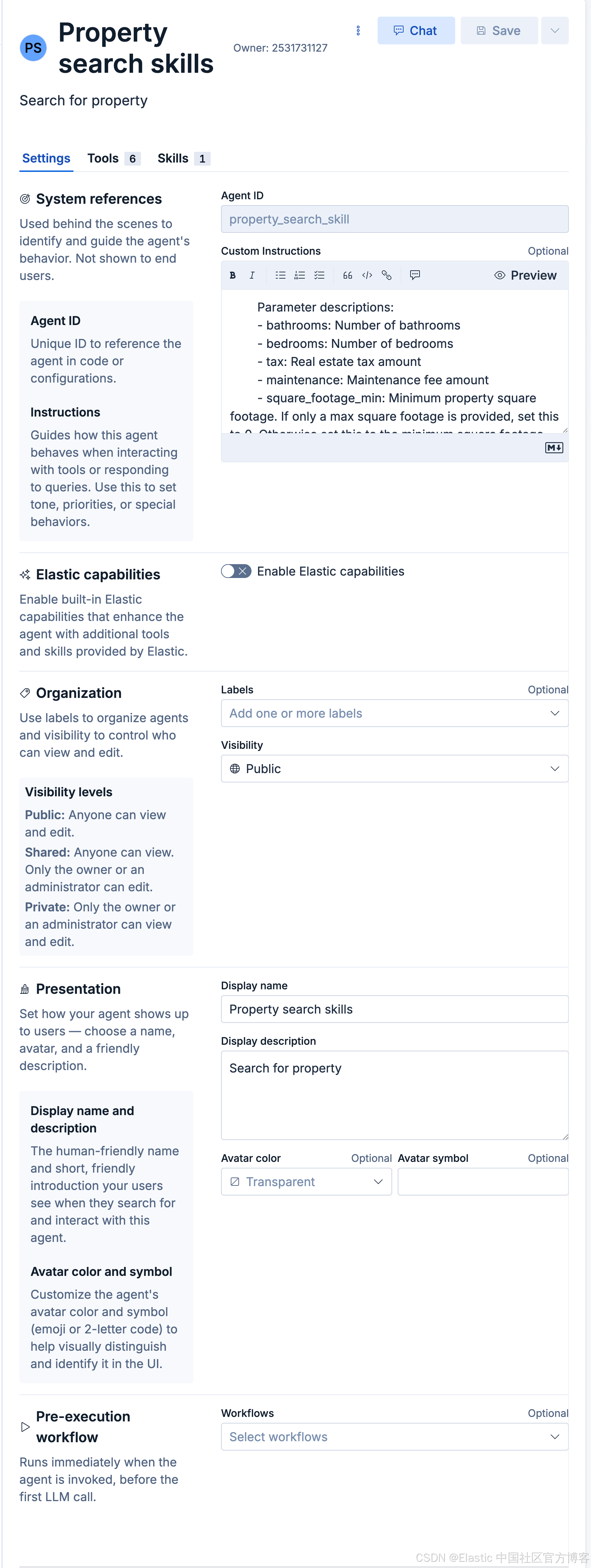
配置:
-
ID:property_search_skill
-
Custom Instructions :
javascriptThis agent is used to search for properties: # Step 1: You are an information extraction assistant. Extract real estate search parameters from the user query. Parameter descriptions: - bathrooms: Number of bathrooms - bedrooms: Number of bedrooms - tax: Real estate tax amount - maintenance: Maintenance fee amount - square_footage_min: Minimum property square footage. If only a max square footage is provided, set this to 0. Otherwise set this to the minimum square footage specified by the user. - square_footage_max: Maximum property square footage - home_price_min: Minimum home price. If only a max home price is provided, set this to 0. Otherwise set this to the minimum home price specified by the user. - home_price_max: Maximum home price - property_features: Home features such as AC, pool, updated kitchens, etc should be listed as a single string. - location: City, state, or full address if present. Rules: - Only include parameters explicitly mentioned. - property_features must be a single space-separated string. - Return ONLY a JSON object (not a string, no quotes, no extra text, no explanations). - Do not include explanations. Example JSON: { "query": "Find a home within 10 miles of Miami, Florida that has 2 bedrooms, 2 bathrooms, central air, and tile floors, with a budget up to $300,000." "bathrooms": 2, "bedrooms": 2, "home_price_min": 0, "home_price_max": 300000, "property_features": "central air tile floors", "location": "Miami, Florida" } # Step 2: - Use the above constructed JSON format, and do a DSL template search. If you need to convert it to ES|QL queries, please do follow exactly the DSL template search ranges: 1. bathrooms is bigger or equal to the extracted one 2. bedrooms is bigger or equal to the extracted one 3. home_price is smaller or equal to the extracted one (home_price_max) - Before you do the searches, please DO refer to the requirements specified by the property search skills/property_search_skill.md. - Please print out the search template used for search, and then print out the top **4 results** for viewing. -
Display name:Property search skills
-
Display description:Search for property
一旦 skill 的设计已经完成,我们可以通过如下的方式来进行测试。在 agent 的聊天里,输入 / 然后,紧跟 skill 的名称:
[/Property search skills](skill://property_search_skills) Find a home within 10 miles of Miami, Florida that has 2 bedrooms, 2 bathrooms, central air, and tile floors, with a budget up to $300,000.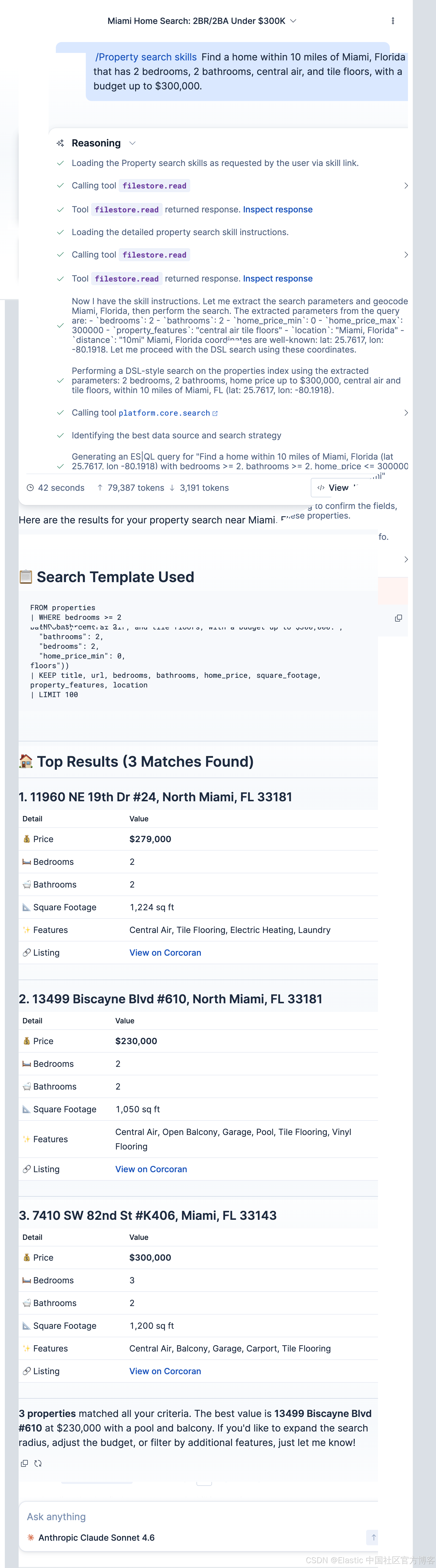
添加 skills:
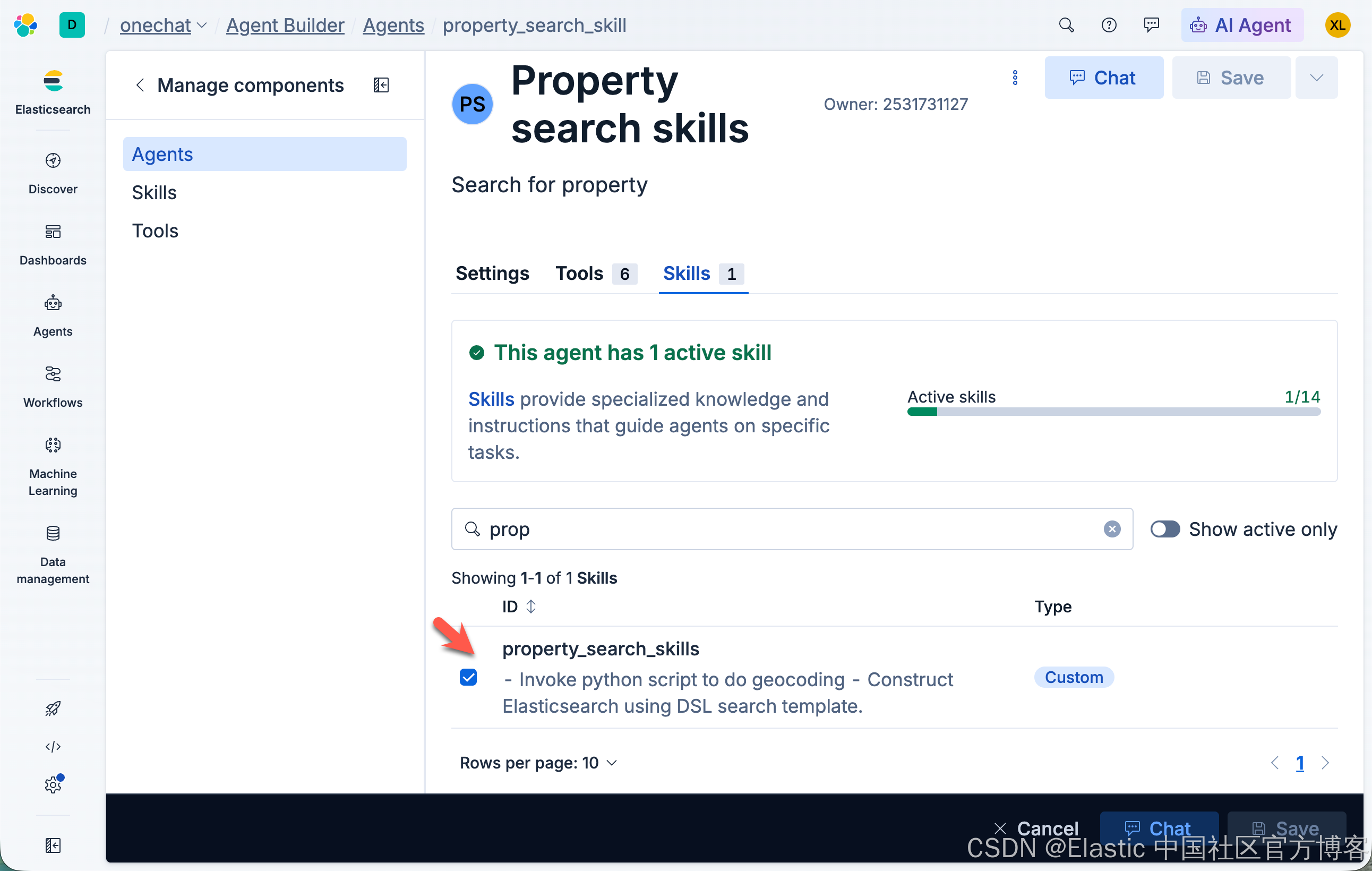
我们把创建的 skill 添加到我们创建的 agent 中。
测试
我们还是按照之前的测试用例来进行测试:
Find a home within 10 miles of Miami, Florida that has 2 bedrooms, 2 bathrooms, central air, and tile floors, with a budget up to $300,000.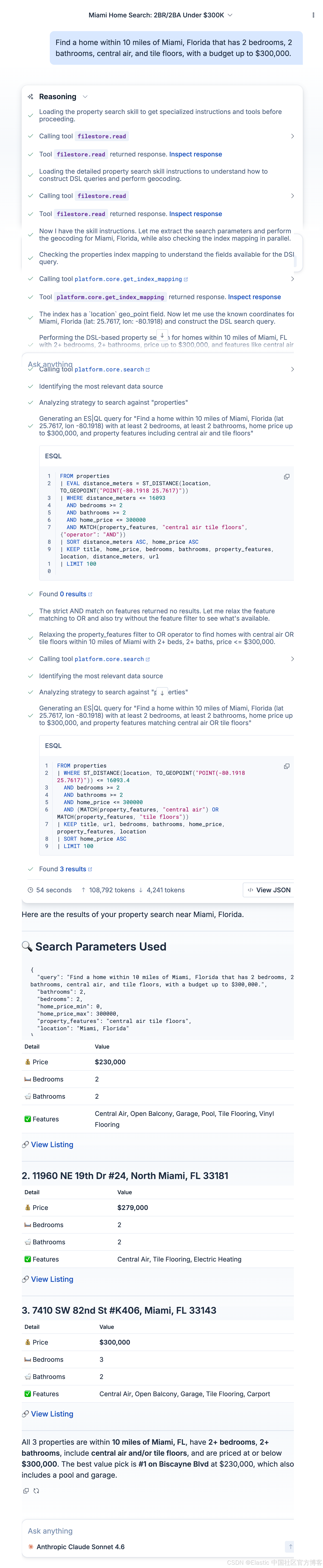
我们再以第二个例子来做展示:
javascript
Find a home within 10 miles of DeBary, Florida with 5 bedrooms, at least 2 bathrooms, central air, and a garage, with a budget up to $600,000.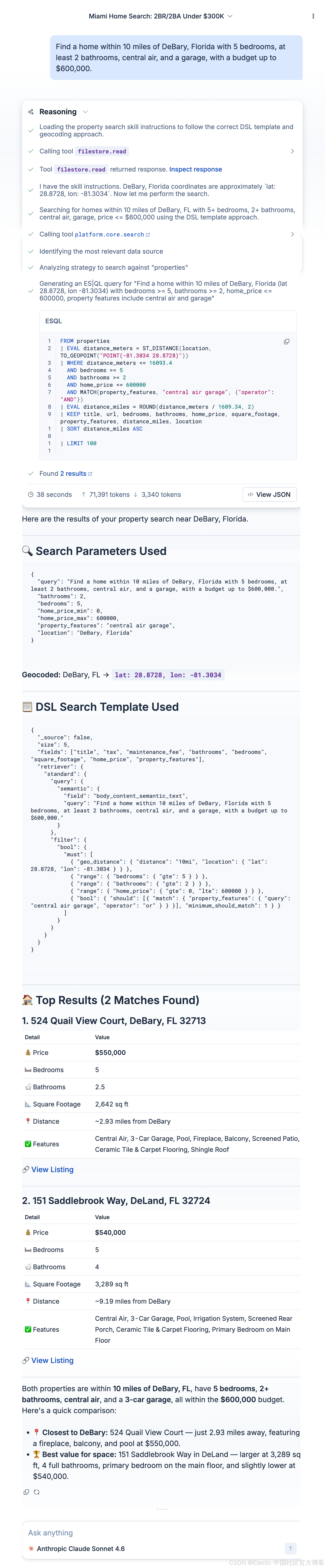
结论
在这个例子里,我们看到了 skill 的强大之处。我们甚至省去了繁琐的代码及 workflow 的创建。我们只使用 skill 即可。这些 skill 只有在需要的时候才会装载。非常省内存。
祝大家学习愉快!