🔥个人主页: Milestone-里程碑
❄️个人专栏: <<力扣hot100>> <<C++>><<Linux>>
🌟心向往之行必能至
目录
[三.缓冲区 :解决前面sleep刷新问题](#三.缓冲区 :解决前面sleep刷新问题)
[5-1 什么是缓冲区](#5-1 什么是缓冲区)
[5.2 为什么要有](#5.2 为什么要有)
[5.3 缓冲类型](#5.3 缓冲类型)
[5.4 代码实战](#5.4 代码实战)
一.重谈重定义
平时我们重定义的写法
bash
[lcb@hcss-ecs-1cde 7]$ ./a.out > log.txt但其实是省略了1,系统默认是1(标准输出)的重定向写入
bash
[lcb@hcss-ecs-1cde 7]$ ./a.out 1 > log.txt1.1
bash
 1 #include <cstdio>
  2 #include<iostream>
  3 using namespace std;
  4 int main()
  5 {
  6   cout<<"hello cout"<<endl;
  7   printf("hello printf\n");
  8   cerr<<"hello cerr"<<endl;
  9   fprintf(stderr,"hello stderr\n");
 10
 11   return 0;
 12 }
bash
[lcb@hcss-ecs-1cde 7]$ ./a.out
hello cout
hello printf
hello cerr
hello stderr
[lcb@hcss-ecs-1cde 7]$ ./a.out  >log.txt
hello cerr
hello stderr
bash
[lcb@hcss-ecs-1cde 7]$ ./a.out 1 >log.normal 2>log.error
[lcb@hcss-ecs-1cde 7]$ cat log.normal
hello cout
hello printf
[lcb@hcss-ecs-1cde 7]$ cat log.error
hello cerr
hello stderr
bash
[lcb@hcss-ecs-1cde 7]$ ./a.out > log.normal 2>> log.normal
[lcb@hcss-ecs-1cde 7]$ cat log.normal
hello cout
hello printf
hello cerr
hello stderr
[lcb@hcss-ecs-1cde 7]$ ./a.out 1 >log.normal 2>&1
[lcb@hcss-ecs-1cde 7]$ cat log.normal
hello cout
hello printf
hello cerr
hello stderr
为什么有标准输出与标准错误
将常规消息与错误消息进行分离
都打印到一个文件呢
例子
对输出进行重定向后
bash
  1  #include<stdio.h>
  2  #include<unistd.h>
  3  #include<sys/types.h>
  4  #include<string.h>
  5 #include<sys/stat.h>
  6 #include<fcntl.h>
  7 #include<stdio.h>
  8 #include <iostream>
  9 int main()
 10 {
 11   int fd =open("myfile.c",O_CREAT | O_WRONLY| O_TRUNC,0666);
 12   dup2(fd,1);
 13   printf("hello printf\n");
 14 std::cout<<"hello cout"<<std::endl;
 15   std::cerr<<"hello cerr"<<std::endl;
 16   close(fd);
 17   return 0;
 18 }
发现标准错误没有改变输入文件
bash
[lcb@hcss-ecs-1cde 7]$ g++ 1.c
[lcb@hcss-ecs-1cde 7]$ ./a.out
hello cerr
[lcb@hcss-ecs-1cde 7]$ vim 1.c
[lcb@hcss-ecs-1cde 7]$ cat myfile.c
hello printf
hello cout
二.理解一切皆"文件"
如进程、磁盘、显⽰器、键盘这样硬件设备也被抽象成了⽂件,你可以使⽤访问⽂件的⽅法访
问它们获得信息;甚⾄管道,也是⽂件
开发者仅需要使⽤⼀套 API 和开发⼯具,即可调取 Linux 系统中绝⼤部分的资源。举个简单的例⼦,Linux 中⼏乎所有读(读⽂件,读系统状态,读PIPE)的操作都可以⽤ read 函数来进⾏;⼏乎所有更改(更改⽂件,更改系统参数,写 PIPE)的操作都可以⽤ write 函数来进⾏。
bash
struct file {
...
1
2
3
4
struct inode *f_inode; /* cached value */
const struct file_operations *f_op;
...
atomic_long_t f_count; // 表⽰打开⽂件的引⽤计数,如果有多个⽂件指针指
向它,就会增加f_count的值。
unsigned int f_flags; // 表⽰打开⽂件的权限
fmode_t f_mode; // 设置对⽂件的访问模式,例如:只读,只写等。所
有的标志在头⽂件<fcntl.h> 中定义
loff_t f_pos; // 表⽰当前读写⽂件的位置
...
} __attribute__((aligned(4))); /* lest something weird decides that 2 is OK
*/
三.缓冲区 :解决前面sleep刷新问题
5-1 什么是缓冲区
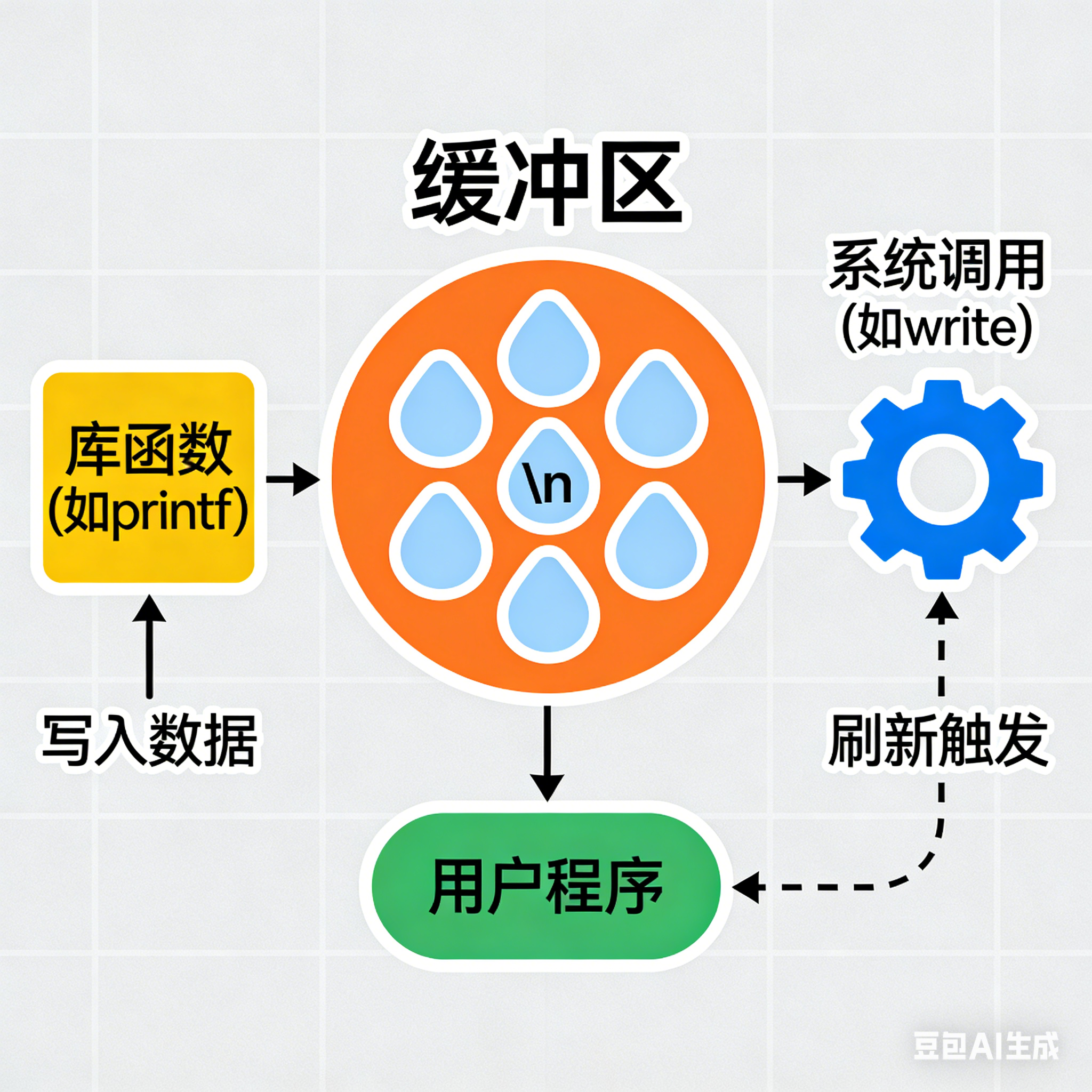
缓冲区是内存空间的⼀部分。也就是说,在内存空间中预留了⼀定的存储空间,这些存储空间⽤来缓冲输⼊或输出的数据,这部分预留的空间就叫做缓冲区。缓冲区根据其对应的是输⼊设备还是输出设 备,分为输⼊缓冲区和输出缓冲区。
5.2 为什么要有
读写⽂件时,如果不会开辟对⽂件操作的缓冲区,直接通过系统调⽤对磁盘进⾏操作(读、写等),那么 每次对⽂件进⾏⼀次读写操作时,都需要使⽤读写系统调⽤来处理此操作,即需要执⾏⼀次系统调 ⽤,执⾏⼀次系统调⽤将涉及到CPU状态的切换,即从⽤⼾空间切换到内核空间,实现进程上下⽂的 切换,这将损耗⼀定的CPU时间,频繁的磁盘访问对程序的执⾏效率造成很⼤的影响。
为了减少使⽤系统调⽤的次数,提⾼效率,我们就可以采⽤缓冲机制。⽐如我们从磁盘⾥取信息可
以在磁盘⽂件进⾏操作时,可以⼀次从⽂件中读出⼤量的数据到缓冲区中,以后对这部分的访问就不 需要再使⽤系统调⽤了,等缓冲区的数据取完后再去磁盘中读取,这样就可以减少磁盘的读写次数,再加上计算机对缓冲区的操作⼤ 快于对磁盘的操作,故应⽤缓冲区可⼤ 提⾼计算机的运⾏速度。
如你买了一大堆快递,如果来一个,打电话叫你去拿,你就要中止自己的事去拿,但如果有了菜鸟驿站,就可以一定数量再去拿,效率大大提高
5.3 缓冲类型
标准I/O提供了3种类型的缓冲区。
•
全缓冲区:这种缓冲⽅式要求填满整个缓冲区后才进⾏I/O系统调⽤操作。对于磁盘⽂件的操作通
常使⽤全缓冲的⽅式访问。
•
⾏缓冲区:在⾏缓冲情况下,当在输⼊和输出中遇到换⾏符时,标准I/O库函数将会执⾏系统调⽤
操作。当所操作的流涉及⼀个终端时(例如标准输⼊和标准输出),使⽤⾏缓冲⽅式。因为标准
I/O库每⾏的缓冲区⻓度是固定的,所以只要填满了缓冲区,即使还没有遇到换⾏符,也会执⾏
I/O系统调⽤操作,默认⾏缓冲区的⼤⼩为1024。
为了符合用户阅读习惯
•
⽆缓冲区:⽆缓冲区是指标准I/O库不对字符进⾏缓存,直接调⽤系统调⽤。标准出错流stderr通
常是不带缓冲区的,这使得出错信息能够尽快地显⽰出来。
除了上述列举的默认刷新⽅式,下列特殊情况也会引发缓冲区的刷新:
- 缓冲区满时;
- 执⾏flush语句;
- 进程结束
5.4 代码实战
bash
 #include<stdio.h>
    2 #include<unistd.h>
    3 #include<stdlib.h>
    4 int main()
    5 {
    6   //库函数
    7   printf("hello printf\n");
    8   fprintf(stdout,"hello fprintf\n");
    9   const char*s="hello fwrite\n";
E> 10   fwrite(s,strlen(s),1,stdout);
   11
   12   //系统调用
   13   const char*ss="hello write\n";
E> 14   write(1,ss,strlen(ss));
   15   fork();
   16   return 0;
   17 }
  ~
结果思考
bash
[lcb@hcss-ecs-1cde 8]$ ./a.out
hello printf
hello fprintf
hello fwrite
hello write
[lcb@hcss-ecs-1cde 8]$ ./a.out > log.txt
[lcb@hcss-ecs-1cde 8]$ cat log.txt
hello write
hello printf
hello fprintf
hello fwrite
hello printf
hello fprintf
hello fwrite
为什么直接展开与重定向展开,结果不一样
原因是重定向,导致程序还未结束,那么子进程结束,就会刷新一次,父进程结束,再刷新一次
四,设计简单的libc库
mystdio.c
bash
#include"mystdio.h"
    2 #include<string.h>
    3 MyFile*bymyfile(int flag,int fd )
    4 {
E>  5   MyFile*file=(Myfile*)malloc(sizeof(MyFile));
    6   file->filefd=fd;
    7   file->flag=flag;
    8   file->flushflag=Line_flush;
    9   file->bufferlen=0;
   10   memset(file->outbuffer,0,sizeof(file->outbuffer));
   11 }
E> 12 MyFile*Myfileopenl(const char* path,cosnt char*mode)
   13 {
   14   int fd=-1;
   15   int flag=0;
E> 16   if(strcmp(mode,"w")==0)
   17   {
E> 18     flag=  O_CREAT | O_WRONLY | O_TRUNC;
E> 19     fd=open(path,flag,0666);
   20
   21   }
E> 22   else if(strcmp(mode,"a")==0)
   23   {
E> 24       flag= O_CREAT | O_WRONLY | O_APPEND;
E> 25      fd=open(path,flag,0666);
   26   }
E> 27   else if(strcmp(mode,"r")==0)
   28   {
E> 29     flag = O_RDWE
E> 30     fd=open(path,flag,0666);
   31   }
E> 32   if(fd ==-1) reutnr NULL;
   33   return bymyfile(flag,fd);
   34 }
   35 void Myfileclose(MyFile*file)
   36 {
   37   if(file->filefd<0) return;
   38    Myflush();
   39     close(file->filefd);
   40     free(file);
   41 }
   42 int*Myfilewrite(MyFile*file,const char * ptr,size_t len)
   43 {
   44   //写入即使拷贝
   45   memcpy(file->outbuffer+file->bufferlen,ptr,len);
   46   file->bufferlen+=len;
   47   //2.尝试判断是否满足刷新条件
   48   if(file->flushflag&Line_FLUSH&&file->outbuffer[file->bufferlen-1]=='\n')
   49     Myflush(file);
   50 }
   51 void Myflush(MyFile*file)
   52 {
   53   if(file->filefd<0) return;
   54   //写入即是拷贝
   55   write(file->filefd,file->outbuffer,file->bufferlen);
   56   file->bufferlen=0;
   57 }
mystdio.h
bash
 #pragma once                                                                                                   1 #include"mystdio.h"
    2 #include<stdio.h>                                                                                           |    2 #include<string.h>
    3 #define MAX_SIZE 1024                                                                                       |    3 MyFile*bymyfile(int flag,int fd )
    4 #define none_flush 0001                                                                                     |    4 {
    5 #define Line_flush 0002                                                                                     |E>  5   MyFile*file=(Myfile*)malloc(sizeof(MyFile));
    6 #define ALL_flush 0003                                                                                      |    6   file->filefd=fd;
    7 typedef struct MyFile{                                                                                      |    7   file->flag=flag;
    8   int filefd;//文件标识符                                                                                   |    8   file->flushflag=Line_flush;
    9   int flag;//                                                                                               |    9   file->bufferlen=0;
   10   int flushflag;                                                                                            |   10   memset(file->outbuffer,0,sizeof(file->outbuffer));
   11   char outbuffer[1024];                                                                                     |   11 }
   12   int bufferlen;                                                                                            |E> 12 MyFile*Myfileopenl(const char* path,cosnt char*mode)
   13 } MyFile;                                                                                                   |   13 {
E> 14 MyFile*Myfileopenl(const char* path,cont char*mode);                                                        |   14   int fd=-1;
   15 void*Myfileclose(MyFile*file);                                                                              |   15   int flag=0;
   16 int*Myfilewrite(const void *ptr,size_t size,size_t numb,MyFile*file);                                       |E> 16   if(strcmp(mode,"w")==0)
   17 void Myflush(MyFile*file);