很显然,大多数时候,我们可以自由的构建数据集来供我们训练的模型读取,但是,到了需要"标准化"或者说数据量很大的情况下,我们需要了解,有什么方式能够方便我们去构建数据量很大的数据集,以及方便别人也能使用,本文就是出于这样的考虑而编写的,我必须得吐槽一句,modelscope实在是太难用了,还是huggingface好用。
介绍两种常见格式(目录结构 与 Parquet),对比差异,并以 COCO128 为例完成从准备数据、本地使用到上传 HuggingFace 的完整流程。
详细代码可参考:https://github.com/SyJarvis/MiniAILabs/tree/main/foundations/fnd-huggingface-dataset
文中也有具体代码。
目录
- 目录结构形式
- [Parquet 格式](#Parquet 格式)
- 两种格式对比
- [实战:以 COCO128 为例](#实战:以 COCO128 为例)
- 本地直接使用
- [上传到 HuggingFace](#上传到 HuggingFace)
1. 目录结构形式
HuggingFace 推荐的图像数据集目录格式:图片放在目录里,元数据用 JSONL 描述,图片不打包进单文件。
目录结构
coco128_zh_huggingface/
├── images/              # 图片目录,每张图一个文件
│   ├── 000000000139.jpg
│   ├── 000000000285.jpg
│   └── ...
└── metadata.jsonl       # 元数据:每行一个 JSON,含 text + 图片路径
metadata.jsonl 格式
每行一个 JSON 对象,字段示例:
| 字段 | 说明 |
|---|---|
text |
文本描述(如中文 caption) |
image |
图片相对路径,如 images/000000000139.jpg |
示例一行:
json
{"text": "街边矗立着一座带有劳力士标识的圆形时钟。", "image": "images/000000000139.jpg"}特点
- 图片以独立文件存在磁盘,按需读取,不占大块内存。
- 适合大数据集、需要直接浏览或管理图片的场景。
- 上传到 Hub 时通常用 git lfs 或 datasets 的 ImageFolder 流程。
2. Parquet 格式
Parquet 是一种高效的列式存储格式,把表格数据(含图片的 bytes)存成列式存储,可单文件也可分片。
Parquet的特点和优势
- 列式存储:不同于传统的行式存储,Parquet将数据按列存储。
- 压缩:Parquet支持多种压缩算法,可以有效地减少存储空间,降低I/O操作,提高数据读取速度。
- 嵌套结构:Parquet可以存储复杂的数据结构,比如数组、结构体等,这使得它非常适合存储多样化的数据。
- 自描述:Parquet文件本身包含了数据的元数据,描述了数据的schema(结构),方便读取和处理。
目录结构
coco128_zh_parquet/
├── train-0000-of-0002.parquet   # 分片 1(可选多片)
├── train-0001-of-0002.parquet   # 分片 2
└── dataset_infos.json            # 数据集说明与字段定义
dataset_infos.json 示例
json
{
  "default": {
    "description": "COCO128 Chinese Captions Dataset...",
    "features": {
      "text": {"dtype": "string", "_type": "Value"},
      "image": {"decode": true, "_type": "Image"}
    },
    "dataset_size": 12828,
    "num_rows": 128
  }
}
生成 Parquet 的两种方式
本仓库 generate_parquet.py 支持两种写盘方式(--method):
| 方式 | 含义 | 依赖 | image 列存储 |
|---|---|---|---|
datasets |
用 HuggingFace datasets 写 parquet |
需 datasets |
Image 类型(bytes+path),自动解码为 PIL |
pyarrow |
用 pyarrow 直接写 parquet |
仅需 pyarrow |
裸 binary(bytes) |
两种方式均可分片,命名均为 train-XXXX-of-NNNN.parquet;加载时配合 dataset_infos.json 的 Image 定义,都会按行解码为 PIL,内存行为一致(按需解码,不会一次性全部加载)。
3. 两种格式对比
| 项目 | 目录结构(images + metadata.jsonl) | Parquet(单/多文件) |
|---|---|---|
| 图片存放 | 磁盘上的独立文件 | 内嵌在 parquet 的 bytes 里 |
| 单文件分发 | 否,需整个目录 | 可,只传 parquet + dataset_infos |
| 写盘依赖 | 无(复制文件 + 写 jsonl) | datasets 或 pyarrow |
| 体积 | 原图 + 元数据 | 图片经 JPEG 等压缩进 parquet |
| 加载 | load_dataset("imagefolder", data_dir=...) 或目录名 |
load_dataset("path/to/coco128_zh_parquet") |
| 读图时机 | 按需从磁盘读图 | 按需从 parquet 解码(mmap + 按行) |
| 适用 | 大数据集、需直接管理/浏览图片 | 小中数据集、希望「几个文件搞定」、便于上传 Hub |
4. 实战:以 COCO128 为例
4.1 准备原始数据
目录与格式要求:
data/
├── train.json    # 每行一个 JSON:{"text": "中文描述", "image": "data/images/xxx.jpg"}
└── images/
    ├── 000000000139.jpg
    └── ...
train.json 示例一行:
json
{"text": "街边矗立着一座带有劳力士标识的圆形时钟。", "image": "data/images/000000000139.jpg"}4.2 安装依赖
bash
pip install datasets Pillow pyarrow(仅用目录格式时可不装 datasets;要跑 generate_parquet.py 或本地 load_dataset 再装。)
4.3 生成目录结构格式
bash
python generate_huggingface.py得到 coco128_zh_huggingface/:images/ + metadata.jsonl。
generate_huggingface.py
python
#!/usr/bin/env python3
"""
将数据集转换为 HuggingFace 推荐的格式(适合实际上传)
生成元数据文件和图片目录结构
"""

import json
import os
import shutil
from pathlib import Path

# 路径配置
DATA_DIR = Path("data")
JSONL_FILE = DATA_DIR / "train.json"
IMAGES_DIR = DATA_DIR / "images"
OUTPUT_DIR = Path("coco128_zh_huggingface")
OUTPUT_DIR.mkdir(exist_ok=True)

# 读取数据
data_list = []
with open(JSONL_FILE, "r", encoding="utf-8") as f:
    for line in f:
        data_list.append(json.loads(line.strip()))

print(f"共有 {len(data_list)} 条数据")

# 创建输出目录结构
(OUTPUT_DIR / "images").mkdir(exist_ok=True)

# 生成元数据 (每行一个JSON对象,类似 COCO 的 captioning 格式)
metadata_file = OUTPUT_DIR / "metadata.jsonl"
with open(metadata_file, "w", encoding="utf-8") as f:
    for item in data_list:
        img_name = item["image"].replace("data/images/", "")
        # 复制图片
        src = IMAGES_DIR / img_name
        dst = OUTPUT_DIR / "images" / img_name
        if not dst.exists():
            shutil.copy2(src, dst)

        # 写入元数据 (使用本地路径)
        # 如果要上传到HF,需要改成相对路径 "images/xxx.jpg"
        meta = {
            "text": item["text"],
            "image": f"images/{img_name}"
        }
        f.write(json.dumps(meta, ensure_ascii=False) + "\n")

print(f"\n已生成文件:")
print(f"  - {OUTPUT_DIR}/images/ (图片目录)")
print(f"  - {OUTPUT_DIR}/metadata.jsonl (元数据)")

# 验证
import os
img_count = len(list((OUTPUT_DIR / "images").glob("*")))
print(f"  - 图片数量: {img_count}")

print("""
=== 上传到 HuggingFace 的方法 ===

方法1: 使用 git lfs 上传 (推荐)
-----------------------------------------
# 1. 安装 git lfs
git lfs install

# 2. 克隆仓库或创建新仓库
huggingface-cli repo create coco128-zh-captions

# 3. 上传
git add . && git commit -m "add dataset" && git push

方法2: 使用 datasets 库上传 (自动处理图片)
-----------------------------------------
from datasets import load_dataset

# 本地加载
dataset = load_dataset("coco128_zh_huggingface", split="train")
# 或使用 ImageFolder
dataset = load_dataset("imagefolder", data_dir="coco128_zh_huggingface")

# 上传到 Hub
dataset.push_to_hub("your_username/coco128-zh-captions")

方法3: 使用 parquet 格式 (适合小数据集)
-----------------------------------------
from datasets import Dataset
import json

# 读取 metadata.jsonl
data = []
with open("coco128_zh_huggingface/metadata.jsonl") as f:
    for line in f:
        data.append(json.loads(line))

# 创建 dataset
ds = Dataset.from_list(data)

# 保存为 parquet
ds.to_parquet("train.parquet")

# 上传
ds.push_to_hub("your_username/coco128-zh-captions")
""")
4.4 生成 Parquet 格式
bash
# 默认:pyarrow,每片 64 条,得到 2 个 parquet
python generate_parquet.py

# 单文件(不分片)
python generate_parquet.py --shard-size 0

# 使用 datasets 库写 parquet
python generate_parquet.py --method datasets
得到 coco128_zh_parquet/:train-*.parquet + dataset_infos.json。
generate_parquet.py
python
#!/usr/bin/env python3
"""
将 coco128-zh-images 数据集转换为 HuggingFace parquet 格式。

支持两种保存方式(通过 --method 选择):
  - datasets: 使用 HuggingFace datasets 库,image 列为 Image 类型(含 bytes+path)
  - pyarrow:  使用 pyarrow 直接写 parquet,image 列为裸 bytes,可分片、无 datasets 依赖
"""

import argparse
import json
import os
from pathlib import Path
from PIL import Image
import io

# 数据路径
DATA_DIR = Path("data")
JSONL_FILE = DATA_DIR / "train.json"
IMAGES_DIR = DATA_DIR / "images"
OUTPUT_DIR = Path("coco128_zh_parquet")
SHARD_SIZE = 64  # 默认每片条数,两种方式(datasets / pyarrow)均使用


def load_and_convert_data():
    """读取 JSONL + 图片,转为 list[dict](text + image.bytes/path)。"""
    data_list = []
    with open(JSONL_FILE, "r", encoding="utf-8") as f:
        for line in f:
            data_list.append(json.loads(line.strip()))

    print(f"共有 {len(data_list)} 条数据")

    converted_data = []
    for idx, item in enumerate(data_list):
        img_rel_path = item["image"].replace("data/images/", "")
        img_path = IMAGES_DIR / img_rel_path

        img = Image.open(img_path)
        if img.mode != "RGB":
            img = img.convert("RGB")

        img_bytes = io.BytesIO()
        img.save(img_bytes, format="JPEG", quality=95)
        img_bytes = img_bytes.getvalue()

        converted_data.append({
            "text": item["text"],
            "image": {"bytes": img_bytes, "path": img_rel_path},
        })

        if (idx + 1) % 32 == 0:
            print(f"已处理 {idx + 1}/{len(data_list)} 条")

    return converted_data


# ---------------------------------------------------------------------------
# 方式一:使用 HuggingFace datasets 保存
# ---------------------------------------------------------------------------
def save_with_datasets(converted_data: list, output_dir: Path, shard_size: int):
    """
    使用 datasets 库保存为 parquet。
    - 可分片,命名 train-0000-of-N.parquet,便于与 pyarrow 方式一致。
    - image 列为 Image 类型(decode=True),加载时自动解码为 PIL。
    """
    from datasets import Dataset

    dataset = Dataset.from_list(converted_data)
    n = len(converted_data)
    num_shards = (n + shard_size - 1) // shard_size if shard_size else 1
    if num_shards <= 1:
        path = output_dir / "train-0000-of-0001.parquet"
        dataset.to_parquet(path)
        print(f"已保存: {path}")
        return 1

    output_dir.mkdir(parents=True, exist_ok=True)
    for i in range(num_shards):
        shard = dataset.shard(num_shards=num_shards, index=i, contiguous=True)
        path = output_dir / f"train-{i:04d}-of-{num_shards:04d}.parquet"
        shard.to_parquet(path)
        print(f"已保存: {path}")
    return num_shards


# ---------------------------------------------------------------------------
# 方式二:使用 pyarrow 直接保存
# ---------------------------------------------------------------------------
def save_with_pyarrow(converted_data: list, output_dir: Path, shard_size: int):
    """
    使用 pyarrow 直接写 parquet。
    - image 列仅存 bytes(binary),无 datasets 依赖,体积与命名可控。
    - 分片命名 train-0000-of-N.parquet。
    """
    import pyarrow as pa
    import pyarrow.parquet as pq

    n = len(converted_data)
    num_shards = (n + shard_size - 1) // shard_size
    print(f"将分成 {num_shards} 个分片(每片约 {shard_size} 条)")

    output_dir.mkdir(parents=True, exist_ok=True)
    for i in range(num_shards):
        start = i * shard_size
        end = min((i + 1) * shard_size, n)
        shard_data = converted_data[start:end]
        shard_table = pa.table({
            "text": [x["text"] for x in shard_data],
            "image": [x["image"]["bytes"] for x in shard_data],
        })
        path = output_dir / f"train-{i:04d}-of-{num_shards:04d}.parquet"
        pq.write_table(shard_table, path)
        print(f"已保存: {path}")
    return num_shards


# ---------------------------------------------------------------------------
# 生成 dataset_infos.json(两种方式共用)
# ---------------------------------------------------------------------------
def write_dataset_infos(
    output_dir: Path,
    num_rows: int,
    num_shards: int,
    description: str | None = None,
):
    """根据实际生成的 parquet 分片,写入 dataset_infos.json。"""
    pattern = f"train-*-of-{num_shards:04d}.parquet"
    files = sorted(output_dir.glob(pattern))
    if not files:
        # 单文件命名
        single = output_dir / "train-0000-of-0001.parquet"
        if single.exists():
            files = [single]
    if not files:
        print("未找到 parquet 文件,跳过 dataset_infos.json")
        return

    dataset_size = sum(os.path.getsize(p) for p in files)
    desc = description or (
        "COCO128 Chinese Captions Dataset\n\n"
        "A Chinese image-text pair dataset derived from COCO128 with 128 human-written captions in Chinese."
    )

    dataset_infos = {
        "default": {
            "description": desc,
            "features": {
                "text": {"dtype": "string", "_type": "Value"},
                "image": {"decode": True, "_type": "Image"},
            },
            "dataset_size": dataset_size,
            "num_rows": num_rows,
        }
    }

    path = output_dir / "dataset_infos.json"
    with open(path, "w", encoding="utf-8") as f:
        json.dump(dataset_infos, f, indent=2, ensure_ascii=False)
    print(f"已生成: {path}")


def main():
    parser = argparse.ArgumentParser(
        description="将 coco128-zh 转为 parquet,支持 datasets / pyarrow 两种方式"
    )
    parser.add_argument(
        "--method",
        choices=["datasets", "pyarrow"],
        default="pyarrow",
        help="保存方式: datasets(依赖 datasets,Image 列) / pyarrow(仅 pyarrow,bytes 列)",
    )
    parser.add_argument(
        "--output-dir",
        type=Path,
        default=OUTPUT_DIR,
        help="输出目录",
    )
    parser.add_argument(
        "--shard-size",
        type=int,
        default=SHARD_SIZE,
        help="每片条数(0 表示不分片,仅 datasets 单文件时生效)",
    )
    args = parser.parse_args()

    output_dir = args.output_dir
    shard_size = args.shard_size if args.shard_size > 0 else 0
    if shard_size == 0 and args.method == "pyarrow":
        shard_size = 999_999  # 实际等价单文件

    converted_data = load_and_convert_data()
    num_rows = len(converted_data)

    print("正在保存为 parquet ...")
    if args.method == "datasets":
        num_shards = save_with_datasets(converted_data, output_dir, shard_size)
    else:
        num_shards = save_with_pyarrow(converted_data, output_dir, shard_size)

    write_dataset_infos(output_dir, num_rows=num_rows, num_shards=num_shards)

    print("\n=== 生成的文件 ===")
    for f in sorted(output_dir.glob("*.parquet")):
        print(f"  {f.name} ({os.path.getsize(f) / 1024:.1f} KB)")
    if (output_dir / "dataset_infos.json").exists():
        print("  dataset_infos.json")

    print("\n=== 加载示例 ===")
    print("""
# 本地加载
from datasets import load_dataset
ds = load_dataset("path/to/coco128_zh_parquet", split="train")

# 上传后加载
ds = load_dataset("your_username/coco128-zh-captions")
""")


if __name__ == "__main__":
    main()
5. 本地直接使用
在项目根目录下(或把路径换成实际绝对路径)执行。
5.1 加载目录格式
python
from datasets import load_dataset

# 目录名即数据集名(当前目录下)
ds = load_dataset("coco128_zh_huggingface", split="train")
# 或显式 ImageFolder
# ds = load_dataset("imagefolder", data_dir="coco128_zh_huggingface")

print(len(ds))       # 128
print(ds[0]["text"]) # 中文 caption
print(ds[0]["image"])# PIL Image
5.2 加载 Parquet 格式
python
from datasets import load_dataset

ds = load_dataset("coco128_zh_parquet", split="train")

print(len(ds))       # 128
print(ds[0]["text"])
print(ds[0]["image"])  # PIL Image,按行解码
两种格式在本地都是「按需读/解码」,不会一次性把所有图片加载进内存。
6. 上传到 HuggingFace
6.1 登录
bash
pip install huggingface_hub
huggingface-cli login
# 或代码中:from huggingface_hub import login; login("your_token")
6.2 目录格式上传
方式 A:用 datasets 加载后推送
python
from datasets import load_dataset

ds = load_dataset("imagefolder", data_dir="coco128_zh_huggingface", split="train")
ds.push_to_hub("your_username/coco128-zh-captions")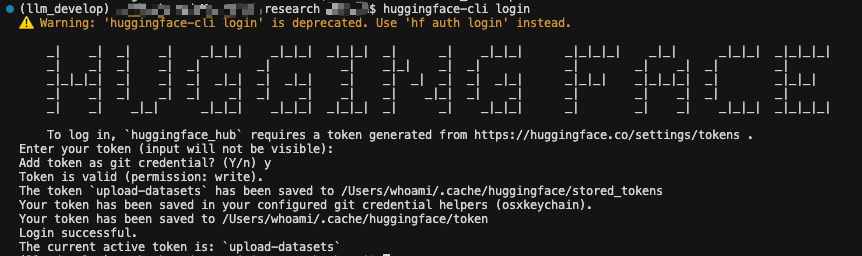
方式 B:用 Git LFS 上传整个目录
bash
git lfs install
huggingface-cli repo create coco128-zh-captions --dataset
git clone https://huggingface.co/datasets/your_username/coco128-zh-captions
cd coco128-zh-captions
cp -r ../coco128_zh_huggingface/* .
git add . && git commit -m "add dataset" && git push
6.3 Parquet 格式上传
python
from datasets import load_dataset

ds = load_dataset("coco128_zh_parquet", split="train")
ds.push_to_hub("your_username/coco128-zh-captions")
上传后,他人可这样用:
python
ds = load_dataset("your_username/coco128-zh-captions", split="train")6.4 获取 Token
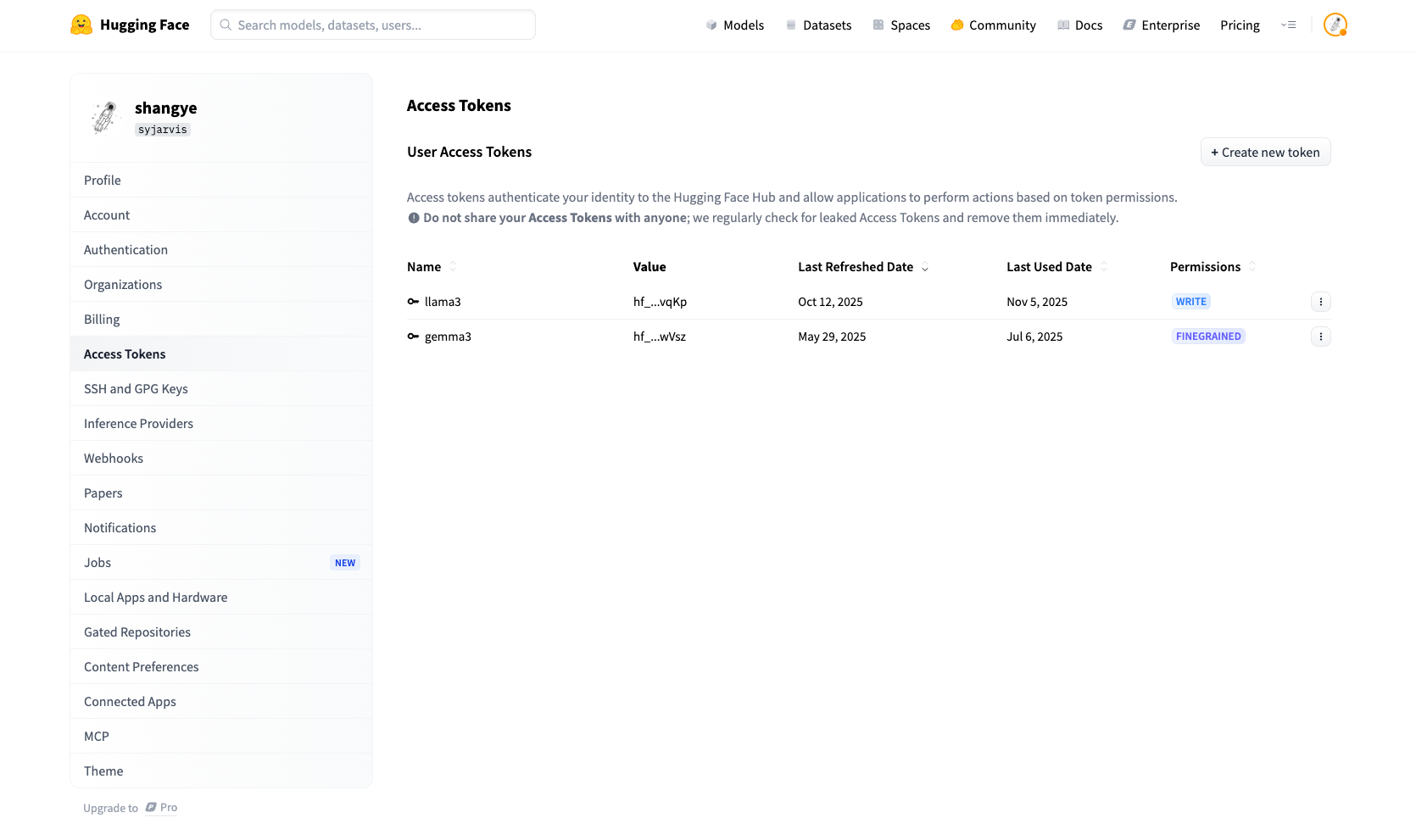
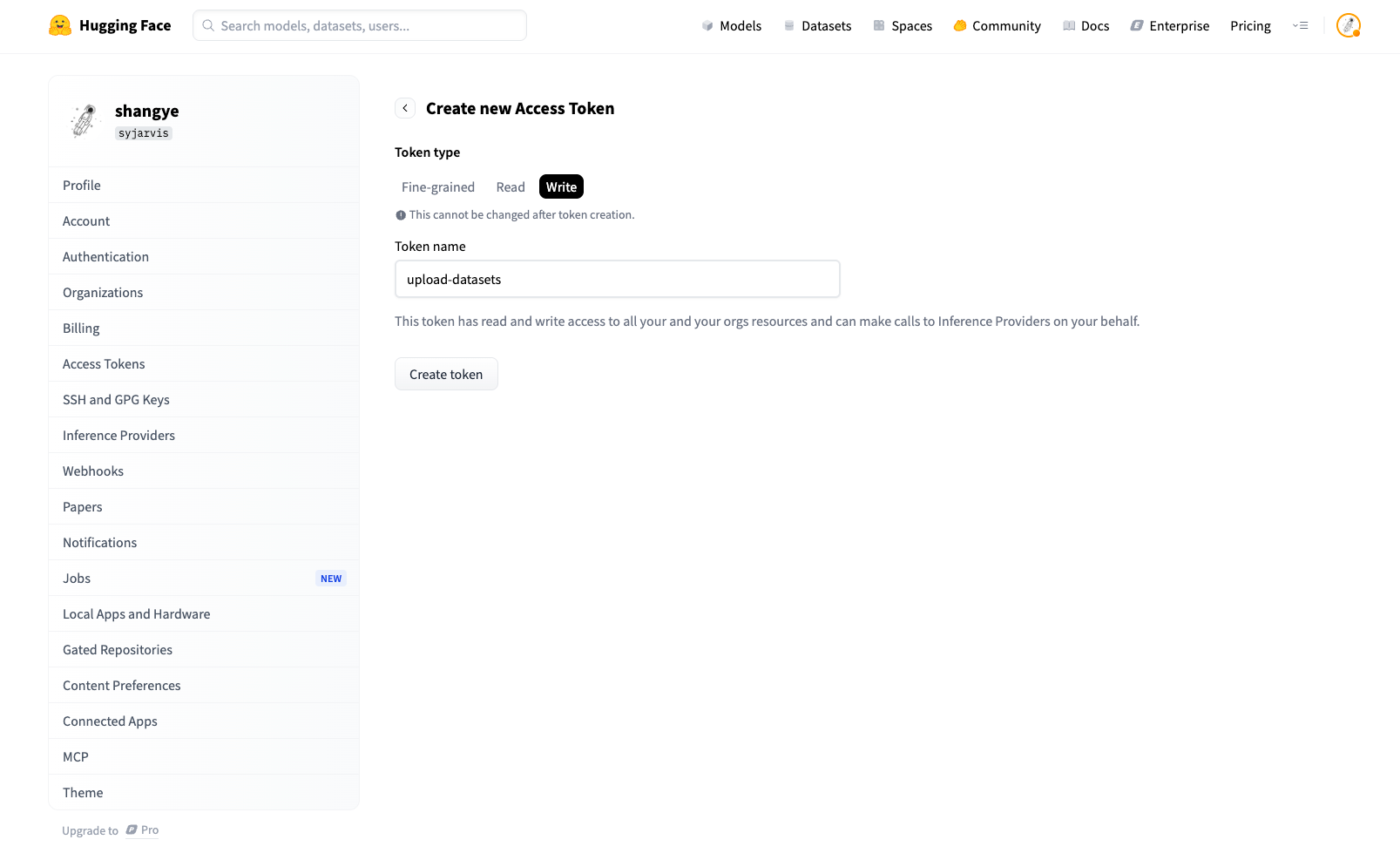
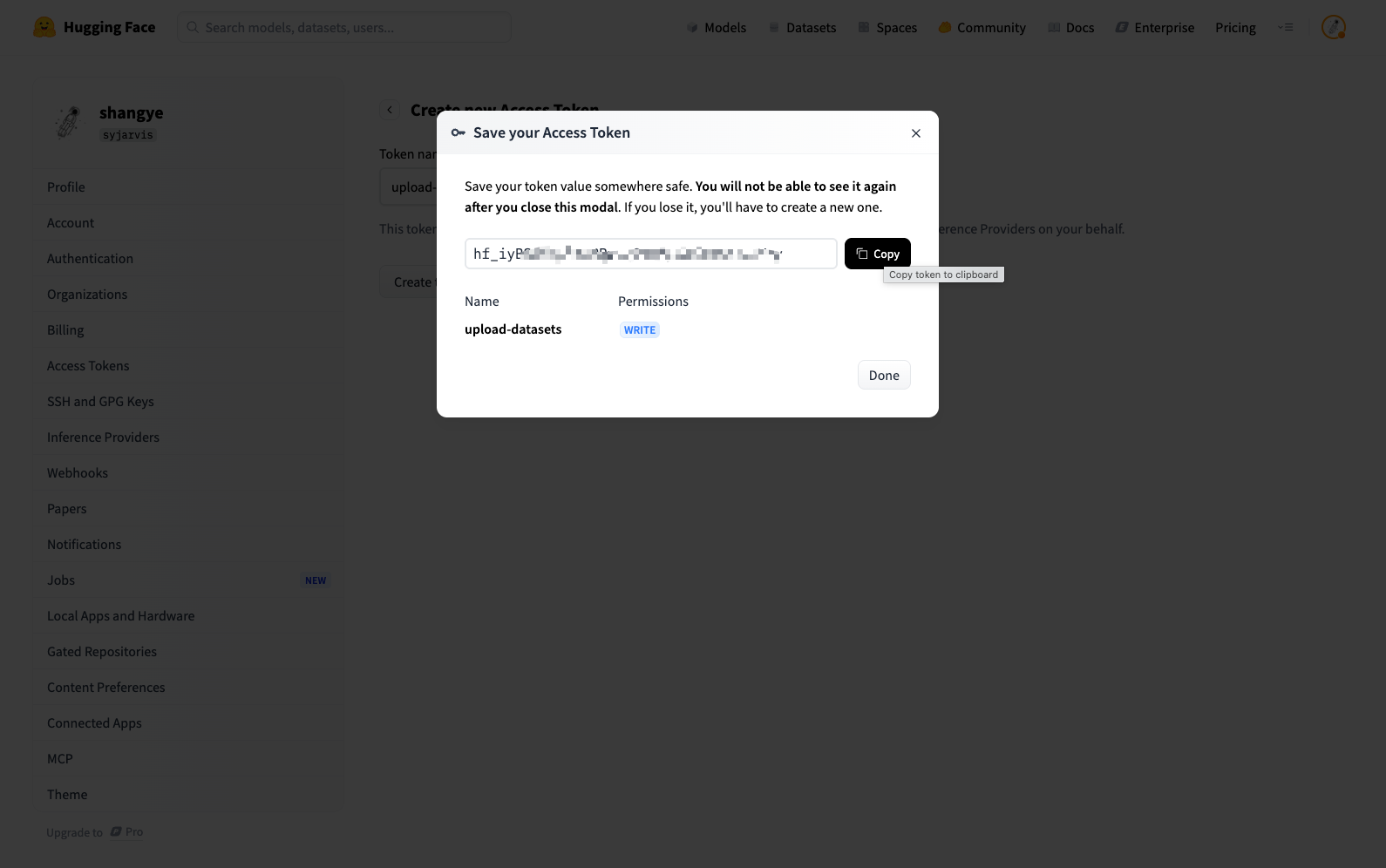
- 打开 https://huggingface.co/settings/tokens
- 新建 Token,复制后用于
huggingface-cli login或login("token")。
流程小结
text
准备 data/train.json + data/images/
       │
       ├─→ python generate_huggingface.py  → coco128_zh_huggingface/
       │         │
       │         ├─→ 本地:load_dataset("coco128_zh_huggingface")
       │         └─→ 上传:load_dataset + push_to_hub 或 git lfs
       │
       └─→ python generate_parquet.py [--method datasets|pyarrow]  → coco128_zh_parquet/
                 │
                 ├─→ 本地:load_dataset("coco128_zh_parquet")
                 └─→ 上传:load_dataset + push_to_hub
按需选择「目录结构」或「Parquet」,再在本地用 load_dataset 或上传到 HuggingFace 使用即可。