🔥个人主页: Milestone-里程碑
❄️个人专栏: <<力扣hot100>> <<C++>><<Linux>>
🌟心向往之行必能至
目录
[1-1 狭义理解](#1-1 狭义理解)
[1-2 ⼴义理解](#1-2 ⼴义理解)
[1-3 ⽂件操作的归类认知](#1-3 ⽂件操作的归类认知)
[1-4 系统⻆度](#1-4 系统⻆度)
[1.5 回顾c的文件操作](#1.5 回顾c的文件操作)
[2.1 接口介绍](#2.1 接口介绍)
[2.2 open使用](#2.2 open使用)
[2.3.1 创建并写入](#2.3.1 创建并写入)
[2.3.2 写入并追加写入](#2.3.2 写入并追加写入)
[2.3.3 追加写入并读取](#2.3.3 追加写入并读取)
[2.3 open返回值及fd](#2.3 open返回值及fd)
[2.3.1 解析为何结果不同](#2.3.1 解析为何结果不同)
[2.4 重定向](#2.4 重定向)
[2.5 dup2--系统调用](#2.5 dup2--系统调用)
[2.6 完善前面自定义shell的重定向](#2.6 完善前面自定义shell的重定向)
一:理解文件
1-1 狭义理解
• ⽂件在磁盘⾥
• 磁盘是永久性存储介质,因此⽂件在磁盘上的存储是永久性的
• 磁盘是外设(即是输出设备也是输⼊设备)
• 磁盘上的⽂件 本质是对⽂件的所有操作,都是对外设的输⼊和输出 简称 IO
1-2 ⼴义理解
• Linux 下⼀切皆⽂件(键盘、显⽰器、⽹卡、磁盘...... 这些都是抽象化的过程)(后⾯会讲如何去理解)
1-3 ⽂件操作的归类认知
• 对于 0KB 的空⽂件是占⽤磁盘空间的
• ⽂件是⽂件属性(元数据)和⽂件内容的集合(⽂件 = 属性(元数据)+ 内容)
• 所有的⽂件操作本质是⽂件内容操作和⽂件属性操作
1-4 系统⻆度
• 对⽂件的操作本质是进程对⽂件的操作
• 磁盘的管理者是操作系统
• ⽂件的读写本质不是通过 C 语⾔ / C++ 的库函数来操作的(这些库函数只是为⽤⼾提供⽅便),⽽是通过⽂件相关的系统调⽤接⼝来实现的
至于c中与文件相关的接口,我们不再重复
访问文件,需要打开文件,而打开文件是进程操作的
本质是:进程对文件的操作
1.5 回顾c的文件操作
我们学过,系统会默认打开三个文件
分别是
stdin:标准输入 键盘文件
stdout:标准输出 显示器文件
stderr:标准错误 显示器文件
二.系统文件I/O
我们前面学过打开文件有fopen,其实系统才是打开的最底层方式,不过学习之前,我们先雪伊西传递位
这下面的传递位,与位图的思想类似
bash
#include<stdio.h>
  2 #define ONE 0001
  3 #define TWO 0010
  4 #define THREE 0011
  5 void func(int flag)
  6 {
  7   if(flag&ONE)
  8     printf("flag has ONE\n");
  9   if(flag&TWO)
 10     printf("flag has TWO\n");
 11   if(flag&THREE)
 12     printf("flag has THREE\n");
 13 }
 14 int main()
 15 {
 16   func(ONE);
 17   func(ONE|TWO);
 18   func(ONE|TWO|THREE);
 19   return 0;
 20 }
~
bash
flag has ONE
flag has THREE
flag has ONE
flag has TWO
flag has THREE
flag has ONE
flag has TWO
flag has THREE
2.1 接口介绍
write read close lseek ,类⽐C⽂件相关接⼝。
bash
#include <sys/types.h>
#include <sys/stat.h>
#include <fcntl.h>
int open(const char *pathname, int flags);
int open(const char *pathname, int flags, mode_t mode);
pathname: 要打开或创建的⽬标⽂件
flags: 打开⽂件时,可以传⼊多个参数选项,⽤下⾯的⼀个或者多个常量进⾏"或"运算,构成
flags。
参数:
    O_RDONLY: 只读打开
    O_WRONLY: 只写打开
    O_RDWR : 读,写打开
    这三个常量,必须指定⼀个且只能指定⼀个
    O_CREAT : 若⽂件不存在,则创建它。需要使⽤mode选项,来指明新⽂件的访问权限
    O_APPEND: 追加写
返回值:
    成功:新打开的⽂件描述符
    失败:-1
2.2 open使用
2.3.1 创建并写入
bash
1 #include<stdio.h>
  2 #include<unistd.h>
  3 #include<sys/types.h>
  4 #include<string.h>
  5 #include<sys/stat.h>
  6 #include<fcntl.h>
  7 int main()
  8 {
  9   int fd=open("log.txt",O_CREAT | O_WRONLY,0666);
 10   if(fd<0) return 1;
 11   printf("fd:%d\n",fd);
 12   char buf[]="hello linux\n";
 13   write(fd,buf,strlen(buf));
 14   close(fd);
 15   return 0;
 16 }
结果:
bash
[lcb@hcss-ecs-1cde 7]$ make
gcc -o file file.c
[lcb@hcss-ecs-1cde 7]$ ./file
fd:3
[lcb@hcss-ecs-1cde 7]$ cat log.txt
hello linux
同样如果我们再对log.txt写入,没有修改flag,会覆盖写入
2.3.2 写入并追加写入
注意:APPEND不可单独使用
bash
1 #include<stdio.h>
  2 #include<unistd.h>
  3 #include<sys/types.h>
  4 #include<string.h>
  5 #include<sys/stat.h>
  6 #include<fcntl.h>
  7 int main()
  8 {
  9   int fd=open("log.txt",O_WRONLY | O_APPEND,0666);
 10   if(fd<0) return 1;
 11   printf("fd:%d\n",fd);
 12   char buf[]="hello linux\n";
 13   write(fd,buf,strlen(buf));
 14   close(fd);
 15   return 0;
 16 }
结果
bash
[lcb@hcss-ecs-1cde 7]$ ./file
fd:3
[lcb@hcss-ecs-1cde 7]$ ./file
fd:3
[lcb@hcss-ecs-1cde 7]$ cat log.txt
hello linux
hello linux
hello linux
2.3.3 追加写入并读取
read调用
- 在非阻塞模式下,数据尚未准备好,则返回错误代码EAGAIN或EWOULDBLOCK。
- 文件指针已到达文件末尾,此时返回0。
- 出现错误,返回-1。
bash
 #include<stdio.h>
  2 #include<unistd.h>
  3 #include<sys/types.h>
  4 #include<string.h>
  5 #include<sys/stat.h>
  6 #include<fcntl.h>
  7 int main()
  8 {
  9   int fd=open("log.txt", O_RDWR,0666);
 10   if(fd<0) return 1;
 11   printf("fd:%d\n",fd);
 12  lseek(fd,0,SEEK_SET);
 13  char buf[1024]={0};
 14  int read_len=read(fd,buf,sizeof(buf)-1);
 15  if(read_len>0)
 16    printf("log.txt:%s\n",buf);
 17  else if(read_len == 0)
 18    printf("log.txt为空\n");
 19  else{
 20    perror("read error");
 21  }
 22   close(fd);
 23   return 0;
 24 }
bash
[lcb@hcss-ecs-1cde 7]$ ./file
fd:3
log.txt:hello linux
hello linux
hello linux
2.3 open返回值及fd
上面我们发现,每次打开文件的返回值fd都是3 ,那么是每个文件都是3吗
bash
#include<stdio.h>
  2 #include<unistd.h>
  3 #include<sys/types.h>
  4 #include<string.h>
  5 #include<sys/stat.h>
  6 #include<fcntl.h>
  7 int main()
  8 {
  9   int fd1=open("log1.txt",O_CREAT| O_RDWR,0666);
 10   int fd2=open("log2.txt",O_CREAT| O_RDWR,0666);
 11   int fd3=open("log3.txt",O_CREAT| O_RDWR,0666);
 12   int fd4=open("log4.txt",O_CREAT| O_RDWR,0666);
 13   printf("fd1:%d\n",fd1);
 14   printf("fd2:%d\n",fd2);
 15   printf("fd3:%d\n",fd3);
 16   printf("fd4:%d\n",fd4);
 17   close(fd1);
 18   close(fd2);
 19   close(fd3);
 20   close(fd4);
 21 //if(fd<0) return 1;
 22 //printf("fd:%d\n",fd);
 23 //seek(fd,0,SEEK_SET);
 24 //har buf[1024]={0};
 25 //nt read_len=read(fd,buf,sizeof(buf)-1);
 26 //f(read_len>0)
 27 // printf("log.txt:%s\n",buf);
 28 //lse if(read_len == 0)
 29 // printf("log.txt为空\n");
 30 //lse{
 31 // perror("read error");
 32 //
 33 //close(fd);
 34   return 0;
 35 }
open的返回值会是从0开始未被使用的最小值
把0 1 2依次关闭试试
• Linux进程默认情况下会有3个缺省打开的⽂件描述符,分别是标准输⼊0, 标准输出1, 标准错误2.
• 0,1,2对应的物理设备⼀般是:键盘,显⽰器,显⽰器
bash
 1 #include<stdio.h>
  2 #include<unistd.h>
  3 #include<sys/types.h>
  4 #include<string.h>
  5 #include<sys/stat.h>
  6 #include<fcntl.h>
  7 int main()
  8 {
  9   close(0);
 10   int fd =open("log.txt",O_RDWR |O_TRUNC,0666);
 11   printf("fd:%d\n",fd);
 12   //int fd1=open("log1.txt",O_CREAT| O_RDWR,0666);
 13   //int fd2=open("log2.txt",O_CREAT| O_RDWR,0666);
 14   //int fd3=open("log3.txt",O_CREAT| O_RDWR,0666);
 15   //int fd4=open("log4.txt",O_CREAT| O_RDWR,0666);
 16   //printf("fd1:%d\n",fd1);
 17  //rintf("fd2:%d\n",fd2);
 18  //rintf("fd3:%d\n",fd3);
 19  //rintf("fd4:%d\n",fd4);
 20  //lose(fd1);
 21  //lose(fd2);
 22  //lose(fd3);
 23  // close(fd1);
 24 //if(fd<0) return 1;
 25 //printf("fd:%d\n",fd);
 26 //seek(fd,0,SEEK_SET);
 27 //har buf[1024]={0};
 28 //nt read_len=read(fd,buf,sizeof(buf)-1);
 29 //f(read_len>0)
 30 // printf("log.txt:%s\n",buf);
 31 //lse if(read_len == 0)
 32 // printf("log.txt为空\n");
 33 //lse{
 34 // perror("read error");
 35 //
 36 //close(fd);
 37   return 0;
 38 }
0
bash
[lcb@hcss-ecs-1cde 7]$ ./file
fd:0
1,但不关闭close,原因后面缓存区再说
bash
[lcb@hcss-ecs-1cde 7]$ ./file2
bash
[lcb@hcss-ecs-1cde 7]$ ./file
fd:0
2.3.1 解析为何结果不同
其实0 1 2的文件 ,系统帮我们默认打开了
0---标准输入流
1---标准输出流
2---标准错误流
那么结果就很明显了,printf fprintf等等c的接口,都是依赖stdout的
关闭了,标准输出流关闭了
而后面再把1的给了log.txt(后面再提)
那么如果我们关闭1,再对log.txt写入呢
bash
[lcb@hcss-ecs-1cde 7]$ cat log.txt
hello linux
发现没有写在显示器文件上,而是写在了log.txt的文件上
其实看上面的0 1 2 3 4....,这不就是数组下标吗
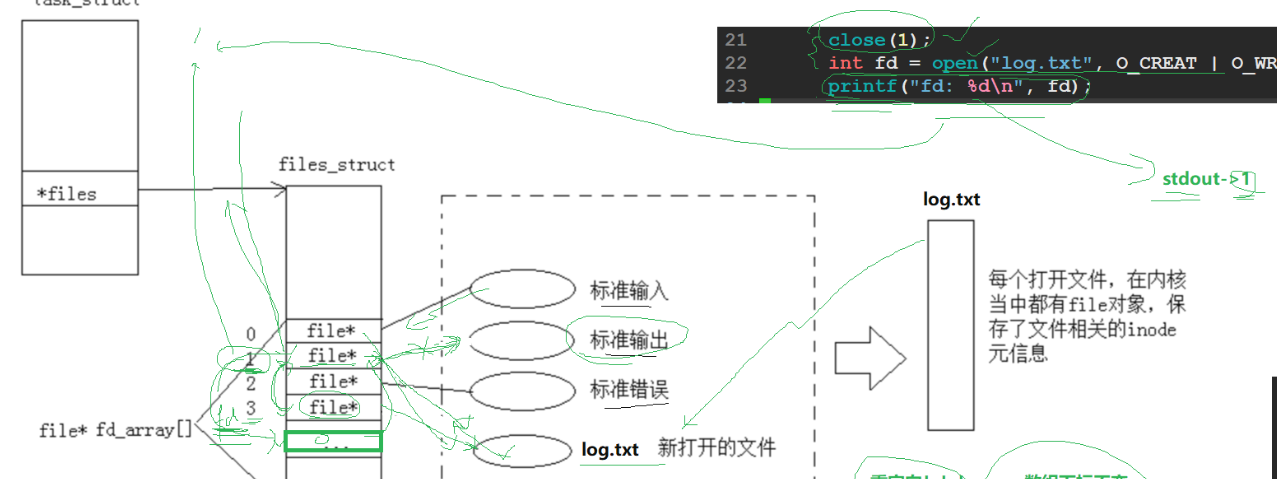
刚开始的1指向标准输出,close后,再打开,fd的返回值是从最小未使用的开始,所以就成了1指向log.txt,而printf的打印结果也就去log.txt文件了
2.4 重定向
我们可以发现,上面关闭1,再打开写入,改变了写入的目标文件,这不就像我们说到的重定向吗
所以重定向的本质
改变指针指向的文件
2.5 dup2--系统调用
上面虽然实现了重定向,但我们发现每次打开再写入,有点麻烦,那么系统给我们提供了这么一个接口


那么问,我们要将1这个位置的指针从标准输出变为fd,参数位置应该如何
答案:fd 放在第一个,1放第二个,因为fd覆盖1,那么log.txt这个文件就被fd与1同时指向了
bash
 #include<stdio.h>
  2 #include<unistd.h>
  3 #include<sys/types.h>
  4 #include<string.h>
  5 #include<sys/stat.h>
  6 #include<fcntl.h>
  7 int main()
  8 {
  9  // close(1);
 10   int fd = open("log.txt", O_WRONLY | O_TRUNC | O_CREAT, 0666);
 11  dup2(fd,1);
 12   char buf[]="hello linux\n";
 13   printf("fd:%d\n",fd);
 14   printf("%s\n",buf);
 15   close(fd);
 16   //int fd1=open("log1.txt",O_CREAT| O_RDWR,0666);
 17   //int fd2=open("log2.txt",O_CREAT| O_RDWR,0666);
 18   //int fd3=open("log3.txt",O_CREAT| O_RDWR,0666);
 19   //int fd4=open("log4.txt",O_CREAT| O_RDWR,0666);
 20   //printf("fd1:%d\n",fd1);
 21  //rintf("fd2:%d\n",fd2);
 22  //rintf("fd3:%d\n",fd3);
 23  //rintf("fd4:%d\n",fd4);
 24  //lose(fd1);
 25  //lose(fd2);
 26  //lose(fd3);
 27  // close(fd1);
 28 //if(fd<0) return 1;
 29 //printf("fd:%d\n",fd);
 30 //seek(fd,0,SEEK_SET);
 31 //har buf[1024]={0};
 32 //nt read_len=read(fd,buf,sizeof(buf)-1);
 33 //f(read_len>0)
 34 // printf("log.txt:%s\n",buf);
 35 //lse if(read_len == 0)
 36 // printf("log.txt为空\n");
 37 //lse{
 38 // perror("read error");
 39 //
 40 //close(fd);
 41   return 0;
 42 }
结果也确实如此,log.txt即被3指向,也被1指向
bash
[lcb@hcss-ecs-1cde 7]$ cat log.txt
fd:3
hello linux
2.6 完善前面自定义shell的重定向
进程替换,不影响重定向结果
先定义好redir对应的读取权限,再定义一个filename来获取有重定向的文件名字
都是全局变量
bash
   31 #define NONE_REDIR 0
   32 #define INPUT_REDIR 1
   33 #define OUTPUT_REDIR 2
   34 #define APPEND_REDIR 3
   35 int redir = NONE_REDIR;
   36 std::string filename;
bash
//
  125   int  Docommad()
  126   {
  127     pid_t id =fork();
  128     if(id==0)
  129     {
  130       //child
  131       if(redir==INPUT_REDIR)
  132       {
E>133         int fd=open(filename.c_str(),O_RODNLY,0666)
  134         if(fd<0) exit(1);
  135           dup2(fd,1);
  136         close(fd);
  137       }
  138
  139       if(redir==OUTPUT_REDIR)
  140       {
E>141         int fd=open(filename.c_str(),O_CREAT | O_WRONLY | O_TRUNC, 0666)
  142           if(fd<0) exit(1);
  143           dup2(fd,1);
  144         close(fd);
  145       }
  146       if(redir==APPEND_REDIR)
  147       {
E>148         int fd=open(filename.c_str(),O_CREAT|O_WRONLY|O_TRUNC,0666);
  149         if(fd<0) exit(1);
  150         dup2(fd,1);
  151         close(fd);
  152       }
  153     }
  154       else{
  155
  156       execvp(argv[0],argv);
  157       }
  158       exit(1);
  159     }
  160     //father
  161     int status=0;
E>162    pid_t ret = waitpid(id,&status,0);
E>163    if(ret>0)
  164    {
  165      lastcode=WEXITSTATUS(status);
  166    }
E>167     return 0;
E>168   }
找出重定向符号后面的文件名
bash
void trimspace(char mad[],int&end)//引用是为了这里改变是改变整体的end,不是改变副本,为后面的dup2使用end使用
  259 {
  260   while(mad[end])
  261   {
  262     ++end;
  263   }
  264 }
  265 void RedirCheck(char mad[])
  266 {
  267   int begin=0;
  268   int end=strlen(mad)-1;
  269   //从后往前找
  270   while(end>begin)
  271   {
  272     if(mad[end]=='<')
  273     {
  274       mad[end++]='0';//分割符
  275       // < 左边的空格不用排查,因为用不到,只需排查右边的
  276       trimspace(mad,end);
  277       redir=INPUT_REDIR;
  278       filename=mad+end;
  279       break;
  280     }
  281     else if(mad[end]=='>')
  282     {
  283      // >>
  284       if(mad[end-1]=='>')
  285       {
  286         mad[end-1]=0;
  287         redir=APPEND_REDIR;
  288       }
  289       else{
  290         // >
  291         redir=OUTPUT_REDIR;
  292       }
  293       trimspace(mad,++end);
  294       filename=mad+end;
  295     }
  296   }
  297 }